
SteelSeries Apex 3 Gaming Keyboard
4.6Editor score
Water resistant design
10-zone RGB lighting
Whisper quiet switches
Magnetic wrist rest
This guide compares the top Mac gaming keyboards for 2026, evaluating build quality, switch types, and connectivity to help you find the perfect fit for your
Finding the right Mac gaming keyboard can be challenging due to compatibility issues and unique layout requirements. You need a device that supports macOS function keys while delivering the performance required for competitive gaming. This guide explores the best options available this month.
We evaluated ten top-rated models based on build quality, switch responsiveness, and wireless connectivity options. Our analysis focuses on how well each keyboard integrates with macOS systems and handles demanding gaming scenarios. We considered user feedback and technical specifications to create this curated list.
Each pick highlights specific strengths like compact designs, premium materials, or budget-friendly pricing. You will find detailed reviews and comparisons to help you make an informed decision. Please note that product prices and availability may change frequently on the retail site.
4.6Editor score
4.3Editor score

4.7Editor score
The following table provides a side-by-side comparison of all ten selected Mac gaming keyboards. It highlights key specifications to help you quickly identify which model fits your specific needs and budget.




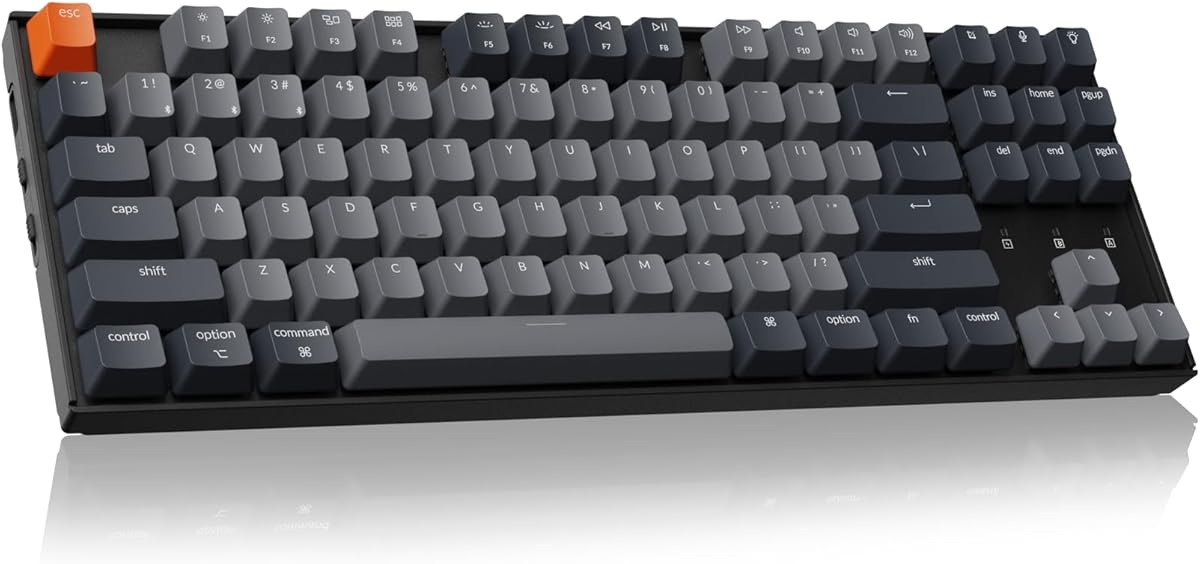
The Keychron K8 stands out as the top choice for Mac users seeking a versatile gaming keyboard. With a 4.3 rating, it balances wireless convenience and mechanical performance effectively. Its design specifically addresses macOS compatibility, making it a standout in a crowded market.
We may earn a commission when you buy through this link, at no additional cost to you.
This keyboard features a tenkeyless layout that saves desk space while retaining essential navigation keys. The dual connection modes allow seamless switching between Bluetooth and wired USB-C, ensuring low latency during intense gaming sessions. The tactile brown switches provide feedback without excessive noise.
While the build quality is solid, the plastic chassis lacks the premium feel of aluminum models. Additionally, software customization is limited compared to brands with dedicated hubs. However, the included keycaps and long battery life make these trade-offs acceptable for most users.
This model is ideal for gamers who need a reliable wireless option without compromising on macOS integration. Its ability to connect to three devices makes it perfect for hybrid work and play setups. We recommend it for those prioritizing connectivity and layout flexibility.
The K8 includes all essential function keys mapped correctly for macOS, eliminating the need for complex remapping or workarounds common with generic gaming keyboards.
With a 4000 mAh battery, this keyboard can last up to 240 hours with backlighting off, ensuring you rarely need to plug it in during normal use.
We may earn a commission when you buy through this link, at no additional cost to you.
The SteelSeries Apex 3 offers incredible value for Mac users on a budget. Its 4.6 rating reflects strong user satisfaction regarding durability and features. While it uses membrane switches, it delivers a quiet and reliable typing experience suitable for casual gaming.
We may earn a commission when you buy through this link, at no additional cost to you.
This keyboard features IP32 water resistance, protecting it from accidental spills. The 10-zone RGB illumination adds a custom touch to your setup without requiring complex software. Dedicated multimedia controls allow you to adjust volume and media playback on the fly.
The lack of mechanical switches means it may not satisfy enthusiasts looking for tactile feedback or rapid actuation. However, for casual gamers and office use, the silent operation is a significant benefit. The included magnetic wrist rest adds comfort during long sessions.
We recommend this keyboard for budget-conscious buyers who prioritize durability and quiet operation over mechanical precision. It is an excellent entry point into gaming peripherals that works well with macOS systems for general tasks and light gaming.
The IP32 rating ensures that accidental spills from drinks will not immediately damage the internal electronics, adding a layer of safety to your desk setup.
The whisper quiet switches are designed to minimize noise, making this keyboard suitable for shared spaces or late-night gaming sessions without disturbing others.
We may earn a commission when you buy through this link, at no additional cost to you.
The GravaStar Mercury K1 combines stunning aesthetics with high-performance gaming features. It holds a 4.7 rating for its exceptional build quality and typing experience. This keyboard stands out with its aluminum exoskeleton and futuristic gradient finish.
We may earn a commission when you buy through this link, at no additional cost to you.
Its gasket-mounted design provides a soft, cushioned typing feel that absorbs shock and reduces noise. The tri-mode connectivity supports wired USB-C, Bluetooth, and 2.4GHz wireless, giving you flexibility across different devices. Customizable RGB lighting adds a visual flair to your setup.
The higher price tag may be a barrier for some buyers compared to standard mechanical keyboards. Additionally, the customization software occasionally experiences stability issues that require updates. However, the hardware quality and design justify the cost for enthusiasts seeking a premium tool.
This keyboard is perfect for gamers who want a unique visual statement and premium tactile experience. It is particularly suited for those who value design and build quality alongside performance. We recommend it for users willing to invest in a top-tier peripheral.
The aluminum alloy exoskeleton provides a robust and lightweight structure that resists flex, ensuring the keyboard remains stable even during intense gaming moments.
Five layers of sound-dampening foam combined with the gasket mounting create a deep and pleasant acoustic profile that reduces clickiness during typing.
We may earn a commission when you buy through this link, at no additional cost to you.
The EPOMAKER X Aula F75 MAX offers unique features that enhance customization and functionality. It holds a 4.6 rating for its innovative TFT screen and gasket-mounted build. This keyboard bridges the gap between productivity and gaming with a compact design.
We may earn a commission when you buy through this link, at no additional cost to you.
Its standout feature is the TFT smart screen, which allows you to display GIFs or battery status directly on the keyboard. The hot-swappable PCB lets you change switches without soldering, offering endless customization options. The volume knob provides quick access to audio controls.
Users may find the software interface slightly complex when setting up custom macros or screen content. The compact 75% layout might also take time to adjust to if you are used to full-size keyboards. However, the typing experience is smooth and satisfying.
This model is ideal for tech enthusiasts who enjoy personalizing their setup and switching components. It works well for Mac users needing a compact yet feature-rich keyboard. We recommend it for those looking for a balance of utility and unique design elements.
The embedded TFT screen lets you show dynamic content or system stats, adding a high-tech element to your keyboard that few competitors offer at this price.
With hot-swappable support for 3-pin and 5-pin switches, you can easily tailor the typing feel to your preference without advanced technical skills.
We may earn a commission when you buy through this link, at no additional cost to you.
The Logitech G915 X delivers a premium full-size experience for gamers who prioritize speed and durability. It holds a 4.0 rating for its advanced engineering and sleek profile. This model is part of Logitech's high-end gaming ecosystem.
We may earn a commission when you buy through this link, at no additional cost to you.
Its low-profile GL mechanical switches provide a short actuation point for rapid key presses, increasing your actions per minute. The sand-blasted aluminum top plate and PBT keycaps ensure long-term durability and a premium tactile feel. LIGHTSYNC RGB allows for deep customization.
While the build quality is excellent, the price point is high for a wired-only keyboard. Users expecting wireless connectivity from the G915 series may be disappointed by this specific version. However, the stability and speed make it a strong contender for competitive play.
This keyboard is best suited for professional gamers or enthusiasts who prefer wired stability and a full-size layout. It fits well into high-end setups where aesthetics and performance are paramount. We recommend it for those already invested in Logitech's RGB ecosystem.
The 1.3 mm actuation point allows for faster reaction times, giving competitive gamers an edge in fast-paced titles requiring rapid inputs.
PBT keycaps resist wear and shine over time, maintaining a consistent texture and appearance even after months of heavy use.
We may earn a commission when you buy through this link, at no additional cost to you.
The Logitech G413 TKL SE is built for users who value durability and simplicity in their gaming setup. With a 4.6 rating, it offers reliable performance at a mid-range price. The tenkeyless design saves space without sacrificing essential keys.
We may earn a commission when you buy through this link, at no additional cost to you.
Its PBT keycaps are resistant to heat and wear, ensuring the keyboard looks new longer than standard ABS caps. The brushed aluminum-magnesium alloy top case provides structural rigidity and minimizes flex during intense typing. Tactile mechanical switches offer satisfying feedback.
The lighting is limited to white LEDs, which may not appeal to those wanting colorful RGB effects. However, the focus on durability and core gaming features makes it a solid choice. The anti-ghosting ensures that all simultaneous keypresses are registered accurately.
This keyboard is ideal for gamers who prefer a no-frills, robust peripheral that focuses on performance. It is particularly good for workspaces where a clean and reliable keyboard is needed. We recommend it for those prioritizing build quality over lighting effects.
The rigid aluminum-magnesium alloy body acts as a sturdy backbone, preventing the keyboard from moving or flexing during fast gameplay sequences.
PBT keycaps are harder than standard plastics, resisting shine and wear from constant use to keep legends clear for a longer period.
We may earn a commission when you buy through this link, at no additional cost to you.
The Redragon K742 offers a high degree of customization in a compact form factor. It holds a 4.6 rating for its versatile connectivity and programmable features. This keyboard is designed for users who want control over their layout and macros.
We may earn a commission when you buy through this link, at no additional cost to you.
Its 98% compact layout saves desk space while retaining most essential keys and a number pad. QMK/VIA support allows deep customization of key mappings and macros, making it ideal for power users. The gasket structure provides a softer typing experience.
Setting up VIA software can be intimidating for beginners compared to plug-and-play solutions. The compact layout also requires an adjustment period if you are used to full-size keys. However, the versatility and build quality are impressive for the price.
This keyboard is perfect for gamers and professionals who need a compact board with advanced programmability. It works well with Mac systems for complex workflows. We recommend it for those who enjoy tinkering with their keyboard configuration.
VIA software allows you to remap any key to create custom shortcuts, improving efficiency for repetitive tasks in games or creative work.
Tri-mode connectivity lets you switch between Bluetooth, 2.4GHz wireless, and wired USB-C easily, adapting to different devices on your desk.
We may earn a commission when you buy through this link, at no additional cost to you.
The Keychron K4 balances compact design with functionality by including a numpad in a small footprint. With a 4.4 rating, it is a favorite for Mac users needing productivity tools. The 96% layout keeps essential keys within reach.
We may earn a commission when you buy through this link, at no additional cost to you.
Its wireless Bluetooth 5.1 connection is stable and allows switching between three devices. The layout is designed specifically for macOS, ensuring all function keys are accessible. Tactile brown switches offer a balance between typing and gaming.
The dense layout means keys are closer together, which can lead to accidental presses for some users. White LED backlighting is functional but lacks the dynamic effects of RGB. However, the convenience of wireless connectivity often outweighs these minor drawbacks.
This keyboard is ideal for Mac users who need a numpad but have limited desk space. It works well for data entry and general gaming tasks. We recommend it for those prioritizing layout efficiency and wireless freedom.
The K4 includes dedicated Mac function keys, ensuring seamless integration with macOS without needing to remap or use third-party tools.
The 96% layout compresses the full-size experience into a smaller area, saving desk space while keeping the number pad for productivity.
We may earn a commission when you buy through this link, at no additional cost to you.
The Logitech MX Mechanical is designed for professionals who also play games. It holds a 4.2 rating for its premium materials and comfort features. The low-profile switches reduce strain during long typing sessions.
We may earn a commission when you buy through this link, at no additional cost to you.
Smart illumination sensors light up the keys when your hands approach and adjust to ambient light. The multi-device pairing allows seamless switching between Mac, PC, and tablets. Tactile switches provide feedback without being noisy in shared spaces.
The price is high for a keyboard that focuses more on productivity than raw gaming performance. Low-profile switches may not satisfy gamers who prefer taller mechanical actuation. However, for hybrid users, the comfort and versatility are significant advantages.
This keyboard is best for professionals who need a single keyboard for both work and light gaming. It fits well into premium office setups. We recommend it for those prioritizing ergonomics and multi-device workflows.
Sensors detect your hands to turn on the backlight instantly and adjust brightness based on room lighting to save battery and improve visibility.
Pairing with up to three devices lets you switch instantly between a Mac and a Windows PC using a dedicated key or app.
We may earn a commission when you buy through this link, at no additional cost to you.
The Logitech G213 Prodigy is a classic choice for budget-conscious gamers and productivity users. With a 4.2 rating, it offers reliable performance and essential features. The full-size layout ensures no keys are missing from your workflow.
We may earn a commission when you buy through this link, at no additional cost to you.
Its fluid-resistant design repels spills and crumbs, making it durable for daily use. The integrated palm rest provides comfort for long sessions without extra accessories. Five customizable lighting zones allow some personalization to match your setup.
While the switches are membrane-based and lack mechanical precision, they offer a decent typing experience for the price. The customization options are limited compared to mechanical rivals. However, it remains a solid option for entry-level gaming needs.
This keyboard is ideal for users entering the gaming scene who want a full-size board without a high price tag. It is suitable for both work and casual gaming. We recommend it for those prioritizing budget and comfort over advanced features.
The built-in palm rest offers ergonomic support right out of the box, reducing wrist fatigue during long gaming or typing sessions.
Fluid-resistant design ensures that accidental spills won't instantly ruin the keyboard, providing peace of mind for busy desks.
We may earn a commission when you buy through this link, at no additional cost to you.
Choosing the right gaming keyboard for your Mac requires understanding how different features impact performance and usability. This section breaks down the key factors to consider before making a purchase.
Mac keyboards must have function keys that align with macOS commands like Control, Option, and Command. Some Windows keyboards require remapping software to work correctly, which can be inconvenient during gaming. Look for models explicitly marketed for Mac compatibility to ensure seamless integration.
Ensure the keyboard supports the necessary macOS shortcuts without additional configuration.
Mechanical switches are standard for gaming due to their precision and longevity. Tactile switches provide feedback, while linear switches are smoother for rapid keypresses. Membrane keyboards are quieter but generally offer less precision for competitive play.
Choose a switch type that matches your preference for feedback and noise levels.
Full-size keyboards offer a numpad but take up more desk space. Tenkeyless (TKL) or 60% layouts save space and allow for better mouse movement. Consider your desk size and whether you need a numpad for productivity.
Select a layout that balances functionality with your available workspace.
Wired connections ensure zero latency, while Bluetooth and 2.4GHz wireless offer convenience and a clutter-free desk. Hybrid models allow you to switch between modes depending on your needs. Check battery life if you plan to use wireless modes heavily.
Decide between wired stability and wireless convenience based on your setup.
Aluminum tops and PBT keycaps contribute to durability and a premium feel. Plastic cases may feel cheaper but can still be sturdy. A solid build ensures the keyboard withstands the rigors of intense gaming sessions.
Look for durable materials if you need a keyboard that will last for years.
RGB lighting allows customization to match your setup theme, while single-color LEDs are simpler. Some keyboards offer per-key RGB, while others use zones. Consider how much customization you want for your lighting.
Choose a lighting style that enhances your workspace without distraction.
Dedicated software allows for macro programming and key remapping. Some brands offer cloud sync or open-source options like QMK. Ensure the software supports macOS if you are a Mac user.
Verify that the software tools meet your customization needs on your operating system.
Gaming keyboards range from budget-friendly membrane models to premium mechanical options. Determine your price point based on the features you need most. Higher prices often bring better build quality and software support.
Balance cost with the specific features that matter most to your usage.
To ensure the best performance, connect your keyboard and configure the function keys in System Settings to match macOS requirements. If using a Windows keyboard, you may need to remap keys to align with Control and Option commands.
Clean your keyboard regularly by turning it upside down and shaking out debris. Use a soft brush or compressed air to clean between the keys without using harsh chemicals that might damage the plastic or coating.
If using a wireless keyboard, store it in a cool dry place when not in use to preserve battery life. For mechanical models, consider removing keycaps occasionally to clean underneath if you spill liquids or accumulate dust.
Most modern gaming keyboards designed for Mac are plug-and-play. However, some Windows-centric models require remapping software like Karabiner-Elements to ensure function keys work correctly for your system. Always check the compatibility list before purchasing.
While mechanical keyboards offer better responsiveness and durability, high-quality membrane keyboards can still work well for casual gaming. Mechanical switches are generally recommended for competitive play where timing and speed matter significantly.
High-quality wireless connections using 2.4GHz dongles offer latency similar to wired connections. Bluetooth may have slightly higher latency but is sufficient for most non-competitive gaming. Always choose models with low latency claims.
Yes, many gaming keyboards offer software support for RGB customization on Mac. However, ensure the brand provides a dedicated macOS app or supports cross-platform tools to adjust colors and effects effectively.
A tenkeyless layout saves desk space, allowing more room for mouse movement. This is beneficial for gaming and productivity alike. It removes the number pad which is rarely needed during games.
Most hybrid keyboards have a physical switch on the back or a key combination like Fn + A/O to toggle between Mac and Windows layouts. This changes the function keys to match the respective operating systems instantly.
Many wireless models allow pairing with up to three devices. You can switch between them using a dedicated key. This is useful if you use both a Mac and an iPad or another device simultaneously.
Gasket-mounted keyboards provide a softer typing feel with better shock absorption. This design reduces noise and offers a premium experience. It is excellent for long sessions where comfort is a priority.
The Keychron K8, SteelSeries Apex 3, and GravaStar Mercury K1 offer distinct advantages for different user needs. Whether you prioritize budget, performance, or premium features, there is a model that fits your specific requirements.
When selecting a keyboard, focus on compatibility, switch type, and layout size to ensure it meets your daily workflow and gaming demands. The best choice is one that feels natural to use and enhances your overall setup.
Remember to check the current prices and availability on the retail site before finalizing your purchase. Deals may vary and inventory can change quickly depending on the season and demand.