
KeiBn Laptop Cooling Pad
4.4Editor score
Two strong cooling fans
Five height stands available
Built in phone holder
Laptops generate significant heat during heavy tasks like gaming or video editing. Effective overheating solutions prevent thermal throttling and extend hardware lifespan for optimal performance.
We analyzed top-rated cooling pads and stands based on fan speed, ergonomic design, and compatibility. Our list covers diverse options to fit various laptop sizes and budgets.
Each pick highlights unique features and performance benefits to help you choose wisely. Remember that product prices fluctuate frequently so verify current details before purchasing online today.
4.4Editor score
4.4Editor score

4.4Editor score
As an Amazon Associate we earn from qualifying purchases.
Explore our detailed side-by-side comparison of the top ten cooling solutions. We evaluate each model based on cooling capacity, build quality, and user feedback.





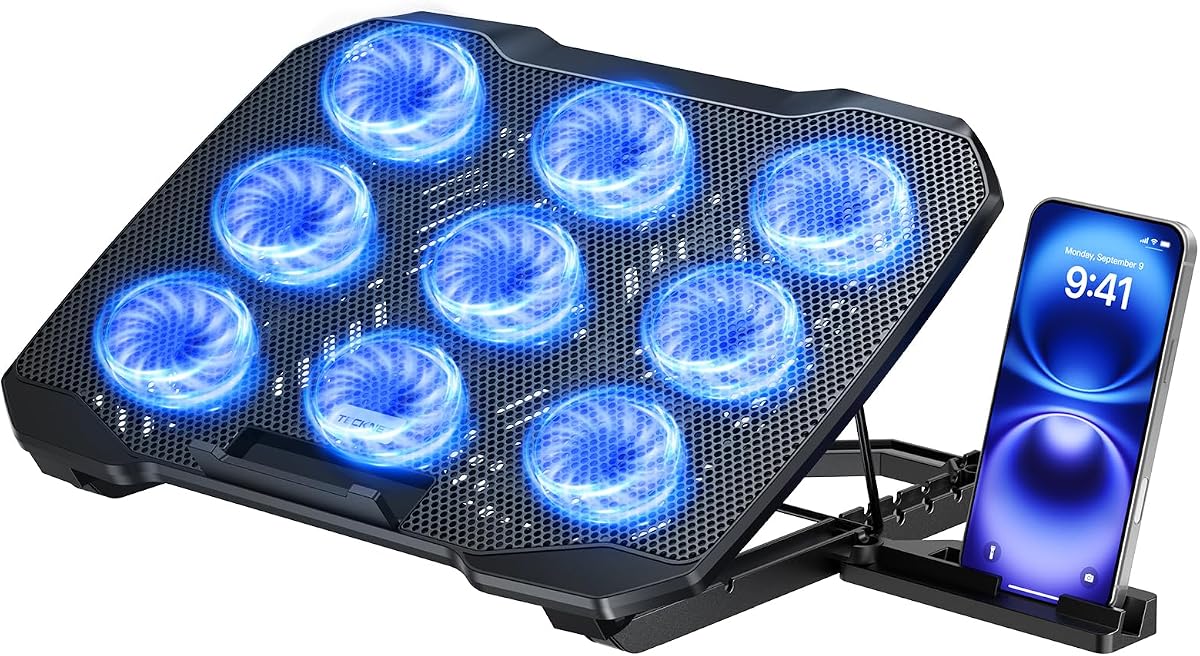
This TECKNET model stands out for its powerful nine fan configuration and ergonomic design. With a rating of 4.4 it delivers consistent cooling for laptops ranging from twelve to fifteen point six inches.
We may earn a commission when you buy through this link, at no additional cost to you.
The key strength lies in its 360 degree surround airflow which quickly dissipates heat to avoid overheating. Users can adjust height settings up to six inches and tilt angles to thirty four degrees for perfect comfort.
While the fan speed syncs with LED brightness which might be distracting in very dark rooms the noise level remains below forty decibels for quiet operation. This trade-off is acceptable given the strong cooling performance.
Gamers and professionals working long hours should buy this for its balance of cooling power and ergonomic support. It offers stable support and extra connectivity for peripherals via dual USB ports.
The nine high-performance fans with stepless speed control ensure your device maintains optimal temperatures even under heavy load conditions.
Adjusting the height and tilt angle reduces neck strain and improves typing posture during extended work or gaming sessions.
We may earn a commission when you buy through this link, at no additional cost to you.
The KeiBn cooling pad offers impressive value with its two strong fans and metal mesh design. It achieves a solid 4.4 rating by keeping laptops cool quickly during long usage sessions.
We may earn a commission when you buy through this link, at no additional cost to you.
Its key strengths include five adjustable height stands that prevent your laptop from sliding down or falling off. This design effectively doubles as a laptop stand to improve airflow beneath the chassis.
While it has fewer fans than premium models the airflow is sufficient for most daily tasks. The hideable phone holder releases your hand for better multitasking during entertainment or study.
Students and casual users seeking affordable cooling should buy this pad for its versatility. It meets everyday needs for home or office use without breaking the bank.
Two strong fans combined with a metal mesh surface ensure rapid airflow to keep your laptop cool quickly and avoid overheating.
Five adjustable heights let you customize your viewing angle for comfortable typing while also acting as a stable laptop stand.
We may earn a commission when you buy through this link, at no additional cost to you.
The Targus Lap Chill Mat provides a unique premium experience with its soft neoprene base for ultimate comfort. It earns a 4.4 rating by combining cooling with ergonomic design for laptop use on your lap.
We may earn a commission when you buy through this link, at no additional cost to you.
Its dual fans are powered via USB-A connection to ensure constant cooling when needed. The open mesh top allows airflow to quickly move away from your laptop for effective heat protection.
While it may be bulkier than ultra-slim pads the neoprene cushioning makes it perfect for extended use on the sofa or bed. Four rubber stops prevent slipping during use for stability.
Remote workers or travelers who need lap use should buy this for comfort and cooling. It keeps both you and your laptop cool with superior material quality.
Soft neoprene material on the bottom provides cushioned comfort while sitting on your lap without sacrificing cooling performance.
Dual USB fans paired with an open mesh top ensure heat moves away from your laptop efficiently during heavy work sessions.
We may earn a commission when you buy through this link, at no additional cost to you.
The havit HV-F2056 is designed specifically for larger laptops ranging from fifteen point six to seventeen inches. It offers ultra-portability while maintaining a stable carrying surface for your device.
We may earn a commission when you buy through this link, at no additional cost to you.
Its three ultra-quiet fans create a noise-free environment allowing you to focus without distractions. The ergonomic design doubles as a stand with two adjustable height settings for comfort.
While the included cable is USB to USB and may require an adapter for Type C devices this is a minor inconvenience. The extra USB port allows connecting more devices easily.
Professionals traveling with larger screens should buy this for its portability and stability. It keeps your investment protected and cool wherever you go.
Slim and lightweight construction allows you to carry it easily in any bag to protect your laptop during travel.
Three ultra-quiet fans ensure that you maintain a silent work environment without sacrificing cooling power.
We may earn a commission when you buy through this link, at no additional cost to you.
The TECKNET cooling pad features three powerful fans working at 1200 RPM to pull in cool air effectively. It holds a 4.5 rating for preventing overheating during extended use or intense gaming sessions.
We may earn a commission when you buy through this link, at no additional cost to you.
Its key strength is that it is powered directly by your laptop's USB port requiring no external adapter. One USB port powers the cooler while the other connects to external devices like a mouse.
While the blue LED indicators confirm fans are running they might be too bright for some users. However the lifetime support provided adds significant value to the purchase.
Gamers and heavy users should buy this for its strong performance and reliability. It supports wide compatibility from twelve to seventeen inch laptops seamlessly.
Three powerful fans operating at 1200 RPM pull cool air from the bottom to prevent your notebook from overheating.
Powered by your laptop via USB with a dedicated on-off switch means no external power adapter is required.
We may earn a commission when you buy through this link, at no additional cost to you.
Kootek offers a cooling stand with five built-in fans all with blue LEDs to ensure effective cooling. It is designed to provide a whisper-quiet operation for a noise-free environment.
We may earn a commission when you buy through this link, at no additional cost to you.
Its strengths include 2 on-off switches allowing simultaneous control of fans and LEDs. You can choose to have one fan working or all five working together for flexibility.
While the cable is USB-to-USB and requires an adapter for Type C devices the dual USB hub provides extra connectivity options. The six adjustable height settings offer ergonomic comfort.
Students and office workers should buy this for its quiet performance and ergonomics. It works with various laptop brands securely and comfortably.
Enjoy a noise-free environment with super quiet fans that allow you to focus on your work without distractions.
Five built-in fans with blue LEDs provide extensive surface coverage to ensure your laptop stays cool under load.
We may earn a commission when you buy through this link, at no additional cost to you.
The Thibault stand focuses on passive cooling through a ventilated aluminum design. It achieves a high 4.6 rating by allowing efficient airflow beneath the laptop to keep it cool.
We may earn a commission when you buy through this link, at no additional cost to you.
Its key strength is that it elevates the laptop to a comfortable height improving typing posture. The metal stand is equipped with soft rubber pads to protect your desk and laptop.
While it lacks active fans the aluminum material helps dissipate heat effectively. The assembly is effortless and requires no complicated instructions to set up.
Users seeking a minimalist desk setup should buy this for its durability and ergonomic benefits. It supports laptops up to seventeen inches securely.
Meticulously crafted from robust aluminum alloy this stand ensures unwavering durability while maintaining an elegant design.
Raising your laptop allows efficient airflow beneath it keeping your device cool and performing at its best.
We may earn a commission when you buy through this link, at no additional cost to you.
Hagibis offers a unique portable solution with small invisible cooler balls. It rates 4.6 for facilitating typing and operation by elevating the laptop for appropriate angles.
We may earn a commission when you buy through this link, at no additional cost to you.
Its strength lies in its Nd-Fe-B magnet design that is durable and strong for easy connection. The two stands are lightweight and fit easily into pants pockets or bags.
While they are small for some users the silica gel pads ensure your laptop is not scratched. This physical heat dissipation method is simple and efficient.
Travelers needing minimal bulk should buy this for discreet cooling. It keeps your device elevated without adding significant weight.
Nd-Fe-B magnets provide durable and strong suction to readily adsorb the stands to your laptop securely.
By elevating the laptop you enhance bottom air circulation reducing temperature to achieve the purpose of heat dissipation.
We may earn a commission when you buy through this link, at no additional cost to you.
The AIMIUZI cooling pad is specially designed to cool down laptops up to fifteen point six inches. It features five quiet fans and a honeycomb style metal mesh for airflow.
We may earn a commission when you buy through this link, at no additional cost to you.
Its strengths include a flip-up anti-slip pad and five adjustable stand height settings to add room for laptop and desk. It helps dissipate heat and then lower the temperature.
While it is USB powered and includes a cable the build quality is robust with a 12-month warranty. The metal bar at the bottom provides ergonomic design.
Users needing adjustable angles should buy this for its versatility. It supports various brands and offers customer service for warranty claims.
A honeycomb style metal mesh combined with multiple fans provides more airflow to keep your laptop cool down.
Five adjustable stand heights add more room for your laptop and desk allowing for effective heat dissipation.
We may earn a commission when you buy through this link, at no additional cost to you.
This TECKNET model features an internal channel design to direct cool flow right to the center of your laptop. It holds a 4.3 rating for providing a quiet working environment.
We may earn a commission when you buy through this link, at no additional cost to you.
Its strengths include two large fans with adjustable speed from zero to maximum. The USB-C and A dual ports allow it to power low-current devices while cooling.
While the airflow is concentrated on the CPU area the flat base allows it to rest comfortably on your lap. This design isolates heat between your computer and legs.
Students and remote workers should buy this for its lap usability. It allows you to use your laptop comfortably even in bed.
Internal channel design draws air from the sides to direct cool flow right to the center of your laptop.
A flat base allows it to rest comfortably on your lap effectively isolating heat between your computer and your legs.
We may earn a commission when you buy through this link, at no additional cost to you.
Selecting the right cooling solution involves evaluating fan power and ergonomics to ensure your laptop performs well.
The number of fans and their RPM determine how much air moves under the laptop. More fans typically mean better heat dissipation but check for noise levels.
Choose a model with high RPM and multiple fans if you run demanding applications like gaming or video editing.
Adjustable height settings help reduce neck strain by aligning the screen with your eyes. Look for pads with multiple levels or tilt adjustments.
Prioritize stands or pads that allow you to customize the viewing angle for long hours of use.
Metal mesh surfaces facilitate better airflow than solid plastic. Aluminum stands also help dissipate heat passively through conduction.
Select sturdy materials that ensure durability and improve overall cooling efficiency.
If you travel frequently choose a slim and lightweight pad. Some models like the Hagibis are designed specifically to fit in pockets.
Balance weight and cooling power based on whether you use the pad at a desk or on the go.
Many pads include extra USB ports to avoid using your laptop's ports for power. This keeps your device more accessible for other peripherals.
Check if the pad offers dual ports to maintain connectivity for your mouse and keyboard.
Ensure the pad supports your laptop's dimensions. Some are designed for 17-inch models while others fit only up to 15.6 inches.
Verify the size range before purchasing to guarantee the device fits securely.
Fans should be quiet enough to not disturb work or sleep. Look for models described as whisper-quiet or with decibel ratings below forty.
Prioritize noise reduction if you use your laptop in shared spaces or quiet environments.
First plug the cooling pad into your laptop's USB port. If it has adjustable heights set it to a comfortable angle before placing the laptop on top.
Second clean the fans and mesh regularly with a soft cloth or compressed air. Dust accumulation can reduce airflow and lower cooling efficiency significantly.
Third check the rubber pads to ensure they grip the laptop surface well. This prevents slipping and maintains stability during typing or gaming.
Yes cooling pads increase airflow beneath the laptop which helps dissipate heat more effectively. This reduces thermal throttling and keeps internal components cooler.
Most pads draw power from the USB port so they use very little electricity. The consumption is negligible compared to the laptop itself.
Yes many pads have flat bases designed for lap use. Look for neoprene mats or models that mention lap comfort to protect your legs from heat.
Two fans usually suffice for light use but three or more are better for gaming. More fans ensure coverage of the entire bottom of the laptop.
Aluminum stands dissipate heat passively but do not actively blow air. Pads with fans are generally better for active cooling during intense tasks.
Using a cooling pad typically does not void the warranty. However always check your manufacturer's terms to ensure external accessories are permitted.
We compared ten top solutions to help you find the perfect fit. Our picks range from portable mats to multi-fan stands for diverse needs.
Prioritize noise levels and ergonomics alongside cooling power. A comfortable setup will make your work and gaming sessions much more enjoyable.
Remember to check current availability and specifications before buying. Our list serves as a guide to finding reliable cooling for your device.