
Redragon K512 RGB Membrane Gaming Keyboard
4.5Editor score
Six onboard macro keys
True RGB lighting modes
Dedicated media controls
This expert guide compares the top keyboards with macro keys for gaming and productivity, evaluating features, build quality, and customization options for
Finding the right keyboard with macro keys can transform your workflow and gaming experience. These devices allow you to automate complex tasks, execute quick combos, and streamline daily operations with just a single press. Whether you are a competitive gamer or a power user, having dedicated macro functionality is essential for efficiency.
We have carefully analyzed ten top-rated models available on the market today. Our comparison focuses on build quality, switch types, macro customization options, and overall value. We looked at wired and wireless options to ensure you find the perfect fit for your specific setup and usage needs without breaking the bank.
Each pick in this list highlights unique strengths tailored to different preferences and budgets. You will see detailed breakdowns of features, pros, and cons to help you make an informed decision. Please note that product availability and pricing can change frequently, so checking the latest details before purchasing is always recommended.
4.5Editor score

4.1Editor score
4.3Editor score
This side-by-side comparison highlights the key specifications and features of each keyboard to help you quickly identify the best match for your needs.


The VSD K1 Pro stands out as a highly versatile mechanical keyboard designed for both gaming and productivity. With a rating of 4.1 stars, it offers a unique blend of macro capabilities and streaming features. The standout quality is its integrated streaming deck function which transforms the keyboard into a command center for creators.
We may earn a commission when you buy through this link, at no additional cost to you.
Key strengths include the ability to program full-key macros via web or software interfaces. You can create unlimited switchable pages with LCD keys and knobs for instant access to actions. The hot-swappable PCB allows you to change switches without soldering, giving you full control over typing feel and sound quality.
Trade-offs include the dependency on software for full functionality like screen customization. The wired connection is necessary for some advanced features which might limit mobility. However, these are acceptable given the depth of control offered over your workflow and gaming experience.
This keyboard is perfect for streamers, power users, and gamers who need advanced macro control. If you want a device that grows with your needs through customization, this is an excellent investment. It balances performance and features effectively for a competitive price point in the market.
The built-in streaming deck allows you to manage apps and media directly from the keyboard without switching windows.
Hot-swappable switches and sound dampening ensure you get a quiet, smooth typing feel tailored to your preferences.
We may earn a commission when you buy through this link, at no additional cost to you.
The Redragon K512 is an excellent entry-level option for those seeking dedicated macro keys without breaking the bank. It holds a strong 4.5-star rating due to its user-friendly design and solid performance. Its standout feature is the ability to record macros directly on the board without any drivers or installation.
We may earn a commission when you buy through this link, at no additional cost to you.
This keyboard shines in simplicity with six onboard macro keys you can assign on the fly. The media wheel lets you control volume and tracks instantly, which is great for gaming sessions. The true RGB lighting offers customization options that add style to your setup without complexity.
While membrane switches may not feel as crisp as mechanical ones, they offer quiet and smooth operation. The lack of advanced software features limits deep customization but keeps the device easy to use. These trade-offs are minor considering the low cost and high utility it provides daily.
Ideal for budget-conscious gamers or casual users needing quick shortcuts, this keyboard delivers value. It requires minimal setup and works out of the box for immediate productivity. If you want reliable macro functionality at a low cost, this is a top choice.
You can program game combos or shortcuts on the fly without needing to install extra software on your PC.
The dedicated media wheel allows you to skip tracks or adjust volume while gaming without leaving the action.
We may earn a commission when you buy through this link, at no additional cost to you.
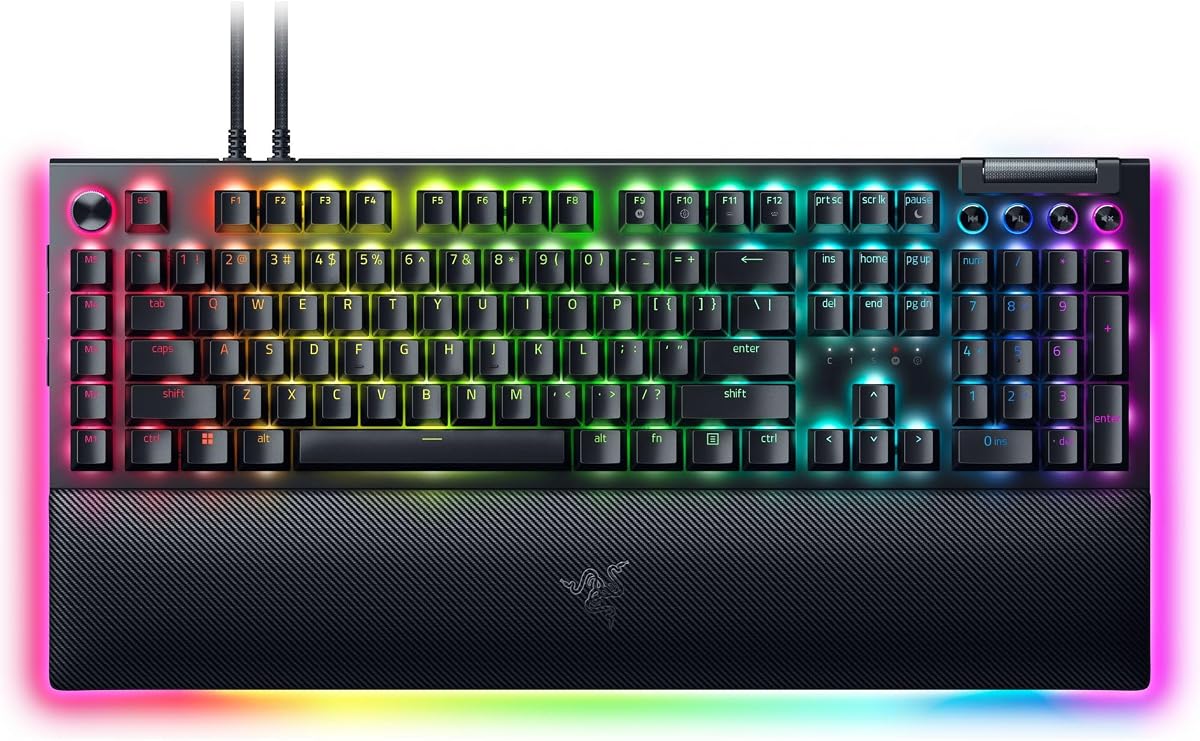
The Razer BlackWidow V4 Pro represents the pinnacle of macro-enabled keyboards for enthusiasts. With a 4.3-star rating, it combines high-end build quality with extensive programmability. Its standout quality is the command dial plus eight dedicated macro keys offering unparalleled control over your setup.
We may earn a commission when you buy through this link, at no additional cost to you.
The command dial allows you to assign custom functions ranging from volume to app shortcuts. Combined with green tactile switches, you get precise feedback and satisfying sounds during intense gaming. The magnetic plush wrist rest ensures comfort during long sessions with integrated underglow for immersion.
Trade-offs include the premium price and large size which may not fit smaller desks. The reliance on Razer Synapse software for full features might not suit everyone. However, the build quality and depth of customization justify the investment for serious users and gamers.
This keyboard is best for those who want the best features available in a single device. It excels in both aesthetics and functionality with seamless integration of lighting and controls. If you demand top-tier performance and comfort, this model is a worthy investment for your battlestation.
The programmable dial adds a unique layer of control allowing quick adjustments to settings or commands instantly.
The plush leatherette wrist rest with underglow provides ergonomic support and enhances the visual appeal of the setup.
We may earn a commission when you buy through this link, at no additional cost to you.
The Corsair K55 RGB PRO offers a robust solution for those seeking reliable macro functionality. Its 4.4-star rating reflects consistent performance and durability for daily use. The standout quality is its IP42-rated design which protects against dust and spills ensuring longevity.
We may earn a commission when you buy through this link, at no additional cost to you.
Six dedicated macro keys allow you to execute complex commands quickly via iCUE software. The detachable palm rest provides comfort for extended typing or gaming sessions. Media and volume keys let you control audio without interrupting your current task or game.
Limitations include the lack of advanced features like hot-swap capability found in mechanical models. The software can be heavy for some users but is necessary for customization. These are minor drawbacks given the solid build and protection features offered at this price point.
This keyboard is ideal for users who need a durable and responsive device for work and play. It strikes a good balance between features and affordability with reliable performance. If you value protection and basic macro capability, this is a strong contender in the market.
The IP42 rating guards against accidental spills and dust keeping your keyboard working smoothly over time.
Customizable RGB zones allow you to personalize your lighting style to match your desk or game aesthetics.
We may earn a commission when you buy through this link, at no additional cost to you.
The Redragon K580 delivers a compelling mix of mechanical feel and macro utility. With a 4.5-star rating, it is praised for its tactile switches and media wheel. Its standout quality is the socket design that allows switch swapping for customization without soldering.
We may earn a commission when you buy through this link, at no additional cost to you.
Five dedicated macro keys enable fast combo execution with easy on-the-fly recording. The media wheel helps you control playback seamlessly which is a nice touch for media consumption. Full anti-ghosting ensures your inputs register accurately even during rapid key presses.
Trade-offs include the lack of a USB pass-through and software limitations compared to premium models. The quiet tactile feel is great for shared spaces but may lack clicky feedback for some. These are acceptable given the solid performance and flexible switch options provided.
This keyboard suits users who want mechanical precision and macro tools at a fair price. It offers a quiet typing experience suitable for office or home gaming. If you value tactile feedback and macro speed, this model is a reliable choice for daily tasks.
Stock brown switches offer a gentle bump with reduced noise perfect for quiet environments.
The media wheel provides instant control over music and video playback during your gaming or work sessions.
We may earn a commission when you buy through this link, at no additional cost to you.
The Redragon K550 stands out for its high count of programmable macro keys and durable build. With a 4.1-star rating, it appeals to users needing extensive automation options. The standout quality is its twelve onboard macro keys plus aluminum top plate for premium feel.
We may earn a commission when you buy through this link, at no additional cost to you.
The aluminum top plate keeps the keyboard steady and elegant on your desk. Twelve macro keys allow for complex setups without needing extra devices or software. The extra USB pass-through simplifies cable management by connecting a mouse or dongle directly.
Trade-offs include the larger footprint and custom switches that may be too loud for some. The lack of included software might limit advanced users but works well for standard macros. These are minor considerations given the solid value and feature-rich design offered.
This keyboard is great for users who need multiple macros and a sturdy build for gaming. It combines functionality with a sleek look suitable for various setups. If you want high macro count and durability, this is an excellent option to consider.
The brushed aluminum top plate ensures stability and adds a premium look to your desktop setup.
Twelve dedicated macro keys provide ample space for all your shortcuts and gaming combos without clutter.
We may earn a commission when you buy through this link, at no additional cost to you.
The Razer BlackWidow V4 X offers a compact design with powerful macro features and smooth switches. It holds a 4.5-star rating for its quick inputs and premium build. The standout quality is the six dedicated macro keys paired with yellow linear switches for rapid-fire actions.
We may earn a commission when you buy through this link, at no additional cost to you.
Yellow switches provide instant and quiet inputs thanks to built-in sound dampeners. The multi-function roller allows quick adjustments for brightness or volume enhancing convenience. Per-key RGB lighting lets you customize each key individually to match your style.
Trade-offs include the lack of an included wrist rest which may be needed for comfort. The compact layout could limit accessibility to some keys for larger hands. These are acceptable given the high performance and aesthetic flexibility offered in a smaller form.
This keyboard is ideal for gamers wanting speed and style without taking up much desk space. It delivers excellent tactile response and customization options for personalization. If you prefer a smaller footprint and fast switches, this is a top choice.
Yellow switches offer zero reset distance for instant actuation which is perfect for competitive gaming.
Per-key RGB allows unique lighting patterns that can be synced with games or other devices.
We may earn a commission when you buy through this link, at no additional cost to you.
The Redragon K618 PRO is a versatile wireless keyboard with extensive macro capabilities. With a 4.1-star rating, it supports multiple devices with seamless switching. Its standout quality is the twenty on-the-fly macro keys allowing complex tasks without software.
We may earn a commission when you buy through this link, at no additional cost to you.
Tri-mode connectivity lets you jump between PC and tablet without re-pairing. The low-profile design reduces travel distance for faster actuation and lighter typing. System toggle switches allow instant changes between Windows and Mac for flexible usage.
Trade-offs include battery management and switch feel which differs from traditional mechanical keyboards. Some users might miss the tactile bump of taller switches. However, these are minor compared to the freedom of movement and extensive macro options provided.
This keyboard is perfect for multi-device users who value mobility and macro control. It is suitable for work or gaming across different platforms. If you need a wireless option with strong macro features, this is an excellent choice to consider.
Tri-mode connectivity ensures you can use the keyboard on PC and mobile devices seamlessly.
Twenty macro keys provide ample room for shortcuts and commands without needing extra tools.
We may earn a commission when you buy through this link, at no additional cost to you.
The Logitech G213 Prodigy is a full-sized keyboard designed for comfort and control. It holds a 4.2-star rating for its ergonomic design and responsive feedback. The standout quality is its integrated palm rest which reduces stress during long sessions.
We may earn a commission when you buy through this link, at no additional cost to you.
Anti-ghosting ensures accurate input registration during rapid key combinations. Five customizable RGB zones allow you to personalize lighting without complex software. Media keys give instant control over playback and volume without interrupting your workflow.
Trade-offs include the softer membrane feel which lacks mechanical click and limited macro depth. The customization relies heavily on G Hub software which may feel bulky to some. These are acceptable given the comfort and durability built into the chassis.
This keyboard is ideal for users prioritizing comfort and simple macro functions. It works well for both gaming and daily productivity tasks. If you want a comfortable and reliable keyboard, this model is a strong choice for your desk.
The integrated palm rest reduces wrist fatigue and helps maintain a healthy typing posture.
Five lighting zones let you create unique lighting effects to match your setup or mood.
We may earn a commission when you buy through this link, at no additional cost to you.
The Razer BlackWidow V4 offers a balanced set of features for enthusiasts seeking quality. With a 4.2-star rating, it provides reliable performance with macro support. Its standout quality is the magnetic plush wrist rest with underglow for immersive styling.
We may earn a commission when you buy through this link, at no additional cost to you.
Yellow linear switches provide rapid and quiet inputs for fast-paced gaming. The magnetic wrist rest snaps securely in place offering comfort for extended play. Six dedicated macro keys allow you to expand commands easily with preferred playstyle.
Trade-offs include the lack of a command dial found in higher-end models and higher price. It focuses on core features rather than extra dials. These are acceptable given the solid build and immersive lighting effects that enhance the gaming experience.
This keyboard suits users wanting a mix of features and comfort without the top-tier cost. It is ideal for gamers who value aesthetics and responsiveness equally. If you want a reliable keyboard with underglow and macros, this is a great pick.
Underglow creates a striking visual effect that enhances the atmosphere of your setup.
The magnetic wrist rest ensures a secure fit while providing cushioning for long gaming marathons.
We may earn a commission when you buy through this link, at no additional cost to you.
Selecting the right keyboard requires evaluating several factors to match your workflow and budget. Here are the key considerations to help you find the best fit.
Look for keyboards that allow on-the-fly recording or robust software support. Onboard macros let you program without drivers while software offers deeper control. Ensure the number of macro keys matches your needs for shortcuts.
Choose a device that offers easy assignment of functions to avoid frustration.
Decide between mechanical and membrane switches based on your preference. Mechanical switches offer tactile feedback and durability while membrane are quieter. Consider hot-swappable options if you want to customize the typing feel later.
Match the switch type to your environment and comfort needs.
Check for features like aluminum plates or dust and spill resistance. A sturdy chassis ensures longevity and stability during intense typing sessions. Look for ratings that indicate high keystroke limits for heavy daily use.
Invest in a build that protects your device from accidents and wear.
Consider wired versus wireless options depending on your mobility needs. Wireless models with low latency are great for flexibility while wired ensures zero lag. USB pass-through ports add convenience for connecting mice or dongles.
Select connectivity that fits your desk layout and usage style.
RGB lighting adds style but check if it offers per-key or zone customization. Brightness controls and multiple modes help you adjust the look to match your setup. Sync capabilities with other devices can enhance the overall aesthetic experience.
Choose lighting options that suit your visual preferences and setup.
Look for detachable or integrated wrist rests to support your hands. Adjustable feet help angle the keyboard for a comfortable typing position. A well-designed keyboard reduces strain during long periods of work or gaming.
Prioritize ergonomic features to prevent fatigue and maintain productivity.
Ensure the keyboard supports your operating system with available drivers. Some models work out of the box while others require companion software for macros. Compatibility with streaming tools can be vital for creators and streamers.
Check software requirements to avoid setup issues with your system.
Compare features against the price to find the best value for your needs. Budget models offer basic macro support while premium options add dials and advanced features. Balance essential functions with cost to maximize your investment.
Choose a model that offers the right features for your specific budget.
Start by installing any required software to unlock full macro capabilities. Connect the keyboard and allow the software to detect the device properly. This ensures you can access all customization options available to your model.
Record macros by assigning sequences to dedicated macro keys or software profiles. Test these macros in your games or applications to ensure they work as intended. Adjust timing or key bindings as needed for smoother execution during use.
Keep your keyboard clean by wiping it down regularly with a soft dry cloth. Avoid spills and dust to maintain performance and longevity of your device. Store it in a dry place when not in use to prevent potential damage over time.
Macro keyboards are not strictly necessary but highly beneficial for gamers. They allow quick execution of complex combos or skills with a single key press. This can give you a tactical edge in competitive scenarios by reducing reaction time.
Not all macro keyboards require software. Many models support onboard macro recording where you program keys directly on the device. Software is typically needed for advanced customization like RGB or complex profiles.
Absolutely. Macro keys are excellent for automating repetitive tasks like shortcuts or file actions. You can assign macros to launch apps or control media to speed up your workflow significantly.
Mechanical keyboards offer tactile feedback and longer life compared to membrane models. Membrane options are quieter and cheaper but lack the clicky feel and durability of mechanical switches.
It depends on your needs. Five to six keys are sufficient for most users while twelve or more offer advanced capabilities. Choose a count that fits your workflow without cluttering your setup.
Modern wireless macro keyboards use low-latency technologies for reliable performance. They are great for reducing cable clutter while maintaining fast response times for gaming and work.
Choosing the right keyboard with macro keys depends on your specific needs and budget. The VSD K1 Pro offers top-tier customization while the Redragon K512 provides excellent budget-friendly performance. The Razer BlackWidow V4 Pro stands out for premium features and style.
Consider factors like switch type, build quality, and connectivity to find the best match. Prioritize ergonomics and macro options that align with your daily workflow. Whether for gaming or productivity, the right tool can greatly enhance your experience.
Remember to check current availability and pricing before making a purchase. Deals and stock levels change frequently so staying updated ensures you get the best offer. We hope this guide helps you find the perfect keyboard for your setup.