
KPXOS OSU3X
3.4Editor score
Magnetic Switches
Adjustable Trigger Distance
RGB Backlight
Discover the top ten keyboards for Geometry Dash in October 2026. This guide compares magnetic switches, rapid trigger technology, and compact designs for
Finding the right keyboard for Geometry Dash requires specific features like rapid trigger and magnetic switches. These tools help players achieve precise timing and faster reaction times during intense gameplay sessions. The best options offer customization and reliability.
We evaluated ten top-rated keyboards based on performance, features, and user feedback. Our analysis focuses on Hall Effect technology, polling rates, and build quality. Each product was reviewed for its suitability in rhythm games and competitive play scenarios.
Each pick highlights unique strengths and potential trade-offs for different players. Ratings and availability change frequently so check current listings before buying. This guide helps you choose the right tool to improve your Geometry Dash performance effectively.
3.4Editor score

4.5Editor score
4.7Editor score
This table compares the ten selected keyboards side by side. It highlights key specifications like polling rate, switch type, and layout to help you find the perfect match for your setup.





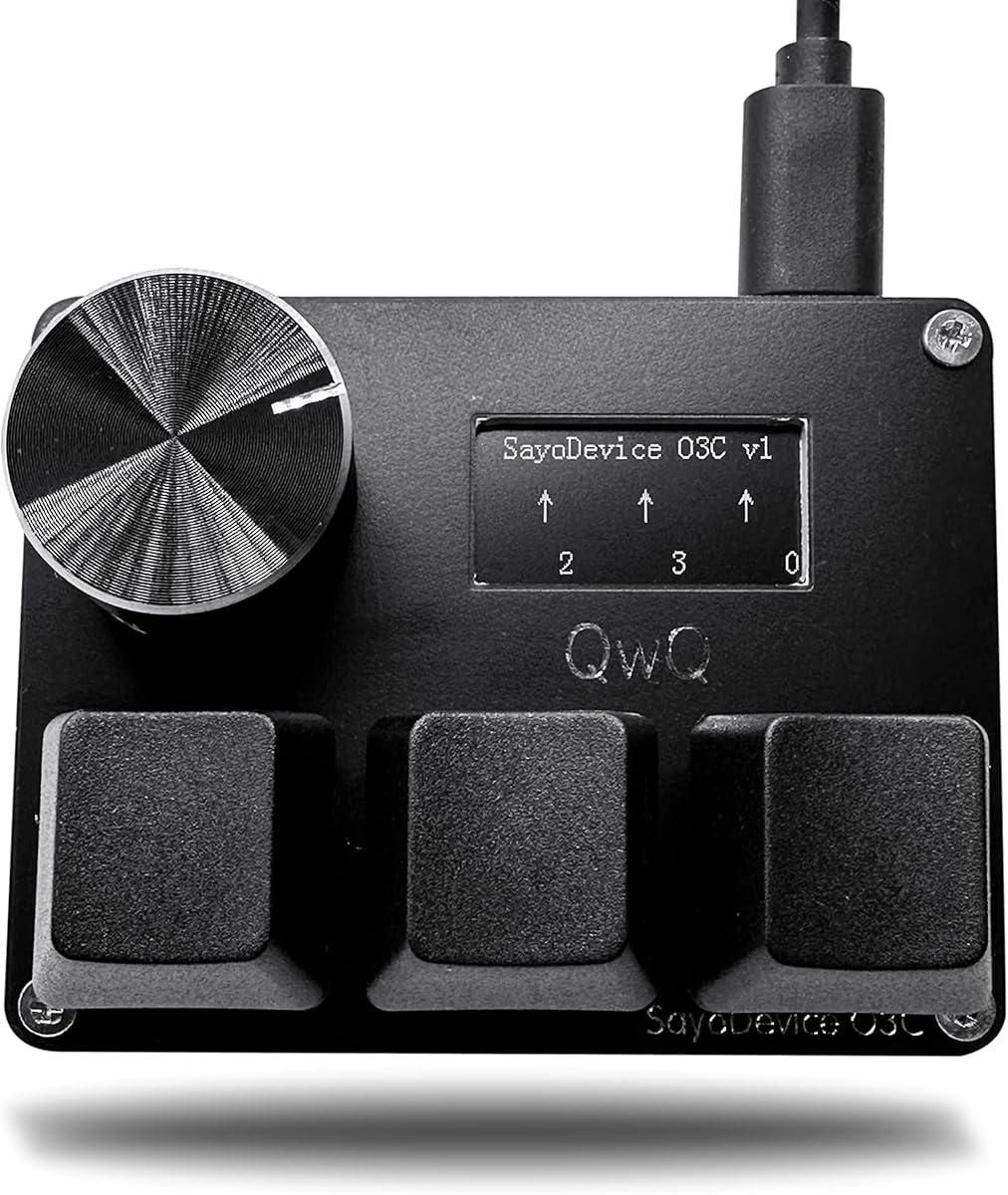
This BTXETUEL SayoDevice O3C keyboard stands out as a top choice for Geometry Dash players. It holds a strong 4.7 rating and features advanced magnetic switch technology. The design focuses on speed and precision which are critical for rhythm games.
We may earn a commission when you buy through this link, at no additional cost to you.
The rapid trigger Hall Effect switches provide unmatched performance. They reset instantly when you lift your finger allowing for complex combos without delay. The 8000Hz polling rate ensures inputs are registered almost instantly.
Calibration is needed initially but it allows precise control over actuation. The screen adds utility for tracking key presses and customizing your experience. Some users find the compact layout takes time to get used to.
Gamers who need high speed and customizability should consider this model. It balances performance and features well making it a reliable tool. We recommend it for anyone serious about improving their Geometry Dash times.
Adjustable trigger points let you tailor key sensitivity to your finger strength.
The IPS screen displays key counts and status for better performance tracking.
We may earn a commission when you buy through this link, at no additional cost to you.
The KPXOS OSU3X is an accessible entry point for magnetic keyboards. It offers rapid trigger features often found in more expensive units. The black design fits well with most gaming setups.
We may earn a commission when you buy through this link, at no additional cost to you.
This keyboard supports adjustable trigger distances down to 0.05mm. This allows players to customize how light or firm their key presses feel. The RGB backlight adds style to your desk.
While affordable some users report lower build quality or software limitations. Calibration may need to be repeated after firmware updates. It is a good option for trying out rapid trigger without spending too much.
Players on a tight budget can benefit from its speed features. It provides core functionality needed for Geometry Dash effectively. We suggest checking recent reviews to ensure current quality standards.
Get high-speed magnetic features at a price point accessible to most gamers.
Use lighting effects to match your mood or highlight specific keys.
We may earn a commission when you buy through this link, at no additional cost to you.
This version of the BTXETUEL SayoDevice O3C offers similar premium features. It maintains a high 4.7 rating among users who value customization. The hot swap function makes it versatile for different switch types.
We may earn a commission when you buy through this link, at no additional cost to you.
The knob allows you to map functions like song scrolling directly. This reduces hand movement during intense gameplay sessions. The screen provides useful information like button counts in real time.
The initial calibration process can be tricky for new users. The price reflects the advanced features available which may be steep for casual players. Overall it is a robust tool for dedicated rhythm gamers.
Those who want total control over their keyboard should choose this. It offers longevity through replaceable parts and strong performance. It is highly recommended for competitive Geometry Dash players.
Swap magnetic switches easily to change the feel without soldering.
Turn the knob into any key or macro for enhanced control.
We may earn a commission when you buy through this link, at no additional cost to you.
The O3C Rapid Trigger keyboard brings solid performance for rhythm games. It has a rating of 4.6 which shows user satisfaction with its speed. The magnetic switches ensure consistent actuation every time.
We may earn a commission when you buy through this link, at no additional cost to you.
Custom animations on the screen can enhance visual feedback during play. You can also set keys to combos like ctrl plus any key for macros. The trigger release can be tuned between zero to four millimeters.
Calibration is required before first use which adds to setup time. The compact layout is great for saving desk space but limits extra keys. It is designed specifically for speed in games like Geometry Dash.
Players seeking a balance of features and performance will find it useful. The customizable options allow you to adapt it to your needs. We see it as a strong contender in this category.
Screen animations help track key presses and system status easily.
Tune how far you must release a key to trigger a reset.
We may earn a commission when you buy through this link, at no additional cost to you.
The Aula WIN60 HE is a compact 60 percent keyboard with advanced tech. It offers an 8000Hz polling rate which is top tier for response speed. The magnetic switches are hot swappable for easy upgrades.
We may earn a commission when you buy through this link, at no additional cost to you.
A web based driver simplifies customization without needing to install software. You can remap keys and set macros directly from your browser. The design saves desk space allowing more room for mouse movement.
The lack of dedicated arrow keys might be an issue for some. You need to use function combinations which can be slower than standard keys. However the speed benefits are significant for rapid inputs.
Players looking for speed and a clean setup will appreciate this model. It handles fast-paced gameplay with ease due to its rapid trigger. We recommend it for those prioritizing desk efficiency.
The compact layout leaves plenty of room for mouse movement.
Customize your keyboard via a web link without bulky software.
We may earn a commission when you buy through this link, at no additional cost to you.
The RedThunder K95 offers wireless convenience with a TFT screen. It connects via Bluetooth or 2.4G for flexible setup options. The gasket mount provides a comfortable feel which typing and gaming.
We may earn a commission when you buy through this link, at no additional cost to you.
PBT keycaps are durable and resist shine over time. The screen can show RGB settings and system status. However it uses traditional mechanical switches rather than Hall Effect rapid trigger.
Wireless can introduce slight latency compared to wired options. It may not be ideal for competitive play but great for casual use. The battery life is impressive lasting many hours with backlight on.
If you prioritize wireless freedom over speed this is a good pick. The build quality is strong and it looks premium. It is worth considering if latency is not a major concern.
Connect to multiple devices seamlessly without messy cables.
Gasket mount and PBT keycaps ensure durability and comfort.
We may earn a commission when you buy through this link, at no additional cost to you.
The WIN68 HE boasts advanced features like SOCD and DKS. It has a rating of 4.7 and supports actuation as low as 0.01mm. This makes it highly precise for rapid inputs in games.
We may earn a commission when you buy through this link, at no additional cost to you.
Switches are pre-lubed for smooth travel out of the box. The gasket structure dampens noise which is good for shared spaces. The RGB lighting offers many effects to personalize your setup.
Web driver support allows customization but only on Windows systems. Mac users may find limited software options for setup. The compact 60 percent layout retains arrow keys which is useful.
Players who need maximum precision and advanced controls will love this. The build quality is solid and the switches feel refined. We recommend it for serious gamers on PC.
Manage opposing key presses for cleaner directional inputs.
0.1ms ultra-low latency ensures instant response to commands.
We may earn a commission when you buy through this link, at no additional cost to you.
The AULA WIN68 HE delivers consistent speed and features. It has an 8000Hz polling rate for fast input transmission. The magnetic switches offer adjustable actuation for personalized feel.
We may earn a commission when you buy through this link, at no additional cost to you.
The web driver is accessible without installation for quick changes. You can set macros and RGB lighting easily via the browser. The black design fits seamlessly into any gaming aesthetic.
It is a wired keyboard which ensures stable connection but limits mobility. Mac users may be unable to use some customization features. It is well suited for laptop or desktop setups.
Gamers who want reliable performance without wireless complexity will like this. The compact size saves space while keeping function keys available. We see it as a solid choice for PC gaming.
Access all settings via a simple web link without installs.
Retains arrow keys in a small 60 percent footprint.
We may earn a commission when you buy through this link, at no additional cost to you.
This KPXOS OSU3X offers a white design for those seeking a clean look. It includes the same magnetic switches and calibration options as the black version. The IPS screen helps visualize key travel real time.
We may earn a commission when you buy through this link, at no additional cost to you.
The rapid trigger feature supports fast and precise inputs. You can customize the interface to show specific data you need. It supports multilingual key recording for broader usability.
Some users report lower satisfaction compared to other models. The setup process might be confusing for beginners. However the core functionality remains solid for rhythm gaming.
If you prefer a white aesthetic over this is a strong candidate. It provides essential features for Geometry Dash at a good price. We suggest reading user feedback before purchasing.
The white design complements modern and clean desk setups.
The IPS screen shows real time key counts and status.
We may earn a commission when you buy through this link, at no additional cost to you.
The KPXOS OSU4X is a simple and affordable option. It supports rapid trigger and calibration for precise control. The screen lets you customize the text to display your ID or name.
We may earn a commission when you buy through this link, at no additional cost to you.
It features three programmable keys and a customizable knob. This simplicity makes it easy to use for focused tasks. The 2 meter cable provides decent length for your desk setup.
The feature set is basic compared to larger keyboards. You might miss out on RGB lighting or advanced macros. However it performs well for specific inputs in games.
Players looking for a minimal tool will find it functional. It is cheap and gets the job done for rapid inputs. We recommend it for beginners testing rapid trigger tech.
Customize the screen text to display your own ID.
Use the plug and play interface for quick connection.
We may earn a commission when you buy through this link, at no additional cost to you.
Choosing a keyboard for Geometry Dash involves looking at specific features like switch type and polling rate. Understanding these elements helps you select a tool that matches your gaming style.
Hall Effect magnetic switches are the standard for Geometry Dash because they allow rapid trigger. This technology lets keys reset faster than mechanical switches improving your reaction time and combo potential.
Look for keyboards that explicitly mention Hall Effect or magnetic switches.
A higher polling rate means the keyboard reports to your computer more often. Rates of 1000Hz or higher are common but 8000Hz offers faster responsiveness which is beneficial for competitive play.
Prioritize keyboards with 8000Hz for the best performance.
Adjustable actuation allows you to set how deep a key must be pressed to register. This helps you tailor the keyboard to your touch and reduce accidental presses during complex movements.
Choose models that offer millimeter precision for better control.
A sturdy build ensures the keyboard withstands intense gaming sessions. Look for durable keycaps like PBT and a solid frame that does not flex during rapid tapping.
Stability is key to maintaining accuracy over time.
Compact layouts like 60 percent save desk space for mouse movement. However ensure the keyboard retains essential arrow keys if your game mode requires them.
Select a layout that fits your desk and playstyle.
Wired connections are generally preferred for zero latency in gaming. If you choose wireless check for a stable 2.4G connection or low latency Bluetooth modes.
Prioritize wired options for consistent performance.
Software or web drivers allow you to remap keys and set macros. Look for user interfaces that are easy to navigate without needing complex installation.
Easy customization improves your workflow efficiency.
Magnetic keyboards can vary widely in cost. Determine your budget and look for the best performance features within that range.
Balance cost with the features you actually need.
After receiving your keyboard perform the initial calibration as instructed. This step ensures the sensors read your keystrokes accurately and prevents input issues.
Clean your keyboard regularly using a soft cloth or compressed air. Dust can accumulate in the switches and affect their performance over time.
Avoid drinking liquids near the keyboard to prevent spills. If a spill occurs disconnect the keyboard immediately and dry it thoroughly before reuse.
Rapid trigger allows keys to reset instantly when you release them. This enables faster repeating inputs and complex combos which are essential for high speed gameplay in Geometry Dash.
For Geometry Dash yes because they offer higher durability and adjustable actuation. They do not rely on physical contact which reduces wear and allows for precise tuning.
Most models require you to press a specific key combination during setup. Follow the guide provided with the product to set the desired trigger distances for each key.
Yes if the layout includes arrow keys. If it lacks arrows you can use function combinations but dedicated keys offer more ease during play.
Most support Windows and macOS via USB. However some software features may only work on Windows so check compatibility before buying.
A polling rate of 8000Hz provides the fastest response times. It reduces delay between your press and the computer registering the input.
Hall Effect switches can last millions of clicks so replacement is rarely needed. You may change them to alter the feel or if one becomes damaged.
Wireless is acceptable for casual play but wired is safer for competitive. A wired connection ensures the lowest possible latency and most consistent performance.
The top picks like the Aula WIN60 HE and BTXETUEL SayoDevice O3C offer excellent performance for Geometry Dash. They combine rapid trigger speed with reliable build quality.
Prioritize hall effect switches and high polling rates when making your decision. These features will help you react faster and maintain precision during gameplay.
Prices and availability change frequently so check current listings before finalizing your purchase. A quick review of the latest deals will ensure you get the best value.