
V-one Wired USB Gaming Controller
4.2Editor score
Supports Windows 11 and Android
Plug and play without drivers
Includes vibration feedback function
Explore our expert guide comparing the top 10 best Joysticks for Windows 11, covering flight sims, gaming, and productivity with detailed reviews.
Finding the right joystick for your PC can transform your gaming experience significantly. Whether you are piloting a virtual jet or playing flight sims, the controller matters. A good joystick offers precision, comfort, and reliability during extended sessions.
We compared ten top-rated controllers to find the best options for Windows 11 users. Our selection includes flight sticks, gamepads, and specialized simulators. Each product was evaluated on compatibility, build quality, and performance in key titles.
This guide shows you the strengths and weaknesses of each pick so you can choose wisely. Remember that availability and costs fluctuate daily. Always verify the current details before finalizing your purchase to ensure you get the best value available.
4.2Editor score

4.4Editor score

4.0Editor score
Here is a side-by-side comparison of all ten products we reviewed. This table highlights key specifications and features to help you quickly identify the right controller for your specific needs and budget.






The PXN 2113PRO is a budget-friendly flight stick designed for PC users on Windows 11. It features a solid build with 12 programmable buttons and a vibration function to enhance immersion. While it lacks some premium features, it is a great starting point for flight sim enthusiasts.
We may earn a commission when you buy through this link, at no additional cost to you.
This controller offers 4-axis control and an 8-way hat switch for precise maneuvering in games like Microsoft Flight Simulator. The software allows for custom adjustments and keyboard mapping to suit your play style. Suction cups at the base help keep it stable on smooth tables.
However, the vibration strength depends heavily on driver settings and battery levels. It does not support force feedback or certain popular titles like Minecraft. If you prioritize functionality over high-end feel, this joystick delivers a decent experience for the price.
Buyers looking for an affordable entry into flight simulation will find this model useful. It pairs well with games like World of Tanks and War Thunder. Just ensure you install the drivers correctly to unlock all features and vibration capabilities.
The rapid fire trigger and 12 buttons allow for complex aircraft control without needing a keyboard for every action.
Comfortable to hold with a single hand, it includes a throttle control that aids in managing speed during takeoffs and landings.
We may earn a commission when you buy through this link, at no additional cost to you.
The Thrustmaster T-Flight Hotas One delivers realistic flight simulator control with a modular HOTAS design. It features an adjustable resistance stick and a detachable throttle, making it versatile for different setups. This model is ideal for both beginner pilots and seasoned enthusiasts.
We may earn a commission when you buy through this link, at no additional cost to you.
Designed for comfort, the joystick offers responsive triggers and multiple programmable buttons for smooth aircraft control. The throttle can be used separately or together, fitting various desk or cockpit arrangements. It also supports expansion with rudder pedals for more realism.
While the detachable throttle adds flexibility, it might be less stable than a fixed unit. The setup is simple with no complex drivers needed, but you must ensure your desk can accommodate the spread. It works seamlessly with most popular flight sim software.
This joystick is perfect for those wanting to start serious flight simulation without a huge investment. Its compatibility with Xbox and PC makes it a future-proof choice. Users can expand the ecosystem later for a more immersive experience.
The detachable throttle allows you to use the stick on your lap while placing the throttle on a desk or side table.
You can add Thrustmaster rudder pedals using the S.M.A.R.T. sliding rail system for enhanced steering control.
We may earn a commission when you buy through this link, at no additional cost to you.
The V-one Wired USB Gaming Controller is a cost-effective choice for users needing a simple joystick across multiple platforms. It supports Windows 11, Android, and PS3, offering versatility that few budget controllers match. The plug-and-play feature ensures immediate use on most PC games.
We may earn a commission when you buy through this link, at no additional cost to you.
It includes vibration feedback and turbo functions to enhance gameplay in supported titles. The controller works in Xinput and Dinput modes, allowing broad compatibility with Steam and other game launchers. An OTG adapter is needed for Android devices with Type-C ports.
However, it does not support Xbox 360, Xbox One, or Mac OS systems. The build is functional but lacks the premium feel of higher-end models. For casual gaming or mobile flight sims, it provides adequate control without breaking the bank.
Buyers seeking a budget-friendly joystick for PC or Android will find this model practical. It is ideal for those who do not need advanced features like force feedback. Always check your device's OTG support before purchasing for mobile use.
The controller switches between Xinput, Dinput, Android, and PS3 modes to ensure compatibility across various gaming platforms.
Drivers are not required for most systems, allowing you to connect and start playing immediately without setup hassles.
We may earn a commission when you buy through this link, at no additional cost to you.
The Thrustmaster USB Joystick is an entry-level controller focused on essential flight simulation needs. It features a unique Point-Of-View button for easy camera control, enhancing immersion in supported games. The ergonomic handle with an enlarged rest ensures comfortable use during shorter sessions.
We may earn a commission when you buy through this link, at no additional cost to you.
With 3 axes and 4 buttons plus a trigger, it provides complete control for basic maneuvering. This model is designed for Windows users who want a straightforward way to play flight games without complex configurations. It is simple to use and reliable for its purpose.
However, the lack of extra buttons and vibration limits its utility for advanced games. It may feel basic compared to modern alternatives that offer more programmability. If you need more than four buttons, you might find it restrictive.
Buyers looking for a simple, inexpensive controller for occasional flight simulation may appreciate this device. It is best suited for users who prioritize camera control over complex button mapping. Always check game compatibility before purchasing to ensure the features match your needs.
This dedicated button allows for quick camera adjustments, adding a layer of realism to your flight simulation experience.
The enlarged rest on the handle reduces hand fatigue during use, making it comfortable to hold for typical gameplay sessions.
We may earn a commission when you buy through this link, at no additional cost to you.
The Microsoft Sidewinder Precision 2 is a well-regarded joystick known for its precise rudder control and robust build. It features a rotating handle that provides intuitive rudder control, a key feature for flight sims. With 16 programmable functions and an 8-direction hat switch, it offers extensive control options.
We may earn a commission when you buy through this link, at no additional cost to you.
The throttle lever covers a 146-degree arc for complete speed control from the joystick itself. Users can save and download programmed commands into game-specific controller profiles for quick setup. The USB connection ensures plug-and-play ease on compatible systems.
However, finding a new unit might be difficult as this is an older model. Drivers may need troubleshooting on newer Windows versions. The price can be higher than modern alternatives, which might not be ideal for budget-conscious buyers.
This joystick is a great choice for collectors or those who prefer classic designs with high precision. It is particularly suited for users who value rudder control in flight simulations. Check compatibility thoroughly before buying to avoid driver issues.
The rotating handle design allows for intuitive rudder movement, essential for realistic flight simulation maneuvering and takeoffs.
You can save specific game commands into controller profiles, streamlining the setup process for different flight simulation titles.
We may earn a commission when you buy through this link, at no additional cost to you.
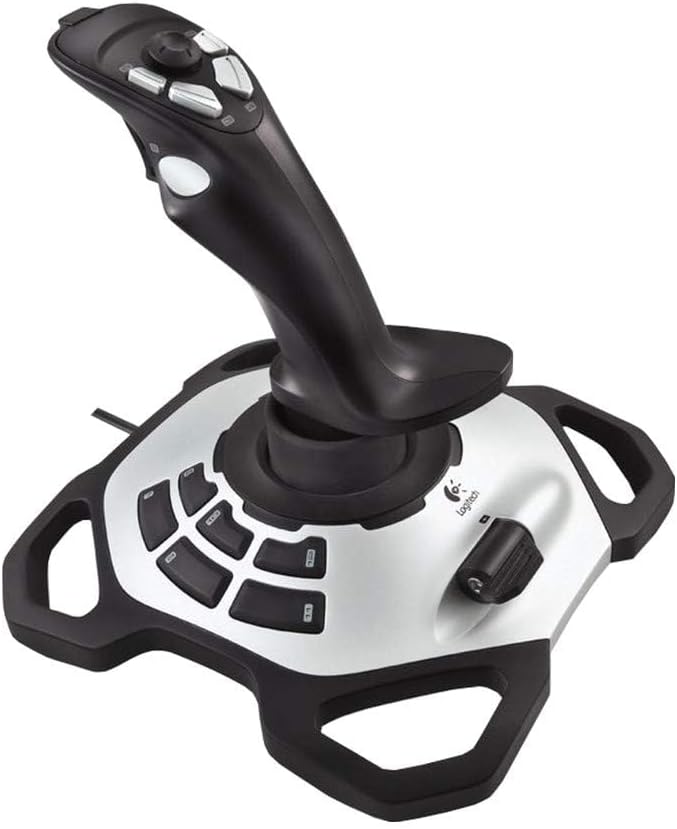
The Logitech Extreme 3D Pro is a precision fightstick designed for flight and space simulations. It features a 12 programmable buttons and a ratchet throttle control system that helps maintain set speeds. The spun base design ensures stability during intense maneuvering.
We may earn a commission when you buy through this link, at no additional cost to you.
Users appreciate the ergonomic layout and the ability to customize button mapping for different aircraft. The throttle has a ratchet mechanism that allows you to lock it into position, reducing thumb fatigue. The overall build quality is sturdy and reliable for daily use.
However, it lacks vibration feedback which some players expect from a modern joystick. The base can spin if not secured properly on smooth surfaces. Also, software updates are less frequent than for newer Logitech products.
This joystick is ideal for users who need a reliable controller for flight games without spending too much. It balances price and performance well. For those who prefer a fixed base or vibration, looking at other options might be better.
The throttle lever features a ratchet system that lets you lock speeds, improving control during long flight sessions.
Buttons are placed for easy access, reducing hand strain and improving reaction times during complex flight maneuvers.
We may earn a commission when you buy through this link, at no additional cost to you.
The VOYEE PC Controller is a wired gamepad designed for compatibility with Windows 11 and Xbox 360 systems. It features improved trigger buttons and sensitive joysticks for quick response. The ergonomic grips fit comfortably in the hand for extended use.
We may earn a commission when you buy through this link, at no additional cost to you.
It includes rumble control that provides vibration feedback based on in-game events. The 7.2ft cord offers greater flexibility in your gaming setup. This controller is plug-and-play, requiring no drivers for most supported systems.
However, it is not recommended for FPS games due to design limitations. The build feels basic compared to premium controllers. Wireless connectivity is not available, which may limit movement freedom for some users.
Buyers looking for a cheap replacement controller for standard gaming will find this useful. It works well for flight sims that support Xbox controllers. Always verify compatibility with your specific game before purchasing.
New trigger buttons and sensitive sticks ensure quick responses to player commands, reducing delay during gameplay.
The grips are contoured to fit your hands comfortably, allowing for longer gaming sessions without fatigue.
We may earn a commission when you buy through this link, at no additional cost to you.
The Thrustmaster SimTask FarmStick is built specifically for Farming Simulator 25 on Xbox and PC. It offers a 3-axis joystick with Hall Effect sensors for ultra-accurate performance without drift. This ensures reliable control when operating tractors and heavy machinery in the game.
We may earn a commission when you buy through this link, at no additional cost to you.
With up to 33 programmable inputs, you can manage every function without relying on a keyboard. The ambidextrous design allows for flexible setups, especially when paired with a racing wheel. It delivers a plug-and-play experience for immediate gameplay.
However, this controller is specialized for farming sims and may not be useful for other genres. A racing wheel is required in conjunction with it for the best experience. The price is higher than general-purpose flight sticks.
Buyers focused on farming simulation will find this model unmatched in precision and feature set. It is perfect for those who want to manage complex machinery efficiently. Ensure you have the required racing wheel before buying.
H.E.A.R.T technology eliminates drift and wear, ensuring long-term precision and reliable control for demanding simulation gameplay.
Featuring up to 33 inputs including thumbwheels and rocker switches, you can manage all functions without using a keyboard.
We may earn a commission when you buy through this link, at no additional cost to you.
The Logitech G X56 H.O.T.A.S is a premium flight controller designed for space and flight simulation precision. It offers 189 programmable controls and an advanced 4-spring system to adjust stick force. The RGB backlighting adds a visual appeal to your gaming setup.
We may earn a commission when you buy through this link, at no additional cost to you.
With accurate 16-bit axes and hall-effect sensors, it ensures precise control over pitch, roll, and yaw. The twin throttles include friction adjusters and locks for stability. It is ideal for VR and demanding flight scenarios requiring subtle distinctions in button feel.
However, the high price and space requirements may not suit casual gamers. The setup is complex, and the software can be time-consuming to configure. You need two USB 2.0 ports to connect the throttle and stick separately.
This controller is perfect for serious enthusiasts who demand the highest level of performance. It allows for detailed customization to match specific aircraft requirements. Investing in this system provides an immersive flight simulation experience.
Customizable options include all control surface options required to achieve the exact performance combat pilots demand.
An advanced 4-spring system lets you adjust stick force, enhancing comfort and control during long simulation sessions.
We may earn a commission when you buy through this link, at no additional cost to you.
The Thrustmaster T.16000M FCS offers precision that does not decrease over time thanks to H.E.A.R.T technology. It is fully ambidextrous with 3 removable components for left or right-handed use. The joystick includes 16 action buttons with braille-style identification for tactile feedback.
We may earn a commission when you buy through this link, at no additional cost to you.
With a 3-way hat switch and 4 independent axes including twist rudder, it provides complete aircraft control. The T.A.R.G.E.T software allows you to load and create specific mapping profiles for each game. This ensures a tailored experience for different simulation titles.
However, it is only compatible with PC via USB, limiting console use. The T.A.R.G.E.T software is powerful but may require learning. Vibration feedback is not included, which may be a drawback for some gamers.
This joystick is a top choice for PC flight simulators who value precision and customization. It suits both beginners and pros looking for reliable long-term performance. Ensure your setup supports PC-only controllers before buying.
The technology provides a precision level greater than current systems that will not decrease over time due to wear.
3 removable components allow you to tailor the joystick perfectly for left-handed or right-handed use.
We may earn a commission when you buy through this link, at no additional cost to you.
Choosing the right joystick requires considering several factors. Here are key elements to evaluate before making a purchase.
Ensure the controller works with your version of Windows 11. Some products support Xbox or Mac systems, while others are PC-only. Always check the system requirements listed by the manufacturer before buying.
Verify compatibility with your specific games to avoid issues. A joystick that supports Windows 11 may still have driver problems with older titles.
Decide if you need a flight stick, gamepad, or specialist controller like a farm joystick. Flight sims demand axis precision, while casual gaming might suit a basic gamepad.
Select a controller tailored to your primary games. Using a specialized joystick for unrelated genres may not provide value.
Look for durable materials and ergonomic designs to reduce strain during long sessions. Solid construction ensures the device withstands regular use without damage.
Prioritize models with stable bases and comfortable grips. This enhances precision and reduces the risk of fatigue.
Check the number of programmable buttons and if the software supports custom mapping. More buttons allow for complex control schemes without needing a keyboard.
Choose a controller with software that allows profile saving. This saves time when switching between different games.
Some controllers offer vibration or force feedback to enhance immersion. This feature adds tactile responses during specific in-game events.
Consider if you need tactile feedback for your gameplay style. If not, a simpler stick may suffice and cost less.
See if the joystick supports add-ons like rudder pedals or throttle extensions. This allows you to upgrade your setup as your interest grows.
Choose a model with an expandable ecosystem. Future upgrades can improve the experience without replacing the whole system.
Ensure the USB cable is long enough for your setup. Short cables can limit movement and require extension solutions.
Measure your desk space before purchasing. Adequate cable length ensures comfortable placement without extra hardware.
Research the manufacturer's reputation for quality and support. Established brands often provide better driver updates and customer service.
Opt for trusted manufacturers when possible. This reduces the risk of compatibility issues or poor after-sales support.
Connect your joystick to a USB port on your computer before launching any games. Most devices are plug-and-play, but installing official drivers ensures full functionality and stability on Windows 11 systems.
Use the manufacturer's software to calibrate the joystick and map buttons. Regularly update drivers to maintain compatibility with new games. This ensures accurate axis response and prevents input lag during gameplay.
Keep the joystick clean by wiping it with a soft cloth. Avoid placing it in damp or hot environments to preserve the sensors. Proper storage when not in use extends the lifespan of the device significantly.
Not all joysticks are guaranteed to work on Windows 11. You should check the product specifications for compatibility with Windows 11 before purchasing. Some older models may require custom drivers or third-party software to function correctly on newer systems.
Most of the flight sticks in this guide use wired USB connections for stability. Wireless options exist but may introduce latency. For precision flight simulation, a wired connection is generally recommended to ensure consistent input response.
Visit the manufacturer's official website and look for the support section. Download the drivers specific to your joystick model and your Windows version. Run the installer and restart your computer to apply the changes.
Some models like the Thrustmaster T-Flight Hotas One support Xbox Series X. However, many flight sticks are PC-only. Always verify console compatibility if you plan to use the controller outside of Windows 11 systems.
A throttle module is a separate unit that controls the speed of your virtual aircraft. It works alongside the flight stick for more realistic control. Some controllers have the throttle attached while others allow it to be detached.
Force feedback enhances immersion by providing tactile responses to in-game events. It is not strictly necessary for basic flight simulation. Budget controllers may lack this feature, but they can still offer a solid experience for beginners.
You can calibrate your joystick through the Windows Control Panel under Game Controllers. Select your device and click Properties to access calibration tools. Follow the on-screen instructions to adjust axes and buttons for accurate input.
While designed for flight sims, some joysticks work with other genres. Gamepads often support various game types better than flight sticks. Check game support before buying if you plan to use it beyond flight simulations.
We have reviewed ten top flight sticks and gamepads that offer excellent performance on Windows 11. Each option has unique strengths depending on your specific needs and budget for simulation.
Prioritize compatibility and precision when selecting your next controller. The right joystick can transform a simple game into a fully immersive experience.
Always check current prices and availability before purchasing. This guide is updated for accuracy, but market values change frequently.