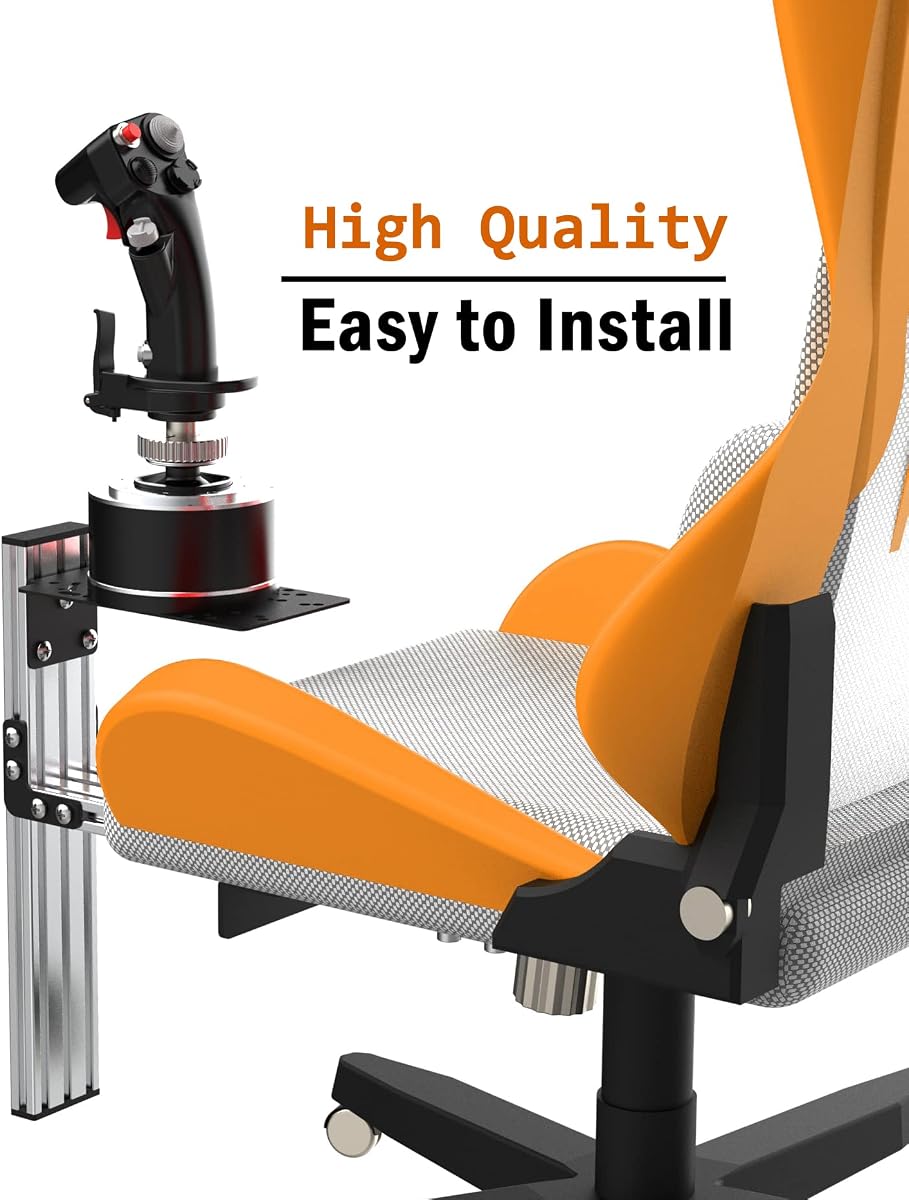
Fosiya SIM Fighting Joystick Center Chair Mount
4.3Editor score
Chair mounted design
Heavy duty M8 screws
Adjustable vertical height
This guide compares the top Joystick Hotas Mounts for flight simulators to help you choose the best desk clamp for your cockpit setup.
Flight simulation enthusiasts know that realistic control is key to immersion. A quality Joystick Hotas Mount keeps your hardware stable and ergonomic during long sessions. These mounts elevate your gear off the desk for better reach and reduced clutter.
We evaluated ten top-rated desk mounts based on stability, compatibility, and ease of use. Each product was analyzed for build quality, adjustment range, and support for popular systems like Logitech and Thrustmaster. Our goal is to help you find the perfect fit for your cockpit.
Each pick highlights specific strengths and trade-offs to guide your decision. We include detailed reviews and a comparison table for quick reference. Please note that prices and availability change frequently, so verify current listings before purchasing your next mount.
4.3Editor score

4.7Editor score

4.6Editor score
The following table provides a side-by-side comparison of the ten best Joystick Hotas Mounts available this month. Review the key specifications and compatibility notes to find the ideal match for your flight simulator setup.


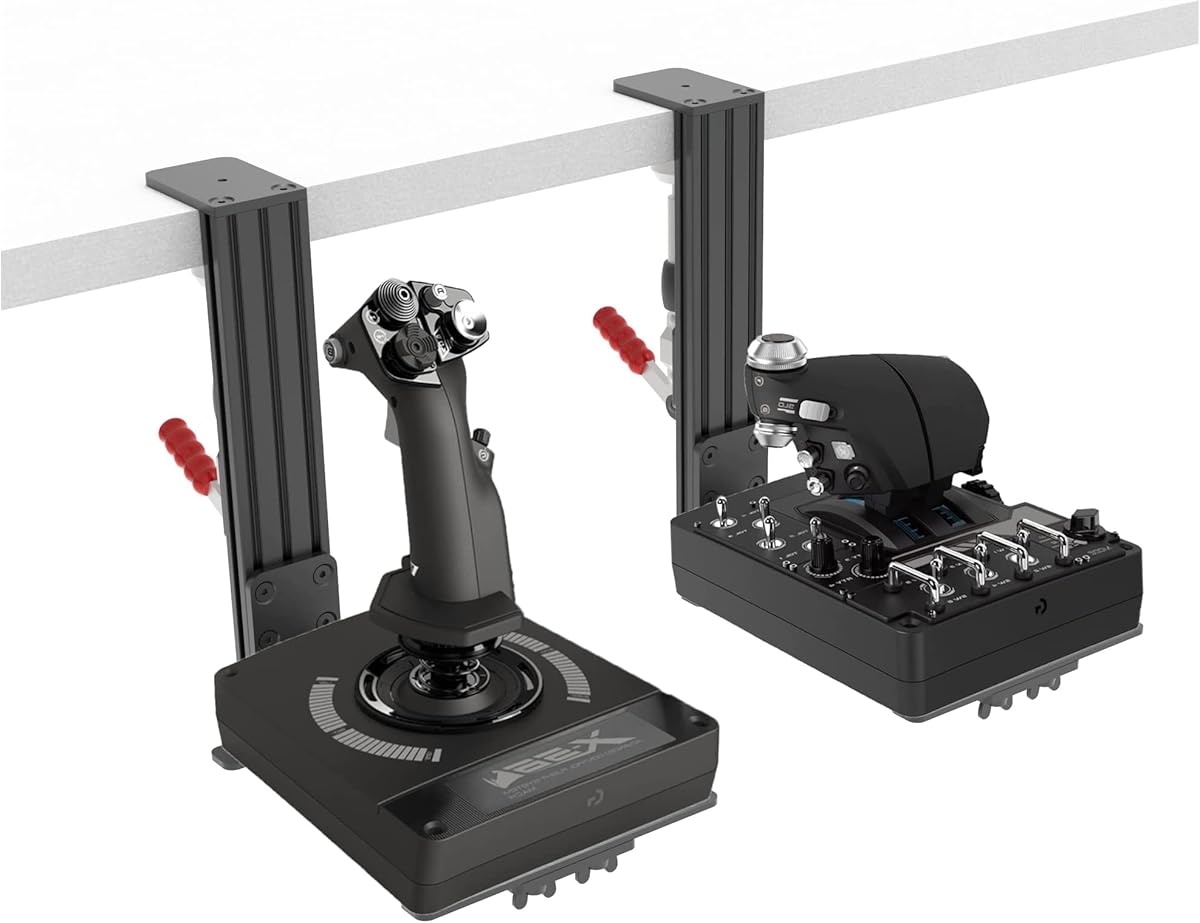
The Hikig 2 Set Desk Mount is a versatile solution for flight sim enthusiasts seeking stability and compatibility. With a 4.1 rating, it offers wide adaptability for most hand-control devices including Logitech and Thrustmaster systems. Its sturdy clamp ensures your joystick stays in place during intense maneuvers.
We may earn a commission when you buy through this link, at no additional cost to you.
This mount stands out for its ease of installation and adjustable features. You can modify the height and position to suit your desk thickness and ergonomic needs. The robust construction handles heavy equipment well, making it a reliable choice for extended flight sessions without unwanted movement.
While the mount performs well, users should note that some assembly is required. The clamp might leave marks on softer desk surfaces if not padded properly. These trade-offs are minor compared to the value provided by its broad compatibility and stable performance during gameplay.
Anyone building a home cockpit or upgrading their existing setup will find this mount beneficial. It transforms your desk into a functional control station quickly. For those prioritizing versatility and stability, the Hikig 2 Set Desk Mount is a strong recommendation for your next flight simulator upgrade.
This mount supports nearly all flight game hand-control devices, ensuring you can use your existing gear without needing new hardware or adapters for seamless integration.
With adjustable height and position settings, you can customize the mount to fit your desk thickness and preferred reach, reducing strain during long simulation sessions.
We may earn a commission when you buy through this link, at no additional cost to you.
The RACGTING 2-Pack Foldable HOTAS Desk Mount delivers true cockpit immersion with its natural hands-down layout. Rated 4.4, it provides rock-solid stability using a durable aluminum clamp system. This design ensures precise control and reduces wobble during critical flight maneuvers effectively.
We may earn a commission when you buy through this link, at no additional cost to you.
Its foldable and removable design makes it perfect for shared desks or offices. You can transition from flight sessions to a clean workspace in seconds. The adjustable height and reach support various desk thicknesses, enhancing comfort for long-term use without compromising stability or performance quality.
While the stability is impressive, the aluminum clamp might not grip extremely smooth surfaces as securely as rubberized versions. The foldable mechanism can also loosen over time with heavy use. These issues are manageable with occasional tightening and careful handling during setup and teardown.
Gamers who value portability and a tidy workspace will appreciate this mount. It balances performance with convenience for versatile flight simulation needs. If you need a reliable solution that keeps your desk organized, the RACGTING 2-Pack is an excellent choice for your cockpit.
Position your joystick in a natural hands-down layout for smoother, more realistic flight sim control that mimics real aircraft cockpits accurately during every session.
The foldable design allows for quick installation under five minutes and easy removal, keeping your space organized when not actively flying simulation missions or games.
We may earn a commission when you buy through this link, at no additional cost to you.
The DIWANGUS Foldable HOTAS Desk Mount clears your desk by giving controls separate positions at the edge. With a 4.4 rating, it fits most popular systems like Logitech and Thrustmaster. The 2-pack ensures you can mount both joystick and throttle without crowding your workspace area.
We may earn a commission when you buy through this link, at no additional cost to you.
Its foldable design helps reclaim space after flying sessions. You can adjust each mount independently for better ergonomics and natural reach. The iron and aluminum construction is sturdy, arriving 90% preassembled to save time. You simply attach crossbars and bolt on your controls to start using it immediately.
The mount may not fit all desk thicknesses beyond 0.4 to 7 inches, so check your setup. Assembly involves a few steps that might take patience. These constraints are minor compared to the space-saving benefits and ergonomic improvements offered for home office users or shared desks.
Those needing a clutter-free solution for flight sims will find this ideal. It separates controls effectively and folds away when not in use. For maximizing desk utility while maintaining control precision, the DIWANGUS Foldable HOTAS is a practical addition to your gaming station.
Give your joystick and throttle separate positions at the desk edge instead of crowding your desktop for a cleaner, more professional-looking flight simulator setup every time.
Remove the mounts from the desk and fold them for storage after each session, ideal for shared desks, home offices and smaller rooms where space is limited.
We may earn a commission when you buy through this link, at no additional cost to you.
The Reashy Hotas Mount combines lightweight aluminum with exquisite craftsmanship for a sturdy setup. It scores 4.4 for its high-quality build and DIY adjustability. The enlarged rotary knob clamp offers a comfortable gaming experience with anti-slip pads to protect your desk surface during use.
We may earn a commission when you buy through this link, at no additional cost to you.
Its pre-assembly saves time since you only need to unfold and install the bar type bracket. The mount adapts well to popular joysticks like Logitech and Thrustmaster, ensuring broad compatibility. You can adjust height and distance for the ultimate game experience tailored to your body position and setup preferences.
The lightweight nature might feel less robust than heavy metal alternatives under intense force. The clamp could scratch desks if not used with care or padding. These are acceptable trade-offs for the portability and ease of adjustment provided to users who value flexibility in their cockpit design.
Gamers looking for a durable yet manageable mount should consider this option. It balances weight and strength well for most flight sims. If you prioritize quick setup and adaptable positioning, the Reashy Hotas Mount is a solid choice for enhancing your flight control setup.
Perfect combination of lightweight aluminum and exquisite craftsmanship to make the mount sturdy and durable, offering a premium feel without unnecessary added weight or bulk to your setup.
Height of bracket and distance from bracket to mount are adjustable, allowing a proper position for Joystick to enable you an ultimate game experience tailored to your setup.
We may earn a commission when you buy through this link, at no additional cost to you.
The SILVIP 2 Set HOTAS Desk Mount offers multi-platform compatibility for PC, Xbox, and PlayStation users. With a 4.5 rating, it covers a wide range of devices including Logitech and Thrustmaster systems. It is a 2-Pack clamp set designed to improve the gaming experience by eliminating desktop placement of joysticks.
We may earn a commission when you buy through this link, at no additional cost to you.
This mount creates a comfortable operating environment for flight simulation enthusiasts. It supports various models like T.Flight Hotas and VKB Gladiator. The assembly is simplified but still requires hands-on ability to ensure stability during use. This approach helps save unnecessary transportation expenses while maintaining quality.
The note about X56 HOTAS not being supported in this version is important to check. Assembly steps might be slightly complex for beginners. These are minor drawbacks considering the broad platform support and value provided by the 2-pack design for serious flight sim users seeking reliability.
Anyone wanting to elevate their flight sim controls across multiple platforms will benefit. It ensures your joystick is never on the desk, reducing wear and improving ergonomics. For versatile support and enhanced control positioning, the SILVIP 2 Set HOTAS is a top recommendation for your setup.
The simulator cockpit is compatible with PC, Windows, Xbox One, Xbox X,Xbox S, Xbox 360, PlayStation 4, PlayStation, and PlayStation 5 platforms for wide support.
This flight simulation joystick desktop bracket creates a comfortable operating environment for flight simulation enthusiasts. There is no need to place the joystick on the desktop anymore.
We may earn a commission when you buy through this link, at no additional cost to you.
The Meza Mount-HOTAS Desk Mount Set of 2 is engineered for flight sim setups using Thrustmaster Warthog systems. With a 4.6 rating, it provides a stable and immersive cockpit-style control layout. The heavy-duty metal construction ensures load-bearing performance for strong performance during combat maneuvers and training.
We may earn a commission when you buy through this link, at no additional cost to you.
This set includes two mounts for both joystick and throttle, allowing left and right desk placement. Adjustable height and position features help reduce desktop clutter. The rigid structure keeps controls stable during takeoff and landing, which is critical for realistic flight simulations and precise inputs.
While it is pricier than basic clamps, the build quality justifies the cost. It is focused on specific systems which might limit broader compatibility. These limitations are acceptable for those seeking professional-grade stability and customization in a dedicated flight cockpit build.
Flight simmers with high-end hardware need this level of stability. The set supports advanced controls and minimizes wobble during intense sessions. For a premium and robust cockpit experience, the Meza Mount-HOTAS Desk Mount is the best choice for serious users.
Reinforced structure designed for heavy HOTAS systems. Made with sturdy metal mounting plates and aluminum profile support columns for strong load-bearing performance.
Helps reduce desktop clutter and improve control access during long flight sessions with adjustable brackets that place controls at a comfortable operating level for everyone.
We may earn a commission when you buy through this link, at no additional cost to you.
The Quick Release Desk Mount is designed to work seamlessly with popular joysticks like Logitech and Turtle Beach. With a 4.7 rating, it offers a versatile clamping system suitable for various desk thicknesses. The all-metal construction ensures durability and tool-free installation with included screws and accessories.
We may earn a commission when you buy through this link, at no additional cost to you.
Its ergonomic design saves desktop space while providing a comfortable gaming experience. You no longer need to place the joystick directly on the desktop, reducing shaking during use. The enhanced gaming immersion comes from stable positioning that lets you focus on flight tactics rather than hardware stability.
This single mount does not come in a 2-pack for throttle options. It supports desks up to 2.36 inches which may exclude thicker surfaces. These are acceptable trade-offs for the price and portability offered to casual flight sim users seeking a simple upgrade for their setup.
Gamers looking for a cost-effective way to improve stability will find this ideal. It is quick to install and remove for flexible use. If you need a reliable budget mount that enhances immersion, the Quick Release Desk Mount is the best option for your desk.
The mount is ergonomically designed, which not only provides a comfortable gaming experience but also helps save valuable desktop space for a cleaner setup.
Crafted from all-metal materials, it has an aluminum alloy main body and high-strength metal accessory parts with anti-slip protective stickers included.
We may earn a commission when you buy through this link, at no additional cost to you.
The 2PCS Hotas Mount features an upgraded dual-clamp design for outstanding stability during gameplay. With a 5.0 rating, it secures the stand from the top to ensure solid grip. It supports Logitech and Thrustmaster systems well. The vertical height adjustment helps you find the perfect operating angle.
We may earn a commission when you buy through this link, at no additional cost to you.
Dual clamp design and anti-slip pads prevent movement during intense sessions. The round anti-slip pads are optional but recommended for better grip. It fits table edges up to 2.36 inches. This model is reliable for users needing consistent clamping power for flight sim controls on standard desks.
Users must verify model compatibility as not all systems are supported. Thick table edges beyond 2.36 inches are not supported by this unit. These checks are easy to perform and ensure the mount works as expected for your specific flight simulation hardware and desk setup.
Anyone needing solid clamping power and adjustment will appreciate this product. It offers peace of mind during critical flight maneuvers with its secure design. If stability and vertical adjustability are priorities, the 2PCS Hotas Mount is a top choice for your cockpit.
We've adopted an upgraded dual-clamp design that firmly secures the stand from the top, ensuring outstanding stability during gameplay for a secure fit.
The stand supports vertical height adjustment. Please check our images for product details and dimensions to find the perfect fit for your desk setup.
We may earn a commission when you buy through this link, at no additional cost to you.
The Hikig 2 Pack Desk Mount delivers high stability with push-pull quick clamp technology. Rated 4.2, it holds up to 386kg for secure equipment fixing. The ergonomic design lets you adjust the bracket vertically. It suits horizontal table tops from 0.2 to 5.3 inches thick for versatile use.
We may earn a commission when you buy through this link, at no additional cost to you.
Its non-slip feet protect the desk surface and ensure better grip. The dual-handed system can be positioned for both left- and right-handed users. This setup offers the best position to feel as if you are sitting in a real cockpit. Quick removal helps keep space clear when not in use.
The push-pull clamp might require precise installation to hold full capacity. Setup involves understanding the system before using. These steps are manageable for users who value stability and flexibility. Proper setup ensures the mount performs at its best potential.
Anyone wanting a stable, ergonomic station for flight sims will benefit. The quick clamp allows easy adjustments between sessions. For realistic positioning and stability, the Hikig 2 Pack Desk Mount is an ideal addition to your cockpit.
We use the push-pull quick clamp, which is fast in loading and unloading and strong in clamping force and holding capacity up to 386kg.
The design of this desk mount is ergonomic. You can adjust the bracket vertically according to the thickness and height of your desktop for comfort.
We may earn a commission when you buy through this link, at no additional cost to you.
The Fosiya SIM Fighting Joystick Center Chair Mount secures flight sticks to your chair for better access. With a 4.3 rating, it supports devices like T-Flight Hotas and VKB Gunfighter. Heavy-duty M8 screws ensure fast loading and holding capacity up to 300kg for stable positioning.
We may earn a commission when you buy through this link, at no additional cost to you.
Its ergonomic design allows adjustable vertical height and left right banners. Non-slip flange nuts protect the chair appearance while ensuring better grip. Quick assembly lets you upgrade with original design without major changes. You can disassemble easily when not using flight simulation.
Chair mounts might not fit all chair types or structures. Assembly follows manual steps which can take time. These trade-offs are minor compared to the stability and ergonomic benefits provided. Users seeking a fixed center mount should verify their chair before purchase.
Gamers needing a fixed central mounting point for joysticks will find this useful. It keeps your stick always in the right place. For stable chair-based mounting, the Fosiya SIM Fighting Joystick Center Chair Mount is a top recommendation for your setup.
We use M8 heavy duty screws to fix, which is fast in loading and unloading and strong in clamping force and holding capacity up to 300kg.
This chair stand is ergonomically designed. You can adjust the stand vertical height and left and right banners according to your habits for optimal comfort.
We may earn a commission when you buy through this link, at no additional cost to you.
Selecting the right Joystick Hotas Mount depends on compatibility, build quality, and setup needs. Here are key factors to consider before purchasing a mount for your flight simulator.
Check if the mount supports your specific joystick and throttle models. Some mounts list compatible brands like Logitech, Thrustmaster, or VKB explicitly. Ensure the clamping mechanism fits your hardware dimensions to avoid instability.
Verify device compatibility before buying to ensure your flight sim gear fits securely.
Look for mounts made of aluminum or steel for durability. Metal clamps provide better hold than plastic ones under heavy use. Strong construction reduces wobble and extends the lifespan of your cockpit setup over time.
Choose metal construction for long-term stability and reliability during intense simulation sessions.
Measure your desk edge thickness before buying. Mounts have minimum and maximum clamp ranges. Exceeding these limits can prevent proper installation or damage your desk surface during flight maneuvers.
Ensure your desk thickness falls within the clamp range for secure and safe installation.
Adjustable height and position features help achieve ergonomic comfort. Look for mounts that let you move controls closer or farther as needed. Proper positioning reduces strain during long flight sessions.
Prioritize mounts with vertical and horizontal adjustments for better ergonomics.
Push-pull or quick-release clamps allow fast setup. Anti-slip pads prevent scratching your desk. Choose a clamp mechanism that matches your need for stability and ease of removal when not using flight sims.
Select a clamp type that offers both stability and easy removal for flexibility.
If you share your desk, consider foldable mounts. Removable designs let you clear space quickly. Portability is key for casual gamers or users with limited workspace availability.
Opt for foldable or removable mounts if you need to save desk space frequently.
Ensure the mount supports your joystick and throttle weight. Heavy-duty mounts can hold heavier equipment without bending. Check weight limits to avoid equipment falling during intense simulation sessions.
Confirm weight capacity matches your flight sim hardware for safe operation.
Pre-assembled mounts save time but may limit customization. Some kits require tools and steps. Weigh the trade-off between ease of setup and desired configuration flexibility.
Consider how much assembly you are willing to handle before purchasing.
Install the clamp securely on the desk edge ensuring it grips firmly. Adjust height and angle to your seating position for ergonomic comfort. Test stability with your joystick before starting long flight sessions to ensure safety.
Clean clamps and non-slip pads regularly to maintain grip. Avoid exposing metal parts to moisture which might cause rust over time. Check screw tightness periodically to prevent loosening during use of your flight controls.
Store foldable mounts properly to prevent bending of parts when not in use. If using on shared desks, remove them to avoid accidental damage. Treat your mount with care to ensure it lasts through many flight simulation sessions effectively.
Most Joystick Hotas Mounts support desk thickness ranging from 0.2 inches to 6 inches. Check the product specs to ensure compatibility with your desk edge. Mounts with adjustable clamps offer more flexibility for varied desk sizes.
No, mounts vary in compatibility. Always verify if your specific model like Logitech X56 or Thrustmaster T.16000M is supported. Universal mounts may need adapters or brackets for perfect fit.
Mounts with rubber pads work better on glass to prevent slipping or scratches. Ensure the clamp applies even pressure. Test stability before use to avoid accidental movement during critical flight simulation maneuvers.
Most mounts come with instructions to attach crossbars and clamps. Use included tools for tightening screws. Ensure all parts are aligned before placing your joystick. Assembly usually takes 5 to 15 minutes depending on design.
Many are designed for easy removal and reinstallation. Look for foldable or quick-release clamps if portability matters. Check if non-slip pads leave residue before cleaning your desk after removal.
Heavy-duty metal mounts can support setups weighing up to 300kg. Lighter models might not handle large throttles well. Check weight capacity specs to avoid strain or collapse during intense use.
We reviewed ten top Joystick Hotas Mounts for flight simmers. Options like the Hikig 2 Set and Meza Mount offer high stability and compatibility. The Quick Release Desk Mount stands out for its ease and affordability for casual users.
Choose a mount based on your desk thickness, joystick model, and portability needs. Prioritize metal construction for long-term durability. Ensure the clamp system supports your hardware weight for a safe cockpit setup.
Remember to verify prices and availability as they change often. We encourage checking current listings on trusted platforms to find the best value for your investment today.