
HUION Keydial Mini Bluetooth Programmable Keypad
4.2Editor score
Eighteen programmable shortcut keys
Bluetooth five point zero connection
Seventy hour battery duration
This guide compares the top 10 iPad Drawing Bluetooth Controller models for digital artists, highlighting features, compatibility, and workflow efficiency for
Finding the right iPad Drawing Bluetooth Controller can transform your digital art workflow significantly. These devices offer tactile shortcuts and dials that streamline common tasks like brush sizing and layer management without breaking your creative flow.
We evaluated ten leading models based on compatibility, battery life, and customization options. Each product was assessed for how well it integrates with popular creative apps and whether it enhances precision during long drawing sessions.
Each pick below details specific strengths and potential limitations to help you choose wisely. Prices and availability change frequently so please verify current details before making your final purchase decision today.
4.2Editor score

5.0Editor score

4.4Editor score
This side by side comparison highlights key specifications across all ten models. Use this table to quickly identify which controller matches your specific device and software needs.


The DIGIDRAW K30 stands out as the premier iPad Drawing Bluetooth Controller for serious artists seeking efficiency. With a perfect rating from users it delivers exceptional performance for digital painting workflows.
We may earn a commission when you buy through this link, at no additional cost to you.
Its dual dial system paired with eleven custom keys allows instant access to zoom brush size and layer switching. The tactile positioning ensures you never lose focus on your canvas while making adjustments.
While the driver setup adds a minor step the customization flexibility outweighs this initial investment. The ultra light build also reduces hand fatigue during extended sessions.
This controller is ideal for professionals who need speed and precision. If you want the best workflow enhancement this model is the top recommendation for 2026.
Two dials allow simultaneous control over brush size and opacity without switching tools.
Raised markers on keys let you navigate shortcuts by feel alone for uninterrupted flow.
We may earn a commission when you buy through this link, at no additional cost to you.
The HUION Keydial Mini offers incredible value for artists needing a reliable iPad Drawing Bluetooth Controller. It combines programmable keys with a functional dial at a budget friendly price point.
We may earn a commission when you buy through this link, at no additional cost to you.
Eighteen keys allow deep customization for shortcuts in Photoshop or Clip Studio Paint. Anti-ghosting ensures multiple keys work together without issues during complex commands.
Battery life is impressive with up to seventy hours of continuous use. Portability is high making it easy to carry to coffee shops or studios.
This is the perfect entry level choice for students or hobbyists. It provides essential features without breaking the bank while still delivering professional results.
Eighteen keys let you map any complex command to a single tap for speed.
Up to ten meter range ensures stable connection without annoying lag or dropouts.
We may earn a commission when you buy through this link, at no additional cost to you.
The TourBox Lite represents the pinnacle of creative controllers with a unified approach to workflow. It is designed for users who want seamless integration across multiple applications without reconfiguring controls.
We may earn a commission when you buy through this link, at no additional cost to you.
Its ergonomic shape fits naturally in hand allowing long sessions without discomfort. The software detection automatically switches settings based on your active app for a smooth experience.
While the price is higher the consistency it provides saves time in the long run. The tactile feedback from knobs and buttons ensures precise adjustments every time.
This is best for power users who prioritize workflow efficiency above all else. If you are ready to invest in a top tier tool this fits the bill perfectly.
One setup works across Photoshop and Illustrator eliminating the need for multiple configs.
Designed with extensive data to support natural hand positioning during creation.
We may earn a commission when you buy through this link, at no additional cost to you.
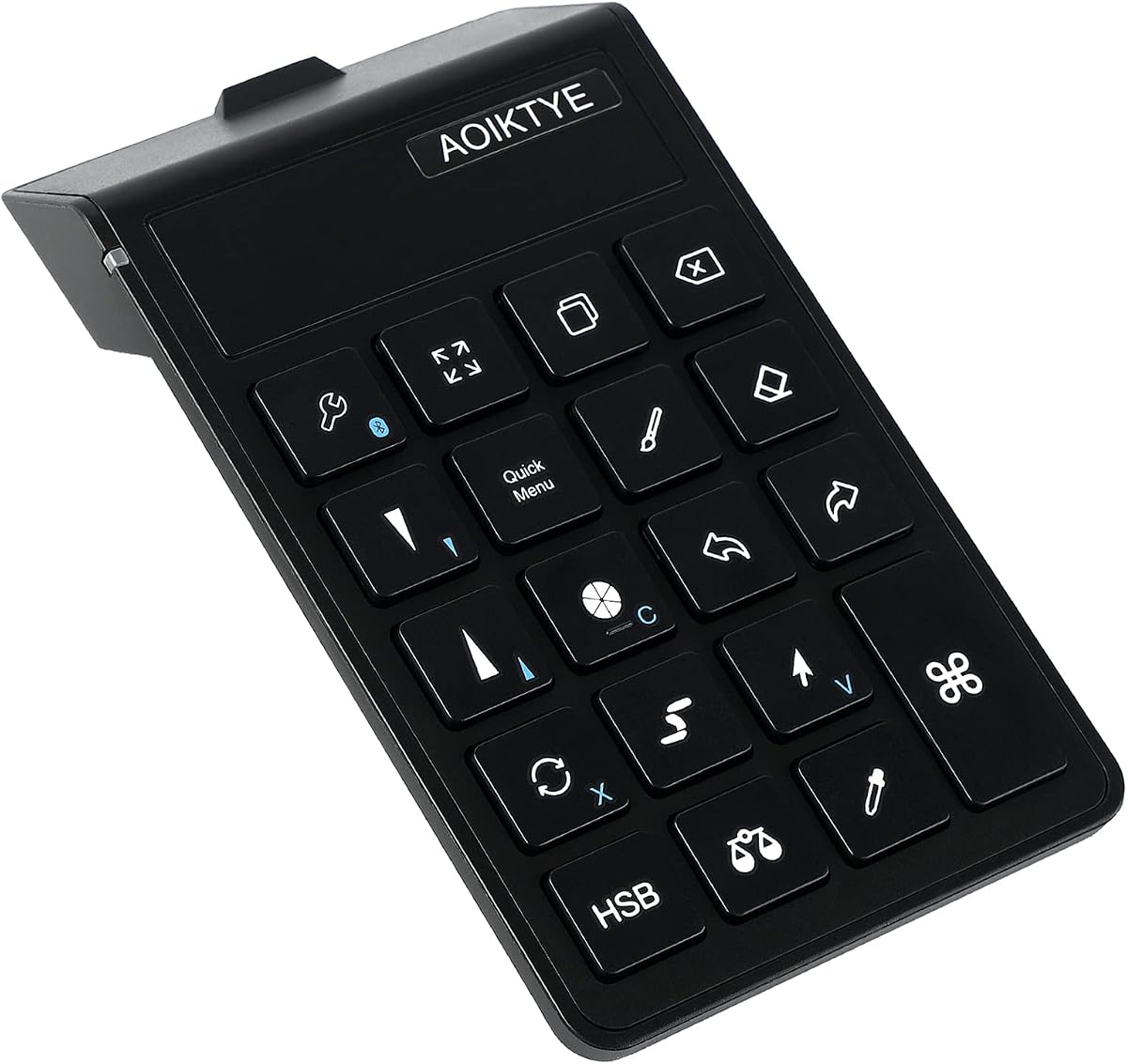
Designed specifically for Procreate this keyboard simplifies the iPad Drawing Bluetooth Controller experience for mobile artists. It covers essential shortcuts that streamline the painting process on your iPad.
We may earn a commission when you buy through this link, at no additional cost to you.
The battery lasts up to eighty four hours ensuring you never run out of power. OTA upgrades allow future improvements and customizations without needing new hardware.
While it is optimized for one app it supports some other creative software too. The improved height makes it more ergonomic for extended drawing sessions.
For dedicated Procreate users this is a no-brainer purchase. It removes friction from the workflow and allows you to focus on creating art.
Keys are arranged for frequent functions like layer removal and color adjustment.
Up to eight four hours on a single charge supports all day work.
We may earn a commission when you buy through this link, at no additional cost to you.
The XPPen ACK05 offers flexibility with three ways to connect via Bluetooth or cable. It brings the same utility as desktop dials to your iPad Drawing Bluetooth Controller setup.
We may earn a commission when you buy through this link, at no additional cost to you.
A massive one thousand mAh battery ensures hundreds of hours of use before needing a charge. Anti-ghosting allows simultaneous key presses for complex shortcuts in creative apps.
Setup on iPad requires a specific app but once configured it works smoothly. The dial provides tactile feedback for precise adjustments like brush size changes.
This is a versatile choice for hybrid creators who switch between tablets and laptops. Its reliability makes it a strong contender for daily professional use.
Choose between Bluetooth dongle or cable to fit your workspace setup.
One twenty fourth rotation with a click sound ensures precise adjustments.
We may earn a commission when you buy through this link, at no additional cost to you.
While primarily a game controller the ShanWan offers unique versatility for creative use. It supports keyboard mouse and drawing modes making it an unconventional iPad Drawing Bluetooth Controller choice.
We may earn a commission when you buy through this link, at no additional cost to you.
Users can customize buttons for drawing tasks across multiple systems. The ergonomic design ensures comfort during extended use on various platforms.
However it lacks specialized features found in dedicated creative tools. Setup for drawing modes can be complex for users needing advanced workflows.
This is best for those who need a single controller for gaming and art. It is a budget option but requires setup effort for best results.
Supports keyboard and mouse emulation for broader system compatibility.
Built-in battery ensures long play or creative sessions without cables.
We may earn a commission when you buy through this link, at no additional cost to you.
The TNP Remote is primarily designed for media navigation but offers trackpad control. It can serve as a basic iPad Drawing Bluetooth Controller for simple cursor movement in creative apps.
We may earn a commission when you buy through this link, at no additional cost to you.
With a trackpad and home button it facilitates easy switching between apps. Bluetooth 5.0 ensures stable connection and responsive feedback during use.
However it lacks the specialized keys required for complex workflows. It is better suited for general tablet control than detailed digital painting.
This is ideal for users who need a mix of media and light drawing control. For heavy artists it may be too basic for daily production.
Moves cursor like a laptop allowing easy canvas navigation without touch.
Play pause and volume control make it great for video editing.
We may earn a commission when you buy through this link, at no additional cost to you.
The Modded G8 PLUS is a high-end controller designed for tablets and hybrid laptops. It features advanced Hall Effect sticks for smooth long-lasting control suitable for iPad Drawing Bluetooth Controller tasks.
We may earn a commission when you buy through this link, at no additional cost to you.
Motion sensing adds another layer of precision for specific creative or gaming needs. The extendable design ensures it fits most tablets securely for stable operation.
It offers customization through magnetic interchangeable parts to suit your preferences. Vibration feedback provides strong subtle cues during interaction.
This is best for tech-savvy users who want top-tier durability. While expensive the performance justifies the investment for professionals using tablet PCs.
Magnetic sticks ensure smooth control without stick drift over time.
Adjustable design supports various tablet sizes without requiring extra holders.
We may earn a commission when you buy through this link, at no additional cost to you.
The Clip Studio Tabmate 2 is optimized specifically for Clip Studio Paint making it a unique iPad Drawing Bluetooth Controller. It assigns frequent operations to buttons to speed up production significantly.
We may earn a commission when you buy through this link, at no additional cost to you.
It includes a software license adding extra value for new users. Bluetooth Low Energy ensures reliable connection without draining your device battery quickly.
While it only supports version 3.0 and later it covers most modern workflows. The design is simple allowing easy adoption by artists new to shortcuts.
This is the perfect companion for professional Clip Studio Paint users. It removes friction from the workflow for a more efficient drawing experience.
Designed exclusively for Clip Studio Paint to maximize productivity features.
Connects reliably while keeping your tablet battery usage to a minimum.
We may earn a commission when you buy through this link, at no additional cost to you.
The Wacom Intuos Small is a graphic tablet that functions as a precision tool for digital art. While not a dedicated controller it offers the most accurate input for iPad Drawing Bluetooth Controller workflows.
We may earn a commission when you buy through this link, at no additional cost to you.
Wacom's EMR technology provides a natural pen on paper feel without batteries. Bluetooth connectivity ensures wireless freedom across multiple operating systems.
It includes software and training to help you get started quickly. As a global leader Wacom ensures reliability and precision in every stroke.
This is ideal for users who prioritize accuracy above all else. If you need the best tool for detailed work this is the standard.
Pen works without batteries for a lighter and more natural drawing experience.
Industry leading accuracy ensures your digital strokes match your intent exactly.
We may earn a commission when you buy through this link, at no additional cost to you.
Selecting the right controller depends on your software and workflow needs. Consider these key factors to ensure the best fit.
Ensure the controller supports your primary apps like Procreate or Photoshop. Some devices are optimized for specific tools while others are universal.
Check that drivers or apps work with your iOS version to avoid setup issues.
Bluetooth 5.0 offers better speed and range for stable connections. Wired options provide reliability if you prefer a physical link.
Look for models that support multiple connection methods for flexibility.
Programmable keys and dials allow you to map your most used shortcuts. Higher customization means faster workflow over time.
Confirm that the driver supports the number of shortcuts you need.
Long battery life ensures uninterrupted work sessions. Look for rechargeable models that last at least thirty hours.
Check for standby modes that extend battery life when not in use.
A comfortable grip reduces fatigue during long drawing sessions. Light models are easier to carry and use for extended periods.
Test the button placement to ensure you can reach keys easily.
Budget options can deliver core features without high costs. Premium models offer better build and advanced customization.
Choose a model that matches your specific usage needs.
Durable materials ensure the controller survives daily use. Tactile feedback confirms presses without needing to look.
Invest in a well-built device to avoid replacements.
Some controllers switch between iPad and PC easily. This is useful for hybrid workflows or sharing devices.
Verify that it works across all your operating systems.
First connect your controller via Bluetooth or cable. Install the necessary drivers or apps to enable full functionality on your device.
Customize your shortcuts based on your most frequent tasks. Use the dials to adjust brush sizes or zoom for precise control.
Charge the battery regularly and store it in a cool place. Clean the surface with a dry cloth to prevent dust buildup.
Not all controllers support every app. Most work with major creative tools like Procreate and Photoshop but check compatibility before buying. Some devices require specific apps to set up correctly.
The best models offer around forty hours of continuous use. This allows you to work through entire days without recharging. Look for rechargeable options to avoid buying batteries.
Most controllers require drivers or apps to customize keys. Without them they function as basic keyboards. Ensure your iPad supports the required app before purchasing.
Many controllers support switching between iPad and PC. This is great if you work on both tablet and laptop. Check the manual for pairing instructions.
The AOIKTYE keyboard is specifically designed for Procreate. It includes shortcuts optimized for that software. It is a great choice for dedicated iPad users.
Dials help adjust brush size and zoom quickly. They save time compared to using screen controls. Not essential but highly useful for detailed art.
The top picks highlight the DIGIDRAW K30 HUION Keydial Mini and TourBox Lite. Each offers unique strengths for different budgets and needs.
Prioritize software compatibility and battery life when deciding. A good controller should enhance your workflow not complicate it.
Remember that prices change often. Verify current details on the product page before you complete your purchase.