
SABRENT 74 in 1
4.0Editor score
Supports 74 card types
Includes USB 2.0 port
Internal power connector
This guide compares the top internal media card readers for desktop PCs, evaluating speed, compatibility, and build quality to help you choose the right model.
An internal media card reader provides convenient access to memory cards without external cables. It fits into your desktop case bay for fast data transfer and permanent installation.
We compared ten top models based on supported formats, interface speeds, and ease of installation. Our analysis highlights key features that matter for photographers and content creators today.
Each pick shows distinct strengths for different needs and budgets. Prices change frequently so verify current offers before purchasing your preferred internal card reader model.
4.0Editor score

4.5Editor score

5.0Editor score
This side-by-side comparison details the specifications and capabilities of each model to help you decide which fits your desktop setup best.
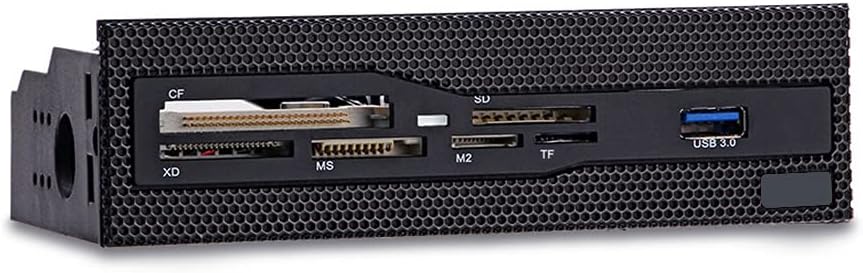


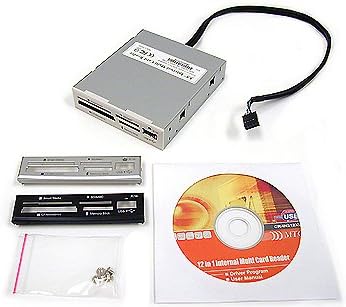
The SABRENT 74 in 1 is an excellent budget choice for those needing broad compatibility without spending much. It rates well for supporting an extensive list of card formats including older types.
We may earn a commission when you buy through this link, at no additional cost to you.
Its standout quality lies in the sheer number of slots available which reduces the need for adapters. The internal power connector ensures stable operation even with power hungry external USB devices connected to the extra port.
Trade-offs include slower USB 2.0 speeds which may bottleneck large transfers and basic plastic construction. These are acceptable given the low cost and convenience it offers for general users.
This model is ideal for hobbyists or small businesses needing legacy card support on a tight budget. We recommend it for users who value versatility over raw transfer speed.
Supports 74 different memory card types reducing the need for multiple readers or adapters.
Includes a USB 2.0 port to connect other devices directly to the internal hub.
We may earn a commission when you buy through this link, at no additional cost to you.
The StarTech Internal Card Reader stands out as a professional grade tool for high speed data transfer. It rates highly for its USB 3.0 UHS-II capabilities which drastically reduce transfer times.
We may earn a commission when you buy through this link, at no additional cost to you.
Key strengths include simultaneous slot access allowing users to copy files between different media types instantly. The TAA compliance and robust build make it ideal for enterprise environments demanding reliability and support.
Trade-offs involve a higher cost compared to consumer options and the requirement for a specific motherboard header. These factors are acceptable for professionals who need consistent performance and compliance.
Buyers like IT managers or video editors should choose this for its speed and durability. It remains the top recommendation for those prioritizing performance and long term value.
USB 3.0 UHS-II interface enables fast data transmission for large media files.
Supports simultaneous access to four different card slots for efficient workflow.
We may earn a commission when you buy through this link, at no additional cost to you.
The Vantec Link USB 3.0 delivers top tier performance with unmatched capacity support for modern and legacy cards. It rates perfectly for its ability to handle massive CompactFlash and SDXC capacities.
We may earn a commission when you buy through this link, at no additional cost to you.
Key strengths include support for ultra high speed modes like SDR104 and quad data access for Memory Stick cards. These features ensure maximum throughput for professional cameras and storage solutions.
Trade-offs include a premium price and a potentially complex setup for non technical users. These are acceptable for professionals who require absolute reliability and future proofing.
This reader is ideal for high end photography studios and video production teams. We recommend it for anyone needing the best possible performance and capacity support.
Supports CompactFlash up to 144PB and SDXC up to 2TB for future storage needs.
Supports UHS-I SDR104 modes for ultra high speed data transfers.
We may earn a commission when you buy through this link, at no additional cost to you.
The 5.25 Internal Card Reader offers solid performance with a focus on standard bay integration and speed. It rates well for its USB 3.0 interface and durable copper plated card slots.
We may earn a commission when you buy through this link, at no additional cost to you.
Key strengths include a grid panel design that fits mesh front cases and six slots for common formats. The USB 3.0 port ensures efficient data transmission for everyday tasks.
Trade-offs are its restriction to 5.25 bays which limits compatibility with modern cases and basic aesthetics. These are acceptable for users with older or specific chassis requirements.
Buyers with 5.25 bays needing front access should consider this option. It balances speed and compatibility well for general desktop upgrades.
High-speed front USB 3.0 interface enables efficient and easy data transmission.
Copper-plated card slots ensure stability during data transmission over time.
We may earn a commission when you buy through this link, at no additional cost to you.
The 5.25inch Media Dashboard combines multiple ports and card reading into one panel for rich connectivity. It rates decently for offering USB 3.0 and eSATA support alongside audio jacks.
We may earn a commission when you buy through this link, at no additional cost to you.
Key strengths include a built-in USB 3.0 hub and audio jacks reducing rear cable clutter. The multi-format reader supports common cards making it versatile for various media.
Trade-offs involve a lower reliability rating and potentially mixed performance quality. These are acceptable for enthusiasts needing a complete front panel solution on a budget.
This is suitable for PC builders wanting expanded front panel options. Consider it if you need audio and multiple USB ports with card reading.
Combines USB 3.0 and 2.0 ports with eSATA for versatile front panel access.
Front panel audio jacks eliminate the need to plug in behind your chassis.
We may earn a commission when you buy through this link, at no additional cost to you.
The TCC-QL5E offers a high count of ports plus card reading for extensive connectivity needs. It rates well for its six USB ports including five USB 3.0 and audio support.
We may earn a commission when you buy through this link, at no additional cost to you.
Key strengths include SATA and eSATA support alongside multiple USB 3.0 ports for high speed connections. The LED indicators help monitor drive activity status effectively.
Trade-offs include complex cabling and no available rating data which may deter cautious buyers. These are acceptable for power users needing maximum front panel connectivity.
This model is best for advanced users needing many ports. Choose it if you require extensive front access options.
Supports five USB 3.0 ports for high-speed connections and device hubs.
LED indicators show power status and hard disk read/write activity clearly.
We may earn a commission when you buy through this link, at no additional cost to you.
The Sony MRW620/U1/181 provides reliable access to a wide range of memory cards with trusted build quality. It rates well for its 17-in-1 support and dual color faceplates.
We may earn a commission when you buy through this link, at no additional cost to you.
Key strengths include included drive letter recognition software and compatibility with older Windows systems. The aesthetic options allow users to match their system bezels easily.
Trade-offs involve limited modern speed support and focus on legacy operating systems. These are acceptable for specific legacy hardware upgrades.
This is ideal for maintaining legacy setups needing brand reliability. Choose it if you have older Windows machines.
Includes Drive Letter Recognition Software to ensure easy card detection.
Comes with black and ivory faceplates to match system aesthetics.
We may earn a commission when you buy through this link, at no additional cost to you.
The All-In-One Internal Card Reader delivers reliable performance in a compact form factor for basic needs. It rates perfectly for its quality build and multiple bezel options.
We may earn a commission when you buy through this link, at no additional cost to you.
Key strengths include the availability of black silver and white bezels to match system aesthetics. The compact size fits well in tight internal spaces.
Trade-offs are a limited slot count and basic features compared to larger units. These are acceptable for users needing simple access to common cards.
Buyers seeking a compact reliable reader should consider this. It is ideal for systems needing minimal front access.
2.5 inch internal design allows installation in smaller bays.
Retail includes black silver and white bezels to match your PC style.
We may earn a commission when you buy through this link, at no additional cost to you.
The Akasa AK-ICR-07 provides convenient front access to popular memory cards with flexible design. It rates well for its six port setup and dedicated adapter slots.
We may earn a commission when you buy through this link, at no additional cost to you.
Key strengths include support for high capacity SDHC cards and an additional USB port. LED indicators show power and data transfer status clearly.
Trade-offs are its restriction to 3.5 bays and basic construction materials. These are acceptable for standard PC builds needing easy access.
This reader is suitable for users needing standard bay front access. Consider it if you need USB connectivity on the front panel.
Conveniently placed on the front of your PC for easy card insertion.
Two LEDs indicate power on card in and data transfer status.
We may earn a commission when you buy through this link, at no additional cost to you.
The MTG CR-IN212XU-1 offers broad card support in a durable metal case for standard bays. It rates decently for its 22-in-1 support and metal construction.
We may earn a commission when you buy through this link, at no additional cost to you.
Key strengths include hot swappable plug and play capability and support for four media icons. Beige black and silver bezels provide customization options.
Trade-offs involve slower USB 2.0 speeds and lack of available rating data. These are acceptable for budget users needing broad compatibility.
Buyers needing many card formats at low cost should consider this. It is a practical choice for general internal expansion.
Supports 22-in-1 card formats including SD MMC Memory Stick and CF.
Metal case fits 3.5 inch drive bay and ensures reliable operation.
We may earn a commission when you buy through this link, at no additional cost to you.
Choosing the right internal media card reader requires evaluating several technical and practical factors to ensure compatibility and performance.
Interface speed determines how fast data transfers between the card and your computer. USB 3.0 and higher standards offer significantly faster throughput than older USB 2.0 options.
Prioritize USB 3.0 or newer for large file transfers to save time and improve workflow efficiency.
Check which card formats your camera or devices use before purchasing. Some readers support hundreds of formats while others focus on common SD and microSD cards.
Ensure the reader supports all your current card types to avoid buying adapters or additional devices.
Internal card readers fit into specific drive bays inside your desktop case. Measure your available space to determine if you need a 3.5 inch or 5.25 inch unit.
Verify your case has the appropriate drive bay opening to ensure proper fit and access.
Some high capacity or high speed cards require more power than USB ports provide alone. Look for readers with internal power connectors to ensure stable operation.
Choose a model with internal power support if you use power-hungry cards or external hubs.
Confirm the reader works with your specific operating system version and architecture. Most modern units support Windows macOS and Linux without extra drivers.
Select a reader with native OS support to avoid installation hassles or driver conflicts.
Construction materials affect longevity and reliability over time. Metal cases often offer better durability than plastic ones for frequent use.
Invest in a durable model with good construction to ensure long term reliability.
Extra features like USB hubs or audio jacks add value by reducing rear port clutter. Consider whether these extras match your workflow needs.
Only choose extra features if you genuinely need them to avoid unnecessary cost.
Balance cost against performance and durability when selecting a reader. Higher priced models often include better warranty coverage and support services.
Check warranty terms and manufacturer support policies to protect your investment.
To install the reader, open your desktop case and mount it into an available 3.5 or 5.25 inch drive bay. Connect the internal cables to your motherboard headers and secure it with screws.
Once installed, boot your system and insert your memory cards into the front slots. Your operating system should recognize the drives automatically without extra drivers.
To maintain your reader, keep the slots clean from dust and avoid forcing cards. Regularly check connections and update firmware if available to ensure optimal performance.
Internal readers often provide more stable power and direct motherboard connections which can improve performance. However speed also depends on the interface standard like USB 3.0 or 2.0.
Most modern internal readers support macOS without additional drivers. Check product details for specific OS compatibility before purchasing to ensure it works with your system.
Typical readers support between 17 to 74 formats depending on the model. Check the specifications to ensure your specific SD, CF, or Memory Stick cards are included.
Most modern readers are plug and play and work without extra drivers on Windows macOS and Linux. Only older systems may require installing specific software for recognition.
Internal readers typically require a 3.5 or 5.25 inch drive bay which may not fit in smaller cases. Measure your case before purchasing to ensure proper space availability.
USB 3.0 provides up to 5Gbps while USB 3.1 offers up to 10Gbps which is faster. Check your motherboard support and card capabilities to utilize the full speed potential.
We reviewed ten internal media card readers ranging from budget friendly to professional grade options. Our top picks include the StarTech USB 3.0 and Vantec Link for performance users.
Prioritize interface speed and card compatibility based on your specific workflow and equipment needs. A reader that matches your current cards will save you from unnecessary adapter purchases.
Always check current prices and availability before purchasing since deals change frequently. This ensures you get the best value for your selected internal media card reader model.