
Lightning to HDMI Adapter for iPhone to TV 1080P
4.4Editor score
Affordable Pricing
No Driver Required
Compact Design
This guide compares the top ten HDMI Lightning adapters for iPhone users. We analyze compatibility features reliability and performance to help you choose the
Finding a reliable HDMI Lightning adapter for iPhone is essential for anyone who wants to share content on a bigger screen. These connectors allow you to mirror your display to TVs projectors and monitors effortlessly. Choosing the right one ensures smooth streaming and clear visuals for work or entertainment.
We have evaluated ten leading adapters based on user feedback compatibility and build quality. Our comparison covers models with charging ports MFi certification and varying price points. Each product offers unique benefits depending on your specific device and usage scenarios.
Each pick in this list highlights key strengths potential limitations and ideal use cases. We focus on real-world performance rather than marketing claims to give you an honest overview. Please note that availability and pricing may change so verify details before purchasing.
4.4Editor score

4.1Editor score

4.2Editor score
The following table provides a side-by-side overview of the ten adapters we reviewed. It highlights key specifications and capabilities to help you quickly identify the model that fits your requirements.





This adapter stands out as a top choice for iPhone users needing reliable screen mirroring. With a solid rating and MFi certification it ensures stable connections across many devices. It delivers clear 1080p video quality for presentations and media viewing.
We may earn a commission when you buy through this link, at no additional cost to you.
The included charging port is a significant benefit allowing you to power your phone while streaming. Its plug and play design means no drivers or Wi-Fi are needed for setup. You simply connect the adapter click trust and wait for the signal.
While it lacks native app support for streaming services like Netflix the performance for other apps is excellent. The compact design makes it easy to carry in a bag or pocket. You should be prepared to use a separate HDMI cable for the connection.
Overall this adapter is ideal for users seeking a balance of affordability and functionality. Whether for business presentations or home entertainment it handles content well. It is a practical solution for anyone needing a reliable HDMI connection for their iPhone.
The adapter mirrors your screen instantly allowing you to view content on larger displays without lag or setup delays.
Thanks to the integrated charging port you can keep your device powered up during long presentations or movie sessions.
We may earn a commission when you buy through this link, at no additional cost to you.
This budget-friendly adapter offers excellent value for those needing basic mirroring capabilities. It supports a wide range of iPhone models and iOS versions ensuring broad compatibility. Users appreciate the simple plug and play functionality and quick connection times.
We may earn a commission when you buy through this link, at no additional cost to you.
The adapter supports mirroring for many popular apps and local videos effectively. It includes a charging port to keep your device running during use. A five-year warranty provides additional peace of mind regarding product durability and support.
Keep in mind that it requires a USB charging cable to be plugged in before use. Also it is limited to 1080p output rather than true 4K resolution. These constraints are acceptable given the low price point and overall performance.
For users seeking an economical solution without sacrificing core functionality this is a strong option. It works well for travel presentations or casual media viewing on a TV. It is a reliable pick for anyone on a tight budget.
This adapter provides essential HDMI connectivity at a price point that is accessible to most users.
A five-year worry-free warranty ensures that you have long-term support and confidence in your purchase.
We may earn a commission when you buy through this link, at no additional cost to you.
As an official Apple product this adapter offers the most reliable experience for iPhone users. It guarantees seamless integration with iOS devices ensuring no unexpected disconnections. The build quality is robust and designed to match Apple devices aesthetics.
We may earn a commission when you buy through this link, at no additional cost to you.
This adapter supports all standard mirroring functions for apps presentations and media. It is particularly useful for professionals who need consistent performance during important meetings. The setup process is straightforward and requires no additional software or settings.
The main trade-off is the higher price compared to third-party alternatives. Additionally it does not include a built-in charging port so you may need a separate charger. However the reliability justifies the cost for many business and power users.
If you prioritize compatibility and stability over cost this is the recommended choice. It eliminates many of the connectivity issues that can occur with cheaper adapters. It is the best premium option for those seeking peace of mind.
As an Apple certified product this adapter delivers consistent performance without compatibility concerns.
Ideal for business settings where uninterrupted video output is critical for presentations and meetings.
We may earn a commission when you buy through this link, at no additional cost to you.
This adapter provides a certified solution for mirroring content to external displays. It works with a wide range of iPhone models and supports full 1080p resolution. The inclusion of a charging port is a convenient feature for extended usage.
We may earn a commission when you buy through this link, at no additional cost to you.
Users can mirror presentations videos and photos without needing additional drivers. The lightweight design makes it easy to pack for travel or work. It is compatible with many common apps though some streaming services have restrictions.
Be aware that it does not support apps with HDCP copyright protection like Netflix. This is a standard limitation for most Lightning adapters due to licensing rules. For general use it performs reliably and offers good value.
This is a great option for users who need a certified adapter with charging capabilities. It suits both personal entertainment and professional presentations well. Consider this if you want a balance of features and compatibility.
MFi certification ensures this adapter meets Apple standards for quality and connectivity.
Its small size allows you to carry it anywhere making it perfect for travel and on-the-go presentations.
We may earn a commission when you buy through this link, at no additional cost to you.
This adapter is designed for users seeking a straightforward mirroring solution. It supports a vast array of iPhone models ensuring compatibility with older and newer devices. The MFi certification provides confidence in its performance and safety.
We may earn a commission when you buy through this link, at no additional cost to you.
It allows you to mirror your screen to TV projectors or monitors easily. The process is simple requiring no complex settings or additional software. You can use it for presentations photos and local media playback effectively.
While it does not support streaming apps with DRM protection it works well for other content. It is a solid choice for those who need a reliable connection without extra features. It is suitable for both home and travel use.
For anyone looking for a versatile and certified adapter this is a strong contender. It offers a seamless experience across many Apple devices without hassle. Consider this if you need a reliable connector for various needs.
Supports a wide range of iPhone models ensuring it works with both current and older devices.
Setup is quick and easy allowing you to start mirroring without technical delays.
We may earn a commission when you buy through this link, at no additional cost to you.
This model stands out for its integrated cable design eliminating the need for a separate HDMI cord. It offers a clean setup for direct connection to TVs or projectors. The MFi certified chip ensures stable video output without interruptions.
We may earn a commission when you buy through this link, at no additional cost to you.
The adapter mirrors your screen effectively for presentations and local media playback. It supports a wide range of devices and iOS versions for broad compatibility. The setup is straightforward requiring no drivers or internet connection.
Note that the integrated cable is fixed so you cannot replace it if damaged. Also streaming services with DRM like Netflix are not supported due to copyright restrictions. Despite this it offers great value for its all-in-one design.
For users who want a tidy setup without extra cables this is an excellent choice. It simplifies the connection process while maintaining high video quality. Consider this if you value convenience and reliability in your adapter.
The built-in cable design simplifies your setup by removing the need for extra cords.
1080p HD support ensures that your content looks sharp and vibrant on larger screens.
We may earn a commission when you buy through this link, at no additional cost to you.
This adapter is highly reviewed for its reliable performance and zero lag mirroring. It is ideal for travel presentations and entertainment on hotel TVs. The plug and play design ensures quick setup without internet or complicated settings.
We may earn a commission when you buy through this link, at no additional cost to you.
It supports a wide range of apps including YouTube local videos and office tools. The certified chip ensures a stable connection across various iPhone models. You can rely on it for seamless presentations and media viewing.
Keep in mind it is limited to 1080p output and does not support USB-C devices. Also streaming apps with DRM like Netflix are not supported due to Apple policy. These limitations are typical for Lightning adapters and manageable for most users.
For frequent travelers or business users needing dependable performance this is a top pick. It offers a hassle-free way to connect to external displays quickly. Consider this if reliability and portability are your main priorities.
Its compact design and easy setup make it perfect for hotel stays and business trips.
Experience smooth screen mirroring without delays ensuring your presentations run flawlessly.
We may earn a commission when you buy through this link, at no additional cost to you.
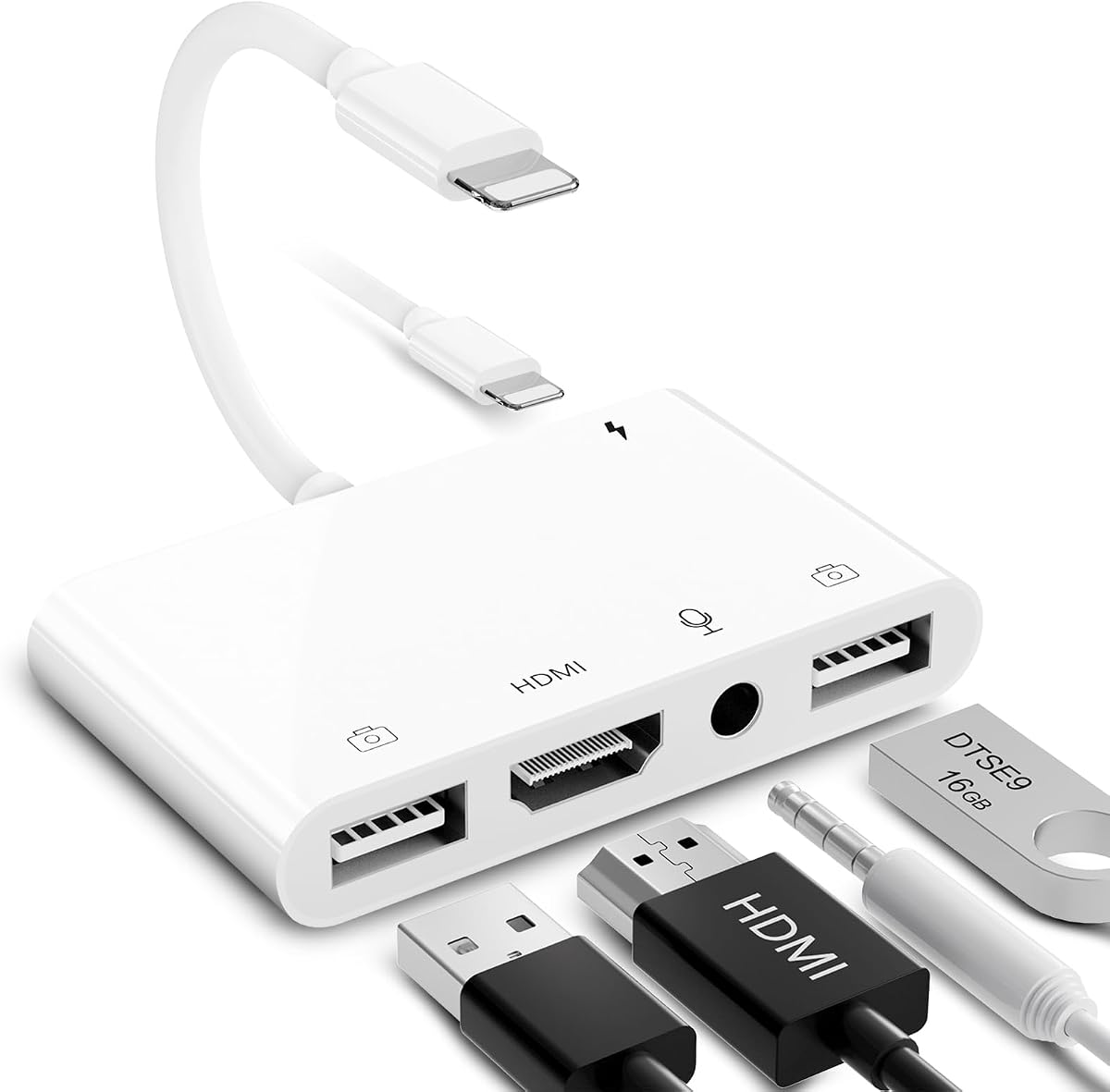
This adapter features a unique 5-in-1 design with dual USB ports and a microphone jack. It allows you to connect peripherals like keyboards or flash drives while mirroring your screen. This makes it a powerful tool for productivity and entertainment.
We may earn a commission when you buy through this link, at no additional cost to you.
You can use it for live streaming gaming or transferring files directly to your device. The charging port ensures your phone stays powered during use. It is particularly useful for complex setups requiring multiple connections.
The larger design may be less portable than standard adapters. It also requires a power connection to function properly. Despite this its expansion capabilities offer benefits that standard adapters lack.
For users needing extra functionality like file transfer or peripheral support this is ideal. It transforms your iPhone into a more versatile workstation. Consider this if you need more than basic mirroring capabilities.
Connect keyboards mice or flash drives directly to your iPhone for expanded functionality.
The microphone jack allows you to stream or record audio while displaying your video.
We may earn a commission when you buy through this link, at no additional cost to you.
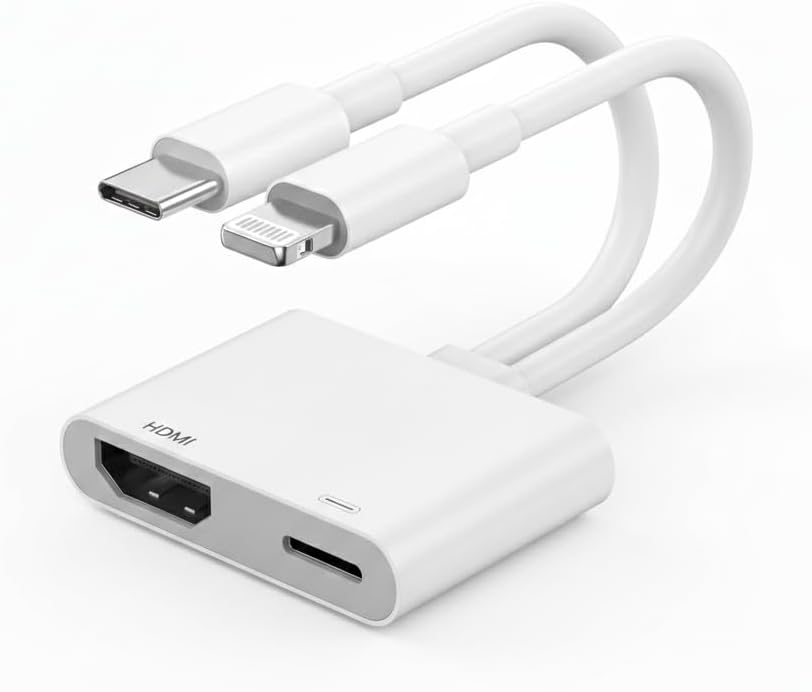
This versatile adapter supports both USB-C and Lightning devices offering future-proof connectivity. It allows streaming of 4K content on compatible devices with impressive clarity. The 100W charging port ensures your device stays powered even during high-demand tasks.
We may earn a commission when you buy through this link, at no additional cost to you.
For Lightning devices it mirrors content reliably though DRM apps remain restricted. For USB-C devices it offers broader app support including protected content. This dual capability makes it a smart choice for households with mixed devices.
Note that Lightning connections still face HDCP restrictions for streaming apps. Also USB-C mode may behave differently regarding content protection. Despite this its versatility is unmatched in the market for multi-device setups.
For users with both iPhone and Mac or Android devices this is a great unified solution. It simplifies your tech setup by handling multiple connection types. Consider this if you need flexibility and high-end performance.
Supports both Lightning and USB-C ports ensuring it works with most of your devices.
The 100W charging port supports fast charging while you use your device.
We may earn a commission when you buy through this link, at no additional cost to you.
As an official Apple product this adapter provides a reliable standard for mirroring. It works seamlessly with all iPhone models offering consistent video and audio output. The design is straightforward focusing on functionality and compatibility.
We may earn a commission when you buy through this link, at no additional cost to you.
It supports all standard mirroring functions for presentations and media playback. Setup is simple requiring no drivers or internet connection to work. You can rely on it for uninterrupted performance during important sessions.
The basic design means it lacks extra features like charging or OTG ports. You also need a separate HDMI cable to complete the connection. However its reliability makes it a safe choice for many users.
For those seeking a no-fuss connection solution this is a dependable option. It ensures your content displays correctly without compatibility issues. Consider this if you value simplicity and official support.
This adapter offers a straightforward connection that works right out of the box.
Compatible with all iPhone models ensuring it works with your device regardless of age.
We may earn a commission when you buy through this link, at no additional cost to you.
Choosing the right adapter involves understanding your specific needs and device compatibility. We have outlined key factors to help you make an informed decision.
Ensure the adapter supports your iPhone model and iOS version. Most adapters work with iPhone 14 and older but verify if your device is included.
Check the product details for a list of compatible devices to avoid issues.
Most adapters support up to 1080p HD which is sufficient for most TVs. If you need 4K look for models that specify high-resolution support.
Keep in mind that not all adapters handle higher resolutions smoothly.
Adapters with a built-in charging port allow you to keep your device powered. This is useful for long presentations or travel.
Consider this feature if you plan to use the adapter for extended periods.
MFi certified adapters ensure stable connections and compliance with Apple standards. Non-certified adapters may cause connection issues.
Look for MFi labeling on the packaging or product description.
Most adapters do not support streaming apps like Netflix due to copyright rules. They work well with YouTube local videos and presentations.
Verify if your preferred apps are supported before purchasing.
Compact designs are easier to carry in your bag. If you travel frequently look for a small lightweight adapter.
Consider the size when choosing a model for on-the-go use.
Some adapters include a built-in cable while others require a separate HDMI cord. Check the product specifications for details.
A longer cable may provide more flexibility in connecting to displays.
Prices vary from budget options to premium Apple devices. Check if the adapter comes with a warranty for added peace of mind.
Balance cost with the features you need to find the best value.
Connect the Lightning end of the adapter to your iPhone and plug an HDMI cable into the HDMI port. Ensure your TV or projector is powered on and set to the correct HDMI input source.
Tap the Trust button on your iPhone when prompted to allow the connection. Wait a few seconds for your screen to appear on the external display.
To maintain the adapter keep it away from heat and moisture. Store it in a protective case when not in use to prevent physical damage.
Most adapters do not support apps with HDCP copyright protection like Netflix. This is due to licensing restrictions set by streaming services. You can still view content on YouTube and local media.
Most models require you to provide your own HDMI cable to connect to the TV. Some premium models include a built-in cable. Check the product description for details before purchasing.
Models with USB-C support can work with iPhone 15. Traditional Lightning adapters will not fit iPhone 15 models due to port changes. Verify compatibility for your specific device.
Yes you can mirror games to a TV for a larger screen experience. Ensure the adapter supports real-time mirroring to reduce lag. Performance depends on the model you choose.
Using a charger is recommended for long sessions to avoid battery drain. Some adapters have a built-in charging port for this purpose. It is optional for short-term use.
Yes these adapters are ideal for presentations in offices or classrooms. They support mirroring for apps like PowerPoint and Keynote. Check app compatibility for best results.
MFi certification ensures the accessory meets Apple quality standards for reliability. It helps prevent connection issues and protects your device. Look for MFi on the packaging.
No these adapters use a direct cable connection and do not need Wi-Fi. They work independently of your internet connection. This is ideal for areas with no signal.
This guide has reviewed ten adapters suitable for mirroring iPhone screens to external displays. Each option offers unique benefits depending on your needs and budget.
Prioritize MFi certification and compatibility to ensure a reliable connection. Consider extra features like charging ports if you need them for your use cases.
Always verify the current availability and pricing before making your purchase. This ensures you get the best value and model for your specific device.