
E12 Mini Handheld Inkjet Printer
4.7Editor score
Compact Mini Design
0.5 Inch Print Height
Quick-Dry Ink System
Discover the top 10 handheld inkjet printers for 2026. Our expert guide compares features, print quality, and versatility to help you choose the perfect coding
Handheld inkjet printers offer a versatile and efficient way to mark products directly on various surfaces. These portable devices are essential for businesses needing quick batch coding, expiration dates, or logos without bulky equipment.
We evaluated ten leading models based on print height, battery life, ink durability, and ease of use. Each product was selected for its ability to handle diverse materials while maintaining consistent output quality in industrial settings.
Every pick highlights key strengths and potential limitations to guide your decision. Remember that specifications and availability can change, so verify details before purchasing to ensure the model meets your specific operational requirements.
4.7Editor score

4.7Editor score
4.4Editor score
This side-by-side comparison highlights the unique specifications of each model to help you find the right fit for your marking needs.


This handheld inkjet printer stands out as the top choice for businesses needing reliable daily coding. Its robust design ensures smooth operation across various materials without frequent interruptions.
We may earn a commission when you buy through this link, at no additional cost to you.
The 16-hour battery life supports long shifts, while the 42ml ink cartridge minimizes downtime. The 4.3-inch touchscreen allows quick edits and file imports via USB.
While it lacks multiple color options, the high-quality prints are sufficient for standard batch codes. The learning curve is manageable with the intuitive interface.
Ideal for warehouses and manufacturers, this model balances performance with ease of use effectively. We recommend it for those seeking a dependable general-purpose solution.
Advanced power management ensures consistent output over extended periods, reducing interruptions during critical labeling tasks.
The proprietary ink formula dries in seconds, preventing smudging on moving products or uneven surfaces.
We may earn a commission when you buy through this link, at no additional cost to you.
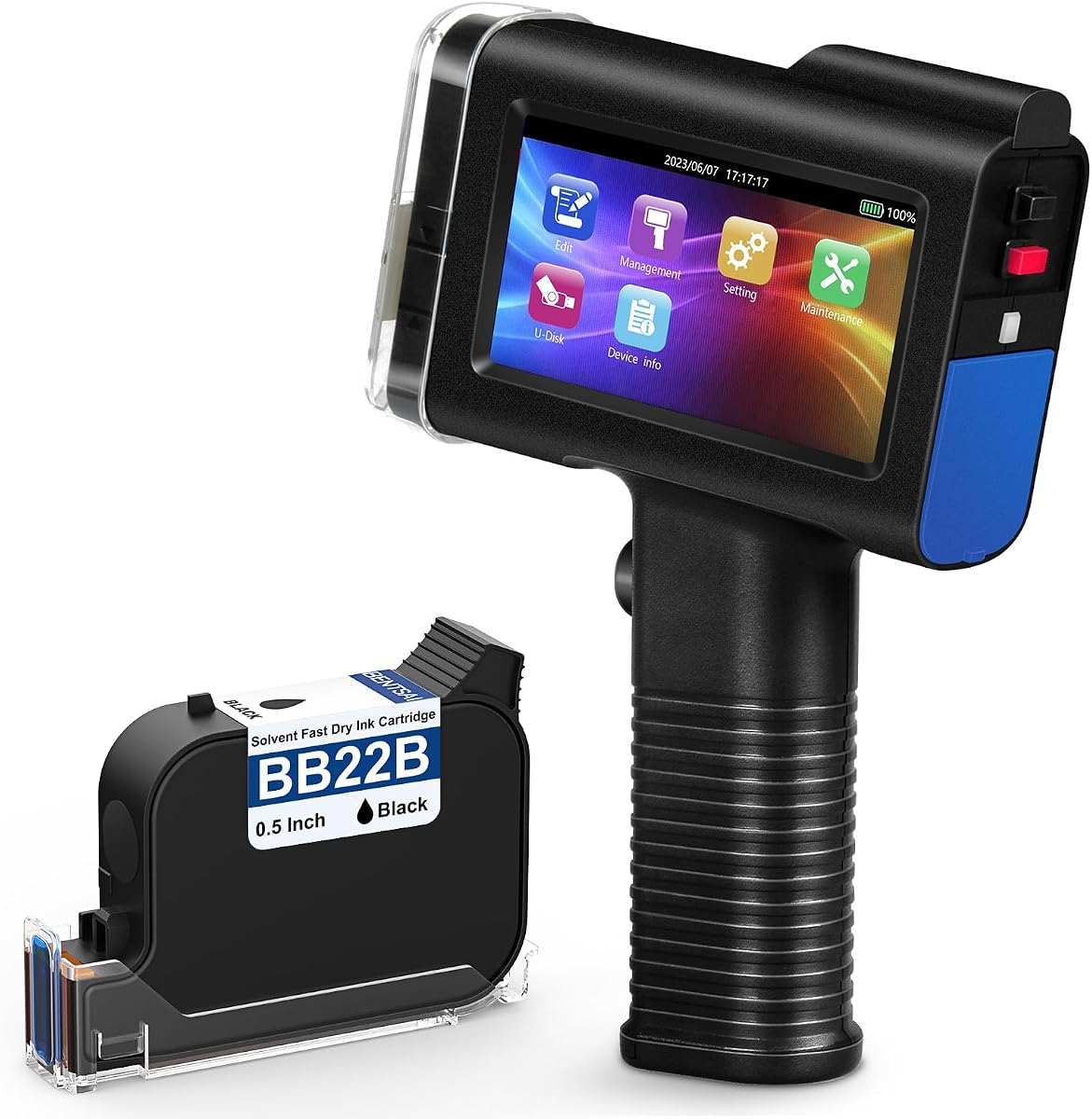
The E12 Mini offers exceptional value with its portable form factor and reliable printing capabilities. It is designed for users who need flexibility without compromising on basic functions.
We may earn a commission when you buy through this link, at no additional cost to you.
Its detachable handle allows transition between full handheld and compact modes easily. The quick-dry ink ensures clean prints on diverse surfaces like plastic and cardboard.
Though the screen is smaller, it remains functional for essential coding tasks. The anti-clog nozzles maintain consistent performance over time.
Best for small businesses or occasional use, this printer delivers quality results at a lower price point. It is a great entry-level option for labeling needs.
Ultra-compact dimensions make it ideal for tight spaces and handheld operation on ladders or production lines.
The leak-proof design prevents common issues with dried ink, ensuring readiness whenever you need to print.
We may earn a commission when you buy through this link, at no additional cost to you.
This premium model offers high-resolution printing suitable for detailed logos and precise barcodes. Its ability to handle nearly any surface makes it a versatile choice for varied industries.
We may earn a commission when you buy through this link, at no additional cost to you.
The 600 DPI resolution ensures crisp text and graphics. Custom templates allow for branding consistency, while the quick-dry ink provides waterproof results.
While the battery life is shorter than others, the print quality justifies the trade-off. Users may find the price higher, but the durability supports long-term investment.
Ideal for businesses requiring professional-grade markings, this printer excels in quality and flexibility. It is recommended for high-value product labeling.
Detailed prints enhance readability and scan rates, ensuring better compliance and inventory tracking.
From smooth metal to rough cardboard, the nozzle system adapts to ensure consistent ink adhesion.
We may earn a commission when you buy through this link, at no additional cost to you.
This model distinguishes itself with adjustable print heights up to one inch, ideal for large markings. The 5-roller system provides stability on uneven surfaces.
We may earn a commission when you buy through this link, at no additional cost to you.
With over 16 hours of operation, it supports continuous use during busy shifts. The ergonomic handle reduces hand fatigue during prolonged printing sessions.
The weight is slightly higher than competitors, which might affect portability. However, the precision and durability justify the bulk for industrial settings.
Best suited for large-scale operations requiring prominent labeling, this printer ensures consistency. It is a strong choice for warehouse and logistics teams.
Variable height settings allow flexibility for different product sizes and marking requirements.
Advanced roller mechanisms prevent jams and ensure straight lines on irregular packaging surfaces.
We may earn a commission when you buy through this link, at no additional cost to you.
The P15 operates independently without needing external devices, streamlining the workflow for on-the-go marking. Its internal storage ensures quick access to saved data.
We may earn a commission when you buy through this link, at no additional cost to you.
A quad-core CPU delivers smooth performance even with complex files. The 4.3-inch screen simplifies editing and navigation for all users.
While the interface is straightforward, advanced users might want more customization. The battery life is decent but not the longest in class.
Best for users who prefer simplicity and self-sufficiency, this model reduces dependency on connectivity. It fits well in environments needing quick setup.
Eliminates the need for phones or laptops, allowing immediate access to printing tools.
Supports over 25 languages, making it suitable for international teams and diverse workforces.
We may earn a commission when you buy through this link, at no additional cost to you.
This printer focuses on simplicity and practicality for everyday coding tasks. It delivers clear prints suitable for retail and warehouse labeling efficiently.
We may earn a commission when you buy through this link, at no additional cost to you.
The touch screen allows for easy customization of text and logos. Ink dries quickly, preventing smearing on moving items during processing.
While build quality is average, it meets standard needs for small businesses. The support system helps resolve issues promptly when they arise.
Best for entry-level needs, it offers a solid balance of features and cost. It is a practical choice for basic batch marking.
Intuitive controls minimize training time, enabling staff to start printing immediately.
Technical assistance is available to troubleshoot problems, ensuring minimal downtime.
We may earn a commission when you buy through this link, at no additional cost to you.
Designed for large-scale identification, this printer supports markings up to one inch tall. It is perfect for industrial containers and large product packaging.
We may earn a commission when you buy through this link, at no additional cost to you.
Infrared aiming helps align the nozzle accurately, reducing errors during operation. The waterproof ink ensures durability in damp or outdoor environments.
Setup may take more time due to calibration needs, but accuracy improves output. The device is slightly heavier but manageable with practice.
Best for heavy-duty applications, it ensures clear, visible labels. It is recommended for construction or manufacturing sites requiring big text.
Infrared technology aids in straight alignment, preventing crooked marks on large surfaces.
Water-resistant ink withstands moisture and friction, keeping labels legible over time.
We may earn a commission when you buy through this link, at no additional cost to you.
Weighing only 0.54 pounds, this is one of the lightest options available. It is ideal for users who prioritize ease of carrying over extended periods.
We may earn a commission when you buy through this link, at no additional cost to you.
The resistive touch screen withstands rough use, while the included stylus prevents accidental inputs. Ink efficiency is high, reducing consumption rates.
The smaller screen may limit visual clarity for complex edits. However, its simplicity supports straightforward coding tasks effectively.
Best for mobile workers or field teams, this printer reduces physical strain. It is a great option for frequent travel and varied locations.
Minimal weight ensures comfort during all-day use, ideal for field service technicians.
High-efficiency cartridges extend runtime, reducing replacement frequency and costs.
We may earn a commission when you buy through this link, at no additional cost to you.
Redesigned for portability, this unit includes a wrist strap to prevent drops during high-paced operations. It fits comfortably in one hand for long periods.
We may earn a commission when you buy through this link, at no additional cost to you.
The 300-nozzle system ensures sharp printing on various surfaces. Battery life supports full shifts, allowing continuous workflow without interruptions.
While the interface is basic, it gets the job done for standard codes. Ink drying is quick, but care is needed when not in use.
Best for warehouse floors with high mobility, it balances speed with comfort. It is a reliable tool for frequent moving and labeling.
The included wrist strap prevents drops, protecting both the unit and the surrounding area.
Continuous operation over 16 hours ensures reliability during the longest shifts.
We may earn a commission when you buy through this link, at no additional cost to you.
This printer excels at direct USB uploads, eliminating extra software for efficient batch coding. It supports multiple file formats for quick customization.
We may earn a commission when you buy through this link, at no additional cost to you.
The ergonomic grip ensures comfort, while the wrist strap prevents accidental drops. 16-hour battery life allows uninterrupted work throughout the day.
Printing height is limited, making it better for small codes than large labels. Overall, the ease of use outweighs the size constraint.
Best for tech-savvy teams needing quick setup, it simplifies workflows. It is recommended for environments with frequent data updates.
Plug-and-play USB uploads remove the need for external software or complicated setups.
Ergonomic design and lightweight build reduce hand fatigue during long labeling sessions.
We may earn a commission when you buy through this link, at no additional cost to you.
Selecting the right handheld inkjet printer involves evaluating key technical factors that affect daily operations.
Print height determines the maximum size of your markings. For small product codes, 0.5 inches is sufficient. Large industrial containers require models with up to 1-inch height. Resolution affects clarity; higher DPI ensures barcodes scan easily.
Look for models with adjustable height settings to match your product sizes.
Battery life dictates how long you can work without recharging. Full-day shifts require at least 12 to 16 hours of continuous operation. Models with advanced power management extend runtime and reduce charging interruptions.
Choose units with reliable batteries if you work long shifts.
Ink quality affects how well marks stick to surfaces. Quick-drying formulas prevent smearing on moving products. Waterproof inks ensure labels survive exposure to moisture or handling.
Prioritize models with fast-dry and fade-resistant ink for durability.
A clear touchscreen simplifies editing content and importing files. Intuitive menus reduce training time for new staff. Touchscreens with high sensitivity improve accuracy during operation.
Select printers with easy-to-use screens for smooth daily workflows.
Connectivity options like USB allow direct file uploads without extra software. Supported file formats include JPG, PNG, and BMP for custom logos. Compatibility with your existing data systems streamlines batch coding.
Ensure the printer supports your preferred file formats for flexibility.
Weight impacts comfort during extended use. Lighter models under 1 pound reduce hand strain. Ergonomic handles and wrist straps prevent drops and improve grip.
Prioritize lightweight designs if your team moves frequently.
Different surfaces require specific ink adhesion. Check if the printer works on your materials like metal, plastic, or wood. Curved surfaces need specialized rollers for smooth application.
Verify surface compatibility to avoid print failures on packaging.
Reliable technical support reduces downtime when issues arise. Manufacturers with global patents often offer better service. Warranty terms protect your investment against defects.
Choose brands with strong support networks for peace of mind.
Start by charging the battery fully before first use. Install the ink cartridge and secure the protective cap to prevent drying. Navigate the touchscreen to set your print height and language.
Hold the device steadily while moving at a consistent speed across the surface. Use the positioning plate for accurate alignment on flat items. Press the trigger to begin printing and stop when done.
After use, replace the protective cap immediately to keep the nozzle clean. Store the unit in a cool, dry place away from direct sunlight. Clean the exterior with a soft cloth to maintain performance.
Most models support a wide range of surfaces including cardboard, plastic, metal, glass, wood, and fabric. Some units handle porous and non-porous materials effectively due to specialized ink formulas.
Cartridge life depends on usage but typically lasts for hundreds of thousands of characters. Quick-dry inks are designed for efficiency, so replacements are rarely needed unless used heavily daily.
Yes, many models include preloaded industrial barcode formats. Users can generate codes directly on the device or import them via USB for custom batch requirements.
Most units feature built-in screens and independent systems, allowing direct data entry. This eliminates the need for external devices, making them ideal for standalone tasks.
Professional ink formulas typically dry within 2 to 5 seconds. This fast drying time prevents smudging and allows immediate handling of printed items.
Modern models offer 12 to 16 hours of continuous operation. This ensures they can handle full work shifts without interruption from charging.
Yes, you can import logos in JPG, PNG, or BMP formats via USB. Some screens allow direct editing for quick customization of text and designs.
Minimal maintenance is needed beyond replacing the protective cap after use. Keeping the nozzle clean and storing in a dry place ensures consistent performance.
We highlighted top models offering robust battery life, clear output, and surface versatility. Each option balances speed and convenience for various industrial needs.
Prioritize features that match your daily workflow such as height adjustment or connectivity options. A unit that simplifies your labeling saves time and resources.
Always verify current availability and specifications before making a purchase. Ensuring compatibility with your environment guarantees optimal results for your business.