
Wireless Caregiver Pager, 1 Call Button + 1 Receiver for Elderly at Home
4.7Editor score
Up to 1500 ft wireless range
58 built-in ringtones
IP55 waterproof and dustproof
Finding the right gadgets for elderly parents can significantly improve their safety and independence at home. These devices range from simple alert systems to advanced monitoring tools designed to ease daily challenges.
We compared ten highly rated products based on ease of use, reliability, and specific features tailored for seniors. Our selection includes wireless pagers, large display clocks, and video monitoring systems.
Each pick highlights key benefits and limitations to help you make an informed decision. Keep in mind that product availability and pricing may change over time so verify details before purchasing.
4.7Editor score

4.8Editor score

4.4Editor score
As an Amazon Associate we earn from qualifying purchases.
The following table provides a side-by-side comparison of all ten products including their core specifications and key features to help you evaluate them quickly.
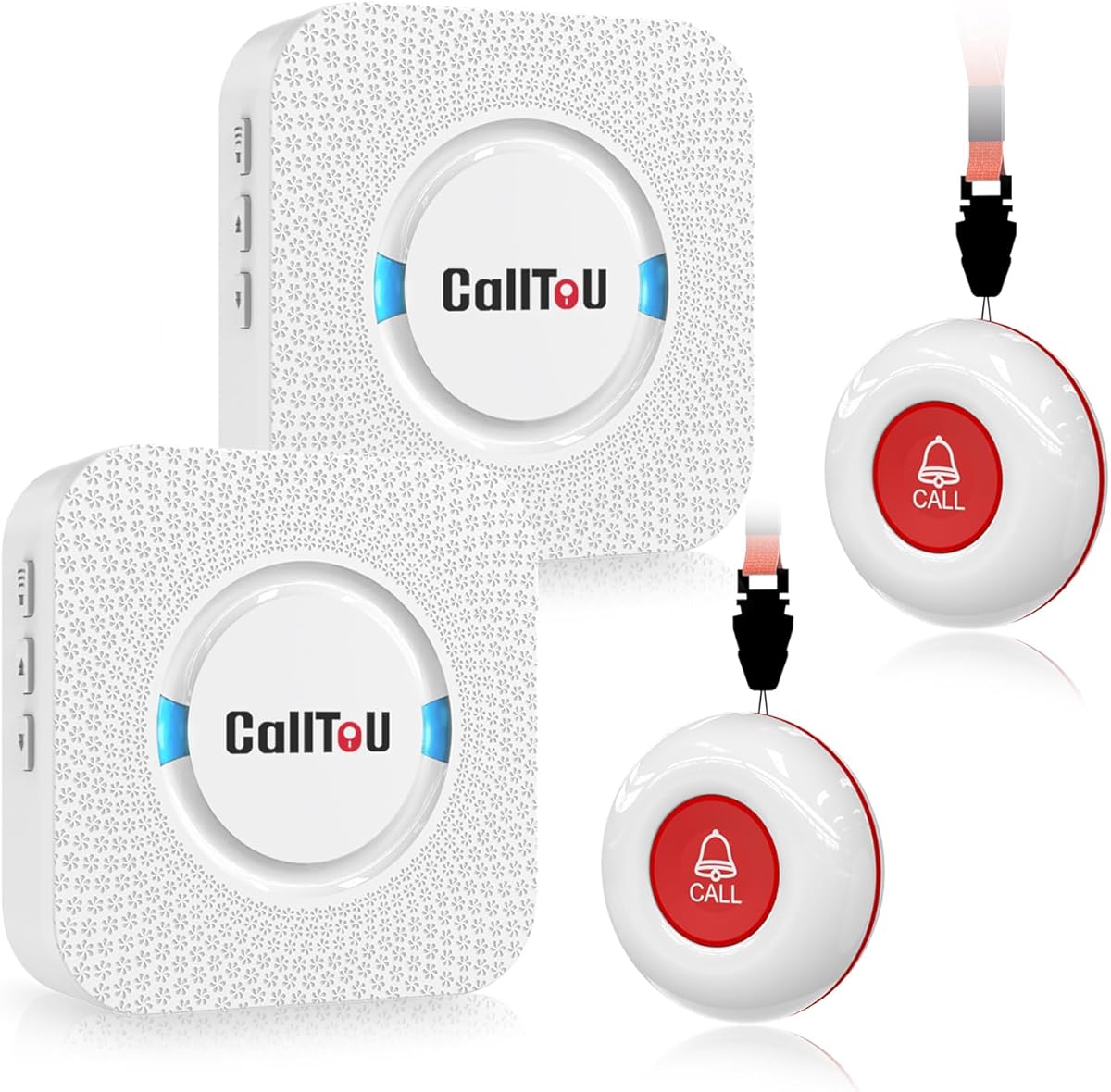


The CallToU Caregiver Pager ranks highly for its reliability and ease of use. With a rating of 4.6 it offers a simple solution for seniors needing quick assistance. The system includes two receivers and two call buttons ensuring coverage in multiple rooms.
We may earn a commission when you buy through this link, at no additional cost to you.
Its standout feature is the flexible placement option. The receiver can be moved by caregivers while the call buttons can be worn or mounted. The 500+ foot range in open areas helps maintain connection throughout most homes.
While it lacks smart app connectivity the traditional alert method ensures immediate sound-based notification. The waterproof design makes it suitable for bathrooms where falls are more common. Volume levels reach up to 110dB for clear audibility.
This device is ideal for families who prefer a straightforward plug-and-play system. It provides peace of mind without requiring complex setup or internet connections. It remains a top choice for basic safety monitoring needs.
Buttons can be hung as pendants or secured to walls providing flexibility for different mobility levels.
55 ringtones and high volume ensure caregivers hear alerts even in noisy environments.
We may earn a commission when you buy through this link, at no additional cost to you.
The FullHouse Caregiver Pager excels in range coverage making it suitable for larger homes. Users rate it at 4.5 stars for its ability to connect across distances up to 1000 feet in open air. This ensures help can be called from remote areas.
We may earn a commission when you buy through this link, at no additional cost to you.
A key strength is the silent mode with LED flash which prevents disturbing others while alerting caregivers. The splash proof button allows use in bathrooms though it cannot be immersed. The wristband option adds convenience for active users.
However the button is not fully waterproof so it should be removed during showers. This limitation requires a bit more caution in wet environments. Overall the system balances range and usability well for private households.
This pager is best for homes where distance between rooms is a concern. The variety of melodies allows personalization of alerts. It offers a cost effective solution for monitoring without recurring fees.
Reach up to 1000 feet outdoors ensuring alerts get through even in large properties.
Use silent mode with LED flash to avoid waking others when help is needed.
We may earn a commission when you buy through this link, at no additional cost to you.
This clock is designed specifically for seniors with dementia or memory loss. With a rating of 4.6 it provides a visual reference for time and date without abbreviations. The 7 inch screen ensures text is large and readable for those with poor vision.
We may earn a commission when you buy through this link, at no additional cost to you.
The auto night dimming feature protects sleep cycles by lowering brightness after 7 PM. Multiple alarm modes help with medication or appointment reminders. Language support includes eight options catering to diverse households.
One drawback is the need for a constant power source. While it has battery backup for settings it resets on power loss. This means it relies on an outlet for continuous operation which limits placement options.
It is a strong choice for families needing cognitive support tools. The clear display reduces confusion and anxiety. It serves both as a timepiece and a daily schedule aid.
Spells out time and date fully avoiding any confusing short forms or codes.
Auto dimming prevents bright light from disturbing rest during night hours.
We may earn a commission when you buy through this link, at no additional cost to you.
This WiFi-enabled pager stands out for its ability to connect directly to smartphones. Rated 4.8 it allows instant alerts to family phones anywhere in the world. The waterproof buttons ensure safety even in bathroom environments where slips occur.
We may earn a commission when you buy through this link, at no additional cost to you.
The signal penetrates corners easily covering up to 656 feet. This reduces dead zones in multi room setups. Users appreciate the no monthly fee model which lowers long term costs significantly.
It requires a 2.4GHz Wi-Fi network which may not work on all routers. Additionally SMS and phone call alerts need a subscription upgrade. These limitations are minor compared to the connectivity benefits.
Tech savvy families will find this device invaluable. It bridges the gap between traditional pagers and modern apps. The convenience of remote monitoring makes it a top recommendation.
Receive alerts on your phone instantly no matter where you are in the world.
Waterproof design allows secure placement in wet areas without worry of damage.
We may earn a commission when you buy through this link, at no additional cost to you.
This clock focuses on accessibility with voice announcement capabilities. With a 4.7 rating it serves those with poor vision by speaking the time when requested. The 7 inch display shows date and day in bold letters for easy reading.
We may earn a commission when you buy through this link, at no additional cost to you.
Multiple alarm settings help manage daily routines like medication times. Auto DST ensures time changes are handled automatically. The dimming function protects eyes at night without manual adjustment.
Voice features may be loud for light sleepers so volume control is essential. It does not integrate with smart home ecosystems but functions well independently. Ease of use is a major advantage here.
It is ideal for households with visually impaired members. The combination of visual and auditory cues ensures no details are missed. It simplifies time management effectively.
Voice announcement supports those with weak vision ensuring time is clear audibly.
One click setup makes it easy for seniors to start using immediately.
We may earn a commission when you buy through this link, at no additional cost to you.
This wireless pager offers exceptional value with strong performance. Rated 4.7 it boasts a massive 1500 foot range suitable for large properties. It can be expanded with up to 30 buttons allowing customization for multi room homes.
We may earn a commission when you buy through this link, at no additional cost to you.
The IP55 waterproof rating ensures durability against dust and splashes. With 58 ringtones there are plenty of options to identify calls easily. A generous 18-month warranty adds long to the purchase.
The design is functional rather than stylish which may not fit every decor. Battery replacement requires care but is standard for such devices. The price point makes it accessible for many budgets.
For those needing coverage over a wide area this is a top budget pick. It delivers reliable alerts without high costs. It is a practical choice for essential safety needs.
Add up to 30 buttons to cover every room or floor in your home.
IP55 rating protects against dust and water splashes ensuring long life.
We may earn a commission when you buy through this link, at no additional cost to you.
This WiFi system allows multiple family members to receive alerts. Rated 4.3 it lets you share notifications through the app so no call is missed. Customizable sounds help identify specific locations quickly.
We may earn a commission when you buy through this link, at no additional cost to you.
The setup is straightforward using standard 2.4GHz Wi-Fi. Shared alerts ensure that even if one person is busy others can respond. Support is available for any usage questions encountered.
Reliability depends on internet stability which might vary in some areas. The 4.3 rating suggests occasional issues reported by users. However the shared feature is a unique advantage for caregivers.
Families with multiple caregivers will benefit most from this device. It ensures redundancy in alert systems. It is a strong option if connectivity is stable.
Alerts reach multiple family members ensuring someone is always available to respond.
Set specific sounds for buttons so you know exactly which button was pressed.
We may earn a commission when you buy through this link, at no additional cost to you.
This camera offers a direct video connection for seniors. Rated 4.4 it features a 2.8 inch screen so parents do not need a smartphone. One-touch calling reduces friction in communication significantly.
We may earn a commission when you buy through this link, at no additional cost to you.
Fall and distress sound alerts provide active monitoring beyond visual checks. Family photos displayed on screen help reduce loneliness by keeping loved ones visible. No subscriptions keep costs predictable.
Continuous power is needed so it cannot be placed where outlets are scarce. Initial setup may require technical knowledge. Once running it offers deep peace of mind for families.
It is ideal for reducing isolation through visual connection. The sound detection adds a layer of safety. This makes it a premium choice for comprehensive care.
Parents see your smiling face clearly without needing to navigate phone apps.
Receive alerts if loud crashes or cries for help are detected automatically.
We may earn a commission when you buy through this link, at no additional cost to you.
This digital clock offers high customization for visual needs. Rated 4.4 it features 12 themes and 10 brightness levels. The display shows icons for time periods making it easy to understand day cycles.
We may earn a commission when you buy through this link, at no additional cost to you.
With 20 alarms and reminders users can track many daily tasks. Photos playback via USB turns it into a digital frame too. One-touch sleep mode ensures quick privacy and darkness.
Too many settings may overwhelm some seniors. Batteries only store settings during outages. It is a versatile device for those needing adaptability.
It fits well for users with specific visual or schedule needs. The photo feature adds a personal touch. It is a robust choice for home organization.
Choose from 12 themes to match your home decor or vision preferences.
Set up to 20 alarms and reminders to stay on track daily.
We may earn a commission when you buy through this link, at no additional cost to you.
This system focuses on portability with a clip-on pager. Rated 4.6 it comes with two buttons and a belt clip for caregivers. This allows the pager to be carried freely during tasks.
We may earn a commission when you buy through this link, at no additional cost to you.
The choice between DINGDONG and ALARM alerts offers flexibility for noise levels. Battery life is supported by 12 months of product assistance. It is compact and easy to use.
Range is limited to 500 feet which may be less than other models. However for small homes this is sufficient. The clip ensures the pager is always close by.
It is ideal for caregivers moving around the house. Simplicity is the main benefit here. It provides reliable alerts for daily care tasks.
The belt clip lets caregivers wear the pager hands free at all times.
Choose a gentle chime or loud alarm depending on your home noise levels.
We may earn a commission when you buy through this link, at no additional cost to you.
Selecting the right gadgets requires understanding specific needs and home layouts. This guide outlines key factors to ensure your choice supports safety and independence.
Devices with simple interfaces reduce confusion for seniors with limited tech experience. Look for large buttons clear displays and minimal setup steps.
Prioritize products that require no complex pairing or app learning curves.
Consider whether you need smart app connectivity or traditional sound alerts. WiFi systems offer remote monitoring while pagers provide immediate local alerts.
Choose a connectivity method that matches your internet reliability and family communication habits.
Ensure the device range covers all areas where your parents spend time. Larger homes may need extended range models exceeding 1000 feet.
Check open area range specifications to account for walls and obstacles in your house.
Customizable ringtones and volume levels ensure alerts are heard and identified easily. This is vital for distinguishing between different devices or locations.
Look for options allowing you to adjust tone loudness and visual indicators.
Battery life affects how often maintenance is needed. Some devices require constant outlet power while others run on replaceable batteries.
Assess whether battery changes are feasible or if outlet access is available.
Waterproof ratings like IP55 allow use in bathrooms where slips are common. Dust resistance ensures longevity in active environments.
Select devices rated for wet or dusty conditions to maximize safety and lifespan.
Many smart systems offer free tiers but may charge for SMS or call alerts. Verify ongoing fees before committing to a plan.
Choose no fee options if you want predictable costs without monthly payments.
Adequate warranty terms and accessible customer support simplify troubleshooting. Look for brands offering at least one year of coverage.
Check reviews for responsiveness to ensure help is available if issues arise.
Start by placing devices in high traffic areas like bedrooms and bathrooms. Test buttons and alerts with family members to confirm range and volume.
Regularly check battery levels and replace as needed to maintain functionality. For WiFi devices ensure your internet connection remains stable and secure.
Clean surfaces gently with a dry cloth to prevent dust buildup. Review user manuals annually to update settings or add new features as needs change.
Most devices listed have no monthly subscription fees. Some smart models may charge for SMS alerts but basic functions remain free. Check specific product details for any optional paid features.
Many pagers support expansion with additional buttons or receivers. Verify the maximum capacity before purchasing. Some systems allow up to 30 buttons for large setups.
Traditional pagers with batteries work independently of outlets. Clocks often have backup settings storage but may lose time until power returns. WiFi devices stop working without electricity unless they have a backup.
Basic pagers do not need internet relying on radio signals. Smart systems with app alerts need a stable WiFi connection. Choose based on your connectivity needs.
Many buttons have waterproof ratings like IP55 suitable for bathroom use. However verify immersion resistance if full submersion is expected. Always follow manufacturer guidelines.
Smart systems allow shared app notifications to multiple phones. Traditional pagers only alert the receiver holder. Check for sharing features if you need multiple caregivers notified.
Battery life varies from months to years depending on usage. Some devices include batteries while others require separate purchases. Always check specifications for replacement schedules.
Clocks with large displays and voice alerts help reduce confusion. Pagers offer simple buttons easy to use during memory lapses. Look for non abbreviations and clear visual cues.
We reviewed ten gadgets including pagers clocks and cameras designed for senior safety. Our top picks cover budget smart and premium needs for various home environments.
Prioritize ease of use and connectivity that matches your family communication style. Ensure coverage range extends to all essential areas like bathrooms and bedrooms.
Prices and availability fluctuate so verify current details before purchasing. Regular maintenance ensures these devices remain effective in supporting your loved ones.