
Stylus Pen for Touchscreen iPad
4.5Editor score
Three distinct tip options
Wide device compatibility
Tool-free tip replacement
This guide compares the top ten fine point stylus pens for touchscreen devices including iPads phones Android tablets to help you find the most accurate tool
Finding the right fine point stylus can transform how you interact with your touchscreen devices. Whether you are taking notes drawing sketching or navigating menus precision matters. A good stylus offers control without damaging your screen.
We have evaluated ten popular options based on tip design compatibility and overall user experience. Each product brings unique features such as replaceable tips or active power options. This list covers the most reliable choices available today.
Every pick highlights specific strengths to help you match a tool to your workflow. Remember that availability and details can shift over time. Check the latest information before making your final decision.
4.5Editor score

4.6Editor score

4.2Editor score
The following table provides a side-by-side look at the key specifications of each model. Use this overview to quickly identify which stylus meets your specific requirements for size compatibility and tip style.




This stylus offers a versatile solution for users needing a reliable tool across multiple devices. Its three-in-one design allows switching between rubber and disc tips to suit different tasks like writing or gaming.
We may earn a commission when you buy through this link, at no additional cost to you.
The transparent disc tip provides excellent visibility of the contact point which enhances precision. Users can switch tips quickly without tools extending the usability of the pen significantly.
While it lacks active features like pressure sensitivity the passive design ensures broad compatibility. The flexible writing angle helps prevent lag during typical touch interactions on capacitive screens.
Ideal for students or casual users this pen delivers consistent performance without complex setup. Its affordability makes it a practical choice for those needing multiple styluses for different devices.
The inclusion of three different tips allows users to adapt to various screen interactions seamlessly.
Compatibility with most capacitive screens means you can use one pen across iPad and Android devices.
We may earn a commission when you buy through this link, at no additional cost to you.
MEKO delivers a refined passive stylus that balances precision and comfort effectively. The upgrade to include a transparent disc tip addresses the need for accurate contact visibility on touchscreens.
We may earn a commission when you buy through this link, at no additional cost to you.
Users benefit from two rubber tip sizes which cater to both browsing and selection tasks. The protective cap helps maintain tip integrity when not in use ensuring longevity.
The lack of battery dependency simplifies usage making it ready for instant interaction. However heavy artists might prefer active pressure sensitivity for nuanced drawing work.
For general productivity and note-taking this pen offers reliable performance. Its design supports smooth transitions between writing and navigating without interrupting your workflow.
The disc tip design allows for precise input without obscuring the cursor position on the screen.
Includes extra tips and a cap ensuring you have what you need for continued use.
We may earn a commission when you buy through this link, at no additional cost to you.
This active stylus introduces features like magnetic attachment and quick charging to enhance usability. The one touch switch simplifies turning the device on and off for immediate use.
We may earn a commission when you buy through this link, at no additional cost to you.
Battery performance is strong allowing for continuous use throughout a workday. The included magnetic design securely attaches to compatible iPad models keeping the pen within reach.
While powerful it may not fit all device needs due to specific compatibility requirements. Users must ensure their device supports the magnetic feature for full functionality.
Ideal for iPad users seeking an active experience this pen bridges the gap between passive and premium tools. It supports consistent performance for daily tasks without frequent recharging.
A quick charge time ensures minimal downtime for keeping your creative workflow uninterrupted.
Magnetic adsorption prevents loss by attaching the stylus directly to your device side.
We may earn a commission when you buy through this link, at no additional cost to you.
This active pen focuses on providing a realistic drawing experience with a fine tip. The power on speed is fast allowing immediate use without waiting for Bluetooth pairing.
We may earn a commission when you buy through this link, at no additional cost to you.
Battery life is designed for extended sessions making it suitable for longer creative work. The auto power off feature helps conserve energy when the pen is not in use.
Lack of pressure sensitivity means lines remain uniform which may limit advanced drawing. However for general note taking and sketching it provides a solid active solution.
Users who want an active stylus without complex connectivity will find this useful. It balances functionality with simplicity for everyday digital writing tasks.
Power on within seconds ensures you can capture ideas instantly without technical delays.
Works with a wide range of smartphones and tablets for versatile use across platforms.
We may earn a commission when you buy through this link, at no additional cost to you.
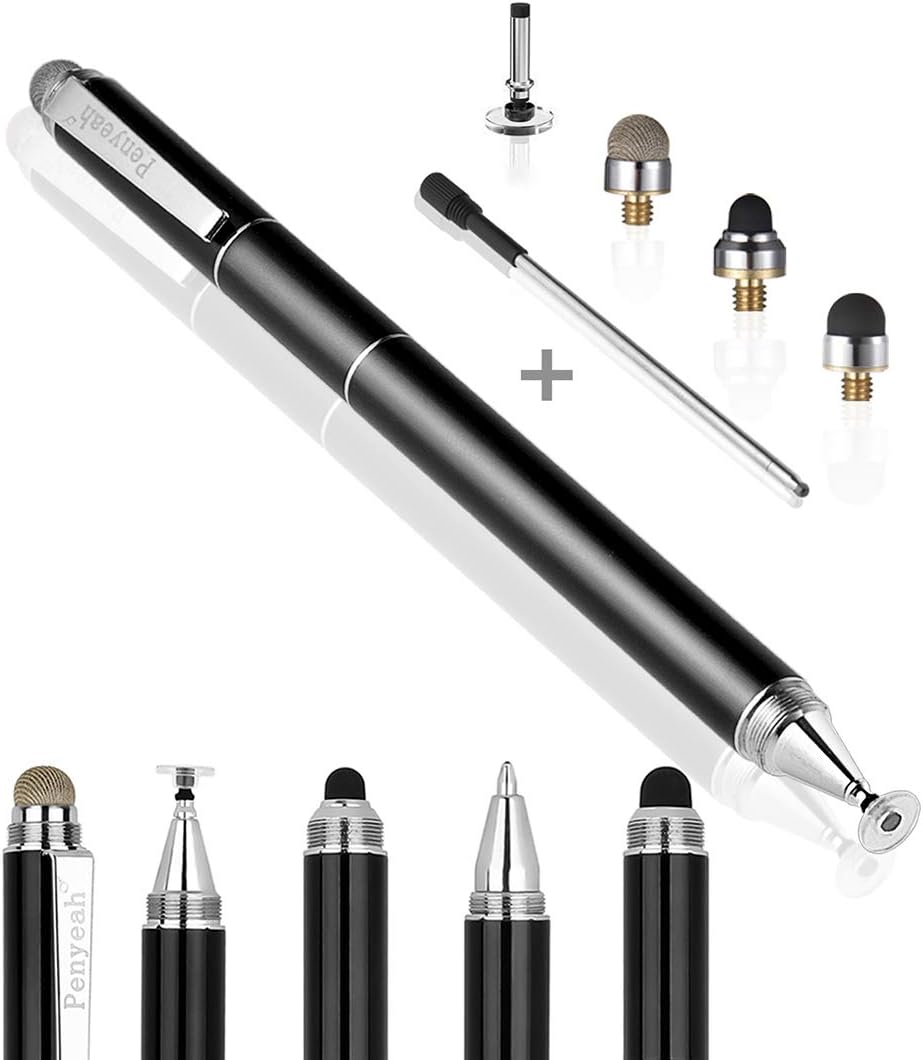
Penyeah offers a unique four-in-one design combining stylus tips with a traditional ink pen. This allows seamless transition between digital and physical writing tasks in one tool.
We may earn a commission when you buy through this link, at no additional cost to you.
The metal body adds a premium feel and durability compared to plastic alternatives. A smooth ink pen makes it practical for signing documents or taking notes on paper.
While versatile users should avoid resting hands on screen as palm rejection is not active. This is common in passive styluses but requires careful handling during use.
Perfect for professionals needing both analog and digital inputs this stylus delivers versatility. Its robust build ensures it can handle daily demands without quick wear.
The combination of stylus and ink pen reduces the need to carry multiple tools.
Corrosion resistant metal body ensures long-term durability and a comfortable grip.
We may earn a commission when you buy through this link, at no additional cost to you.
This active stylus stands out for its lightweight build and ultra fine tip. It aims to provide a smooth writing experience close to a real pen on tablets.
We may earn a commission when you buy through this link, at no additional cost to you.
Compatibility upgrades ensure it works with newer iPad generations making it a solid choice. The buffer unit at the tip helps improve accuracy during detailed input tasks.
Charging requires care with specific voltage inputs to prevent internal damage. Users must use standard chargers to ensure the device remains functional over time.
Best for artists and students needing precision this pen balances weight and control. Its design supports long usage sessions without causing hand fatigue.
The buffer unit and fine tip work together to reduce jitter during precise strokes.
Lightweight body reduces strain during extended use for comfortable daily writing.
We may earn a commission when you buy through this link, at no additional cost to you.
This set provides six styluses making it ideal for families or shared workspaces. Each pen features a clip to attach to pockets or notebooks ensuring easy access.
We may earn a commission when you buy through this link, at no additional cost to you.
The rubber tips offer smooth gliding on screens without leaving fingerprints. Simple design means no setup is needed before using on any capacitive device.
While basic the bundle offers excellent value for groups needing multiple tools. Users should not rely on pressure sensitivity as these are purely passive devices.
For offices or classrooms this pack simplifies sharing digital input tools. The vibrant colors help distinguish pens among different users effectively.
Buying in bulk ensures everyone has access to a stylus without individual costs.
Built-in clip allows attaching the pen to bags or notebooks securely.
We may earn a commission when you buy through this link, at no additional cost to you.
MEKO provides a bundle of four pens with substantial replacement tips included. This ensures longevity and convenience for users who need multiple styluses.
We may earn a commission when you buy through this link, at no additional cost to you.
Each pen features a disc tip for accuracy and a rubber tip for general use. The aluminum barrel adds a solid feel making them comfortable to hold for longer periods.
Support services offer a replacement warranty which adds confidence to the purchase. Users can easily swap tips to maintain performance without buying new pens.
Ideal for students or teams this set balances quality with value. The design supports smooth interactions with various touchscreen devices effortlessly.
Including replacement tips ensures you have backups ready when wear occurs.
Aluminum barrel provides a durable and comfortable feel during use.
We may earn a commission when you buy through this link, at no additional cost to you.
This bulk set offers ten styluses plus extra tips for shared environments. It is designed for classrooms or offices where multiple styluses are needed simultaneously.
We may earn a commission when you buy through this link, at no additional cost to you.
The dual tip design allows selecting between wide and narrow tips for different tasks. Alloy construction ensures durability for rough handling by students or employees.
Colors help distinguish pens among users preventing loss or confusion. While basic the performance is consistent for daily navigation and writing.
For procurement needs this pack delivers high value per unit. It is a practical solution for equipping large groups with stylus tools.
Buying in large quantities reduces cost per unit significantly for organizations.
Mixed colors make it easy to assign specific pens to specific users.
We may earn a commission when you buy through this link, at no additional cost to you.
A large bundle of ten pens designed for shared use in offices or homes. The aluminum body provides a sleek look and durable feel for daily use.
We may earn a commission when you buy through this link, at no additional cost to you.
Dual tips on each pen allow flexibility between precision and general navigation. Replacement is simple ensuring you can maintain the set without much effort.
High compatibility means you can use them on most capacitive devices without issues. It is a reliable option for those needing multiple styluses at once.
For group settings this set ensures everyone has a stylus ready. It balances style and utility for broad adoption across different user needs.
Providing multiple styluses simplifies workflow in shared digital environments.
Aluminum bodies offer a professional look suitable for office settings.
We may earn a commission when you buy through this link, at no additional cost to you.
Choosing the right stylus involves considering your device compatibility and usage needs. This guide outlines the key factors to help you select a model that fits your workflow.
The tip type defines how the stylus interacts with your screen. Fine point tips offer precision for writing and detail work whereas disc tips show the contact point clearly.
Select a tip that matches your primary task whether it is note taking or gaming.
Ensure the stylus works with your specific tablet or phone model. Passive styluses are broadly compatible while active ones may need specific software support.
Check product details to confirm it fits your device type before purchasing.
Passive styluses use finger touch emulation without batteries which makes them simple to use. Active styluses require charging and may offer features like pressure sensitivity.
Choose passive for simplicity and active for advanced creative features if your device supports it.
If you choose an active stylus consider how long the battery lasts on a single charge. Many models offer several hours of continuous use which is essential for long sessions.
Look for quick charge features to minimize downtime during critical work.
Material quality affects how well the stylus withstands daily use. Metal bodies tend to be more durable than plastic ones but may add weight.
Assess build quality to ensure the stylus lasts through your expected usage.
A comfortable grip reduces strain during long writing sessions. Look for designs that fit well in your hand and provide balance.
Try holding the stylus if possible to ensure it feels natural to you.
Styluses with replaceable tips can extend their useful life significantly. This is cost effective as you only need to change worn parts.
Check if replacement tips are easy to find and install for the model you choose.
Passive styluses are generally more affordable while active ones cost more for features. Consider your budget and how often you will use the tool.
Higher price does not always mean better performance for your specific needs.
Begin by ensuring your screen is clean and dry before using the stylus. Dust or moisture can interfere with the touch sensitivity and accuracy.
Replace tips periodically to maintain precision. If the tip feels scratchy or worn swapping it out improves performance and protects your screen.
For active styluses charge the battery fully before first use. Store the stylus in a cool dry place to preserve the battery life over time.
Passive styluses mimic a finger touch and do not require power while active styluses need batteries. Active ones often offer features like pressure sensitivity but passive ones are simpler and cheaper.
High quality styluses have soft tips designed to prevent scratches. However damaged or dirty tips can harm the screen so replace them regularly to stay safe.
Passive styluses never need charging but active ones require periodic battery topups. Always check the product description to see which type you are buying.
Most passive styluses work on any capacitive screen but active ones may need specific drivers. Verify compatibility with your specific device model before purchasing.
Most models allow tip replacement by unscrewing or pulling off the old tip and attaching a new one. Refer to the manual for specific instructions for your model.
Check if the screen is clean and if the stylus tip is properly installed. For active styluses ensure the battery is charged and the device is on.
Most styluses function fine with standard screen protectors. However thick protectors may reduce sensitivity so test before relying on it for precise work.
Artists usually prefer active styluses with pressure sensitivity and tilt support. Look for models compatible with your tablet to ensure creative features work properly.
The top three picks offer a balance of value precision and features for most users. Whether you need a budget option or a premium tool there is a choice here.
Prioritize compatibility and tip type based on your primary tasks. A well chosen stylus can significantly enhance your digital writing experience.
Remember that models change so check current availability before buying. Ensure you select a stylus that meets your current device requirements.