
ARCTIC Case Fan Hub
4.7Editor score
10 port PWM distribution
SATA power direct input
Compact 55mm height design
This guide compares the top ten fan control hub for PC models available in October 2026 to help you find the best cooling and lighting management solution.
Modern PC builds often require more cooling fans than your motherboard can handle directly. A reliable fan control hub for PC solves this problem by consolidating power and signals into a single efficient connection point.
We evaluated ten highly rated hubs based on port capacity, mounting options, power stability, and cable management features. Each entry was reviewed for compatibility with PWM and ARGB standards and real-world performance under load.
Every pick below highlights specific strengths and trade-offs to match different build needs. Keep in mind that product availability and pricing can fluctuate so verify details before finalizing your purchase decision.
4.7Editor score

4.7Editor score
4.6Editor score
The following table provides a side-by-side overview of key specifications and features across all ten selected fan control hubs for PC builds in the current market.


The ARCTIC Fan Controller stands out as the most flexible hub for builders who need precise tuning of each fan. With support for independent PWM control across all ten ports it removes the limitations of traditional hubs that sync all fans to one signal.
We may earn a commission when you buy through this link, at no additional cost to you.
Its compatibility extends beyond Windows thanks to native driver support for Linux Kernel 7.2 or later. This broad OS compatibility makes it ideal for professional workstations or enthusiasts who run custom Linux distributions. The hardware delivers up to 2 A per port and 4.5 A total ensuring stable power even under heavy load conditions.
While it excels in control features the hub focuses purely on PWM management without integrated RGB lighting sync capabilities. Users who want lighting control will need separate controllers or integrated hubs. The mounting includes both magnetic and adhesive options giving flexibility for placement inside cases.
This hub is best suited for advanced users who prioritize thermal performance and independent fan tuning over lighting aesthetics. It delivers a clean build with centralized cabling and reliable power distribution across a large fan array.
Each port can be adjusted separately allowing optimal balance between cooling and noise across different zones in your case.
Drivers work seamlessly on Linux systems opening up options for headless servers or specialized computing environments.
We may earn a commission when you buy through this link, at no additional cost to you.
The ARCTIC Case Fan Hub delivers reliable ten port distribution at a highly accessible price point. It passes a synchronous PWM signal to all connected fans and reads speed data from the first fan slot for BIOS reporting.
We may earn a commission when you buy through this link, at no additional cost to you.
Power comes directly from the SATA connector eliminating voltage drop that can occur with long Y splitter cables. The small footprint allows it to be tucked into tight areas without blocking other components or airflow paths.
Limitations include the lack of individual fan control and no ARGB integration. If you need synchronized speeds and simple power distribution this hub meets those needs efficiently without extra cost.
Best for budget focused builders who want to expand fan headers without sacrificing clean cabling or stable power delivery across multiple case fans.
All fans receive the same PWM signal ensuring consistent performance and predictable noise levels across the system.
At only 55 mm in height it fits easily behind panels or in small form factor chassis spaces.
We may earn a commission when you buy through this link, at no additional cost to you.
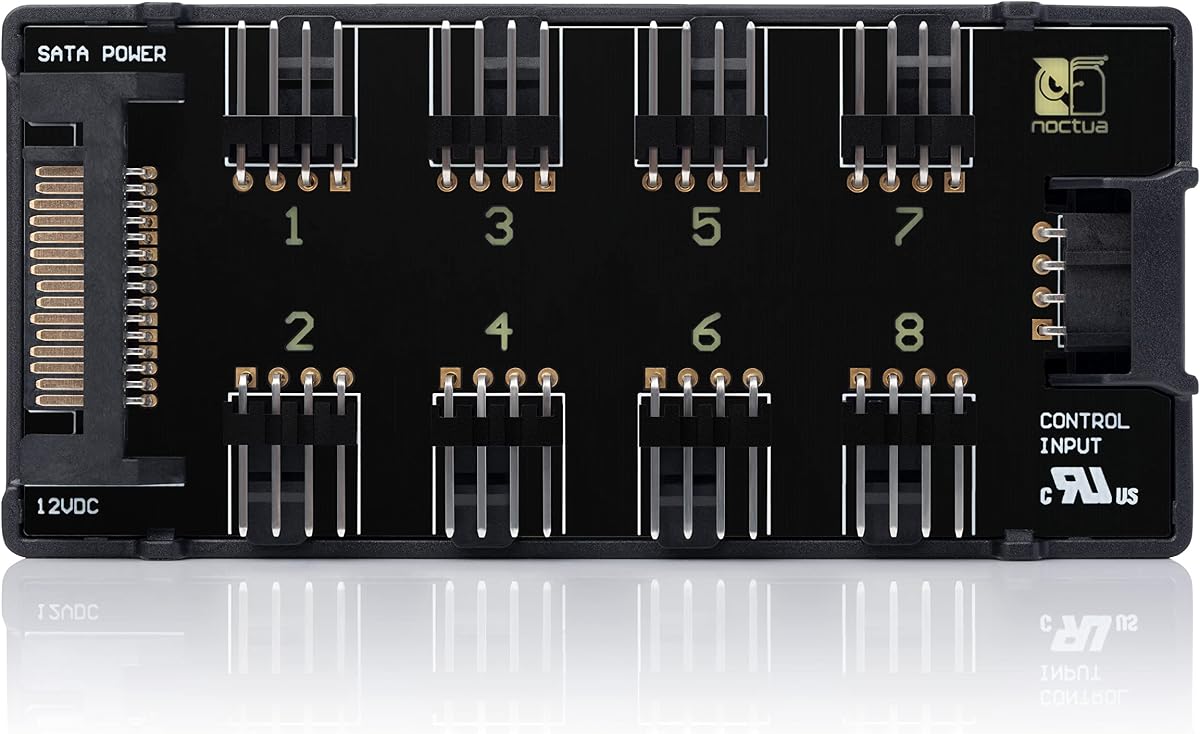
The Noctua NA-FH1 is designed for builders who prioritize safety and reliability over price. It includes short circuit protection fuses and accepts power from both SATA and 4 pin inputs simultaneously.
We may earn a commission when you buy through this link, at no additional cost to you.
Mounting uses four strong magnets allowing it to be placed on any steel panel without drilling or adhesive residue. The six year warranty is among the longest in this category reflecting high confidence in durability.
While the cost is higher than generic hubs the added protection and warranty justify the investment for critical systems. Port count is lower than ten port alternatives but eight is sufficient for most standard cases.
Choose this hub if you value peace of mind and premium build quality for high end workstations or long term deployments.
Built-in protection against overcurrent and short circuits reduces risk to expensive fans and motherboard headers.
Strong magnets secure the hub to case walls allowing flexible placement without permanent fixtures or glue.
We may earn a commission when you buy through this link, at no additional cost to you.
Thermalright delivers a versatile hub that handles both PWM fans and 5V ARGB lighting in one unit. It supports eight groups of fans and includes strong adhesive and magnetic mounting for flexible placement.
We may earn a commission when you buy through this link, at no additional cost to you.
The hub uses direct SATA power to maintain stable output under load and keeps cables organized with separate connectors for power and signal. Speed reading works through a single red port due to motherboard IC limitations.
Users must take care to insert ARGB plugs in the correct 5V direction to avoid equipment damage. The hub does not control lighting effects so external software is required for synchronization.
This hub is a balanced choice for builders needing both cooling and lighting expansion without buying separate controllers.
Separate connectors for PWM and ARGB let you manage both systems with a single hub unit.
Paste and magnetic options allow secure placement on steel or painted surfaces inside the case.
We may earn a commission when you buy through this link, at no additional cost to you.
The upHere hub stands out for including an RF remote that lets you customize RGB lighting without opening the case. It combines nine PWM fan ports with 5V ARGB device support in a compact hub.
We may earn a commission when you buy through this link, at no additional cost to you.
Built in magnets secure the unit to steel panels and the kit includes all necessary cables for a plug and play install. The hub draws from SATA power to avoid voltage drop under heavy load.
While the remote only handles lighting and not fan speeds it still adds convenience for color and effect tuning. PWM fans remain synchronized to the motherboard for speed control.
Ideal for custom RGB builds where remote lighting control is a priority alongside solid fan expansion capacity.
Use the included RF remote to change colors and effects without needing software or software access.
All required cables and a remote are provided so no extra purchases are needed for setup.
We may earn a commission when you buy through this link, at no additional cost to you.
Thermalright offers a dedicated ten port PWM hub that expands fan control to full capacity without RGB features. It uses strong double sided stickers for installation and draws power directly from SATA.
We may earn a commission when you buy through this link, at no additional cost to you.
The design prioritizes clean cable management with all ten ports consolidated into a small box. Only one red interface supports speed reading due to motherboard controller constraints.
This hub is straightforward and effective for builders who only need more fan headers and not lighting control. The brand is known for reliable thermal components and this hub maintains that standard.
Pick this for pure fan expansion when RGB is not a requirement for your case setup.
All ten ports deliver full PWM control making this one of the highest port counts in its class.
Direct SATA power keeps performance consistent even when all fans are running at full speed.
We may earn a commission when you buy through this link, at no additional cost to you.
The X12 IR White model supports up to twelve groups of fans and lighting making it one of the highest capacity hubs available. It offers a clean white finish that suits themed builds and separates PWM and ARGB connections clearly.
We may earn a commission when you buy through this link, at no additional cost to you.
Stability comes from direct SATA power which maintains output under load. The hub does not control speed or lighting so it works as an extender for motherboard signals.
Careful plug alignment is required for 5V ARGB connectors to avoid damage. The size is compact but the port density keeps wiring tidy.
This hub is best for large cases needing maximum fan and lighting support in a coordinated white theme.
High port count allows for complex setups with multiple fans and ARGB bars across the system.
The white housing matches clean builds with white or light colored case and component palettes.
We may earn a commission when you buy through this link, at no additional cost to you.
Thermalright X8 hub offers eight groups of fans and lighting in a compact black housing. It supports both PWM and ARGB standards with separate connectors to keep wiring organized.
We may earn a commission when you buy through this link, at no additional cost to you.
Mounting uses strong double sided stickers for secure placement and power comes directly from SATA for stable performance. The small footprint leaves more room for cable routing inside the case.
No included software means lighting relies on motherboard or external software control. This keeps costs lower but limits independent customization.
Ideal for mid range builds needing both cooling and lighting expansion without extra control complexity.
Separate connectors for fans and lighting reduce clutter and simplify installation in tight spaces.
SATA input ensures consistent power without voltage loss across multiple connected devices.
We may earn a commission when you buy through this link, at no additional cost to you.
The J-10 Pro hub adds RF remote control for lighting effects alongside a ten port fan splitter. Magnetic suction mounting makes installation quick and secure on steel panels inside the case.
We may earn a commission when you buy through this link, at no additional cost to you.
SATA power provides direct stable output to all connected fans and lighting. The remote and chassis key control options give flexibility without requiring software access.
Fan speeds remain tied to motherboard headers but the remote simplifies color changes and effects. This is helpful for cases with limited front panel control access.
Choose this hub when lighting control convenience and magnetic mounting are priorities alongside full fan capacity.
Use the remote or a chassis key to change lighting modes without restarting the computer.
Magnets allow quick placement and removal which is useful for maintenance or reconfiguring layouts.
We may earn a commission when you buy through this link, at no additional cost to you.
Thermalright offers a budget friendly eight port hub that supports both PWM and ARGB standards. It uses strong double sided stickers for secure placement and features clear red and black connectors for speed and lighting.
We may earn a commission when you buy through this link, at no additional cost to you.
Direct SATA power keeps performance stable under load and the black housing blends with most builds. The hub does not control speeds or colors so external software manages lighting effects.
Note that the SATA power cable is not included so verify you have a free connector before buying. The small size leaves room for other components inside tight cases.
This hub is an excellent value for builders needing both lighting and fan expansion on a budget.
Provides dual PWM and ARGB control at a price point lower than many specialized controllers.
Direct SATA connection ensures all fans receive consistent power even at high speeds.
We may earn a commission when you buy through this link, at no additional cost to you.
Selecting the right fan control hub for PC requires understanding your case layout fan types and lighting needs. The following factors will help you identify the model that matches your build requirements.
Determine how many fans you need to connect based on your case size. Some hubs offer eight ports while others offer ten or twelve. Consider whether you need extra ports for future upgrades.
Choose a hub with enough ports to cover all your fans without needing splitters which can clutter cables further.
Check whether your fans use PWM for speed or ARGB for lighting. Many hubs support both but some only handle one type. Confirm the connector types match your hardware before purchase.
Hubs that support both standards simplify your build by combining fan and lighting control in one unit.
Most hubs require a SATA power connection. Ensure your power supply has free SATA connectors to avoid needing extra adapters. Review the current ratings to ensure the hub can handle your total fan load.
Hubs with direct SATA power reduce voltage loss and keep fan speeds stable under full load conditions.
Mounting style affects how you place the hub inside your case. Options include magnetic, adhesive, or screw in methods. Magnetic mounting allows quick placement while adhesive is permanent.
Select a mounting style that suits your case interior and allows easy access for maintenance or removal.
Some hubs offer remote controls or software integration for lighting effects. Others only pass signals from the motherboard. Decide if you want to control lighting manually or prefer software based synchronization.
Remote included hubs add convenience for color changes but still rely on motherboard headers for fan speed control.
Premium hubs may include short circuit protection or fuses. These protect fans and motherboard headers from overcurrent. Look for certifications or warranty terms that reflect reliability.
Safety features are valuable in large systems with multiple fans to prevent potential electrical damage.
Hub size can affect how easily it fits in your case. Small boxes are easier to hide behind panels but larger hubs may block other components. Measure your available space before buying.
Compact designs improve airflow and make cable routing easier by reducing obstructions in tight areas.
Brands like Noctua offer longer warranties which signal quality. Check customer support availability for firmware or driver issues. Warranty terms vary widely between budget and premium models.
A longer warranty provides peace of mind and protection against manufacturing defects over time.
Connect the SATA power cable from your power supply to the hub first. Ensure the connection is tight to avoid intermittent power loss during use.
Plug your fan headers into the hub and then connect the hub to your motherboard fan header. Verify the red speed read port matches the fan you want the BIOS to monitor.
Regularly check that cables remain secure after moving your system. Clean dust from the hub to prevent overheating and maintain clear connections over time.
Hubs that use direct SATA power maintain stable voltage and do not reduce fan speeds. Using Y splitters without power can cause voltage loss which leads to slower RPM. Always use a powered hub for consistent performance.
No standard ARGB hubs are designed for 5V 3 pin devices. Using 12V 4 pin RGB fans with a 5V hub can damage the LEDs. Always match voltage and pin count before connecting.
Typical hubs support eight to twelve fan groups depending on the model. Check the product specifications to confirm the maximum number of supported fans before purchasing.
Most passive hubs do not need drivers since they pass signals from the motherboard. Active controllers with software support may require specific drivers for full functionality.
Proper power delivery can reduce electrical noise which improves smoothness. Hubs with quality components often result in steadier RPM which can lower audible noise.
Many modern hubs support both PWM and ARGB connections separately. Check the product page to confirm it has dedicated ports for both standards to avoid mixing voltage levels.
The ten hubs in this guide cover a wide range of needs from simple PWM expansion to full RGB and speed control. The ARCTIC Fan Controller leads for individual control while the Noctua NA-FH1 excels in premium protection and warranty.
Prioritize port count and power stability for large builds and consider mounting options for ease of installation. Budget friendly models like the ARCTIC Case Fan Hub offer great value for basic expansion needs.
Prices and stock change frequently so confirm current availability and specifications before buying. The right hub will keep your cables neat and your cooling reliable for years to come.