
SSK Portable SSD 1TB External Solid State Hard Drive
4.5Editor score
Affordable price point
Lightweight design
Good transfer speeds
This guide compares the top ten external SSDs for Linux users, focusing on compatibility, speed, durability, and value to help you choose the right drive.
Linux users often face unique challenges when selecting external storage due to file system compatibility and driver support. Choosing the right external SSD ensures seamless integration with your distro and protects your data during transfers.
We evaluated ten leading portable SSDs based on read and write speeds, build quality, encryption features, and Linux compatibility. Our analysis highlights models that perform reliably across various distributions without requiring extra configuration or drivers.
Each pick showcases real-world performance, connectivity options, and durability ratings to guide your decision. Prices and availability fluctuate frequently, so always check current listings before purchasing to secure the best deal for your needs.
4.5Editor score

4.7Editor score

4.6Editor score
The following table provides a side-by-side comparison of all ten selected external SSDs, highlighting key specifications and performance metrics to help you quickly identify the model that best fits your Linux workflow.





The Samsung T7 Portable SSD stands out as a top choice for Linux users seeking reliable high-speed storage. With a 4.7 rating and PCIe NVMe technology, it delivers fast read speeds up to 1050MB/s that handle large datasets efficiently.
We may earn a commission when you buy through this link, at no additional cost to you.
Its solid aluminum unibody construction provides excellent protection against drops up to 6 feet. The drive includes extensive compatibility for heavy-duty application usage and works seamlessly across various systems without needing extra drivers.
While the included software is optimized for Windows, the T7 works excellently with Linux out of the box thanks to standard USB protocols. The thermal guard ensures consistent performance even during long file transfers or data intensive tasks.
For Linux users needing a balance of speed, durability, and portability, the T7 is highly recommended. It fits comfortably in pockets and handles video editing or file backups with ease and reliability.
PCIe NVMe technology provides read and write speeds that are nearly twice as fast as older portable drives.
The sturdy aluminum body withstands drops and provides a premium feel while maintaining a compact form factor.
We may earn a commission when you buy through this link, at no additional cost to you.
The SSK Portable SSD offers exceptional value for Linux users on a budget without sacrificing essential speed and features. It achieves read speeds up to 1050MB/s and includes SLC caching to maintain consistent performance during large transfers.
We may earn a commission when you buy through this link, at no additional cost to you.
Weighing just 36.6 grams, this drive is remarkably light and easy to carry. The aluminum alloy case aids in heat dissipation, ensuring reliable performance without overheating during extended use sessions.
Linux compatibility is straightforward as it uses standard USB 3.2 Gen 2 protocols. The included USB C and A cables allow for easy connection to laptops and desktops without needing adapters.
If you need a cost-effective solution for backups or file transfers, the SSK SSD delivers strong performance and reliability. It is a practical choice for daily workloads or casual storage needs.
This drive combines an accessible price with a lightweight design that fits easily into any laptop bag.
SLC caching ensures that write speeds remain steady even when transferring multiple large files at once.
We may earn a commission when you buy through this link, at no additional cost to you.
The Samsung T9 Portable SSD sets a new standard for speed and reliability for Linux professionals and creatives. With read speeds up to 2000MB/s, it accelerates workflows for editing high-resolution video and managing large datasets.
We may earn a commission when you buy through this link, at no additional cost to you.
Its dynamic thermal guard technology keeps the drive cool under heavy loads, preventing performance throttling. The Magician software allows for firmware updates and health monitoring to ensure long-term reliability.
Linux users will appreciate the extensive compatibility and seamless integration with heavy-duty applications. The USB 3.2 Gen 2×2 interface ensures maximum throughput on supported systems.
For those needing top-tier performance and robust features, the T9 is a premium investment. It delivers exceptional speed and durability for demanding tasks and professional use cases.
Transfer files nearly instantly with sustained read speeds that outperform most other portable drives available.
Advanced thermal solutions maintain ideal temperatures even during prolonged sessions to protect your data.
We may earn a commission when you buy through this link, at no additional cost to you.
The SanDisk Extreme Portable SSD is built for rugged use and high capacity needs. Linux users working in challenging environments will appreciate its IP65 water and dust resistance and 3-meter drop protection.
We may earn a commission when you buy through this link, at no additional cost to you.
Read speeds reach up to 1050MB/s, ensuring fast transfers of large files. The included password protection uses 256-bit AES hardware encryption to keep private content secure during transit.
The handy carabiner loop allows you to secure the drive to a backpack or belt loop, adding peace of mind during travel. The Memory Zone app helps manage files and free up space automatically.
Ideal for field work or outdoor projects, this drive balances speed with exceptional durability. It is a reliable companion for Linux users who need protection against the elements.
IP65 rated resistance ensures the drive survives water splashes and dust in harsh working conditions.
Carabiner loops and password protection add practical security layers for travel and storage safety.
We may earn a commission when you buy through this link, at no additional cost to you.
The Samsung T7 Shield offers premium durability with its IP65 rating and drop resistance up to 9.8 feet. Linux users needing protection against water and dust will find this drive exceptionally reliable for outdoor projects.
We may earn a commission when you buy through this link, at no additional cost to you.
It delivers read speeds up to 1050MB/s, maintaining performance even in heavy use. The Magician software supports health monitoring and firmware updates to keep your data safe.
The rugged design adds extra durability for harsh environments while maintaining a palm-sized form factor. It is compatible with a wide range of devices including PCs and gaming consoles.
For Linux users requiring a tough drive for travel or field work, the T7 Shield is an excellent choice. It balances speed and ruggedness effectively for long-term use.
Water and dust resistance plus drop protection ensure your drive survives rough handling and elements.
Consistent high-speed transfers and large capacity options make it ideal for heavy file workloads.
We may earn a commission when you buy through this link, at no additional cost to you.
The Western Digital My Passport SSD combines blazing fast NVMe technology with robust security features for Linux users. It offers read speeds up to 1050MB/s and includes password protection with 256-bit AES hardware encryption.
We may earn a commission when you buy through this link, at no additional cost to you.
Designed to be sturdy, the drive resists shock and vibration with drop resistance up to 6.5 feet. Cross compatibility with USB 3.2 Gen 2 ensures easy connections to various systems.
Password enabled encryption keeps your sensitive data secure regardless of where the drive is stored. The compact design fits easily into pockets for convenient portability during work or travel.
For Linux users prioritizing security and speed, the My Passport SSD delivers reliable performance. It is a solid choice for protecting confidential files while maintaining fast access.
256-bit AES hardware encryption ensures your private data remains protected with password enabled access.
NVMe technology provides blazing fast speeds for efficient file transfers and quick data access.
We may earn a commission when you buy through this link, at no additional cost to you.
The Lexar ES3 Portable SSD features a thin and stylish design that weighs only 42 grams. Linux users needing a compact drive for easy transport will appreciate its 10.5mm thickness and lightweight build.
We may earn a commission when you buy through this link, at no additional cost to you.
Read speeds reach up to 1050MB/s for efficient work and fast file transfers. Lexar DataShield encryption software provides 256-bit AES protection to safeguard your files from unauthorized access.
Compatibility is broad, supporting laptops, cameras, and gaming consoles like Xbox and PS5. The drive comes with a Type-C cable for plug-and-play convenience across different devices.
For Linux users seeking a portable and secure option, the Lexar ES3 is a strong contender. It balances sleek design with essential security features and good performance.
A thin and lightweight form factor makes this drive easy to carry in pockets or small bags.
Included encryption software ensures your personal data remains secure with strong AES encryption standards.
We may earn a commission when you buy through this link, at no additional cost to you.
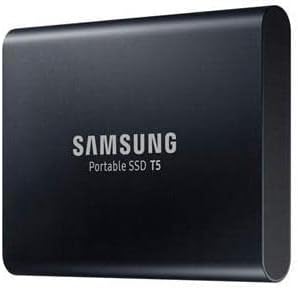
The Samsung T5 Portable SSD is a classic choice known for reliable performance and solid build quality. Linux users will appreciate its metal design and up to 540MB/s read speeds for efficient file transfers.
We may earn a commission when you buy through this link, at no additional cost to you.
Password protection with AES 256-bit hardware encryption keeps private data secure. The drive includes both USB C to C and USB C to A cables for flexible connectivity options.
Shock resistance protects your drive from accidental drops, ensuring longevity for daily use. Compatibility is broad with support for Windows and Android devices.
For those preferring a trusted and durable drive, the T5 remains a solid choice. It offers good speed and reliability for standard storage and backup tasks.
Consistent read speeds make file transfers quick and efficient for everyday tasks.
The metal design offers durability and a premium feel that protects your data on the go.
We may earn a commission when you buy through this link, at no additional cost to you.
The Samsung T7 500GB Portable SSD offers a vibrant red design combined with high-speed performance for Linux users. It transfers files nearly 9.5x faster than traditional external hard drives with speeds up to 1050MB/s.
We may earn a commission when you buy through this link, at no additional cost to you.
Advanced heat control uses Dynamic Thermal Guard technology to prevent overheating during heavy use. Password security ensures your data stays private with built-in protection features.
Samsung recommends using the included USB Type-C cables for maximum transfer speed. The drive is shock resistant and can withstand drops from 6 feet.
For students and professionals who want style and speed, this model is a great option. It balances performance and reliability with an attractive design for personal use.
Read speeds up to 1050MB/s ensure your data moves quickly between devices without delay.
Dynamic Thermal Guard automatically slows transfers if needed to maintain safe operating temperatures.
We may earn a commission when you buy through this link, at no additional cost to you.
The Samsung T5 Portable SSD 500GB in blue offers reliable performance with a compact metal design. Linux users will find it sturdy and portable with up to 540MB/s read speeds for efficient transfers.
We may earn a commission when you buy through this link, at no additional cost to you.
Optional password protection and AES 256-bit hardware encryption keep your personal and private data secure. The drive includes USB type C to C and USB type C to A cables for seamless connectivity.
The metal design fits in your palm and slides easily into pockets for work on the go. A 3-year limited warranty provides added peace of mind for long-term use.
For budget-conscious users seeking a trusted drive, the T5 is a strong choice. It delivers reliable speed and security with a timeless design suitable for various tasks.
A slim metal design fits in your palm and slides easily into pockets for convenient transport.
AES 256-bit hardware encryption ensures your personal and private data remains highly secure.
We may earn a commission when you buy through this link, at no additional cost to you.
Selecting the right external SSD for Linux involves considering compatibility, speed, durability, and security features to ensure smooth operation and reliable performance.
Ensure the SSD supports standard USB protocols that Linux recognizes natively. Look for drives formatted with ext4 or exFAT for seamless integration without needing extra drivers.
Choose drives that work across various distributions to avoid configuration issues.
Look for NVMe PCIe performance with read speeds of at least 1000MB/s for efficient large file transfers. Faster speeds reduce wait times during backups or video editing tasks.
Higher speeds improve workflow efficiency for professional workloads.
Select drives with aluminum unibody designs or rugged IP ratings to withstand drops and dust. A solid build protects your data during travel or outdoor use.
Durability ensures your drive lasts through challenging conditions.
Password protection and AES 256-bit hardware encryption keep your data private from unauthorized access. Hardware encryption is more secure than software-only solutions.
Security is essential for protecting sensitive personal or business data.
Lightweight and compact designs fit easily into pockets or laptop bags for convenient travel. Consider dimensions and weight if you carry the drive daily.
Portability enhances flexibility for on-the-go work.
Choose capacity based on your typical data storage needs and future growth. Higher capacities allow for storing large datasets and media files without constant backups.
Sufficient capacity reduces the need for multiple drives.
Advanced thermal guards prevent overheating during long file transfers and heavy use. Consistent performance is key to avoiding slowdowns during intensive tasks.
Proper cooling extends the drive's lifespan.
USB 3.2 Gen 2 or Gen 2×2 ports ensure fast data transfer rates. Compatibility with both USB-C and USB-A cables offers flexible connection options for different devices.
Flexible connectivity ensures you can connect to any system.
Always safely eject your drive from the system before unplugging to prevent data corruption. Use the system eject option or run a sync command before disconnecting cables.
Keep your SSD cool and dry during storage. Avoid exposing it to extreme temperatures, direct sunlight, or moisture which may damage the internal components.
Regularly update firmware through manufacturer tools to maintain security and performance. Periodic updates ensure your drive works reliably with the latest Linux kernel versions.
Yes, most external SSDs work with Linux using standard USB protocols without extra drivers. Simply connect the drive and it should mount automatically on modern distributions.
External SSDs with USB-C or USB-A interfaces work well with Raspberry Pi and other devices. Ensure your device provides enough power for stable operation.
Most SSDs come formatted as NTFS or exFAT, which Linux can read. You can reformat drives to ext4 using Linux tools for full native support.
For basic storage, 1000MB/s read speeds are sufficient. For video editing or large file transfers, look for NVMe drives with sustained write speeds.
Samsung SSDs are highly compatible with Linux due to standard USB support. Their Magician software may not run natively but hardware functions work fully.
Yes, you can install Linux directly to an external SSD for portable computing. Ensure the drive supports boot mode and proper BIOS configuration.
The Samsung T7 and T9 offer top-tier performance for most Linux users. Budget options like the SSK SSD provide excellent value without sacrificing speed.
Prioritize drives with strong security and thermal management for professional workflows. Consider rugged designs if you work in challenging environments.
Always check current listings for availability and pricing. Availability and pricing can vary across retailers for different storage capacities.