
DKE Desktop Computer Power Switch
4.7Editor score
2 meter long cable
Lightweight and portable
Includes splitter cable
An external PC power button allows you to control your desktop computer from a convenient location. Whether your tower is hidden under a desk or in a hard-to-reach corner, these switches provide easy access to power on and off functions without bending over or moving heavy equipment.
We evaluated ten top-rated models based on installation ease, cable length, build quality, and additional features like USB hubs or wireless remotes. Each product was assessed for compatibility with standard ATX motherboards and reliability in daily use scenarios for home and office environments.
Each pick in this list highlights key strengths and specific use cases to help you find the perfect match for your build. Please note that pricing and availability can change frequently, so always verify current details on the product page before making a purchase decision.
4.7Editor score

4.8Editor score

4.5Editor score
As an Amazon Associate we earn from qualifying purchases.
This side-by-side comparison highlights the key specifications and features of all ten products reviewed. Use this table to quickly identify which model offers the cable length, additional ports, or build material that best fits your specific desktop configuration needs.





This PC Power Button Desktop switch offers a straightforward solution for relocating your computer's power control. With a solid 4.6 rating, it stands out as a reliable choice for users needing a simple extension without breaking the bank.
We may earn a commission when you buy through this link, at no additional cost to you.
The included 1 to 2 splitter allows you to keep your original case button functional while adding the external switch. This dual functionality is ideal for test benches or shared workstations where multiple access points are needed for power control.
While the plastic construction is basic, it fulfills the core purpose effectively. The adhesive mount ensures you can place the button on a desk or panel without drilling holes, preserving the aesthetics of your workspace.
For budget-conscious builders or those with PCs under desks, this model delivers essential features at a low cost. It is a practical upgrade for anyone struggling to reach the rear or front of their tower regularly.
The splitter board enables simultaneous use with the original chassis button, offering flexibility for complex setups.
Adhesive stickers and clear instructions make mounting the switch quick and damage-free for most surfaces.
We may earn a commission when you buy through this link, at no additional cost to you.
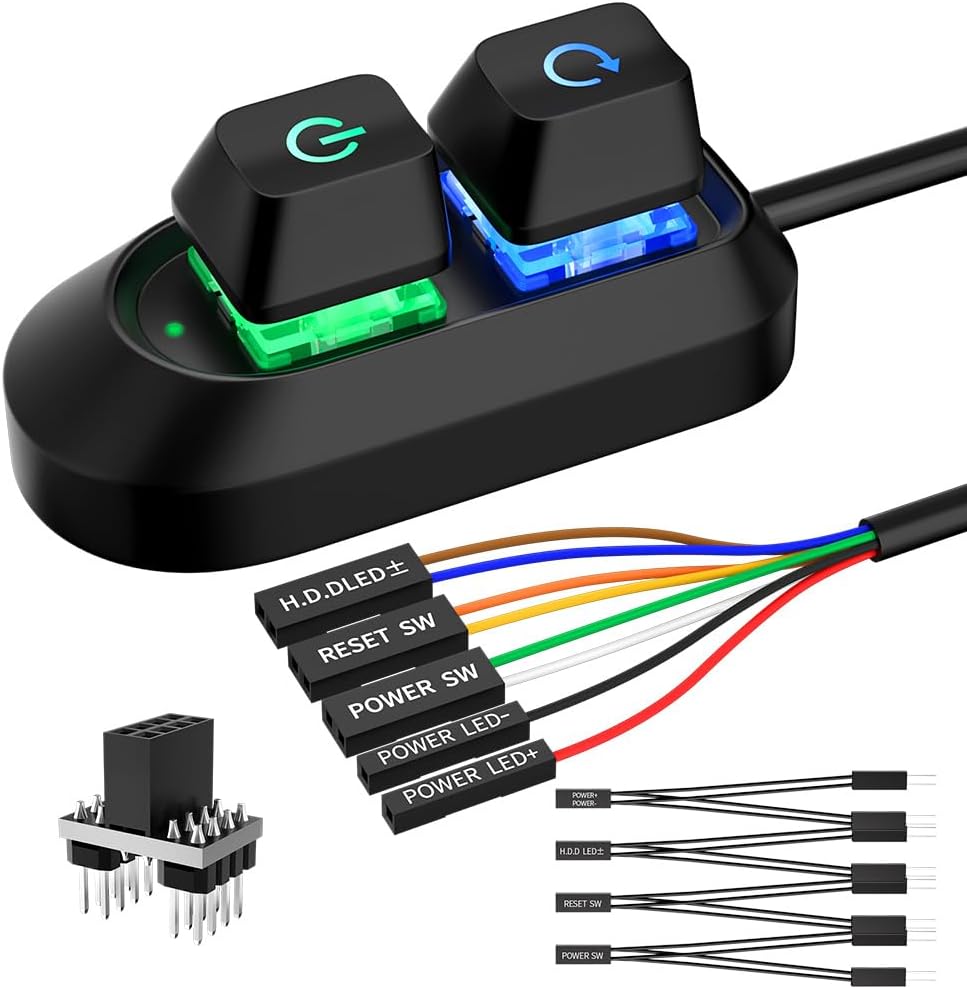
This model expands functionality by including reset switch and HDD LED connections alongside the main power button. It is designed for users who want a complete front-panel experience on their external control unit.
We may earn a commission when you buy through this link, at no additional cost to you.
The 2 meter cable provides ample length to reach across a large desk or from under a desk to a comfortable height. This extra length reduces cable tension and allows for cleaner routing through panels or slots.
Having both a splitter board and cable offers flexibility if your installation space varies. The reset function is particularly useful for systems that freeze often and need frequent restarts without opening the case.
Ideal for DIY enthusiasts or office setups where control over system states is important. The additional features justify the slightly higher cost compared to basic power-only switches.
Includes connections for reset and HDD activity lights to mimic a full front panel experience.
The 2 meter cable ensures you can place the button exactly where you need it regardless of case location.
We may earn a commission when you buy through this link, at no additional cost to you.
This switch features an impressive 118 inch cable, making it suitable for setups where the PC is far from the user. It ensures you can reach the button from a comfortable distance without straining or moving furniture.
We may earn a commission when you buy through this link, at no additional cost to you.
The standard 4-pin connector works with the majority of ATX motherboards, simplifying compatibility checks. It includes a splitter to maintain original functionality while adding the external option for convenience.
Installation is straightforward with adhesive mounting options. The LED indicator provides visual confirmation of system status, which is helpful when the tower is hidden from direct view.
Best for large workspaces or cases placed in cabinets or under desks where distance is a primary concern. The length ensures flexibility in positioning the control unit exactly where needed.
The 118 inch cable offers industry-leading reach for remote placement options in large rooms.
Standard connectors ensure it fits most desktop motherboards without needing adapters.
We may earn a commission when you buy through this link, at no additional cost to you.
The OwlTree Desktop Computer Power Button stands out with its premium acrylic construction and high 4.8 rating. It combines functionality with a sleek design that complements modern desktop setups nicely.
We may earn a commission when you buy through this link, at no additional cost to you.
Users appreciate the inclusion of both power and reset buttons along with HDD indicators. This complete feature set makes it feel like a high-quality replacement for a damaged front panel.
The acrylic material provides a sturdy and refined look compared to standard plastic alternatives. It resists everyday wear and tear while maintaining a clean appearance over time with proper care.
Recommended for users who prioritize build quality and aesthetics in their PC components. It is an excellent choice for visible setups where the button will be seen frequently on a desk.
Acrylic material offers a durable and stylish alternative to standard plastic switch housings.
Includes reset and HDD indicators for full control panel functionality without bulk.
We may earn a commission when you buy through this link, at no additional cost to you.
This external button adds a touch of style with a 7-color breathing LED effect that requires no software configuration. It is perfect for gaming setups where visual flair is often desired alongside utility.
We may earn a commission when you buy through this link, at no additional cost to you.
The 2 meter cable ensures flexibility in placement, allowing you to reach from under a desk or across a workspace. The low-voltage design guarantees safety while maintaining reliable performance during daily use.
While the RGB light is a standout feature, some users may prefer a neutral look. However, the aesthetic appeal often outweighs this minor limitation for enthusiasts building gaming or streaming stations.
Ideal for gamers or home users who want a glowing accent on their desk while maintaining control over their system. It blends modern tech trends with essential hardware functionality effectively.
The RGB breathing LED adds a dynamic visual element that syncs well with gaming environments.
No drivers or software are needed to enable the LED lighting effect out of the box.
We may earn a commission when you buy through this link, at no additional cost to you.
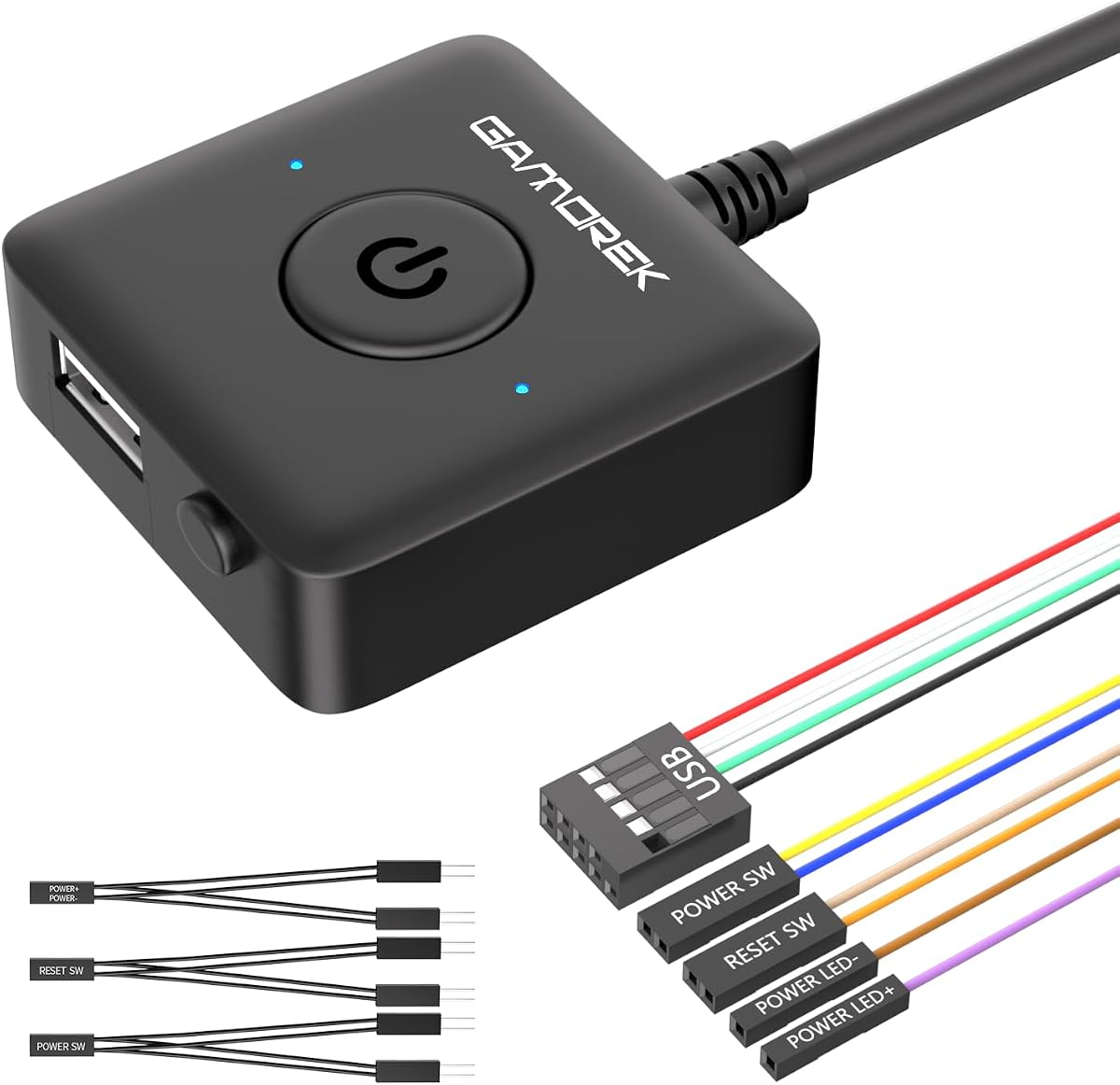
This model combines power control with USB extension capabilities, adding significant convenience to your desk. It includes support for USB 2.0 headers to bring data ports to a more accessible location.
We may earn a commission when you buy through this link, at no additional cost to you.
The included PCI bracket helps organize the installation in ATX and MATX cases by routing cables cleanly through the back. This reduces clutter and improves the overall look of a custom desktop build.
Users appreciate the dual functionality of power and USB access in one unit. It minimizes the need for additional dongles or hubs, saving port availability on your motherboard or existing hubs.
Best for office setups or stations where frequent USB device swapping occurs. It streamlines the workflow by keeping power and data connectivity within easy reach without extra hardware.
Extends USB 2.0 ports to your desk, making it easy to connect drives and peripherals.
PCI bracket helps route cables professionally for a tidy and organized cable management look.
We may earn a commission when you buy through this link, at no additional cost to you.
This switch integrates a 4-port USB 3.0 hub, offering high-speed data access directly from your desk. It is perfect for transferring large files or connecting multiple peripherals without cable clutter.
We may earn a commission when you buy through this link, at no additional cost to you.
The 5.0Gbps transfer rate ensures efficient data movement for external drives and other high-bandwidth devices. It simplifies your workflow by keeping essential ports within arm's reach at all times.
While the cable is shorter than some competitors, the added utility of the hub justifies the space saving. Installation remains simple with adhesive mounting and standard motherboard header connections.
Ideal for users who need frequent USB access for drives, cameras, or phones. The combination of power control and fast data ports makes it a valuable tool for productivity.
USB 3.0 support ensures fast file transfers for external drives and media devices.
Saves desk space by combining power switching and USB hub functions into one unit.
We may earn a commission when you buy through this link, at no additional cost to you.
This DKE switch is incredibly lightweight at just 1 ounce, making it easy to move and mount anywhere. The compact dimensions ensure it does not take up valuable desk real estate during use.
We may earn a commission when you buy through this link, at no additional cost to you.
The 2 meter cable provides ample reach for most setups, allowing you to place the button exactly where you need it. It includes a splitter to maintain compatibility with your existing case buttons.
Despite its small size, it performs reliably for daily power control tasks. The adhesive mounting ensures it stays secure on desks or panels without requiring tools or permanent fixtures.
Best for users who value portability and minimal footprint. It is a simple, effective solution for extending power control without adding bulk to your workspace environment.
Weighing only 1 ounce, it is easy to mount and move without adding weight to your desk.
Small dimensions allow it to fit discreetly on crowded desks without interfering with peripherals.
We may earn a commission when you buy through this link, at no additional cost to you.
This model features a robust aluminum casing that offers superior durability compared to plastic alternatives. It provides a premium feel that withstands daily use and accidental impacts better over time.
We may earn a commission when you buy through this link, at no additional cost to you.
The 2 meter cable ensures you can reach your PC from a distance, while the included splitter maintains original functionality. It supports both power and reset functions for complete control flexibility.
Users who prefer metal components will appreciate the solid construction and modern aesthetic. It resists scratches and wear, maintaining a clean look even in active work environments or offices.
Ideal for those seeking a long-lasting solution for their desktop control needs. The combination of metal build and full feature set justifies the slightly higher investment for quality.
Aluminum housing resists wear and tear, ensuring a long lifespan for your power control device.
Supports reset and splitter options for versatile usage across different system configurations.
We may earn a commission when you buy through this link, at no additional cost to you.
This wireless solution offers the ultimate convenience by allowing you to power your PC from up to 50 feet away. It eliminates the need for cables entirely, making it perfect for hidden or remote PC locations.
We may earn a commission when you buy through this link, at no additional cost to you.
The PCIe receiver board installs directly into your motherboard slot to establish a stable wireless connection. It works seamlessly without requiring any drivers or software installation for a smooth setup experience.
While it requires a PCIe slot which may not be available on all boards, the flexibility it provides is unmatched for certain setups. It is ideal for home theater PCs or systems hidden in cabinets.
Best for users who want maximum convenience and cable-free operation. The wireless range ensures you can control your system from a couch or across the room effortlessly.
Wireless technology removes cable clutter, offering a clean and flexible control solution for any room.
Up to 50 feet of range allows control from a distance without physical proximity to the PC.
We may earn a commission when you buy through this link, at no additional cost to you.
Selecting the right external power button depends on your specific setup needs and preferred features. This guide breaks down the key factors to consider before making a purchase.
Cable length is one of the most critical factors when choosing an external switch. If your PC is under a desk or far from your seating position, you need a cable long enough to reach comfortably without tension. Most models offer between 1.5 and 2 meters, but some specialized units provide even longer reach like 118 inches for extreme cases.
Always measure the distance from your motherboard header to your desired button location before buying to ensure the cable is sufficient.
Mounting options vary by model, with adhesive stickers being the most common and easiest method. These allow you to place the button on a desk or panel without drilling holes. Some higher-end models might include screws or brackets for a more permanent installation if you prefer a fixed look.
Adhesive mounting is generally recommended for most users to preserve the surface of your furniture and simplify setup.
Ensure the switch connector matches your motherboard headers. Most units use a standard 4-pin connector compatible with the majority of ATX boards. Check if you need specific pins for LED status or reset functions to avoid compatibility issues during installation.
Compatibility with standard ATX headers ensures the button will work with most desktop motherboards without adapters.
Many switches offer extra features like USB hubs, RGB lighting, or wireless remote control. These can add significant value by reducing desk clutter or allowing remote access. Consider if you need these extras or if a basic power switch is sufficient for your needs.
Decide if additional features like USB ports or wireless options justify the higher cost for your specific usage scenario.
Build materials range from basic plastic to durable acrylic and aluminum. Higher-quality materials often provide a more premium feel and better resistance to wear over time. This is important if the button will be used frequently or is in a visible area on your desk.
Opt for aluminum or acrylic builds if you prioritize aesthetics and long-term durability in your workspace.
Splitter support allows you to keep your original case power button active while using the external one. This is useful for testing or shared access. Many packages include a splitter, but verify this before purchasing to ensure you get the functionality you expect.
Look for models that include a 1-to-2 splitter if you need to maintain dual access to the power function.
Installation complexity varies from simple adhesive mounting to requiring PCIe slots or additional wiring. Basic models just need header connections and adhesive, while wireless models require a card in the motherboard. Choose a level of complexity that matches your technical comfort.
Basic header and adhesive setups are easiest for beginners, while wireless options offer more convenience with more steps.
Prices vary significantly from budget-friendly plastic switches to premium wireless options. Determine your budget and balance it against the features you need. Sometimes paying a bit more for better build quality or USB ports saves money in the long run.
Assess the value of included features against the price to ensure you are not overspending on unnecessary extras.
Start by connecting the power switch connectors to the motherboard headers according to the provided instruction manual. Ensure the LED and SW pins align correctly with your motherboard manual to avoid incorrect functionality.
Secure the button in place using the provided adhesive stickers or mounting hardware. Choose a flat, clean surface where the button is accessible but not in the way of daily work.
Regularly check the connection points to ensure cables remain secure and the adhesive is intact. Clean the switch surface with a dry cloth to remove dust and maintain its appearance over time.
Most external power buttons use a standard 4-pin connector that is compatible with 90% of ATX motherboards. Always check your motherboard manual to confirm the header layout before purchasing. If your board is older or non-standard, verify the pinout to ensure a match.
The LED indicator connects to the POWER LED header on your motherboard. Match the positive and negative pins according to the sticker labeling on the switch and the motherboard manual. Proper connection ensures the light indicates power status correctly.
Yes, many models include a splitter that allows both switches to function simultaneously. This means you can keep using your case button while also having an external one. Verify the package includes a splitter before buying to confirm this capability.
Installation is generally straightforward for beginners as it involves simple header connections and adhesive mounting. Most packages include an instruction manual to guide you through the process. No specialized tools are usually required beyond what you have for standard PC building.
If the wireless remote does not work, check that the ErP/EUP Ready option is disabled in BIOS. This setting can prevent the receiver from waking up the system properly. Ensure the receiver is securely plugged into an available PCIe slot.
Yes, many models include a reset switch function that allows you to reboot the system. This connects to the RESET header on your motherboard. Check the product specifications to confirm if reset functionality is included with your chosen switch.
These ten external power buttons offer a range of options from budget-friendly plastic switches to premium wireless solutions. Whether you need a simple extension or a feature-rich hub, there is a model in this list to suit your specific desk setup.
Prioritize cable length and build quality when making your choice to ensure long-term satisfaction. Consider additional features like USB ports or wireless control only if they truly add value to your daily workflow.
Remember to check current prices and availability before buying as these can change frequently. Always verify compatibility with your motherboard to avoid any installation issues once the product arrives.