
Nulea M501 Wireless Trackball Mouse Ergonomic Thumb Control
4.4Editor score
Rechargeable battery
Adjustable DPI levels
3 device connection
This guide compares the top ergonomic trackball mice for comfort and precision, reviewing features like thumb control, tilt angles, and battery life to help
Finding the right ergonomic trackball mouse can transform your daily workflow by reducing strain on your wrist and forearm. These devices offer precise control without requiring constant arm movement, making them ideal for long work sessions or limited desk spaces.
We have carefully evaluated ten leading models based on ergonomic design, tracking accuracy, connectivity options, and overall user comfort. Our analysis focuses on how each device supports natural hand positions and minimizes muscle fatigue throughout the day.
Each pick highlights specific strengths and considerations to help you match a mouse to your unique needs. Keep in mind that availability and pricing may fluctuate, so checking current listings is recommended before making a final decision.
4.4Editor score
4.5Editor score

4.4Editor score
The following table provides a side-by-side overview of key specifications and features across all ten models to help you quickly identify the best fit for your workspace needs.




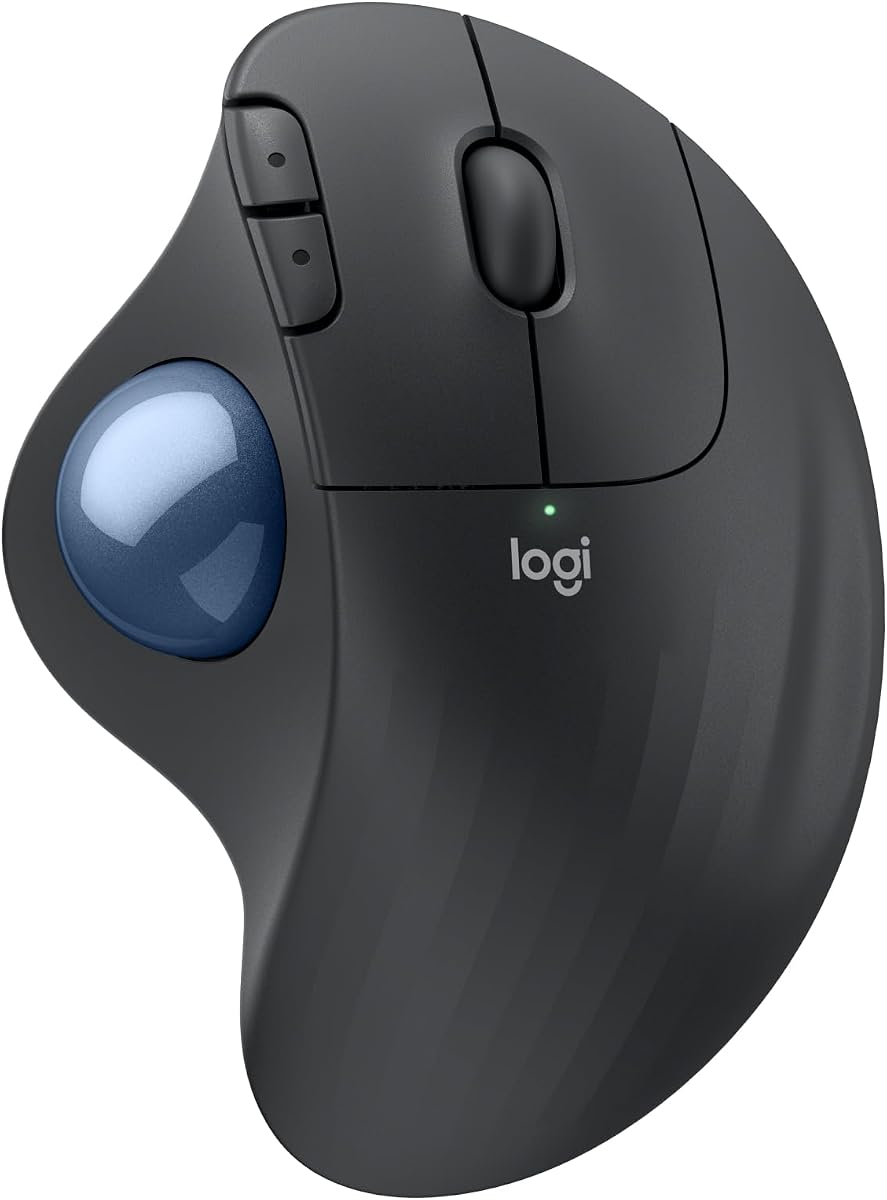
This Logitech model stands out as a top choice for users seeking comfort and reliability. With a 4.5 star rating, it combines ergonomic design with practical features like quiet clicks and long battery life.
We may earn a commission when you buy through this link, at no additional cost to you.
The sculpted shape supports your hand and realigns your forearm into a better posture. Users report 25% less muscle strain in the forearm, making it suitable for all-day use. Smart Actions via the Logi Options+ app enhance productivity.
While the trackball is excellent for precision, it may require cleaning over time. Additionally, full customization requires the companion app, which might be a minor hurdle for some users.
Ideal for office workers and anyone needing a space-saving input device, this mouse balances performance and comfort effectively. It is a strong recommendation for those prioritizing ergonomics.
The design encourages a natural hand position that reduces wrist bending and forearm strain during extended use.
Smart Actions allow you to map complex commands to single clicks, streamlining repetitive tasks efficiently.
We may earn a commission when you buy through this link, at no additional cost to you.
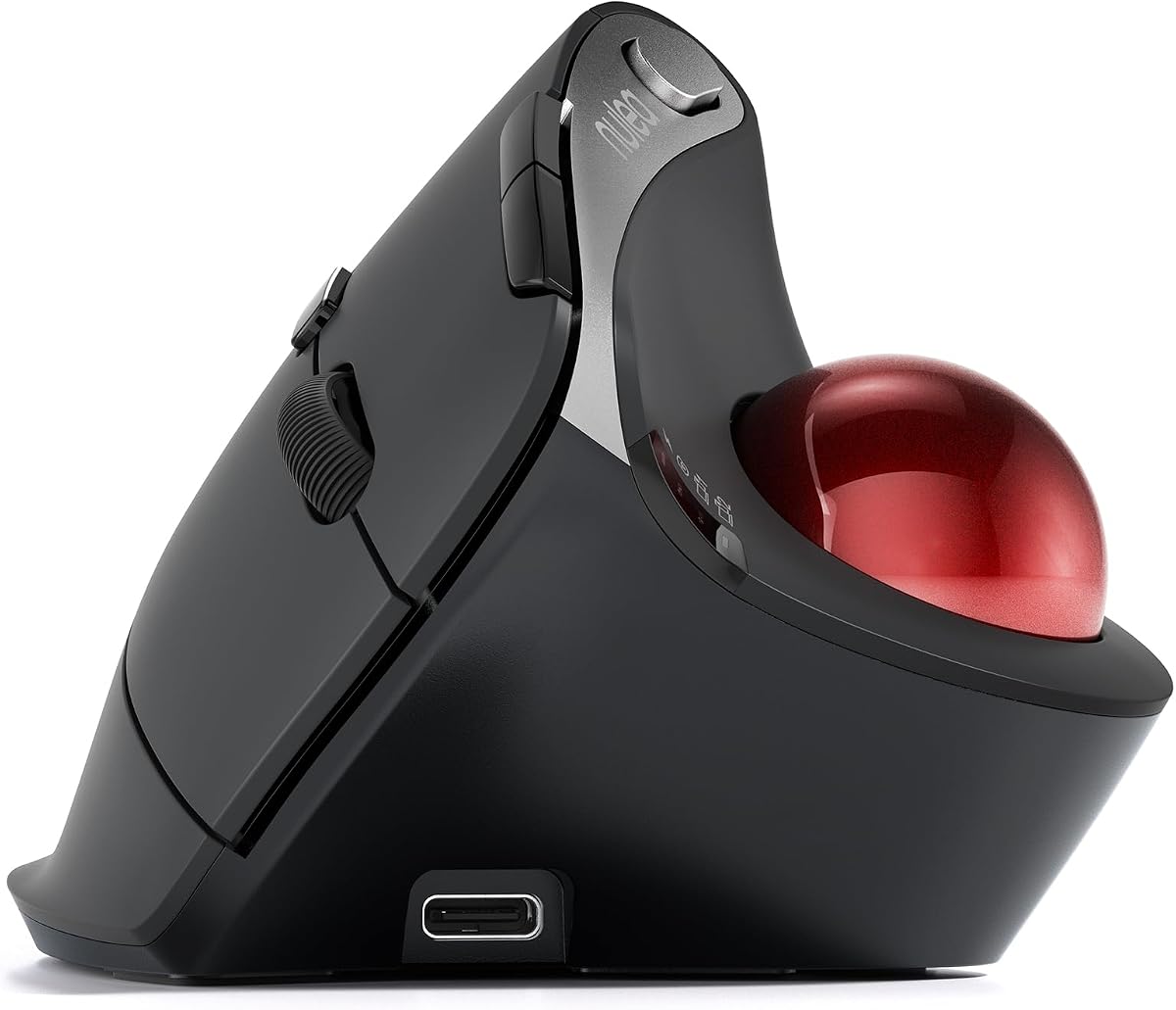
The Nulea M501 offers impressive value for budget-conscious buyers seeking ergonomic benefits. Its 4.4 star rating reflects solid performance in reducing wrist movement through thumb control.
We may earn a commission when you buy through this link, at no additional cost to you.
Features like adjustable DPI and a rechargeable battery make it versatile for different tasks. You can connect up to three devices via Bluetooth or USB, switching easily between them to improve workflow efficiency.
The lack of programmable buttons is a limitation compared to premium models. Also, you must use the included cable for charging and avoid fast chargers to ensure longevity.
This mouse is a great entry point for those new to trackballs or needing a secondary device. It provides essential ergonomic features without breaking the bank.
Switching between PC, tablet, or laptop is seamless with the easy-swap button at the base of the mouse.
The rechargeable design eliminates the need for disposable batteries, reducing waste and ongoing costs.
We may earn a commission when you buy through this link, at no additional cost to you.
This black variant of the M575S shares the core benefits of its sibling while maintaining a sleek appearance. With a 4.6 star rating, it confirms strong user satisfaction regarding comfort and ease of use.
We may earn a commission when you buy through this link, at no additional cost to you.
The key features focus on improving forearm posture and reducing movement strain. It connects easily and offers a long battery life, making it suitable for uninterrupted work sessions across various environments.
While effective, it lacks some advanced customization found in higher-tier models. The trackball mechanism also requires occasional maintenance to ensure smooth rolling over time.
It is an excellent choice for users who prefer a traditional look without compromising on ergonomic health. This model delivers consistent performance for daily office tasks.
The ergonomic design remains a gold standard for reducing wrist strain during long periods of computer use.
Stable connection via Bluetooth or receiver ensures no lag during critical tasks or presentations.
We may earn a commission when you buy through this link, at no additional cost to you.
The MX Ergo S represents a premium tier with advanced features like a 20-degree tilt and USB-C charging. Its design aims to reduce muscle strain by 27% while offering 80% quieter clicks.
We may earn a commission when you buy through this link, at no additional cost to you.
Users appreciate the ability to switch between speed and precision tracking easily. The Logi Options+ app supports six customizable buttons and smart actions, enhancing workflow efficiency significantly.
The high cost may be a barrier for some, but the ergonomic benefits and build quality justify the investment. It is best suited for medium to large hands seeking maximum comfort.
This model is ideal for professionals who need top-tier ergonomics and advanced functionality. It sets a high bar for what a trackball mouse should offer.
A dedicated button toggles between standard and high-precision modes for detailed design work.
Constructed with recycled plastic, it balances performance with environmental responsibility effectively.
We may earn a commission when you buy through this link, at no additional cost to you.
TECKNET's model features a unique 16-degree vertical angle designed to reduce muscle strain by up to 50%. It is particularly well-suited for users with larger hands seeking ergonomic relief.
We may earn a commission when you buy through this link, at no additional cost to you.
The rechargeable battery offers quick charging—just 15 minutes provides a full day of use. With five DPI levels and triple device connectivity, it adapts well to different work environments.
Adapting to the vertical design may take a week or two. However, most users find the long-term comfort benefits outweigh this initial adjustment period.
This mouse is recommended for those experiencing wrist fatigue and needing a robust solution. It delivers strong performance in comfort and functionality.
The tilted design promotes a natural handshake position, reducing forearm rotation and stress.
Fast charging capabilities ensure minimal downtime for users on the go or working remotely.
We may earn a commission when you buy through this link, at no additional cost to you.
With a 4.7 star rating, the Nulea M506 is highly praised for its 54-degree vertical design. This angle keeps wrists and forearms in a relaxed position, aiding in long-term comfort.
We may earn a commission when you buy through this link, at no additional cost to you.
A standout feature is the detachable trackball, allowing for easy cleaning without tools. It supports multi-device connection and offers four DPI levels for versatile use.
The battery lasts up to 21 days on a single charge, reducing maintenance. However, buttons are not programmable, limiting customization options for power users.
This model is excellent for office workers and creatives needing precision and comfort. It is a reliable choice for those prioritizing ergonomic health.
Removing the trackball ensures smooth operation by clearing dust and dirt regularly.
The precise cursor control and ergonomic grip suit graphic design and creative workflows effectively.
We may earn a commission when you buy through this link, at no additional cost to you.
This Nulea model features a 65-degree ergonomic angle and an advanced infinite scroll wheel. These elements make navigating long documents and web pages effortless without excessive finger movement.
We may earn a commission when you buy through this link, at no additional cost to you.
True silent control ensures noise-free operation, which is ideal for shared spaces or quiet environments. The thumb-controlled trackball reduces arm movement, aiding in fatigue prevention.
While the silent features are great, the lack of programmable buttons restricts advanced customization. Users may need time to pair multiple devices effectively.
It suits users prioritizing quiet operation and smooth scrolling. This mouse is a solid option for general office tasks requiring comfort.
The scroll wheel automatically switches between precise and fast modes based on your speed.
All components including the trackball operate silently to minimize distractions in shared workspaces.
We may earn a commission when you buy through this link, at no additional cost to you.
The Nulea Tilt Stand features a 21.7-degree tilt designed to promote a natural wrist position. It includes silent operation and six buttons for basic productivity tasks.
We may earn a commission when you buy through this link, at no additional cost to you.
Adjustable DPI levels allow for customization of sensitivity. The design focuses on reducing strain by elevating the palm and supporting a relaxed grip.
While the tilt angle is fixed, it provides a good middle ground for ergonomics. The silent feature adds value for quiet office environments.
This mouse is suitable for users needing basic ergonomic improvements without high costs. It offers a comfortable experience for daily use.
The elevated stand lifts the palm to a more natural height, reducing pressure on the wrist.
Silent buttons and trackball prevent noise distractions during late-night work or meetings.
We may earn a commission when you buy through this link, at no additional cost to you.
Designed for businesses, this model offers Logitech Sync for remote deployment and monitoring. It provides the same ergonomic comfort as consumer versions but tailored for corporate environments.
We may earn a commission when you buy through this link, at no additional cost to you.
Features include 25% reduced muscle activity and precision tracking on any surface. The use of recycled plastic aligns with sustainability goals for large deployments.
While powerful for IT management, individual users might not need the enterprise features. The battery life remains excellent at 18 months.
This is an ideal choice for organizations looking to reduce employee strain at scale. It balances professional requirements with ergonomic benefits.
IT admins can remotely update settings or monitor usage without physical access to devices.
Certified by US Ergonomics, ensuring proven comfort for long work days.
We may earn a commission when you buy through this link, at no additional cost to you.
This advanced model adds USB-C charging and an encrypted dongle for security. With six programmable buttons, it offers deep customization for complex workflows on PC or Mac.
We may earn a commission when you buy through this link, at no additional cost to you.
The 20-degree tilt angle reduces muscle strain and improves forearm posture. Users can switch between speed and precision modes instantly via a dedicated button.
While expensive, the combination of security, ergonomics, and power makes it a top pick. The USB-C port ensures easy recharging with modern devices.
It is perfect for tech professionals and creative workers needing security and control. This mouse delivers a premium experience for demanding tasks.
The encrypted dongle ensures data safety for enterprise or sensitive work environments.
Programmable buttons allow mapping of frequently used shortcuts to increase daily efficiency.
We may earn a commission when you buy through this link, at no additional cost to you.
Selecting the right ergonomic trackball mouse involves considering various factors that impact comfort, usability, and productivity. Understanding these elements ensures you pick a device that suits your specific needs.
Most modern trackballs use thumb control to minimize finger movement and strain. Finger-operated models exist but are less common. Thumb control generally allows for better ergonomic positioning during prolonged use.
Look for models with smooth rolling and a comfortable thumb rest. This design helps keep the hand relaxed and reduces repetitive strain.
The angle of the mouse affects how your wrist and forearm rest on the desk. Tilt angles ranging from 16 to 54 degrees help align the hand with the natural position. A vertical angle can reduce forearm strain significantly.
Choose a tilt that feels comfortable for your hand size. Testing is ideal, but reviews often indicate which angles suit medium or large hands better.
Trackball mice often offer Bluetooth or USB receiver connectivity. Some support multiple devices, allowing seamless switching between PC and tablet. Dual connectivity increases flexibility for modern work setups.
Ensure the connection method matches your system. Wireless models reduce cable clutter but require battery management.
Battery life varies from months to years depending on the model. Rechargeable batteries are becoming standard, reducing waste. USB-C or micro-USB charging ports affect convenience and speed.
Long battery life minimizes interruptions. Consider how easy it is to charge the device and if it includes cables or receivers.
Some models allow button customization via apps, enabling shortcuts and macros. Others have fixed buttons that are not programmable. Software can significantly boost productivity for power users.
If you need custom commands, verify that the device supports them. Basic users may prefer simpler, plug-and-play options without extra software.
Durable materials ensure longevity. Many brands now use recycled plastics to support sustainability. Soft rubber grips can improve comfort and control during use.
Inspect the texture and finish of the mouse. High-quality construction ensures the device withstands daily wear and tear.
Trackballs can accumulate dust and debris over time, affecting performance. Some models allow the ball to be removed for cleaning without tools. Others require special tools or may not support easy removal.
Look for a model with a detachable trackball for easy maintenance. Regular cleaning ensures smooth rolling and precise cursor control.
The physical dimensions of the mouse determine how well it fits your hand. Larger models provide better support for big hands, while smaller ones are better for compact desks. Hand size should dictate the choice.
Check the listed dimensions and compare them to your current mouse. Ensuring a good fit prevents awkward positions that negate ergonomic benefits.
To get the most out of your trackball mouse, begin by adjusting the DPI settings to match your comfort level. A higher DPI allows faster cursor movement while a lower DPI provides precision for detailed tasks.
Regularly clean the trackball and the ball cage to prevent dust from interfering with movement. For models with detachable balls, remove them gently and wipe them down with a soft cloth.
Take breaks and stretch your hands periodically to maintain ergonomic health. While these mice reduce strain, prolonged use without breaks can still lead to fatigue over time.
The primary benefit is reduced strain on the wrist and forearm. By keeping the hand stationary and using the thumb to control the cursor, users experience less muscle fatigue and better posture during long work sessions.
Yes, trackball mice can be beneficial as they minimize wrist movement. Many models are specifically designed to support a neutral wrist position, which may alleviate pressure on the carpal tunnel.
Most modern trackball mice allow the ball to be removed easily. Simply eject the ball and wipe it with a clean, dry cloth to remove dust and dirt that may affect tracking performance.
Yes, because the ball is built into the device, it does not rely on surface texture like a standard mouse. This allows for flexible placement on any flat surface, including desks or trays.
Battery life varies by model, with some lasting up to 18 months on a single charge. Rechargeable models typically offer several weeks of use before needing a recharge, reducing the need for disposable batteries.
Many models support multi-device connectivity through Bluetooth or a USB receiver. You can switch between devices with a button press, making it convenient for users working across different systems.
We have explored ten distinct models ranging from budget-friendly options to advanced professional tools. Each offers unique ergonomic features like tilt angles and quiet clicks to support your comfort.
Prioritize factors such as battery life, connectivity, and hand fit when making your final decision. A good ergonomic mouse should feel natural and reduce strain immediately upon use.
Remember that prices and stock levels can change quickly. Check current listings to ensure you get the best value and availability for your chosen model.