
GE BigEZ OneTouch Big Button Universal TV Remote for Seniors, Easy to Use
4.3Editor score
Backlit buttons for visibility
Colorblind friendly design
Simple one touch setup
This guide compares the top ten easy to use TV remote for seniors options to help you find a simple large button device for elderly users.
Finding the right control device is crucial for elderly users who struggle with complex interfaces. A good remote should feature large buttons, clear labels, and a simple layout that reduces confusion during daily use.
We evaluated ten top rated models based on ease of programming, button size, and compatibility with major television brands. Our selection process focused on devices that prioritize accessibility and reduce frustration for seniors.
Each pick highlights specific strengths like backlighting or color coding to match different needs. Please note that availability and costs may vary over time so check current listings before buying.
4.3Editor score
4.2Editor score

4.4Editor score
The following table provides a side-by-side look at key features and compatibility details for each selected remote to help you make an informed decision.


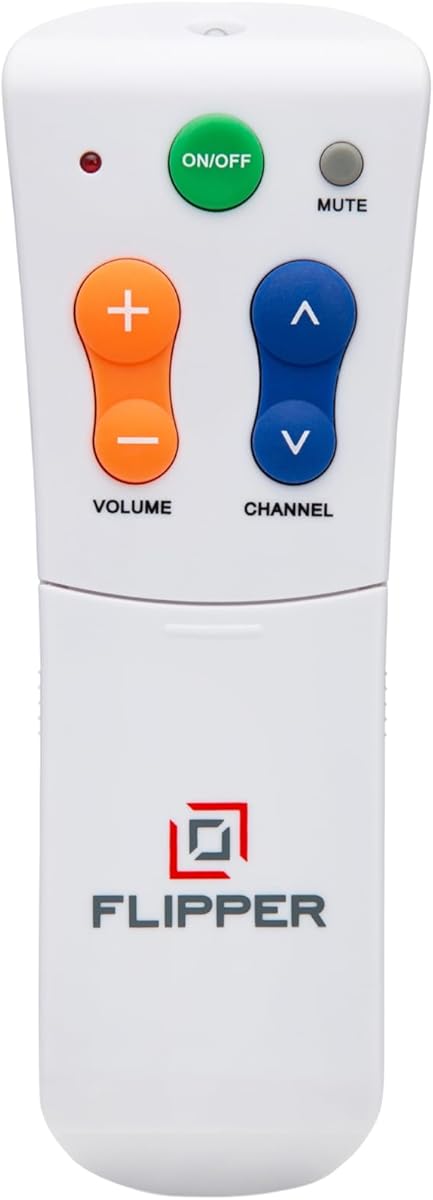
The Flipper remote is designed to help seniors with dementia regain independence. It features a clean interface with color coded buttons that reduce confusion during use.
We may earn a commission when you buy through this link, at no additional cost to you.
This device stands out with its ability to store up to twenty five favorite channels. Users can cycle through them easily without needing to remember numbers or navigate menus.
While it simplifies daily viewing it cannot control streaming apps like Netflix. This limitation is acceptable for those who primarily watch traditional broadcast or cable television.
Caregivers will appreciate the peace of mind this remote offers. It is an ideal solution for households where simplicity and reliability are the top priorities.
Buttons are color coded to match specific functions like volume and channels making them easy to identify.
Pre programmed channels allow users to access their favorite shows with just a few simple presses.
We may earn a commission when you buy through this link, at no additional cost to you.
The GE BigEZ OneTouch remote offers excellent value with its large white body and fully backlit keypad. It is designed to be easy to find and use even in low light.
We may earn a commission when you buy through this link, at no additional cost to you.
Users benefit from preset buttons for major brands like Samsung and LG. The setup process is streamlined to minimize the steps needed to get started quickly.
While it lacks some advanced features the core functions work reliably. The blue and orange buttons are specifically chosen to assist colorblind users.
This remote is a smart choice for those seeking an affordable yet effective solution. It balances cost with essential accessibility features well.
The fully backlit keypad ensures buttons are visible in dark rooms without needing a separate light.
Preset buttons for major brands reduce the need for complex manual programming steps.
We may earn a commission when you buy through this link, at no additional cost to you.
This remote is specifically tailored for Samsung TV owners who want immediate functionality. It comes with a protective cover and a wall hook to keep it organized.
We may earn a commission when you buy through this link, at no additional cost to you.
The backlit buttons provide a significant advantage for users with vision issues. They stay lit for thirty seconds so users have enough time to find the right button.
The no setup feature means it works right out of the box. This is a major benefit for seniors who might struggle with technical pairing processes.
If you own a Samsung TV this is a top tier option. The included accessories add extra value and make it easy to keep the remote safe.
Works immediately without pairing or programming which reduces frustration for tech hesitant users.
The silicone cover and hook help prevent drops and keep the remote accessible at all times.
We may earn a commission when you buy through this link, at no additional cost to you.
The EZclicker remote features a specialized large enter button that simplifies selection tasks. It is designed for seniors who need extra tactile feedback when pressing keys.
We may earn a commission when you buy through this link, at no additional cost to you.
Its compact design makes it easy to store in a drawer or on a table. The setup is straightforward involving holding volume buttons for a minute.
This model is ideal for those who want a no fuss universal option. It covers most major TV brands effectively without extra complexity.
It is a solid choice for basic TV control needs. The large enter button is a standout feature for users who struggle with precision.
The extra large enter button makes selection tasks easier for users with limited dexterity.
Keys provide tactile feedback to confirm presses which reduces accidental inputs.
We may earn a commission when you buy through this link, at no additional cost to you.
This version of the EZclicker remote emphasizes simplicity above all else. The layout is stripped down to essential functions to prevent overwhelm.
We may earn a commission when you buy through this link, at no additional cost to you.
The tactile feedback helps users feel when a button is pressed. This is helpful for those with reduced sensitivity in their fingertips.
It is a straightforward tool for those who only need basic TV control. The setup is similar to other models in the brand.
For users who find other remotes too cluttered this is a great alternative. It focuses purely on power volume and channel adjustments.
The layout removes unnecessary buttons to focus only on essential daily functions.
Weighs very little so it is easy to hold for extended periods without fatigue.
We may earn a commission when you buy through this link, at no additional cost to you.
This remote works right out of the box without any programming steps. Users can simply insert batteries and start controlling their TV immediately.
We may earn a commission when you buy through this link, at no additional cost to you.
It covers a wide range of brands including Samsung LG and Sony. The large enter button makes it easier to confirm selections during use.
A nine month warranty adds confidence to the purchase. This shows the manufacturer stands behind the durability of the product.
For those who want immediate use this is a strong candidate. It removes the barrier of setup which is often the biggest hurdle for seniors.
Works immediately without pairing or programming which reduces frustration for tech hesitant users.
Supports a broad list of brands so it fits many households without needing a new remote.
We may earn a commission when you buy through this link, at no additional cost to you.
This remote focuses on physical comfort with an ergonomic design. It is lightweight and shaped to fit well in a hand with limited grip strength.
We may earn a commission when you buy through this link, at no additional cost to you.
The button layout is clear and avoids clutter. This helps users with low vision find what they need quickly without confusion.
It is built to withstand daily use without breaking easily. The focus on durability makes it suitable for long term use at home.
If comfort is a priority this remote delivers well. It balances ease of use with a sturdy build quality.
Designed to fit comfortably in the hand to reduce strain during use.
Buttons are clearly marked to help low vision users identify them easily.
We may earn a commission when you buy through this link, at no additional cost to you.
The Philips BigEZ OneTouch remote offers a simple setup process with just one button press. It features a backlit keypad that aids visibility in dark rooms.
We may earn a commission when you buy through this link, at no additional cost to you.
It includes a directional pad which helps with navigation on compatible devices. The five brand preset covers common options found in many living rooms.
While the rating is lower it still provides essential functions. Technical support is available to help with any setup issues that arise.
This is a viable option for those who prioritize setup speed. The backlit keypad is a useful addition for evening viewing.
Programming is done with one button press which simplifies the initial configuration.
A directional pad helps navigate menus on compatible TVs and streaming devices.
We may earn a commission when you buy through this link, at no additional cost to you.
This remote provides a basic solution for those needing simple controls. The buttons are large and clearly visible to support users with vision issues.
We may earn a commission when you buy through this link, at no additional cost to you.
It is designed for traditional TVs and does not handle streaming. This keeps the interface simple for those who do not need smart features.
While the rating is lower it may suit basic needs. It is a low cost option for simple households.
If you only need power and volume this works. It is best for those who prefer minimal features over advanced options.
Focuses on essential buttons to avoid overwhelming the user with too many choices.
Large buttons make it easy to see what you are pressing without straining your eyes.
We may earn a commission when you buy through this link, at no additional cost to you.
The Anderic RR1004 features glow in dark keys for use in the dark. It also includes a learning function to copy commands from other remotes.
We may earn a commission when you buy through this link, at no additional cost to you.
Its minimalist design includes only essential controls. This reduces confusion by removing complex menus and unnecessary buttons.
It is pre-programmed for LG TVs right out of the box. Other brands require setup which may need some assistance.
This is a good fit for those who need extra visibility. The learning function adds flexibility if you have a complex setup.
Keys glow in the dark so you can find them easily without a light.
The learning function allows copying commands from other remotes for custom control.
We may earn a commission when you buy through this link, at no additional cost to you.
Choosing the right remote involves considering size, layout, and compatibility with your existing TV setup.
Large buttons with clear labels are essential for seniors with vision issues. A simple layout reduces confusion and helps users find the power and volume keys quickly.
Look for devices with minimal unnecessary buttons to keep the interface clean and easy to understand.
Ensure the remote works with your specific TV brand or model. Some universals require programming while others work out of the box.
Check if it supports your cable or streaming setup to avoid control issues later on.
A simple setup process is crucial. One touch programming or no setup options are ideal for seniors who prefer not to deal with technical steps.
Avoid models that require complex pairing or manual code entry.
Backlit buttons help with visibility in low light conditions. This feature allows users to see keys without turning on a room light.
Choose a remote with consistent backlighting that lasts long enough to be useful.
Check what battery type is required. AAA or AA batteries are common and easy to replace.
Consider devices with long battery life to reduce the frequency of changes.
A lightweight remote with an ergonomic shape is easier to hold and less tiring to use.
Avoid heavy remotes that might be hard to grip for those with arthritis.
Durability matters as remotes may be dropped. Look for sturdy construction and protective cases if available.
A robust build ensures the device lasts longer and reduces replacement needs.
Technical support can be helpful if setup issues arise. Brands with U S based support provide more reliable assistance.
Check warranty terms to understand your protection if the remote fails.
Insert batteries correctly according to the markings inside the battery compartment to ensure proper function.
Point the remote directly at the TV sensor to maintain reliable signal strength during daily use.
Keep the remote in a designated spot like a hook or holder to prevent it from getting lost.
Most models listed support major brands like Samsung LG and Sony but always check compatibility before buying. Some are universal while others are designed for specific brands only.
Some models like Flipper work with cable boxes but many are designed for TV only. Check the product details to confirm if your cable box is supported.
Most use standard AAA or AA batteries which are widely available. Always check the product details before purchasing to know what type you need.
Many models offer one touch or no setup programming to keep it simple. Some require holding buttons to pair but instructions are usually straightforward.
Most are designed for traditional TV control and may not navigate streaming apps. Look for specific models that support streaming if that is your primary need.
Some packages include hooks or covers to help keep the remote in place. Storing it in a consistent spot also helps prevent it from being misplaced.
Check the battery connections first and try replacing them. If issues persist contact the manufacturer support as many offer warranties.
Most models listed focus on simple button controls without voice features. If voice control is needed look for dedicated smart TV remotes.
We reviewed ten remotes offering various features like backlighting and simplified layouts. The Flipper and GE models stand out for their ease of use.
Prioritize devices with large buttons and minimal setup to reduce frustration. Choose a model that matches your TV brand for best results.
Always check current prices and availability before making a purchase. Availability may change so confirm details before ordering.