
TP-Link ER605
4.4Editor score
Five Gigabit Ports Total
USB WAN Port Support
Advanced Security Features
This guide compares the top ten dual wan routers for seamless internet failover and load balancing to ensure your business stays online.
Dual wan routers provide essential redundancy by connecting multiple internet sources simultaneously. This setup ensures your network remains active even if one connection fails. Choosing the right model depends on your specific bandwidth and security needs.
We evaluated ten leading models based on port versatility, failover speed, and encryption standards. Our analysis covers budget friendly units to enterprise grade solutions with cloud management. Each product offers unique advantages for different network environments and usage scenarios.
Every selection in this list highlights specific strengths like vpn tunnel capacity or multi gigabit ports. Prices and availability change frequently so check current listings before purchasing. We focus on reliable performance and real world functionality for business continuity.
4.4Editor score

4.4Editor score

4.2Editor score
This comparison table lists every model evaluated to help you quickly identify key specifications and unique selling points for your specific networking requirements.



The Cudy R700 stands out as the top choice for budget conscious businesses needing robust multi WAN functionality. It holds a solid 4.4 rating and delivers professional grade features at an entry level price point. Its support for OpenWRT makes it unique compared to locked down alternatives.
We may earn a commission when you buy through this link, at no additional cost to you.
Its key strength lies in the complete business continuity suite offering automatic failover and load balancing for up to five ISPs. The integrated VPN suite including WireGuard and OpenVPN allows secure remote access without extra hardware. Security features like SPI firewall and DoS protection are included out of the box.
While it lacks some advanced traffic shaping tools found in higher priced models, the trade-off is acceptable for most small offices. The web GUI is straightforward but lacks the polish of premium cloud managed devices. OpenWRT support compensates for this by allowing deep customization for advanced users.
Anyone seeking a reliable router without overspending should consider this unit immediately. It balances affordability with powerful features like VLAN segmentation and custom QoS policies via OpenWRT. For home labs or small startups, it offers the best value proposition in the current market.
Full OpenWRT support unlocks VLAN segmentation and custom firewall rules for professional management.
Built-in server and client options for WireGuard and OpenVPN simplify secure remote access setup.
We may earn a commission when you buy through this link, at no additional cost to you.
The TP-Link ER605 is a dedicated wired router known for its stability and versatile port configuration. With a 4.4 rating it remains a popular choice for environments needing multiple internet sources. It supports up to three WAN ports which optimizes bandwidth usage across different connections.
We may earn a commission when you buy through this link, at no additional cost to you.
Its standout feature is the USB WAN port allowing mobile broadband via 4G modems for critical backup. Security is robust with advanced policies including IP and URL filtering plus DoS defense. It handles up to 20 VPN connections seamlessly for secure remote site access.
This model does not include built-in Wi-Fi meaning you will need separate access points for wireless coverage. The web interface is functional but less modern compared to cloud managed competitors. However for a pure routing device it delivers consistent performance without unnecessary bloat.
IT managers looking for a cost-effective routing solution should add this to their short list. It excels at basic redundancy and security without requiring technical expertise. For offices prioritizing wired stability and backup options it is hard to beat at this price level.
Support for three WAN ports plus USB backup ensures continuous connectivity during ISP outages.
Handles multiple IPsec and OpenVPN tunnels for secure remote access needs.
We may earn a commission when you buy through this link, at no additional cost to you.
The NETGEAR PR60X offers enterprise grade performance with hardware designed for high speed networks. It holds a 4.2 rating and features a 10G Multi-Gigabit port for future proofing. This model integrates tightly with NETGEAR Insight for remote management capabilities.
We may earn a commission when you buy through this link, at no additional cost to you.
Its dual WAN architecture ensures seamless connectivity through failover and load balancing features. Security is enhanced with IPSec and WireGuard VPN support for encrypted remote access. You can manage up to 32 VLANs to segment network traffic effectively.
The Insight subscription provides centralized control but adds an ongoing cost beyond the hardware purchase. Users accustomed to basic web interfaces might find the cloud portal different initially. However the remote management benefits are significant for distributed teams or multiple sites.
Businesses needing high throughput and centralized control should prioritize this router for their infrastructure. It is ideal for SMEs looking to upgrade to multi gigabit internet speeds. The robust security and VLAN options make it a solid investment for growing organizations.
The 10G Multi-Gigabit port allows for maximum speed and future proofing of your network.
NETGEAR Insight subscription allows for remote network management anytime and anywhere.
We may earn a commission when you buy through this link, at no additional cost to you.
The Omada ER707-M2 is designed for businesses already using Omada access points and switches. It features a 4.4 rating and supports 2.5Gigabit WAN for faster internet connections. Centralized cloud management via the Omada app simplifies operations across different sites.
We may earn a commission when you buy through this link, at no additional cost to you.
It supports up to 1000 clients and 500,000 concurrent sessions ensuring high performance under load. The SFP WAN/LAN port allows flexible fiber connectivity for specialized environments. VPN support includes over 100 IPsec connections for secure remote operations.
Full value is realized when integrated with other Omada devices which may limit standalone use. Setting up the controller and SDN features requires some technical knowledge initially. Once configured however it offers a seamless experience for managing wired and wireless networks.
Companies invested in the Omada ecosystem will find this router essential for their infrastructure. It provides the bandwidth and session limits needed for larger offices. For those preferring a unified dashboard the investment in compatibility is well worth the effort.
Remote cloud access allows centralized network management from a single interface anywhere.
Maximum of 500,000 concurrent sessions ensures smooth performance for busy networks.
We may earn a commission when you buy through this link, at no additional cost to you.
The ASUS RT-BE88U combines a powerful router with cutting edge WiFi 7 capabilities. It holds a 4.3 rating and supports up to 7.2 Gbps throughput for high speed devices. The dual 10G ports ensure wired connectivity keeps pace with wireless speeds.
We may earn a commission when you buy through this link, at no additional cost to you.
Its AI WAN detection automatically selects the best internet source for optimal performance. This feature helps maintain always-on connectivity without manual intervention. AiMesh compatibility allows you to build a whole home network easily with other ASUS devices.
This unit is very powerful but requires careful setup to maximize the AiMesh benefits effectively. The price is high compared to standard routers but you get a premium wireless experience. Advanced security features like AiProtection Pro provide an extra layer of safety.
Tech enthusiasts and power users needing maximum wireless and wired speeds should choose this model. It is perfect for environments with multiple high bandwidth devices. For a future proof setup that handles modern traffic demands it stands out clearly.
WiFi 7 technology boosts throughput up to 7200Mbps for demanding applications.
AI WAN detection ensures seamless connectivity by selecting the best available internet source.
We may earn a commission when you buy through this link, at no additional cost to you.
The Peplink B-One is engineered for enterprise branches requiring consistent and resilient connectivity. It holds a 4.4 rating and offers seamless dual WAN failover for uninterrupted internet access. Its proprietary SpeedFusion technology ensures smooth video calls even during bandwidth spikes.
We may earn a commission when you buy through this link, at no additional cost to you.
Integration with Starlink simplifies satellite internet connections for remote or difficult locations. You can load balance cable fiber and Starlink effortlessly through the single interface. The router offers unparalleled stability reducing the need for frequent resets or reboots.
The price point is significantly higher than basic routers reflecting its enterprise focused design. Advanced settings might feel complex for casual users compared to simpler home grade options. However for mission critical connections the reliability and redundancy features justify the investment.
Organizations with distributed offices or high dependency on video calls will benefit greatly. The ability to combine multiple internet sources securely is unique to Peplink. If uptime is your top priority this router provides the robust architecture you need.
SpeedFusion technology creates a robust network that keeps you online even if primary internet fails.
Seamless integration with Starlink allows effortless backup or load balancing with satellite.
We may earn a commission when you buy through this link, at no additional cost to you.
The ASUS ExpertWiFi EBG15 focuses on commercial grade security with Layer 7 firewall rules. It holds a 3.8 rating and provides up to three WAN ethernet ports for flexible load balancing. This model integrates deeply with the ExpertWiFi mobile app for management.
We may earn a commission when you buy through this link, at no additional cost to you.
IPS intrusion prevention helps block malicious traffic before it reaches your network devices. Each port can be assigned to specific VLANs adding an extra layer of isolation. The setup is straightforward with Bluetooth assistance for initial configuration and management.
User feedback suggests some inconsistency in reliability compared to other models on this list. The lack of built-in Wi-Fi means separate hardware is required for wireless clients. For wired only environments however the security features remain very strong and accessible.
Small businesses needing robust intrusion prevention without enterprise complexity will find this suitable. The commercial grade tools are essential for protecting sensitive data effectively. If you prioritize security over speed this router delivers a solid foundation.
IPS features include deep packet inspection to block malicious traffic proactively.
Each Ethernet port can be assigned to VLAN IDs for added network security.
We may earn a commission when you buy through this link, at no additional cost to you.
The D-Link DSR-250V2 meets strict government and industry standards for compliance. It holds a 2.9 rating and supports dual WAN failover for continuous connectivity. The router uses strong encryption like AES to protect sensitive data during transit.
We may earn a commission when you buy through this link, at no additional cost to you.
It follows TAA and NDAA guidelines making it suitable for agencies and businesses under strict regulations. SNMP tools offer clear visibility and control for network administrators. A limited lifetime warranty provides long-term confidence in the quality and reliability of the device.
While the compliance features are robust the user interface feels dated compared to newer models. Some users report issues with ease of use and setup steps. The hardware works well for specific requirements but lacks modern polish.
Organizations requiring strict adherence to government standards should consider this router. It is a specialized tool designed for security and reliability. If compliance is your primary requirement the trade-off in interface modernity is acceptable.
Follows TAA and NDAA guidelines ensuring enhanced trust for regulated industries.
Enterprise grade encryption helps protect sensitive data reducing risk from external threats.
We may earn a commission when you buy through this link, at no additional cost to you.
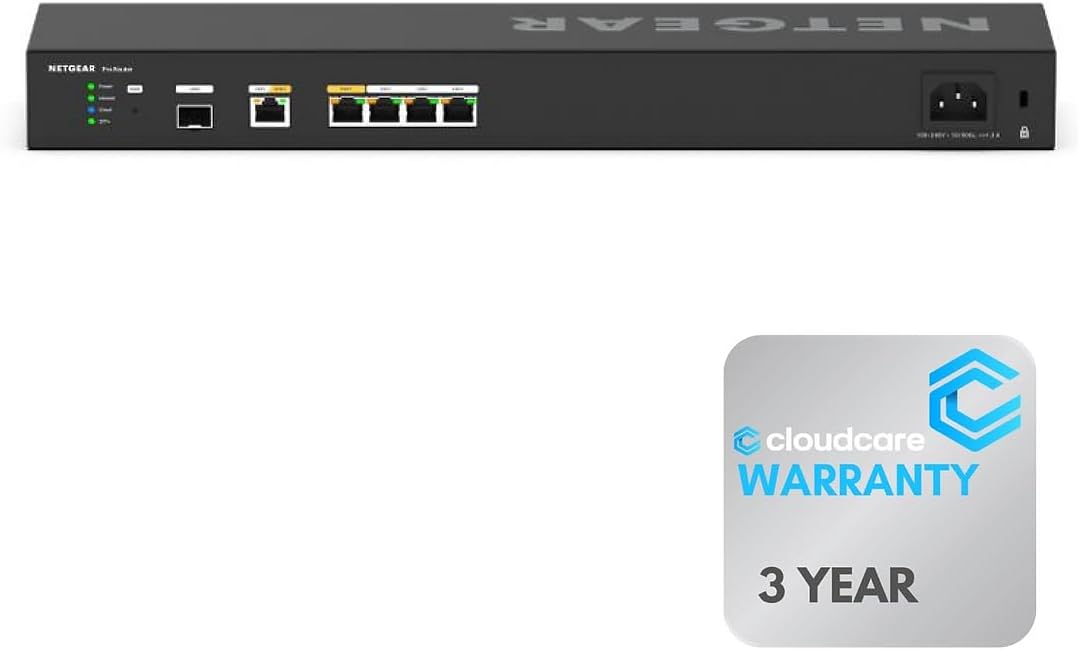
This NETGEAR PR60X listing includes exclusive Cloud Care warranty support for added peace of mind. It holds a 4.6 rating and offers six 10G Multi-Gigabit ports for maximum speed. The rack-mountable design helps organize equipment efficiently in professional environments.
We may earn a commission when you buy through this link, at no additional cost to you.
Netgear Insight cloud management allows remote control and monitoring of your network. This feature is crucial for businesses needing to manage multiple locations from a central point. The warranty support simplifies claims by consolidating coverage for all products purchased.
Installation requires a rack mount environment which adds to the complexity for small offices. The price reflects the high-end hardware and extended warranty coverage provided. It is a premium solution designed for robust and managed network needs.
IT departments wanting simplified warranty claims and professional mounting options should select this model. The high port count ensures scalability for future growth. If you need enterprise reliability with extended support this is a top choice.
Cloud Care offers All-in-one Warranty SupportPlus for simplified claim processes.
Insight cloud management offers cloud-based control for easy setup and maintenance.
We may earn a commission when you buy through this link, at no additional cost to you.
The Linksys LRT224 offers essential business features for small offices needing reliable internet. It holds a 4.0 rating and supports up to 50 IPsec tunnels for secure connections. The router includes load balancing and WAN failover for consistent connectivity.
We may earn a commission when you buy through this link, at no additional cost to you.
It provides a 900 Mbps firewall throughput which is sufficient for most small business needs. The setup is straightforward with a feature-rich web interface for basic management. This unit meets wide range of business network requirements without high costs.
Throughput rates are lower than premium models limiting use in high-speed environments. The interface is functional but lacks modern aesthetics found in newer competitors. However for basic redundancy and secure remote access it performs well enough.
Small business owners seeking a straightforward and affordable solution should consider this router. It covers the basics of failover and VPN access effectively. For offices with moderate internet needs this offers a dependable entry point.
Up to 50 IPsec tunnels support site-to-site and client-to-site secure access.
900 Mbps firewall throughput handles standard business traffic effectively.
We may earn a commission when you buy through this link, at no additional cost to you.
Selecting the right router requires understanding your bandwidth needs and security requirements to ensure seamless internet continuity.
Look for multiple WAN ports and flexible LAN configurations to accommodate different internet lines and local devices. The number of ports dictates how many sources you can connect simultaneously for optimal redundancy and speed.
Ensure you have enough physical ports to meet your current setup and future expansion needs without requiring additional switches.
Failover speed determines how quickly the router switches to a backup connection when the primary one goes down. Faster switching minimizes downtime which is critical for voice over IP and real-time business applications.
Choose a model with automatic failover capabilities to maintain business continuity without manual intervention during an outage.
Security features like IPS, firewalls, and encryption standards protect your network from external threats. Strong encryption ensures data remains private during transmission across multiple internet sources.
Verify that the router supports modern protocols like WireGuard and IPsec to keep sensitive business data secure.
A clear and intuitive management interface simplifies configuration and monitoring of your network settings. Cloud managed options allow you to control the router remotely which is useful for distributed offices.
Opt for a web GUI or app that provides real-time insights into traffic and connection status for better control.
Load balancing distributes traffic across multiple internet connections to optimize bandwidth usage and speed. This feature prevents one connection from becoming a bottleneck during high demand periods.
Ensure the router supports effective load balancing policies to maximize the value of multiple internet subscriptions.
If remote access is needed verify the number of supported VPN tunnels and supported protocols. A robust VPN suite allows secure connections for traveling employees without needing extra hardware.
Select a router that meets your tunnel requirements to ensure all remote users can access resources securely.
Scalability ensures the router can grow with your business as you add more devices or internet lines. Check for firmware update support and port expandability options to accommodate future changes.
Invest in a model that offers sufficient session limits and throughput to handle growth without immediate replacement.
Reliable warranty and technical support are essential for resolving issues quickly and minimizing downtime. A long warranty period indicates manufacturer confidence in the hardware quality.
Prioritize products with accessible support channels and clear documentation to assist with any technical challenges.
To begin connect your primary internet modem to the first WAN port and configure the settings through the web interface. Verify the connection status to ensure the router is receiving signals correctly.
Connect a secondary internet source to a second WAN or WAN/LAN port to enable failover. Test the failover function by disconnecting the primary line to confirm it switches automatically.
Keep your router firmware updated regularly through the settings menu to maintain security and performance. Ensure adequate ventilation around the device to prevent overheating and extend its operational lifespan.
A dual wan router allows you to connect two or more internet service providers to a single network. It manages traffic between these connections to ensure you stay online even if one provider goes down.
Yes most models support fiber connections via Ethernet or SFP ports. Check the specs to ensure the router supports the speeds provided by your fiber ISP for optimal performance.
Technically you can use two lines from the same provider but you need separate physical lines. This offers redundancy but may not provide true diversity if the provider has a regional outage.
Each WAN port typically requires a separate modem or connection source to function. Some models support USB modems so you only need one physical modem for the secondary connection.
Failover monitors the health of your primary connection and switches to the backup if it detects a drop. This process happens automatically to prevent downtime for your network users.
Many modern models offer cloud management allowing you to control settings remotely via an app. This simplifies managing settings across multiple locations without needing physical access to the router.
This guide has explored ten distinct dual wan routers catering to various business needs and budgets. From budget friendly options like the Cudy R700 to enterprise solutions like the NETGEAR PR60X there is a fit for everyone.
Prioritize models that offer seamless failover and robust security to protect your business data. Ensure the router supports your current internet speeds and can scale as your network grows.
Prices and availability fluctuate so verify the current listings and warranty details before purchasing your final choice.