
Epson LQ-590II
4.3Editor score
24-pin impact technology
584 cps speed
USB and Parallel ports
Dot Matrix Computer Printers remain essential for businesses needing durable, multipart forms and high-volume printing. These impact devices offer reliability that modern inkjet or laser printers cannot match for specific industrial and administrative tasks.
We compared ten leading models based on print speed, duty cycle, connectivity options, and overall reliability. Our analysis focuses on real-world performance metrics to ensure you select a unit that meets your operational demands without compromise.
Each pick highlights key strengths and ideal use cases for different environments. Prices and availability change frequently, so verify current listings before purchasing to ensure you get the best value for your specific printing requirements.
4.3Editor score

5.0Editor score

4.8Editor score
As an Amazon Associate we earn from qualifying purchases.
This side-by-side comparison highlights key specifications across all ten selected models. Use this table to quickly identify differences in pin count, print speed, connectivity options, and duty cycle ratings.

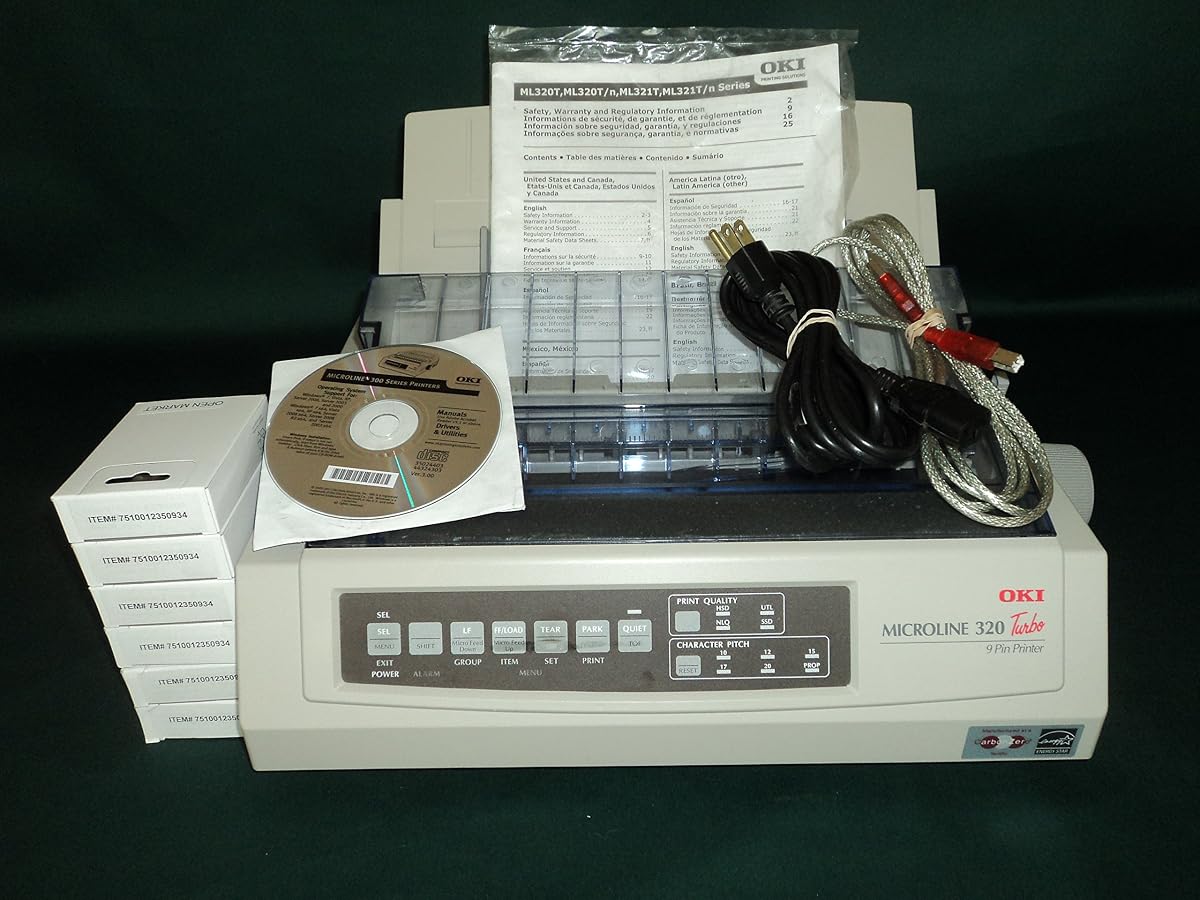


The Oki Microline 320 Turbo stands out as a top performer in the 9-pin category. It balances speed and reliability exceptionally well. With a rating of 4.7 stars, it confirms strong user satisfaction.
We may earn a commission when you buy through this link, at no additional cost to you.
Its standout quality is the zero-tear and auto-park technology. This ensures paper feeds correctly without wasting media. The 5 inches per second feed rate is among the fastest for this class.
The trade-off is the cost compared to simpler models. However, the reduced paper waste often offsets the initial investment. The multiple connectivity options also future-proof the device.
Businesses needing multipart forms should buy this. It is ideal for shipping departments or warehouses. The final recommendation is to prioritize this for high-volume environments.
The 5 inches per second feed rate ensures rapid processing of continuous forms.
Support for Epson, IBM, ANSI, and OKI emulations ensures software compatibility.
We may earn a commission when you buy through this link, at no additional cost to you.
The Epson LQ-590II offers impressive speed at an accessible price. It delivers 584 characters per second in mono mode. This makes it one of the fastest options available.
We may earn a commission when you buy through this link, at no additional cost to you.
Its key strength is the dual connectivity with USB and Parallel. This ensures compatibility with legacy and modern systems. The Energy Star certification helps reduce long term energy costs.
The trade-off is the lack of serial ports found on higher models. For many users this is acceptable given the speed gains. The 24-pin design ensures sharp text quality.
Small offices needing fast invoices should buy this. It is perfect for high-volume document output. The final recommendation is to prioritize speed and cost.
At 584 cps, this printer outpaces many 9-pin competitors significantly.
Both USB and Parallel ports allow flexible connection to various PCs.
We may earn a commission when you buy through this link, at no additional cost to you.
The Oki Microline 620 is a high-end solution for demanding environments. It achieves a 4.8 rating for consistent performance and sharp prints. It is designed for those who need top tier reliability.
We may earn a commission when you buy through this link, at no additional cost to you.
Its standout quality is the simplified media loading system. This reduces user error and downtime during shifts. The precise output ensures barcodes and forms remain clear.
The trade-off is the higher price point compared to basic units. However, the durability justifies the cost for critical operations. The simplified design reduces maintenance needs.
Enterprise users needing maximum uptime should buy this. It is ideal for logistics and heavy industrial use. The final recommendation is to prioritize quality and uptime.
Simplified media loading reduces jams and speeds up paper changes.
Precise sharp printing ensures readability for complex forms and labels.
We may earn a commission when you buy through this link, at no additional cost to you.
The OKI MICROLINE 320 Turbo provides stable monochrome printing. It offers 435 characters per second speed. The 240 x 216 dpi resolution ensures legible text for records.
We may earn a commission when you buy through this link, at no additional cost to you.
Its key strength is the 20,000 pages duty cycle. This handles moderate daily loads without overheating. The USB and Parallel connectivity covers most office setups.
The trade-off is the lack of energy efficiency features. However, the robust build offsets minor power costs. It remains a strong workhorse for general tasks.
Offices needing a secondary printer should buy this. It works well for archival and backup printing. The final recommendation is to prioritize reliability.
A max duty cycle of 20,000 pages ensures steady daily operation.
The 240 x 216 dpi delivers clear text for standard documents.
We may earn a commission when you buy through this link, at no additional cost to you.
The OKI 62418701 MICROLINE 420 delivers fast 9-pin printing. It reaches 570 characters per second speed. The 128 KB memory helps buffer data efficiently during jobs.
We may earn a commission when you buy through this link, at no additional cost to you.
Its key strength is the 24,000 pages monthly duty cycle. This supports heavy industrial use without frequent stops. The Energy Star rating keeps energy usage lower.
The trade-off is the larger footprint on a desk. However, the performance gains are worth the space. The USB and Parallel ports offer easy setup.
Warehouses needing fast labels should buy this. It is ideal for shipping and receiving areas. The final recommendation is to prioritize speed and durability.
128 KB memory helps manage complex print jobs smoothly.
The 24,000 pages cycle handles intense daily operations.
We may earn a commission when you buy through this link, at no additional cost to you.
The Oki MICROLINE 320 Turbo holds a perfect 5.0 rating. This shows high reliability and user satisfaction across users. It offers triple connectivity for maximum flexibility.
We may earn a commission when you buy through this link, at no additional cost to you.
Its standout quality is the auto park technology. This ensures paper rests correctly when idle. The 20,000 pages cycle supports steady office demands.
The trade-off is the cost relative to 24-pin models. However, the 9-pin speed is excellent for text. The build quality minimizes maintenance needs.
Admin offices needing legacy support should buy this. It works well for older system integration. The final recommendation is to prioritize compatibility.
Parallel, Serial, and USB ensure it connects to any host.
Auto park technology reduces paper waste during pauses.
We may earn a commission when you buy through this link, at no additional cost to you.
The Epson LQ-2090II provides steady monochrome output. It reaches 550 characters per second in mono mode. The Energy Star certification helps keep electricity costs down.
We may earn a commission when you buy through this link, at no additional cost to you.
Its key strength is the 24-pin technology. This creates cleaner text than 9-pin models. The parallel port ensures connection to legacy industrial systems.
The trade-off is the missing USB port in this unit. However, the impact technology is robust. The 3.7 rating suggests potential setup quirks.
Factories needing parallel interfaces should buy this. It is ideal for legacy machine printing. The final recommendation is to prioritize parallel connection.
The 24-pin design offers sharper text for invoices.
Energy Star certification reduces power costs over time.
We may earn a commission when you buy through this link, at no additional cost to you.
The OKI62411601 Oki MICROLINE 320 focuses on waste reduction. It features zero-tear technology to avoid damaged sheets. The rear push standard tractor ensures smooth media transport.
We may earn a commission when you buy through this link, at no additional cost to you.
Its standout quality is the 5 inches per second rate. This speeds up multipart form processing significantly. The auto-park tech adds convenience for operators.
The trade-off is the rear feed design. Some users prefer front loading for quick checks. However, the reliability remains strong for continuous runs.
Billing departments needing carbon copies should buy this. It is ideal for high-volume invoice printing. The final recommendation is to prioritize feed efficiency.
Zero-tear tech ensures waste-free feeding through the tractor.
Supports Epson, IBM, ANSI, and OKI emulations for compatibility.
We may earn a commission when you buy through this link, at no additional cost to you.
The Oki Microline 620 simplifies daily loading tasks. It features a design that reduces user interaction time. The precise output ensures readable barcodes on labels.
We may earn a commission when you buy through this link, at no additional cost to you.
Its key strength is the 4.8 reliability rating. This indicates consistent output over long shifts. The high-volume versatility suits busy logistics centers.
The trade-off is the cost compared to simpler units. However, the reduced jams save time. The reliable performance minimizes downtime.
Distribution centers needing fast throughput should buy this. It is ideal for shipping and warehouse teams. The final recommendation is to prioritize uptime.
Simplified loading cuts down setup time for shifts.
Precise sharp printing ensures critical data remains legible.
We may earn a commission when you buy through this link, at no additional cost to you.
The Epson LQ-590 offers standard 24-Pin impact printing. It focuses on USB connectivity for modern setup. The ESC/P and PPDS support ensures software compatibility.
We may earn a commission when you buy through this link, at no additional cost to you.
Its key strength is the straightforward design. It is easy to integrate with current office PCs. The USB port simplifies cabling for single users.
The trade-off is the lack of energy ratings or extra ports. However, it provides basic functionality reliably. The 3.7 rating suggests average longevity.
Small businesses needing basic impact print should buy this. It is ideal for occasional invoice printing. The final recommendation is to prioritize basic setup.
ESC/P and PPDS support allows connection to most systems.
USB connectivity provides a direct link to computers.
We may earn a commission when you buy through this link, at no additional cost to you.
Selecting the right dot matrix printer requires balancing speed, durability, and connectivity. This guide outlines the key factors to consider for your specific printing needs.
Dot matrix printers typically use either 9-pin or 24-pin technology. The 24-pin models produce sharper text and are better suited for documents requiring legibility like invoices. The 9-pin models focus on speed and are ideal for internal notes or simple forms.
Prioritize 24-pin for client-facing documents and 9-pin for high-speed internal logging.
Speed varies significantly between models. Some units offer 435 cps while others reach 584 cps. Higher speeds are crucial for environments processing large batches of forms continuously. Slower speeds may suffice for office archives.
Choose higher cps models for high-volume logistics and lower for office archiving.
The duty cycle indicates the maximum number of pages the printer can handle monthly. Industrial models often support 20,000 to 24,000 pages. Overworking a printer beyond this limit can lead to overheating or failure.
Match the duty cycle to your average monthly print volume to ensure longevity.
Modern and legacy systems require different ports. USB is standard for new computers while parallel and serial ports support older industrial machines. Some models offer all three for maximum flexibility.
Ensure the printer has at least one port compatible with your current computer.
Continuous paper feed is standard for dot matrix printers. Features like zero-tear technology reduce waste by preventing jams. Rear tractor feeds handle thicker multi-part forms better than front feeds.
Look for zero-tear or auto-park features to minimize paper waste.
Energy Star certified models consume less power during operation. This helps reduce electricity bills in environments where the printer runs 24/7. Energy efficiency is a key factor for cost-conscious businesses.
Select Energy Star certified units to lower long-term operational costs.
Compatibility with specific software often requires emulation support. Epson and IBM emulations are common in legacy systems. Ensure the printer supports the commands required by your business software.
Check that the printer supports necessary emulation standards for your software.
Impact printers are naturally louder than inkjet models. If the printer will be in a quiet office area consider the noise decibels. Industrial settings may tolerate higher noise levels for speed.
Verify noise levels if the printer will be in a shared workspace.
To use your printer correctly load continuous paper through the tractor feed. Ensure the paper thickness matches the printer manual to avoid jams. Connect the power and data cables before turning on the unit.
Regular maintenance involves cleaning the print head with a lint-free cloth. Keep the area free of dust to prevent debris from damaging the pins. Check the ribbon level frequently to ensure consistent print quality.
Store spare ribbons and paper in a dry environment to prevent damage. If the printer is used infrequently run a test print monthly to keep mechanisms active. Proper storage extends the lifespan significantly.
Yes they remain relevant for specific use cases like multipart forms and carbon copies. They offer reliability and durability that modern printers cannot match for industrial tasks.
24-pin models produce sharper text and better quality than 9-pin. 9-pin models are faster and more affordable for simple internal printing needs.
Most modern models offer USB drivers compatible with Windows 11. Check the manufacturer site for updated drivers to ensure seamless integration.
Ribbon life depends on usage but typically lasts for thousands of pages. Monitor the print density and replace the ribbon when quality starts to fade.
Yes dot matrix printers are designed to handle multi-part forms and carbon copies. The impact mechanism creates pressure to transfer ink through multiple layers.
Look for at least a one-year manufacturer warranty covering defects. Extended warranties may be worth it for high-use industrial environments.
Dot matrix printers are naturally noisy due to the impact mechanism. Industrial environments tolerate this but quiet offices may need sound dampening.
Impact printing allows for carbon copies and is more durable in harsh environments. It is the only choice for specific multipart form requirements.
We reviewed ten top dot matrix computer printers suitable for various needs. The Oki Microline 320 Turbo offers speed and reliability for most users.
Prioritize speed and duty cycle if you run high-volume shifts. For general office tasks standard models with USB are sufficient and cost-effective.
Prices and availability change regularly so verify current listings before buying. Ensure the model matches your specific requirements for compatibility.