
THUSTAR 8MP Document Camera & Webcam 4K
4.4Editor score
A3-Size capture area
3-Level LED Lights
Plug-and-play USB
Modern classrooms require visual tools that enhance learning and engagement. A document projector allows educators to display physical materials clearly. Choosing the right device ensures students can see details without strain.
We evaluated ten leading models based on resolution, connectivity options, and ease of use. Our analysis focuses on features that matter most in educational settings. Each product offers unique benefits for different classroom needs and budgets.
Each pick highlights key specifications and ideal use cases for educators. Prices may fluctuate based on market demand and retailer promotions. Always verify current availability and compatibility before making your final purchase decision.
4.4Editor score

4.5Editor score
4.4Editor score
As an Amazon Associate we earn from qualifying purchases.
This side-by-side comparison helps you quickly identify which document projector best fits your specific classroom environment and teaching style requirements.





The IPEVO V4K stands out as a top choice for educators needing high-resolution document capture. Its 8 Megapixel camera delivers crystal-clear images that enhance student engagement during lessons.
We may earn a commission when you buy through this link, at no additional cost to you.
With a high frame rate of up to 30 fps at full HD, this camera ensures smooth, lag-free live streaming. The Sony CMOS Image Sensor provides exceptional noise reduction, making it effective even in dimly lit classrooms.
While it offers impressive performance, users must ensure their computers meet system requirements like a Solid-state drive and dedicated video memory. The fixed shooting area of 13.46 inch x 10.04 inch is standard but limits flexibility.
Teachers seeking reliable, high-quality presentation tools will find this device invaluable for live demos and distance learning. Its compatibility with Mac, PC, and Chromebook systems ensures broad utility across school networks.
The 8MP sensor captures up to 3264 x 2448 pixels, ensuring text and details are easily readable by all students.
Works with various software applications on multiple operating systems, allowing seamless integration into existing classroom setups.
We may earn a commission when you buy through this link, at no additional cost to you.
This Apollo model brings classic overhead projection power into modern classrooms with enhanced features. It projects a bright 2000 Lumen output that remains visible even in well-lit environments without needing to dim lights.
We may earn a commission when you buy through this link, at no additional cost to you.
The open head design accommodates larger sheets, making it versatile for maps, transparencies, or oversized documents. The inclusion of an LCD display alongside VGA and USB ports bridges the gap between analog and digital presentations.
However, the design may be bulkier than modern camera-based systems, requiring more desk space. Educators accustomed to slide projectors will appreciate the straightforward operation, though setup might take longer than plug-and-play USB cameras.
Ideal for schools transitioning from older systems, this projector offers robust performance and connectivity. It serves well for presentations where physical transparency sheets are still preferred over digital documents.
2000 Lumen output ensures clarity in various lighting conditions, reducing eye strain for viewers during long sessions.
Supports both analog transparencies and digital inputs via VGA and USB, offering flexibility for diverse content types.
We may earn a commission when you buy through this link, at no additional cost to you.
The IPEVO VZ-X offers unparalleled freedom with its wireless capabilities, allowing teachers to move around the classroom while projecting content. With a massive 33-foot range, educators can demonstrate objects anywhere in the room without cables.
We may earn a commission when you buy through this link, at no additional cost to you.
Its 9 to 12-hour battery life ensures it lasts through an entire school day without needing a recharge. The 8MP camera delivers high-definition images in Wi-Fi and HDMI modes, ensuring visual clarity during lectures.
While premium priced, the flexibility it offers justifies the cost for dynamic teaching styles. The built-in LED illumination and swiveling head provide professional-quality visuals without needing external lighting or complex setups.
Teachers who prioritize mobility and ease of use will love this device. Whether presenting to students physically or virtually, it adapts seamlessly to different environments and conferencing software.
Wireless range allows for dynamic teaching, letting the instructor stand beside the student while capturing the document.
Long battery life means no power outlets are needed during lessons, enabling use in any corner of the room.
We may earn a commission when you buy through this link, at no additional cost to you.
THUSTAR delivers exceptional value with a 4K-capable document camera that covers A3-size materials easily. Its adjustable brightness and LED lights ensure clear visibility regardless of ambient lighting conditions in the classroom.
We may earn a commission when you buy through this link, at no additional cost to you.
The foldable design makes it easy to store and transport, perfect for teachers who share classrooms or need to present remotely. Dual microphones help capture audio during video calls, reducing noise for better communication.
While it lacks some premium features like advanced optical zoom or wireless connectivity, its plug-and-play simplicity makes it a great choice for schools on a tight budget. It works seamlessly with Zoom, Microsoft Teams, and Google Meet.
Educators seeking a cost-effective yet powerful tool will find this model ideal. It balances performance and price well, making high-definition document projection accessible to more schools and individual teachers.
3-level adjustable LED lights help eliminate shadows and ensure text remains clear in dark or bright rooms.
Foldable design minimizes desk clutter, making it easy to tuck away when not in active use during the day.
We may earn a commission when you buy through this link, at no additional cost to you.
INSWAN INS-2 is built for educators handling large documents and artwork regularly. The 13MP SONY sensor captures stunningly clear images suitable for professional art instructions or detailed scientific diagrams.
We may earn a commission when you buy through this link, at no additional cost to you.
Its multi-joint arm allows flexible angle adjustments, which is essential for displaying two-page spreads or physical 3D objects accurately. The anti-glare sheet ensures that reflections don't obscure the text during presentations.
The included Documate software adds value with zoom, annotation, and OCR tools, streamlining lesson preparation. While it lacks wireless options, the robust USB plug-and-play ensures stability during critical teaching moments.
For art instructors or science teachers needing high detail, this model is highly recommended. Its combination of hardware quality and software support makes it a reliable companion for complex classroom tasks.
Anti-glare sheet and multi-joint arm make it perfect for displaying textured artwork or detailed 3D scientific models.
Documate software offers essential tools like annotation and OCR, enhancing interactive lessons without extra tools.
We may earn a commission when you buy through this link, at no additional cost to you.
This Lumens projector functions as an all-in-one visual aid, capturing images directly without needing a computer. Its internal memory and SD card slot allow teachers to store and retrieve lesson materials instantly.
We may earn a commission when you buy through this link, at no additional cost to you.
The 6X optical zoom provides clear magnification of small text or details, essential for reading fine print. Compatibility with interactive whiteboards ensures it integrates smoothly into modern smart classroom setups.
Although user feedback suggests some operational quirks, its standalone nature simplifies setup for teachers who prefer not to manage multiple devices. It is a robust choice for rooms needing permanent installation.
If you prefer a standalone solution over a camera connected to a laptop, this projector offers that convenience. Its optical zoom and storage features make it a practical tool for repetitive classroom routines.
No computer needed to capture images; internal memory allows teachers to present directly from the device.
6X optical zoom ensures sharp detail retention even when magnifying small text or complex diagrams significantly.
We may earn a commission when you buy through this link, at no additional cost to you.
While technically a standard LCD projector, the PowerLite 118 is a robust solution for projecting visual content in classrooms. Its 17,000-hour lamp life significantly reduces maintenance costs and downtime.
We may earn a commission when you buy through this link, at no additional cost to you.
The built-in speaker and HDMI connectivity simplify setup, allowing quick projection of videos or digital documents. Ceiling mounting capabilities keep the device out of the way while maintaining a clear line of sight.
For schools that already have document cameras but need a reliable display unit, this projector is an excellent pairing. It complements other visual tools by providing consistent, bright output for any classroom source.
Investors in longevity and minimal maintenance will appreciate its durable design. This projector ensures that educational sessions remain uninterrupted by technical failures or frequent bulb changes.
17,000-hour lamp life means bulbs rarely need replacing, saving money and ensuring continuous classroom operation.
Built-in speaker ensures audio is available without extra hardware, perfect for video-based lessons or presentations.
We may earn a commission when you buy through this link, at no additional cost to you.
This DLP projector is engineered to maintain clarity in bright environments, making it suitable for classrooms with large windows. Its 3300 lumens ensure slides and charts remain visible even during daylight hours.
We may earn a commission when you buy through this link, at no additional cost to you.
The quick startup design reduces waiting time between classes, maximizing instructional time. DLP technology provides natural color presentation and enhanced contrast, ensuring text and graphics appear sharp and professional.
While marketed for offices, its features align well with educational needs requiring high visibility and reliability. Teachers who need bright images without dimming lights will find this model particularly effective.
Ideal for daytime classes, this projector offers a hassle-free setup that prioritizes simplicity. Its reliable performance helps maintain focus during presentations by ensuring content remains easily readable.
High brightness levels ensure that projected content remains clear even when windows are open during the day.
Quick startup reduces downtime between lessons, keeping the classroom pace smooth and efficient for students.
We may earn a commission when you buy through this link, at no additional cost to you.
The PowerLite E20 delivers vibrant, true-to-life images through 3LCD technology, ensuring text and diagrams look natural on screen. Its flexible construction allows for easy display from virtually anywhere in the room.
We may earn a commission when you buy through this link, at no additional cost to you.
With a durable design offering 12,000 hours of lamp life, it is a cost-effective choice for frequent classroom use. The built-in 5-watt speaker adds audio convenience, simplifying setup for multimedia lessons.
Teachers who need a dependable projector to pair with document cameras will find this model suitable. Its HDMI connectivity ensures easy linking with modern computers, while ceiling mounting keeps the workspace clutter-free.
Ideal for schools with existing document cameras, it enhances the overall display quality. Its balance of performance and reliability makes it a solid investment for educational environments requiring consistent output.
3LCD technology ensures colors remain accurate, helping students distinguish details in colorful educational materials.
Flexible mounting options allow for optimal placement, whether on a ceiling or a standard table surface.
We may earn a commission when you buy through this link, at no additional cost to you.
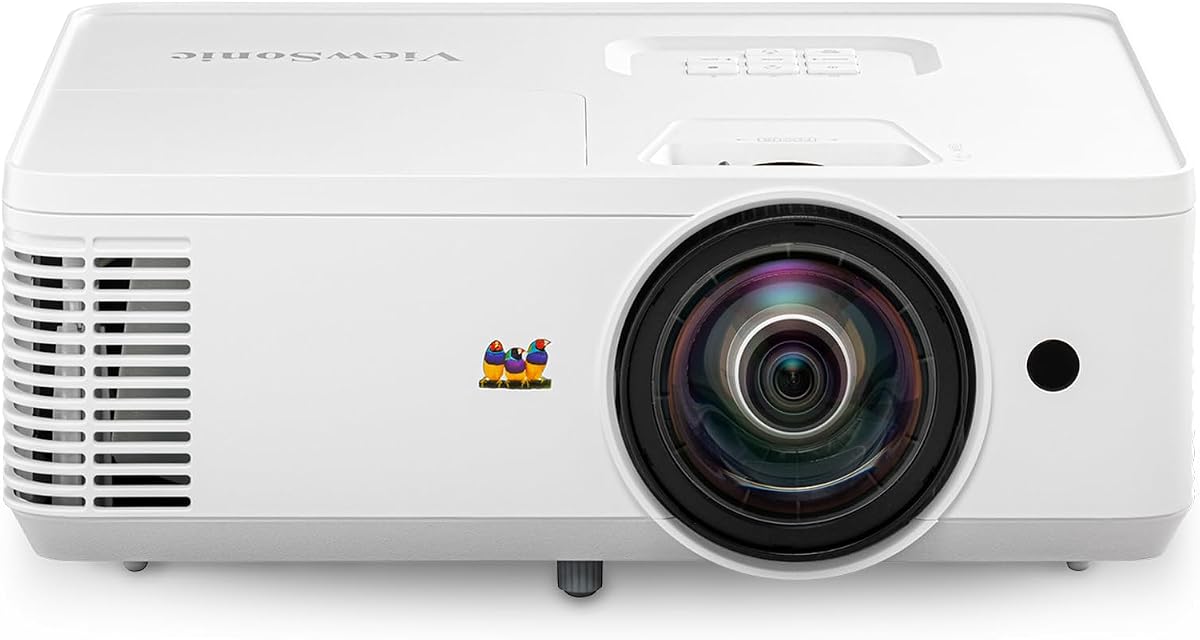
The ViewSonic PS502W excels in small spaces with its short throw ratio, allowing large images from just 4.5 feet away. This design prevents shadows and avoids obstructing the view of the classroom.
We may earn a commission when you buy through this link, at no additional cost to you.
Its 4000 ANSI lumens maintain visibility even in moderate ambient light, ensuring presentations stay clear without needing a dark room. The auto-keystone correction simplifies setup, making it easy to align the screen quickly.
Dual HDMI ports allow easy switching between devices, beneficial when connecting multiple teachers or students. Instant power on and off remove wait times, facilitating a smoother flow between classes or presentations.
For classrooms with limited floor space, this projector is the top choice. Its combination of brightness, ease of setup, and short throw capability maximizes the utility of smaller educational environments.
Short throw design enables large screen projection from close range, ideal for rooms with limited distance to the wall.
Auto-keystone correction and digital zoom allow quick image alignment, reducing the time spent on technical adjustments.
We may earn a commission when you buy through this link, at no additional cost to you.
Selecting the right projector requires balancing resolution, brightness, and connectivity. This guide breaks down the key factors to ensure your classroom has the best visual tools.
Resolution determines how sharp the projected text and images appear. For classrooms, at least HD 720p is recommended, but 4K or 8MP capabilities are ideal for detailed diagrams. Look for high pixel counts to ensure every student can read fine print from the back of the room.
Prioritize higher resolution for better visibility of text and intricate details.
Brightness is measured in lumens and dictates visibility under ambient light. For classrooms with windows, aim for 3000 lumens or more to prevent washed-out images. This ensures the screen remains clear without needing to close blinds.
Higher lumens mean better visibility in bright or naturally lit classrooms.
Modern classrooms need versatile connections. HDMI is standard for most computers, but USB and Wi-Fi add flexibility for wireless presentations. Ensure the projector supports the devices your students and teachers use daily.
Choose devices with HDMI, USB, and wireless options for seamless integration.
If you share rooms, a portable projector is essential. Look for compact designs that are lightweight and easy to transport. For permanent installations, ceiling mountability is a crucial feature to consider.
Select based on whether you need a permanent fix or a mobile solution.
Long lamp life reduces the frequency of bulb replacements and associated costs. LED-based projectors often last longer than traditional lamps. Consider the total cost of ownership, including bulb changes and potential repair costs.
Longer lamp life ensures less downtime and lower long-term maintenance costs.
Some document cameras come with annotation tools or OCR software. These features can enhance interactive lessons by allowing teachers to write directly on projected documents. Check if the device includes useful bundled software.
Look for software tools like annotation or scanning to boost interactivity.
Budget varies widely, from affordable document cameras to high-end projectors. Determine your maximum spending limit early to narrow down options. Sometimes a mid-range model offers the best balance of features and price for schools.
Set a clear budget to find the best value within your financial limits.
Ensure the device is compatible with your existing hardware, such as Macs or Windows PCs. Verify operating system requirements before purchasing to avoid connectivity issues. Compatibility with conferencing apps is also vital for remote teaching.
Check device and OS compatibility to avoid frustrating setup problems.
Start by connecting the projector to your laptop using the appropriate cable. Turn on the device and allow it a moment to stabilize. Ensure the lens is clean and free of dust for the clearest image possible.
Adjust the focus and zoom until the image is sharp. If using a document camera, place the material flat under the lens. Avoid leaving heavy objects on the lens area for extended periods to prevent damage.
Turn off the device using the power button, allowing it to cool down fully. Store the projector in a dry, dust-free environment. Regularly clean the air vents and exterior to ensure optimal performance.
Most document cameras connect via USB, HDMI, or wirelessly, so they work with many standard projectors. Check that the projector supports the specific input type required by the camera. Some newer systems have built-in camera compatibility for easier setup.
Not necessarily. Higher lumen projectors can display images clearly even in daylight or with lights on. Aim for brightness of 3000 lumens or more for better visibility in well-lit classrooms without needing to close blinds.
Traditional lamps typically last between 3,000 to 5,000 hours, while LED lamps can last significantly longer. Many modern models offer 10,000 hours or more, reducing the frequency and cost of replacements over time.
Wireless connectivity offers greater flexibility and reduces cable clutter, which is ideal for active teaching styles. However, wired connections are often more stable and faster for large file transfers or video streaming.
Yes, most modern document cameras are compatible with video conferencing software like Zoom and Teams. They allow remote students to see physical materials clearly, bridging the gap between online and offline learning.
Use a soft, lint-free microfiber cloth to gently wipe the lens. Avoid using harsh chemicals or paper towels that could scratch the surface. Keep the projector covered when not in use to prevent dust accumulation.
We highlighted ten top options, ranging from versatile wireless cameras to powerful LCD projectors. The IPEVO V4K and THUSTAR 8MP stand out for affordability and clarity, while the ViewSonic PS502W offers unmatched brightness.
Prioritize resolution and brightness based on your classroom lighting conditions. If flexibility is key, wireless options provide freedom, while fixed mounts offer stability. Choose tools that support your teaching style and student needs.
Always verify current prices and compatibility before purchasing as deals change frequently. Your students benefit most when technology works seamlessly. Invest in quality equipment that enhances learning outcomes.