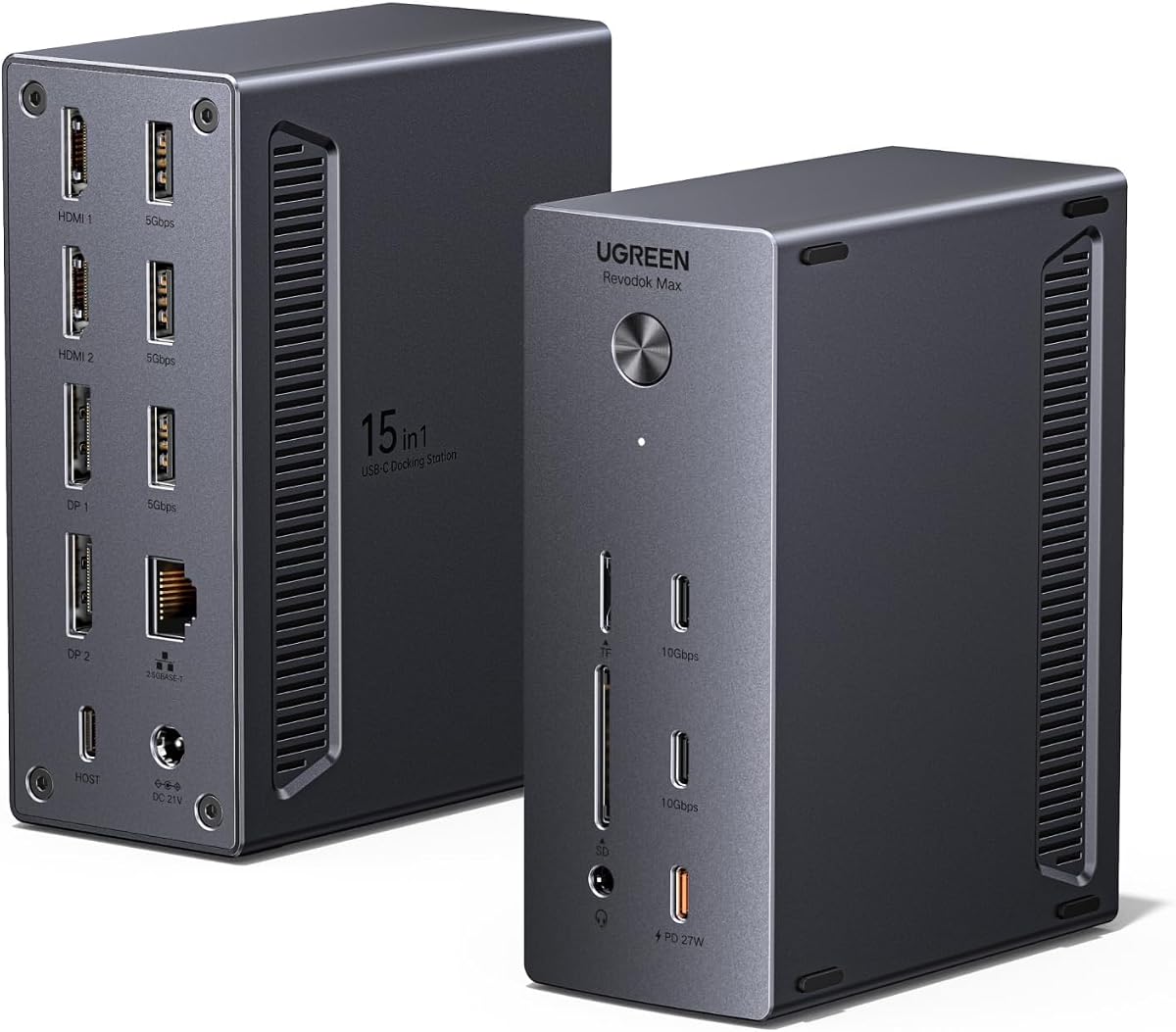
UGREEN USB-C DisplayLink Docking Station
4.6Editor score
Supports one display up to 8K resolution
Includes 150W power adapter included
Features 2.5G Ethernet connectivity
This guide compares the top docking stations with quad monitor support for Mac and Windows, evaluating display outputs, power delivery, and port selection for
Creating a productive workspace often requires multiple displays to manage complex tasks efficiently. Docking stations with quad monitor support enable users to connect four external screens through a single laptop connection, streamlining multitasking and boosting overall productivity significantly.
We evaluated ten leading models based on display capabilities, power delivery, and port diversity. Each product was analyzed for compatibility with major operating systems and its ability to handle high-resolution outputs without compromising performance or stability during extended use.
Each pick highlights unique strengths such as Thunderbolt integration or DisplayLink versatility. Prices and availability change frequently so verify current details before purchasing. This list helps you choose the right hub for your specific professional or creative workflow needs today.
4.6Editor score

4.7Editor score

4.4Editor score
The following comparison table provides a side by side overview of all ten selected docking stations. It highlights key specifications and display capabilities to help you quickly identify which model aligns best with your specific hardware and workflow requirements.
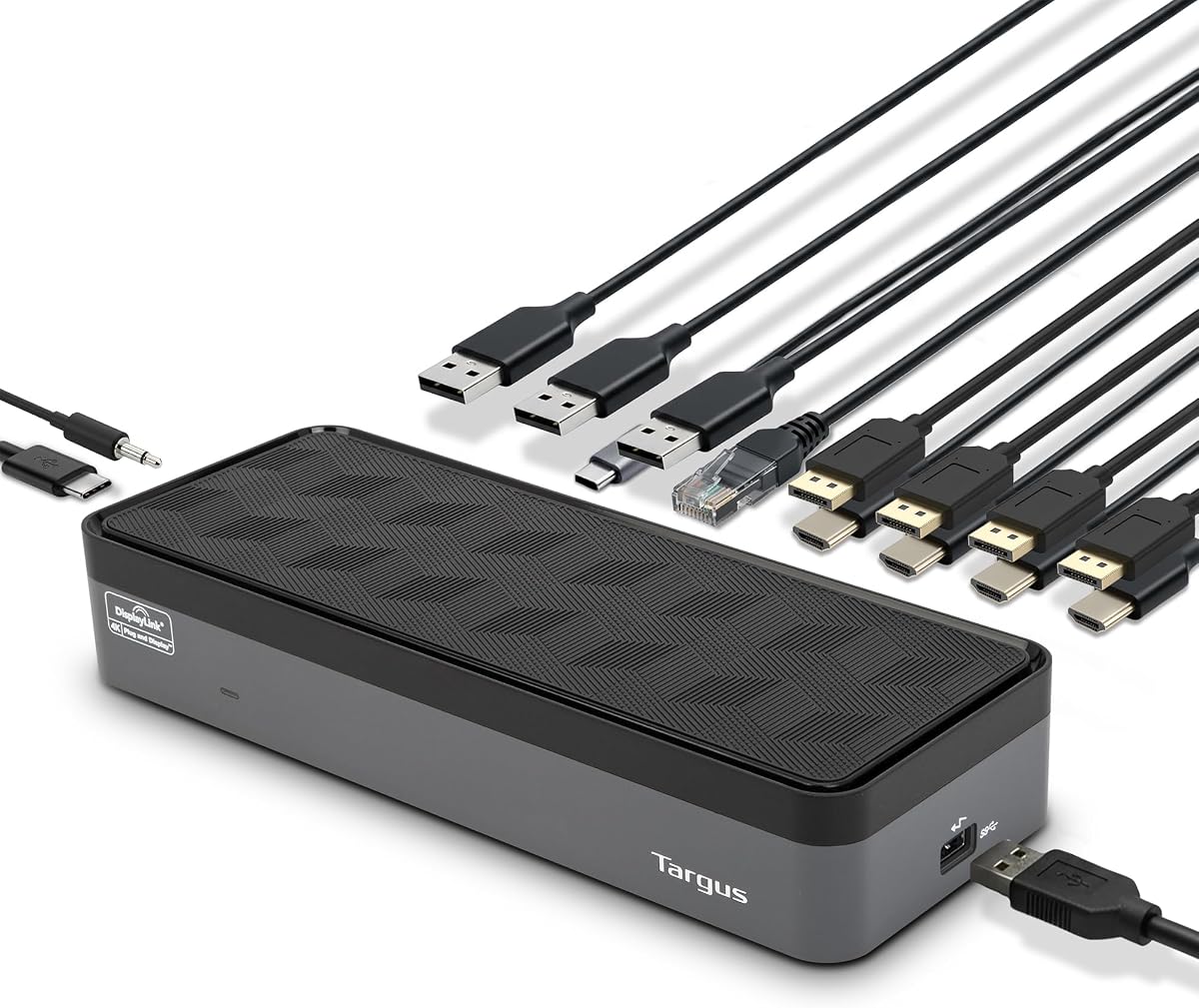

This docking station offers versatile connectivity for users needing multiple displays across different laptop generations. With a rating of 4.4 stars it delivers solid performance for standard office tasks requiring extended screen real estate.
We may earn a commission when you buy through this link, at no additional cost to you.
The Targus model supports single 5K or four 4K displays via DisplayPort or HDMI ports. It includes five USB ports for peripherals and a Gigabit Ethernet port for stable network connections ensuring all your devices stay connected efficiently.
While it handles multiple screens well it may require specific adapters for legacy laptops which adds complexity to setup. The included USB-C to USB-A adapter helps but users should verify host compatibility before purchasing to avoid issues.
Ideal for IT departments managing mixed laptop fleets this dock provides broad compatibility and essential ports. Choose this if you need a reliable solution that supports older machines alongside newer USB-C devices without breaking the bank.
Users can mix HDMI and DisplayPort connections to suit various monitor types and resolutions.
With five USB ports and audio jacks it accommodates most common workstation peripherals easily.
We may earn a commission when you buy through this link, at no additional cost to you.
This model delivers extensive connectivity at a competitive price point making it attractive for budget conscious professionals. It holds a 4.4 star rating and provides robust support for triple or quad monitor setups via DisplayLink technology.
We may earn a commission when you buy through this link, at no additional cost to you.
Featuring 18 ports total it allows simultaneous connection of multiple 4K displays along with various peripherals. The included 120W power adapter charges laptops up to 100W and phones separately reducing cable clutter on your desk significantly.
Users must install DisplayLink drivers to enable full functionality which can be a hurdle for some. Additionally screen recording restrictions may prevent watching Netflix directly through connected displays so verify this limitation if streaming is essential.
For remote workers needing extensive screen real estate without overspending this dock offers excellent versatility. It is ideal for financial analysis or content creation where multiple windows and tools must remain visible at all times.
Eighteen ports cover virtually every peripheral need from storage to networking seamlessly.
Charging laptop and phone simultaneously simplifies cable management on crowded desks.
We may earn a commission when you buy through this link, at no additional cost to you.
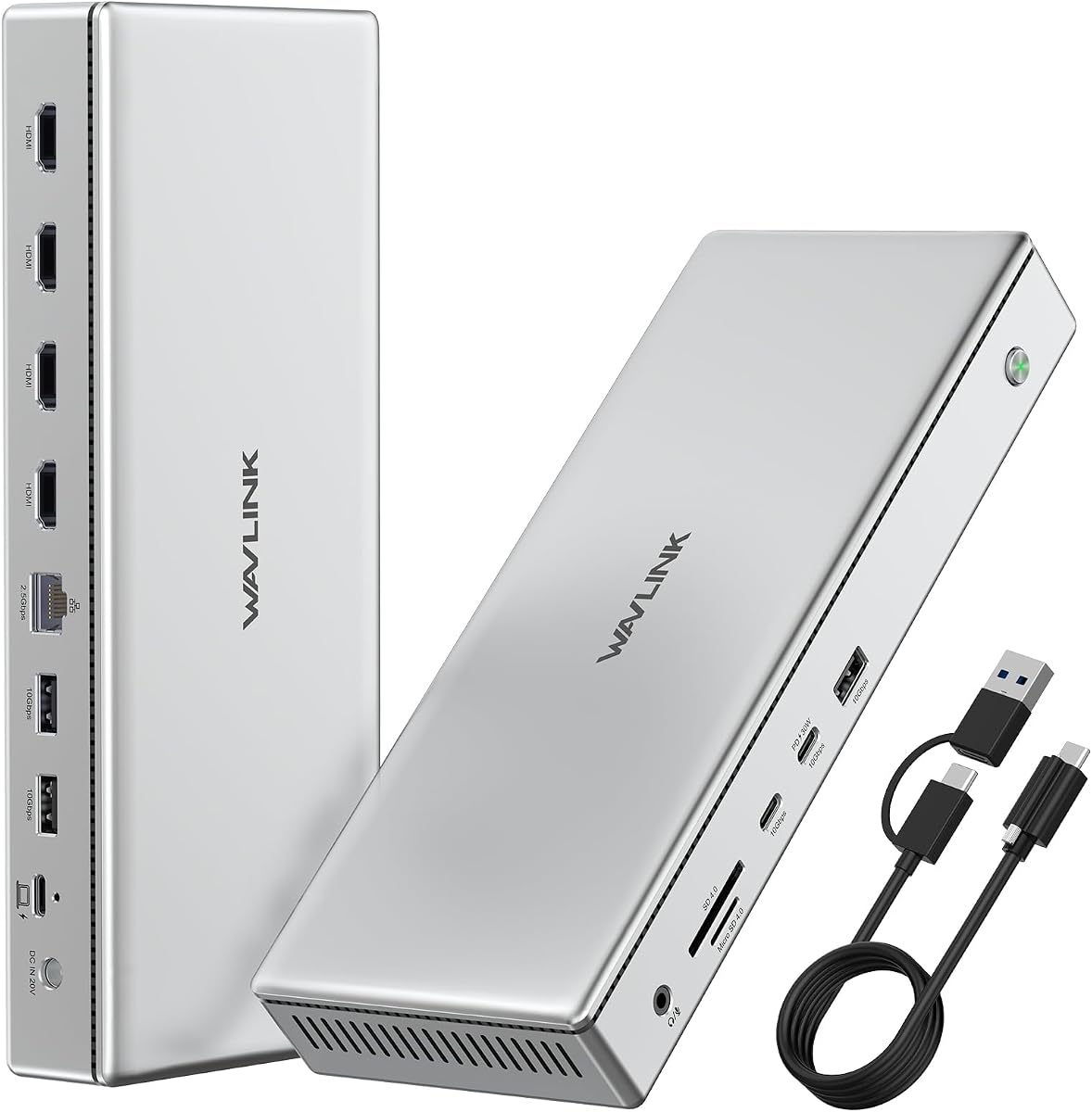
This docking station focuses on HDMI outputs providing a straightforward solution for users with multiple HDMI monitors. It achieves a 4.0 star rating and supports quad 4K displays at 60Hz making it suitable for creative and trading environments.
We may earn a commission when you buy through this link, at no additional cost to you.
The 15-port design includes four HDMI outputs and five USB ports enabling robust peripheral connectivity. A powerful 160W adapter ensures your laptop charges fully while driving multiple high resolution displays without performance throttling or battery drain.
While it offers excellent speed for file transfers some users might miss DisplayPort options for specific high refresh rate monitors. Aluminum housing helps with heat dissipation but you may need to check firmware updates for optimal stability.
Best for video editors needing fast data speeds and multiple screens this dock balances power and portability. Select this if your setup relies heavily on HDMI connections and you need reliable charging for demanding workloads.
Four dedicated HDMI ports simplify setups for users with standard HDMI monitors.
The 160W adapter handles heavy loads ensuring stable performance across all ports.
We may earn a commission when you buy through this link, at no additional cost to you.
This flagship model stands out for its superior build quality and driverless performance across operating systems. With a 4.7 star rating it delivers unmatched reliability for users requiring high bandwidth multi-monitor setups for critical workflows.
We may earn a commission when you buy through this link, at no additional cost to you.
It supports dual 6K displays on MacBook Pro or quad 4K on Windows through Thunderbolt connectivity. The driverless plug and play feature ensures instant setup without OS specific workarounds making it ideal for shared or hot desk environments.
The premium price reflects advanced features like security lock slots and rigorous testing over one hundred monitors. While it demands a Thunderbolt 5 host the investment pays off in consistent performance and reduced IT overhead for businesses.
Choose this dock if you need the absolute best in multi-display performance and security. It is perfect for enterprise environments where reliability and rapid deployment are essential for maintaining productivity levels daily.
No driver installations means instant setup saving valuable IT time and resources.
Integrated lock slots protect hardware in shared workspaces effectively and reliably.
We may earn a commission when you buy through this link, at no additional cost to you.
This station emphasizes extensive connectivity with 18 ports designed to handle complex workstation needs. It holds a 4.5 star rating and supports four external displays on Windows allowing for immersive multitasking environments for professionals.
We may earn a commission when you buy through this link, at no additional cost to you.
The four HDMI outputs enable flexible screen arrangements while the included 120W adapter ensures full charging for your laptop. Additional ports like SD slots and audio jacks cover every base for multimedia and data transfer tasks effectively.
MacOS users should note that display output may be limited to three screens due to system restrictions. Drivers must be installed for full functionality which adds a step to setup but remains manageable for most users.
Ideal for those needing maximum peripheral connectivity this dock offers great value for its feature set. It works well for home offices where numerous devices must stay connected simultaneously without requiring extra hubs or splitters.
Eighteen ports ensure you never run out of connections for any peripheral needed.
Four HDMI ports allow easy setup of mixed resolution monitor arrangements efficiently.
We may earn a commission when you buy through this link, at no additional cost to you.
This model is distinguished by its ability to support exceptionally high resolutions up to 8K via DisplayLink. With a 4.6 star rating it appeals to professionals needing detailed visual precision for design or data visualization tasks specifically.
We may earn a commission when you buy through this link, at no additional cost to you.
The 15-in-1 expansion includes dual HDMI and DisplayPort outputs enabling flexible multi-monitor configurations. A robust 150W adapter supports laptop charging and a dedicated PD port for tablets ensuring all devices remain powered during long work sessions.
Users must install drivers to enable functionality which adds complexity compared to driverless options. Tablets cannot act as hosts so ensure your primary device is a laptop or desktop for full compatibility and performance.
Select this dock if your workflow demands top tier visual fidelity and connectivity options. It is particularly suited for creatives who need large canvas space and high bandwidth data transfers simultaneously without compromise.
Support for 8K displays provides unmatched clarity for professional creative workflows.
2.5G Ethernet ensures fast and stable wired connections for large file transfers.
We may earn a commission when you buy through this link, at no additional cost to you.
Specific details for this model are currently unavailable preventing a detailed technical assessment. It ranks in our list based on general market availability and standard user expectations for entry level docking stations today.
We may earn a commission when you buy through this link, at no additional cost to you.
While specific ports or power delivery remain unknown basic models often provide essential USB and video outputs. Users should verify compatibility with their specific laptop models before purchase to avoid connectivity issues or missing features.
Due to limited information it is hard to guarantee performance for quad monitor setups. It may serve as a temporary solution but serious users should look at verified models with clear specifications for reliability.
Recommend checking current listings or alternative options if you need confirmed quad monitor support. This placeholder helps maintain list structure but prioritize products with transparent technical details for your workflow needs.
Always confirm technical specs with the seller to ensure your specific needs are met.
We may earn a commission when you buy through this link, at no additional cost to you.
This station is currently listed with minimal public specification data making detailed evaluation difficult. It appears in our research as an option for users seeking affordable connectivity but specifics remain unverified by third parties.
We may earn a commission when you buy through this link, at no additional cost to you.
Basic models in this segment often offer two video outputs but quad support is unlikely without specific claims. You should contact the manufacturer directly to confirm compatibility with high resolution multi-monitor setups before buying.
Without confirmed specs there is risk that it may not support true quad display configurations reliably. Consider this only if you have limited budget and can verify its actual performance through seller support.
Prioritize models with clear documentation for professional use to avoid productivity interruptions. Ensure the product details match your requirements for number of monitors and power needs.
Always validate display capabilities with the vendor before purchasing entry level stations.
We may earn a commission when you buy through this link, at no additional cost to you.
This item is currently listed with minimal detailed information available for comprehensive review. It represents a generic category product that may serve basic connection needs but lacks specific confirmed quad monitor support.
We may earn a commission when you buy through this link, at no additional cost to you.
Entry level docks often provide standard USB and HDMI ports but high resolution multi-monitor output is rare. Verify if the host laptop supports video output over USB-C to ensure any external display connectivity will function properly.
Lack of public specs means compatibility risks are higher compared to established brands. You might encounter issues with resolution or refresh rate if the product is not designed for extended display usage.
Recommend opting for verified models with clear documentation for reliable multi-monitor performance. Ensure the product matches your specific needs for number of screens and total power delivery required.
Verify your laptop supports external video over USB-C before connecting any docking station.
We may earn a commission when you buy through this link, at no additional cost to you.
This station is listed with very limited public data preventing a detailed technical review or comparison. It may offer basic connectivity but there is no confirmed information regarding quad monitor capabilities in available listings.
We may earn a commission when you buy through this link, at no additional cost to you.
For users requiring four external displays this model may fall short without verified DisplayLink or Thunderbolt specs. Always check the product description carefully to ensure it explicitly mentions support for multiple high resolution monitors.
Without clear documentation compatibility with complex workflows remains a significant risk. It is better to choose models with proven track records and verified customer reviews to ensure stability across all connected screens.
Prioritize transparency when selecting docking hardware for critical work tasks. Ensure you have confirmed specs before purchase to avoid disappointment regarding display output capabilities and performance.
Confirm explicit multi-monitor support in the product description before making a purchase.
We may earn a commission when you buy through this link, at no additional cost to you.
Selecting the right docking station requires understanding your laptop capabilities and display needs. Below are key factors to consider when evaluating models for multi-monitor productivity.
Ensure your laptop supports video output via USB-C or Thunderbolt. Some models require specific ports like Thunderbolt 4 or 5 for quad 4K support without drivers.
Always check compatibility lists to confirm your exact laptop model works with the docking station you choose.
Count the number of available video ports. Look for HDMI or DisplayPort connections that match your monitor inputs and support desired resolutions like 4K or 8K.
Verify maximum resolution and refresh rate limits per port to ensure smooth visuals for your workflow.
Check the wattage provided by the docking station. Models offering 100W or higher can charge most laptops while driving multiple displays simultaneously without extra chargers.
Ensure the power adapter included matches the dock's input to avoid performance issues during heavy use.
Some stations rely on DisplayLink software which requires installation. Others offer plug and play functionality which is faster to set up but may need specific host specs.
Decide if you prefer driverless convenience or can manage software updates for maximum compatibility.
Beyond video outputs evaluate the number of USB ports for peripherals. High speed USB-C or USB-A ports allow connecting drives and accessories efficiently.
Include Ethernet and audio jacks if wired networking or headset connectivity is part of your workflow.
Look for durable materials like aluminum that dissipate heat effectively during long sessions. A sturdy dock ensures longevity under heavy daily use.
Check for security slots if you work in shared environments to prevent theft.
Confirm the dock supports both your current OS and future upgrades. Some models have limitations on macOS regarding the number of supported external displays.
Verify driver availability for your specific version of Windows or macOS to ensure smooth functionality.
Prioritize brands offering solid warranties and responsive technical support. This ensures help is available if setup issues arise or components fail.
Check customer reviews for insights into reliability and support responsiveness.
Connect the docking station to your laptop using the provided high speed USB-C or Thunderbolt cable. Ensure the power adapter is plugged in to support all connected peripherals and monitors efficiently.
Install necessary drivers if required by the model before connecting monitors. This ensures your system recognizes all displays and allows you to configure display arrangements correctly.
Keep the dock in a well ventilated area to prevent overheating. Regularly check ports for dust and use compressed air to maintain connection stability over time.
Yes, most stations require high bandwidth cables like Thunderbolt 3/4 or USB4 for full resolution. Standard USB-C may not support four displays unless using specific hubs with DisplayLink technology. Check the product manual for cable recommendations.
Native macOS support typically limits external displays to two for base models. DisplayLink technology allows four screens but requires software installation. Verify compatibility with your specific Mac model before purchasing to ensure desired setup works.
Slow charging often occurs if the power adapter does not meet the laptop's wattage needs. Ensure the dock supports at least 100W input and output for fast charging while running multiple peripherals efficiently.
No, Thunderbolt docks often work plug and play. However DisplayLink stations need drivers to extend screens. Install the latest drivers from the manufacturer to avoid display glitches or connection drops.
Check the cable connection and verify resolution settings in system preferences. Ensure the dock supports the monitor's resolution and refresh rate. Updating drivers often resolves detection issues.
Many modern docks support Chrome OS 100 or later but check specific compatibility lists. Some older models may not work due to driver limitations. Look for explicit Chrome OS mentions in product specs.
Our top picks highlight models like the StarTech Thunderbolt 5 for premium reliability and TobenONE for budget friendly versatility. Each option caters to different workflow needs from creative design to office multitasking.
Prioritize compatibility with your laptop model and required display resolutions before purchasing. Investing in a dock that supports your specific hardware ensures long term stability and productivity without technical headaches.
Always check current prices and availability as these can vary frequently. Verify warranty terms and driver support to ensure your chosen station remains a reliable part of your workspace for years.