
Microsoft Surface Dock
4.5Editor score
Affordable pricing option
Essential port selection
Magnetic Surface Connect
This guide compares the top docking stations for Surface Pro to help you choose the perfect connector for your workspace needs in 2026.
Transforming your Microsoft Surface into a powerful desktop workstation requires the right docking station. A good dock provides essential ports for monitors, storage, and peripherals while maintaining fast charging capabilities.
We evaluated ten leading docking solutions based on compatibility, port variety, data transfer speeds, and display support. Each option offers unique benefits for different users and workflows.
Our detailed reviews highlight key features, pros, and cons for every product. Note that pricing fluctuates frequently, so verify current offers before making your final purchase decision today.
4.5Editor score

4.4Editor score

4.8Editor score
This side-by-side comparison highlights the core specifications and capabilities of each docking station to help you quickly identify the best fit for your Microsoft Surface setup.



This Microsoft docking station stands out as the premier choice for power users needing maximum throughput. It boasts a 4.4 rating reflecting user satisfaction with its robust build and performance.
We may earn a commission when you buy through this link, at no additional cost to you.
The Thunderbolt 4 ports enable lightning-fast data transfers and support dual 4K monitors simultaneously. Charging happens in just 2.5 hours while you work, ensuring uninterrupted productivity throughout your day.
While excellent, the Thunderbolt requirement may not suit older Surface models lacking this standard. The higher cost is justified for professionals who rely on consistent high-speed connectivity daily.
Buy this if you demand top-tier speed and display capabilities. It transforms your Surface into a true desktop powerhouse efficiently.
Thunderbolt 4 delivers up to 40Gbps bandwidth allowing seamless video streaming and data syncing without bottlenecks.
Rapid charging technology powers up your device in just hours keeping you productive without frequent interruptions.
We may earn a commission when you buy through this link, at no additional cost to you.
An affordable yet reliable solution the original Microsoft Surface Dock earns high praise with a 4.5 rating. It simplifies desktop setup for various Surface models effectively.
We may earn a commission when you buy through this link, at no additional cost to you.
This dock transforms your tablet into a desktop via the Surface Connect cable. It offers four USB 3.0 ports, Mini DisplayPorts for monitors, and Gigabit Ethernet for stable internet.
The older Mini DisplayPort standard limits 4K high refresh rate support compared to modern HDMI standards. However, it remains a solid entry-level choice for basic home offices.
Select this dock if you need essential ports without breaking the bank. It delivers straightforward functionality for everyday productivity tasks.
Plugging in the magnetic Surface Connect cable instantly converts your portable Surface into a full desktop PC setup.
Four USB 3.0 ports and Ethernet ensure you can connect all necessary peripherals for a complete workstation experience.
We may earn a commission when you buy through this link, at no additional cost to you.
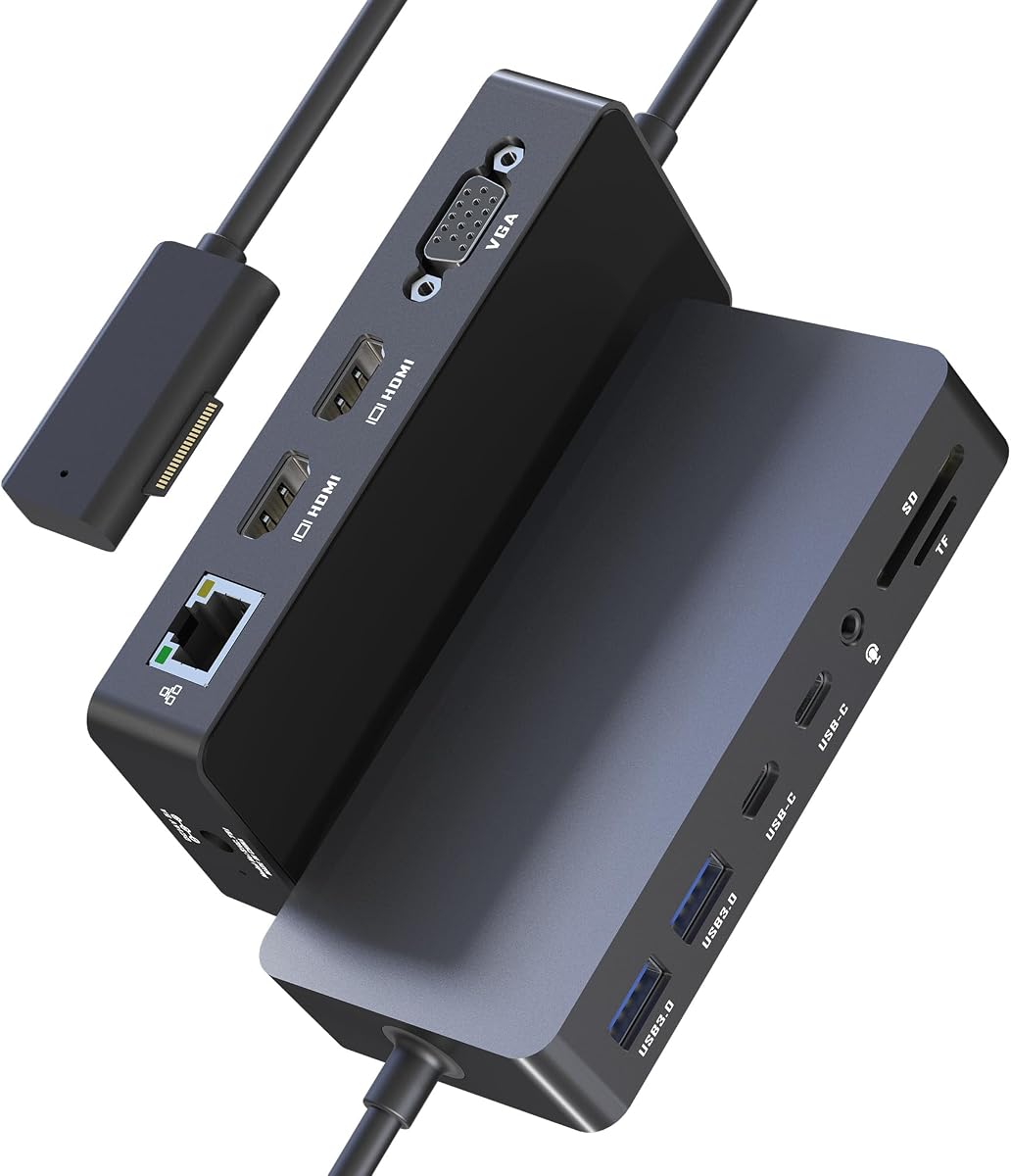
This 12-in-1 dock offers triple display output for maximum multitasking potential. With a 4.1 rating it provides extensive connectivity for varied workflow needs.
We may earn a commission when you buy through this link, at no additional cost to you.
Featuring dual HDMI and VGA ports you can extend your workspace across three external monitors. The included power adapter ensures stable charging while data transfers run via USB 3.0.
Some users report connectivity quirks compared to Microsoft native docks. It still serves well for creative professionals needing multiple screens and card readers for media work.
Choose this dock if triple monitor setups are your priority. It expands your Surface capabilities significantly at a competitive price point.
Connect up to three screens to boost efficiency and manage complex projects across multiple windows easily.
Integrated SD and TF slots allow direct access to camera cards for fast photo and video file transfers.
We may earn a commission when you buy through this link, at no additional cost to you.
With an impressive 4.8 rating this dock excels in user satisfaction and reliability. It provides essential features for mobile professionals needing robust desktop connectivity.
We may earn a commission when you buy through this link, at no additional cost to you.
The 72W power supply allows your Surface to charge while peripherals run. Two HDMI ports plus VGA enable triple display setups enhancing multitasking significantly for design work.
Achieving three external displays requires turning off the built-in Surface screen. This trade-off is acceptable for users prioritizing external workspace real estate over tablet usage.
This dock is ideal for remote workers switching between office and home. Its design minimizes desk clutter while maximizing functionality effectively.
A 72W adapter meets demanding power needs for both charging the laptop and running connected peripherals simultaneously.
Triple display support allows creative designers to keep multiple applications open without constantly switching views.
We may earn a commission when you buy through this link, at no additional cost to you.
Rated 4.2 this hub offers comprehensive connectivity for diverse Surface models. It supports dual 4K HDMI outputs and VGA for versatile monitor configurations.
We may earn a commission when you buy through this link, at no additional cost to you.
The included 72W power adapter ensures your Surface remains charged while connected to multiple devices. Ethernet and USB-C ports provide stable internet and fast data transfer options.
As a third-party solution it lacks official Microsoft branding but delivers strong functionality. Users appreciate the plug-and-play simplicity and extensive port availability.
Choose this dock for a balance of features and cost. It handles daily professional tasks reliably across the Surface ecosystem.
Dual 4K@30Hz outputs provide sharp visuals ideal for creative design work and detailed spreadsheet viewing.
A dedicated 100Mbps Ethernet port ensures low-latency internet connections for seamless video conferencing.
We may earn a commission when you buy through this link, at no additional cost to you.
The Dock 2 brings next-gen connectivity to Surface devices with a 4.5 rating. It supports dual 4K at 60Hz for smooth video performance.
We may earn a commission when you buy through this link, at no additional cost to you.
Equipped with four USB-C ports and two USB-A ports it offers versatile connection options. The 199W power supply ensures your device stays fully charged under heavy loads.
While pricier than basic hubs the higher refresh rate support justifies the cost for media professionals. It requires the Surface Connect cable which some users find less versatile.
Select this dock for maximum performance and official Microsoft support. It delivers a premium desktop experience for modern Surface users.
Dual 4K displays at 60Hz provide smoother motion ideal for video editing and gaming on external monitors.
A 199W power supply provides ample energy to charge powerful laptops while running multiple peripherals simultaneously.
We may earn a commission when you buy through this link, at no additional cost to you.
Rated 4.8 this dock is a top contender for official Microsoft connectivity. It provides dual 4K support and extensive port variety for demanding workflows.
We may earn a commission when you buy through this link, at no additional cost to you.
The Surface Connect cable simplifies setup while the 199W adapter delivers robust power. Front and rear USB-C ports offer flexible connection options for all your peripherals.
It requires a Surface Connect compatible device limiting use to newer models. The premium price ensures reliability and official Microsoft hardware standards.
Opt for this dock if you value official integration and top-tier build quality. It transforms your Surface into a reliable desktop workstation.
Designed by Microsoft for Surface devices this dock ensures seamless driver compatibility and optimal performance.
The included 199W power supply handles demanding tasks without draining your laptop battery during work.
We may earn a commission when you buy through this link, at no additional cost to you.
This 12-in-1 dock delivers extensive connectivity with dual 4K@60Hz HDMI outputs. Rated 4.3 it balances price and performance for creative professionals.
We may earn a commission when you buy through this link, at no additional cost to you.
The 100W DC charging adapter keeps your Surface powered while using all ports. Gigabit Ethernet and SD card slots provide fast data transfer options for large files.
While lacking official Microsoft certification it offers impressive specs at a lower cost. The triple monitor setup supports complex workflows efficiently.
Choose this dock if you need maximum port variety affordably. It bridges the gap between mobile and desktop workflows effectively.
Support for triple monitors boosts workflow efficiency significantly for traders and designers needing large screen real estate.
A dedicated 100W adapter ensures your laptop charges rapidly even when multiple high-power peripherals are connected.
We may earn a commission when you buy through this link, at no additional cost to you.
A renewed option with a 4.7 rating this dock offers official Microsoft quality at a better price. It provides essential ports for full desktop functionality.
We may earn a commission when you buy through this link, at no additional cost to you.
The 199W power adapter supports high-demand tasks while USB-C and Ethernet ports ensure fast connectivity. Rigorous testing ensures reliable performance comparable to new units.
As a renewed product it may show minor cosmetic signs of use. The limited warranty remains a consideration compared to brand-new purchases.
Select this dock for certified Microsoft reliability without the premium price. It suits budget-conscious buyers seeking high performance.
Rigorous testing and thermal management ensure consistent performance matching brand-new hardware standards.
Access official Microsoft premium docking capabilities at a reduced price point for budget-conscious professionals.
We may earn a commission when you buy through this link, at no additional cost to you.
Rated 4.2 this dock offers solid connectivity for older Surface models. It includes dual Mini DP and four USB ports for essential desktop needs.
We may earn a commission when you buy through this link, at no additional cost to you.
The 90W power supply supports standard charging while Ethernet ensures stable internet access. It uses surface connection technology for quick and tidy cable management.
While it lacks modern HDMI or USB-C video outputs it supports 4K resolution effectively. This makes it suitable for home offices needing basic multi-monitor setups.
Choose this dock for simplicity and compatibility with legacy devices. It provides reliable expansion for everyday productivity tasks.
A compact design keeps your workspace tidy while providing essential connectivity for monitors and storage.
High-speed transmission of video audio and data keeps your desktop organized and efficient.
We may earn a commission when you buy through this link, at no additional cost to you.
Selecting the right dock requires balancing display needs power requirements and port variety to match your workflow.
Determine how many monitors you need and whether 4K support at high refresh rates is critical. Some docks offer dual HDMI while others rely on Mini DisplayPort or USB-C video outputs.
Choose a dock that matches your display count and resolution needs.
Ensure the dock provides enough wattage to charge your Surface while running peripherals. High-performance setups often require 100W or more to prevent battery drain during heavy use.
Adequate power delivery keeps your device charged during work.
Verify whether your Surface uses USB-C Thunderbolt or Surface Connect ports. Thunderbolt docks offer faster speeds but may not fit all models.
Compatible connection types ensure stable and reliable operation.
Look for USB 3.0 or Thunderbolt ports to ensure fast file transfers between external drives. Ethernet ports should ideally support Gigabit speeds for smooth networking.
High-speed data transfers save time on large file operations.
Assess the number and types of USB and SD card slots available. Diverse options allow you to connect keyboards, mice, drives, and cards without extra adapters.
Varied ports reduce the need for additional dongles.
Opt for docks made with durable materials and thermal management systems. Quality construction prevents overheating during prolonged use.
Solid build quality ensures long-term reliability.
Balance your budget against feature requirements. Higher-priced models offer official support and better warranty coverage.
Reasonable pricing delivers the best value.
Check the warranty duration and customer service options before purchasing. Longer warranties provide peace of mind for hardware investments.
Strong warranty coverage protects your purchase.
Connect the power adapter first before plugging the dock into your Surface to prevent electrical surges. This ensures stable power delivery from the start.
Avoid overloading ports by connecting multiple high-power devices simultaneously. Distribute peripherals to prevent power fluctuations.
Keep the dock and cables clean by regularly wiping dust off connectors. Proper maintenance extends the lifespan of your hardware significantly.
Not all docks work with every Surface model due to port differences. Verify that your Surface supports the dock's connection type like USB-C or Surface Connect before buying. Most models work with USB-C docks but older ones need adapters.
The dock might not supply enough wattage for your specific Surface model. Some devices require 100W or more for fast charging while others use less. Always check the power adapter rating against your device needs.
Use HDMI or DisplayPort cables to connect external screens to the dock. Configure your display settings in Windows to extend or mirror your desktop. Ensure the dock supports the resolution you need.
Many third-party docks offer reliable performance and cost advantages. Look for products with strong reviews and warranties to ensure quality. Official Microsoft docks provide guaranteed compatibility but third-party ones often include more ports.
Thunderbolt 4 is a high-speed interface supporting data transfer up to 40Gbps. It allows charging video output and data over one cable. It is ideal for fast workflows and high-resolution displays.
Most USB-C docks work with both Windows and Mac devices seamlessly. However some features like fast charging may depend on OS compatibility. Check specs for multi-device support before purchasing.
Check for driver updates regularly to ensure optimal performance and bug fixes. Windows Update often handles this automatically. Keeping drivers current prevents connectivity issues.
Yes if the dock provides sufficient power to charge your device while in use. Ensure the wattage meets your device requirements to avoid battery drain during operation. Check compatibility before removing the original charger.
Our top picks cover a range of needs from budget options to premium Thunderbolt models. The Microsoft Surface Thunderbolt 4 Dock stands out for speed while the original Surface Dock offers value.
Prioritize display requirements and power delivery when selecting your dock. Ensure compatibility with your specific Surface model to avoid connection issues.
Prices fluctuate regularly so check current offers before making your final decision. This guide helps you choose a reliable dock that enhances your productivity efficiently.