
Switch Dock for Nintendo Switch
4.2Editor score
100W PD input charging
4K 60Hz HDMI output
USB 3.0 data port
This guide compares the top 10 dock for Nintendo Switch portable Play options for October 2026 to help you choose the right travel adapter.
Finding the right dock for Nintendo Switch portable Play can transform how you enjoy your gaming sessions on the go. These compact adapters allow you to connect your console to any screen instantly. You need reliable performance without the bulk of the original station.
We compared ten highly rated options based on port count, charging speed, and video output capabilities. Each product was evaluated for build quality, compatibility with newer consoles, and ease of setup for travelers. Our list covers various price points and feature sets to suit different needs.
Each pick shows unique strengths like 4K output or multi-device support for your setup. Prices and availability change frequently so please check the current listings before purchasing. We aim to help you find the perfect portable solution for your gaming adventures.
4.2Editor score

4.4Editor score

4.4Editor score
The following table provides a side-by-side comparison of all ten products featured in this guide. It highlights key specifications like port types, video resolution support, and weight to help you quickly identify the best fit for your needs.

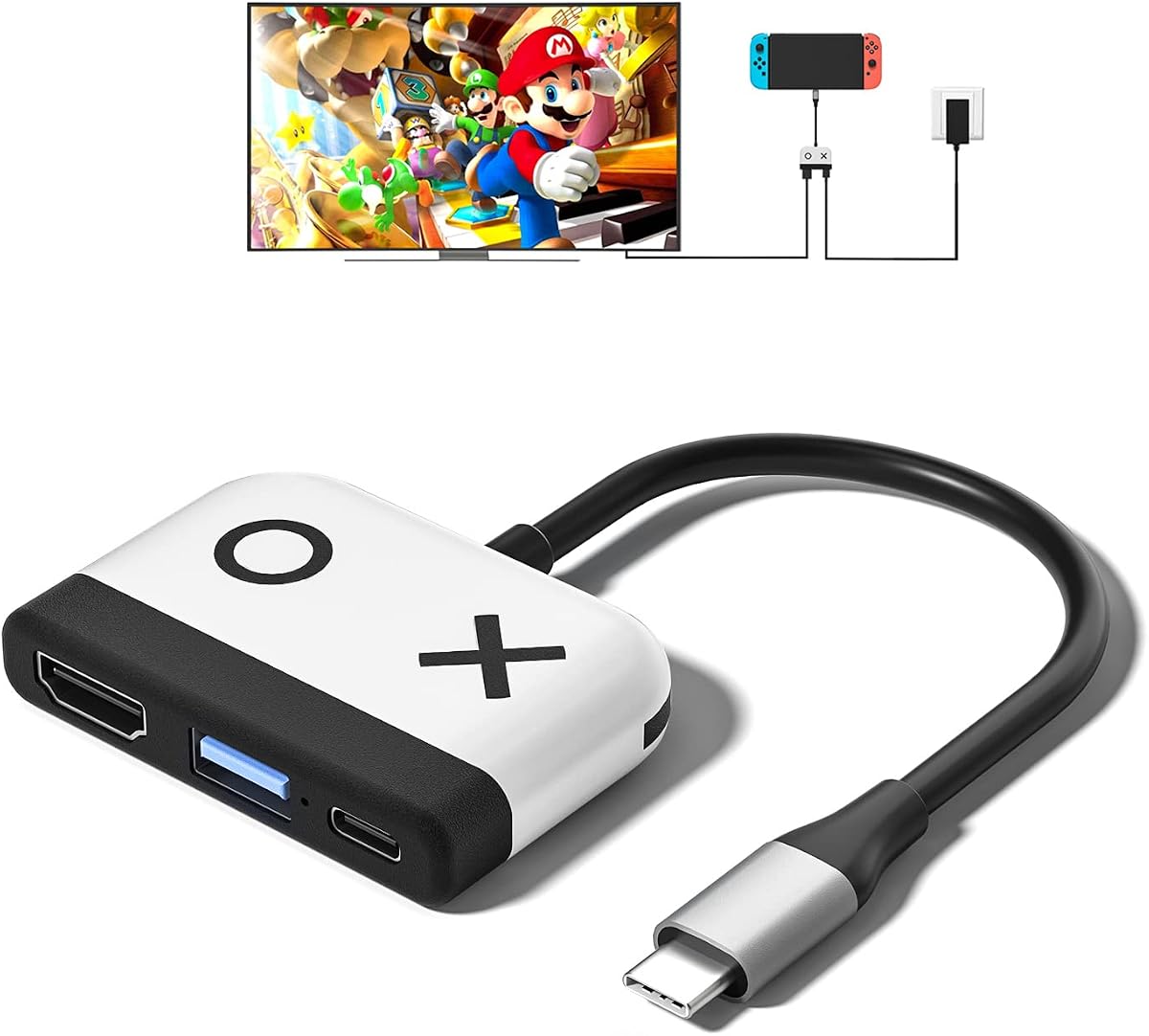


The pdobq Switch Dock stands out as a top contender in the market for portable adapters. With a strong rating and versatile features it offers great value for budget-conscious gamers seeking reliable performance without compromise.
We may earn a commission when you buy through this link, at no additional cost to you.
It features HDMI 2.0 output capable of 4K at 60Hz which ensures crisp visuals on modern screens. The inclusion of a USB 3.0 port allows for data transfer or connecting accessories while charging via the PD port keeps your console powered during sessions.
While it lacks bundled cables and uses standard plastic materials its compact form factor makes it easy to pack. The trade-off for the lower price is minimal given the solid functionality and broad compatibility with various devices.
Ideal for travelers needing a reliable replacement for the original station this dock delivers essential features effectively. It balances cost and performance well making it a smart choice for casual or frequent users alike.
The combination of HDMI and USB ports allows you to connect controllers or drives while streaming video.
Its small size ensures it fits easily into any backpack or carry-on without adding significant weight.
We may earn a commission when you buy through this link, at no additional cost to you.
The RREAKA TV Dock impresses with its robust aluminum alloy construction that feels premium in the hand. This build quality ensures longevity and heat dissipation which is critical for sustained gaming sessions on large screens.
We may earn a commission when you buy through this link, at no additional cost to you.
It supports 100W power delivery allowing rapid charging of your console and compatible devices simultaneously. The 4K 60Hz HDMI output provides smooth and detailed visuals making it perfect for high fidelity gaming experiences on modern TVs.
Although the price is higher than plastic alternatives the durability and charging speed justify the investment. The main limitation is the lack of included cables but most users already have compatible HDMI and power adapters at home.
This dock is best for users who prioritize build quality and fast charging capabilities. It serves as an excellent replacement that enhances both performance and the overall feel of your setup during play.
The aluminum case protects internal components and helps manage heat better than plastic options.
The 100W PD input ensures your device charges quickly even while running intensive games in dock mode.
We may earn a commission when you buy through this link, at no additional cost to you.
This portable dock features a high-quality silicone exterior that resists scratches and minor impacts during travel. Its rugged design makes it a reliable choice for gamers who frequently move their setup between locations like hotels or friends' homes.
We may earn a commission when you buy through this link, at no additional cost to you.
It supports various video outputs including 4K and 1080P ensuring compatibility with different screen types. The USB 3.0 port offers fast data transfer speeds while the charging port keeps your console powered up during extended use.
While the silicone exterior may attract dust easily it is simple to wipe clean and protects the internal components well. The lack of included accessories is a minor inconvenience given the solid functionality and portability of the device.
Ideal for active users this dock combines protection with performance seamlessly. It ensures your console stays safe while providing the necessary connections for a smooth gaming experience on any available display.
The silicone coating absorbs shocks and prevents scratches that could damage the device during transit.
Compatible with various devices it offers flexibility for different consoles and monitors with HDMI ports.
We may earn a commission when you buy through this link, at no additional cost to you.
The iPLYGAM Switch Dock features an upgraded 6-in-1 design providing extensive connectivity options for your devices. This allows you to connect peripherals and charge simultaneously without needing additional hubs or adapters for your setup.
We may earn a commission when you buy through this link, at no additional cost to you.
It includes safety features like an overheat protection chip to ensure safe operation during long sessions. The LED light indicator helps you confirm connectivity status quickly which is useful when setting up in different rooms or environments.
While it uses plastic materials the anti-skid pads keep it stable on flat surfaces effectively. The primary drawback is the absence of included cables but this keeps the price competitive for users who already have necessary accessories.
This dock suits users needing more ports for a connected desk setup while traveling. It balances functionality and safety with a design that fits well in various spaces without taking up much room.
Multiple USB ports allow you to attach keyboards or drives while maintaining your video feed.
Built-in protection chips help prevent overheating which protects your console during extended docked play.
We may earn a commission when you buy through this link, at no additional cost to you.
Designed with future hardware in mind this dock supports the latest Switch 2 console as well as current models. This forward compatibility ensures you won't need to replace your accessory when upgrading to newer systems in the near future.
We may earn a commission when you buy through this link, at no additional cost to you.
It comes with an HDMI cable included which adds immediate value and reduces initial setup costs for users. The 100W PD charging capability keeps your console powered efficiently ensuring uninterrupted gameplay even during intense sessions.
While the power adapter is not included most users have compatible chargers readily available. The slightly higher price reflects the advanced compatibility and bundled cable making it a cost-effective choice for long term use.
Best for gamers looking to future-proof their setup this dock offers reliability and convenience. It streamlines the connection process and ensures high quality video output for the best gaming experience possible.
Support for new console models means you can use this dock for years without compatibility issues.
The included HDMI cable means you can start gaming on your TV immediately upon arrival.
We may earn a commission when you buy through this link, at no additional cost to you.
This dock offers a straightforward 3-in-1 solution that covers essential needs without unnecessary complexity. Its plug-and-play simplicity makes it ideal for users who want a quick and easy way to connect to a TV.
We may earn a commission when you buy through this link, at no additional cost to you.
With 100W pass-through charging it keeps your console powered while playing on a big screen. The USB 3.0 port allows for connecting basic peripherals like mice or keyboards for a more versatile experience at home.
The lightweight build is great for travel but may feel less durable compared to metal options. However the low price point makes it an excellent entry-level choice for those new to portable docking stations.
It is perfect for budget-conscious buyers needing reliable functionality for basic use cases. The design ensures you get the core features needed for TV mode without paying for premium extras.
No drivers are required to get started ensuring a hassle-free connection process for any user.
This model provides essential docking features at a price that is hard to beat in the market.
We may earn a commission when you buy through this link, at no additional cost to you.
Designed for minimalists this dock is incredibly lightweight and small enough to fit in a pocket easily. It prioritizes portability above all else ensuring you can carry it anywhere without worrying about adding bulk to your bag.
We may earn a commission when you buy through this link, at no additional cost to you.
It supports 1080P video output which is sufficient for most portable and small TV setups. The three available ports including USB 3.0 and PD charging cover the basics for gaming and powering your console simultaneously.
While the lower resolution limits use on large screens the convenience factor is high for casual travel. It is a practical tool for quick sessions where carrying a heavy dock is not desirable or necessary at all.
This option works best for users who prioritize extreme portability over high-end video features. It delivers reliable performance in a form factor that is unmatched by many other options available today.
Its tiny footprint ensures it never gets lost in a backpack and is always ready for use.
The minimal weight makes it ideal for backpackers or commuters who need to save every ounce of weight.
We may earn a commission when you buy through this link, at no additional cost to you.
This dock stands out for its compatibility with MacBooks and other USB C devices beyond just gaming consoles. It acts as a versatile hub for laptops and phones allowing you to expand your productivity while gaming on a large screen.
We may earn a commission when you buy through this link, at no additional cost to you.
The 4K 60Hz HDMI output ensures sharp visuals for both gaming and video content. The USB 3.0 port provides high-speed data transfer which is useful for moving files between your console and computer quickly during setup.
While it lacks bundled cables its broad compatibility makes it a strong choice for users with multiple devices. The Samsung DEX support adds extra utility for Android users needing a versatile workstation setup.
It is ideal for power users who need a single dock for both work and play. The ability to connect various devices efficiently makes it a valuable tool for a connected lifestyle on the go.
Support for DEX and desktop modes turns your phone or tablet into a full workstation setup.
The USB 3.0 port ensures fast file transfers which speeds up setup for your devices.
We may earn a commission when you buy through this link, at no additional cost to you.
This dock combines a classic aesthetic with strong performance features making it a stylish addition to any setup. The aluminum alloy construction ensures durability while keeping the weight low for easy transport during trips.
We may earn a commission when you buy through this link, at no additional cost to you.
It supports 4K 60Hz output providing clear and smooth video for gaming and media consumption. The USB 3.0 port offers reliable data connectivity ensuring that your peripherals function correctly while you play games.
While it does not include cables its straightforward design reduces the risk of failure. The focus on essential features ensures you get reliable performance without unnecessary complexity or bulk.
Best for users who appreciate clean design and reliable function this dock delivers consistently. It balances style and utility making it a great choice for both travel and permanent home installations.
The classic black and white color scheme blends well with most modern electronics and furniture setups.
The aluminum casing protects against physical damage and helps dissipate heat efficiently during use.
We may earn a commission when you buy through this link, at no additional cost to you.
This dock features an advanced cooling system designed to protect your console during long gaming sessions. The ventilation openings help dissipate heat effectively which prevents overheating issues that can arise during extended use.
We may earn a commission when you buy through this link, at no additional cost to you.
It supports 4K video output and multiple USB ports offering flexibility for connecting various devices. The spring stand connector protects the charging port from damage when inserting or removing the console repeatedly over time.
While it has lower user ratings the unique safety features make it a viable option for concerned parents or tech enthusiasts. The cooling design ensures that your console runs cooler than with standard plastic alternatives available.
Ideal for long gaming nights this dock prioritizes the safety and health of your device. Its thoughtful design elements add value by addressing common concerns about heat and physical wear during play.
The integrated cooling vents ensure your console stays within safe temperature limits even during heavy use.
The flexible spring stand reduces stress on the charging port preventing damage from frequent plugging.
We may earn a commission when you buy through this link, at no additional cost to you.
Selecting the right portable dock involves considering several key factors that affect performance and durability. This guide breaks down the essential aspects to help you make an informed decision.
Check if the dock supports 4K or 1080P output to match your TV capabilities. Most consoles limit output but a good dock should not bottleneck your display.
Look for HDMI 2.0 ports to ensure smooth playback at higher refresh rates.
Ensure the dock supports Power Delivery to keep your console charged while playing. A minimum of 60W is recommended for stable performance.
Higher wattage options like 100W offer faster charging which is useful for longer sessions.
Aluminum alloys offer better durability and heat dissipation compared to standard plastics. Consider the material if you travel frequently.
A sturdy build ensures longevity and protects internal components from physical impacts.
Look for USB 3.0 ports if you need to connect drives or peripherals while gaming. More ports add versatility to your setup.
A dedicated charging input and HDMI output are the minimum requirements for any dock.
Compact designs that fit in a pocket or small bag are ideal for travel. Avoid bulky docks if you plan to carry them often.
Lightweight options reduce the strain on your bag during transit and are easier to store.
Verify that the dock works with your specific console model and any future upgrades. Some docks support multiple devices like Steam Deck or MacBooks.
Universal compatibility ensures you can use the dock for other devices as needed.
Some docks come with cables or adapters which can save money on separate purchases. Check if the adapter is included before buying.
Missing cables are common so be prepared to use your own high-quality HDMI and power adapters.
Look for built-in chips that protect against overheating and overcharging to safeguard your console. Safety is crucial for long-term device health.
Proper insulation and ventilation design prevent damage to sensitive electronics during use.
Start by connecting the power adapter to the dock first to ensure stable power flow. Then plug your HDMI cable into the dock and the TV. This order prevents connection errors.
Insert the console into the dock carefully avoiding excessive force on the charging port. Wait a few seconds for the TV signal to switch automatically before starting your game session.
Store the dock in a protective pouch when not in use to prevent scratches and damage. Keep it dry and away from direct sunlight to maintain the build quality over time.
Most docks do not include HDMI or power cables so you should check the product description before buying. Some models offer bundles with cables but standalone units are more common. Plan to use your own compatible accessories for the best setup.
While many docks support 4K output most current consoles are limited to 1080P natively. The dock ensures you can use a 4K TV for other devices like laptops or future consoles.
Yes many of these docks support other USB C devices like tablets and laptops. Check the compatibility list to ensure it works with your specific non-console hardware needs.
It is recommended to use an adapter that matches the wattage requirements for stable performance. Most docks support standard PD chargers but high wattage options provide better stability.
If the dock feels excessively hot to the touch it may be overheating during use. Ensure proper ventilation and avoid covering the device while playing to maintain safe operation.
Several models are designed to support Switch 2 hardware so check the product title for compatibility. Future-ready docks will explicitly state support for newer console generations in their descriptions.
Flickering can be caused by loose cables or insufficient power. Ensure all connections are tight and use a high-wattage power adapter for stable signal transmission.
Yes most docks support pass-through charging allowing you to play while keeping your console powered. This is essential for long gaming sessions on TV without running out of battery.
Our top picks offer a range of options from budget-friendly choices to premium models with advanced features. Whether you need durability or speed there is a dock that fits your specific gaming needs.
Prioritize build quality and charging speed to ensure your setup performs well over time. Consider how often you travel and what accessories you need to make the right choice.
Always verify current prices and product details on the retailer site before purchasing to ensure the best deal. Availability can change quickly so act promptly if you find the right fit.