
CENMATE Aluminum 4 Bay
4.3Editor score
Aluminum-Alloy build with fan
Supports up to 80TB total
USB A/C 3.0 compatibility
Direct Attached Storage provides a reliable way to expand your computer's capacity without network complexity. These enclosures connect directly via USB or Thunderbolt, offering fast transfer speeds and simple plug-and-play functionality for professionals and enthusiasts alike.
We analyzed ten top-rated DAS models based on compatibility, transfer speeds, build quality, and user feedback. Our comparison highlights key differences in drive support, cooling systems, and RAID capabilities to ensure you find the perfect fit for your workflow.
Each pick showcases unique strengths, from budget-friendly 4-bay options to hybrid HDD and NVMe solutions. Prices and availability change frequently, so check current listings before purchasing to ensure you get the best value for your specific storage needs.
4.3Editor score

4.2Editor score

5.0Editor score
As an Amazon Associate we earn from qualifying purchases.
This side-by-side comparison evaluates all ten Direct Attached Storage enclosures across critical specs like interface speed, bay count, drive compatibility, and unique features to help you decide which model suits your data management requirements.


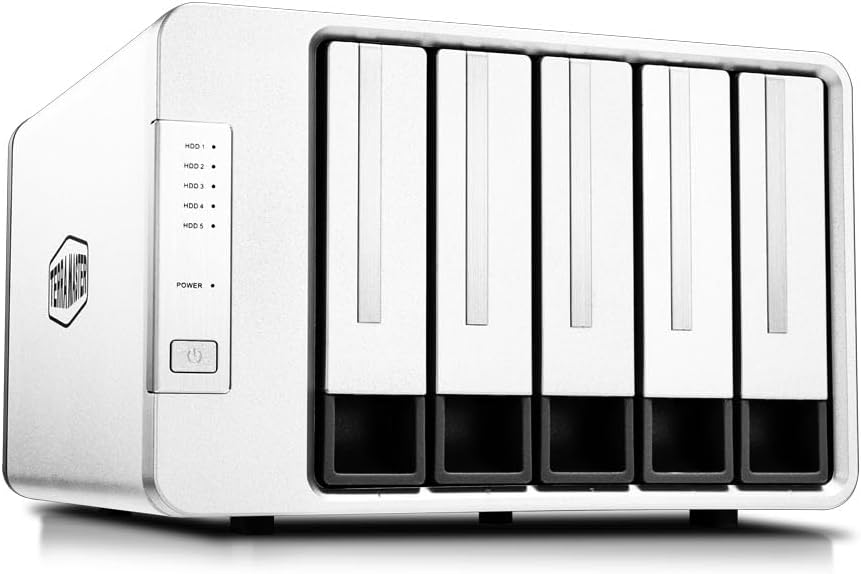


The TERRAMASTER D4-320 is a robust 4-bay enclosure that delivers high-speed performance for professional workflows. With a 4.2 rating from users, it stands out for its reliable USB 3.2 Gen2 connection and efficient cooling system.
We may earn a commission when you buy through this link, at no additional cost to you.
This model supports up to 120TB of total storage and achieves read/write speeds reaching 1016 MB/s with four SATA III drives. The tool-free push-lock design simplifies drive installation while the intelligent fan maintains safe operating temperatures.
While it lacks hardware RAID functionality, the plug-and-play simplicity makes it ideal for users who prefer individual drive management. The noise reduction features ensure it remains suitable for office environments.
It is an excellent choice for creatives needing quick access to large media files without network dependency. We recommend it for anyone prioritizing speed and ease of use in a direct attached storage setup.
USB 3.2 Gen2 allows 10Gbps transfer rates, reducing wait times during large file moves or video editing workflows.
Sound-absorbing panels and a temperature-controlled fan keep noise levels low while protecting drives from overheating.
We may earn a commission when you buy through this link, at no additional cost to you.
The QNAP TR-004 is designed for users seeking hardware RAID protection in a direct attached storage device. With a solid 4.2 rating, it offers reliable performance and seamless integration with compatible QNAP network attached storage units.
We may earn a commission when you buy through this link, at no additional cost to you.
It supports RAID 0, 1, and 5 configurations, providing data redundancy or speed enhancements depending on your needs. The USB Type-C connection ensures compatibility with modern computers and faster data transfers than older USB standards.
While it is primarily an external storage solution, its ability to expand QNAP NAS capacity adds significant value for existing users. However, it does not support combining storage pools with certain older NAS models.
This unit is best suited for businesses or professionals needing secure, expandable storage with minimal configuration. It is a strong option for those already invested in the QNAP ecosystem requiring additional local storage.
Built-in RAID support allows for data redundancy and performance improvements without relying on software processing.
Users can utilize the TR-004 to extend the storage capacity of their existing QNAP network attached storage systems.
We may earn a commission when you buy through this link, at no additional cost to you.
The TERRAMASTER D8 Hybrid 2 delivers exceptional performance by integrating both mechanical drives and NVMe SSDs in one unit. It holds a perfect 5.0 rating, reflecting its success in balancing massive capacity with high-speed access for demanding tasks.
We may earn a commission when you buy through this link, at no additional cost to you.
With four HDD bays and four NVMe slots, users can store large files on HDDs while keeping active projects on fast SSDs. The USB 3.2 Gen2 interface supports transfer speeds up to 10Gbps, ensuring smooth workflows for video editors and developers.
A unique TPM power management feature optimizes energy use without compromising performance. This technology allows users to switch between power save and active modes easily, extending drive life and reducing power consumption.
This is an ideal choice for professionals requiring both archival storage and rapid processing speeds. While the investment is significant, the flexibility and speed make it a top-tier direct attached storage solution for power users.
Separating hot and cold data across NVMe and HDD drives maximizes both performance and cost efficiency simultaneously.
Proprietary technology balances energy efficiency and rapid wake-up times for a tailored user experience.
We may earn a commission when you buy through this link, at no additional cost to you.
The CENMATE Aluminum 4 Bay provides an excellent entry point into direct attached storage with its affordable price and robust design. It has earned a 4.3 rating, indicating high satisfaction among users looking for reliable and accessible storage expansion.
We may earn a commission when you buy through this link, at no additional cost to you.
Constructed from aluminum alloy, this enclosure dissipates heat effectively and includes a cooling fan to maintain performance during transfers. It supports up to 80TB of total storage and offers plug-and-play functionality for Windows, Mac, and Linux systems.
While it uses USB 3.0 rather than the latest Gen2 standards, it still delivers respectable speeds for everyday tasks. The tool-free design ensures easy maintenance and drive swapping without needing extra tools.
This model is perfect for home users or small businesses needing affordable storage without sacrificing durability. If you prioritize cost efficiency and reliable build quality over maximum transfer speeds, this enclosure is a smart choice.
The aluminum shell provides premium protection at a budget-friendly price point suitable for general users.
No drivers are needed to set up, making it ready to use immediately after connecting to your computer.
We may earn a commission when you buy through this link, at no additional cost to you.
The SABRENT 5-Bay dock is ideal for users needing to manage multiple large drives simultaneously. Its 4.1 rating reflects consistent performance and the reliability of its dedicated controller for each bay, ensuring stable data connections.
We may earn a commission when you buy through this link, at no additional cost to you.
Featuring tray-less hot-swap technology, drives can be inserted and removed without tools while the unit is running. This convenience is paired with a USB-C 10Gbps interface for high-speed data transfers and support for up to 100TB total capacity.
The design includes a rear USB-C port for daisy-chaining, which helps reduce cable clutter on desks. However, it lacks RAID support, so individual drive management is the primary focus for data organization.
This solution is perfect for professionals needing to maintain large libraries of independent drives. If you prioritize reliability and the ability to manage multiple high-capacity drives without network overhead, this dock is highly recommended.
A dedicated controller for each bay ensures stable connections and prevents one drive from affecting others.
Connect multiple docks in a chain using the rear USB-C port to expand capacity without needing extra ports.
We may earn a commission when you buy through this link, at no additional cost to you.
The TERRAMASTER D8 Hybrid offers a versatile setup for users wanting both massive capacity and fast SSD speeds. With a 3.5 rating, it performs well but requires careful planning to maximize its hybrid storage capabilities effectively.
We may earn a commission when you buy through this link, at no additional cost to you.
Supporting up to 152TB of total space, it balances slow bulk storage with rapid access for active files. The USB 3.2 Gen2 protocol ensures speeds up to 10Gbps for NVMe drives, and the enclosure includes smart cooling to prevent overheating.
Its power-on recovery feature automatically reboots after unexpected power loss, enhancing stability in unattended scenarios. However, the lack of automatic RAID means users must manually organize data across different drive types for optimal results.
This is best for advanced users comfortable managing different storage tiers manually. If you need a mix of large archives and fast working space in one unit, this model provides strong technical potential for flexible setups.
Allows users to manually choose where data lives based on speed needs and storage capacity priorities.
Adjusts fan speed based on disk temperature to keep performance stable during heavy workloads.
We may earn a commission when you buy through this link, at no additional cost to you.
The TERRAMASTER D5-310 stands out for its hardware RAID control via a physical knob on the back. With a 3.6 rating, it offers robust data protection and decent performance for users requiring redundancy without complex setup steps.
We may earn a commission when you buy through this link, at no additional cost to you.
It supports RAID 5, 0, 1, and 10 modes, allowing flexibility in how data is stored and protected. The USB 3.1 Gen 1 interface delivers up to 5Gbps speeds, which is sufficient for most backup and archival tasks.
Compatibility with macOS is seamless, making it a good choice for Apple users needing direct attached storage. Included backup software further adds value by automating scheduled tasks for data protection.
This unit is well-suited for users prioritizing data safety through hardware redundancy. If you need a straightforward way to implement RAID on a Mac or PC without third-party tools, this is a practical option.
A dedicated knob on the back makes switching between RAID modes simple and intuitive for non-experts.
Works without drivers on Windows, macOS, and Linux systems for seamless multi-platform usage.
We may earn a commission when you buy through this link, at no additional cost to you.
The WAVLINK 4-Bay is unique among direct attached storage enclosures for its inclusion of an HDMI output. With a 4.0 rating, it provides both fast data storage and the ability to connect directly to displays without routing through a computer.
We may earn a commission when you buy through this link, at no additional cost to you.
It supports transfer speeds up to 10Gbps and allows up to 88TB of capacity. The aluminum build ensures durability and heat dissipation while independent power switches allow for flexible drive management.
Users can connect peripherals via another USB-C port or daisy-chain devices. The HDMI feature supports 4K resolution making it useful for media playback or presentation scenarios requiring external storage.
This is best for users needing a versatile docking station that also serves as a storage solution. If you want to connect drives to a monitor or TV easily, this model offers distinct advantages over standard enclosures.
The HDMI port supports 4K output enabling direct connection to displays for viewing media from storage.
USB 3.2 Type-C delivers 10Gbps bandwidth for rapid data access and large file transfers.
We may earn a commission when you buy through this link, at no additional cost to you.
The ORICO 5 Bay enclosure focuses on simplicity with a magnetic cover that eliminates the need for screws. It holds a 4.0 rating reflecting its reliable performance and ease of use for home users expanding their local storage.
We may earn a commission when you buy through this link, at no additional cost to you.
With support for up to 110TB, it provides substantial space for media libraries or backups. The magnetic chip design ensures the cover stays secure while allowing quick access to internal drives when needed.
It includes multiple protection features against voltage spikes and overheat to safeguard connected data. However, Linux users may experience limitations in recognizing all drives simultaneously which is a known constraint for this model.
This is a solid choice for home media servers or casual backups needing capacity and ease of access. If you value tool-free maintenance and simple plug-and-play functionality, this unit delivers good value for the price.
No tools are required to open the enclosure making drive changes quick and frustration-free.
Built-in safeguards protect against overcurrent and overheat to maintain data security and hardware longevity.
We may earn a commission when you buy through this link, at no additional cost to you.
The QNAP TR-002 offers a compact 2-bay solution for users needing reliable hardware RAID in a small footprint. With a 4.0 rating, it provides consistent performance and integrates well with QNAP ecosystems for expanded storage workflows.
We may earn a commission when you buy through this link, at no additional cost to you.
It supports RAID 0, 1, and JBOD configurations allowing flexibility between speed and redundancy. The USB Type-C connection ensures compatibility with modern devices and provides stable data transfers for everyday backup needs.
While limited to two drives, it is sufficient for users prioritizing data safety over massive capacity. Lockable bays add an extra layer of security for physical drive protection in shared environments.
This unit is ideal for small businesses or personal users needing a straightforward redundant backup option. If you are already using QNAP NAS or want a simple hardware RAID solution, this model is highly practical.
A smaller form factor does not sacrifice RAID protection making it easy to fit into tight workspaces.
Works seamlessly with QNAP systems to expand total storage capacity without complex configuration steps.
We may earn a commission when you buy through this link, at no additional cost to you.
Selecting the right Direct Attached Storage involves evaluating interface speed, drive capacity, and compatibility with your existing systems to ensure optimal performance for your specific data management needs.
Transfer speed depends heavily on the connection protocol like USB 3.2 Gen2 or USB 3.0. Faster interfaces reduce wait times during large file transfers which is critical for video editing or backup workflows.
Look for USB 3.2 Gen2 or Thunderbolt support if you prioritize high-speed data access over other features.
Determine how many drives you need now and in the future. More bays allow for greater total capacity but often increase size and power requirements.
Choose a 4-bay or 5-bay unit for large archives or 2-bay for compact backups to match your storage growth plans.
Some enclosures offer hardware RAID which provides data redundancy or speed advantages without relying on software. This is vital for protecting important data from drive failure.
Opt for a model with dedicated RAID controllers if data safety is a higher priority than simple individual drive management.
Ensure the enclosure works without drivers on your system whether Windows macOS or Linux. Native support simplifies setup and reduces potential connectivity issues.
Check product descriptions explicitly stating cross-platform support to avoid installation headaches on your specific device.
Active cooling fans maintain drive health during heavy transfers but can introduce noise. Look for temperature-controlled fans that adjust speed based on heat levels.
Prioritize enclosures with sound-dampening materials if you plan to keep the unit in a quiet office or home environment.
Materials like aluminum provide better heat dissipation and protection against physical damage compared to plastic. A solid build ensures longevity especially when drives are frequently swapped.
Select a unit with reinforced housing and lockable bays if portability or security is a concern for your setup.
Hot-swapping allows removing or installing drives without powering down the enclosure. This feature enhances workflow efficiency for users managing multiple datasets regularly.
Ensure the model supports hot-swap with secure locking mechanisms to prevent accidental disconnection during operation.
Compare features against cost to find the best balance for your needs. Higher-end models offer hybrid NVMe support or advanced RAID but may not be necessary for basic storage expansion.
Invest in premium features only if your workflow specifically demands them to avoid unnecessary spending on unused capabilities.
Connect the enclosure to a powered USB port and wait for the system to recognize the drives. Most models are plug-and-play so no driver installation is required for standard use.
Always use the provided power adapter for stable operation especially when multiple drives are installed. This prevents voltage drops that could lead to data corruption or drive failure.
Regularly check drive temperatures and clean dust from ventilation areas to maintain optimal cooling. Back up critical data to a separate location to ensure protection against hardware failure.
DAS connects directly to one computer via USB while NAS connects over a network allowing access from multiple devices. DAS is simpler and often faster but limited to a single host.
Most modern enclosures are plug-and-play and require no driver installation on Windows Mac or Linux. Always check compatibility notes if you use an older operating system.
Yes most DAS enclosures support both HDDs and SSDs provided the interface matches. SSDs offer faster speeds but may generate less heat than mechanical drives.
Check your computer manual or use system info tools to view port specifications. USB 3.2 Gen2 ports are usually labeled SS10 or Type-C with 10Gbps markings.
RAID is useful for data redundancy and performance but optional if you back up elsewhere. Decide based on how critical immediate data protection is to your workflow.
Ensure the enclosure is formatted in a Mac-compatible file system like ExFAT or APFS. Some older models may require firmware updates to support newer macOS versions.
Sudden power loss can interrupt data transfers but modern units often have safeguards. Always safely eject drives before unplugging to prevent data corruption.
We have reviewed ten top Direct Attached Storage solutions offering various combinations of speed capacity and features for different workflows. From the TERRAMASTER D4-320's balanced performance to the WAVLINK 4-Bay's HDMI versatility there is an option for every need.
Prioritize your specific requirements such as interface speed RAID support or hybrid drive options when making your decision. Understanding your workflow will guide you to the enclosure that delivers the best value and performance.
Prices and availability fluctuate so always check current listings before purchasing to ensure you get the best deal. We recommend comparing current offers to secure the ideal storage setup for your needs.