
Digital Calendar 10.1 Touchscreen
4.4Editor score
No subscription required for features
Smart weekly meal manager
Wall-mountable design
Modern households juggle countless schedules, chores, and memories that often end up scattered across paper notes and digital apps. A digital touchscreen organizer brings all these elements together into one central command center on your wall or desk. These devices transform mundane planning into an interactive experience that keeps every family member aligned and informed.
We evaluated ten leading models based on screen quality, syncing capabilities, and ease of use for all ages. Our analysis focused on features like real-time calendar integration, interactive chore systems, and dual functionality as photo frames. We prioritized devices that offer robust organization without requiring hidden monthly subscription fees.
Each pick below highlights specific strengths such as budget-friendly options, large displays, or advanced smart home integration. You will find detailed breakdowns of pros, cons, and ideal use cases for every model. Please note that prices and availability can change frequently, so verify current details before purchasing.
4.4Editor score

4.4Editor score

4.6Editor score
As an Amazon Associate we earn from qualifying purchases.
This side-by-side comparison highlights the key specifications and unique selling points of each digital touchscreen organizer to help you decide which model fits your home best.


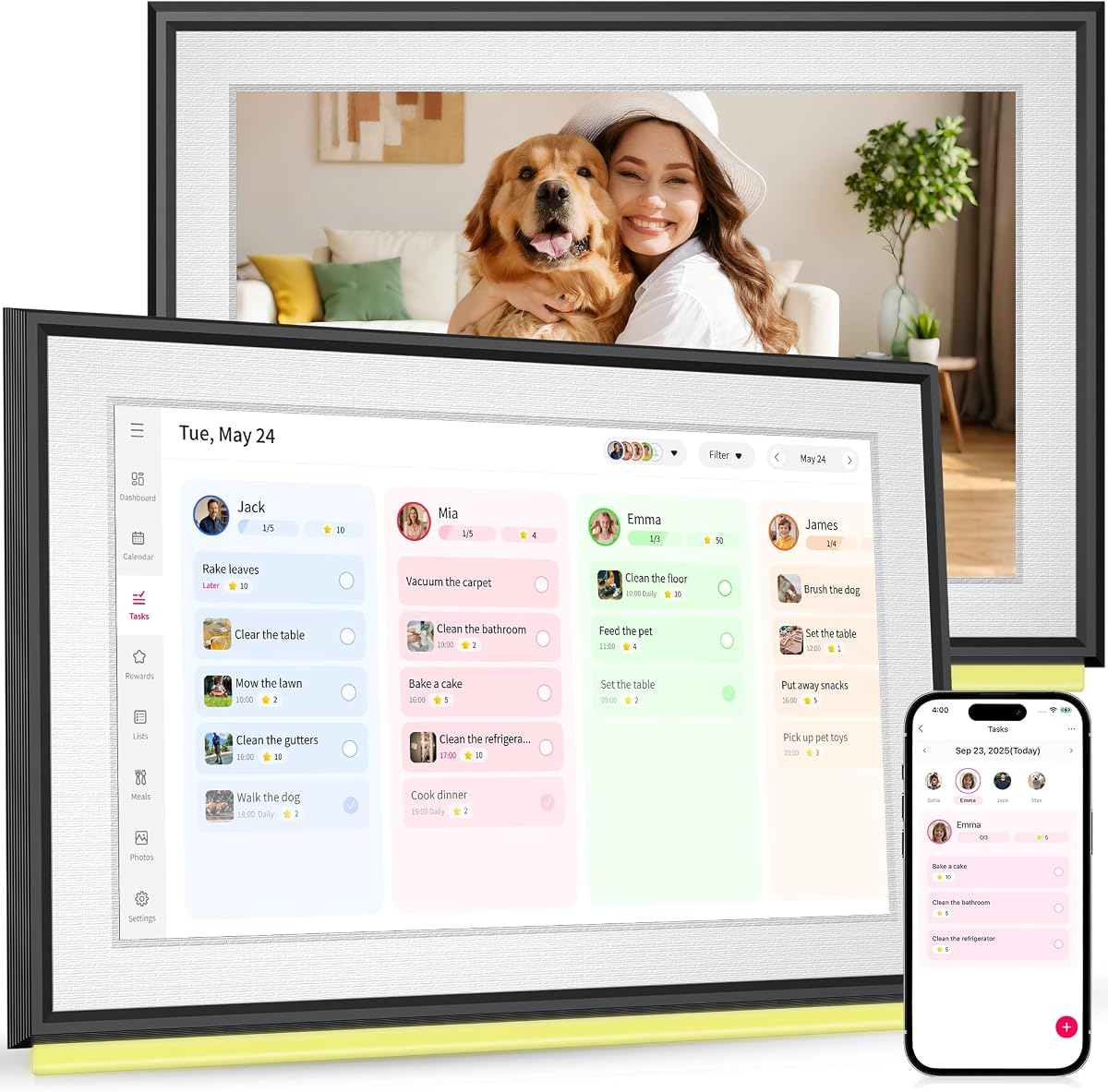

This 15.6 inch digital calendar wall touch screen stands out as a top choice for families needing a comprehensive command center. It offers a high rating of 4.4 stars based on user feedback regarding its intuitive interface and reliable syncing capabilities. The device transforms mundane scheduling into an engaging experience with built-in chore charts and photo frames.
We may earn a commission when you buy through this link, at no additional cost to you.
The standout quality is its ability to seamlessly integrate family calendars, meal planning, and chore charts into one sleek unit. Users appreciate the real-time synchronization with Google, Outlook, and iCloud which ensures every family member stays updated instantly. The HD touchscreen provides crystal-clear visibility from various angles making it easy for kids and seniors to use.
While the device is robust there are minor trade-offs such as the need to purchase batteries separately for any remote functionality. Additionally the wall mounting process involves basic hardware that may require a few minutes to install securely on your desired surface. These inconveniences are generally acceptable given the extensive organizational benefits provided by the unit.
If you need a reliable hub for managing complex household schedules this model is highly recommended. It suits busy parents looking to coordinate activities without hidden costs while also keeping grandparents connected through shared events. The combination of practicality and engaging features makes it a solid investment for any modern home.
It effectively reduces daily stress by centralizing information that was previously scattered across notes or apps. The reward system encourages children to take ownership of their tasks fostering responsibility in a fun way.
Syncs with major calendar platforms instantly so everyone sees updates without manual entry.
Gamified chore charts help kids learn habits while earning rewards for completed tasks.
We may earn a commission when you buy through this link, at no additional cost to you.
The Skylight Calendar offers a premium experience for busy families seeking a central display for shared schedules. It features a 15.4 inch touchscreen that combines scheduling with an interactive digital chore chart effectively keeping everyone in sync. The design is sleek and mounts easily on walls or sits beautifully on kitchen countertops for convenient access.
We may earn a commission when you buy through this link, at no additional cost to you.
Key strengths include seamless syncing with Google iCloud and Outlook allowing anyone to add updates directly on the device or app. The interactive chore chart and meal planning tools help reduce daily stress about routines and dinner decisions. Users find the HD smart display readable at a glance making it ideal for high traffic areas.
A trade-off is that certain advanced features like the photo screensaver or Magic Import require an optional premium plan. While basic functionality is robust this might be a consideration for those avoiding extra subscriptions. The limited color options mean it may not match every decor style as well as neutral alternatives.
This device is perfect for families who want a stylish yet functional organizer that encourages independence in children. It keeps the whole household on track with shared calendars and tasks providing on-the-go access via the companion app. The design fits naturally into layouts ensuring it becomes a daily utility rather than just a gadget.
It brings order to frantic routines by visualizing responsibilities and plans clearly. The ability to customize design elements allows it to blend well into modern home aesthetics while serving a practical purpose.
High quality screen ensures text and graphics remain readable even in bright kitchen lighting.
Integrated meal planning helps standardize dinner routines to reduce daily decision fatigue.
We may earn a commission when you buy through this link, at no additional cost to you.
This Digital Calendar 10.1 Touchscreen delivers excellent value by offering a full suite of features without hidden subscription fees. It syncs Google Calendar iCloud and Outlook in real time making it a smart organizer for schedules chores and meal plans. The device doubles as a digital picture frame displaying cherished memories when idle to add warmth to your home.
We may earn a commission when you buy through this link, at no additional cost to you.
Users appreciate the interactive chore list that lets you assign tasks and monitor progress right from your phone. Kids enjoy earning stars and unlocking rewards which turns routines into a fun game fostering responsibility. The smart weekly meal manager displays menus beautifully and generates grocery lists automatically to simplify shopping.
While the screen is smaller than premium models it remains highly functional and fits well in most spaces. The design is straightforward and may lack the sleek polish of higher end devices but it is reliable and effective. These limitations are minimal considering the comprehensive functionality available at this accessible price point.
This organizer is ideal for budget-conscious families who need robust tools without committing to monthly payments. It serves as a perfect gift for busy moms or grandmas holding together daily household logistics. The one screen approach ensures everyone knows their plans without chasing updates or asking what is next.
It reduces mental load by centralizing tasks and deadlines into a single visual interface. The sleep save energy features ensure the device is eco-friendly and cost effective for 24/7 operation.
No monthly fees make this an accessible entry point for digital organization tools.
Gamified rewards motivate children to complete chores independently and happily.
We may earn a commission when you buy through this link, at no additional cost to you.
The Digital Calendar 10.1 Smart Touchscreen is an all-in-one family organizer that balances affordability with useful features. It includes calendar sync chore charts rewards meal planning and to-do lists all without monthly fees. The 10.1 inch 1080P HD touchscreen offers clear visibility and doubles as a digital photo frame when not managing schedules.
We may earn a commission when you buy through this link, at no additional cost to you.
It works seamlessly with major platforms like Google iCloud and Yahoo ensuring everyone stays on the same page. A simple star-based reward system helps motivate kids to complete daily tasks maintaining family harmony. The storage capacity allows you to keep thousands of photos and videos stored directly on the device.
Trade-offs include the smaller screen which might be less visible from across a large room compared to larger models. App integration is functional but lacks some advanced customizations found in premium options. These factors are acceptable given the strong core functionality and reliable performance for daily household needs.
This model is great for smaller households or as a secondary display in a specific room like a bedroom. It makes an ideal gift for various occasions ensuring your whole family stays organized connected and on schedule year round. The combination of practical tools and memory display adds personal value to the device.
It streamlines daily stress by organizing tasks and meals in one convenient place. The photo frame mode adds a cozy touch to your home decor by showcasing family memories.
1080P HD ensures text and images remain sharp and easy to read up close.
Large storage keeps family memories safe and visible without needing external devices.
We may earn a commission when you buy through this link, at no additional cost to you.
This 15.6-inch Smart Digital Wall Planner earns a perfect 5.0 rating by combining smart chore charts with schedule planning. It transforms daily routines with a simple to color coded task system that eliminates messy paper planners. The intuitive interface is simple for kids seniors and every family member to use effectively without training.
We may earn a commission when you buy through this link, at no additional cost to you.
Users love the seamless calendar sync which connects schedules from Google iCloud and Yahoo within minutes of setup. The 2-in-1 design functions as a family planner and photo frame showcasing memories via rotating slideshows when idle. Uploading photos via the free app is convenient and keeps cherished moments visible on the stunning HD touchscreen.
A minor limitation is the inclusion of only a standard US-style plug which may require an adapter for some users. The design is straightforward but might not offer extensive color customization options. These small issues do not detract from the high quality performance and reliability praised by owners.
This model is perfect for those seeking a large clear display that manages tasks and memories seamlessly. The sleep wake mode helps save energy while keeping the calendar ready whenever you need it. It makes a thoughtful gift for women men and families looking to improve daily organization and connection.
It centralizes essential data so everyone knows their activities at a glance. The visual approach helps families stay organized and eliminates missed appointments consistently.
Simple setup means you can start organizing your schedule within minutes of opening the box.
Smart sleep mode reduces power consumption while maintaining instant access when needed.
We may earn a commission when you buy through this link, at no additional cost to you.
This Digital Calendar Wall Planner stands out with a professional color classification system for scientific family management. It serves as the ultimate command center replacing scattered paper notes with a single sleek screen for schedules and tasks. The real-time data synchronization prevents missed important dates and schedule conflicts across different platforms.
We may earn a commission when you buy through this link, at no additional cost to you.
The color-coded chore system distinguishes tasks for different members making it easy to track responsibilities. You can assign colored housework tasks and customized reward rules for kids to make chores fun and engaging. This approach cultivates independence and self-discipline while easing daily parenting pressure significantly.
Users note that setup involves using the specific app which might take a few extra steps than native solutions. The design is minimalist and functional but may lack premium materials found in higher priced units. These limitations are minor compared to the strong organizational tools and user friendly interface provided.
This device is ideal for parents who want to visualize schedules clearly without extra costs. The recipe saving function simplifies meal arrangements and helps standardize family housework routines. Remote photo sharing enables distant family members to bond by watching kids growth photos at any time.
It streamlines trivial matters to help everyone enjoy a warm and stress-free home life. The sensitive touch screen ensures smooth fingertip operation for quick updates throughout the day.
Color coding helps visually distinguish plans and chores for every family member instantly.
Remote photo sharing bridges gaps for grandparents living far from grandchildren.
We may earn a commission when you buy through this link, at no additional cost to you.
The Apolosign 21.5-inch Digital Calendar is a robust solution for homes wanting advanced customization without monthly fees. It allows you to switch easily between Calendar Mode and Android Mode for a fully customizable dashboard with widgets. The built-in Google Gemini voice assistant helps check schedules set reminders and control compatible smart home devices.
We may earn a commission when you buy through this link, at no additional cost to you.
This device supports widgets for weather clocks meals music and more to create a connected family dashboard. It also syncs with Google Calendar iCloud and Outlook ensuring daily life stays organized. The anti-glare HD touchscreen clarity and sleep mode provide comfortable viewing around the clock.
A trade-off is the premium price tag which may be too high for families seeking basic tools. Additionally fully customizing the Android mode takes time to learn and configure to your specific needs. These are acceptable compromises for those needing a smart hub that integrates deeply with other home systems.
This model is perfect for tech-savvy users who want more than a simple calendar display. It turns your wall into a living display that adapts to your routines and preferences. The combination of voice control and flexible layouts makes it a powerful tool for modern households.
It simplifies complex routines by centralizing apps and data on one large screen. The large display ensures everyone can view content clearly from anywhere in the room.
Voice assistant allows hands-free control of lights and cameras directly from the wall.
Android mode enables download of apps to expand functionality beyond standard planning.
We may earn a commission when you buy through this link, at no additional cost to you.
This Apolosign 15.6-inch Digital Calendar offers similar functionality to larger models in a compact format. It features dual mode for simple scheduling and customizable dashboards with widgets like weather and music. The included stand makes placement on desks or counters easy without needing wall mounting hardware.
We may earn a commission when you buy through this link, at no additional cost to you.
Users appreciate the interactive chore chart and reward tracking which helps keep routines consistent. It allows you to manage lists and meal planning in one shared digital space through the companion app. The anti-glare HD touchscreen clarity ensures content remains readable under various lighting conditions.
Trade-offs include the stand adding vertical space which might not suit every tabletop setup. The white finish looks clean but may require regular cleaning to maintain its appearance. These points are minor given the versatility and rich feature set provided by the device.
This model is great for kitchens or offices where wall mounting is not an option. It brings together schedules reminders and shared calendars to improve daily organization. The flexible placement options make it adaptable to different home layouts and environments.
It keeps schedules organized by bringing multiple tools into one screen. The dashboard allows for quick visual access to essential daily information.
Included stand allows for immediate desktop use without drilling holes in walls.
Customizable widgets put essential tools like weather right next to your calendar.
We may earn a commission when you buy through this link, at no additional cost to you.
This BIGASUO WiFi-enabled smart digital calendar simplifies scheduling with color-coded tasks and meal planning. It acts as a digital hub that transforms into a photo frame to display favorite memories around the clock. The setup is straightforward: just plug it in connect to Wi-Fi and sync your calendars automatically.
We may earn a commission when you buy through this link, at no additional cost to you.
Users find the interactive chore chart useful for building responsibility and healthy habits in children. The device syncs with Google iCloud and Yahoo ensuring events are always up to date. It offers a tablet-style interface that is intuitive for most users to navigate and update.
A limitation is that it is not designed for wall mounting limiting it to desktop placement. The system performance is adequate but may not match the speed of premium models. These trade-offs are acceptable for users seeking an affordable tabletop solution for family coordination.
This device is ideal for smaller households that prefer a portable command center. It helps end the chaos of missed appointments by providing a single visual schedule. The photo frame feature adds a personal touch to make the device feel more than just a tool.
It centralizes tasks and plans to make daily life more organized and stress-free. The free app enables easy updates from your phone whenever you are away.
Tablet style allows you to move the device between rooms as needed.
Color-coding tasks visually separates priorities for better family awareness.
We may earn a commission when you buy through this link, at no additional cost to you.
The 21.5-inch digital wall calendar combines planning and memory display in one elegant touchscreen device. It syncs with family schedules and offers reward points to motivate family members to complete tasks. The 1920x1080P IPS touchscreen delivers vibrant colors and wide viewing angles for everyone to see.
We may earn a commission when you buy through this link, at no additional cost to you.
Users appreciate the customizable themes which allow font sizes to be adjusted for grandparent-friendly interfaces. The free app enables you to plan your week from your phone with changes appearing instantly on the wall. It also serves as a digital photo frame to celebrate family memories when idle.
Trade-offs include a basic user interface that may lack advanced features found in other smart displays. The ecosystem is limited compared to full Android devices reducing flexibility for app expansion. These limitations are minor for those primarily needing a reliable wall display for schedules and photos.
This model is perfect for larger kitchens or offices where screen visibility is critical. It helps households stay organized by reducing missed appointments through clear visual reminders. The included mounting hardware ensures you can start using it right away in any desired spot.
It simplifies daily life by merging a desk planner with a digital photo album. The large display ensures that schedules are readable from across the room.
IPS display ensures colors remain accurate from any angle in the room.
Adjustable font sizes make it easy for seniors to read schedules clearly.
We may earn a commission when you buy through this link, at no additional cost to you.
Selecting the right organizer depends on your specific household needs and technical comfort. This guide breaks down the key factors to consider before purchasing.
Screen size impacts visibility and placement options. Larger screens like 21.5 inches are great for open walls while 10 inch models fit desks better. Always look for HD resolution (1080P) to ensure text is crisp and readable from a distance.
Choose a size that fits your room without overwhelming the space.
Many organizers promise free use but lock advanced features behind monthly subscriptions. Always check if core features like chore charts and syncing are free forever. This ensures your investment remains cost-effective over time.
Prioritize models that offer full features without recurring fees.
Ensure the device syncs with the apps your family already uses like Google Calendar or Outlook. Real-time sync prevents double bookings and keeps everyone informed instantly. Some models support multiple platforms while others are limited.
Verify the device supports your preferred calendar platforms before buying.
Look for interactive charts that let you assign tasks and track progress easily. Reward systems like stars or points make chores more fun for children. A good system should be simple to update on the device itself.
Select a model with a user-friendly task assignment interface.
When not in use, the device should display photos to serve as a decorative frame. Check storage capacity and whether you can upload photos via an app. This dual use adds value beyond just scheduling tasks.
Ensure the photo mode supports slideshow features for variety.
Some devices are designed for wall mounting while others sit on desks. Verify if mounting hardware is included or if you need to purchase it separately. Versatile options allow you to change the device position as needs evolve.
Choose a mounting style that fits your room layout.
The setup process should be straightforward connecting to Wi-Fi and syncing in minutes. A complicated setup might lead to abandonment of the device. Look for models with intuitive on-screen instructions and support.
Look for plug-and-play features to avoid technical headaches.
Higher-end models may include voice assistants like Google Gemini for hands-free control. This is useful for quickly checking weather or adding reminders without touching the screen. It adds a layer of convenience for busy households.
Consider voice control if you want hands-free interaction.
Start by placing the device in a central location like the kitchen or entryway where everyone will see it. Connect it to your home Wi-Fi network using the on-screen menu to enable syncing features. Follow the setup prompts to link your preferred calendar apps like Google or Outlook for real-time updates.
Regularly update your chore lists and meal plans to keep the content fresh and relevant for your family. Use the photo frame mode to display new memories periodically to add warmth to your home. Adjust screen brightness or sleep settings to balance visibility with energy consumption.
Clean the touchscreen with a soft dry cloth to avoid scratches or damage to the display. Avoid exposing the device to direct sunlight or moisture which can affect performance. Restart the device occasionally if it slows down to ensure smooth daily operation.
Most of the top models reviewed allow full access to chore charts without any subscription. Always verify this feature in the product details as some brands lock specific rewards behind paid plans. The budget picks often include these features for free to add value.
Many organizers come with mounting hardware but some tabletop models are designed for desks only. Check the product specs to confirm if wall installation is supported. If unsure look for models labeled as wall mountable specifically.
You typically link your accounts during setup by logging in to services like Google or iCloud. Once connected changes made on your phone appear instantly on the organizer screen. This sync ensures everyone sees the latest updates without manual entry.
Yes most devices allow you to upload photos via a companion mobile app. This lets you share memories from your phone to the organizer's storage. Some models also allow email uploads or direct sharing from other apps.
The device usually continues to show local data like saved photos or tasks. However syncing new calendar events requires an active connection. Simply reconnecting to Wi-Fi restores all cloud features automatically.
These organizers are designed with simple interfaces suitable for kids. The touchscreens are durable enough for daily interactions. Just ensure the device is securely placed to avoid tipping over.
Basic display features work offline but syncing calendars requires internet access. You can view local tasks and photos without a connection. However full functionality depends on network access for updates.
Use a soft microfiber cloth slightly dampened with water to wipe the screen. Avoid harsh chemicals or paper towels that might scratch the surface. Ensure the device is powered off before cleaning for safety.
The 15.6 Digital Calendar Wall Touch Screen offers the best balance of features and value for most families. It provides robust syncing and a clear display without hiding features behind subscriptions. This model ensures everyone stays on the same page with minimal effort.
For those seeking advanced capabilities consider the Apolosign 21.5-inch Digital Calendar for its large screen and voice assistant. It is ideal for tech-forward households that need deep integration with smart home devices. The dual mode offers flexibility that other standard planners lack.
Remember to verify current prices and availability as these details can change frequently. Investing in a digital organizer now can simplify your daily routine significantly. Select the model that fits your specific needs to transform your home management.