
HOZO NeoRuler Digital Scale Ruler
4.4Editor score
Bluetooth App Integration
Infinite Custom Scales
Space Divider LED
This guide compares the top digital architectural scale ruler models for architects and engineers, highlighting accuracy, built-in scales, and smart features
Choosing the right digital architectural scale ruler can transform how you measure plans and estimate materials on the go. These tools combine precision wheels with digital displays to eliminate manual calculations and reduce human error during takeoffs.
We evaluated ten leading models based on their scale variety, accuracy, portability, and additional features like app integration or drafting kits. Our analysis focuses on real-world usability for professionals who need reliable measurements in offices or on job sites.
Each product pick highlights specific strengths such as custom scales, volume calculations, or durability. While prices may fluctuate due to market conditions, these models represent the current best options for accurate digital plan measurement in 2026.
4.4Editor score

4.8Editor score

4.8Editor score
This table provides a side-by-side overview of the top ten models, highlighting their core specifications and unique features to help you quickly identify the tool that matches your specific drafting or measuring needs.




The Calculated Industries Scale Master Pro XE stands out as the top choice for professionals needing a reliable digital measuring tool. With a high rating and robust feature set, it excels in versatility and ease of use on various plan types.
We may earn a commission when you buy through this link, at no additional cost to you.
Its 91 built-in scales cover most architectural and engineering needs, while the 10 custom scale memory allows quick calibration for out-of-scale plans. The auto and manual counters streamline material takeoffs by tracking items like studs or piers as you roll.
While the device requires a tool for battery replacement to ensure safety, this is a minor trade-off for its durability. The rolling accuracy remains within acceptable limits for most estimating tasks, making it a trusted companion for jobsites.
If you need a comprehensive tool that minimizes calculation errors, this model is highly recommended. It balances advanced functionality with portability, ensuring you can work efficiently whether in the office or on the hood of a truck.
The inclusion of both US and metric scales in square and cubic formats ensures you can handle diverse project requirements without switching tools.
Dedicated keys for length width and height allow rapid data entry, while the accumulating memory helps track multiple measurements seamlessly.
We may earn a commission when you buy through this link, at no additional cost to you.
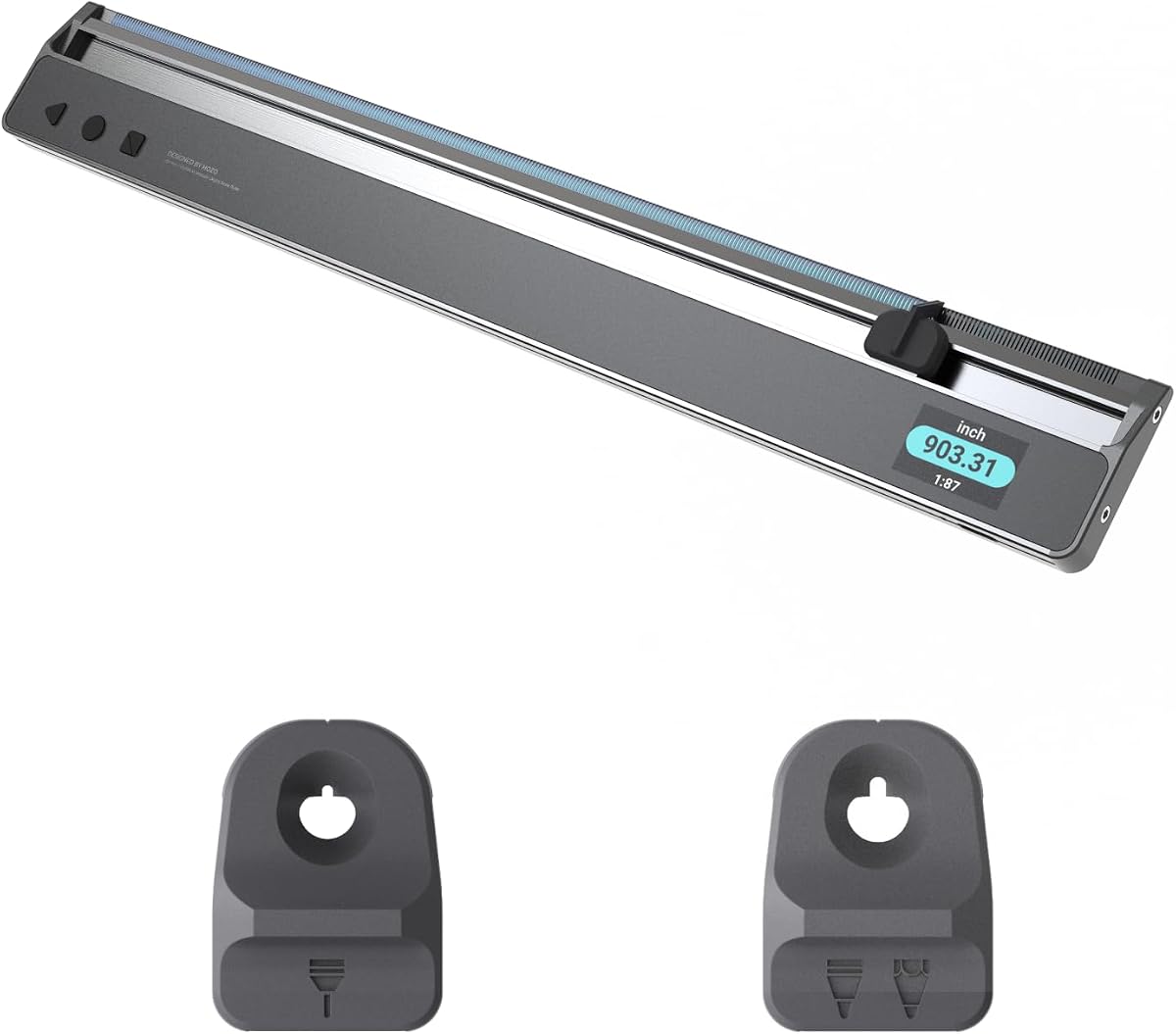
The HOZO NeoRuler brings smart technology to traditional measuring with its Bluetooth connectivity and app integration. This model is ideal for users who want to digitize their workflow and export measurements directly to CAD software.
We may earn a commission when you buy through this link, at no additional cost to you.
With 93 built-in scales and the ability to define infinite custom scales, it offers unmatched flexibility. The space divider feature helps quickly split distances into equal sections using LED indicators, which is useful for layout planning.
The premium price reflects its advanced capabilities, but those needing app connectivity will find it worthwhile. Some users may prefer standalone tools, yet the data export options provide significant value for digital design professionals.
For architects and engineers who prioritize digital workflow integration, this ruler is a strong candidate. Its durable construction ensures it can handle daily use while providing precise measurements for complex projects.
Transferring data to the MEAZOR app allows for further editing and drawing, bridging the gap between physical measurement and digital design.
Constructed from high-pressure aluminum alloy and stainless steel, the ruler is built to withstand the rigors of frequent use in various environments.
We may earn a commission when you buy through this link, at no additional cost to you.
For those who prefer a traditional approach without digital complexity, this 12-inch architectural scale ruler offers excellent value. Its high rating indicates strong performance for manual drafting and quick measurements on printed plans.
We may earn a commission when you buy through this link, at no additional cost to you.
Made from anodized aluminum alloy, it is sturdy and resistant to wear. The laser etched technology ensures numbers and markings remain clear over time, preventing the fading issues common with cheaper plastic rulers.
While it lacks digital features, its triple-sided design covers essential imperial scales needed for most building layouts. This makes it a practical backup or primary tool for students and professionals focused on drafting.
If you need a reliable physical ruler without electronic components, this is a top choice. Its durability and clarity make it suitable for daily studio use or as a dependable gift for engineering students.
Laser etched markings prevent wear and fading, ensuring long-term readability for precise measurements on various plan types.
The 12-inch size fits easily in drawers or bags, making it convenient for transport to different work locations without bulk.
We may earn a commission when you buy through this link, at no additional cost to you.
This bundle combines the HOZO NeoRuler with a NeoReading Kit, offering enhanced visibility for intricate details. The NeoMagnifier makes reading small text or fine lines on plans significantly easier, which is a key advantage for precision work.
We may earn a commission when you buy through this link, at no additional cost to you.
With 93 built-in scales and infinite customization options, the core ruler remains versatile. The addition of the magnifier adds value for professionals dealing with dense blueprints where detail clarity is paramount for accurate interpretation.
While the bundle adds slight weight, the convenience of having reading tools together is beneficial. The high rating suggests users appreciate the combined utility of measurement and readability in a single package.
If detailed reading is a priority alongside digital measurement, this bundle is worth considering. It addresses a common pain point in architectural work by ensuring you can see and measure accurately without strain.
The NeoMagnifier provides a clear view of small text, reducing eye strain when working with fine print on technical drawings.
Having measurement and reading tools in one set reduces the need to switch between different equipment during complex drafting tasks.
We may earn a commission when you buy through this link, at no additional cost to you.
The Calculated Industries Scale Master Pro offers a more compact alternative to the XE model while retaining core digital functionality. Its 7.3-inch design makes it easy to carry in a pocket or small bag for quick jobsite visits.
We may earn a commission when you buy through this link, at no additional cost to you.
With 72 built-in scales and six custom options, it covers most standard needs. The area and volume calculation modes are straightforward, allowing you to roll length and width or set height for quick material estimates.
The counting function adds utility for tracking recurring items, which saves time during detailed takeoffs. While the custom scale count is lower than the XE, it remains sufficient for most users who do not frequently change scales.
For professionals who need a lightweight tool for occasional use, this model is ideal. It balances portability with essential features, ensuring you can get accurate measurements without carrying heavy equipment.
The compact form factor ensures the device fits easily in small spaces, making it convenient for mobile professionals and contractors.
Support for both imperial and metric units in linear square and cubic formats allows versatile application across different project types.
We may earn a commission when you buy through this link, at no additional cost to you.
This bundle expands the NeoRuler experience by adding a NeoDrafting Kit alongside the reading tools. It includes penholders for 0.8mm and 1.2mm pens, which supports precision work beyond just measuring.
We may earn a commission when you buy through this link, at no additional cost to you.
The inclusion of the NeoMagnifier maintains the benefit of enhanced visibility for reading small text. This makes the kit suitable for tasks that require both accurate measurement and detailed drafting on the same plan.
While user reviews are mixed, the comprehensive nature of the bundle offers significant value for those needing multiple tools. The combination of reading and drafting aids simplifies the workflow for architects and engineers.
If you want a single purchase to cover measurement, reading, and drafting needs, this kit is a strong option. It reduces the need to source individual accessories, providing a cohesive solution for detailed work.
The 0.8mm and 1.2mm penholders accommodate different line weights, allowing for precise drafting directly on plans when needed.
The NeoMagnifier ensures that fine details on complex drawings remain clear, reducing errors during interpretation and measurement.
We may earn a commission when you buy through this link, at no additional cost to you.
This set includes both architect and engineering scales along with a stainless steel ruler, making it a comprehensive solution for drafting. The high contrast laser-etched markings ensure readability, even in varying lighting conditions.
We may earn a commission when you buy through this link, at no additional cost to you.
With three rulers in one set, you can handle architectural layouts and civil engineering blueprints without switching tools. The stainless steel ruler adds a reliable straight edge for technical drawings and precise measurements.
The durable metal construction ensures longevity for daily studio use. While it lacks digital features, the clarity and variety of scales make it a reliable choice for students and professionals who prefer traditional tools.
If you need a complete drafting toolkit that covers multiple disciplines, this set is highly effective. It simplifies organization and provides the necessary tools for a wide range of design and engineering tasks.
By including both architect and engineer scales, the set supports diverse projects from building plans to civil infrastructure designs.
The aluminum and stainless steel construction resists bending and wear, ensuring the rulers stay straight and accurate over time.
We may earn a commission when you buy through this link, at no additional cost to you.
This bundle focuses on precision drafting by adding penholders for 0.8mm and 1.2mm pens to the NeoRuler. It is designed for professionals who need to measure and draw accurately without switching between different tools.
We may earn a commission when you buy through this link, at no additional cost to you.
The NeoRuler itself provides 93 built-in scales and Bluetooth connectivity for data export. This allows you to transfer measurements to the MEAZOR app for further editing, bridging physical and digital workflows effectively.
While there is less user feedback compared to other models, the feature set suggests high utility for drawing tasks. The penholders fit standard pens, offering flexibility for various drafting styles and preferences.
For users who prioritize drafting capabilities alongside measurement, this bundle is a solid choice. It consolidates essential tools for design work, making it convenient for engineers and architects on the move.
The two penholder sizes support fine and bold lines, enabling precise drafting directly on plans during detailed design phases.
Exporting to CAD formats via the app ensures your measured data integrates smoothly with professional design software for documentation.
We may earn a commission when you buy through this link, at no additional cost to you.
This full kit offers the most comprehensive solution by including NeoReading, NeoDrafting, and a collection case. The magnetic storage allows you to organize modules neatly, ensuring everything stays together for transport.
We may earn a commission when you buy through this link, at no additional cost to you.
With both reading and drafting aids included, it supports a complete workflow from measuring to drawing. The ultra protection case safeguards the ruler and modules, adding value for professionals who carry tools daily.
While the price is higher, the convenience of having all necessary accessories in one package is significant. It simplifies logistics for field work, reducing the chance of losing critical components like penholders or magnifiers.
If you need a turnkey solution for digital measurement and drafting, this kit is unmatched. It ensures you have the right tools for any task while keeping them organized and protected.
The magnetic storage feature keeps modules secure and accessible, making it easier to find the right tool when needed on site.
Combining reading drafting and measurement tools provides a one-stop shop for various professional needs without separate purchases.
We may earn a commission when you buy through this link, at no additional cost to you.
This bundle pairs the advanced Scale Master Pro XE with the standard Scale Master Pro, giving you two robust tools in one purchase. It provides extensive scale coverage with 91 and 72 built-in options respectively.
We may earn a commission when you buy through this link, at no additional cost to you.
Having both models allows you to keep one in the office and another on the job site without worrying about cross-contamination or damage. The XE offers extra custom scales, while the Pro focuses on core functionality.
The high rating reflects the reliability of Calculated Industries products. This bundle is ideal for teams or individuals who need redundancy and variety in their measuring tools to handle diverse project requirements.
If you want the best of both worlds from a trusted brand, this bundle is a smart investment. It ensures you have the right level of functionality for any task while maximizing value through dual inclusion.
Having two devices ensures you always have a backup available, reducing downtime when one tool needs maintenance or battery changes.
The combination of models allows selection of the appropriate tool for simple or complex tasks, enhancing efficiency across different workflows.
We may earn a commission when you buy through this link, at no additional cost to you.
Selecting the right digital architectural scale ruler depends on your specific workflow needs, budget, and the types of plans you measure. This guide breaks down the key factors to help you make an informed decision.
The number and types of built-in scales determine how many plan formats you can handle. Look for models with both imperial and metric options in linear square and cubic formats to cover diverse project types.
Ensure the ruler supports the common scales used in your industry to avoid manual conversion errors.
Out-of-scale plans or reduced drawings require custom calibration. Digital tools with custom scale memory allow you to define and store specific ratios for quick reuse without recalibration.
Choose a model with enough custom slots to cover your frequent needs for non-standard plan adjustments.
Precision is critical for accurate estimates. Digital rulers typically offer accuracy within a few percent, but check user reviews to confirm reliability in real-world conditions like uneven surfaces or varied plan materials.
Higher accuracy models may cost more but reduce the risk of costly errors in material takeoffs.
Modern tools often include Bluetooth to transfer data to apps or CAD software. This feature streamlines documentation and integration with digital design workflows.
If you need to export measurements to other software, ensure the ruler supports compatible file formats like DXF or PDF.
Consider the size and weight of the device if you often work on job sites. Compact models fit easily in pockets, while larger ones may offer better display visibility.
A protective case is essential for durability and should be included or easily available for travel.
Long battery life ensures the tool is ready when you need it. Some models use button-cell batteries with tool-secured compartments, while others have larger rechargeable batteries.
Check battery type and expected lifespan to plan for replacements without interrupting your workflow.
Durability is key for tools used daily in varying environments. Look for sturdy frames like aluminum or steel that can withstand drops and wear over time.
High-quality construction ensures long-term accuracy and reliability without frequent replacements.
Some bundles include reading aids or drafting tools like magnifiers and penholders. These accessories add value if you perform detailed work beyond simple measurement.
Evaluate if these extras fit your specific tasks to avoid paying for unused components.
To get started, set your desired scale using the scale selection keys. For custom scales, follow the calibration instructions by measuring a known distance on your plan and entering the value into the device.
Roll the wheel steadily along the lines you wish to measure. For area and volume, use the dedicated keys to input width and height after rolling length. Ensure the wheel stays aligned with the plan to avoid errors.
Keep the device clean by wiping it with a dry cloth after use. Store it in the protective case to prevent scratches and damage. Replace batteries when the display dims to maintain consistent accuracy and performance.
Digital rulers automate calculations, reducing human error in reading and converting scales. While traditional rulers rely on manual reading, digital tools provide precise numerical outputs. Accuracy depends on wheel alignment and plan quality, but digital tools are generally more reliable for complex takeoffs.
Yes, digital rulers work on printed or scanned plans as long as the scale is known. If the plan was resized during scanning, use the custom scale feature to calibrate. Always verify a known distance on the plan to ensure the correct scale setting.
Most users report an error rate of plus or minus 2 to 3 percent depending on start and stop point accuracy. This margin is acceptable for most estimating purposes. Proper technique like consistent wheel pressure helps minimize variations.
Basic measuring functions do not need internet. However, features like app syncing or CAD export require Bluetooth and a mobile device. If you only need takeoffs on-site, standalone operation is sufficient without connectivity.
Measure a known distance on the plan using a standard ruler, then enter that value into the digital tool as the reference length. The device calculates the ratio automatically. Save this setting in custom memory for future use without repeating the process.
Most models feature durable housings and protective cases designed for daily use. However, extreme drops or exposure to harsh elements can affect performance. Using the included case and keeping the device clean extends its lifespan significantly.
The Calculated Industries Scale Master Pro XE and HOZO NeoRuler lead in functionality and smart features, making them ideal for professionals seeking accuracy and workflow integration.
Prioritize your needs by considering scale variety, connectivity, and portability to ensure the tool fits your daily tasks. A model with custom scale memory and clear display offers the best balance of convenience and precision.
Remember that prices and availability may change over time, so check current listings before purchasing. Investing in a reliable digital ruler can save significant time on takeoffs and reduce calculation errors.