
Pens Adapters Compatible with Maker
4.7Editor score
Fits over forty pens
Includes dual coding manual
No depth calibration needed
Finding the right Cricut pen adapter can transform your crafting experience by allowing you to use a wide variety of pens instead of limited proprietary options. These adapters fit into your machine's clamp to hold standard markers and pens securely during drawing and scoring tasks without slipping. Selecting a high-quality adapter ensures smooth lines and protects your machine from damage caused by improper fit or unstable pen placement during operation.
We evaluated ten top-rated adapters based on compatibility across Cricut models, ease of installation, pen variety support, and build quality. Each product was reviewed for its ability to hold different pen diameters while maintaining precise alignment for accurate drawing. Our analysis focuses on real-world usability, customer feedback regarding durability, and how well each adapter integrates with popular crafting software features.
Each pick below highlights key strengths, limitations, and ideal use cases for different crafting needs and machine types. You will see detailed breakdowns of features, pros, and cons to help you make an informed decision for your workspace. Please note that pricing and availability can change frequently on retailer sites so always check current listings before purchasing.
4.7Editor score

4.5Editor score

4.7Editor score
As an Amazon Associate we earn from qualifying purchases.
The following comparison table outlines key specifications and features for all ten adapters to help you quickly identify the right match for your Cricut machine and pen collection.


This universal pen adapter set stands out for its ability to work with a wide range of pen brands and types including Sharpie Bic and Sakura. It is rated highly by users for its snug fit and ease of use across Cricut Maker and Explore models.
We may earn a commission when you buy through this link, at no additional cost to you.
The adapter allows you to replace the original pen holder with one that accepts pens under 0.5 inches in diameter. It includes two calibration units and a storage box which makes organization simple. Users report that once you are proficient no additional calibration is needed for most projects.
While it works with many pens there may be slight deviations requiring a test before starting a project. This is manageable with the included calibration process. The design ensures pens are held securely to prevent wobbling during drawing.
Ideal for crafters who want to use their favorite markers without buying proprietary Cricut pens. This adapter offers flexibility and value for those working on diverse crafting projects with different machine models.
Works with over twenty brands including Sharpie Pilot and Crayola for versatile drawing options.
Includes improved calibration units that make setup quicker especially for Maker 3 users.
We may earn a commission when you buy through this link, at no additional cost to you.
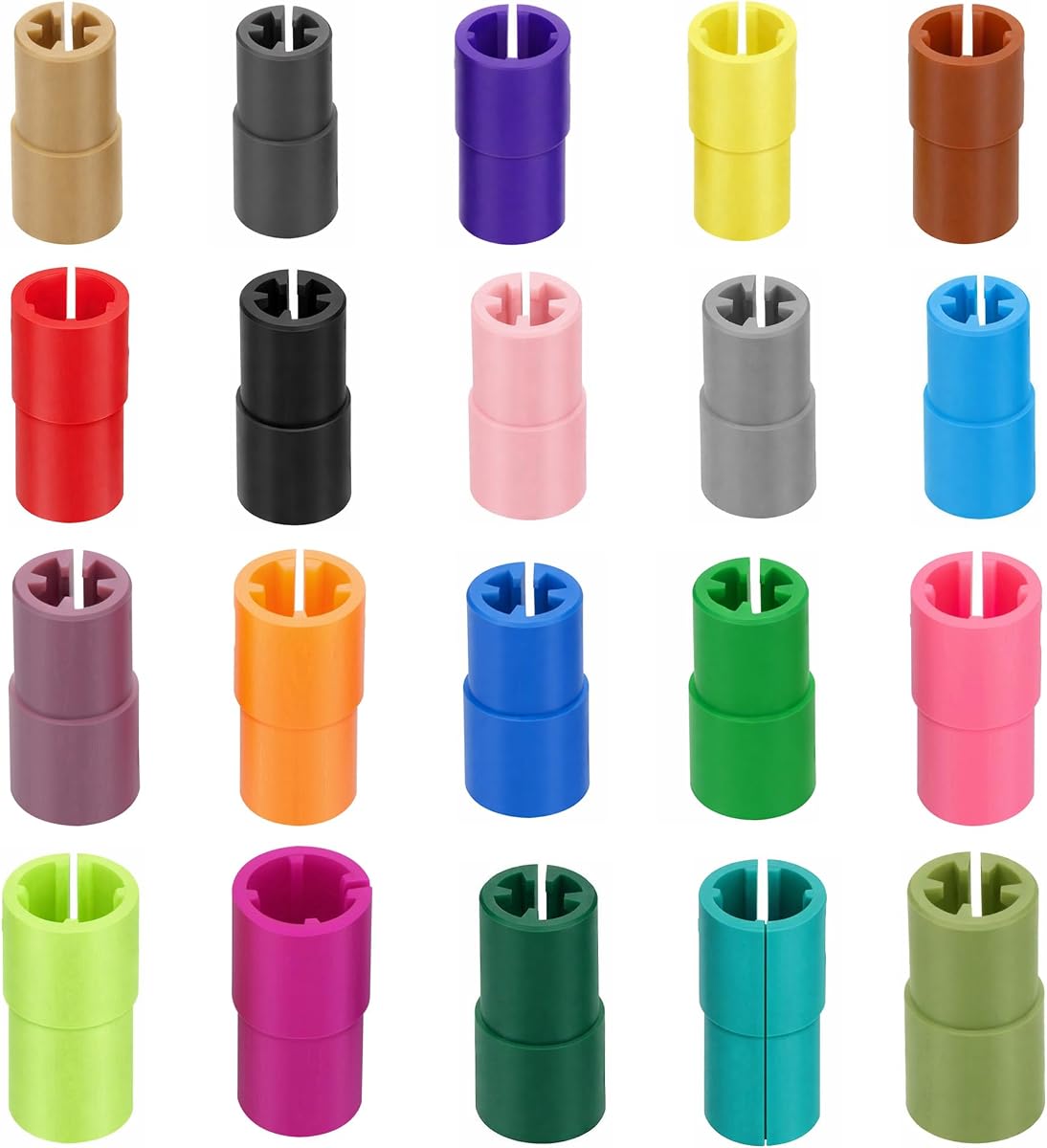
This set provides twenty different adapters designed for the most popular pens and markers used with Explore and Maker machines. It simplifies switching between pens since each adapter holds the pen in the exact center for alignment.
We may earn a commission when you buy through this link, at no additional cost to you.
Each adapter is engraved with an abbreviation to identify which pen it fits saving time during project setup. The product is made from high quality ABS plastic ensuring durability over repeated use in crafting sessions.
While it covers many popular brands it is not compatible with Explore One or Joy machines which have different clamp structures. Sorting twenty adapters may take some effort but the engraved labels help streamline the process.
Perfect for users who frequently switch between pen types and need a dedicated adapter for each. This variety pack ensures you have the right tool ready for every drawing task without constant recalibration.
Every adapter ensures pen center alignment for perfect line up with draw and cut operations.
Engraved abbreviations make it simple to grab the correct adapter quickly without confusion.
We may earn a commission when you buy through this link, at no additional cost to you.
This universal adapter is designed to fit almost any pen marker or tool under 0.5 inches in diameter making it highly versatile for different crafting needs. It slides smoothly into the pen clamp on Maker and Explore machines.
We may earn a commission when you buy through this link, at no additional cost to you.
The set includes a gift box that organizes components neatly which is useful for storage or gifting. Users appreciate that the adapter holds the pen securely without wobbling during whole projects ensuring consistent lines.
While it covers over twenty pen brands it is not compatible with Explore 5 or ONE machines due to different clamp designs. The single adapter approach simplifies choices but may require testing for specific pen fits.
Best for crafters who want a single reliable adapter for multiple pen types without managing a large set. It offers convenience and stability for a wide range of drawing and scoring tasks.
Compatible with Sharpie Pilot Sakura and over twenty other brands for extensive creative options.
Snug fit ensures the pen stays secure during drawing to prevent unwanted movement.
We may earn a commission when you buy through this link, at no additional cost to you.
This adapter features a simple plug and play design that lets you insert the adapter and pen to start creating immediately. It works with most pens and markers under 0.5 inches in diameter for broad compatibility.
We may earn a commission when you buy through this link, at no additional cost to you.
Made from high quality ABS material it is lightweight yet sturdy for repeated crafting and DIY projects. The engineering focuses on accurate pen alignment to ensure smooth writing and clean drawing lines.
While it lacks extra accessories it delivers reliable performance for standard drawing tasks without unnecessary complexity. Users find it easy to swap between markers quickly during project sessions.
Ideal for users who prefer a straightforward tool without extra features or calibration steps. It provides a dependable solution for everyday drawing and writing tasks on compatible machines.
Insert the adapter and pen then start drawing without tools or calibration steps.
ABS material ensures longevity even with frequent swapping of pens during crafting.
We may earn a commission when you buy through this link, at no additional cost to you.
This adapter uses a dual-thread design to secure the pen more firmly reducing side-to-side wobbling during operation. It is designed for Maker 4 and Explore 4 series machines to expand drawing possibilities.
We may earn a commission when you buy through this link, at no additional cost to you.
Installation is easy as you simply insert the adapter into the clamp place your pen and start drawing without tools. Users report stable and consistent lines which help achieve precise results for cards and invitations.
While it covers most pens under 0.5 inches it is not compatible with Explore 5 which has a different clamp structure. The focus on stability makes it a good choice for detailed work.
Perfect for crafters who need reliable pen stability for intricate designs on compatible machines. It simplifies setup while maintaining precision for everyday writing and drawing tasks.
Dual-thread design eliminates side movement ensuring precise lines throughout the project.
Simple drop-in installation allows quick swapping between different pen types.
We may earn a commission when you buy through this link, at no additional cost to you.
This set broadens the use of pens for Cricut Venture and Explore machines by offering adapters compatible with over forty pens and twenty brands. It includes a dual coding manual to help identify and use each adapter correctly.
We may earn a commission when you buy through this link, at no additional cost to you.
The kit includes a special adapter to replace the original one if broken or missing for standard pens and stylus. Users appreciate that it does not require depth calibration before use saving setup time.
Managing fifteen sets of adapters may take organization but the coding manual simplifies selection. The compact design ensures the pen holder fits just right in the pen clamp without harming the machine.
Best for users who want the most extensive pen options without calibration hassles. It provides excellent value with a wide range of adapters to match nearly any pen in your collection.
Tested adapters fit over forty pens from popular brands for maximum creative freedom.
Special adapter included to replace original ones if they break or go missing.
We may earn a commission when you buy through this link, at no additional cost to you.
This set is specifically designed for Sharpie Fine Point Ultra Fine Point and Art Pens on Cricut Explore Air and Maker series machines. Each adapter is precision aligned to ensure precise height and point center without depth calibration.
We may earn a commission when you buy through this link, at no additional cost to you.
You can easily identify each adapter by inscribed abbreviations rather than relying on color codes. The product includes three adapters covering classic metallic extreme neon and color burst varieties for comprehensive Sharpie use.
While it focuses solely on Sharpie it offers high reliability for those who prefer these markers for their projects. A small USA-based business stands behind the products ensuring customer support for concerns.
Ideal for crafters who use Sharpie markers exclusively for drawing on Cricut machines. It delivers precise results with minimal setup effort for consistent and professional looking designs.
Designed exclusively for Sharpie markers to ensure perfect fit and alignment for these brands.
Inscribed abbreviations make it easy to identify the correct adapter at a glance.
We may earn a commission when you buy through this link, at no additional cost to you.
This accessory adapter enables drawing writing and scoring with the Cricut Accessory Adapter on Explore and Maker machines. It installs easily into your machine's A clamp to immediately expand your creative options.
We may earn a commission when you buy through this link, at no additional cost to you.
Designed specifically for these models it provides a straightforward replacement for lost or damaged original adapters. Users appreciate the ability to expand what they can create without buying additional proprietary accessories.
While it is a standard adapter it serves well for replacing broken units or expanding tool compatibility. It is not intended for use with Cricut Explore One which has a different configuration.
Best for users needing a reliable replacement adapter for standard Explore and Maker models. It simplifies the process of restoring drawing capabilities to your machine quickly.
Installs easily to expand your creative options for drawing and scoring tasks.
Fits into the machine's A clamp for secure and stable adapter placement.
We may earn a commission when you buy through this link, at no additional cost to you.
These adapters are compatible with Joy Joy 2 and Joy Xtra cutting machines to allow use of popular pens like Sharpie and Pilot. They are easy to install by inserting the adapter on corresponding pens and placing them in the pen clamp.
We may earn a commission when you buy through this link, at no additional cost to you.
Each adapter is carved with an abbreviation to identify which pen to work with and comes with a manual printed with compatible pen model names. This saves money by allowing use of previous fine point pens that work on Joy machines.
The adapters are made with ABS plastic to ensure they are durable and strong for repeated use. Users report smooth installation with no harm to the original pen clamp on Joy devices.
Perfect for Joy machine owners who want to use standard pens without buying branded ones. It provides a budget friendly way to expand pen options on the Joy series of machines.
Designed specifically for Joy Joy 2 and Joy Xtra to fit their unique clamp size.
Saves money by allowing use of existing fine point pens on Joy machines.
We may earn a commission when you buy through this link, at no additional cost to you.
This six pack adapter set fits perfectly for Maker 4 3 and Explore models for writing and drawing with Sharpie pens. Each adapter is easy to identify by inscribed abbreviations and color codes for different pen types.
We may earn a commission when you buy through this link, at no additional cost to you.
There is no need for depth calibration as adapters perfectly align each pen for precise height and point center. Users save money by using Sharpie pens instead of proprietary branded ones for similar results.
The green F adapter is for Fine Point pink U for Ultra Fine Point and blue A for Art Pen making selection intuitive. The adapters are sturdy and useful making drawings as precise as the original holder.
Ideal for crafters who use Sharpie pens regularly for projects on Maker and Explore machines. It offers a reliable and easy way to expand pen choices without extra calibration steps.
Color codes like green pink and blue make identifying the right adapter effortless.
Adapters align pens to ensure drawings match the precision of original holders.
We may earn a commission when you buy through this link, at no additional cost to you.
Selecting the right adapter depends on your machine model pen preferences and desired ease of use.
Always check that the adapter fits your specific Cricut model like Maker 4 Explore 4 or Joy as clamps vary between machines. Some adapters explicitly state they do not work with Explore One or Explore 5 which have unique structures.
Verify the adapter lists your machine in its compatibility details before buying to avoid returns.
Choose an adapter that supports the pen types and brands you use most such as Sharpie Pilot or Sakura. Universal adapters handle many brands while specific ones like DESMOR focus on Sharpie only for precision.
Consider how many adapters you need if you use many pens or a single set if you prefer one tool.
Some adapters require depth calibration before use which adds setup time but ensures precise results. Others claim no calibration is needed saving effort but may need testing for your specific pen.
If you want quick setup prioritize adapters stating no calibration is required for most pens.
High quality ABS plastic ensures the adapter is durable and withstands frequent swapping of pens. Look for descriptions mentioning sturdy construction to avoid breakage during regular crafting.
Check for reviews noting stability and secure hold to prevent pen wobbling during projects.
Adapters with engraved abbreviations or color coding make it easy to pick the right one quickly. This reduces mistakes and saves time when switching between different pen types during a project.
For large sets prioritize options with clear labeling or included manuals for easy management.
Some kits include calibration units storage boxes or manuals which add value and organization. These extras help you stay efficient and keep adapters tidy when not in use.
Consider if you need these add-ons based on your workspace size and organizational needs.
Prices vary by number of adapters and brand reputation so compare cost against how many pens you need. A larger set may cost more but offers more versatility than a single adapter.
Balance your budget with the features you need to get the best value for your crafting setup.
Look for adapters from brands with positive customer reviews and strong support policies for quality assurance. Established options often provide reliable performance and easier resolution if issues arise.
Check seller ratings and product feedback to gauge reliability before finalizing your purchase.
First insert the adapter into your Cricut machine's pen clamp ensuring it sits securely and flush. Then place your chosen pen inside the adapter until it fits snugly without wobbling or moving.
For new adapters test the pen on a scrap material first to confirm proper depth and alignment before starting your main project. This prevents wasted material and ensures clean lines from the beginning of your work.
Store adapters in a dry container or box when not in use to protect them from dust and damage. Clean them gently if needed but avoid soaking to maintain the plastic structure and longevity.
Most adapters work with pens under 0.5 inches in diameter but check compatibility lists before buying. Some adapters are universal for many brands while others focus on specific ones like Sharpie for best results.
Many modern adapters require calibration only once after setup so you do not need to repeat it for each project. Follow the manufacturer instructions to set depth properly the most consistent results.
Using third party adapters may not void your warranty but avoid forcing adapters that do not fit your machine. Stick to adapters designed for your model to prevent damage that could affect coverage.
Universal adapters fit many pen brands while specific ones like DESMOR target brands like Sharpie for precise alignment. Choose universal for flexibility or specific for optimized performance with known pens.
Check the product description for compatible brands and diameters and look for labels or manuals included. Some adapters have engraved abbreviations matching specific pen types to help identify the right fit.
Yes many adapters work with scoring styluses to expand drawing and scoring capabilities. Ensure the pen tool fits securely in the adapter clamp for accurate scoring results on materials.
Keep adapters in a small organized box or container to protect them from dust and loss. Many kits include storage solutions which help keep your workspace tidy and tools ready for use.
These ten adapters offer a range of options from universal sets to precision focused packs for different Cricut machines. Selecting the right one depends on your machine model pen collection and how often you swap pens.
Prioritize compatibility and build quality to ensure smooth operation and long term value for your crafting projects. Adapters with clear identification and easy install save time and reduce setup frustration.
Prices and availability can change so always check current listings before buying to secure the best deal. With the right adapter you can expand your creative possibilities using any pen you love.