
Thermalright Assassin X120 Refined SE
4.7Editor score
4 heat pipes with AGHP
TL-C12C PWM fan
Supports AM4 and AM5
This guide compares the top CPU Air Cooler Fan Heatsink models for performance and value, helping you choose the right cooling solution for your build.
Keeping your processor cool is essential for stability and longevity. A quality CPU Air Cooler Fan Heatsink removes heat efficiently without the complexity of liquid systems. Whether you need silent operation or high thermal output, there is a reliable option available for every budget and case size.
We analyzed ten highly rated models based on heat pipe design, fan noise levels, and socket compatibility. Our selection includes single tower, dual tower, and compact designs suitable for various form factors. Each product was evaluated for build quality and cooling capacity against common thermal demands.
Every pick highlights key strengths like AGHP technology or ARGB lighting to help you decide. Ratings and availability fluctuate regularly so always verify current listings before purchasing. Use this guide to find the ideal balance between price, performance, and aesthetics for your specific motherboard and processor.
4.7Editor score
4.7Editor score

4.8Editor score
This table provides a side-by-side overview of the ten selected coolers highlighting their core specifications and compatibility details to simplify your final decision.


This unit stands out as a highly affordable option for mainstream processors. It combines a 4 heat pipe design with AGHP technology to ensure efficient heat transfer regardless of orientation. With a rating of 4.7 it is praised for its value and low noise output during normal operation.
We may earn a commission when you buy through this link, at no additional cost to you.
The TL-C12C PWM fan delivers up to 66.17CFM while staying under 25.6dB of noise. The cooler measures 148mm in height making it suitable for medium-sized cases without interfering with most components. The aluminum heatsink cover protects the fins and adds a clean look to your build.
Trade-offs include the single tower configuration which may struggle with extreme overclocking or high TDP chips. The fan uses standard mounting hardware that requires careful handling during installation. These limitations are acceptable given the price and performance it delivers for everyday computing.
This is ideal for users seeking reliable cooling for mid-range builds without breaking the bank. It supports Intel LGA sockets including 1700 and 1851 along with AMD AM4 and AM5 platforms. Choose this if you prioritize cost efficiency and simplicity over maximum thermal capacity.
AGHP technology solves gravity effects by using sintered powder inside the pipes for consistent cooling in any position.
The PWM fan allows automatic speed control based on CPU temperature ensuring silence when idle and performance under load.
We may earn a commission when you buy through this link, at no additional cost to you.
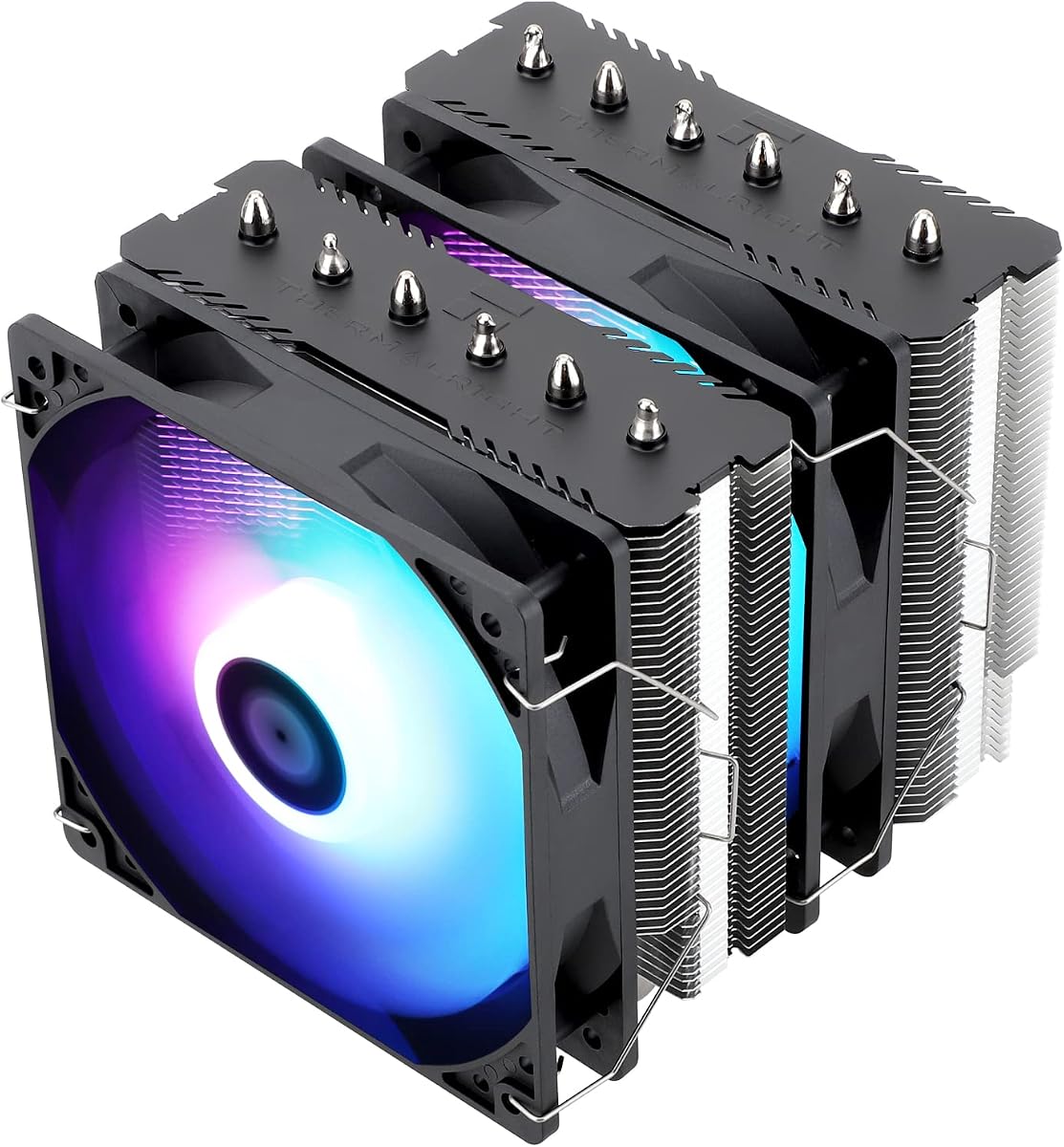
This model offers near high-end cooling performance at a mid-tier price. Its dual tower design uses six heat pipes to dissipate heat from high TDP CPUs efficiently. With a rating of 4.7 it is recognized for balancing thermal output and build quality exceptionally well.
We may earn a commission when you buy through this link, at no additional cost to you.
The dual TL-C12C-S PWM fans deliver significant airflow while maintaining low noise levels. The cooler supports sockets including Intel LGA1700 and 1851 and AMD AM4 and AM5. The AGHP technology ensures that the pipes function correctly even if installed horizontally.
The main drawback is its size at 155mm height which may not fit smaller mid-tower cases. RAM clearance is managed by cutouts but high-profile sticks might conflict. These factors are manageable for most users seeking high thermal performance without liquid cooling costs.
Ideal for enthusiasts needing strong cooling for gaming or workstation workloads. It provides a stable base for overclocking while keeping acoustic levels reasonable. Select this if you want proven thermal efficiency and dual fan redundancy for critical systems.
Two towers increase the surface area for heat exchange allowing better dissipation than single tower models.
Pure copper sintered heat pipes provide rapid heat transfer from the base to the fins for faster cooling.
We may earn a commission when you buy through this link, at no additional cost to you.
This classic dual tower cooler remains a benchmark for high performance and silence. Its all-black design fits modern builds while delivering cooling comparable to many liquid systems. With a rating of 4.8 it is trusted by enthusiasts for reliability and consistent thermal results.
We may earn a commission when you buy through this link, at no additional cost to you.
The two NF-A15 140mm fans are renowned for their efficiency and low noise output. The SecuFirm2 mounting system simplifies installation on various Intel and AMD sockets. High-grade materials ensure that the unit will last throughout the lifespan of your computer system.
The main trade-off is the cost which is higher than mass market alternatives. Its 165mm height may restrict use in compact cases or with tall RAM modules. These factors are often acceptable given the long-term value and performance reliability it provides.
Best suited for users who prioritize absolute silence and maximum thermal safety for their processor. It supports Intel LGA1851 and 1700 as well as AMD AM5 and AM4. Invest in this model if you want a proven cooling solution backed by a strong warranty.
The fans use Flow Acceleration Channels to minimize turbulence and maximize pressure for better heat sink performance.
This mounting system ensures even pressure across the CPU surface which optimizes heat transfer and prevents damage.
We may earn a commission when you buy through this link, at no additional cost to you.
This unit delivers top-tier performance in a 120mm form factor that prioritizes compatibility. It avoids overhanging RAM slots which is crucial for motherboards with tight spacing. With a rating of 4.8 it is highly regarded for combining efficiency with ease of installation.
We may earn a commission when you buy through this link, at no additional cost to you.
The two NF-A12x25 fans provide exceptional airflow for their size and keep noise low. The 158mm height fits most tower cases without blocking PCIe slots on ATX boards. The mounting system is robust and works well with Intel and AMD platforms alike.
While not as high output as dual 140mm models it is a perfect balance for most builds. The price reflects the premium materials and fan technology included in the package. This is acceptable given the superior design and compatibility features it offers.
Choose this if you need high performance without the bulk of a full dual tower. It supports Intel LGA1851 and 1700 plus AMD AM5 and AM4 sockets. This model is ideal for users who value clean cable management and component accessibility.
The NF-A12x25 fan uses advanced blade design to optimize static pressure for dense heatsink fin arrays.
The SecuFirm2 system adapts to multiple socket types ensuring secure and reliable contact for the processor.
We may earn a commission when you buy through this link, at no additional cost to you.
This cooler stands out with a digital screen top cover that displays real-time CPU metrics. It combines heat dissipation with visual feedback to let you monitor temperature and usage directly. With a rating of 4.7 it is liked for its unique blend of function and aesthetics.
We may earn a commission when you buy through this link, at no additional cost to you.
The single tower design uses four heat pipes and a high-speed TL-P12-S PWM fan. The screen connects via USB and uses TRCC software to show data like CPU temperature and GPU occupancy. The unit supports modern Intel and AMD sockets including 1851 and AM5.
The screen adds a fun element but requires cable management and software setup to function fully. Its thermal performance is adequate for mainstream chips but not for extreme loads. These factors are minor compared to the unique visual appeal and monitoring capabilities.
Perfect for builders who want to track system stats without opening software dashboards. It supports Intel LGA1851 and 1700 plus AMD AM5 and AM4 platforms. Select this if you value innovative design and visual customization alongside standard cooling functions.
The digital display updates live via USB connection so you can see heat levels at a glance.
The fan supports 5V 3pin sync to match motherboard lighting for a cohesive look.
We may earn a commission when you buy through this link, at no additional cost to you.
This model remains one of the most respected coolers in the market. It offers class-leading performance for overclocking or near-silent systems thanks to its dual tower design. With a rating of 4.8 it has accumulated hundreds of awards for quality and performance.
We may earn a commission when you buy through this link, at no additional cost to you.
The NF-A15 fans are optimized for low noise and maximum cooling efficiency under load. The package includes NT-H1 thermal paste to ensure proper contact right out of the box. It supports a wide range of sockets including latest Intel and AMD platforms.
The size and price are significant considerations for buyers with smaller cases. The design blocks some RAM slots in certain configurations but offers superior airflow. These trade-offs are often worth it for users seeking the best thermal safety available.
Ideal for workstations or high-end gaming rigs that prioritize performance. It works with Intel LGA1851 and 1700 and AMD AM5 and AM4 sockets. Choose this if you want a legacy performance benchmark with trusted quality standards.
This cooler has been recognized by hundreds of hardware websites for its reliability and thermal efficiency.
High-end NT-H1 paste ensures optimal heat transfer from the processor to the heatsink base.
We may earn a commission when you buy through this link, at no additional cost to you.
This asymmetrical design solves common clearance issues found in traditional dual towers. By shifting the fan forward it avoids RAM overhang while maintaining strong thermal performance. With a rating of 4.8 it is praised for its ability to clear slots without sacrificing cooling.
We may earn a commission when you buy through this link, at no additional cost to you.
The single NF-A15 140mm fan provides low-noise operation even under full load. The 160mm height fits most tower cases and the 65mm RAM clearance supports high-profile modules. It is supported on Intel LGA1851 and 1700 plus AMD AM5 and AM4 sockets.
The asymmetrical layout may complicate cable routing in tight cases or with specific motherboards. It still requires a decent case height and airflow path for best results. These issues are manageable and acceptable given the improved compatibility it provides.
Best for users with high-profile RAM who want premium cooling. It works with Intel LGA1851 and 1700 and AMD AM5 and AM4 platforms. This model is perfect for balanced builds needing both performance and memory clearance.
The offset tower design allows standard or tall RAM to fit under the cooler without removal.
The chromax.Black finish ensures the unit blends seamlessly with dark or themed PC builds.
We may earn a commission when you buy through this link, at no additional cost to you.
This unit is designed specifically for small form factor builds needing strong cooling. Its 110mm height fits tight spaces without overhanging RAM or PCIe slots. With a rating of 4.7 it is appreciated for its ability to deliver high performance in a minimal footprint.
We may earn a commission when you buy through this link, at no additional cost to you.
The NF-A9 92mm fan ensures ultra-quiet operation while maintaining effective airflow for the dual tower. It supports Intel LGA1851 and 1700 as well as AMD AM5 and AM4 sockets. The package includes NT-H1 paste and SecuFirm2 mounting for easy setup.
The 92mm fan may struggle to dissipate extreme heat from high-wattage processors. The price is higher than standard coolers given its small physical dimensions. These limits are acceptable for users targeting silent media PCs or ITX workstations.
Perfect for HTPCs or small cases where traditional coolers do not fit. It works with Intel LGA1851 and 1700 and AMD AM5 and AM4 platforms. Choose this if space is limited but you still need reliable dual tower cooling.
The compact height and narrow width ensure it fits standard Mini-ITX motherboards without interference.
The optimized fan blades reduce turbulence for whisper-quiet performance in media center builds.
We may earn a commission when you buy through this link, at no additional cost to you.
This classic 120mm design is known for outstanding compatibility and performance. Its slim tower profile prevents PCIe slot blockage which is essential for some graphics cards. With a rating of 4.8 it is a trusted choice for balanced builds needing standard cooling.
We may earn a commission when you buy through this link, at no additional cost to you.
The NF-F12 fan delivers focused airflow through the tower fins using advanced pressure technology. The mounting system supports Intel LGA1851 and 1700 plus AMD AM5 and AM4 sockets. The cooler includes high-end thermal paste for optimal heat transfer out of the box.
The single fan design may not be enough for overclocked high-TDP chips. It is larger than very compact coolers but smaller than dual towers. These trade-offs are minor for users needing reliable and quiet stock-level cooling.
Best for mainstream users wanting a balance of size and performance. It works with Intel LGA1851 and 1700 and AMD AM5 and AM4 platforms. Choose this if you need a reliable and compact cooler for standard systems.
The NF-F12 fan uses specific blade shapes to maximize pressure through dense heatsink fins.
The slim tower width ensures it fits without obstructing PCIe slots on most ATX boards.
We may earn a commission when you buy through this link, at no additional cost to you.
This model delivers high-end thermal performance at a mid-range price point. Its offset asymmetric layout improves graphics card and motherboard compatibility. With a rating of 4.8 it is recognized for stable output and robust build quality.
We may earn a commission when you buy through this link, at no additional cost to you.
Six 6mm heat pipes connect to a copper base with soldered joints for rapid heat exchange. The dual TL-C12C fans provide high airflow with low noise during operation. It supports Intel LGA1700 and 1851 plus AMD AM5 and AM4 sockets.
The cutouts on fins help fit RAM but high-profile sticks may still require removal. Installation requires careful handling of mounting plates and pressure. These factors are minor given the performance and price it delivers.
Ideal for budget-conscious users wanting dual tower cooling. It works with Intel LGA1700 and 1851 and AMD AM5 and AM4 platforms. Select this if you want maximum thermal output at an affordable cost.
Soldered heat pipes ensure rapid heat transfer from the CPU to the fins.
The dual 120mm fans move significant air to keep temperatures low during heavy loads.
We may earn a commission when you buy through this link, at no additional cost to you.
Selecting the right cooler involves evaluating several technical factors to ensure compatibility and performance.
TDP ratings indicate the maximum heat a cooler can dissipate. Match this number to your CPU's TDP to ensure adequate cooling under load. High TDP processors like X or K variants need higher-rated coolers.
Always choose a cooler with a TDP rating equal to or higher than your processor's maximum output.
Check that the cooler supports your motherboard socket. Modern coolers often cover both Intel and AMD sockets including LGA1851 and AM5. Verify compatibility before purchasing to avoid mounting issues.
Ensure the mounting hardware is included for your specific socket type.
Measure your case's CPU cooler clearance height. Most dual towers exceed 150mm which may not fit slim cases. Compact coolers around 110mm are ideal for small form factor builds.
Verify your case specifications to avoid fitting issues after purchase.
Look for noise ratings in decibels (dB). Lower dB means quieter operation especially at idle. PWM fans allow speed control which helps balance noise and cooling.
Select fans rated under 30dB for quieter environments.
Tall RAM modules can conflict with larger coolers. Check cooler width and fan overhang to ensure RAM slots remain accessible. Asymmetrical designs often help here.
Review cooler width to confirm compatibility with your memory height.
Copper cores transfer heat faster but heavier aluminum fins reduce weight. Most premium models mix both materials for balance. Quality finishes protect against corrosion.
Prioritize units with solid base materials for best heat transfer.
Many coolers include thermal paste which saves extra cost. Check if it is high quality like NT-H1 or if you need to buy separately. Proper application is key to performance.
Ensure the package includes paste if you plan to install immediately.
A longer warranty signals manufacturer confidence. Look for at least 3 to 6 years of coverage. Some brands offer excellent support if parts fail.
Always verify warranty terms before finalizing your purchase.
Prepare your system by ensuring the CPU surface is clean and dry. Apply a small pea-sized amount of thermal paste to the center of the processor. Lower the cooler slowly and use the included screws to secure the mounting brackets evenly.
Connect the fan's PWM cable to the CPU_FAN header on the motherboard. Verify the connector is fully seated to allow automatic speed control. Once powered on check your BIOS to confirm the fan is spinning and temperature readings look normal.
Dust buildup can reduce cooling efficiency over time. Use compressed air to blow out the fins every few months. If possible remove the fan to clean the heat pipes without damaging the fins. Regular cleaning keeps temperatures low and ensures long term performance.
Air cooling is generally more reliable and requires less maintenance than liquid systems. It avoids potential leaks and is often cheaper for similar thermal performance. For most users air cooling provides sufficient protection against overheating.
PWM stands for Pulse Width Modulation which allows the motherboard to control fan speed dynamically. This ensures the fan spins faster when the CPU is hot and slower when idle. It reduces noise while maintaining effective cooling during load.
Yes you can install a cooler on a used processor if the socket is clean. Remove any old thermal paste residue with is and isopropyl alcohol before applying new paste. Ensure the mounting mechanism matches your motherboard model.
Noise under load often indicates high fan speeds due to heat buildup. Check if dust is blocking the fins or if the mounting is loose. If speeds are too high adjust fan curves in BIOS to optimize the balance.
Most quality pastes last two to three years without significant degradation. If temperatures start rising over time replacing the paste is a good maintenance step. High-end models like NT-H1 often last longer than budget pastes.
Dual towers usually require at least 160mm of vertical clearance. Check your case manual to confirm CPU height limits before buying. Some cases limit cooler height to 155mm which may require single towers instead.
We reviewed ten models that balance thermal efficiency and acoustic quality across various budgets. The Thermalright Assassin X120 Refined SE offers great value for entry level builds while Noctua units provide premium reliability.
Prioritize socket compatibility and case dimensions before focusing on brand or aesthetics. High quality paste and proper installation will always impact performance more than minor design details. Ensure your chosen model matches your specific motherboard needs.
Always verify current pricing and stock before placing your order. Retailers update availability frequently so check multiple sources for the best deal. This guide helps you narrow down the right cooler for your system needs.