
Calibrite Display 123
4.0Editor score
Easy workflow software
USB C connectivity
Supports two displays
This guide compares the top colorimeter for monitor calibration tools to help photographers and designers choose the right device for accurate screen profiles.
Accurate color reproduction is essential for creative professionals who rely on their screens for editing photos and videos. A quality colorimeter ensures your display matches real-world outputs so your work looks consistent across devices. Without proper calibration even high-end monitors can show misleading tones and contrast levels that hurt your final results.
We evaluated ten leading colorimeters based on sensor accuracy software flexibility and support for modern display technologies. Our analysis covers entry-level tools for hobbyists as well as advanced systems for professional workflows involving HDR and wide color gamuts. Each product was assessed for ease of use measurement speed and reliability in daily editing environments.
Every selection in this list offers distinct advantages depending on your specific needs and budget constraints. You will find detailed breakdowns of key features pros and cons for each device to help you make an informed decision. Please note that pricing and availability may change so verify current details before purchasing your next calibration tool.
4.0Editor score
4.5Editor score

4.0Editor score
The following table provides a side-by-side comparison of all ten colorimeters reviewed in this guide. It highlights key specifications and capabilities to help you quickly identify which device best fits your calibration needs and workflow requirements.


The Calibrite Display 123 is an affordable colorimeter designed for photographers and creators who need accurate screen profiles without complex settings. It holds a solid rating for its ease of use and reliable performance in everyday editing tasks. The guided software workflow makes calibration accessible even for those new to color management tools.
We may earn a commission when you buy through this link, at no additional cost to you.
Its standout qualities include the intuitive three step process and USB C connectivity for modern laptops. The before and after check lets you see immediate improvements in color accuracy and contrast. Supporting up to two displays ensures consistent color across multi-screen setups which is vital for productivity.
While it lacks advanced customization options found in premium models it delivers consistent results for standard workflows. The compact design and adjustable counterweight make physical setup quick and stable. These minor trade-offs are acceptable given the device targets users seeking simplicity over granular control.
Anyone starting out in photo editing or needing a secondary calibrator will find this device highly effective. It balances performance and price well making it a top choice for budget-conscious professionals. We recommend it for straightforward calibration needs where speed and simplicity matter most.
The guided workflow removes guesswork so users can focus on editing rather than technical settings.
Calibrating two screens simultaneously ensures matching colors which reduces eye strain during long sessions.
We may earn a commission when you buy through this link, at no additional cost to you.
The Calibrite Display Plus HL is engineered for professionals working with high dynamic range and super bright displays. It features an advanced sensor capable of measuring up to ten thousand nits ensuring accurate calibration for HDR monitors. This capability is essential for video editors and colorists who need precise highlight and shadow detail.
We may earn a commission when you buy through this link, at no additional cost to you.
Its PROFILER software offers both basic and advanced modes allowing full control over white point and gamma settings. The inclusion of validation tools like Quick Check and Uniformity Check helps maintain trust in calibration results over time. It also supports broadcast standards making it versatile for diverse production environments.
While the cost is higher than entry-level tools the investment pays off in accuracy and feature depth. Some users may need to manage additional adapters for connectivity which can be slightly cumbersome. These trade-offs are minor compared to the robust performance provided for demanding creative work.
This device is ideal for studios and professionals who require consistent color across mixed display technologies. It stands out for its ability to handle modern panel types like OLED and Mini LED effectively. We recommend it for those prioritizing precision and future-proofing their calibration setup.
The high luminance sensor ensures HDR content looks accurate without clipping highlights or losing shadow detail.
Advanced modes allow deep customization while basic modes keep workflows efficient for quick adjustments.
We may earn a commission when you buy through this link, at no additional cost to you.
The datacolor Spyder Monitor Calibrator brings modern calibration features to a user-friendly tool. It simulates how photos appear on other devices directly on your screen helping you anticipate final output results. This DevicePreview Beta feature is particularly useful for social media creators and remote collaborators.
We may earn a commission when you buy through this link, at no additional cost to you.
Its ambient light sensor tracks room conditions and adjusts display brightness automatically to maintain consistent viewing. Calibration completes in about ninety seconds which minimizes downtime during active work sessions. The software warns you when recalibration is needed based on light level changes or usage time.
Some advanced users may find the preset options limiting for highly specialized workflows. Full customization often requires additional subscriptions or software tiers which adds ongoing costs. Despite this the device offers strong value for its speed and adaptability to current display technologies.
This tool is perfect for creatives who need quick reliable calibration without technical overhead. It supports the latest laptop and desktop panels ensuring compatibility with modern hardware. We recommend it for users who prioritize ease of use and timely recalibration alerts.
Viewing your edits through the lens of other screens prevents unexpected shifts after export.
Automatic brightness adjustment based on ambient light preserves shadow detail in changing environments.
We may earn a commission when you buy through this link, at no additional cost to you.
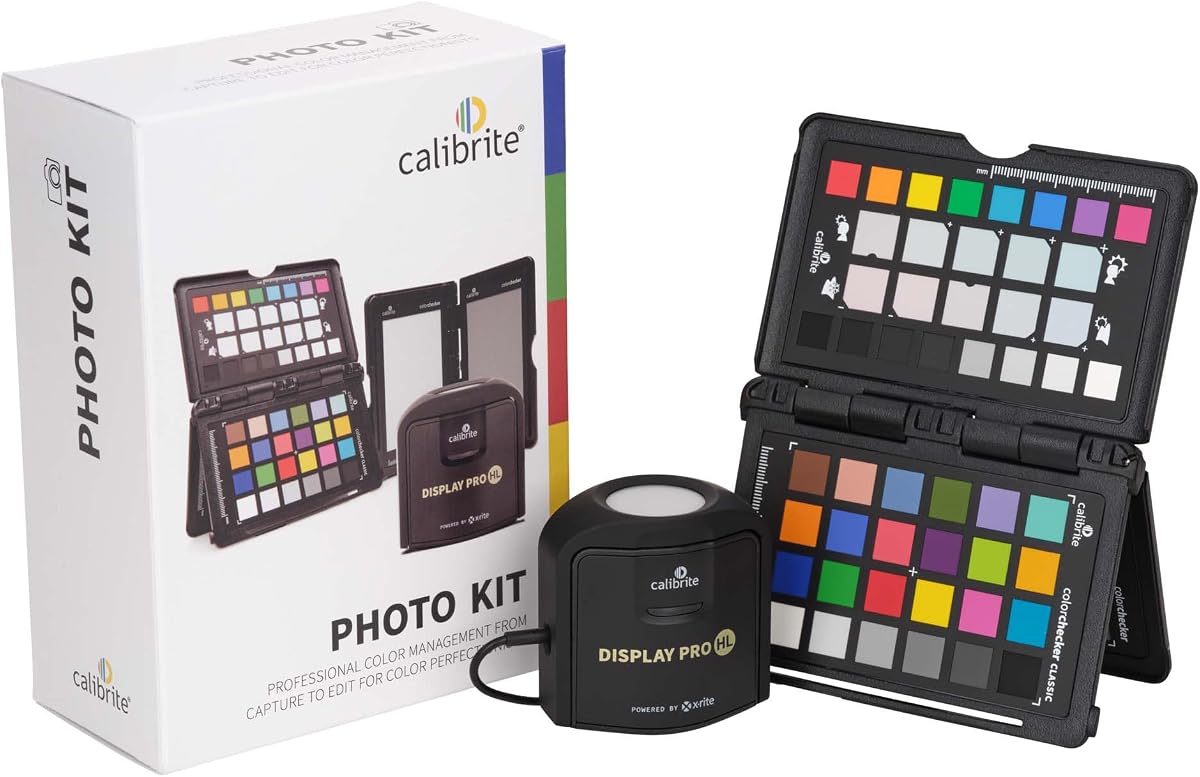
The Calibrite Photo Kit combines monitor calibration with camera profiling to create a seamless capture to edit workflow. It includes the Display Pro HL colorimeter and ColorChecker Passport Photo 2 for comprehensive color control. This integration helps photographers reduce color guesswork and maintain reliable results across different sessions.
We may earn a commission when you buy through this link, at no additional cost to you.
Key strengths include custom camera profiles for RAW workflows and consistent white balance setup. The Display Pro HL component supports modern display technologies ensuring your edits match final output accurately. This holistic approach saves time and improves confidence in post-production grading.
Managing two calibration devices can be complex initially for those used to simpler tools. The price point reflects the complete nature of the kit which may be steep for hobbyists. These considerations are outweighed by the significant workflow efficiency gains for professional photographers.
Ideal for serious photographers who need end-to-end color consistency from shoot to print. It simplifies the color management process significantly reducing errors and rework. We recommend it as the top choice for those seeking a unified professional system.
Connecting camera profiles to monitor profiles ensures on-screen edits match real-world prints.
Custom profiles for RAW files allow precise exposure and color adjustments without artifacts.
We may earn a commission when you buy through this link, at no additional cost to you.
The Calibrite Creator Kit offers a practical solution for hybrid photographers and filmmakers needing consistent color. It pairs the Display 123 colorimeter with the ColorChecker Passport Video 2 for capture control. This combination helps set accurate white point and verify exposure across changing lighting conditions.
We may earn a commission when you buy through this link, at no additional cost to you.
Its strengths lie in reducing trial-and-error corrections during post-production. The easy monitor workflow builds trust in on-screen color for grading and editing. It supports multiple cameras and monitors which is critical for team-based video projects.
The Display 123 component is basic compared to high-end models so users needing advanced features may look elsewhere. Video features are functional but lack deep professional grading tools. These trade-offs are acceptable for creators prioritizing simplicity and consistency.
This kit suits content creators who want dependable color management without complexity. It supports both still and video production ensuring professional results. We recommend it for hybrid shooters seeking a balanced entry into color control.
Using a common reference ensures different cameras record consistent colors on set.
Simple profiling allows focus on editing rather than troubleshooting display settings.
We may earn a commission when you buy through this link, at no additional cost to you.
The Calibrite ColorChecker Display Pro is known for its high repeatability and optical design. It supports both ccProfiler and i1Profiler software making it flexible for existing users. Its rotatable diffuser arm doubles as a stand for projector profiling and ambient light measurement.
We may earn a commission when you buy through this link, at no additional cost to you.
Strengths include the integrated tripod mount for larger venues and consistent performance across different display types. The device maintains long-term stability ensuring reliable results over extended use. It is well-suited for professionals requiring consistency in mixed environments.
It is an older generation device so lacks some modern features found in newer models. Software integration requires careful setup which may deter casual users. These limitations are offset by its robust performance and versatility for unique setups.
Ideal for professionals who already use compatible software and need dependable calibration. It bridges the gap between desktop monitors and larger projectors effectively. We recommend it for those valuing repeatability and hardware versatility.
The rotating arm allows stable measurements for projectors and ambient light without extra gear.
Compatible with multiple software options ensures long-term use without buying new tools.
We may earn a commission when you buy through this link, at no additional cost to you.
The Datacolor Spyder5PRO is designed for serious photographers and designers needing accurate screen profiles. It offers room light monitoring to determine optimal brightness matching prints and fine shadow detail. Calibration takes about five minutes ensuring color accuracy quickly.
We may earn a commission when you buy through this link, at no additional cost to you.
Key strengths include the before and after evaluation feature allowing comparison with your own images. Display Analysis lets you compare multiple monitors for consistency across a workspace. These tools reduce wasted ink and paper by ensuring on-screen matches final output.
This model lacks specific support for modern display types like Mini LED or OLED. It is an older generation device which may limit compatibility with new operating systems. These drawbacks are minor for standard SDR setups where reliability is key.
Best for traditional photographers and designers focused on print and standard monitor workflows. It provides a stable and reliable calibration experience. We recommend it for users prioritizing print matching and long-term consistency.
Room light monitoring ensures shadow details on screen match printed output accurately.
Comparing displays helps maintain consistency across multiple screens in a studio.
We may earn a commission when you buy through this link, at no additional cost to you.
The ASUS ProArt CaliContrO MCA02 offers a 3-in-1 solution with colorimeter display OSD control and ASUS Dial features. It supports hardware and software calibration to maintain long-term color accuracy. With capability to measure up to 10000 nits it handles HDR displays effectively.
We may earn a commission when you buy through this link, at no additional cost to you.
Its integration with ASUS exclusive software provides precise control over display settings via the dial. Reversible USB-C connection ensures effortless connectivity for modern setups. These features are particularly useful for ASUS hardware users wanting tight ecosystem integration.
However the low rating score indicates potential issues with software stability or ease of use. Third-party software support is limited making it less versatile for non-ASUS users. These trade-offs must be weighed against the specialized benefits offered.
Best for ASUS ProArt users needing deep integration and HDR calibration. It offers unique controls not found in generic colorimeters. We recommend it cautiously for those committed to the ASUS ecosystem.
The shortcut dial allows quick adjustments to creator software enhancing workflow speed.
Direct control of monitor settings simplifies calibration without navigating complex menus.
We may earn a commission when you buy through this link, at no additional cost to you.
The Datacolor Spyder4Pro provides a robust sensor with double-shielded filters for better color accuracy. It calibrates multiple displays with a single sensor ensuring consistency across your workspace. Accuracy is improved by up to 26 compared to previous generations with better long-term stability.
We may earn a commission when you buy through this link, at no additional cost to you.
Its ReCAL assistant makes recalibration quick and easy to compensate for changes over time. Automated brightness and color calibration remove manual guesswork from the process. The software keeps results reliable for everyday editing needs.
As an older model it lacks modern HDR or ambient light support. Software may lack advanced customization found in newer versions. These limitations are acceptable given its stable performance and value.
Ideal for users needing reliable basic calibration on standard displays. It maintains color consistency effectively over time. We recommend it for budget-conscious professionals seeking proven stability.
Double-shielded filters reduce noise ensuring closer match to CIE color standards.
The ReCAL tool allows fast checks without full recalibration saving time.
We may earn a commission when you buy through this link, at no additional cost to you.
The Datacolor Spyder X Pro features a groundbreaking lens-based color engine for higher accuracy. It is intuitive enough for first-time users with a wizard workflow and 12 predefined targets. Calibrating takes just a minute or two ensuring color precision quickly.
We may earn a commission when you buy through this link, at no additional cost to you.
Room-light monitoring and automatic profile changing adapt to your environment without manual input. SpyderProof functionality allows before-and-after evaluation using your own images. These tools help maintain consistent shadow detail and white balance.
While powerful for SDR displays it lacks specific HDR calibration options. Software customization is limited compared to advanced tools. These trade-offs are acceptable for beginners prioritizing simplicity and speed.
Best for first-time users and hobbyists needing accurate color without complexity. It delivers precise screen color and reliable results. We recommend it for those new to color management seeking ease of use.
The unique engine provides higher precision for multiple monitors than traditional sensors.
Profile changes based on ambient light ensure consistent color throughout the day.
We may earn a commission when you buy through this link, at no additional cost to you.
Selecting the right colorimeter depends on your workflow needs display type and budget constraints.
High-quality sensors ensure accurate measurements across different light levels. Look for full-spectrum or lens-based engines that match industry standards for precision. Advanced sensors handle HDR and high luminance displays better than basic models.
Choose a sensor that supports your display types to avoid calibration errors over time.
Software flexibility is critical for professionals needing custom targets and presets. Advanced tools support broadcast standards and allow sharing profiles across teams. Check if the software integrates with your operating system and applications.
Prioritize software that offers both simplicity for quick calibrations and depth for advanced customization.
Ensure the device supports modern technologies like OLED Mini LED and high nits. Older models may struggle with brightness and contrast on new screens leading to poor results. Verify compatibility before purchasing to avoid hardware limitations.
Match the device capabilities to your current and future monitor upgrades for longevity.
Faster calibration workflows save time for busy professionals and frequent recalibration. Devices taking under two minutes reduce workflow interruptions compared to older tools. Consider how often you need to recalibrate based on your work intensity.
Balance speed with accuracy to ensure reliable results without sacrificing time efficiency.
Built-in light sensors adjust calibration based on room conditions preventing shifts during use. This feature helps maintain consistent viewing environments throughout the day. It reduces the need for manual adjustments and recalibrations.
Look for devices with auto-recalibration warnings triggered by ambient changes.
Physical build quality affects stability during measurement. Adjustable weights and compact bodies ensure consistent placement. Tripod mounts and rotatable arms add versatility for projectors or complex setups.
Choose a design that fits your workspace and ensures stable contact with the screen.
Consider long-term costs including software subscriptions and compatibility updates. Manufacturer support and warranty coverage are vital for reliability. Higher upfront costs often reflect better durability and feature depth.
Evaluate total cost of ownership to ensure the device fits your budget sustainably.
Intuitive workflows reduce technical overhead for beginners. Guided processes and pre-set options make color management accessible. Advanced users need granular control for specialized workflows.
Select a device that matches your skill level and workflow complexity needs.
Start by installing the provided software on your computer and connecting the device via USB or wireless if supported. Ensure your monitor is warmed up for at least 30 minutes before calibration to stabilize performance. Follow the on-screen prompts to position the sensor correctly on the screen surface.
After calibration save the profile as your default display setting and enable automatic updates if available. Recalibrate every four weeks or whenever you notice color shifts to maintain accuracy. Use the validation tools to confirm your results remain consistent over time.
Store the colorimeter in its case when not in use to prevent physical damage or sensor drift. Keep the sensor window clean and free of dust or fingerprints by wiping gently with a soft cloth. Avoid exposing the device to extreme temperatures or humidity to preserve its lifespan.
Calibration ensures the colors on your screen match the final output such as prints or web images. Without it your edits may look correct on one screen but wrong on another leading to client dissatisfaction. It reduces rework and ensures consistency across all devices.
Most professionals recalibrate every four weeks to account for display aging and environmental changes. Frequent users may need calibration every two weeks while casual users can wait up to six weeks. Ambient light shifts also trigger the need for recalibration in advanced devices.
Modern colorimeters with high luminance sensors can effectively calibrate OLED and Mini LED displays. Older models may struggle with the brightness or contrast of these advanced panels. Always check device specifications to ensure compatibility before purchasing.
Some devices include free software while others require paid subscriptions for advanced features. Basic calibration tools are often included in the purchase price but updates may cost extra. Check licensing terms to understand ongoing costs before buying.
Software calibration adjusts display settings via graphics card settings while hardware calibration updates the monitor's internal LUTs. Hardware calibration offers more stable and accurate results especially for professional workflows. Look for devices supporting hardware options for best performance.
Yes most colorimeters allow calibration of multiple displays to ensure color consistency across setups. Software tools typically let you save different profiles for each screen. This is essential for multi-monitor editing environments.
Ambient light sensors detect room brightness and adjust calibration to match viewing conditions. This prevents your screen from appearing too dark or bright depending on the environment. It maintains consistent perceived color throughout the day without manual intervention.
Calibration is critical for video editing to ensure color grading matches broadcast standards and HDR outputs. Incorrect color can lead to rejected projects or poor playback quality on different devices. It ensures your edits look consistent across all viewing platforms.
We reviewed ten leading colorimeters offering options from budget-friendly tools to premium professional systems. The Calibrite Photo Kit stands out as the best overall choice for comprehensive color management workflows. Entry-level options like the Display 123 provide reliable performance without breaking the bank.
Prioritize display compatibility and software flexibility when selecting a device for your needs. Ensure your chosen tool supports modern panel types and offers customization for your workflow. These factors determine long-term satisfaction and accurate color results.
Please verify current pricing and availability before purchasing as market conditions change frequently. Many products feature seasonal sales or updated versions that may offer better value. Check vendor listings for the latest deals and warranty terms.