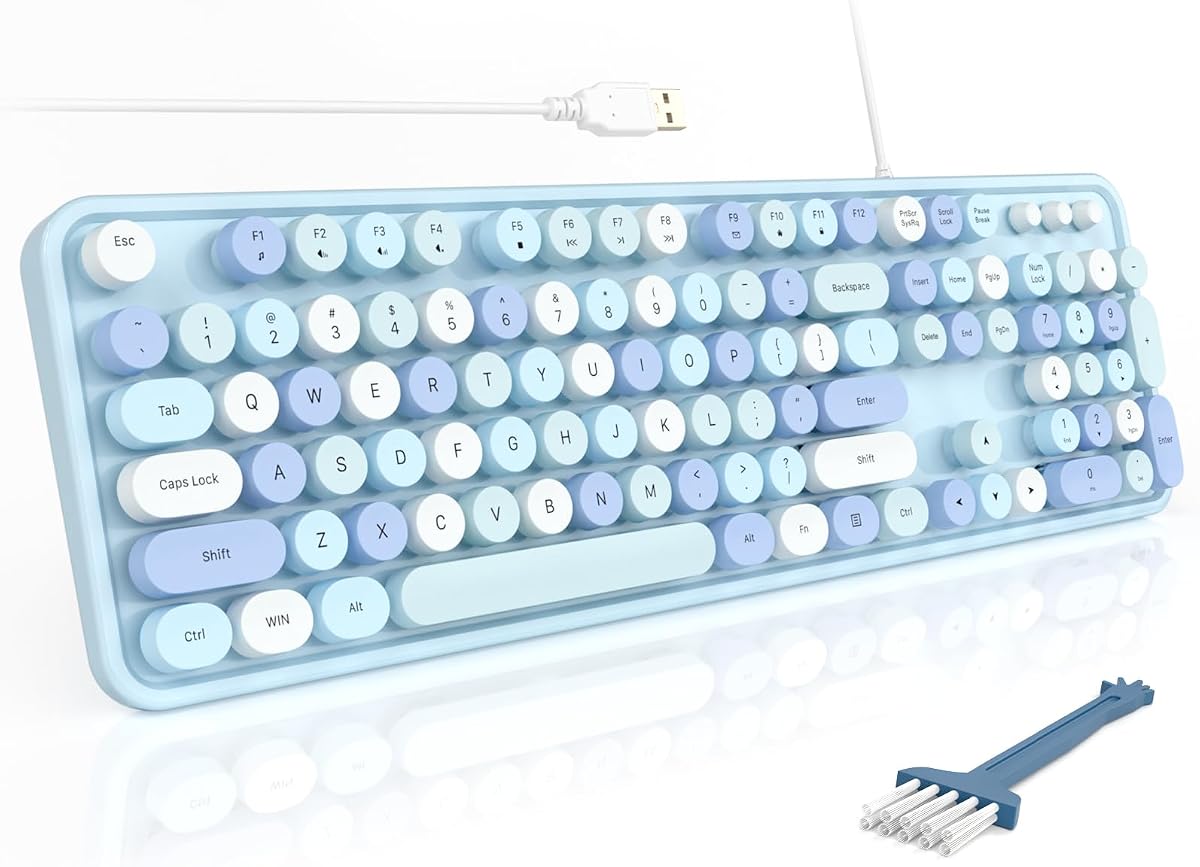
MOFII Computer Keyboards Wired, Plug Play USB Full Size Typewriter Keyboard, Cute Colorful Aesthetic Keyboard with Foldable Stands for Windows PC Laptop (Blue Colorful)
4.6Editor score
Retro typewriter style
Foldable stands
Plug and play
Discover the top colorful keyboards for 2026. We compare retro, wireless, and mechanical options to help you find the perfect vibrant input device.
Colorful keyboards transform your workspace into a vibrant hub of creativity and style. These input devices blend retro aesthetics with modern functionality to suit diverse user needs.
We evaluated ten top models based on design, connectivity, durability, and typing experience. Our analysis ensures you find a keyboard that matches your workflow and visual preferences.
Each pick highlights key strengths and ideal use cases for home or office setups. Please note that product availability and details may change over time.
4.6Editor score

4.7Editor score

4.4Editor score
This side-by-side comparison highlights the core features and design elements of each model to help you make an informed decision.


The KNOWSQT Wireless Keyboard and Mouse Combo stands out with its distinctive MilkTea color scheme that immediately draws attention. Rated 4.4 stars, it offers a full-size layout perfect for office productivity while maintaining a playful, retro vibe.
We may earn a commission when you buy through this link, at no additional cost to you.
Its 2.4GHz wireless connection ensures stable performance up to 35 feet away. The floating button design provides a soft typing feel reminiscent of classic typewriters. Detachable keycaps allow for easy maintenance, keeping the keyboard looking fresh.
While it uses membrane switches rather than mechanical ones, the quiet operation makes it suitable for shared spaces. Battery life is decent, though users need to monitor the low battery indicator closely.
Ideal for users seeking a stylish upgrade to their desk setup without compromising on functionality. This combo delivers a pleasant typing experience and vibrant aesthetics for daily work.
The 2.4GHz technology and shared nano receiver eliminate clutter while maintaining responsive performance across various devices.
Detachable keycaps and included cleaning tools make maintenance simple, ensuring long-term hygiene and appearance.
We may earn a commission when you buy through this link, at no additional cost to you.
The MOFII Wired Keyboard is an excellent choice for budget-conscious buyers seeking style and utility. With a 4.6 rating, its blue colorful finish adds charm to any workspace while delivering reliable performance.
We may earn a commission when you buy through this link, at no additional cost to you.
The retro typewriter keycaps provide a nostalgic typing experience. Foldable stands offer ergonomic adjustment to reduce wrist strain. Multimedia shortcuts streamline media control, enhancing workflow efficiency.
Since it is wired, there are no batteries to replace, ensuring consistent performance without interruptions. The included dust brush aids in routine maintenance.
Perfect for stationary setups where cost-effectiveness matters. This keyboard blends vintage aesthetics with modern convenience for a great value.
Foldable stands and anti-slip pads provide a comfortable typing angle for extended sessions.
Plug and play functionality requires no driver installation, making it ready to use instantly.
We may earn a commission when you buy through this link, at no additional cost to you.
This retro wireless combo delivers exceptional value with a 4.4 star rating. The black-colorful design combines classic aesthetics with practical functionality for everyday computing tasks.
We may earn a commission when you buy through this link, at no additional cost to you.
Its 2.4GHz wireless connection reaches up to 30 meters, ensuring stable connectivity. The shared nano receiver simplifies setup. Noise reduction keys offer a quiet typing experience, while multimedia hotkeys add convenience.
Battery life is a standout feature, lasting up to 36 months. However, users need to purchase AAA and AA batteries separately.
Ideal for office workers prioritizing a tidy desk and long-term reliability. This combo balances style and performance effectively.
Auto power-saving mode extends battery life significantly, reducing replacement frequency.
Retro round concave keycaps align with fingertips for a natural, comfortable feel.
We may earn a commission when you buy through this link, at no additional cost to you.
The UBOTIE wireless combo features a stunning purple rainbow design that brightens any workspace. With a 4.2 rating, it brings personality to desktop setups while maintaining functional quality.
We may earn a commission when you buy through this link, at no additional cost to you.
Fade-resistant keycaps ensure the colors stay vibrant over time. The retro round keycaps deliver a clicky typing experience. Independent power switches for keyboard and mouse allow flexible customization.
Wireless range extends up to 33 feet with minimal lag. However, users note that shortcut keys may require adjustment when moving between different operating systems.
Great for users wanting a colorful upgrade without sacrificing core functionality. This keyboard is a delightful choice for home offices.
Upgraded materials ensure the rainbow design remains fresh through daily use.
Separate switches let you control each device independently to conserve battery life.
We may earn a commission when you buy through this link, at no additional cost to you.
The MOFII wireless combo in green adds a fresh pop of color to any desk. Rated 4.2 stars, it combines retro style with full-size utility for comprehensive daily use.
We may earn a commission when you buy through this link, at no additional cost to you.
Its ergonomic folding stand and anti-slide pads provide stable typing support. The full-size layout includes a number pad, ideal for data entry. Removable keycaps simplify cleaning.
Battery life extends up to 18 months for both keyboard and mouse. However, initial setup requires purchasing separate AA batteries.
Perfect for users seeking a stylish yet functional wireless solution. This keyboard offers a balanced experience for home and office environments.
Full-size layout with number pad ensures versatility for typing and numeric tasks.
Folding stand design prevents movement during use for consistent performance.
We may earn a commission when you buy through this link, at no additional cost to you.
FOPETT delivers reliability with a three-year warranty on this blue colorful wireless set. With a 4.3 rating, it combines practical durability with modern wireless convenience.
We may earn a commission when you buy through this link, at no additional cost to you.
Splash-resistant coating protects against accidental spills. Silent mouse clicks make it ideal for quiet environments. High-definition laser-engraved keycaps resist fading over time.
The shared nano receiver keeps desks tidy. However, users note that some multimedia hotkeys may not function perfectly on macOS.
Excellent for office environments prioritizing longevity and stability. This set offers solid performance and peace of mind.
Splash resistance and durable materials extend the keyboard's usable lifespan significantly.
Silent mouse technology and quiet keys reduce noise for collaborative workspaces.
We may earn a commission when you buy through this link, at no additional cost to you.
Atelus offers a classic purple wired keyboard rated 4.6 stars. Its retro typewriter styling provides a satisfying tactile experience ideal for daily typing tasks.
We may earn a commission when you buy through this link, at no additional cost to you.
Foldable stands adjust the typing angle comfortably. The large number pad supports data entry needs. Detachable keycaps allow for quick cleaning.
As a wired device, it requires no charging or battery replacements. The plug-and-play design ensures instant connectivity with any USB port.
Best for stationary workstations needing reliable input without wireless complexity. This model balances affordability with essential features.
Wired connection ensures consistent input without wireless interference or power concerns.
Round keycaps mimic classic typewriters for a unique and enjoyable typing experience.
We may earn a commission when you buy through this link, at no additional cost to you.
The Womier SK80 delivers premium features with its customizable multimedia display screen. Rated 4.7 stars, it stands out for users wanting both aesthetics and performance.
We may earn a commission when you buy through this link, at no additional cost to you.
The gasket mount design enhances stability while reducing noise. Hot-swappable switches let you personalize tactile feedback without soldering. RGB lighting offers 19 effects and 9 colors.
While the software is Windows-only, core functions work seamlessly on Mac. The detachable Type-C cable adds flexibility for various setups.
Ideal for enthusiasts seeking high-end customization and modern design. This keyboard redefines what a colorful input device can achieve.
The multimedia screen displays GIFs and settings for a highly personalized interface.
Hot-swap sockets and gasket mounting provide superior flexibility and acoustic quality.
We may earn a commission when you buy through this link, at no additional cost to you.
This UBOTIE combo features a sleek black-colorful design with a mirror finish panel. Rated 4.3 stars, it offers a modern twist on retro aesthetics.
We may earn a commission when you buy through this link, at no additional cost to you.
Fade-resistant coating keeps colors vibrant. Round keycaps provide a satisfying clicky feel. The shared USB receiver simplifies setup and reduces clutter.
Automatic sleep mode conserves battery life. However, some macOS users report minor issues with specific shortcut keys.
Best for users wanting a sophisticated look with reliable wireless performance. This combo is a strong contender for stylish workspaces.
The mirror finish panel adds a touch of elegance to any desktop environment.
Updated wireless chip ensures fast response times for smooth daily usage.
We may earn a commission when you buy through this link, at no additional cost to you.
The HUO JI wired gaming keyboard brings colorful LED lighting to everyday typing. Rated 4.4 stars, it suits users seeking gaming aesthetics for general use.
We may earn a commission when you buy through this link, at no additional cost to you.
Rainbow backlit modes are adjustable or can be turned off. Water-resistant design prevents damage from spills. Floating keycaps simplify cleaning and maintenance.
26-key non-conflict ensures smooth performance. However, its wired nature limits mobility compared to wireless options.
Perfect for gamers or streamers who want vibrant visuals. This keyboard offers robust features at a competitive price point.
Rainbow backlighting adds dynamic visual appeal suitable for gaming or evening use.
Water-resistant protection safeguards against accidental liquid spills during usage.
We may earn a commission when you buy through this link, at no additional cost to you.
Choosing the right colorful keyboard involves evaluating aesthetics, connectivity, and functional features to match your workspace.
Colorful keyboards come in various themes from retro typewriters to modern rainbow patterns. Consider how the color scheme complements your existing desk setup and personal style preferences.
Look for fade-resistant materials if you plan to use the keyboard daily to ensure the vibrant colors stay bright over time.
Decide between wired and wireless options based on your need for mobility. Wireless combos offer cleaner desks but require batteries, while wired models ensure consistent power without replacements.
For wireless, verify the connection range and whether a shared receiver is included to minimize USB port usage.
Retro round keycaps evoke a vintage typewriter feel and provide a unique tactile experience. Detachable keycaps allow for easier cleaning and customization if maintenance is a priority.
Ensure the keycaps are made from high-quality ABS or similar durable plastics to prevent wear and fading.
Full-size keyboards include a number pad ideal for data entry tasks, while compact models save desk space. Consider your typical workflows to choose the right form factor.
Check if the keyboard supports tilt adjustments or includes stands for ergonomic positioning during long sessions.
Verify that the keyboard works with your operating system, whether Windows, macOS, or Chrome OS. Some multimedia keys may have limited functionality on certain platforms.
Universal compatibility ensures seamless switching between multiple devices or shared workstations.
Wireless keyboards rely on batteries or rechargeable power sources. Long battery life models reduce maintenance frequency and improve overall user convenience.
Auto-sleep modes are essential features that help conserve power when the keyboard is not in active use.
Look for keyboards with water-resistant coatings or splash protection to prevent accidental damage. This feature is especially useful in busy office environments.
High build quality ensures the keyboard withstands daily wear and tear without losing functionality or aesthetic appeal.
Features like RGB lighting, multimedia keys, or display screens add customization options. Consider whether these extras enhance your workflow or are merely decorative.
Warranty length and customer support availability also play a role in long-term satisfaction and peace of mind.
For wireless models, insert the included USB receiver and ensure the keyboard is powered on. If using a shared receiver, connect both keyboard and mouse simultaneously for optimal performance.
Clean the keyboard regularly using the provided dust brush to remove debris from between keycaps. Detachable keycaps can be removed for deeper cleaning if necessary.
Maintain battery life by enabling power-saving modes or turning off the device when not in use. Replace batteries promptly when low indicators appear to avoid disruptions.
Most modern colorful keyboards support macOS, but some multimedia keys may function differently than on Windows. Always check the product specifications for macOS compatibility before purchasing.
Use a soft brush to remove surface dust. For detachable keycaps, gently pull them off, wash with mild water, and let them dry completely before reattaching.
Most wireless keyboards do not include batteries to reduce shipping weight. Users typically need to purchase AA or AAA batteries separately upon receiving the product.
Standard wireless keyboards using 2.4GHz technology offer a range of approximately 30 to 35 feet. This range ensures stable connectivity across typical room distances.
Many modern colorful keyboards use fade-resistant materials to maintain vibrancy over time. However, direct sunlight exposure may still accelerate fading in some cases.
Some models feature detachable keycaps for easy replacement, while others use fixed designs. Check the product details to confirm if keycap replacement is supported for your model.
Our top picks include the Womier SK80 for premium customization, the MOFII wired model for budget value, and the KNOWSQT combo for retro aesthetics.
Prioritize your specific needs such as connectivity type, layout size, and aesthetic preferences when making your final selection.
Always verify current product availability and details on the retailer site before purchasing to ensure you get the latest version.