
OMTech K40+ 45W Desktop CO2 Laser Engraver & Cutter
4.4Editor score
45W compact desktop performance
12×8 inch work area
LightBurn software support
Compare the top ten CO2 Laser Cutters available in October 2026 based on power, speed, safety features, and overall value for makers and professionals.
CO2 laser cutters transform creative ideas into reality with precision cutting and engraving. Whether you run a small business or hobbyist workshop, finding the right machine matters for quality output and safety.
We analyzed ten real products based on power output, working area, speed, and safety features. This list covers desktop models to industrial-grade options suitable for various materials and project scales.
Each pick highlights key strengths, pros, cons, and who it suits best. Prices change often so verify current listings before purchasing. These insights help you choose a cutter matching your needs and budget.
4.4Editor score

4.5Editor score

5.0Editor score
This table compares key specifications across all ten CO2 laser cutters including power, work area, speed, and safety features to help you find the best match.



The xTool P3 is the flagship 80W CO2 laser cutter offering intelligent automation and desktop industrial performance. It earns high praise for combining powerful cutting with safety and advanced workflow features for serious makers.
We may earn a commission when you buy through this link, at no additional cost to you.
Its Revolutionary Automated Creation System integrates LiDAR autofocus and dual HD cameras for precise positioning. The largest desktop area at 36×18 inches supports large projects while smart nesting minimizes material waste.
Trade-offs include higher cost compared to standard desktop cutters and separate accessory purchases for conveyors or air purifiers. However, the time saved on setup and higher precision justify the investment for professionals.
Buyers seeking the best CO2 laser cutter for automation and production should choose this model. Its Class 1 safety and modular versatility make it ideal for scaling creative or commercial work.
ACS simplifies setup with LiDAR ranging and HD cameras for perfect autofocus and positioning every time.
Class 1 enclosed design with interlocks and active detection ensures safe operation during high-power cutting.
We may earn a commission when you buy through this link, at no additional cost to you.
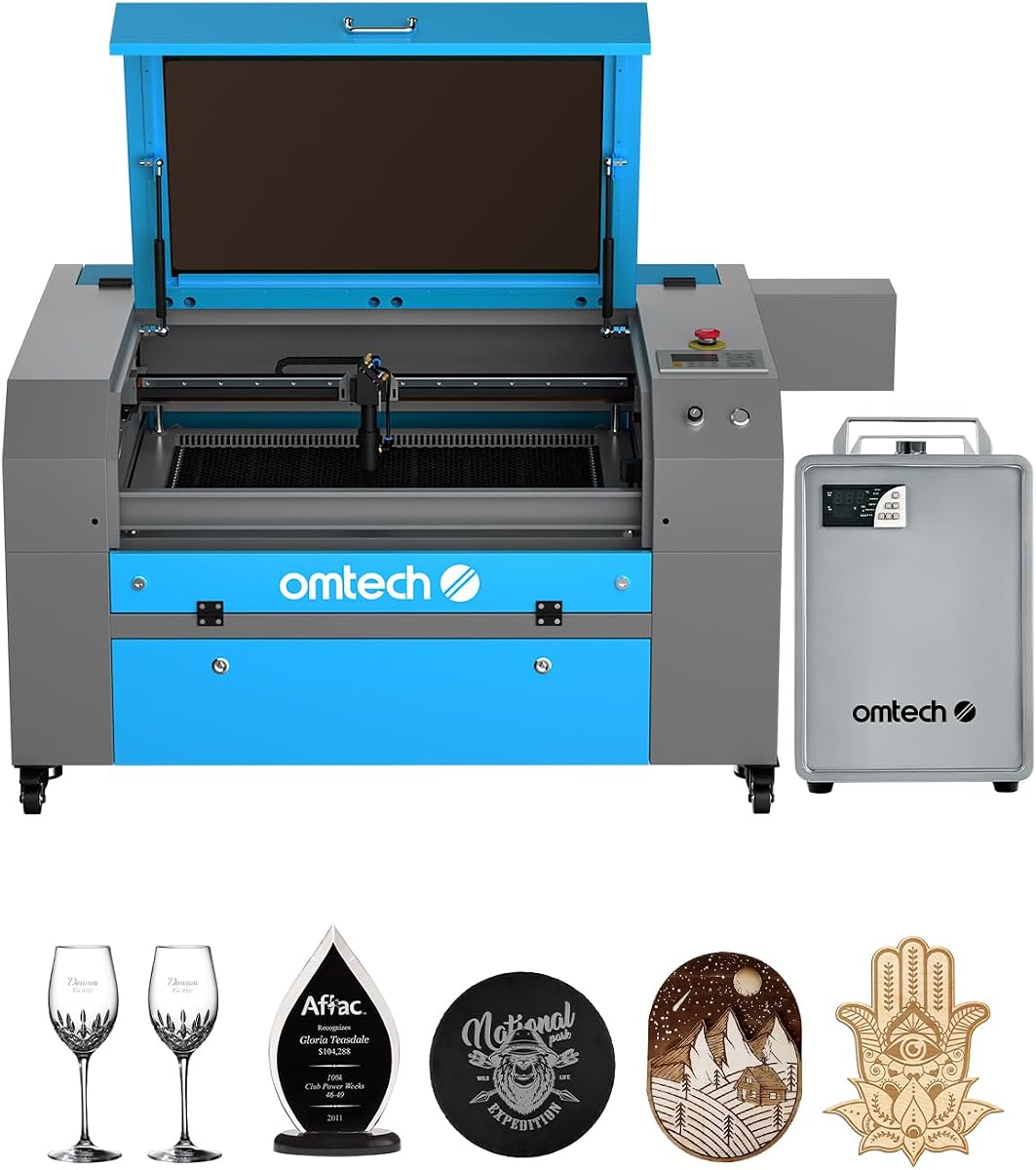
The OMTech K40+ is a powerful 45W desktop CO2 laser engraver cutter designed for DIY and small business use. It balances cost and performance making it a top budget pick for hobbyists.
We may earn a commission when you buy through this link, at no additional cost to you.
Its 45W laser slices through 0.4 inch acrylic and 0.31 inch wood easily with speeds up to 300mm/s. The compact 12×8 workspace supports standard materials while optional accessories expand versatility.
Trade-offs include a smaller work area compared to larger models and manual adjustments without autofocus. Yet its integrated air assist and safety features provide reliable results at a competitive price point.
Budget-conscious buyers needing a dependable CO2 laser cutter for wood and acrylic should consider this model. Its software compatibility and global support ensure ease of use and longevity.
Upgraded power boosts cutting speed and depth for faster and deeper cuts than earlier K40 models.
24/7 support and local demos provide expert assistance and peace of mind for users anywhere.
We may earn a commission when you buy through this link, at no additional cost to you.
The OMTech Pro 130W is a high-end CO2 laser cutter built for industrial-grade work with a massive 35×55 inch workspace. It excels in speed and stability ideal for professional and large volume production.
We may earn a commission when you buy through this link, at no additional cost to you.
Powered by 130W and servo motors it achieves speeds up to 1200mm/s with precise ball-bearing rails. The built-in CW5200 chiller maintains stable temperatures ensuring consistent output during long engraving sessions.
Trade-offs include higher cost and weight requiring dedicated space and careful handling. Still the professional features like WiFi control and four-way pass-through doors justify the investment for serious users.
Professionals needing a powerful and reliable CO2 laser cutter should prioritize this model. Its large workspace and advanced cooling make it suitable for demanding projects and continuous use.
Upgraded servo motors with ball-bearing rails deliver rapid and precise engraving for intricate details.
Built-in chiller keeps the laser tube cool for extended operation without overheating or downtime.
We may earn a commission when you buy through this link, at no additional cost to you.
The VEVOR 100W CO2 laser engraver offers a spacious 24×35 inch workspace suitable for larger materials and projects. It combines strong power with user-friendly features ideal for expanding creative or business use.
We may earn a commission when you buy through this link, at no additional cost to you.
Its 100W laser cuts up to 0.59 inch thick in one pass with speeds up to 19.7 inches per second. The intuitive digital control panel works seamlessly with LightBurn CorelDRAW and AutoCAD on multiple OS.
Trade-offs include higher cost than smaller models and lack of advanced automation features. Yet its pass-through doors and wheels enhance flexibility and mobility making it practical for workshop settings.
Users needing extra workspace without industrial scale should choose this CO2 laser cutter. Its safety features and software compatibility make it a versatile and safe choice for various materials.
The 24×35 inch area supports large sheets and projects with pass-through doors for longer materials.
Compatible with Windows Linux and macOS software ensures seamless file transfer and control options.
We may earn a commission when you buy through this link, at no additional cost to you.
The OMTech Maker 90W CO2 laser engraver offers solid power with included water chiller for stable performance. It targets users seeking reliable commercial-grade output without high-end automation or costs.
We may earn a commission when you buy through this link, at no additional cost to you.
Its 90W tube engraves up to 0.4 inch on wood and acrylic at speeds up to 23.6 inches per second. The honeycomb and aluminum beds support flexible setups with four-way pass-through doors.
Trade-offs include fewer advanced safety or automation features than top tier models. However the included chiller and built-in air assist ensure clean and efficient engraving for regular use.
Those seeking a balanced CO2 laser cutter with cooling and workspace should consider this. Its flame retardant window and interlocks provide reliable safety for daily operations.
Included chiller extends laser tube life and maintains consistent performance during long sessions.
Pass-through doors enable handling longer items without removing the material from the bed.
We may earn a commission when you buy through this link, at no additional cost to you.
The OMTech Maker 60W CO2 laser engraver includes LightBurn software and water chiller for an all-in-one solution. It simplifies setup with autofocus and offers reliable performance for medium projects.
We may earn a commission when you buy through this link, at no additional cost to you.
Its workbeds adjust with autofocus reducing manual guesswork. The 20×28 workspace fits most projects while flame retardant materials and air assist enhance safety and cut quality.
Trade-offs include lower power than 90W or 100W models limiting depth and speed. However bundled software adds significant value and ease of use for buyers new to laser cutting.
Buyers valuing convenience and software support should choose this CO2 laser cutter. Its autofocus and included tools make it a user-friendly option for consistent results.
Included LightBurn software simplifies design and control for intuitive workflow without extra costs.
Autofocus adjusts workbeds automatically ensuring consistent focal distance for quality engraving.
We may earn a commission when you buy through this link, at no additional cost to you.
The OMTech Pronto 100W CO2 laser engraver offers unmatched efficiency with speeds up to 39.4 inches per second. It is built for creators needing fast turnaround and large workspace without extreme costs.
We may earn a commission when you buy through this link, at no additional cost to you.
Its 100W laser tube delivers up to 12000 hours usage. Advanced autofocus and four-way pass-through doors allow quick setups and easy handling of large or long items.
Trade-offs include fewer advanced safety features compared to top tier models. Still its powerful air pump ensures clean cuts and reduced burn enhancing overall project quality.
Those prioritizing speed and workspace in a CO2 laser cutter should consider this model. It balances performance and usability well for makers and small businesses.
Up to 39.4ips speeds make production and bulk orders significantly faster than standard models.
Included air pump removes smoke and debris ensuring precise and clean engraving results.
We may earn a commission when you buy through this link, at no additional cost to you.
The OMTech Pronto 130W CO2 laser engraver features an expansive 51×35 inch workspace for large format projects. It delivers powerful output and high speeds suitable for professional and commercial work.
We may earn a commission when you buy through this link, at no additional cost to you.
Its 130W laser engraves up to 0.4 inch depth with speeds up to 1000mm/s. Autofocus reduces setup time while comprehensive safety features ensure reliable daily operation.
Trade-offs include high price and manual adjustments instead of advanced automation. Yet the large workspace and high power support scaling production efficiently without extra equipment.
Professionals needing large capacity CO2 laser cutter should choose this model. Its power and workspace balance performance and usability for diverse materials and designs.
51×35 workspace accommodates full sheets and oversized materials without repositioning issues.
130W power enables deeper cuts and faster engraving for demanding commercial applications.
We may earn a commission when you buy through this link, at no additional cost to you.
This OMTech K40+ 45W desktop CO2 laser engraver and cutter offers standard design for entry level hobbyists. It provides essential features at a budget price for basic wood and acrylic work.
We may earn a commission when you buy through this link, at no additional cost to you.
Its 45W power suits smaller projects and lighter cutting tasks. The compact workspace allows placement in limited areas but requires careful alignment for larger items.
Trade-offs include limited power and workspace compared to enhanced models. However its simplicity and affordability make it ideal for beginners exploring laser engraving.
New users seeking an affordable CO2 laser cutter should consider this variant. Its standard features allow safe experimentation without significant financial commitment.
Basic K40 design keeps costs low while delivering reliable performance for simple projects.
Smaller footprint fits on standard desks making it accessible for home hobbyists and small shops.
We may earn a commission when you buy through this link, at no additional cost to you.
The OMTech Pro 130W CO2 laser engraver combines high power and precision for industrial applications. Its large workspace and servo motors make it ideal for demanding and high volume production.
We may earn a commission when you buy through this link, at no additional cost to you.
Servo motors achieve up to 1200mm/s engraving with ball-bearing rails for smooth movement. WiFi connectivity and four-way pass-through doors simplify workflow handling longer materials with ease.
Trade-offs include highest price point and size requiring ample workshop space. However advanced features like tri-color status lights and flame-retardant windows enhance safety and control.
Users needing premium performance in a CO2 laser cutter should prioritize this model. Its robust build and connectivity offer reliability and efficiency for professional environments.
Servo motors ensure precise and rapid movement reducing vibration for clean accurate cuts.
WiFi control enables remote monitoring and management improving workflow and convenience.
We may earn a commission when you buy through this link, at no additional cost to you.
Choosing the right CO2 laser cutter requires evaluating power workspace safety and software to match your projects and skill level.
Laser power measured in watts determines material cutting depth and speed. Higher wattage like 130W suits industrial use while 45W or 60W works for hobbyists.
Select power based on the thickest materials you will cut to ensure consistent results.
Workspace dimensions affect the size of materials you can engrave or cut at once. Larger workspaces require more space but reduce repositioning.
Match workspace to typical project sizes to maximize efficiency and minimize waste.
Speed measured in mm/s or ips impacts production time. Faster machines boost throughput but may reduce precision if not balanced with power.
Prioritize speed if you handle bulk orders or tight deadlines regularly.
Safety features like Class 1 enclosures interlocks and emergency stops protect users during operation. Always prioritize certified safety designs especially for indoor use.
Look for flame retardant materials and ventilation systems to ensure a safe workspace.
Compatible software determines ease of design import and control. Popular options include LightBurn CorelDRAW and AutoCAD for advanced workflows.
Choose a cutter that supports your preferred software to streamline operations and reduce learning time.
Higher power lasers generate heat requiring active cooling to maintain performance and tube life. Built-in chillers simplify setup and ensure consistent output.
Consider a model with integrated chiller if you plan on extended engraving sessions.
Automation features like autofocus LiDAR and HD cameras reduce manual setup time and improve accuracy. These are vital for professional and repetitive production.
Invest in automation if minimizing setup time and maximizing consistency is critical for your workflow.
Budget affects available features and long term reliability. Ensure the vendor offers strong warranty and customer support for maintenance and troubleshooting.
Evaluate total cost of ownership including accessories to make a cost-effective decision.
Prepare materials by cleaning surfaces and ensuring they are non-metallic to avoid damage or fire risks during engraving.
Use appropriate software to import designs set cut parameters and align the laser head before starting any operation.
Regularly clean lenses mirrors and bed to maintain performance and safety while monitoring water levels in the chiller system.
CO2 laser cutters safely cut wood acrylic leather fabric cardboard and paper. Avoid cutting metals PVC vinyl or other materials that release toxic fumes or damage the laser tube.
Yes proper ventilation is essential to remove smoke and fumes during cutting. Most units include air assist or exhaust fans but additional ventilation improves safety and air quality.
A typical CO2 laser tube lasts 6000 to 12000 hours depending on usage and maintenance. Higher quality tubes and proper cooling extend lifespan significantly.
CO2 lasers generally do not engrave bare metal effectively without special coatings. Marking sprays can be used to allow engraving on metal surfaces.
Autofocus simplifies setup and ensures consistent engraving depth across materials but manual focus is possible. It is a valuable feature for high volume or varied material workflows.
Class 1 enclosed lasers are safest as they prevent exposure during operation. Class 2 machines require more user caution and should always be used with protective equipment.
The xTool P3 stands out as the best overall with automation and safety making it ideal for serious makers. Budget buyers find value in the OMTech K40+ while professionals benefit from the OMTech Pro's industrial power.
Prioritize laser power workspace safety features and software compatibility when selecting your cutter. Balancing these factors ensures you choose a machine that grows with your projects.
Always check current prices and availability since listings change frequently. Use this guide to make an informed decision and start creating with confidence.