
RDS – Licensed Nintendo Action Grip NES Classic Controller – Red
4.5Editor score
Licensed Nintendo accessory
Textured silicone material
Comfortable extended grip
This guide compares the top Classic Nes Controller Replacement options for retro gaming, evaluating compatibility, cable length, and button quality to help you
Finding the right Classic Nes Controller Replacement can transform your retro gaming experience. Whether your original controllers have worn out or you need extras for multiplayer sessions, selecting the correct replacement is crucial for maintaining that authentic feel and responsiveness you expect from classic titles.
We have carefully analyzed various options available in the market today. Our comparison focuses on key factors such as build quality, cable length, compatibility with different systems, and overall user satisfaction. This list covers a wide range of choices from budget-friendly packs to premium licensed alternatives.
Each pick in this guide highlights specific strengths and potential drawbacks to help you make an informed decision. Remember that prices and availability can change frequently, so always check the current listings before purchasing. We aim to provide you with the most accurate and useful information possible for your gaming setup.
4.5Editor score

4.8Editor score

3.7Editor score
This side-by-side comparison highlights the key specifications and features of each product to help you quickly identify the best fit for your specific gaming console and preferences.


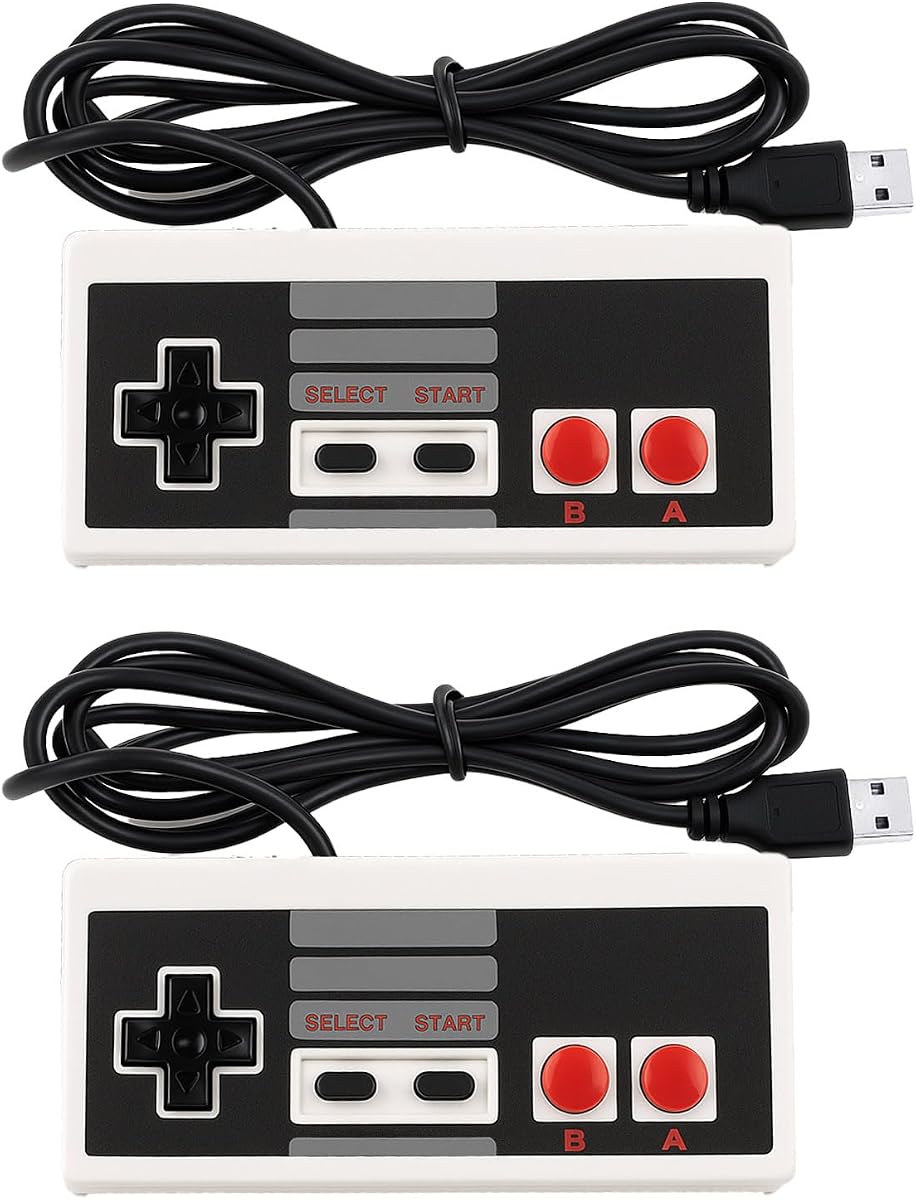


This NGHTMRE pack offers a cost-effective solution for those needing extra controllers for the NES Classic Mini. With a 3.7 rating, it provides basic functionality without breaking the bank. The standout feature is the extended cable length which enhances comfort during longer sessions.
We may earn a commission when you buy through this link, at no additional cost to you.
The controllers are designed specifically for the 2016 model with HDMI sockets. Sensitive buttons aim to provide precision control for retro gaming. The 10ft cable ensures you can sit back comfortably without being tethered too closely to the screen.
However, user feedback suggests that button responsiveness can be inconsistent over time. While functional for casual play, they may not satisfy competitive gamers seeking perfect tactile feedback. The build quality is decent for the price but not premium.
If you need a simple backup set for family game nights, this pack is worth considering. It fulfills the basic requirement of replacing worn out controllers on a budget. Just manage expectations regarding long-term durability compared to licensed options.
The 10ft cable allows players to sit further away from the screen, reducing eye strain during extended gameplay sessions.
Ensure your console is the 2016 HDMI model as these controllers are not designed for the original 1985 NES hardware.
We may earn a commission when you buy through this link, at no additional cost to you.
ZAMPAM controllers offer a wireless twist for PC and Mac retro gaming setups. Rated 4.0, they bring modern convenience to classic titles. The wireless adapter allows you to play without wires cluttering your desk while maintaining a stable connection within ten meters.
We may earn a commission when you buy through this link, at no additional cost to you.
These controllers feature a turbo function which can be customized via software for rapid fire inputs. The rechargeable lithium-ion battery offers around 100 hours of playtime per charge. You will need to download a joystick mapper to configure keys effectively on your system.
It is crucial to note these do not work with the NES Classic Mini or Super Nintendo consoles. They are strictly for PC and Linux based emulation. If you need physical console compatibility, you should look at other options in this list.
For desktop retro gaming on a computer these controllers provide excellent value. The wireless capability and battery life make them convenient for daily use. Just ensure you are comfortable with the software configuration process before purchasing.
One full charge lasts approximately 100 hours allowing for extended gaming periods without frequent recharging interruptions.
Users can set rapid button sequences manually to gain an edge in games requiring frequent repeated inputs.
We may earn a commission when you buy through this link, at no additional cost to you.
The XYAB controller aims to bring a classic feel to modern systems with minimal setup. However, a 1.0 rating indicates significant user dissatisfaction that cannot be ignored. It offers USB plug and play functionality for Windows and macOS users looking for a simple connection.
We may earn a commission when you buy through this link, at no additional cost to you.
Design wise it features a classic D-pad and responsive A/B buttons intended for precision. The 6-foot cable provides reasonable reach for desktop gaming. The construction uses premium materials to ensure durability over time according to product claims.
Despite the promises of quality the low rating suggests inconsistent performance or failure rates among buyers. Some users may find the buttons unresponsive or the build quality lacking. It is advisable to read recent reviews before committing to this specific model.
If you find a discounted deal and are willing to take a risk this could serve as a basic option. However due to the poor feedback you might want to consider alternatives with higher satisfaction ratings for reliability.
This controller works with all major operating systems including Windows and macOS for versatile retro gaming options on computers.
The design prioritizes comfort during long sessions with ergonomic shaping and responsive buttons for classic games.
We may earn a commission when you buy through this link, at no additional cost to you.
With a high 4.8 rating this happymaxplus pack is a top choice for owners of AV based retro consoles. The 9 pin port design ensures a secure connection to systems like AV 620 and HD 621. It delivers a reliable plug and play experience out of the box.
We may earn a commission when you buy through this link, at no additional cost to you.
Each controller features four buttons including continuous fire capability for rapid action sequences. This feature gives you an edge in games requiring frequent inputs. The two pack allows you to share gaming moments with family or friends comfortably.
While excellent for specific retro consoles it is not compatible with the NES Classic Mini. The product description clearly states it is a high-quality alternative not a first-party item. Confirming your console model before purchase is essential to avoid returns.
For users with compatible AV retro consoles these controllers offer robust performance and high satisfaction. The build quality and feature set justify the purchase for dedicated retro enthusiasts seeking reliable hardware for their specific setup.
The standard 9 pin DB9 plug is designed to work seamlessly with a wide range of retro game consoles.
Built-in continuous fire helps dominate challenges in games requiring rapid button tapping without tiring your finger.
We may earn a commission when you buy through this link, at no additional cost to you.
ZENANBiBi controllers offer a practical solution for users running emulators on Linux and Raspberry Pi systems. Rated 3.8 they are designed to replicate the classic NES feel. The 5.6ft cable provides enough length to play from a comfortable distance on a TV setup.
We may earn a commission when you buy through this link, at no additional cost to you.
Plug and play functionality means you can connect via USB 2.0 and start playing immediately. There is no need to install drivers which simplifies the setup process significantly. They support a wide range of operating systems including Windows and Mac.
These controllers are not compatible with modern Switch hardware or the NES Classic Mini. They are tailored for PC based emulation and similar retro setups. This limitation is standard for USB clones designed for specific emulation environments.
If you are building a retro Pi console or need extra controllers for PC gaming this pack is a solid choice. The combination of compatibility and ease of use makes it a functional option for budget-conscious gamers.
Designed to work with popular emulators on RetroPie and Linux systems for instant retro gaming without complex setups.
The 5.6ft cable ensures you can sit comfortably away from the screen while maintaining a stable connection.
We may earn a commission when you buy through this link, at no additional cost to you.
This adapter by MAYFLASH allows you to use various controllers with NES Classic and Wii U systems. Rated 3.9 it bridges the gap between legacy hardware and modern consoles. You can plug in SNES controllers to play games on the NES Classic Edition easily.
We may earn a commission when you buy through this link, at no additional cost to you.
No extra drivers are required making the setup straightforward for most users. The adapter includes a built-in turbo function to enhance gameplay for action titles. You can also exchange the D-pad and left stick depending on your preference and game requirements.
It is important to note this is an adapter rather than a standalone controller replacement. It enhances your existing collection but does not provide a new controller itself unless paired with one. This makes it a specific tool for customization.
If you want to expand your controller options on Wii or NES Classic this adapter is a functional addition. It offers versatility for retro enthusiasts who want to mix and match controllers on their consoles.
The adapter supports both NES and SNES controllers enabling flexible gameplay across different retro systems.
Built-in turbo adds automatic rapid firing for actions requiring fast button presses during intense gaming moments.
We may earn a commission when you buy through this link, at no additional cost to you.
This product provides a custom housing to give your Switch Joycons a retro NES look. With a 4.4 rating it is popular for personalizing handhelds. The soft touch material provides a good grip and prevents slipping during long play sessions.
We may earn a commission when you buy through this link, at no additional cost to you.
The installation process requires moderate electronic experience to fit the housing correctly. The package includes necessary screwdrivers and spare screws to assist with the assembly. Watching installation guides can help ensure a proper fit without damage.
The retro design brings an 80s aesthetic to your modern device. It is designed for d-pad intensive games improving left Joycon functionality. However it does not include the electronics so you must reuse your existing Joycon internals.
If you want to customize your Switch with a unique retro shell this is a strong option. It changes the feel and look significantly while maintaining original functionality. Just ensure you are comfortable with the required disassembly process.
The ergonomic d-pad improves functionality for games requiring precise directional inputs over analog sticks.
Soft touch material offers anti-slip benefits and a comfortable feel during extended handheld gaming sessions.
We may earn a commission when you buy through this link, at no additional cost to you.
This bundle aims to provide a complete set for users needing replacements and extra power options. However the 2.4 rating suggests significant issues with product reliability or quality. It includes one controller and a power supply along with two extension cables.
We may earn a commission when you buy through this link, at no additional cost to you.
The 6ft extension cables help solve the original short cable issue found on the console. This allows for better seating distance during play. The power supply ensures you can run the console without relying on the original potentially faulty unit.
Despite the convenience of a bundle the low user feedback indicates potential risks. Some units may not function as expected or materials may feel cheap. It is advisable to check return policies before purchasing this specific bundle.
If you need a power supply and extensions together this bundle could save a trip to the store. However for pure controller quality you might find better value by buying items separately from higher-rated listings.
Includes a dedicated power supply to ensure the console runs reliably without depending on the original adapter.
Two 6ft extension cables allow for flexible seating arrangements away from the television screen.
We may earn a commission when you buy through this link, at no additional cost to you.
RDS Industries offers a licensed accessory that meets Nintendo quality standards. Rated 4.5 this controller is made with superior materials to ensure durability. The textured silicone material creates a comfortable grip that extends your control range significantly.
We may earn a commission when you buy through this link, at no additional cost to you.
The design prioritizes precision and comfort for play. It features a unique shape that fits naturally in the hand. Being an official licensee ensures better compatibility and build quality compared to generic alternatives on the market.
While it is often more expensive than unlicensed clones the quality justifies the cost for many users. It comes in a red color option to add some style to your setup. Packaging includes a color box with hang tab for display.
If you want peace of mind regarding build quality this licensed controller is a top recommendation. It provides a reliable replacement with better ergonomics than standard plastic pads.
As a #1 Nintendo licensed manufacturer this controller is built to meet official quality and safety standards.
Textured silicone material ensures the controller stays in your hand during intense gaming moments.
We may earn a commission when you buy through this link, at no additional cost to you.
This KIWITATA pack brings SNES style ergonomics to PC retro gaming. Rated 4.3 the controllers feature a precise cross key and frosted concave design. This design helps prevent slipping during use and fits comfortably in the contour of your hands.
We may earn a commission when you buy through this link, at no additional cost to you.
You will need to manually set buttons and directionals within your emulator software. The controller connects via standard USB 2.0 port and does not assign axes automatically. This offers flexibility for custom setups but requires initial configuration effort.
It supports Windows and Mac OS systems effectively for running classic games. The 5ft cable provides enough length for most desktop gaming setups. It is specifically designed for computer use and not for original SNES hardware.
If you play retro games on a PC these controllers offer a comfortable SNES feel at a reasonable price. The ergonomic design reduces strain during long sessions making it a practical choice for computer based retro gaming.
The shape follows hand contours to reduce fatigue and improve grip comfort during extended gameplay.
Manual configuration within emulator software allows for flexible button mapping to suit different play styles.
We may earn a commission when you buy through this link, at no additional cost to you.
Choosing the right replacement requires looking at compatibility, cable length, and build quality. These factors determine how well the controller fits your setup and lasts over time.
The first factor to consider is whether the controller works with your specific console or setup. Some products are designed for the NES Classic Mini while others target PC and Mac emulation. Always verify the product description matches your hardware to avoid return hassles.
Confirm the console model before purchasing to ensure a seamless connection.
Standard controllers often come with short cables which limit your seating position. Look for replacements with extended cables if you plan to play on a TV from a distance. Longer cables reduce strain and allow for more comfortable seating arrangements.
Choose a cable length that matches your room setup for better comfort.
Durability varies widely between licensed and unlicensed options. Official products typically use better materials and resist wear over time. Third-party controllers may have inconsistent button feel but can be more affordable for casual users.
Prioritize materials that feel sturdy to ensure long-term use.
Retro games often require precise inputs which depend on responsive buttons. Look for descriptions mentioning sensitive or responsive buttons to ensure accurate control. Poor button feel can lead to missed inputs during fast-paced games.
Test button responsiveness reviews when possible before buying.
If you plan to play with friends or family check if the product is a multi-pack. Buying two controllers in one package is often cheaper than purchasing singles separately. This ensures consistency in feel across both controllers.
Buying a pack saves money and ensures uniform controller feel.
Determine if you need a wired or wireless solution for your setup. Wired USB options are plug and play while wireless controllers need adapters or specific setups. Wired connections generally offer zero latency for precise retro action.
Wired is best for precision wireless for convenience on a PC.
Some controllers include turbo functions or custom layouts for modern emulation. These features can enhance gameplay in specific titles requiring rapid inputs. Consider if you need these extras or prefer a simple classic experience.
Check for extras like turbo if you need rapid-fire support.
Higher prices often correlate with better durability and comfort features. Licensed products cost more but provide peace of mind regarding quality. Budget options work for short-term use but may need replacement sooner.
Balance cost with expected usage duration for the best value.
Start by connecting the controller securely to your console or computer USB port. Ensure the cable is not bent or kinked at the connection point to avoid signal issues. Proper insertion ensures the controller is recognized immediately by the system.
For USB controllers check your emulator settings to map buttons correctly. Some software requires manual configuration for directionals and action buttons. This step ensures the controller responds exactly as you expect during gameplay.
Store controllers in a cool dry place to protect internal components from humidity. Avoid placing heavy objects on the cable to prevent internal wire damage. Gentle care extends the lifespan of the plastic casing and button mechanisms.
Most USB or HDMI based controllers in this guide are designed for modern systems or the NES Mini. The original 1985 NES uses a proprietary connector that requires specific legacy adapters. Always check the product description for legacy compatibility.
Most of the controllers listed are plug and play and do not require drivers. However some wireless or PC specific options may need joystick mapper software for key configuration. Check the manual included with your specific purchase.
Only specialized adapters or housing replacements listed in this guide work with the Switch. Most standard NES USB controllers will not connect natively to the Switch system. Verify Switch compatibility in the product details before buying.
Price differences often reflect build materials and licensing status. Licensed controllers from official partners cost more to meet standards. Unlicensed clones use lower cost materials to offer budget-friendly options for casual users.
Check the USB connection and ensure no cables are damaged. Try unplugging and replugging to reset the connection. If the issue persists the controller may have internal wiring faults requiring replacement.
Many controllers in this list explicitly support macOS for retro gaming. They connect via standard USB and should work with emulators on the system. Check the compatibility section for macOS support before purchasing.
Most replacements in this list are wired to ensure latency-free gameplay. A few wireless options exist but are designed for PC setups rather than consoles. Check the product specs for wireless capabilities.
Turbo allows automatic rapid firing by holding a single button. This is useful for games requiring repeated inputs to shoot or move. Not all controllers include this feature so check the details if you need it.
We have reviewed ten distinct options for replacing your classic controller ranging from budget-friendly packs to premium licensed choices. Each product offers unique strengths depending on your system and gaming style. The top picks provide a solid starting point for most users.
Prioritize compatibility and cable length when making your final decision. These factors impact your physical comfort and setup convenience more than any other feature. Invest in durable options if you plan to game for many hours each week.
Remember that prices and stock can change frequently on the marketplace. Always check the current listings for the most up to date availability. We hope this guide helps you find the perfect controllers for your retro gaming journey.