
Creative Pebble 2.0
4.6Editor score
USB powered single cable
45 degree elevated drivers
Passive radiator bass
This guide compares the top affordable computer speakers for PC and laptop users, evaluating sound quality, design, and value to help you find the perfect
Finding the right audio setup does not require breaking the bank. Many users search for cheap PC speakers that deliver clear sound without costing a fortune. Whether you need them for gaming, work, or movies, there are plenty of budget-friendly options available.
We have analyzed ten highly rated models to create this comprehensive list. Our focus is on performance, build quality, and ease of use. Each product has been selected based on customer feedback and technical specifications to ensure reliability.
Every entry below highlights key features and real-world performance insights. Keep in mind that pricing and availability can fluctuate over time. Always check the latest offers before making your final purchase decision to get the best deal.
4.6Editor score

4.4Editor score

4.2Editor score
The following table provides a side-by-side comparison of all ten selected models. This overview helps you quickly identify key specifications and features to narrow down your choice based on your specific needs and preferences.




This speaker system is a solid choice for anyone needing reliable audio on a budget. It holds a high rating from thousands of users who appreciate its simplicity and performance. The design focuses on delivering clear sound without unnecessary complexity.
We may earn a commission when you buy through this link, at no additional cost to you.
The USB power means you do not need extra outlets near your desk. Volume control is conveniently placed on the cable for quick adjustments. The bottom radiator helps produce decent bass for such a small unit.
While the plastic build is simple, it feels durable enough for daily office or home use. There is no remote control, but the inline knob works well. Sound quality is balanced for the price point.
This is ideal for students or remote workers who need clear voice and music playback. It fits easily on crowded desks. We recommend it as a top pick for value and ease of use.
The USB plug draws power directly from your PC, reducing cable clutter and simplifying setup significantly.
Inline volume knobs allow you to adjust sound levels without reaching for the mouse or keyboard constantly.
We may earn a commission when you buy through this link, at no additional cost to you.
Creative is a known name in audio, and this model continues their legacy of affordable quality. Users love the unique elevated driver design that projects sound directly at ears. It is a very popular pick for small spaces.
We may earn a commission when you buy through this link, at no additional cost to you.
The far-field drivers work well with passive radiators to enhance bass. You do not need to plug in extra power cables since one USB line handles everything. The sleek look fits modern desktop setups perfectly.
It lacks the raw power of larger systems, so don't expect room-filling volume. However, for personal listening, it performs impressively. The controls are front-facing, making them easy to reach.
If you want a trusted brand without spending much, this is the best value. It is perfect for laptops and small monitors. We suggest checking the current price before ordering.
Drivers tilted at 45 degrees ensure sound waves travel directly to your ear level for better clarity.
A single USB cable handles both power and audio signal, keeping your desk free of tangled wires.
We may earn a commission when you buy through this link, at no additional cost to you.
This model stands out with its higher power output and unique tilt design. It is recognized for Japanese quality standards, which often means better durability and consistency. The sound profile is rich and detailed.
We may earn a commission when you buy through this link, at no additional cost to you.
The 30-degree tilt directs audio straight to you, reducing reflection issues. Gold-plated inputs minimize signal noise for cleaner listening. It includes a warranty and support for peace of mind.
It takes up slightly more space than tiny USB speakers but offers better sound quality. The matte finish looks professional and resists scratches. It works with many devices beyond just Windows PCs.
Choose this if you want premium features without buying a massive stereo system. It suits gamers and music lovers alike. Always verify compatibility with your specific monitor setup.
Award-winning design and premium components ensure high standards of build and audio performance quality.
The upward tilt of the speakers aims sound directly at your ears for a focused and immersive experience.
We may earn a commission when you buy through this link, at no additional cost to you.
These speakers are designed for minimal desk space with maximum sound output. The column shape is distinct and helps direct audio effectively. They are a favorite for users with limited room for external devices.
We may earn a commission when you buy through this link, at no additional cost to you.
Users report clean, distortion-free audio even at higher volumes. The anti-slip pads keep them stable during use. Setup involves just plugging in USB and audio cables. No drivers are needed for this to work.
While they do not have advanced bass enhancement, they sound clear for general tasks. The matte metal panels look modern and durable. Controls are simple but functional enough for daily use.
This is a great option for basic computing tasks and streaming. It is lightweight and portable. Make sure your USB port is working correctly for power.
The unique vertical design saves desk space while maintaining a modern aesthetic look.
Anti-slip pads on the bottom ensure the speakers stay firmly in place on smooth surfaces.
We may earn a commission when you buy through this link, at no additional cost to you.
This soundbar style speaker clamps directly onto your monitor to save desk space. It includes a G-sensor that adjusts audio channels based on position. The USB C adapter makes it versatile for newer laptops.
We may earn a commission when you buy through this link, at no additional cost to you.
The loud sound output is impressive for such a small form factor. Touch controls are intuitive and easy to use. It connects easily to Windows and macOS systems without extra software.
Keep in mind this is for PC monitors only, not for TVs or projectors. The mount must fit your screen thickness. Audio quality is rich with strong bass response for movies.
Ideal for those with cramped desks who want better sound. The clip mechanism is secure and stable. Check your monitor compatibility before purchasing to ensure fit.
Clamps securely to monitor edges to free up valuable desk space for other peripherals.
An internal sensor detects position to automatically switch left and right audio channels correctly.
We may earn a commission when you buy through this link, at no additional cost to you.
Designed for portability, these speakers are easy to move between rooms. The headphone jack on the unit allows direct listening without using system audio settings. It is a practical choice for laptops.
We may earn a commission when you buy through this link, at no additional cost to you.
The on/standby switch adds convenience for turning off without unplugging. Weight is light, making it easy to pack in a bag. Sound is clear for voices and soft music.
The 2.2 watts of power is limited but sufficient for quiet rooms. Frequency range covers standard needs for speech and media. The black finish is neutral and goes with any setup.
Perfect for students moving between dorm and home. It lacks deep bass but excels in clarity. Ensure your USB port provides stable power for best performance.
A 3.5mm jack on the unit lets you connect headphones directly for private listening.
Compact dimensions and light weight allow for easy movement and travel without bulk.
We may earn a commission when you buy through this link, at no additional cost to you.
This soundbar style unit offers a wider soundstage thanks to its elongated shape. It uses one USB cable for power and audio signal together. Compatibility includes macOS and Linux which is a plus.
We may earn a commission when you buy through this link, at no additional cost to you.
Enhanced bass comes from the passive radiator technology inside. It delivers stereo sound with good volume for a desktop. Drivers are high-excursion for better dynamic range and lower distortion.
You do not need a separate audio jack since USB handles everything. It avoids messy cable setups on your desk. The build quality is solid for the price point offered.
Best for users needing a simple audio upgrade without complexity. It is wide enough to sit under most monitors. Verify your OS audio settings for best results.
A single USB cable transmits both power and sound to simplify your connection setup.
Works seamlessly across Windows, macOS, and Linux systems without driver installation.
We may earn a commission when you buy through this link, at no additional cost to you.
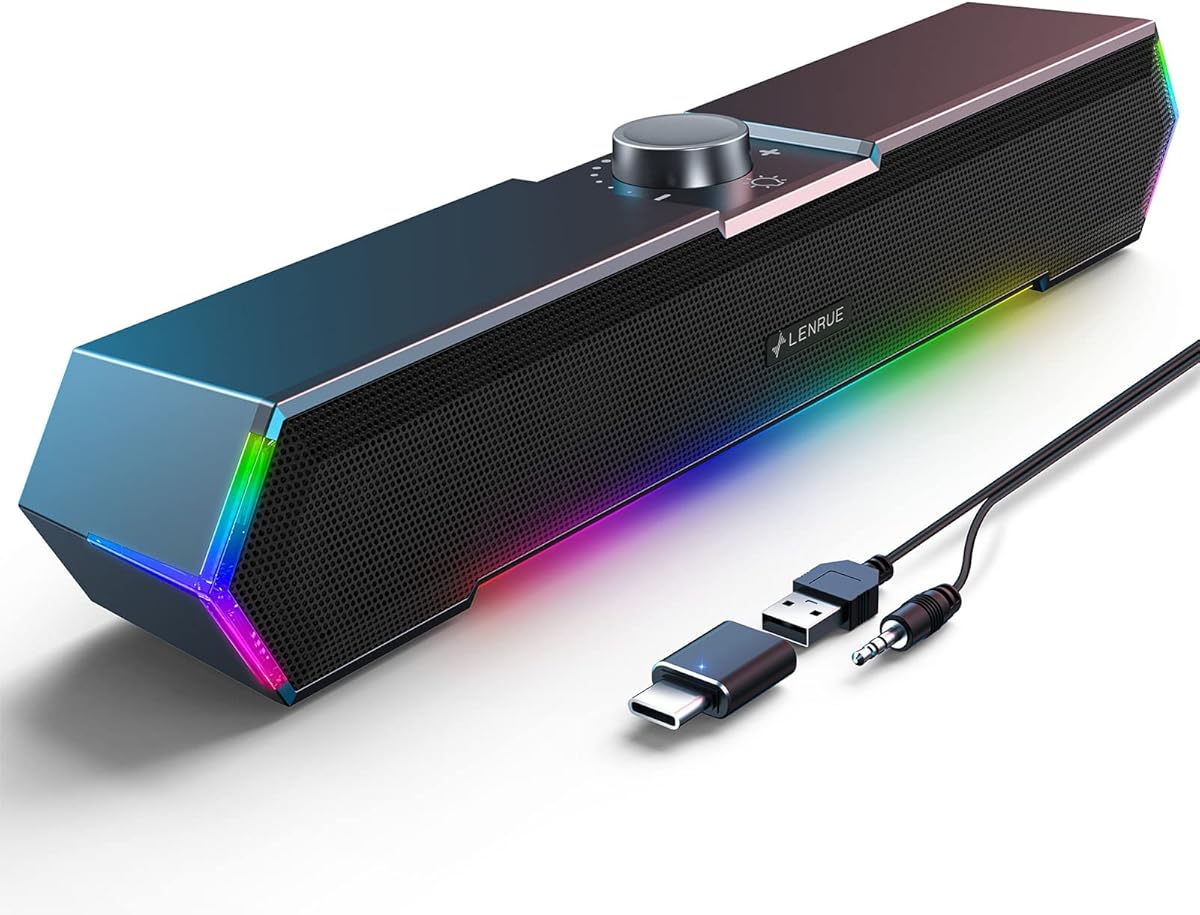
This model adds visual flair with touch-sensitive dynamic lights. The design is intended to match gaming or modern office setups. It supports USB C power for newer devices easily.
We may earn a commission when you buy through this link, at no additional cost to you.
Surge sound technology aims for distortion-free performance at high volumes. The amplifier ICs are designed to handle more power cleanly. Volume control is on top for quick access.
It is compact enough to fit under a monitor easily. Cables are glued to keep them organized on the desk. The lights add ambience without taking extra space.
Great for users who like ambient lighting in their room. Audio quality is clear for media consumption. Remember it does not have a headphone port.
Unique angular lights add a visual atmosphere that enhances gaming or working environments.
High-quality amplifiers allow for louder volumes without losing sound clarity or introducing noise.
We may earn a commission when you buy through this link, at no additional cost to you.
RGB lighting adds a fun touch to this compact audio solution. The lights cycle through seven colors for a vibrant look. It is designed to be space-efficient for smaller desks.
We may earn a commission when you buy through this link, at no additional cost to you.
Audio performance is balanced with crisp highs and deep bass. Volume can be adjusted via inline rotary knob. The setup is universal with no software required for use.
Be aware that system volume settings might need adjustment for full loudness. The 3W drivers deliver decent sound for casual listening. It is a great aesthetic addition to a setup.
Perfect for gamers who want light and sound in one. The slim profile keeps it out of the way. Check your media player settings for best volume levels.
Dynamic lighting cycles through multiple colors to match your personal style or mood.
Built-in rotary knob on the cable lets you fine-tune volume quickly without digging for settings.
We may earn a commission when you buy through this link, at no additional cost to you.
This speaker focuses on delivering loud, clear sound in a small package. The 2x3W tech helps push out sufficient audio for daily tasks. It fits anywhere without cluttering your workspace.
We may earn a commission when you buy through this link, at no additional cost to you.
Anti-slip foot pads ensure the units stay put on smooth desks. Cables are glued together to prevent tangling and mess. The volume is controlled via inline knob on the wire.
You get a warranty with purchase for peace of mind. Build is simple but functional for general use. It supports a wide range of desktop computer types easily.
Ideal for budget buyers who need reliable sound. It is easy to set up immediately. Ensure cables are organized after plugging in for best look.
Cables are secured together to keep your desk tidy and reduce clutter.
Mini size ensures they fit in tight spaces while still delivering clear audio.
We may earn a commission when you buy through this link, at no additional cost to you.
Selecting the right speakers depends on your specific needs and environment. We highlight key factors to consider before making a purchase decision.
Most budget speakers use USB for power and audio or a 3.5mm jack. USB offers simpler setup while 3.5mm provides broader compatibility with older devices.
Choose USB if you want plug and play ease or 3.5mm if your PC lacks audio ports.
Power measured in watts affects loudness and bass. Look for at least 4W total for clear sound. Higher watts fill rooms better.
Prioritize models with higher wattage if you have a larger listening area.
Consider desk space constraints. Compact or soundbar styles fit under monitors better. Check dimensions before buying.
Measure your workspace to ensure the speakers fit comfortably.
Check for frequency range and passive radiators. These features enhance bass and clarity. Read user reviews for real performance feedback.
Look for reviews mentioning clear mids and deep bass.
Inline knobs or front buttons make adjusting volume easy. This avoids digging into system menus constantly.
Pick models with physical controls for quick adjustments.
Ensure support for your operating system like Windows or macOS. Some devices need USB C adapters.
Verify your device ports match the speaker requirements.
Durable materials prevent wear and tear. Metal panels resist scratches better than plastic. Check warranty terms.
Choose sturdy builds to extend the lifespan of the product.
Balance features with cost. The cheapest option may lack power. Aim for best value within your budget.
Compare features across similar price points before buying.
Connect the USB cable to a powered port on your computer. If the speakers need audio cables, plug the 3.5mm jack into the audio port.
Adjust volume using the inline knobs or system settings. Place speakers equidistant from your seating for balanced stereo sound.
Keep them dry and free of dust. Wipe gently with a soft cloth to maintain appearance and function over time.
Most USB speakers draw enough power from the computer port. However, very high power models might need a wall adapter. Check product specs for power requirements.
Yes, most support macOS and require no drivers. Just plug in the USB cable and select the audio output in settings.
Ensure system volume is maxed out first. Then adjust the inline knob. Sometimes audio settings mute the device.
Some models clip directly on monitors while others sit beside them. Check mount compatibility before purchasing for best fit.
Many include passive radiators for improved bass. Expect decent low end for small sizes but not deep subwoofer levels.
Use a dry soft cloth to wipe the exterior. Avoid harsh chemicals or liquids that might damage internal components or surfaces.
We have reviewed ten top options that deliver quality without high costs. Our top picks cover various needs from portability to audio quality.
Prioritize connection types and sound preferences when making your final decision. Ensure the design fits your desk layout for comfort.
Prices may change so check current listings before buying. Always read the latest reviews for real-world user experiences.