
LGA 1155 Motherboard H61
5.0Editor score
Supports Intel 2nd 3rd gen
Includes M.2 NVMe slot
HDMI and VGA outputs
This guide compares the top ten affordable motherboards for AMD and Intel platforms to help you find the best cheap motherboard for your next PC build.
Finding a cheap motherboard does not mean sacrificing quality or essential features for your new computer system. You need reliable power delivery, modern connectivity options, and solid build quality to ensure your investment lasts for years of use and gaming.
We analyzed ten highly rated options across different chipsets and socket types to bring you this curated selection of budget-friendly mainboards. Each product was chosen based on user feedback, technical specifications, and overall value proposition for cost-conscious builders.
Every pick below highlights specific strengths and potential trade-offs so you can match a board to your exact processor and case needs. Prices and availability shift frequently on major online marketplaces so verify current stock before finalizing your purchase decision today.
5.0Editor score
4.5Editor score

4.5Editor score
The following table provides a side-by-side technical overview of all ten models to help you quickly identify which board matches your processor and feature requirements.





The GIGABYTE B550M K is a standout option for builders seeking an affordable entry into the AMD AM4 ecosystem. It scores well in user reviews for reliability and straightforward functionality without unnecessary extras. The board supports modern Ryzen processors and offers essential connectivity for a functional system.
We may earn a commission when you buy through this link, at no additional cost to you.
Its enhanced power solution features a digital 3+3 VRM design with premium chokes that ensure steady power delivery to the CPU. This stability is crucial when running mid-range processors or even slightly overclocked units. The advanced thermal armor includes chipset heatsinks that help manage heat dissipation during extended sessions of gaming or productivity work.
While the board is budget-friendly, it does not compromise on critical connectivity options. You get two M.2 slots for fast storage and a PCIe 4.0 x16 slot for modern graphics cards. The four USB 3.2 Gen 1 ports on the rear panel provide plenty of options for peripherals like mice and keyboards without needing extra hubs.
This motherboard is an excellent choice for budget-conscious gamers or office users who need a stable platform for everyday tasks. It supports memory overclocking via Extreme Memory Profile to squeeze out extra performance from your RAM. If you are building a system around a Ryzen 5000 series CPU, this board provides the perfect balance of cost and capability.
The digital 3+3 power phase design ensures that your CPU receives clean and consistent power even under load.
With two M.2 slots including one PCIe 4.0 option, you can install ultra-fast NVMe SSDs for quick boot times.
We may earn a commission when you buy through this link, at no additional cost to you.
The LGA 1155 Motherboard H61 represents an incredibly low-cost entry point for older Intel builds. It maintains a perfect rating by users who appreciate its compatibility with budget processors like the Core i3 or Xeon E3 series. This board proves you can still get modern features like M.2 storage on older platforms.
We may earn a commission when you buy through this link, at no additional cost to you.
It supports dual-channel DDR3 slots which can be configured for up to 16GB of memory to handle standard daily tasks efficiently. The inclusion of an M.2 interface allows for NVMe SSD connectivity which significantly boosts system responsiveness compared to traditional SATA drives. Video interfaces include HDMI and VGA for versatile monitor connections without external graphics cards.
Users should note that this board relies on older DDR3 memory which is cheap but slower than modern standards. The package includes essential cables and an I/O baffle but excludes the user manual and battery which you may need to source separately. Installing a graphics card is recommended if your chosen CPU lacks integrated graphics capabilities.
This is the ideal choice for anyone restoring an old system or building a basic office PC on a tight budget. It is perfect for light computing tasks where the latest speed is not the primary concern. If you need a functional computer for web browsing and document editing, this motherboard delivers exceptional value for very little money.
This board extends the life of older Intel processors by supporting legacy chips like the Xeon E3 v2 series.
Adding an M.2 slot to this classic chipset allows for modern storage speeds without needing a newer CPU.
We may earn a commission when you buy through this link, at no additional cost to you.
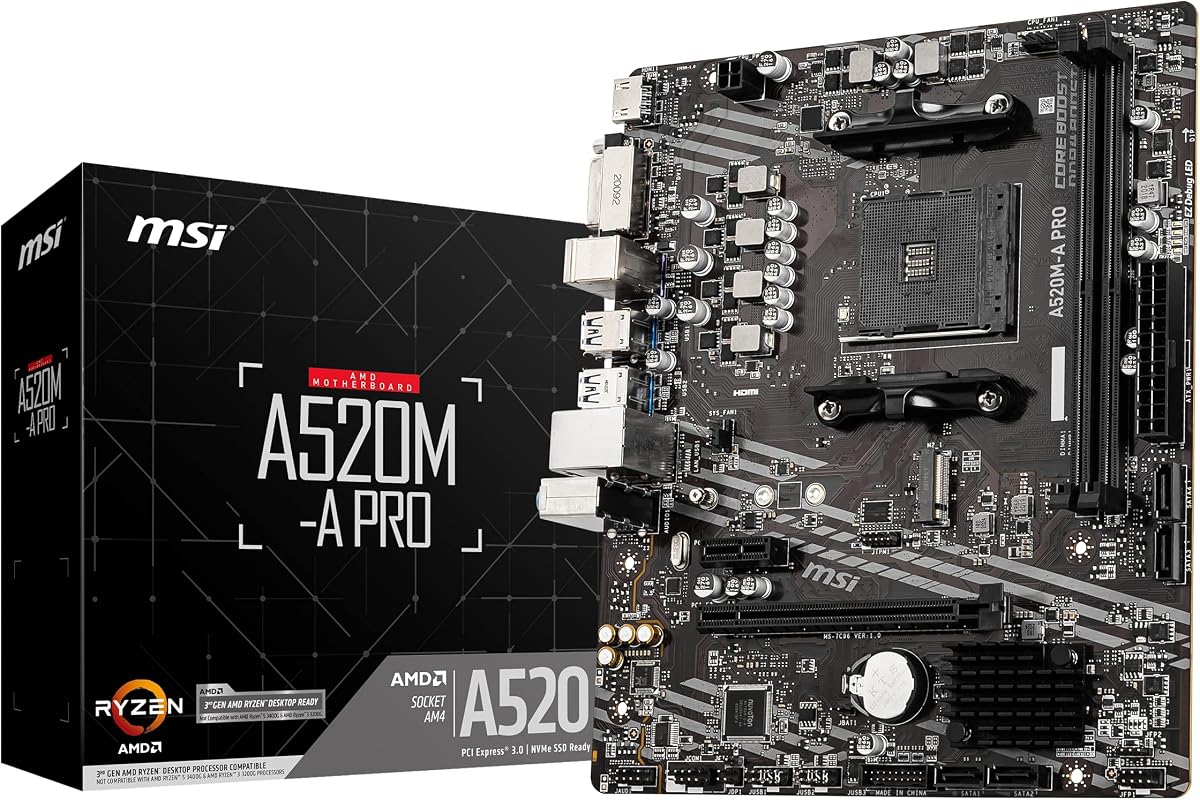
The MSI A520M-A PRO offers a reliable foundation for AMD Ryzen 5000 series processors at a competitive price. It balances essential features with cost-saving measures to provide a smooth experience for budget gamers. User ratings highlight its stability and the convenience of its turbo M.2 slot for fast storage.
We may earn a commission when you buy through this link, at no additional cost to you.
This motherboard supports DDR4 memory with speeds up to 4600 MHz on overclock to ensure your system runs efficiently. The turbo M.2 slot runs at PCI-E Gen3 x4 to maximize performance for NVMe based SSDs. Audio Boost technology rewards your ears with studio grade sound quality which enhances your gaming without needing a separate sound card.
Dragon Center software integrates exclusive tools into a user friendly interface that helps you manage system performance easily. While the board lacks PCIe 4.0 it still delivers sufficient performance for most graphics cards and everyday tasks. The micro-ATX form factor fits easily into smaller cases which is great for compact desk setups.
You should buy this board if you are building a budget gaming PC with a Ryzen 5000 series CPU. It provides excellent value and supports modern memory speeds to future-proof your system. For users who prioritize stability and cost over cutting-edge bandwidth this A520 board is a smart choice.
The turbo M.2 slot allows you to use high speed NVMe SSDs for quick system boot and game loading.
Dragon Center software provides easy access to system tools and performance settings from one convenient interface.
We may earn a commission when you buy through this link, at no additional cost to you.
The ASRock B550M-HDV supports a wide range of AMD Socket AM4 processors and offers excellent value for budget builds. It features a 6 Power Phase design with premium power chokes that provide stable power for your processor. This board is a strong contender for users needing reliable performance without premium pricing.
We may earn a commission when you buy through this link, at no additional cost to you.
It supports high speed memory with overclocked speeds up to 4733+ to ensure your system runs at maximum efficiency. The primary PCIe x16 slot supports PCIe 4.0 speeds with compatible CPUs so you can use modern graphics cards effectively. The board includes six USB 3.2 Gen1 ports which is plenty for all your peripherals.
Full Spike Protection on USB Audio and LAN ports guards against electrical surges to protect your hardware components. This motherboard also offers legacy display support with HDMI DVI-D and D-Sub outputs for maximum monitor compatibility. However you should verify your case specifications as the micro-ATX form factor may not fit all chassis.
If you need a board with plenty of USB ports and PCIe 4.0 at a low price this is an ideal pick. It is perfect for home systems or office setups where stability and connectivity matter most. The protection features add a layer of security that makes this board a safe investment for daily use.
Dual DDR4 DIMM slots support overclocked speeds up to 4733 MHz for better application and game performance.
Full Spike Protection on major ports prevents damage from electrical surges to keep your system safe.
We may earn a commission when you buy through this link, at no additional cost to you.
The MSI PRO B550M-P is outfitted with the AMD B550 chipset and features MSI Core Boost technology for improved stability. It handles Ryzen 5000 series processors with ease and offers memory overclocking speeds up to 4400+ MT/s for high performance. Users appreciate its ability to deliver consistent results during gaming and productivity tasks.
We may earn a commission when you buy through this link, at no additional cost to you.
Storage options include one M.2 Gen4 x4 slot and one M.2 Gen3 x4 slot to maximize your NVMe capabilities. The PCIe 4.0 x16 slot supports cutting-edge graphics cards with 64GB/s throughput for fast data transfer. Frozr AI cooling automatically adjusts system fan settings based on CPU and GPU temperatures to keep noise low.
The board includes Gigabit LAN and rear ports with USB 5Gbps Type-A to keep you connected efficiently. Audio Boost delivers 7.1 HD Audio for immersive gaming experiences without needing extra hardware. While the VRM cooling is passive it manages heat well for most non-overclocked setups within typical budget ranges.
Buy this board if you need a modern feature set like PCIe 4.0 without paying flagship prices. It is a solid choice for gamers who want to use the latest storage tech. The combination of speed and affordability makes it a versatile option for various budget builds.
Core Boost technology uses digital power regulation to deliver precise and steady current to the CPU for stability.
Frozr AI cooling adjusts fan speeds automatically based on temperatures to balance noise and performance.
We may earn a commission when you buy through this link, at no additional cost to you.
The MSI B550M PRO-VDH WiFi stands out for its integrated wireless connectivity which is rare at this price point. It supports dual channel DDR4 memory up to 4400 MHz and features Core Boost technology for steady current delivery. The board is designed to offer a premium experience without the flagship price tag.
We may earn a commission when you buy through this link, at no additional cost to you.
Lightning Gen 4 M.2 with M.2 Shield Frozr ensures your storage runs cool and fast during heavy use. Premium Thermal Solution with 2oz thickened copper helps dissipate heat efficiently for better system longevity. Audio Boost provides studio grade sound quality which enhances the multimedia experience significantly.
The Flash BIOS Button lets users update the BIOS even without a CPU or memory installed which simplifies upgrades. This feature is incredibly useful for future-proofing your system with newer processor updates easily. The board supports 128 GB of memory to handle demanding applications without any bottlenecks in speed.
This motherboard is perfect for users who want wireless convenience and solid performance in one package. It is suitable for home offices or gaming PCs where cabling is minimal. The inclusion of Wi-Fi and Bluetooth makes it a comprehensive choice for modern connectivity needs.
Built-in Wi-Fi and Bluetooth remove the need for cables and adapters for wireless peripherals.
The Flash BIOS Button allows you to update firmware easily even without a CPU installed in the socket.
We may earn a commission when you buy through this link, at no additional cost to you.
The GIGABYTE B550 Gaming X V2 delivers premium features on an ATX form factor for enthusiasts who need extra space. It features a digital twin 10+3 power phase design that ensures steady power delivery to your processor. This board is a top pick for users who want robust cooling and connectivity.
We may earn a commission when you buy through this link, at no additional cost to you.
Advanced thermal armor includes an advanced VRM heatsink that improves heat dissipation significantly. The board supports DDR4 memory with Extreme Memory Profile support to let you push your RAM to its limits. You get a front USB 3.2 Gen 1 Type-C port which adds modern convenience to your case.
Q-Flash Plus allows effortless BIOS upgrades without installing your CPU RAM or GPU which saves time and hassle. The Integrated I/O Shield simplifies PC DIY assembly and protects the back panel ports. RGB Fusion allows you to sync lighting across your system for a cohesive look.
This board is ideal for builders who want premium features like front USB-C and strong power delivery. It supports a wide range of Ryzen processors to ensure long term compatibility. If you are building a system with room to grow this ATX board offers the best features in the lineup.
The digital twin 10+3 power phase design provides superior stability and performance for your CPU.
Q-Flash Plus lets you update the BIOS without installing a CPU to save time during upgrades.
We may earn a commission when you buy through this link, at no additional cost to you.
The Gigabyte A520M K V2 is designed for compact cabinets and medium-sized builds where space is a priority. It supports DDR4 memory to enable high-speed RAM upgrades which improves overall system performance efficiently. Users appreciate its simple layout that makes assembly straightforward for beginners.
We may earn a commission when you buy through this link, at no additional cost to you.
With HDMI and D-Sub video outputs you can connect to most modern and older monitors easily. The USB 3.2 ports provide fast data transfer speeds for external drives and peripherals. This board is a good fit for budget office machines or entry-level gaming rigs.
Its MATX format ensures it fits into smaller cases which saves desk space and improves airflow. The board supports modern Ryzen processors to keep your system relevant for several years. It balances cost and functionality to offer a reliable platform for everyday computing tasks.
Choose this motherboard if you need a small and affordable solution for a basic PC. It is perfect for users who want a no-fuss experience without extra features. The compact design and solid performance make it a practical choice for constrained setups.
The MATX format is ideal for compact cabinets allowing you to build a smaller system footprint.
Support for DDR4 memory enables high-speed RAM upgrades for better multitasking performance.
We may earn a commission when you buy through this link, at no additional cost to you.
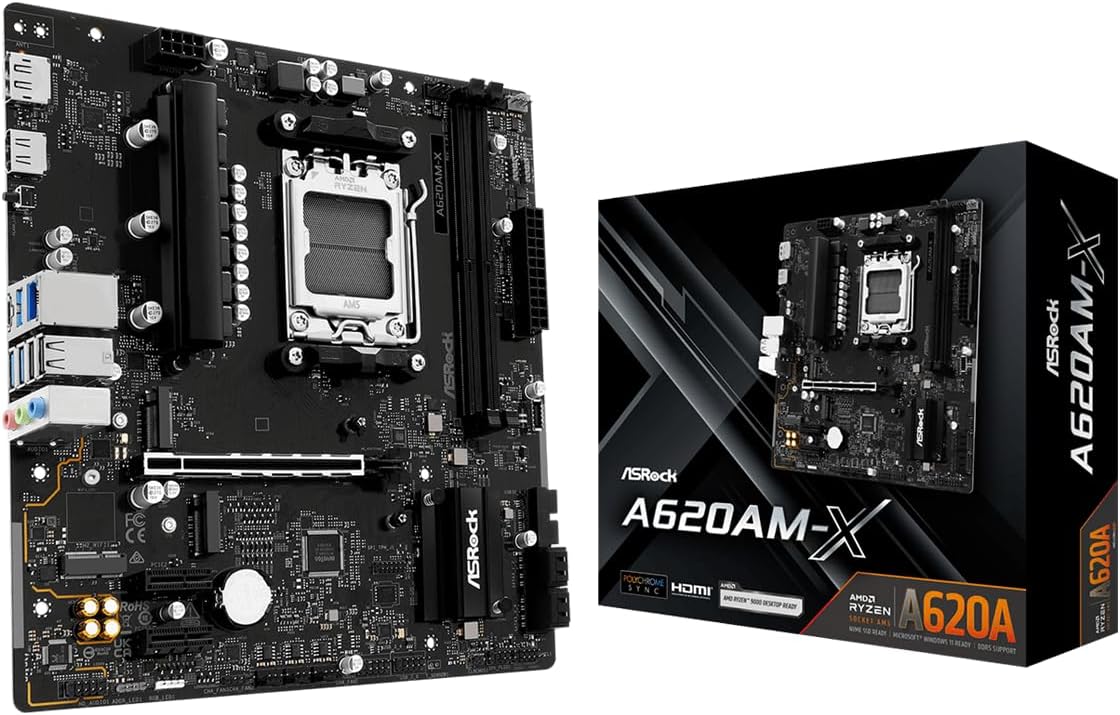
The ASRock A620AM-X provides an affordable entry point to the latest AM5 ecosystem with support for Ryzen 9000 series processors. It supports DDR5 memory with overclocked speeds up to 8000+ which ensures high performance for modern workloads. This board is a smart choice for future-proofing your build.
We may earn a commission when you buy through this link, at no additional cost to you.
Realtek 2.5G LAN provides high-speed wired networking for seamless online experiences and fast file transfers. Two Hyper M.2 slots offer flexible storage configurations for your NVMe drives. BIOS Flashback support enables easy updates without CPU installation which simplifies maintenance significantly.
The efficient power design with Dr.MOS technology ensures stable performance for VCore components under load. It includes front and rear USB 3.2 Gen1 Type-C ports for modern connectivity options. The display outputs support integrated graphics from compatible AMD processors for versatile setups.
If you want to build on the latest AM5 platform this is a great budget option. It supports high speed DDR5 memory to keep your system relevant for years. For users planning to upgrade to next-gen Ryzen processors this board offers the right foundation.
Support for Ryzen 9000 and 7000 series ensures your system remains compatible with future processors.
Realtek 2.5G LAN provides faster wired internet speeds for better online gaming and streaming.
We may earn a commission when you buy through this link, at no additional cost to you.
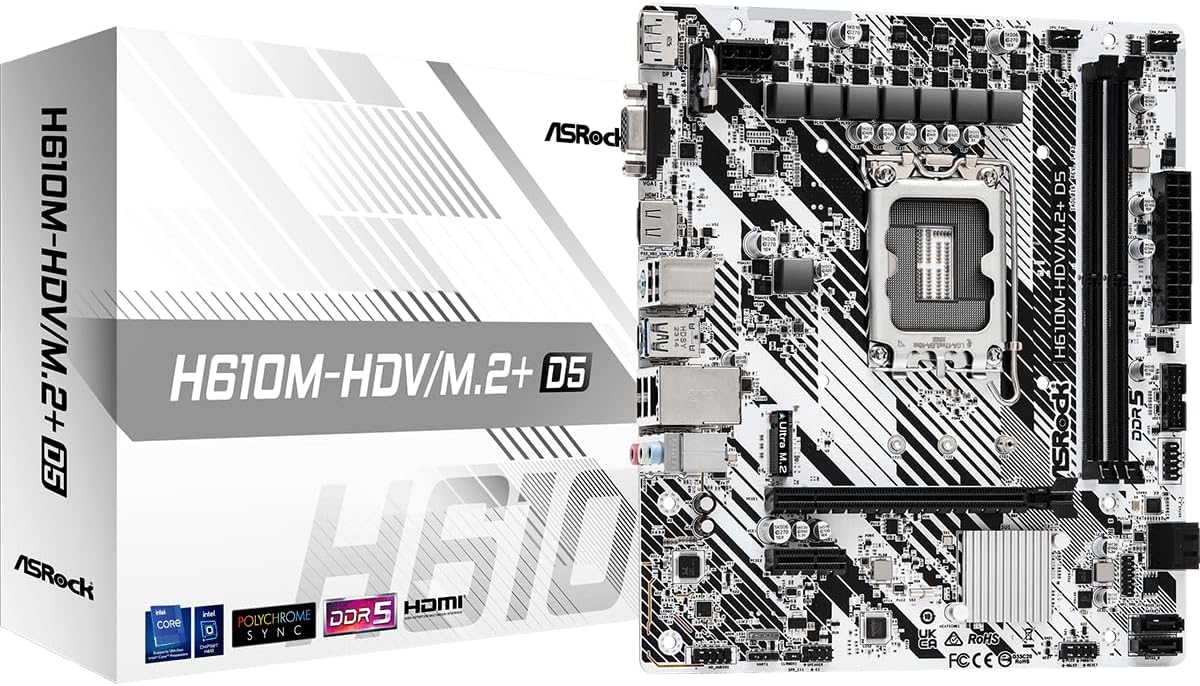
The ASRock H610M-HDV/M.2+ D5 supports 14th and 13th Gen Intel Core processors with DDR5 memory capability. This board offers a modern foundation for Intel builds at a budget-friendly price. Users appreciate its ability to handle latest-gen CPUs without expensive chipset requirements.
We may earn a commission when you buy through this link, at no additional cost to you.
It supports DDR5 5600MHz memory to ensure high bandwidth for demanding applications and games. The PCIe 4.0 x16 slot provides fast data transfer for modern graphics cards. Display options include HDMI DisplayPort and D-Sub for versatile monitor connections.
The 6+1+1 Power Phase design ensures stable performance for your Core processor. This board is ideal for office PCs or entry-level gaming rigs using Intel hardware. It balances cost and features to provide a solid experience for everyday computing tasks.
If you are building an Intel PC with DDR5 memory this is a smart choice. It supports the latest processors to ensure long term compatibility. The affordable price point makes it accessible for budget builders who want modern tech.
Support for 14th Gen Intel and DDR5 memory ensures your system stays relevant for years.
HDMI DisplayPort and D-Sub outputs allow you to connect to almost any monitor easily.
We may earn a commission when you buy through this link, at no additional cost to you.
Choosing the right cheap motherboard requires balancing your processor needs with essential features to ensure long-term satisfaction.
The most critical factor is ensuring the motherboard supports your CPU socket. AMD AM4 is common for budget builds while AM5 is the latest. Intel LGA 1700 supports 12th through 14th Gen. Always check the CPU support list to avoid incompatibility.
Always verify the socket type matches your processor to avoid physical incompatibility issues.
DDR5 is becoming standard on newer boards like AM5 and LGA 1700 but DDR4 is still common on older budgets. Check the supported memory speed to ensure it matches your RAM modules. Overclocking support can boost performance further.
Match the memory type to your processor to ensure smooth operation without errors.
PCIe 4.0 slots are essential for modern graphics cards to prevent bottlenecks. Check if the board offers enough slots for your GPU or add-in cards. M.2 slots are critical for fast NVMe storage.
Ensure the board has the latest PCIe slots for your GPU to avoid performance limits.
USB ports should include enough Type-A and Type-C options for your peripherals. Look for USB 3.2 or faster speeds for external storage. Check audio and network port requirements as well.
Check the rear panel for enough USB ports to connect all your devices easily.
Micro-ATX boards are common for budget builds due to smaller cases. ATX offers more slots but needs larger cases. Measure your case interior before buying to ensure physical fit.
Confirm the board size matches your computer case to avoid assembly issues.
A board with decent VRM design ensures stable power delivery to your CPU. Heatsinks on VRMs and chipsets help manage heat effectively. Better cooling allows for stable performance under load.
Look for boards with VRM heatsinks to keep temperatures low during use.
Built-in Gigabit LAN is standard but 2.5G is better for high-speed internet. Audio codecs vary so check if you need high fidelity sound. Wi-Fi is a bonus feature often found on higher price boards.
Verify the network speed and audio quality meet your daily usage needs.
Flash BIOS buttons allow updates without a CPU installed which is very helpful. Check the BIOS interface for ease of use. Some boards offer better software tools for management.
Prefer boards with easy update tools to simplify future hardware changes.
Install the motherboard on standoffs in your case to avoid short circuits. Ensure all screws are tight but not overtightened to prevent damage. Connect the power and data cables carefully to avoid bent pins.
Update the BIOS as soon as possible after installation to get the latest compatibility fixes. Use the BIOS update feature if available or follow manufacturer instructions carefully.
Keep your system clean from dust to prevent overheating of components. Monitor system temperatures regularly using software tools to ensure stable operation over time.
A cheap motherboard can still support gaming performance if it has the correct socket and PCIe slots. Most budget boards do not bottleneck modern CPUs significantly. The key is ensuring adequate power delivery and thermal management for stability.
For AMD Ryzen 5000 series the MSI A520M-A PRO offers great value with solid features. For Ryzen 7000 or 9000 series the ASRock A620AM-X provides the latest AM5 support at a budget price.
The ASRock H610M-HDV/M.2+ D5 is a strong choice for Intel 12th to 14th Gen processors. It supports DDR5 memory and offers essential features without extra costs.
Older boards like LGA 1155 can be worth it for very specific legacy builds. They are affordable but rely on DDR3 memory and older CPUs. Only consider them for basic office use.
Most budget boards have basic audio that is sufficient for casual users. Higher quality audio may require an external sound card. Look for models with Audio Boost features for better sound.
Yes you can upgrade later but you may need a new CPU or RAM. It is best to choose a board that supports future processors. This extends the life of your system investment.
Micro-ATX is often cheaper and fits smaller cases. It has fewer expansion slots which is fine for most builds. ATX offers more ports but costs more and needs a larger case.
Prioritize socket compatibility and PCIe slots first. Then consider memory support and connectivity options. Power delivery and cooling come next to ensure stability.
This guide highlights ten excellent cheap motherboards for both AMD and Intel platforms. The MSI A520M-A PRO and ASRock B550M-HDV stand out for value and features. Each option offers unique benefits to suit different budget needs.
Prioritize socket compatibility and support for modern memory to future-proof your build. Ensure the board has the PCIe slots and USB ports you need for daily tasks. Avoid boards with limited connectivity that might bottleneck your system.
Always check the current price and stock before finalizing your purchase as deals change often. Verify the product image and specifications match the listing to avoid confusion. Buying the right board sets the foundation for a successful and efficient PC build.