
Eaton Tripp Lite BC350R Small UPS
4.5Editor score
Wall mount compatible
Simple setup
Low maintenance
This guide compares the top 10 Battery Backup for Small Office solutions to help you protect your critical data and hardware from power outages effectively.
Protecting your office equipment from sudden power outages is essential for maintaining productivity and preventing data loss. A reliable battery backup system ensures your computers and network devices stay online during unexpected electrical fluctuations.
We have evaluated ten top-rated uninterruptible power supply units based on their output capacity, runtime performance, and surge protection capabilities. Our analysis focuses on models that offer the best balance of reliability and value for small business environments.
Each selection highlights specific strengths such as sine wave output, smart management software, or energy-efficient designs. Please note that prices and availability may change over time, so verify current offers before making your purchase decision.
4.5Editor score

4.5Editor score
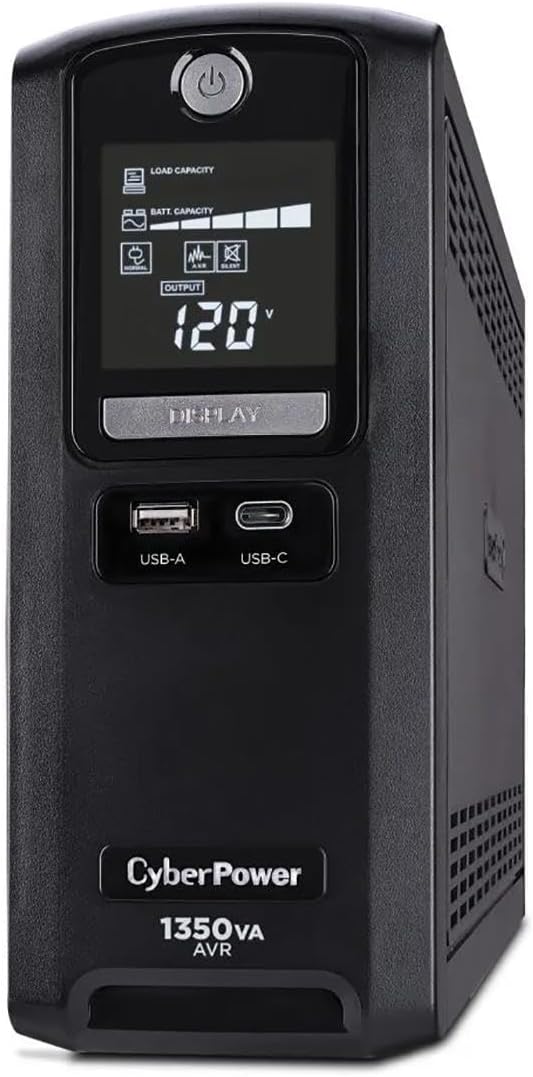
4.9Editor score
The following table provides a side-by-side comparison of all ten selected models. It highlights key specifications such as output wattage, outlet count, and special features to help you quickly identify the right fit for your specific office needs.


This unit stands out as the top choice due to its pure sine wave output and robust build quality. It has earned a strong rating from users who rely on it for critical office equipment safety.
We may earn a commission when you buy through this link, at no additional cost to you.
The inclusion of twelve outlets provides ample space for computers monitors and networking gear without needing extra power strips. Automatic voltage regulation helps correct minor fluctuations before they affect your hardware performance.
While the physical dimensions are larger than budget models, the stability it offers justifies the footprint. The price is higher but reflects the advanced protection features and extended warranty coverage included.
Small offices managing sensitive workstations should prioritize this model to prevent hardware damage and data corruption during unstable power conditions.
Unlike simulated outputs this system delivers clean power ideal for active power factor corrected supplies found in modern computers.
The included PowerPanel software allows you to monitor power status and configure automatic shutdowns for your devices remotely.
We may earn a commission when you buy through this link, at no additional cost to you.
This model offers a compelling balance of capacity and cost for general office needs. It provides strong performance for standard electronics and delivers reliable runtime during short outages.
We may earn a commission when you buy through this link, at no additional cost to you.
The color LCD panel gives immediate visibility into battery status and load levels which helps users manage connected devices effectively. It features twelve outlets split between backup and surge protection.
While it uses a simulated sine wave it is suitable for most conventional power supplies rather than advanced PFC models. The price is moderate and fits well within typical small office budgets.
It is a solid middle ground option for businesses that need more outlets than basic models provide but do not require pure sine wave technology.
The color display alerts users to potential power issues quickly allowing proactive responses before equipment is affected.
Integrated USB ports let you charge phones or tablets during a shutdown without needing a separate charger.
We may earn a commission when you buy through this link, at no additional cost to you.
This unit distinguishes itself with its ECO mode feature that automatically powers off peripherals when the main computer is asleep. It is a smart choice for reducing unnecessary energy consumption in the office.
We may earn a commission when you buy through this link, at no additional cost to you.
It provides twelve outlets which is generous for a compact footprint and includes an easy to read LCD panel for status monitoring. The performance is reliable for standard desktop setups.
The wattage capacity is lower than high end models so it is best suited for light to medium office workloads. This helps keep the price accessible for smaller operations.
Businesses focused on sustainability and cost reduction will appreciate the automatic power management features designed into this system.
When your main computer sleeps the connected peripherals on ECO outlets shut down to save power automatically.
With twelve outlets you can connect a full workstation and additional gear without overloading the system.
We may earn a commission when you buy through this link, at no additional cost to you.
Designed with space saving in mind this unit offers a slim profile that fits easily under desks or in tight server racks. It delivers consistent performance for home office environments.
We may earn a commission when you buy through this link, at no additional cost to you.
The high efficiency design reduces power consumption during normal operation which is beneficial for running costs. It includes twelve outlets with adequate spacing for larger adapters.
While it lacks some advanced features like USB ports it covers the essentials of surge protection and short term backup power. The price is competitive for a unit of this quality.
This model is a good fit for offices with limited desk space that still need multiple outlets for their connected devices.
The slim form factor makes it easy to hide away or place in crowded work areas.
Advanced inverter technology minimizes energy draw when the grid power is stable.
We may earn a commission when you buy through this link, at no additional cost to you.
This system has earned the highest rating in the selection due to its robust protection capabilities and extended runtime. It is particularly strong for offices needing to protect data lines alongside power.
We may earn a commission when you buy through this link, at no additional cost to you.
It features ten outlets and includes network coaxial protection which is rare and valuable for routers modems and security systems. The extended runtime allows more time for safe shutdowns.
The simulated sine wave output works well for most equipment but the main draw is the comprehensive protection package. The price is fair given the additional data line safeguards included.
Offices with critical network infrastructure will benefit most from the ability to protect both power and data signals from surges.
Network and coax protection stops surges from entering equipment through phone or cable lines.
The battery supports longer usage at half load giving you time to save work during outages.
We may earn a commission when you buy through this link, at no additional cost to you.
This model focuses on stabilizing incoming power through automatic voltage regulation which protects electronics from minor fluctuations. It is a practical choice for areas with unstable utility power.
We may earn a commission when you buy through this link, at no additional cost to you.
It includes data line protection which is crucial for networking gear that might suffer damage from telephone line surges. The twelve outlets provide good connectivity for general office setups.
The price is moderate and offers good value for the specific protections provided. The LCD display ensures you always know the current status of the battery and power.
It is a strong contender for businesses that experience frequent brownouts or voltage drops without full blackouts.
Automatic voltage regulation corrects drops and spikes without draining the battery unnecessarily.
Line protection safeguards modems and routers from power surges traveling through phone cables.
We may earn a commission when you buy through this link, at no additional cost to you.
This unit is designed to operate silently in both line and battery modes which makes it ideal for quiet workspaces. It provides basic but effective protection for smaller setups.
We may earn a commission when you buy through this link, at no additional cost to you.
The wall mount tabs allow you to keep it off the floor or desk saving valuable workspace. It features eight outlets with wide spacing for bulky adapters.
The wattage is lower so it is best reserved for essential devices like routers or single computers. The price is accessible for small businesses on a tight budget.
It is a good choice for offices where noise is a concern and the power requirements are minimal.
The system remains silent during operation reducing distractions in focused work environments.
Wall mount tabs let you secure the unit vertically to free up desk space.
We may earn a commission when you buy through this link, at no additional cost to you.
This is the most budget friendly option in our list making it accessible for very small offices or single user setups. It provides essential protection for critical devices.
We may earn a commission when you buy through this link, at no additional cost to you.
Setup is straightforward and it includes wall mount slots for flexible placement. It is designed for basic networking equipment or a single computer.
While it has low capacity it serves well as a stop gap for essential gear like routers. The price is the lowest of all options reviewed.
It is ideal for startups or small teams that need basic safety without a significant investment.
The low price point makes surge and backup power accessible for all budgets.
Its small size fits easily on shelves or under desks without clutter.
We may earn a commission when you buy through this link, at no additional cost to you.
This model is known for its ease of battery replacement which keeps long term costs low. It is a reliable choice for basic office protection needs.
We may earn a commission when you buy through this link, at no additional cost to you.
It features a USB phone charger that works during outages so you can stay connected. The battery replacement process is simple and does not require tools.
The capacity is modest and it suits single workstations or small networking setups. The price is competitive for an APC unit with these features.
Businesses that value low maintenance and brand trust will find this unit a solid choice for their desktops.
The easy swap battery system means you can replace aging cells without buying a new unit.
A built in USB port charges your phone so you stay reachable during power failures.
We may earn a commission when you buy through this link, at no additional cost to you.
This unit offers a compact solution for basic office needs with a focus on efficiency. It provides eight outlets which is generous for its class.
We may earn a commission when you buy through this link, at no additional cost to you.
The LED status light gives you clear visibility of the power state. It is suitable for protecting essential devices like routers or small PCs.
The capacity is limited to small loads but it covers the basics well. The price is reasonable and fits entry level budgets.
It is a practical choice for small offices that need a simple reliable backup without complex features.
The compact design fits on any desk without taking up valuable workspace.
A clear LED light shows you the power and fault status instantly.
We may earn a commission when you buy through this link, at no additional cost to you.
Selecting the right battery backup involves evaluating capacity waveform type and outlet needs. This guide explains the key factors to consider for your small office environment.
Output capacity determines how much power the UPS can deliver. Measure your total load in watts to ensure the unit can support it.
Always choose a unit with capacity above your total load to allow for future expansion.
Pure sine wave models are needed for sensitive electronics like modern PC power supplies. Simulated sine wave is cheaper but may not work with all equipment.
Check your device requirements to decide if pure sine wave is necessary for your hardware.
Count how many devices you need to protect. Some units offer more outlets for backup than others.
Ensure the outlets are spaced well enough to fit large power adapters.
Run time varies by load. Expect minutes not hours. Look at the half load runtime to compare models.
More time means better chance to save your work during an outage.
Surge protection is vital for daily safety. Higher joule ratings offer better defense against spikes.
Look for data line protection if you have routers connected via phone lines.
Batteries degrade over time. Check if the battery is easy to replace. Some units offer longer warranties.
Select a model with a replaceable battery to extend the life of your UPS.
Software lets you automate shutdowns and monitor battery health. It is useful for unattended servers or PCs.
Ensure the software is compatible with your operating system before buying.
Larger units often have more capacity. Ensure you have space under your desk or in your rack.
Consider wall mount options if desk space is limited.
Connect your critical devices to the battery backup outlets first. Plug nonessential gear into the surge only outlets if available.
Regularly test the unit to ensure it functions correctly. Most units have a test button to verify battery response.
Replace the battery when it loses charge or every three years to maintain protection levels.
Calculate the total wattage of all devices you plan to connect. Select a UPS with a watt rating higher than your total load to ensure adequate protection and runtime.
It is not recommended. Laser printers draw high power during operation which can overload the battery and shorten its lifespan.
Run time depends on the load. Under half load many units offer ten to fifteen minutes. Under full load it may drop to two or three minutes.
Pure sine wave mimics utility power and works with all electronics. Simulated wave is cheaper but may cause issues with active power factor corrected supplies.
No. Most UPS batteries last three to five years. You should replace it when the unit indicates a low battery or fails a self test.
Yes. Ensure the UPS has enough wattage and pure sine wave output. Software support is also critical to shut the server down safely.
Yes. A surge protector stops spikes but does not provide battery backup. A UPS does both but costs more.
UPS batteries contain lead. Do not throw them in regular trash. Take them to a recycling center or use a return program from the manufacturer.
We reviewed ten models offering varied capacities and features. The CyberPower CP1500PFCLCD leads in overall reliability and outlet flexibility.
Focus on matching the wattage to your load and choosing the right waveform type for your equipment. Budget models work for small setups but advanced ones offer better safety.
Prices change often so check current offers before purchasing. The right unit protects your data and keeps your office running smoothly.