
Bluetooth 1D&2D Barcode Scanner, 3-in-1 Bluetooth & USB Wired & 2.4G Wireless QR Barcode Reader
4.3Editor score
Supports 1D and 2D codes
Three connection modes available
Affordable price point
Compare the best barcode scanner for iPad devices featuring top rated models for retail, inventory, and library management with detailed specs and pros cons.
Finding the right barcode scanner for iPad can transform how you manage inventory or process sales. A reliable device ensures fast accuracy and seamless connectivity with your tablet workflow.
We compared ten top rated models based on compatibility scan speed battery life and overall user experience. Our analysis covers wireless options and rugged designs suitable for professional environments.
Each pick highlights key strengths and potential limitations to help you choose wisely. Keep in mind that prices and availability may change so verify details before purchasing your next scanner.
4.3Editor score
4.9Editor score

4.5Editor score
This side by side comparison highlights key specifications and capabilities across all ten selected models to help you identify the best fit for your specific scanning needs.


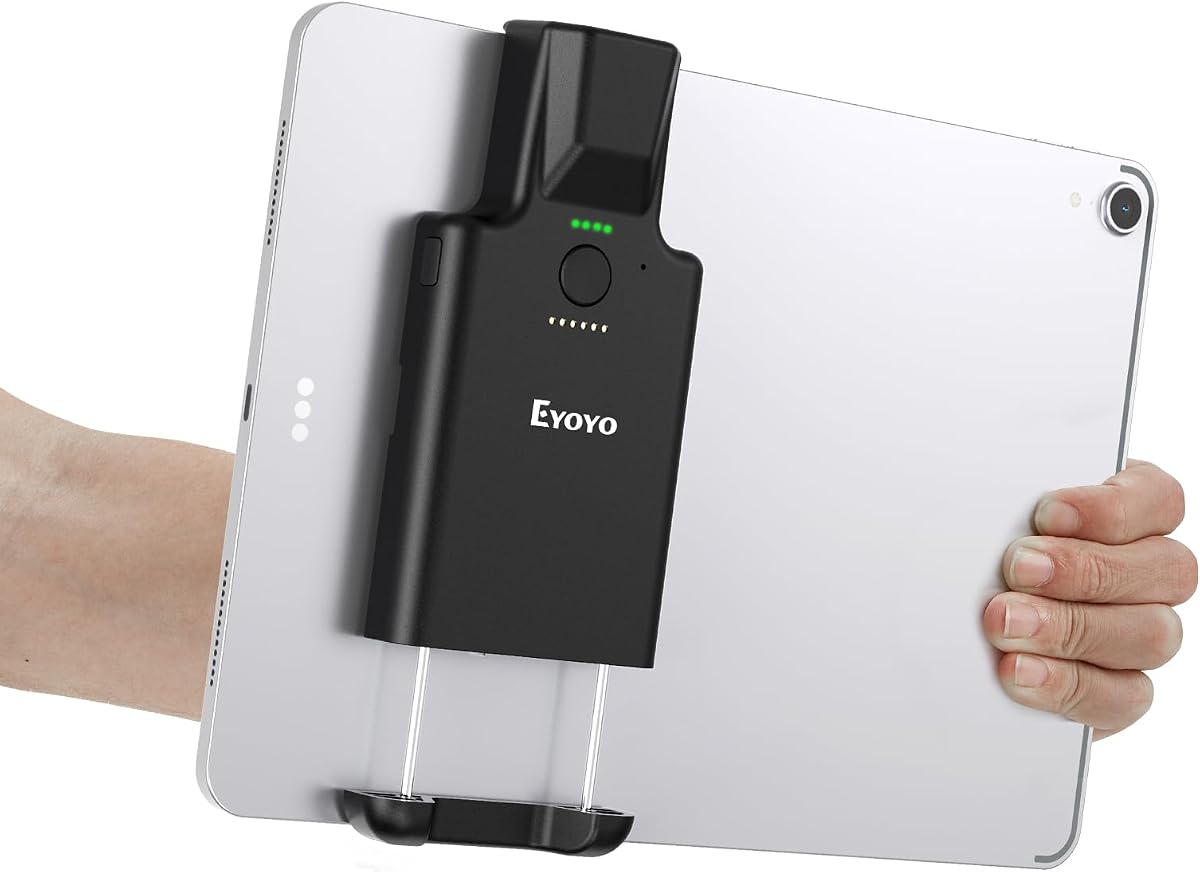
The Eyoyo 1D 2D Portable Bluetooth Barcode Scanner stands out as the top choice for iPad users seeking versatility and reliability. With a stellar 4.9 rating it delivers advanced 2D CMOS imaging that handles damaged curved or screen barcodes with ease.
We may earn a commission when you buy through this link, at no additional cost to you.
Its unique vertical retractable clip fits tablets ranging from 5.7 to 7.1 inches ensuring a secure grip during scanning. The 3000mAh battery provides up to thirty hours of continuous use while smart LED indicators keep you informed of power levels.
While it lacks 2.4G wireless connectivity the Bluetooth and USB modes offer sufficient flexibility for most mobile workflows. The ergonomic three button layout allows comfortable left or right handed operation which reduces fatigue during long shifts.
This scanner is ideal for retail staff librarians or warehouse workers who need to scan both paper and digital codes on the go. Its blend of durability battery life and tablet specific design makes it the best overall pick for iPad integration.
The flexible clip accommodates various iPad models keeping your device steady while you scan without needing one hand to hold it.
With up to thirty days of life for light users the 3000mAh battery ensures you rarely need to recharge during busy work weeks.
We may earn a commission when you buy through this link, at no additional cost to you.
The Bluetooth 1D&2D Barcode Scanner offers exceptional value for budget conscious buyers needing both 1D and 2D capabilities on their iPad. It supports QR codes Data Matrix and PDF417 formats which many cheaper scanners lack entirely.
We may earn a commission when you buy through this link, at no additional cost to you.
Its three in one connectivity allows switching between 2.4G wireless Bluetooth and USB wired modes seamlessly. The 2600mAh battery supports over nine hours of continuous scanning and the device stores up to 130000 barcodes offline when out of range.
While the build quality is functional rather than premium the scanning speed reaches 350 times per second ensuring efficient workflows. The tradeoff is a more basic grip compared to ergonomic models and mixed user feedback on long term durability.
This model is perfect for small businesses or individuals scanning occasionally who want modern 2D support without overspending. Its robust storage and versatile connections make it a practical low cost solution for diverse scanning tasks.
Switching between 2.4G Bluetooth and USB ensures you always have a connection option regardless of your iPad setup or distance from the receiver.
Store up to 130000 codes locally to continue working in remote areas without losing data until you reconnect to your device.
We may earn a commission when you buy through this link, at no additional cost to you.
The Inateck 1D Bluetooth Barcode Scanner is the premium choice for users who prioritize range and durability over 2D scanning. Its 115ft wireless range allows freedom of movement in large warehouses or outdoor settings with your iPad.
We may earn a commission when you buy through this link, at no additional cost to you.
Built to withstand daily wear it features an external TPU protective case that is twice as thick as similar products. The triple consolidation treatment for internal parts ensures it can survive repeated six foot drops onto concrete floors.
Although it only scans 1D barcodes the recognition ability handles blurry or broken codes under strong and dim light. The 2600mAh battery provides an impressive 180 days of standby time minimizing downtime during critical shifts.
This scanner is ideal for industrial environments or logistics teams needing robust hardware with reliable Bluetooth connectivity. If you require QR code scanning consider other options but for heavy duty 1D tasks this model excels.
The 115ft range lets you move far from your iPad while scanning items in large storage areas or distribution centers.
The TPU case and internal consolidation protect against drops and impacts ensuring reliable operation in tough physical environments.
We may earn a commission when you buy through this link, at no additional cost to you.
The NETUM Bluetooth Barcode Scanner offers robust performance with its 2500 pixel CCD sensor that decodes worn or tightly spaced barcodes reliably. It supports 2.4G wireless Bluetooth and wired connections providing flexibility for various iPad setups and environments.
We may earn a commission when you buy through this link, at no additional cost to you.
Its automatic scanning modes include manual trigger continuous and auto sensing options. The device can store up to 100000 barcodes in storage mode which is useful for remote inventory tasks. The programmable configuration allows custom prefixes suffixes and keyboard key additions.
The 2600mAh battery supports up to 200000 scans on a full charge and lasts at least one month with regular use. However you must scan specific configuration barcodes from the manual before use which adds a setup step for new users.
This scanner is well suited for warehouses libraries or hospitals needing high capacity and reliable 1D reading. If you use Square POS avoid this model but otherwise it offers strong versatility and endurance for professional workflows.
Add custom prefixes or suffixes and keyboard combinations to tailor barcode output for your specific software or database needs.
With support for 200000 scans per charge the battery life ensures long shifts without interruption during peak operational hours.
We may earn a commission when you buy through this link, at no additional cost to you.
The NetumScan Desktop Barcode Scanner is designed for handsfree operation at a checkout counter or workstation using your iPad. Its omnidirectional sensor captures 1D and 2D barcodes from any angle on labels paper or mobile screens without needing to position precisely.
We may earn a commission when you buy through this link, at no additional cost to you.
Smart sensing technology triggers scans when an item moves under the window reducing staff effort. The anti slip base and built in anti vibration system protect against drops up to 4.92 feet and the IP54 rating keeps dust out.
This model works via USB cable ensuring a stable connection with your iPad or PC. It is ideal for retail cashier environments where speed and efficiency are prioritized over mobility. No software installation is required for immediate use.
Choose this scanner if you need a stationary device that maximizes throughput during busy periods. It is not suitable for field work but excels in controlled indoor settings where a fixed setup is feasible.
Pass items over the sensor window for automatic scanning freeing your hands to handle other tasks during checkout.
The anti shock design and IP54 rating ensure the device survives accidental drops and dust exposure in active retail spaces.
We may earn a commission when you buy through this link, at no additional cost to you.
The NetumScan Bluetooth Barcode Scanner with Charging Dock is a compact solution for mobile scanning with your iPad. The integrated base serves as both a fast charging station and data receiver reducing cable clutter in your workspace.
We may earn a commission when you buy through this link, at no additional cost to you.
It supports switching between Bluetooth 2.4G and USB wired modes for flexible use. The 1200mAh battery lasts through extended shifts and charges fully in four hours. Silent vibration mode allows scanning without disturbing others in quiet environments like libraries.
Its pocket sized ergonomic grip fits comfortably in hand for fatigue free operation. The CMOS sensor captures 1D and 2D codes from paper or screens even if they are distorted. However the 1200mAh capacity is smaller than some competitors.
This model suits inventory managers or retailers needing a lightweight portable option with docking convenience. If you prioritize extreme battery life explore larger models but for daily mobile tasks this offers a balanced feature set.
The base acts as both charging station and receiver simplifying your setup and keeping the scanner ready whenever needed.
Switch to vibration to scan discreetly without beeping which is ideal for shared spaces or customer facing areas.
We may earn a commission when you buy through this link, at no additional cost to you.
The NetumScan Bluetooth Barcode Scanner with Charging Doc combines durable construction with smart controls for reliable iPad integration. Its dual button design prevents accidental shutdowns by separating power and scan functions for safer operation.
We may earn a commission when you buy through this link, at no additional cost to you.
The global shutter CMOS sensor reads 1D and 2D codes quickly even if smudged or distorted on paper or screens. The device withstands two meter drops onto concrete thanks to its modified ABS plastic shell with vibrant accents.
Its multi functional base serves as charging dock and data receiver keeping your scanner always ready. The 1200mAh battery charges in four hours and supports high frequency daily scanning. Silent vibration mode helps in noise sensitive settings.
This model is best for field operations or warehouse staff needing a rugged portable scanner with smart ergonomics. The drop protection and dual button layout offer peace of mind during demanding physical tasks.
Separating power and scan buttons prevents accidental shutdowns during intense work when you need continuous operation.
The CMOS sensor captures clear images of codes quickly ensuring accuracy even with distorted or low contrast barcodes.
We may earn a commission when you buy through this link, at no additional cost to you.
This Bluetooth Wireless Handheld Barcode Scanner supports 2.4G wireless and Bluetooth modes for flexible iPad connectivity. It decodes both 1D and 2D barcodes including QR PDF417 and Data Matrix formats which expands its utility beyond basic scanning.
We may earn a commission when you buy through this link, at no additional cost to you.
The built in 16MB memory stores up to 50000 QR codes for offline use. An ergonomic design keeps the weight at 110g for comfortable handling. A switch on the right side must be pushed to ON before scanning.
While it offers broad compatibility with Windows Mac iOS and Android the lower rating suggests mixed reliability. Some users may find the connection or build inconsistent compared to top tier models. Still the offline storage adds value for remote tasks.
Consider this scanner if you need dual wireless options on a budget. Ensure you check user reviews for your specific iPad model since connection stability can vary across devices.
Store up to 50000 QR codes locally to continue scanning even when out of wireless range of your iPad.
Decoding QR and PDF417 codes allows handling diverse inventory types without needing separate specialized scanners.
We may earn a commission when you buy through this link, at no additional cost to you.
The KUIIYER Bluetooth Barcode Scanner features an 800×600 pixel CMOS sensor that reads barcodes faster and more accurately than traditional laser models. It supports 2D codes 1D codes and screen codes with a 360 degree scanning range.
We may earn a commission when you buy through this link, at no additional cost to you.
With a 2000mAh battery it allows longer continuous usage for demanding shifts. The IP54 rating protects against dust and water and the ABS+PC shell survives up to 1.5 meter drops. Built in auxiliary light helps in dark environments.
It connects via 2.4G wireless Bluetooth or USB without needing drivers. The scanner stores 50000 barcodes offline and supports thirty two languages for international use. The 90 day return and two year promise add peace of mind.
This scanner is suitable for international or varied environments requiring durable high resolution imaging. While the price is moderate the extra protection and battery capacity justify the investment for long term reliability.
The 800×600 CMOS sensor captures clearer images for reading codes quickly even on curved or damaged surfaces.
IP54 rating and drop resistance make this scanner reliable for outdoor or rough warehouse conditions.
We may earn a commission when you buy through this link, at no additional cost to you.
The Eyoyo Mini 1D Bluetooth Barcode Scanner is the lightest option available at just 35 grams making it ideal for portable pocket use. Its 3 in 1 connection allows switching between 2.4G wireless Bluetooth and USB modes effortlessly.
We may earn a commission when you buy through this link, at no additional cost to you.
It captures common 1D codes including UPC EAN Code 39 and more with superior decoding capability for damaged or colorful barcodes. The 650mAh battery provides up to eight hours of continuous scanning and auto off extends standby to ten days.
Volume can be adjusted or turned off and vibration mode allows silent scanning in libraries. While it lacks 2D support the small size and reliability make it great for retail checks or inventory counts on the go.
Choose this scanner if you value portability above all else. For iPad users needing quick 1D scans without bulk this model delivers solid performance in a tiny package.
At 35 grams the scanner fits comfortably in your pocket for effortless carrying during mobile inventory rounds.
Adjust volume or use vibration to scan quietly in shared spaces without disturbing colleagues or customers.
We may earn a commission when you buy through this link, at no additional cost to you.
Selecting the right barcode scanner for iPad requires evaluating key features that affect performance compatibility and usability in your workflow.
Ensure the scanner supports Bluetooth 2.4G wireless or USB to pair seamlessly with your iPad. Some models require specific drivers or settings for iOS so verify app integration before buying.
Check that the scanner offers at least one wireless option compatible with your iPad model to avoid cable limitations during mobile use.
Decide whether you need 1D barcodes alone or 2D codes like QR and Data Matrix. Most modern scanners handle both but budget models may only support 1D formats.
Choose a scanner with 2D CMOS imaging if you plan to scan digital codes from phone screens or damaged labels.
Look for scanners with at least 1000mAh capacity to sustain full work shifts. High endurance models reach 2000mAh or more for weeks of standby.
Prioritize models with longer battery life if you use the scanner daily without frequent recharging opportunities.
Consider the weight and grip shape especially if you scan frequently. Lightweight scanners reduce hand fatigue while ergonomic buttons improve accuracy.
Select a design that fits comfortably in your hand and includes adjustable buttons for left or right handed use.
For warehouse or field use pick a scanner with IP ratings for dust and water resistance. Drop protection ensures the device survives accidental falls.
Look for IP54 or higher ratings and reinforced casings if your scanner will be used in challenging environments.
Offline storage allows saving barcodes when out of range of your iPad. Choose models with 50000+ capacity if you work in remote areas.
Verify that the scanner can upload stored data reliably once you reconnect to ensure no data is lost.
Advanced users may need to add prefixes suffixes or keyboard shortcuts. Programmable scanners offer more flexibility for integrating with database software.
Check if the scanner supports custom configurations via settings barcodes or software tools for your workflow needs.
Set a budget that aligns with your required features. Budget models work well for occasional scanning while premium options offer better build and endurance.
Look for warranties of at least one year and accessible customer support to protect your investment over time.
To begin pairing your Bluetooth scanner with iPad go to Settings and enable Bluetooth. Put the scanner in pairing mode by holding the power button until the LED blinks and select it from the list.
For wired connection use a USB OTG adapter to plug the scanner into your iPad and ensure your inventory app supports external input devices for immediate recognition.
Clean the scanner lens regularly with a soft dry cloth to prevent dust buildup. Store the device in a protective case when not in use and charge it fully before long periods of inactivity.
Yes many models like Eyoyo and NetumScan support 2D CMOS imaging that reads QR codes from digital screens. Confirm the product lists 2D support before buying since some only read printed barcodes.
Most Bluetooth scanners work with any iPad that supports Bluetooth 4.0 or later. Check the product specs for iOS compatibility to ensure seamless pairing with your specific device model.
Battery life varies from eight to thirty hours of continuous use. Higher capacity batteries like 2600mAh offer longer runtime and standby times up to months when not in active use.
Yes many scanners have offline storage modes that save barcodes locally. Data uploads to your iPad once the connection is restored so you can work in remote areas.
Most models include setting barcodes in the manual that reset or reprogram the device. Scan these codes to restore defaults or change keyboard suffixes and prefixes.
Most are compatible with common POS systems except Square which is noted in many product descriptions. Always verify your POS system compatibility before purchasing the scanner.
Yes scanners with quiet vibration modes and 1D barcode support work well for library tracking. Look for models that allow silent operation to avoid disturbing patrons.
Try pairing in safe mode or resetting the Bluetooth connection on iPad. Ensure the scanner is charged and in pairing mode then restart both devices before reconnecting.
The Eyoyo 1D 2D Portable leads as the top choice offering versatile 2D imaging with a tablet specific clip design. Its blend of ergonomics and battery life suits most professional iPad users.
Prioritize connection type and barcode formats based on your daily tasks. If you need 2D QR scanning invest in CMOS models whereas pure 1D users can save with simpler Bluetooth units.
Always verify current pricing and stock levels before purchase since availability may change quickly. Check customer reviews for latest iOS compatibility notes to ensure smooth integration.