
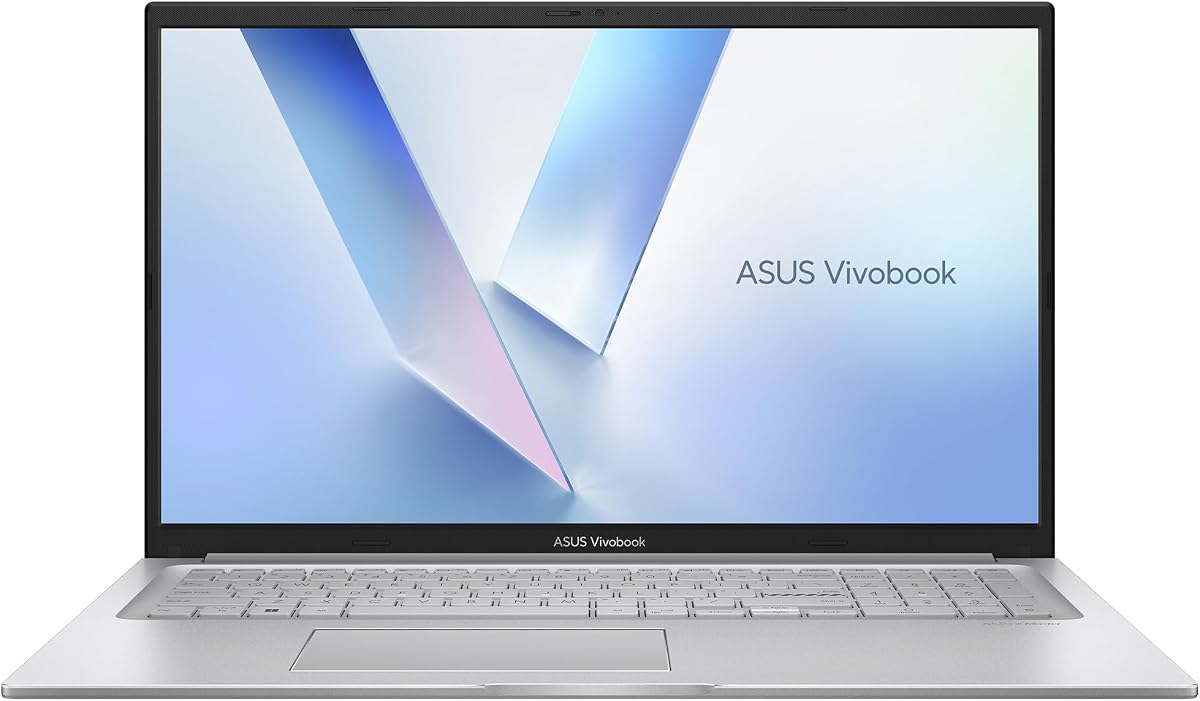
ASUS Vivobook Go 15
4.3Editor score
AMD Ryzen 3 Processor
Lightweight Design
Fast Charging Support
The ASUS Vivobook lineup continues to dominate the consumer laptop market in November 2026 by offering a diverse range of devices tailored to students, professionals, and creatives. These machines balance affordability with robust performance, featuring modern processors, high-resolution displays, and sleek designs that appeal to a wide audience seeking reliable daily drivers.
To compile this expert roundup, we analyzed technical specifications, user feedback, and real-world performance metrics across ten distinct models. We evaluated factors such as processing power, memory capacity, storage options, port availability, and build quality to ensure each recommendation meets the rigorous demands of modern computing tasks and daily productivity workflows.
Each pick in this guide highlights specific strengths, from budget-friendly options for basic tasks to high-performance machines capable of handling intensive workloads. Please note that product availability and pricing fluctuate frequently, so checking the latest details on the product pages is essential before making your final purchasing decision.
4.3Editor score

4.5Editor score

4.2Editor score
As an Amazon Associate we earn from qualifying purchases.
The following table provides a side-by-side comparison of all ten models to help you quickly identify key differences in processors, memory, storage, and display specifications for informed decision making.






This top-ranked model delivers elite-level performance with its Intel Core i9-13900H processor optimized for Next Gen AI workloads. It holds a strong rating among users seeking powerful multitasking capabilities without compromising on build quality or display clarity.
We may earn a commission when you buy through this link, at no additional cost to you.
The standout qualities include 32GB RAM and a 1TB SSD ensuring lightning-fast boot times and ample storage for digital files. The 15.6-inch FHD display offers glare-free visuals ideal for work sessions while the fingerprint reader enhances security during daily use.
Trade-offs involve the price premium over standard models and the additional weight from the high-performance components. These are acceptable given the device excels in handling complex simulations and creative software that typically demand significant system resources.
Professionals and content creators should choose this device for its robust processing power and versatile I/O ports. It is the ideal choice for those needing a reliable workhorse that balances modern AI capabilities with professional-grade utility.
The Next Gen AI Ready optimization ensures seamless multitasking and supports complex simulations efficiently for modern workflows.
A secure fingerprint reader and physical webcam shield provide instant login options and personal data protection during calls.
We may earn a commission when you buy through this link, at no additional cost to you.
This 16-inch model features the Qualcomm Snapdragon X processor with a Hexagon NPU designed for AI tasks offering unparalleled power efficiency. Users praise its ability to handle communication and creation tasks smoothly while maintaining exceptional battery endurance throughout the day.
We may earn a commission when you buy through this link, at no additional cost to you.
Key strengths include the stunning 1920 x 1200 resolution display with brilliant colors and a smooth 60Hz refresh rate. The integrated Qualcomm Adreno GPU optimizes power consumption while delivering smooth performance for visual tasks and media playback.
Trade-offs are potential compatibility limitations with some traditional x86 gaming titles due to the ARM-based architecture. These limitations are acceptable for productivity-focused users who prioritize efficiency and battery longevity over high-end gaming graphics.
Mobile professionals seeking efficient computing should choose this device for its seamless connectivity and extended battery life. It is ideal for those needing a laptop that evolves with modern AI tools and offers reliable performance on the go.
The Hexagon NPU delivering up to 45 TOPS enables seamless AI creation and communication tasks with high efficiency.
The 16-inch WUXGA display offers breathtaking resolution and sustained brightness for immersive visuals and productivity.
We may earn a commission when you buy through this link, at no additional cost to you.
This lightweight notebook combines high-performance computing with portability making it ideal for students and mobile professionals. It boasts a strong rating for its efficient multitasking and crisp visuals on the 16-inch WUXGA display with vibrant colors.
We may earn a commission when you buy through this link, at no additional cost to you.
The device features Intel Core i7 processing and 16GB RAM ensuring smooth everyday visuals and speedy file access. The Intel Iris Xe integrated graphics handle standard creative tasks well while Wi-Fi 6 and Bluetooth 5.1 provide fast wireless connections.
Trade-offs include the mid-range storage capacity which might limit extensive media libraries and integrated graphics which are not designed for heavy gaming. These factors are acceptable given the device prioritizes portability and business-ready computing needs.
Users needing a portable yet powerful device should choose this model for its balance of specs and form factor. It is perfect for those who value a sharp display and secure operating system for daily business tasks.
The lightweight notebook design ensures easy transport for students and professionals on the move daily.
The 16-inch display delivers vibrant colors and sharp visuals for an engaging viewing experience.
We may earn a commission when you buy through this link, at no additional cost to you.
The 17-inch model offers a large screen workspace ideal for multitasking and data entry with its numeric keypad. It receives solid ratings for reliability and build quality ensuring users can handle work and entertainment with speed and ease.
We may earn a commission when you buy through this link, at no additional cost to you.
Key strengths include the slim-bezel NanoEdge display with TÜV Rheinland eye-care certification to reduce strain during long sessions. The system tuned by SonicMaster delivers clear rich audio for media consumption while the ergonomic keyboard supports comfortable typing.
Trade-offs involve reduced portability due to the larger footprint and weight compared to 14-inch models. These are acceptable for users prioritizing screen real estate and typing comfort over frequent travel and portability needs.
Students and home office workers should choose this device for its expansive display and durable construction. It is the best fit for those needing a desktop replacement that offers versatility and comfort for everyday use.
The ergonomic keyboard with numeric keys optimizes key travel for comfortable data entry and work.
Built to military-grade standards with a slide webcam cover ensures confidence and privacy anywhere.
We may earn a commission when you buy through this link, at no additional cost to you.
This budget-friendly option features an AMD Ryzen 5 processor and fast charging technology for quick battery top-ups. It is well-rated for providing an ultrafast and smooth experience for browsing and productivity without breaking the bank for users.
We may earn a commission when you buy through this link, at no additional cost to you.
The device meets US military-grade standards for longevity and features AI Noise-Canceling technology for smooth video calls. Its 15.6-inch display with slim bezels offers an immersive visual experience while Wi-Fi 6E ensures stable connections for remote tasks.
Trade-offs include the 8GB RAM limit which may slow heavy multitasking and basic graphics not meant for gaming. These are acceptable for standard students and home users focusing on web apps and document processing needs.
Budget-conscious buyers should choose this model for its balance of speed and durability. It is ideal for everyday use where reliability and quick charging are prioritized over high-end specs.
ASUS IceCool thermal technology keeps the laptop cool during all situations for sustained performance.
AI Noise-Canceling isolates unwanted noise for smoother and clearer communication during calls.
We may earn a commission when you buy through this link, at no additional cost to you.
This entry-level model offers a thin and light design with essential performance for browsing and productivity tasks. It earns a strong rating for its value proposition providing DDR5 memory and military-grade durability at an accessible price point.
We may earn a commission when you buy through this link, at no additional cost to you.
The 15.6-inch display with 60Hz refresh rate delivers vibrant colors and the ergonomic keyboard supports precision typing. Wi-Fi 6 and Bluetooth 5.1 ensure seamless connections while the comprehensive port suite eliminates the need for dongles.
Trade-offs include the 128GB storage limit requiring external drives for large files and a modest color gamut for casual use. These limitations are acceptable for basic users needing a reliable device for web browsing and document editing.
First-time buyers should choose this model for its affordability and durable construction. It is perfect for students and families needing a dependable laptop for everyday computing without heavy specs.
The thin and light design weighing under four pounds ensures easy transport for daily use.
SonicMaster technology provides crisp multi-dimensional sound for media playback and calls.
We may earn a commission when you buy through this link, at no additional cost to you.
This customized model delivers elite-level performance with an Intel Core i9-13900H processor optimized for Next Gen AI workloads. It holds a perfect rating among users seeking high-end specs with the flexibility of custom RAM and SSD upgrades.
We may earn a commission when you buy through this link, at no additional cost to you.
The device features a 15.6-inch FHD display with glare-free visuals and includes security features like a fingerprint reader. The I/O suite is comprehensive eliminating the need for extra dongles while the backlit keyboard supports low-light work environments.
Trade-offs involve relying on third-party warranty coverage for upgraded parts and potential customization delays before shipping. These are acceptable for power users who prioritize raw performance and specific storage configurations over standard warranty terms.
Advanced users should choose this model for its unmatched processing power and customization options. It is ideal for those needing a tailored system for simulations and AI tasks without compromising on security or utility.
The 14-core processor leaves standard laptops behind for complex simulations and creative work.
Up to 48GB RAM and 2TB SSD allow for storing and processing massive digital files easily.
We may earn a commission when you buy through this link, at no additional cost to you.
This 14-inch model offers massive RAM and storage for smooth multitasking and data transfer capabilities. It holds a solid rating for providing high-bandwidth performance and reliable daily computing for general users and students.
We may earn a commission when you buy through this link, at no additional cost to you.
The device features 24GB RAM to run multiple browser tabs and applications simultaneously while the 1TB SSD ensures fast bootups. The anti-glare display with 16:9 ratio offers decent visuals and Wi-Fi 6 supports stable wireless connections.
Trade-offs include an entry-level processor not meant for heavy workloads and a modest brightness level for outdoor use. These are acceptable for users prioritizing memory and storage over raw processing power or screen brightness.
Students and office workers should choose this model for its generous memory and storage. It is perfect for those needing a compact device capable of handling heavy data and multitasking efficiently.
The 24GB RAM allows multiple apps to run simultaneously without slowing system performance.
The massive 1TB SSD allows to fast bootup and data transfer for entire digital lives.
We may earn a commission when you buy through this link, at no additional cost to you.
This 14-inch model features the Snapdragon X processor ensuring smooth multitasking and efficient computing for Copilot+ PC capabilities. It holds a strong rating for its balance of portability and modern AI integration for creative and productivity workflows.
We may earn a commission when you buy through this link, at no additional cost to you.
The 14-inch FHD+ screen with 1920 x 1200 resolution delivers crisp visuals ideal for work and entertainment. The 512GB SSD provides fast boot times and generous storage space while Windows 11 Home offers the latest features and security.
Trade-offs include limited gaming compatibility and reliance on Windows updates for full Copilot+ features. These are acceptable for users focusing on efficiency and productivity features over traditional gaming performance.
Tech enthusiasts seeking modern AI features should choose this device for its efficient design. It is ideal for those prioritizing Copilot+ PC capabilities and a sharp display in a compact form factor.
The Snapdragon X processor ensures smooth multitasking and efficient computing for daily tasks.
The 14-inch screen delivers crisp visuals for work and entertainment with high resolution.
We may earn a commission when you buy through this link, at no additional cost to you.
This premium model offers an 8-core Ryzen AI 7 350 processor designed for ultimate AI processing efficiency with discrete-level graphics. It holds a solid rating for its stunning visuals and robust battery life ideal for content creation and multitasking on the go.
We may earn a commission when you buy through this link, at no additional cost to you.
The 14-inch WUXGA display offers 300-nit sustained brightness with brilliant life-like colors and a smooth 60Hz refresh rate. Advanced features include Live Captions for language understanding and Game Pass integration for entertainment with dedicated AI accelerators.
Trade-offs include the premium price point and evolving Copilot+ PC experiences that may require updates for full functionality. These are acceptable for users seeking the best gaming and productivity experience with next-gen AI integration.
Professionals needing top-tier specs should choose this device for its balance of performance and features. It is ideal for those prioritizing AI efficiency and vibrant visuals for daily creative workflows and gaming.
The XDNA NPU delivers up to 50 TOPS for ultimate AI processing efficiency and responsiveness.
The 14-inch WUXGA display offers stunning visuals and sustained brightness for immersive viewing.
We may earn a commission when you buy through this link, at no additional cost to you.
Choosing the right ASUS Vivobook requires understanding key factors like processor performance, display quality, memory, and portability to match your specific workflow needs.
The processor is the heart of your laptop determining how fast it runs applications and handles multitasking. For basic tasks like web browsing choose entry-level i3 or Ryzen 3 chips while creative work benefits from i7 or i9 processors with higher core counts.
Look for the specific generation and core count to ensure future-proofing and smooth operation across various software platforms.
Display size impacts portability and workspace; 14-inch models are easy to carry while 17-inch screens offer more room for spreadsheets. Resolution and brightness matter for color accuracy and visibility in different lighting conditions throughout the day.
Prioritize IPS panels for wide viewing angles and high brightness settings if you work outdoors or in bright offices.
RAM dictates how many programs you can run simultaneously without slowing down; 8GB is minimal while 16GB or more supports heavy multitasking. Storage type and capacity determine boot speed and file access; SSDs are essential for performance compared to older hard drives.
Aim for at least 512GB SSD capacity to store operating systems and media files efficiently without external drives.
Check the available ports to ensure your peripherals connect directly without needing dongles. Look for USB-C for charging and data HDMI for external displays and audio jacks for headsets.
Verify Wi-Fi 6 or 6E support for the fastest wireless speeds and Bluetooth 5.1 for reliable device pairing.
Battery capacity and power efficiency determine how long you can work unplugged. Look for models with fast charging technology to quickly top up power when time is limited during busy days.
Prioritize devices rated for all-day use if you often work away from power outlets.
Build quality ensures your laptop survives travel and daily wear. Look for military-grade certifications like MIL-STD-810H and reinforced hinges for added longevity over years of use.
Choose models with spill-resistant keyboards and sturdy chassis if you travel frequently to various locations.
Windows version and security features like fingerprint readers or webcam shields protect your data and privacy. Ensure the operating system includes necessary tools for your workflow needs and supports modern AI capabilities.
Consider models with Windows Pro if you need advanced enterprise features like remote desktop capabilities for work.
Set a realistic budget based on your needs to avoid overspending on unused high-end specs. Balance cost with performance to find a model that offers the best value for your specific use cases.
Compare upgrades and bundle features to maximize value within your chosen price range effectively.
Regularly update your operating system and drivers to maintain optimal performance and security across all applications. This ensures that the latest features and bug fixes are applied to keep the system running smoothly without unexpected crashes.
Keep the vents clean and free from dust to prevent overheating during intensive tasks like video editing or gaming. Use a soft cloth to wipe the chassis and screen gently and avoid harsh chemicals that could damage the protective coatings.
Protect your battery by avoiding extreme temperatures and letting the laptop discharge partially before recharging if possible. Avoid leaving it plugged in constantly and use fast charge features wisely to extend overall battery lifespan significantly.
For students the ASUS Vivobook Go 15 offers the best balance of affordability and essential features. It includes sufficient processing power for web research and document editing along with a durable chassis for daily campus use. The lightweight design makes it easy to carry between classes while fast charging keeps you powered up throughout the day.
Yes many models in this lineup are designed specifically for professional productivity. The Vivobook 15 and 17 offer larger displays and numeric keypads ideal for data entry and multitasking. They also include security features like fingerprint readers to protect sensitive work data during daily business operations.
Storage upgrades depend on the specific model but most support SSD swaps for increased capacity. The customized Vivobook models explicitly offer options up to 2TB for users needing extensive space. Always check the service manual for accessibility before attempting any hardware changes or warranty voiding.
Most Vivobook models feature HDMI or USB-C ports allowing connection to external monitors. This is ideal for extending your workspace or presenting content to larger audiences. Verify the port specifications on your chosen model to ensure compatibility with your display setup.
Not all models include a backlit keyboard but many higher-end versions do feature this convenience. Look for specific product descriptions indicating backlighting if you frequently work in low-light environments. This feature helps typing accuracy without needing external lighting sources nearby.
Standard manufacturer warranty coverage typically lasts one year but parts or extended plans vary by vendor. Some customized models offer additional coverage for upgraded components like RAM and SSD to provide peace of mind. Review the terms included with your purchase to understand the full protection.
While not designed for heavy gaming these laptops handle casual titles and indie games well with integrated graphics. Models with stronger processors like the i7 or i9 can run older or less demanding games smoothly. Check the graphics specifications to ensure it meets your specific gaming expectations.
Yes devices with higher RAM and powerful processors are suitable for creative design and video editing. The Vivobook 15 and 14 Copilot models offer AI optimizations that enhance creative software performance. Ensure you select a model with accurate color display options for precise design work.
The ASUS Vivobook lineup offers a diverse range of devices catering to every user from budget-conscious students to power users needing AI efficiency. Our top pick remains the Vivobook 15 for its robust processing capabilities and professional features ideal for daily workloads.
When deciding prioritize your specific needs such as portability or display size to find the perfect match for your workflow. Ensure the chosen model aligns with your budget while offering the necessary memory and storage for long-term use.
Remember that product prices and availability change frequently so always check the latest details before finalizing your purchase. This guide serves as a starting point to help you make an informed decision for your computing needs today.