
Kingwin 80mm Silent Fan
4.5Editor score
Low noise operation
Universal fit
Affordable price
This guide compares the top 80mm case fans for performance, noise, and value to help you choose the right cooling solution for your build.
Finding the right cooling solution is essential for maintaining optimal system performance and longevity. 80mm case fans are often used in compact builds or specialized cooling setups where space is limited.
We evaluated ten leading models based on airflow, static pressure, noise levels, and build quality. Each option was selected to meet different needs ranging from budget-friendly upgrades to premium silent operation.
Every pick highlights key features and real-world applications to help you decide. Keep in mind that prices and availability can fluctuate over time so always check current listings before purchasing.
4.5Editor score

4.9Editor score

4.7Editor score
The following table provides a side-by-side look at key specifications for each fan to help you compare performance metrics at a glance.



The Noctua NF-A8 PWM stands out as the top choice for users seeking a balance of performance and silence. With a near-perfect rating it delivers reliable cooling for compact cases without disturbing your environment.
We may earn a commission when you buy through this link, at no additional cost to you.
Its Flow Acceleration Channels and Acoustic Optimisation frame ensure air moves efficiently while minimizing turbulence noise. The 4-pin PWM interface allows precise speed control to match your thermal needs automatically.
While the cost is higher than many competitors the included anti-vibration mounts and Low-Noise Adaptor add significant value. The brown color may not suit all builds but performance outweighs aesthetics here.
Ideal for HTPC or ITX builds where noise sensitivity is high this fan is a solid investment. Its reliability and quiet operation make it the best overall option for most users.
Advanced frame design reduces noise turbulence allowing for high airflow without the usual hum.
Includes mounting hardware extension cables and y-cables for flexible installation in tight spaces.
We may earn a commission when you buy through this link, at no additional cost to you.
This five-pack from Arctic offers excellent value for users needing multiple fans for server racks or large cooling arrays. The high static pressure design ensures air pushes through dense components effectively.
We may earn a commission when you buy through this link, at no additional cost to you.
Each fan runs at up to 3000 RPM providing strong airflow for heat dissipation. The Fluid Dynamic Bearing ensures longevity and reduces friction for consistent performance over time.
The trade-off is the 3-pin connector which lacks PWM speed control. This means manual voltage control or full-speed operation which may increase noise in quiet environments.
Best for budget builds or industrial setups where sheer volume of cooling matters most. If you need multiple fans quickly this pack delivers solid performance at a low cost per unit.
High RPM and static pressure ensure air reaches deep into radiators and heatsinks for better cooling.
German-engineered bearing reduces friction and extends service life compared to standard sleeve bearings.
We may earn a commission when you buy through this link, at no additional cost to you.
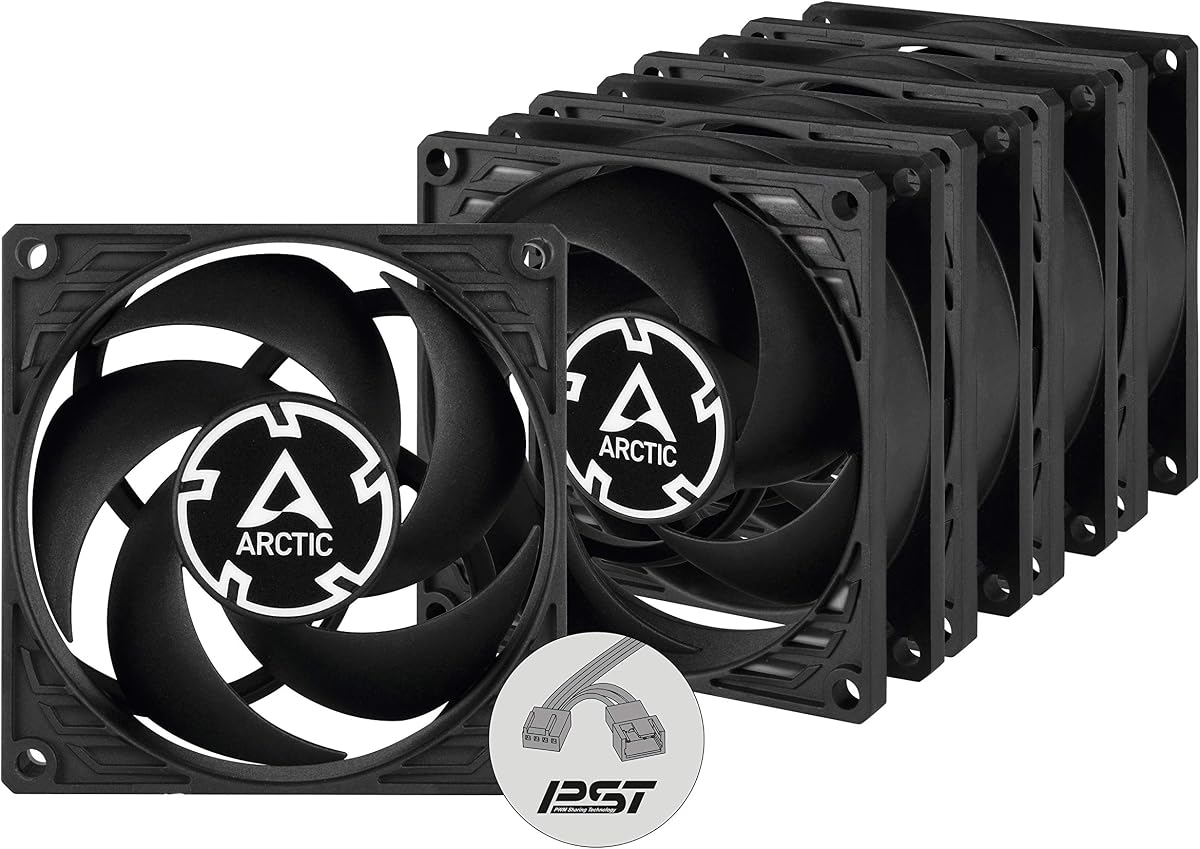
The ARCTIC P8 PWM PST improves on the standard P8 by adding PWM Sharing Technology. This allows synchronized control of all five fans via a single motherboard header reducing cable clutter.
We may earn a commission when you buy through this link, at no additional cost to you.
A new Neodym-Iron-Boron magnet ring boosts motor efficiency allowing precise speed adjustments between 200 and 3000 RPM. This range ensures quiet idle and powerful cooling under load.
Although slightly more expensive than the standard P8 the added control features justify the cost for advanced users. It simplifies cable management while maintaining high static pressure for radiators.
This bundle is ideal for custom loops or dense server cases where coordinated fan speeds are crucial. If you need control and performance in a multi-fan setup this is the smart choice.
PWM Sharing lets you connect multiple fans to one header for cleaner builds and easier control.
New generation magnet design allows better power usage and smoother speed regulation across all speeds.
We may earn a commission when you buy through this link, at no additional cost to you.
The NF-R8 redux-1800 offers classic Noctua quality at a more accessible price point. It strips away some accessories but keeps the core engineering that fans trust.
We may earn a commission when you buy through this link, at no additional cost to you.
Running at 1800 RPM it provides a strong balance between airflow and noise. The optimized low-noise design ensures it remains quiet even under full speed without sacrificing cooling power.
While it does not include extra mounts or adapters in the box users can buy them separately if needed. This makes it a flexible choice for those who prefer minimal packaging.
Recommended for users who want Noctua performance without the top-tier price tag. It is perfect for standard chassis ventilation or NAS replacement where reliability is key.
Focuses on core performance and quality materials without including every accessory in the box.
Blade design maximizes airflow and static pressure for efficient heat dissipation in compact spaces.
We may earn a commission when you buy through this link, at no additional cost to you.
The Kingwin fan is a straightforward choice for those on a tight budget who still need decent cooling. It delivers maximum airflow with a low noise profile suitable for daily computing tasks.
We may earn a commission when you buy through this link, at no additional cost to you.
Its universal fit makes it easy to swap into existing cases or CPU coolers without modification. The long life bearing ensures it lasts longer than cheaper alternatives found in local stores.
It lacks advanced PWM controls or special mounting kits found in pricier models. This simplicity is its strength for basic users who just need airflow without fuss.
Ideal for mining rigs or office PCs where cost is a major factor. If you need a quick replacement fan that works well this is the most budget-friendly pick.
Delivers solid airflow and silence at a fraction of the price of premium branded fans.
Designed for extended lifespan to minimize replacement needs and keep systems running reliably.
We may earn a commission when you buy through this link, at no additional cost to you.
The ARCTIC P8 Silent is engineered for users who prioritize silence above all else. It runs at a reduced 1600 RPM to minimize noise without compromising airflow efficiency.
We may earn a commission when you buy through this link, at no additional cost to you.
Its motor uses an alloy/lubricant combination developed in Germany to reduce friction and unwanted noise. This makes it virtually silent even when operating continuously under load.
Without PWM support it cannot adjust speed based on temperature but this ensures consistent quietness. The high static pressure still ensures it can push air through tight heatsink fins.
Choose this if you want a near-silent fan for home media PCs or sound-sensitive setups. It balances airflow needs with noise concerns better than most standard options available today.
Specially designed bearing and motor reduce friction and noise for truly silent operation.
Still effective on radiators and heatsinks despite the lower noise-focused design profile.
We may earn a commission when you buy through this link, at no additional cost to you.
This version of the NF-A8 delivers the same quiet performance as the original but with a sleek all-black look. It suits modern builds where brown tones might clash with the case interior.
We may earn a commission when you buy through this link, at no additional cost to you.
The swappable anti-vibration pads let you customize the color to match your system. This adds a personal touch without requiring complex modifications or third-party parts.
Performance remains unchanged with Flow Acceleration Channels ensuring optimal airflow and noise control. The premium price reflects the design enhancements and customization options included.
Perfect for style-conscious users who want Noctua quality without sacrificing aesthetics. If you prefer a monochrome setup this fan bridges the gap between function and form perfectly.
Interchangeable pads allow you to match your system's color scheme without extra hardware.
Sleek black frame offers a modern look that fits contemporary PC building trends.
We may earn a commission when you buy through this link, at no additional cost to you.
This bundle extends the benefits of the P8 Silent to multiple zones in your system. It is ideal for cases that require several silent intake and exhaust points.
We may earn a commission when you buy through this link, at no additional cost to you.
Each fan operates at 1600 RPM ensuring they run quietly while maintaining enough pressure for standard airflow needs. This helps keep overall system noise low during heavy usage.
Since these are fixed-speed 3-pin fans you may need a manual controller for speed adjustment. This simplicity ensures consistent performance without complex wiring configurations needed.
Great for silent server racks or workstation builds needing comprehensive coverage. If you need multiple silent fans the cost savings and performance make this a solid bundle.
Five-pack ensures you have enough quiet fans for full case coverage without high expense.
All fans share the same low-noise design to prevent any single fan from disrupting quietness.
We may earn a commission when you buy through this link, at no additional cost to you.
The P8 Max is designed for high-density environments where airflow is critical. With speeds up to 5000 RPM it offers unmatched cooling power for small form factor high thermal loads.
We may earn a commission when you buy through this link, at no additional cost to you.
Its Fluid Dynamic Bearing supports this extreme performance without excessive vibration or wear. The PWM control allows you to throttle speed for quiet operation when full power isn't needed.
While it can be loud at top speed the range of control lets you balance noise and performance. It is overkill for a standard home PC but perfect for specialized server applications.
Choose this if you need maximum cooling in minimal space. For dense server racks or mining setups this fan provides the raw performance required to keep components safe.
Highest speed and pressure ensure rapid heat dissipation even in the tightest high-density layouts.
Designed specifically for 2U server racks and other demanding industrial computing environments.
We may earn a commission when you buy through this link, at no additional cost to you.
This fan stands out with its 15mm thickness making it ideal for tight spaces where standard 25mm fans won't fit. It maintains strong performance despite the slim form factor.
We may earn a commission when you buy through this link, at no additional cost to you.
The S-FDB V2 bearing keeps noise minimal while ensuring durability for long-term use. It connects via 4-pin PWM allowing automatic speed control based on motherboard temperature data.
Airflow is decent for its size but naturally lower than thicker fans. This trade-off is acceptable for cases where height clearance is the primary constraint during installation.
Best for mini-ITX builds or CPU coolers with limited clearance. If you need a fan that fits where others cannot this offers a reliable performance compromise.
Only 15mm thick allowing installation in cramped compartments where standard fans would clash.
S-FDB V2 technology ensures long life and minimal noise despite high-speed operation.
We may earn a commission when you buy through this link, at no additional cost to you.
Selecting the right 80mm fan depends on understanding your specific cooling needs and case constraints. The following factors will help guide your decision process.
While most 80mm fans are 25mm thick some models like the Thermalright TL-8015 are only 15mm. Always check your case clearance to ensure the fan fits without obstruction.
Thin fans save space but may sacrifice some airflow compared to standard thickness models.
Airflow is critical for general case ventilation while static pressure is needed when pushing air through dense heatsinks or radiators. Choose based on where the fan will be installed.
Fans labeled as static pressure optimized work best on CPU coolers or water blocks.
Noise is measured in dB or Sone. Lower values indicate quieter operation which is vital for home offices or media centers where ambient noise matters.
Consider fans with PWM support to lower speeds during idle for reduced noise.
3-pin fans provide fixed speed control while 4-pin PWM fans allow the motherboard to adjust speed automatically based on temperature.
PWM offers better energy efficiency and noise control but costs slightly more.
Fluid Dynamic Bearings (FDB) offer long life and low friction. Sleeve bearings are cheaper but wear out faster. Always check the MTTF rating.
FDB bearings are ideal for continuous use in servers or mining rigs.
If you need multiple fans PST allows one header to control all of them. This reduces cable clutter and simplifies BIOS configuration significantly.
Look for this feature in multi-pack bundles for easier installation.
Some brands include anti-vibration mounts or y-splitters in the box. These add value and make installation smoother without buying extras later.
Check the product details to see what is included before purchasing.
Color and design matter if your case has a side panel. Black fans are versatile while colored options offer customization for theme builds.
Swappable pads allow you to change colors without buying a new fan.
Install the fan securely using screws or anti-vibration mounts to prevent rattling. Ensure airflow direction matches your case intake or exhaust strategy for best results.
Dust accumulation reduces efficiency over time so use compressed air to clean fan blades monthly. Keeping the motor free of debris extends its operational life significantly.
Monitor fan speeds via BIOS or software to ensure they respond correctly to temperature changes. Adjust PWM curves if necessary to balance cooling and noise.
Yes 80mm fans can be used for either intake or exhaust depending on your case setup. Check the airflow arrows on the frame to install them in the correct orientation for proper cooling.
3-pin fans run at a fixed speed set by voltage. 4-pin fans use PWM for variable speed control allowing the motherboard to adjust them based on temperature for better efficiency.
It depends on the model and speed. Premium fans like Noctua offer very quiet operation while budget models may produce more noise at high RPMs. Check dB ratings before buying.
You can use a Y-splitter or PST technology to run multiple fans from one header. Ensure your motherboard can handle the combined current draw to avoid damaging ports.
Use anti-vibration mounts to reduce frame rattling and ensure the fan is securely mounted. Cleaning dust and adjusting speed curves in BIOS also help minimize unwanted noise.
Static pressure measures a fan's ability to push air through resistance. High static pressure fans are better for cooling radiators and dense heatsinks than standard airflow fans.
Quality fans with Fluid Dynamic Bearings can last 50,000 to 150,000 hours. Proper dusting and secure mounting also prevent wear and extend their operational life.
The Noctua NF-A8 PWM leads as the top overall pick for its balance of quiet operation and high performance. For budget buyers the Kingwin model delivers solid value at a low cost.
Prioritize static pressure if you need cooling for radiators or airflow for general case ventilation. Also consider PWM support for automatic speed control to reduce noise during idle.
Always verify compatibility with your case dimensions and power headers before purchasing. Prices may vary so check current listings to get the best deal available now.