
Nektar SE49
4.5Editor score
Affordable entry price point
DAW integration included
Basic MIDI functionality
This guide compares the top 49 Key MIDI Keyboards for producers and musicians, evaluating keybeds, DAW integration, software bundles, and build quality to help
Finding the right 49 Key MIDI Keyboards can transform your music production workflow significantly. These controllers offer a balanced range of notes perfect for both live performance and studio composition without taking up excessive desk space.
We evaluated ten top models based on keybed feel, software integration, build quality, and included value. Our analysis covers entry-level options to professional grade controllers to ensure you find the best fit for your budget and needs.
Each pick highlights specific strengths and weaknesses to help you make an informed decision. Remember that prices and availability can change frequently so check current listings before purchasing to secure the best deal possible.
4.5Editor score

4.7Editor score

4.4Editor score
This side-by-side comparison highlights the key differences between the ten models we reviewed. Use this table to quickly identify which controller offers the specific features and value proposition that aligns with your production goals.




The Novation Launchkey 49 MK4 stands out as a top tier controller for serious producers and performers. With a rating of 4.7 stars it offers a premium experience that justifies its place at the top of our list.
We may earn a commission when you buy through this link, at no additional cost to you.
Its standout feature is the combination of a high quality keybed and responsive FSR drum pads. The seamless integration with major DAWs like Ableton Live and Logic Pro allows for intuitive workflow without tedious manual mapping.
While the price is higher than entry level options the build quality and included software make it a solid long term investment. The Scale and Chord modes are particularly helpful for those looking to enhance their creative process without deep music theory knowledge.
This keyboard is ideal for producers who need reliable hardware that integrates deeply with their software environment. If you want a controller that grows with your skills and offers professional grade features this is the top recommendation.
The included Scale and Chord modes allow you to play complex harmonies and melodies with ease.
Custom scripts for major DAWs ensure that transport and mixer controls work immediately out of the box.
We may earn a commission when you buy through this link, at no additional cost to you.
The Arturia KeyLab mk3 is a premium offering that delivers professional features for serious musicians. With a rating of 4.4 stars it is designed for those who need extensive control over their music production environment.
We may earn a commission when you buy through this link, at no additional cost to you.
Key features include aftertouch on all 49 keys and twelve pressure-sensitive performance pads. These capabilities allow for dynamic expression and control over modulation parameters that are not available on standard entry level controllers.
The price point is higher than many competitors but the build quality and included Analog Lab V software provide significant value. The controller is built to withstand rigorous touring or daily studio use with reliable hardware components throughout.
This is the best choice for professionals who require tactile control and expressive features. If you value high-end build quality and need aftertouch for nuanced performances this controller is the clear leader in the premium category.
Aftertouch on every key allows for dynamic modulation and effects control while you play.
The robust construction ensures this controller can handle the demands of both studio and live use.
We may earn a commission when you buy through this link, at no additional cost to you.
The Nektar SE49 offers exceptional value for those starting their music production journey. With a rating of 4.5 stars it proves that you do not need to spend a fortune to get a functional MIDI controller.
We may earn a commission when you buy through this link, at no additional cost to you.
It includes comprehensive MIDI functionality and DAW integration for most popular software. This allows you to control transport and basic mixer functions without needing complex setup or drivers to get started.
While the build is more basic and the keybed is not as robust as premium models it gets the job done effectively. The price makes it accessible for students or home studio owners on a tight budget who need 49 keys.
Choose this if you want a no fuss affordable controller that works well with your software. It is an ideal starting point for beginners who want to learn production without a significant financial commitment.
The low price point makes this a perfect first controller for new producers on a budget.
Broad compatibility with Mac PC and iOS ensures you can use it with most of your favorite tools.
We may earn a commission when you buy through this link, at no additional cost to you.
The M-AUDIO Oxygen 49 MKV is a versatile mid range controller that balances features and price effectively. With a rating of 4.6 stars it is a popular choice for producers looking for hands on control over their software.
We may earn a commission when you buy through this link, at no additional cost to you.
It features two banks of drum pads with Note Repeat and extensive control via knobs and faders. The Native Kontrol Standard support allows for seamless interaction with Native Instruments libraries making it a favorite among electronic producers.
The build is functional though mostly plastic which may not suit heavy touring environments. However for home studio use it offers a comprehensive set of tools including an arpeggiator and scale modes that enhance creativity.
This model is recommended for those who need drum pads and faders at a reasonable price. It serves as a great central hub for beat making and general production tasks without breaking the bank.
The drum pads are responsive and include Note Repeat which is essential for quick beat sketching.
NKS integration means you can browse and control NI presets directly from the hardware interface.
We may earn a commission when you buy through this link, at no additional cost to you.
The Arturia KeyLab Essential mk3 is designed to provide a complete production package out of the box. With a rating of 4.5 stars it is particularly appealing to those who want high quality sounds without hunting for plugins.
We may earn a commission when you buy through this link, at no additional cost to you.
It includes Analog Lab V which offers a massive library of presets spanning vintage and modern sounds. The RGB backlit pads and small LCD screen provide visual feedback that helps you navigate sounds and parameters quickly.
While the hardware is slightly simplified compared to the full mk3 it still delivers good tactile control. The software integration is seamless making it easy to start creating music immediately after purchase.
Buy this if you want a controller that comes with top tier software included. The value proposition is strong for beginners who want access to a wide range of high quality sounds right away.
The included Analog Lab V software provides thousands of presets to spark your creativity immediately.
The LCD screen and backlit pads help you see your settings and parameters at a glance.
We may earn a commission when you buy through this link, at no additional cost to you.
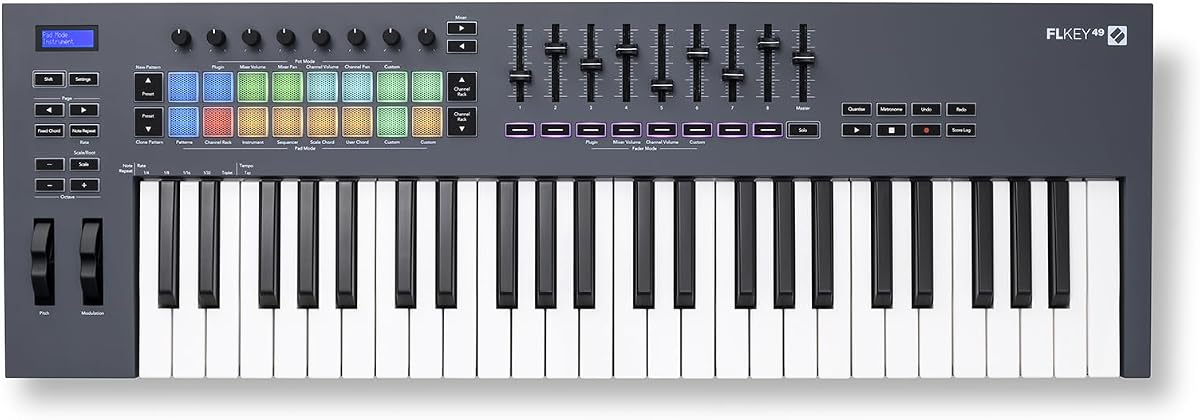
The Novation FLkey 49 is a specialized controller designed specifically for users of FL Studio software. With a rating of 4.6 stars it eliminates the need for manual mapping by integrating seamlessly with the host application.
We may earn a commission when you buy through this link, at no additional cost to you.
It brings mixer and channel rack controls off the screen and into your hands with faders and pots. This hardware integration allows for a more tactile workflow which can speed up your mixing and automation tasks significantly.
While it is optimized for FL Studio it still functions as a standard MIDI controller for other software. However the unique features and custom mappings are most beneficial within the FL Studio ecosystem.
This is the ideal choice for dedicated FL Studio producers who want hardware integration. If you spend most of your time in FL Studio this controller will enhance your workflow and keep you in the creative flow.
The controller maps directly to FL Studio controls so you don't have to spend time setting things up manually.
Physical faders and pots give you immediate control over mixing parameters and automation tasks.
We may earn a commission when you buy through this link, at no additional cost to you.
The M-AUDIO Keystation 49 MK3 is a no fuss controller focused on playing and recording. With a rating of 4.5 stars it is perfect for musicians who want a reliable keyboard without complex features.
We may earn a commission when you buy through this link, at no additional cost to you.
It features velocity sensitive keys that provide a natural feel for expressive performance. The plug and play connectivity means you can connect it to your computer or iOS device without installing drivers.
This model lacks drum pads and extensive knobs which makes it less suitable for beat making. However for composers and pianists it offers a clean and efficient interface for controlling your virtual instruments.
Choose this if you want a straightforward controller for playing melodies and chords. It is an excellent choice for those who prioritize keybed feel and simplicity over extensive control surfaces.
The focus on keys and basic transport controls ensures you can focus on your performance.
The compact design and lightweight build make it easy to move between home and studio.
We may earn a commission when you buy through this link, at no additional cost to you.
The M-AUDIO Oxygen Pro 49 builds on the Oxygen series with advanced features for professionals. With a rating of 4.5 stars it offers a comprehensive control surface for those who need deep integration.
We may earn a commission when you buy through this link, at no additional cost to you.
It includes aftertouch on the keys and a full set of 16 RGB pads. The 5-pin MIDI output allows for connection to external gear which is not available on USB only controllers.
This model is slightly heavier and more expensive but the extra features justify the cost for serious users. The software bundle is robust and supports both Native Instruments and Akai Professional libraries.
Buy this if you need aftertouch and MIDI output for external synths. It is a powerful all-in-one solution for producers who need maximum control over their studio setup.
The 5-pin MIDI output allows you to control external hardware synthesizers without extra interfaces.
Pressure sensitivity on the keys adds a layer of expression that is critical for professional performance.
We may earn a commission when you buy through this link, at no additional cost to you.
The 49-Key MIDI Keyboard Controller is a compact solution for those with limited space. While it does not have a rating listed it offers a practical design for basic music creation tasks.
We may earn a commission when you buy through this link, at no additional cost to you.
Its small footprint makes it ideal for laptops and small desks where larger controllers would not fit. The ABS construction keeps it light and durable enough for casual use and transport.
This is a basic controller without extensive software or advanced features. It serves as a simple input device for recording ideas or practicing scales on a budget.
Choose this if you need a small controller for a tight workspace. It is a functional option for those who want a simple keyboard without the bulk of a larger unit.
The compact dimensions allow this keyboard to fit easily on laptops or cramped desks.
Simple controls make it easy to start playing and recording without learning complex setups.
We may earn a commission when you buy through this link, at no additional cost to you.
The midiplus AK490 is one of the most affordable 49 key controllers on the market. With a rating of 4.3 stars it offers a basic set of features for those on a strict budget.
We may earn a commission when you buy through this link, at no additional cost to you.
It includes standard features like velocity sensitive keys and a MIDI DIN output. This output is useful for connecting to older hardware synthesizers that do not have USB support.
Build quality is basic and you may not get the same refinement as with brand name controllers. However for the price it provides a functional way to enter music production without high costs.
Choose this if budget is your primary concern and you need basic connectivity. It is a valid option for students or hobbyists who need a simple controller to start their projects.
The low price point makes this accessible for anyone wanting to try music production.
The MIDI DIN port allows you to connect to older gear that lacks USB connectivity.
We may earn a commission when you buy through this link, at no additional cost to you.
Selecting the right MIDI controller involves evaluating several factors beyond just the number of keys. This guide breaks down the essential features to consider to ensure your new tool fits your workflow perfectly.
The keybed is the most critical part of any controller. Look for velocity sensitive keys that respond to your playing dynamics. Semi-weighted or fully weighted keys feel more like a piano which is important for realism.
Consider the keybed quality when choosing a controller. High-quality semi-weighted or fully weighted keys provide the dynamic control needed for realistic piano and instrument performances.
Seamless integration with your Digital Audio Workstation saves time during sessions. Controllers often come with pre-mapped controls for specific software like Ableton Live or Logic Pro. This allows you to mix and transport without using the mouse.
Check if your controller supports your specific DAW. Proper integration means you can control mixing and transport directly from the hardware interface to improve workflow efficiency.
Beyond keys you need to consider knobs faders and pads. Drum pads are essential for beat makers while knobs are vital for synth tweaking. The number of controls determines how hands-on your production process can be.
Aim for a control surface that matches your production style. Adequate knobs and pads ensure you have tactile control over parameters without relying solely on mouse clicks.
Many controllers come with free software including DAWs and virtual instruments. This adds significant value to the purchase price. Look for suites that include production tools relevant to your genre and workflow needs.
Evaluate the included software to maximize value. High-quality plugins and DAWs can save you hundreds of dollars compared to buying them separately.
Most controllers use USB for power and data. However some offer 5-pin MIDI outputs for connecting to external gear. This feature is useful if you own older hardware synths that do not support USB directly.
Check connectivity options based on your setup needs. USB is standard for computers but extra MIDI ports are valuable for hardware-focused studios.
A sturdy controller withstands regular use and transport. Look for metal reinforcement or quality plastics that resist wear. The durability of the faders and knobs is just as important as the keybed itself.
Prioritize build quality to ensure longevity. A well-constructed controller will maintain its feel and function for years even with heavy use.
A 49 key controller is a middle ground between portability and range. Ensure it fits on your desk and can be transported easily if needed. Weight is a factor if you plan to take it to gigs regularly.
Balance size and portability for your needs. A compact design is helpful if you have limited space but ensure it remains stable during use.
Prices vary significantly from entry-level to professional models. Determine your budget based on the features you actually need. Sometimes spending more upfront buys better build quality and software that lasts longer.
Set a realistic budget that aligns with your goals. Investing in a slightly better controller often saves money in the long run by avoiding upgrades.
Start by connecting your controller to your computer via USB. Install any necessary drivers or software that came with the device to ensure full functionality. Launch your DAW and verify that the controller is detected in the MIDI preferences menu.
Use the included software bundle to familiarize yourself with the instrument sounds and presets. Adjust knobs and faders to modify sound parameters in real time. Experiment with the drum pads to program beats or trigger samples during your session.
Keep your controller clean by wiping it down with a dry cloth after use. Avoid liquids and extreme temperatures which can damage electronic components. Store it in a safe place when not in use to prevent dust accumulation and accidental damage.
Most 49 key MIDI keyboards are compatible with any MIDI software but integration depth varies. Some controllers have custom drivers for specific DAWs which provide better control over transport and mixing features.
Velocity sensitive keys respond to how hard you play while weighted keys simulate the physical resistance of a piano. Weighted keys are better for pianists while velocity only is often preferred by producers.
No you do not need a separate sound card for MIDI playback. The computer processes the sound through your interface and speakers. However an audio interface is needed for recording vocals or instruments alongside MIDI.
Yes many models are designed for both studio and stage use. Look for controllers with durable build quality and reliable USB or MIDI connections to ensure stability during performances.
Most modern controllers are class compliant and do not need drivers for basic MIDI. However advanced features like custom mapping or audio transfer may require specific software drivers provided by the manufacturer.
Controllers typically include a suite of production software such as DAWs and virtual instruments. The specific titles vary by brand but often include versions of Ableton Live Logic Pro X and various synthesizers.
USB-C offers faster data transfer and reversible connections which is more convenient. However for MIDI keyboards USB-B is still widely supported and works just as well for standard MIDI data transfer.
Factory reset methods vary by model but usually involve holding a specific combination of keys or buttons on power up. Check the user manual for the specific key combination to restore default settings.
Choosing the right 49 Key MIDI Keyboard depends on your specific production needs and budget. Our top picks offer a range of options from affordable entry-level controllers to professional grade units with advanced features.
Prioritize the features that matter most to your workflow such as DAW integration or drum pads. A well-matched controller will significantly enhance your creative process and reduce friction during production.
Remember to check current prices and availability before making your final decision. Prices and promotions change frequently so comparing current listings ensures you get the best value for your investment today.