
Samsung 49 Odyssey OLED G9 G91SD
4.3Editor score
QD-OLED Panel Technology
0.03ms Response Time
Dual QHD Resolution
Choosing the right display for your racing setup is crucial for performance and immersion. A 49 inch ultrawide monitor offers a panoramic view that matches human peripheral vision, allowing you to see tracks and opponents without turning your head excessively.
We evaluated ten leading models based on resolution, refresh rate, and panel technology. Our analysis focuses on how each screen handles dynamic racing scenes, color accuracy for track details, and connectivity options for various racing sim rigs.
Each pick highlights specific strengths for sim racing enthusiasts. While prices fluctuate regularly, these models represent the current market leaders. Always verify current availability and compatibility with your GPU before making a final purchase decision.
4.3Editor score

4.6Editor score

4.2Editor score
As an Amazon Associate we earn from qualifying purchases.
This side-by-side comparison highlights the key technical differences between the top ten monitors. We focus on resolution, refresh rates, and panel types to help you decide which fits your sim racing needs best.





The Raywego 49 Inch Curved Ultrawide Gaming Monitor stands out as an excellent entry point for serious sim racers. With a 4.6 rating from users, it delivers a panoramic 32:9 view that replaces two standard screens without the bezel interruption.
We may earn a commission when you buy through this link, at no additional cost to you.
Its DQHD 5120×1440 resolution provides sharp details for reading track signs and judging braking points. The 165Hz refresh rate ensures that high-speed cornering remains fluid without noticeable frame stuttering.
While the VA panel offers deep blacks essential for night races, the HDR400 support is functional but not spectacular. The 1500R curvature is aggressive but manageable for most desks.
This monitor is ideal for racers needing high resolution at a reasonable cost. It balances performance and price effectively for those building a new cockpit setup.
The 32:9 aspect ratio mimics human peripheral vision, allowing you to spot competitors in side mirrors without turning your head.
With a 165Hz refresh rate and 1ms response time, motion blur is minimized during rapid turns and braking maneuvers.
We may earn a commission when you buy through this link, at no additional cost to you.
The Samsung 49 Inch Odyssey OLED G9 offers a premium experience that justifies its higher cost through superior image quality. QD-OLED technology delivers perfect blacks and vibrant colors that make night races and detailed track textures pop.
We may earn a commission when you buy through this link, at no additional cost to you.
Its 0.03ms response time is nearly instantaneous, ensuring that split-second braking decisions are visually accurate. The 144Hz refresh rate combined with G-Sync support provides a glitch-free visual experience.
Care must be taken to avoid burn-in with static HUDs or dashboards over long sessions. The thermal modulation system helps, but users should utilize screen savers during idle times.
This monitor is best for racers who prioritize visual fidelity and response speed over cost. It represents the top tier of ultrawide sim racing hardware.
Infinite contrast allows for true blacks, making dark corners on tracks visible without washing out bright headlights.
Near-instantaneous pixel transitions reduce motion blur, critical for judging distances at high speeds.
We may earn a commission when you buy through this link, at no additional cost to you.
The INNOCN 49 Inch Curved Monitor is a strong contender for those seeking immersion without breaking the bank. Its 5K2K resolution ensures that track details remain crisp even during zoomed-in viewing.
We may earn a commission when you buy through this link, at no additional cost to you.
USB-C connectivity with 65W power delivery simplifies connections for laptops, while the R1800 curvature offers a more gentle curve than 1000R models. The built-in speakers are a nice bonus for quick audio checks.
While the 120Hz refresh rate is lower than top competitors, it remains sufficient for most non-competitive racing. The 99% sRGB coverage ensures colors remain true for general content consumption.
This monitor is ideal for beginners or secondary setups. It provides a massive screen footprint at a competitive price point.
USB-C reduces cable clutter, making the cockpit cleaner and easier to maintain.
Height and tilt adjustments ensure the screen aligns with your eye level to prevent fatigue.
We may earn a commission when you buy through this link, at no additional cost to you.
The Samsung 49 Inch Odyssey G9 Series delivers raw speed with its 240Hz refresh rate. This makes it a top choice for competitive racing where frame consistency can impact reaction times.
We may earn a commission when you buy through this link, at no additional cost to you.
Its 1000R extreme curvature wraps tightly around your field of view, creating an immersive cockpit effect. The HDR1000 support ensures that bright sunlight scenes are handled with high brightness and detail.
However, the aggressive curve might cause distortion for general desktop use. It is best suited for dedicated racing rigs where the monitor is angled specifically for gaming.
This model is designed for racers who want the fastest response and highest brightness. It excels in high-performance scenarios.
240Hz smooths out high-speed visuals, providing a competitive edge in fast simulations.
The 1000R curvature fills peripheral vision, making the track feel real and immediate.
We may earn a commission when you buy through this link, at no additional cost to you.
The Samsung 49-inch Odyssey G9 (G91F) is a refined 2025 model that balances performance and usability. Its 144Hz refresh rate provides smooth motion while keeping power consumption manageable.
We may earn a commission when you buy through this link, at no additional cost to you.
The 1000R curvature delivers an immersive experience, and the ergonomic stand allows for easy height and tilt adjustments. Auto Source Switch ensures quick access to your racing rig without manual input switching.
While HDR600 is decent, it may not fully utilize HDR content compared to higher-end models. However, color accuracy remains solid for racing game visuals.
This monitor is excellent for those wanting a reliable modern Samsung experience. It fits well in a premium gaming setup.
Auto Source Switch reduces friction, allowing you to start racing instantly.
Full adjustability ensures the screen is always at the perfect angle for viewing.
We may earn a commission when you buy through this link, at no additional cost to you.
The CRUA 49 DQHD monitor offers a compelling mix of features for budget-conscious gamers. Its 165Hz refresh rate rivals more expensive models, ensuring fluid gameplay.
We may earn a commission when you buy through this link, at no additional cost to you.
The 1500R curve is a standard ultrawide shape that fits most desks comfortably. Wide color coverage ensures vibrant visuals for racing environments.
While it lacks some premium features like USB-C, it focuses on delivering core performance. It is a no-nonsense option for those prioritizing frame rates.
This monitor is great for those who want high specs at a lower cost. It performs well in standard racing titles.
165Hz refresh rate delivers smooth motion without demanding a premium price.
3000:1 contrast ratio provides deep blacks for better visibility in shadowed areas.
We may earn a commission when you buy through this link, at no additional cost to you.
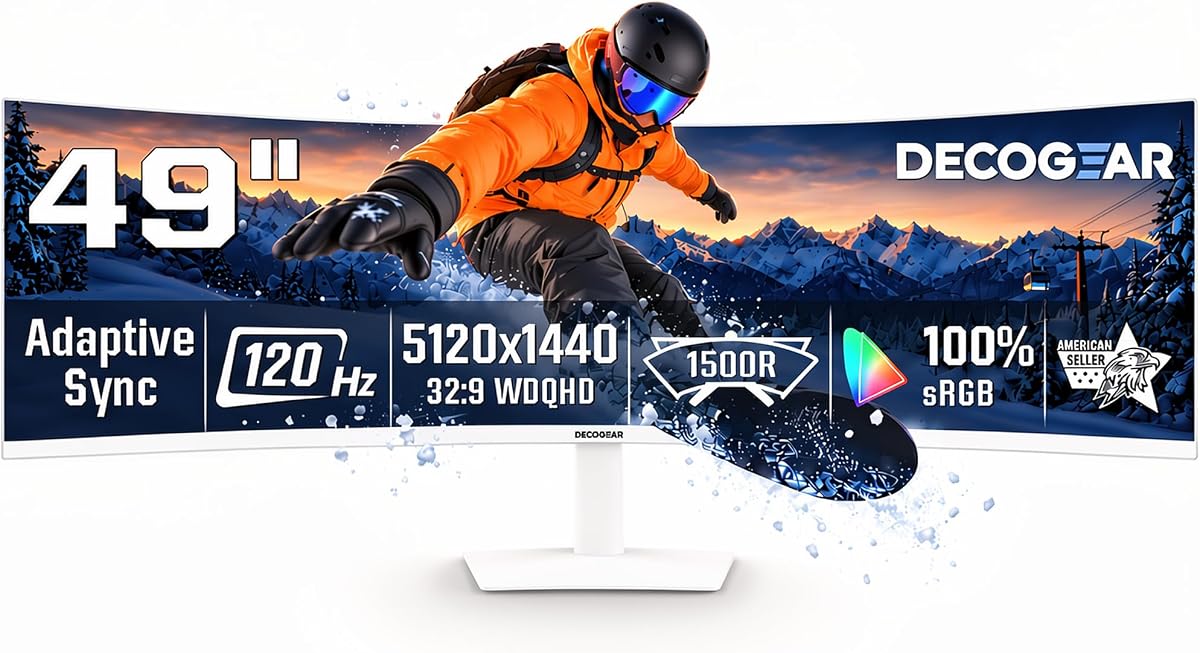
The Deco Gear 49 Super Ultrawide monitor bridges the gap between gaming and productivity. USB-C KVM switching allows you to control multiple devices easily.
We may earn a commission when you buy through this link, at no additional cost to you.
Its 120Hz refresh rate provides enough speed for casual racing, while built-in speakers reduce cable clutter. PIP/PBP modes let you view guides alongside gameplay.
For serious racers, the refresh rate may be a limitation. However, for users who need a multi-purpose display, it offers versatility.
This monitor is best for hybrid setups. It handles both gaming and office work with equal competence.
KVM allows one keyboard and mouse to control multiple computers effortlessly.
Integrated speakers remove the need for external audio devices in compact setups.
We may earn a commission when you buy through this link, at no additional cost to you.
The ASUS ROG XG49VQ remains a respected choice for those seeking reliability. Its DFHD resolution is lower than dual QHD but still offers wide coverage.
We may earn a commission when you buy through this link, at no additional cost to you.
FreeSync 2 HDR ensures smooth motion without tearing. The 1800R curve is less aggressive, reducing eye strain during long sessions.
While resolution may lack detail for distant objects, the monitor delivers solid overall performance. It is a trusted option from a major gaming brand.
This monitor is suitable for those who prefer established brands. It provides consistent results across many titles.
ASUS builds monitors with robust support and long-term stability.
1800R curve allows for comfortable viewing angles over long durations.
We may earn a commission when you buy through this link, at no additional cost to you.
The Z-Edge 5K 49 Inch Curved Monitor offers a rare combination of high refresh rate and affordable pricing. Its 240Hz capability rivals premium models without the cost.
We may earn a commission when you buy through this link, at no additional cost to you.
Resolution is sharp, and USB-C supports one-cable video transmission. Built-in speakers add convenience for a cleaner desk.
While brand support may be less extensive than major players, performance specs are competitive. It appeals to those who value raw numbers.
This monitor is ideal for users prioritizing refresh rate and resolution. It delivers high-end specs at a mid-range price.
240Hz refresh rate ensures fluid visuals typically found only on premium displays.
5120×1440 resolution keeps track details crisp during high-speed gameplay.
We may earn a commission when you buy through this link, at no additional cost to you.
The Samsung 49 G9 G93SC brings OLED technology to ultrawide gaming with exceptional color accuracy. Its QD-OLED panel delivers vibrant colors that enhance racing environments.
We may earn a commission when you buy through this link, at no additional cost to you.
With 240Hz and HDMI 2.1 support, it handles next-gen gaming and high-refresh racing smoothly. Auto Connect ensures rapid switching between devices.
Like all OLEDs, caution is needed with static HUDs to prevent burn-in. Proper settings management extends panel life effectively.
This monitor is perfect for users who want premium OLED visuals. It offers stunning fidelity for track details.
QD-OLED panel provides superior color saturation and accuracy for immersive visuals.
Supports next-gen consoles and high-bandwidth inputs easily.
We may earn a commission when you buy through this link, at no additional cost to you.
Selecting the right monitor for sim racing involves balancing technical specs with your specific rig setup. The factors below will help you navigate the options.
Resolution determines how sharp track details appear. DQHD (5120×1440) is the standard for 49-inch screens, offering clear text and road textures.
Higher resolution helps with judging braking points accurately, especially when zoomed into virtual cockpits.
A higher refresh rate like 144Hz or 240Hz reduces motion blur. This is critical when cars pass rapidly in side mirrors or during high-speed turns.
Look for refresh rates of at least 144Hz to ensure fluid visuals during intense racing sequences.
Curvature impacts how the screen wraps around your field of view. 1000R is very immersive but requires a large desk, while 1500R or 1800R is more flexible.
Choose a curvature that matches your desk depth to avoid eye strain from constant head movement.
VA panels offer high contrast for dark tracks, while OLED panels provide perfect blacks and faster response times. OLED is premium but requires burn-in care.
VA is more budget-friendly and suitable for most racers who want deep blacks without the complexity of OLED maintenance.
Ensure your monitor supports DisplayPort 1.4 or HDMI 2.1 to utilize full refresh rates and resolutions. USB-C can simplify laptop connections and power delivery.
Multiple ports allow for easier multitasking, letting you keep chat apps or telemetry visible alongside the game.
Fast response times like 1ms reduce ghosting. This ensures that moving objects stay sharp during rapid direction changes.
Look for response times of 1ms or lower to maintain a competitive edge in precision driving.
Adjustable stands allow you to set the screen at eye level. VESA compatibility is crucial for mounting on racing rigs.
Proper height adjustment reduces neck strain during long practice sessions and races.
HDR support improves brightness range, making sunlit tracks more realistic. Color gamut ensures trackside scenery looks true to life.
Look for models with at least 99% sRGB coverage for accurate color reproduction across all environments.
Position the monitor at eye level using the stand adjustments to prevent neck strain. Ensure the curvature aligns with your seating position for the best view.
Keep the screen clean with a microfiber cloth to maintain image clarity. Avoid touching the panel with sharp objects to prevent permanent damage.
Adjust settings like brightness and contrast in your graphics driver for optimal performance. Regularly update drivers to ensure compatibility with new racing titles.
DQHD (5120×1440) is the standard and recommended resolution for 49-inch ultrawide monitors. It provides sharp enough detail for track signs and cars without excessive strain on your graphics card.
While 144Hz is sufficient for most users, 240Hz provides smoother motion which can help in competitive scenarios. It is not strictly necessary but enhances the visual fluidity significantly.
A 49-inch monitor typically requires about 49 inches of width on your desk. Ensure your desk is deep enough to accommodate the curvature so it does not feel too close to your face.
OLED monitors are prone to burn-in if static elements like HUDs are left on for extended periods. Use screen savers or reduce brightness when idle to prevent permanent damage.
DisplayPort is generally more robust for high refresh rates and resolutions. USB-C is convenient for laptops and single-cable setups but may have power or bandwidth limitations.
1000R curvature offers maximum immersion but requires a large desk. 1500R or 1800R is more versatile and comfortable for most setups without requiring specialized mounting.
Yes, 49-inch monitors are excellent for multitasking. You can split the screen for work and gaming or use picture-in-picture features to view telemetry while playing.
Most 49-inch monitors support VESA 100×100 mounting. Check the specific product data to confirm compatibility with your racing rig's arm mount.
The top picks offer a range of options from budget-friendly to premium OLED performance. Each model brings unique strengths for sim racing enthusiasts.
Prioritize resolution and refresh rate for competitive play. If budget allows, OLED panels provide unmatched visual fidelity.
Always check current prices and availability before purchasing to ensure you get the best deal.