
VIVO Pneumatic Arm Quad Ultrawide Monitor Extra Tall Desk Mount
4.5Editor score
Supports ultra-wide screens up to 49 inches
Pneumatic height adjustment for effortless movement
Heavy-duty cast aluminum construction for durability
Creating a professional workstation often requires multiple screens to boost productivity and streamline workflows. A reliable 4 Monitor Mount with Adjustable Arms is essential for organizing these displays efficiently while maintaining an ergonomic posture for long hours of work or play.
We evaluated ten top-rated quad monitor mounts based on construction quality, range of motion, weight capacity, and ease of installation. Our analysis focuses on real-world usability to help you find the ideal solution for your specific desk setup and screen configuration needs.
Each pick highlights unique features and trade-offs to guide your decision-making process effectively. Remember that product availability and pricing can fluctuate, so always verify current details before finalizing your purchase for your ultimate multi-screen workspace.
4.5Editor score

4.5Editor score

4.5Editor score
As an Amazon Associate we earn from qualifying purchases.
The following table provides a side-by-side comparison of all ten selected models. Examine the key specifications to identify which mount aligns best with your screen sizes, weight requirements, and desk configuration preferences.

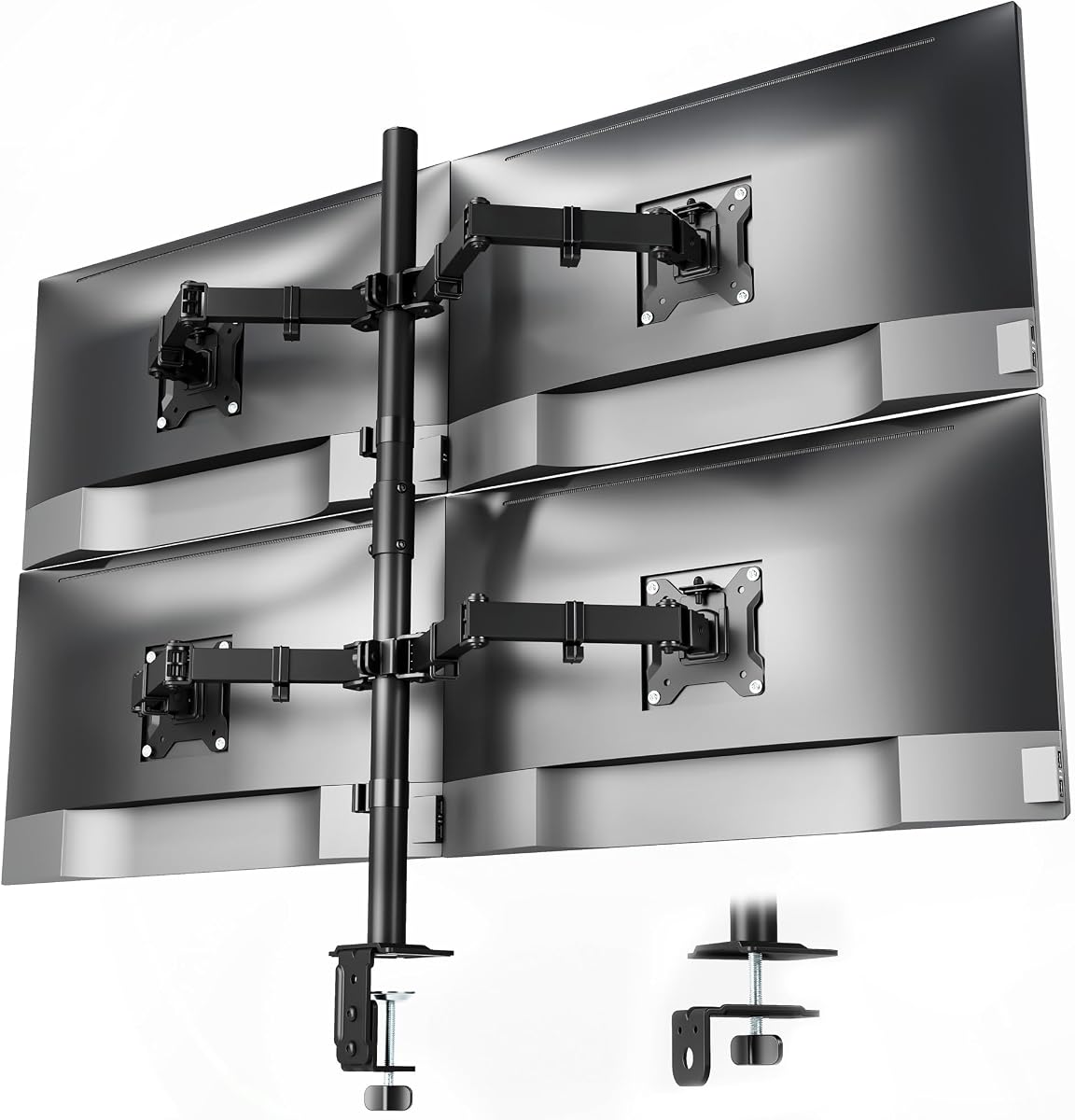


The WALI Stacked 4 Monitor Mount stands out as a top choice for users seeking a reliable and affordable solution for multi-screen setups. With a strong 4.5 rating from verified buyers, it delivers consistent performance for workstations requiring up to four displays within a 13 to 27 inch range.
We may earn a commission when you buy through this link, at no additional cost to you.
Its construction features a robust steel frame that maintains stability even when adjusting heavy screens. The mount supports up to 22 lbs per arm, ensuring your monitors stay secure. Additionally, the integrated cable management system keeps wires neatly tucked in, transforming your workspace into a professional and clutter-free environment.
While the height extension reaches a practical 31.65 inches, users needing maximum reach might find the arm length limiting. However, the tilt and swivel adjustments allow for optimal viewing angles. These trade-offs are acceptable for most standard desk layouts.
This mount is ideal for professionals and gamers who need to consolidate four screens efficiently. It reduces neck strain by elevating monitors to eye level. We recommend the WALI Stacked 4 Monitor Mount for those prioritizing stability and organization on a budget.
Elevating monitors to eye level reduces neck and back strain during long work sessions.
Integrated cable clips keep wires hidden and organized along the arms for a tidy look.
We may earn a commission when you buy through this link, at no additional cost to you.
The VIVO Pneumatic Arm Quad Ultrawide is designed for professionals managing massive screens. It holds up to 49 inch displays and supports 44 lbs per arm, making it a premium choice. The 4.5 rating reflects its ability to handle extreme weights without sagging.
We may earn a commission when you buy through this link, at no additional cost to you.
Its standout feature is the pneumatic height adjustment, allowing smooth transitions between sitting and standing positions with minimal effort. The heavy-duty cast aluminum construction ensures durability and scratch resistance. Detachable VESA plates simplify installation for complex screen arrangements.
The high cost reflects the specialized engineering required for such heavy loads. While it requires a substantial desk clamp, the stability is unmatched. These factors are justified for users investing in high-end multi-monitor environments.
This mount is perfect for financial traders or video editors needing large screens. It transforms your desk into a command center. We recommend the VIVO Pneumatic Arm Quad Ultrawide for those requiring maximum strength and premium materials.
Handles screens up to 49 inches, perfect for immersive data visualization tasks.
Pneumatic technology balances screen weight, enabling easy height adjustments with a touch.
We may earn a commission when you buy through this link, at no additional cost to you.
The MOUNTUP Quad Monitor Stand offers exceptional value for budget-conscious buyers needing four screens. With a 4.5 rating, it reliably supports displays up to 32 inches and 17.6 lbs per arm. This makes it a top contender for home offices.
We may earn a commission when you buy through this link, at no additional cost to you.
It features fully adjustable tilt and swivel options to optimize ergonomics. The quick-release VESA plates simplify mounting, reducing assembly time to under 20 minutes. Integrated cable clips keep wires organized, improving the overall look of your workstation.
The weight capacity is lower than premium models, which limits use for very heavy monitors. However, the affordable price makes up for this limitation. For standard screens, this trade-off is minor and acceptable.
This stand is ideal for students and remote workers on a tight budget. It provides necessary stability without breaking the bank. We recommend the MOUNTUP Quad Monitor Stand for those seeking affordability and simplicity.
Quick-release plates allow fast monitor attachment, saving time during installation.
Comes with a 3-year support warranty, ensuring long-term reliability for your setup.
We may earn a commission when you buy through this link, at no additional cost to you.
The PUTORSEN Quad Monitor Mount is unique for its vertical configuration, ideal for traders and multitaskers. It supports a 49 inch ultra-wide on top with 44 lbs capacity. This structure keeps your primary view elevated, offering a professional look.
We may earn a commission when you buy through this link, at no additional cost to you.
Its 3-section arm design prevents sagging at joints by distributing weight effectively. The gas spring allows smooth vertical movement. All brackets rotate 360 degrees, enabling flexible screen orientations. This versatility supports complex workflow needs.
Lower arms have a lower capacity, limiting secondary screen choice. Assembly is more complex due to the unique structure. However, these constraints are necessary for stability. They are acceptable for those prioritizing central screen height.
This mount suits professional trading setups and data monitoring. It maximizes desk space while elevating critical displays. We recommend the PUTORSEN Quad Monitor Mount for specialized professional environments.
Designed specifically for trading and monitoring, placing main screen at top for focus.
Advanced arm structure prevents sagging, ensuring steady screens even at full extension.
We may earn a commission when you buy through this link, at no additional cost to you.
The monTEK Quad Monitor Stand is built for stability and high capacity. It supports 22 lbs per arm, allowing heavy monitors without sagging. The 4.5 rating highlights its reliability for four large screens in various environments.
We may earn a commission when you buy through this link, at no additional cost to you.
Its advanced joint design ensures displays stay level. Tilt ranges from -45 to +45 degrees, offering extensive viewing angles. Integrated cable organizers keep wires tidy. The modern design fits any home or office aesthetic.
Without gas springs, adjusting height requires more physical effort. However, this ensures robust support for heavier weights. The lack of springs is a fair trade for stability. It works well for fixed-height setups.
This stand is ideal for users who prioritize structural integrity over speed. It supports diverse screen weights efficiently. We recommend the monTEK Quad Monitor Stand for those needing robust and reliable support.
High weight capacity ensures stability even with heavy, larger monitors in the setup.
Cable organizers keep wires hidden, maintaining a clean and professional workspace look.
We may earn a commission when you buy through this link, at no additional cost to you.
The MOUNT PRO 4 Monitor Mount excels in providing ergonomic height adjustments. It features an extra tall pole reaching 31.7 inches, accommodating standing desks easily. The 4.5 rating reflects its success in reducing posture issues.
We may earn a commission when you buy through this link, at no additional cost to you.
Its fully adjustable nature allows flexible positioning for comfort. It supports up to 17.6 lbs per arm, suitable for standard monitors. Cable clips keep wires organized. The installation process is straightforward with labeled parts.
The weight capacity limits heavier screens, but standard monitors fit well. This trade-off is acceptable for ergonomic focus. Most users find the height versatility worth the lower load limit.
This mount is ideal for users concerned about posture. It adapts to sitting or standing positions efficiently. We recommend the MOUNT PRO 4 Monitor Mount for those prioritizing ergonomic health.
Extra tall pole allows screens to be positioned for standing desks comfortably.
Labeled parts make setup easy, even for those new to monitor mounting.
We may earn a commission when you buy through this link, at no additional cost to you.
The VIVO Quad Pneumatic Monitor Mount provides smooth movement with dual pneumatic arms. It supports 17.6 lbs per arm, offering a good balance of weight and ease. The 4.4 rating confirms its reliability for multi-monitor needs.
We may earn a commission when you buy through this link, at no additional cost to you.
Its dual springs allow transitions between sitting and standing with minimal effort. The setup is drill-free, securing firmly with a C-clamp. Step-by-step instructions simplify the process. It ensures screens remain stable during adjustment.
Adjusting tension for heavier monitors can require some trial and error. This may be frustrating for beginners. However, the resulting flexibility is valuable for dynamic workspaces.
This mount suits users wanting effortless height changes. It keeps the desk clean without drilling. We recommend the VIVO Quad Pneumatic Monitor Mount for those seeking smooth adjustability.
Dual pneumatic arms counterbalance monitors, making height adjustments effortless throughout the day.
Drill-free mounting means your desk remains intact while securing the stand firmly.
We may earn a commission when you buy through this link, at no additional cost to you.
The Pholiten Quad Monitor Arm focuses on smooth positioning with gas spring technology. It supports up to 10kg per arm, ensuring heavy monitors stay level. The 4.4 rating highlights its effectiveness in maintaining posture.
We may earn a commission when you buy through this link, at no additional cost to you.
Its gas springs enable effortless movement with minimal effort. This enhances ergonomic comfort during long sessions. VESA plates attach easily. The design minimizes desk footprint effectively.
Instructions may lack detail for some setups. Adjusting clamp fit might take time. However, once installed, the performance is consistent. These issues are minor compared to the benefits.
This arm is ideal for users valuing ease of use. It reduces strain through fluid motion. We recommend the Pholiten Quad Monitor Arm for smooth, effortless adjustment.
Gas spring arms ensure smooth transitions, protecting monitor positioning from jitter.
Sandwiched installation keeps the desktop open for other peripherals and notes.
We may earn a commission when you buy through this link, at no additional cost to you.
The WALI Quad Monitor Desk Mount is the highest-rated option with 4.6 stars. It supports 22 lbs per arm, accommodating larger screens reliably. Its popularity is due to consistent performance and broad compatibility.
We may earn a commission when you buy through this link, at no additional cost to you.
It offers extensive adjustability, tilting 90 degrees and swiveling freely. The height pole reaches 31.5 inches for ergonomic viewing. Cable management keeps wires out of sight. It creates a tidy and organized workstation.
Assembly requires patience and precise alignment. This can be time-consuming. However, the sturdy build makes the effort worthwhile. These issues are acceptable for the quality provided.
This mount is ideal for those seeking proven reliability. It supports various monitor types well. We recommend the WALI Quad Monitor Desk Mount for trusted quality.
Top customer ratings confirm that this model is dependable for long-term daily use.
Double efficiency design maximizes space, keeping your desk organized for productivity.
We may earn a commission when you buy through this link, at no additional cost to you.
The VIVO Quad Monitor 13 to 32 inch offers a unique layout with a 3 plus 1 articulating design. It supports 22 lbs per arm, ensuring stability. The 4.3 rating reflects its value for general office use.
We may earn a commission when you buy through this link, at no additional cost to you.
Its longer upper bracket allows downward angling for the top monitor. This helps align with lower screens effectively. Drill-free mounting protects desk surfaces. Included cable clips keep wires organized.
The tilt range is limited to plus or minus 15 degrees. This restricts extreme viewing angles. However, for standard desk heights, this is adequate. It is a minor trade-off for stability.
This mount is ideal for standard office setups needing alignment. It supports varied screen sizes well. We recommend the VIVO Quad Monitor 13 to 32 inch for straightforward office use.
Extended upper bracket allows top screen to angle down, improving view consistency.
Padding and drill-free clamp protect your desk from scratches during installation.
We may earn a commission when you buy through this link, at no additional cost to you.
Selecting the right 4 Monitor Mount with Adjustable Arms requires evaluating several technical factors. This guide helps you prioritize key features to match your specific hardware and workspace needs.
Ensure the mount supports your monitor's dimensions and weight. Most mounts handle up to 32 inches and 17.6 to 22 lbs per arm. Verify VESA patterns match your screens.
Check maximum weight ratings carefully to prevent sagging.
Most mounts offer C-clamp or grommet installation. Ensure your desk thickness falls within the specified range. Some options require thicker desks for stability.
Select the method that best fits your desk structure.
Look for full tilt, swivel, and rotation capabilities. Tilt usually ranges from 45 to 90 degrees. Swivel and 360-degree rotation are essential for multi-monitor setups.
Prioritize models with wide angles for ergonomic positioning.
Consider gas spring or mechanical springs. Gas springs offer smoother movement but cost more. Mechanical springs are stiffer but often more affordable and stable.
Choose based on your need for frequent height changes.
Steel and aluminum constructions provide durability. Thicker materials prevent shaking. Check for reinforced joints that hold screens steady.
Invest in robust materials for long-term use.
Integrated clips keep wires organized. This prevents tangling and improves safety. Look for routes that hide cables neatly.
Ensure the system supports your cable count and length.
Complexity varies between models. Some offer quick-release VESA plates for faster setup. Others require more steps but offer better stability.
Check instructions for time estimates before purchasing.
Optimal height reduces neck strain. Ensure the pole allows reaching eye level. Consider dual monitors for sitting and standing work.
Prioritize features that support good posture.
Start by verifying desk thickness and clamp compatibility. Use the C-clamp for solid edges or grommet for drilled holes. Ensure surfaces are clean and stable before attaching the base.
Attach monitors using VESA plates, securing all screws tightly. Adjust the springs or tension to match monitor weight. Test stability by gently pushing the arms to ensure they hold position.
Regularly tighten screws to prevent loosening over time. Clean the arms with a soft cloth to remove dust. Avoid placing heavy objects on the extended arms to maintain structural integrity.
Most mounts support curved screens within the size limits. Always verify the screen depth and weight. Curved screens are generally compatible if the VESA pattern matches standard requirements.
Use the tension screw on the joint. Turn clockwise to increase strength or counterclockwise to decrease it. Adjust until the monitor stays at the desired height without drifting.
Yes, as long as the monitor fits the size and weight limits. Ensure the mount supports the VESA pattern. Gaming monitors usually fall within standard capacity ranges.
Most supports handle desks up to 3.62 inches thick. Verify the specific model's specifications before installation. If your desk is thicker, use a grommet mount instead.
Check weight capacity and adjust arm tension. Ensure all screws are tightened securely. Heavier mounts or higher-quality materials help prevent sagging over time.
Yes, many models feature tall poles for standing heights. Ensure the height range matches your standing desk setup. Check that cables can move freely as the desk rises.
Most kits include all necessary tools. You may need a screwdriver or wrench for some adjustments. Always follow the provided instructions for a smooth setup.
Use the built-in cable clips to route wires along the arms. Group cables before routing to reduce clutter. Use longer cables to allow flexibility during adjustment.
Our top picks include the VIVO Pneumatic Arm for premium needs, the WALI Stacked for balanced value, and the MOUNTUP for budget-conscious buyers. Each offers distinct features to suit different workstation requirements effectively.
Prioritize weight capacity and range of motion for your specific workflow. Ensure the mount supports your desk thickness and screen sizes. Proper selection ensures long-term ergonomic comfort.
Always verify current product details and availability before buying. Prices and stock may change frequently. Choose the model that best fits your professional needs today.