
FLASHFORGE AD5X
4.4Editor score
IFS multi-color technology
600mm/s high speed
300°C nozzle temperature
This guide compares the top 10 3D printers for figurines and models to help you choose the best machine for detailed miniatures and hobby projects.
Finding the right 3D printer for figurines and models requires balancing speed, precision, and ease of use. Whether you are crafting miniatures or custom props, the right machine ensures high-quality results every time.
We have evaluated ten leading printers based on performance features and user feedback. Each product was compared to identify strengths in detail resolution, material compatibility, and overall reliability for hobbyists and professionals.
Every pick highlights key capabilities and ideal use cases to streamline your decision. Note that pricing and availability fluctuate regularly, so verify current details before purchasing to ensure you get the best value today.
4.4Editor score

4.7Editor score

4.5Editor score
This side-by-side comparison highlights the key specifications and unique features of each printer to help you decide which one fits your specific needs for detailed model printing.






The Bambu Lab A1 stands out as a top contender for anyone seeking high-quality results in model printing. With a rating of 4.7, it is praised for its speed and precision that ensure intricate details are captured flawlessly every time.
We may earn a commission when you buy through this link, at no additional cost to you.
Its high-speed precision delivers blazing-fast prints without sacrificing accuracy thanks to an acceleration of 10000 mm/s². Active flow rate compensation ensures smooth surfaces while the full-auto calibration system eliminates manual setup hassles for consistent success.
While the AMS lite for multi-color printing must be purchased separately, this flexibility allows you to tailor your setup. The quiet operation and quick-swap nozzle make maintenance easy, though beginners may need to learn specific filament requirements initially.
Ideal for hobbyists and professionals alike, this printer balances performance with ease of use. If you value speed and detail in your figurines, the A1 is a highly recommended choice that delivers reliable results.
The 10000 mm/s² acceleration ensures rapid printing while maintaining the precision needed for detailed model features.
Full-auto calibration handles Z-offset and bed-leveling automatically, reducing the risk of failed prints.
We may earn a commission when you buy through this link, at no additional cost to you.
The P2S Combo combines a robust printer with advanced multi-color capabilities, making it a strong choice for complex designs. Its 4.7 rating reflects reliability in speed and multi-material handling, which is essential for detailed model work.
We may earn a commission when you buy through this link, at no additional cost to you.
With speeds up to 600 mm/s and Active Flowrate Compensation, every layer remains sharp and smooth. The included AMS 2 Pro enables seamless multi-color printing with built-in drying, while adaptive airflow ensures crisp overhangs and engineering-grade material support.
Setup is quick at just 15 minutes, and smart airflow adjusts for different filaments. However, the higher cost and need for the combo version to unlock multi-color features may be considerations for budget-conscious buyers.
This machine is perfect for those who want professional-grade output without manual calibration hassles. It balances high performance with smart features that streamline the workflow from design to finished print effectively.
AMS 2 Pro supports built-in filament drying and seamless multi-material switching for vibrant detailed prints.
The Adaptive Airflow System balances cooling and heat retention for better print quality across materials.
We may earn a commission when you buy through this link, at no additional cost to you.
The Creator 5 Pro is built for serious work with four independent toolheads and industrial-level features. Its 4.0 rating highlights its robustness, offering near-zero waste and high stability that suits demanding model production needs.
We may earn a commission when you buy through this link, at no additional cost to you.
Independent toolheads switch in just 7 seconds without flushing filament, slashing operational overhead. The fully enclosed active heated chamber prevents warping in advanced materials like ABS, while CoreXY motion delivers fast speeds without sacrificing accuracy.
Dual HEPA and carbon filters ensure safety and odorless printing, and the built-in camera allows remote monitoring. However, its industrial design and cost might be overkill for casual hobbyists seeking basic functionality.
Ideal for professionals or advanced users prioritizing stability and waste reduction, this printer excels in large-scale or complex print environments. It provides the control and safety features necessary for robust model creation.
FlashSwap changer switches nozzles without flushing filament, reducing material waste significantly.
Dual filtration and HD camera ensure a safe, odorless environment with real-time progress tracking.
We may earn a commission when you buy through this link, at no additional cost to you.
The P1S delivers fast performance in a fully enclosed design, making it a reliable option for detailed prints. With a 4.5 rating, users appreciate its speed and ease of use for both hobbyists and professionals.
We may earn a commission when you buy through this link, at no additional cost to you.
Print speeds reach up to 500 mm/s with true high-speed acceleration, and automatic bed leveling ensures high-quality starts. The enclosed body improves performance for advanced filaments, while setup takes just 15 minutes for immediate use.
While AMS connectivity allows for up to 16 colors, it is an extra purchase. The balance of speed and enclosure is great for ABS but may limit advanced engineering compared to higher-end models.
This printer is excellent for those wanting quick results with minimal setup complexity. Its reliable performance and user-friendly design make it a strong contender for standard and multi-color model printing needs.
Full enclosure improves performance for advanced filaments and maintains temperature stability during prints.
Prints ready in 15 minutes with speeds up to 500 mm/s for efficient project turnaround.
We may earn a commission when you buy through this link, at no additional cost to you.
The AD5X offers advanced multi-color features at a budget-friendly price point. With a 4.4 rating, it provides impressive speed and auto leveling that simplify detailed model creation without expensive overhead costs.
We may earn a commission when you buy through this link, at no additional cost to you.
IFS technology allows four colors simultaneously, and speeds up to 600 mm/s accelerate prototyping. The 300°C nozzle and auto leveling guarantee consistent quality, while the 220mm build volume suits various project scales effectively.
While the nozzle max and moderate build size limit some large engineering projects, the value is unmatched for hobbyists. It balances performance features like high heat capacity with user-friendly automation features.
This printer is ideal for those seeking multi-color results on a budget. Its reliable auto leveling and fast speed make it a great choice for artistic and functional small to medium-sized model projects.
Independent Filament System enables four colors at once for vibrant and intricate model designs.
600 mm/s speed delivers rapid results without compromising precision for hobby and professional use.
We may earn a commission when you buy through this link, at no additional cost to you.
The Snapmaker U1 redefines multi-material with a robust SnapSwap system. Its 4.5 rating reflects high reliability, making it perfect for creators needing flexible material mixing for complex and articulated model designs.
We may earn a commission when you buy through this link, at no additional cost to you.
True multi-material printing allows mixing rigid and flexible materials or supports without manual swaps. The 5-second tool changer reduces waste significantly, and the CoreXY system maintains speed stability across the large 270mm build volume.
Advanced calibration and Orca slicer support ensure smooth workflows, but the price reflects its premium nature. While powerful, casual users may find the tool system complex compared to simpler filament changers.
This machine is ideal for professionals requiring design freedom and minimal waste. Its smart features and speed make it a top choice for end-use parts and high-quality detailed prototype work.
SnapSwap system changes toolheads in just 5 seconds, drastically reducing print interruption time.
True multi-material support enables mixing materials like TPU and PVA in one print for complex models.
We may earn a commission when you buy through this link, at no additional cost to you.
The SPARKX i7 Combo introduces AI features that simplify design for beginners. With a 4.0 rating, its quick setup and AI photo capabilities make it an appealing option for custom gifts and quick prototyping tasks.
We may earn a commission when you buy through this link, at no additional cost to you.
CubeMe AI allows uploading a portrait to generate a 3D model instantly, bypassing complex software. Multicolor printing wastes less filament than traditional systems, and the quiet night mode ensures peaceful operation even overnight.
AI detection catches failures like spaghetti in real-time, and the 260mm build fits large items. However, AI-generated models often require manual cleanup, and the build size is standard rather than large.
This printer suits those wanting easy entry into custom modeling. Its smart detection and fast setup provide a streamlined experience for hobbyists looking for unique personalized and detailed model creations.
Upload a photo to generate a 3D model instantly without complex modeling software skills.
Built-in AI camera detects print failures and alerts you to maximize success rates on every print.
We may earn a commission when you buy through this link, at no additional cost to you.
The Adventurer 5M Pro delivers high-speed performance with a focus on material versatility. Its 4.0 rating highlights reliability in handling advanced materials and maintaining speed, which is essential for functional model parts.
We may earn a commission when you buy through this link, at no additional cost to you.
CoreXY structure supports speeds up to 600 mm/s, and the high-temp extruder reaches 280°C for engineering filaments. Quick-swap nozzles allow 3-second changes, while dual filtration keeps the environment clean and odorless.
Low noise under 50dB makes it suitable for shared spaces, but users must handle hot parts carefully. The balance of speed and temperature capability is strong, though manual nozzle changes require attention.
Ideal for users needing engineering-grade prints quickly, this printer balances speed with material options. Its quiet operation and smart camera support make it a practical choice for professional and home environments.
All-metal CoreXY frame supports 600 mm/s speeds with vibration compensation for smooth finishes.
280°C nozzle allows reliable printing of engineering materials like ABS and ASA for durable parts.
We may earn a commission when you buy through this link, at no additional cost to you.
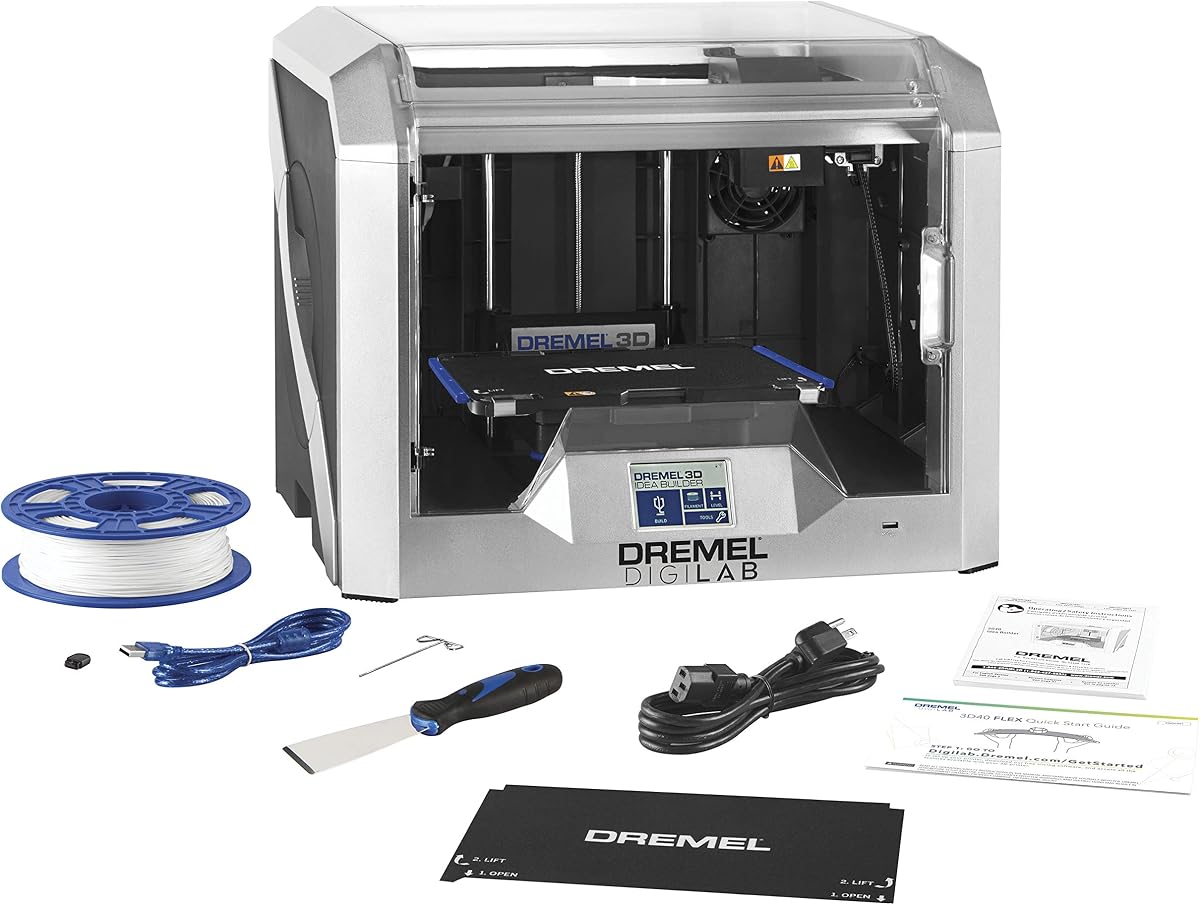
The Dremel 3D40 Flex is designed for ease and reliability. Its 4.4 rating confirms strong performance for novices, offering a flexible plate and automated leveling that make starting projects simple and successful.
We may earn a commission when you buy through this link, at no additional cost to you.
The flexible magnetic build plate ensures models are removed easily, and the 9-point leveling sensor handles bed variations automatically. With a direct drive extruder, it resists clogs and provides smooth prints for everyday usage needs.
While speed is lower than high-end options, the setup is quick and supported by excellent customer service. This reliability suits classrooms or home labs where consistency matters more than high-speed output for detailed work.
This machine is perfect for those prioritizing reliability and simple operation. Its enclosed housing and user-friendly features ensure a hassle-free experience for anyone entering the world of 3D printing.
Magnetic snap-on mechanism and ergonomic handles make model removal fast and safe.
9-point leveling sensor detects bed variations and adjusts automatically for consistent print quality.
We may earn a commission when you buy through this link, at no additional cost to you.
The A1 Combo combines the proven A1 unit with full multi-color support via the AMS Lite. Its 4.6 rating highlights the seamless experience of printing vibrant models without manual color changes or extra setups.
We may earn a commission when you buy through this link, at no additional cost to you.
Active flow compensation ensures accurate extrusion by measuring nozzle pressure, while calibration happens on every job. The open frame design supports quick changes, and motor noise cancellation keeps the environment quiet.
Unlike enclosed options, it may not suit high-temp materials as well, but for standard PLA models it is excellent. The combination of speed and multi-color capability makes it a top choice for creative projects.
This machine is perfect for those wanting multi-color results out of the box. Its automation and flow control provide precision for intricate models, making it a strong choice for enthusiasts.
Includes AMS Lite to unlock multi-color 3D printing accessible and reliable for everyone.
Active flow compensation adjusts flow rate based on nozzle pressure for accurate extrusion.
We may earn a commission when you buy through this link, at no additional cost to you.
Selecting the right machine requires evaluating key features that impact detail and reliability.
High-speed printers like those with CoreXY motion systems offer rapid output but must maintain precision for intricate models. Look for acceleration rates and resolution to ensure speed does not compromise surface finish.
Prioritize machines with vibration compensation if you need fast production without sacrificing detail.
Multi-color printing enhances model aesthetics. Options like AMS or IFS systems enable multiple colors without manual swaps. Consider if the system includes the changer or if it is an add-on.
Choose a combo version if you need immediate multi-color support for your projects.
Ensure the build area fits your project dimensions. Larger volumes allow for bigger figurines but may cost more. Check if the printer can print tall or wide models efficiently.
Match the size to your typical project needs to avoid unnecessary costs or space issues.
Higher nozzle temperatures allow for advanced materials like ABS or engineering filaments. A range up to 300°C ensures versatility for durable models.
Check the maximum temp if you plan to use materials beyond standard plastics.
Auto leveling and calibration save time and reduce errors. Look for sensors and software that handle setup automatically.
Prioritize fully automatic systems to minimize manual setup time and print failures.
Quiet motors and enclosed chambers are essential for shared spaces. Enclosed units also support temperature-sensitive materials better.
Select enclosed designs if you need consistent temperatures and low noise.
Some printers support standard PLA while others handle engineering-grade polymers. Check the filament list for compatibility with your desired material properties.
Ensure the printer supports the materials you need for strength and finish.
Cloud and mobile control allow remote monitoring and management. Look for open-source slicer support for customization options.
Choose systems with strong app support for easier workflow integration.
Begin by leveling the print bed and setting correct temperatures for your filament to ensure adhesion and detail. Follow the manufacturer guidelines for first-layer settings.
Regularly clean the nozzle and replace worn parts to maintain precision. Use cleaning cycles to prevent clogs during extended printing sessions.
Store filaments in dry environments to avoid moisture issues that degrade print quality. Monitor progress via cameras or apps to catch errors early.
The Bambu Lab A1 is highly recommended for its high-speed precision and auto calibration that capture fine details. It ensures consistent results without needing extensive manual tuning.
Yes, printers with AMS or IFS systems like the P2S Combo allow multi-color printing without manual filament changes. This improves efficiency and color consistency in your projects.
Enclosed printers offer better temperature control for advanced materials and reduce warping. They are ideal if you need to print with durable plastics beyond standard PLA.
Select a build volume that fits your largest typical model. A larger bed allows for more flexibility but may take up more space in your workspace.
Moderate to high speeds with acceleration compensation offer a balance. Aim for machines that maintain precision even at faster rates to save time.
Modern printers require minimal maintenance if you keep nozzles clean and use high-quality filaments. Regular checks and calibration help maintain consistent print quality.
The top picks like the A1 and P2S Combo deliver exceptional speed and multi-color capabilities for detailed projects. Each option offers unique strengths depending on your needs for precision or automation.
Prioritize features like auto calibration, build volume, and multi-color systems to align with your workflow. Choosing the right machine saves time and improves print quality significantly.
Remember to check current prices and availability before purchasing as details may change. Verify compatibility with your intended materials to ensure satisfaction with your new printer.