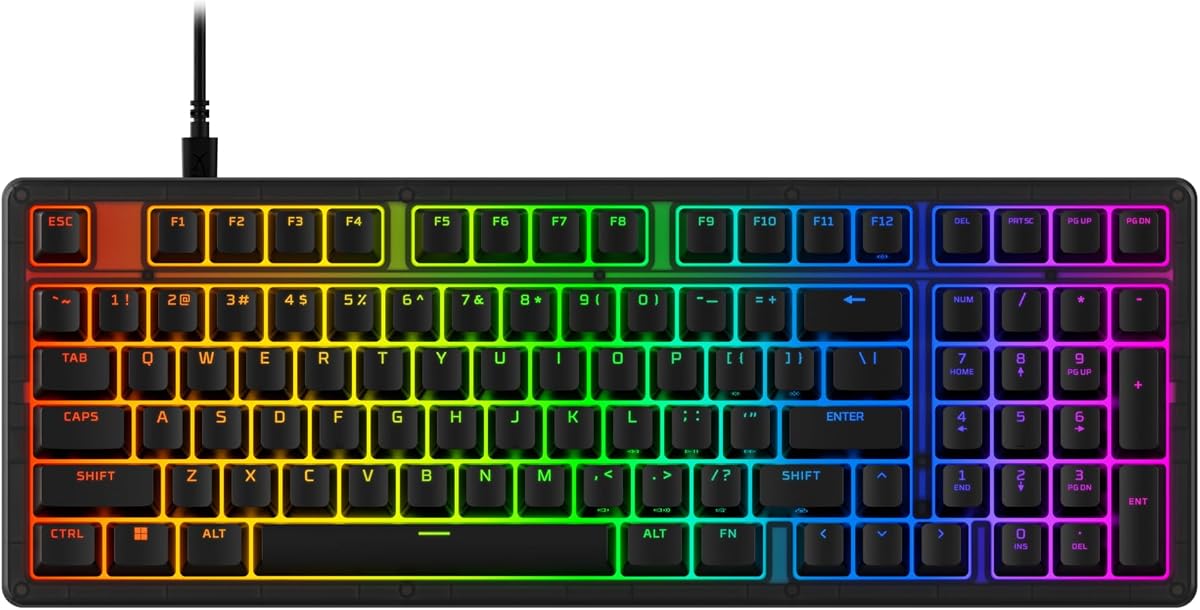
HyperX Eve 1800
4.6Editor score
Membrane switches
10-zone RGB lighting
Dedicated media buttons
Finding the right compact keyboard can transform your workspace by saving desk space while maintaining full functionality. The 1800 form factor offers a unique balance between a full-size layout and a more streamlined design, making it ideal for users who need a numpad but want to keep their mouse closer.
We have analyzed ten top-rated models ranging from industrial-grade mechanical boards to sleek wireless options. Each product was evaluated based on build quality, switch performance, connectivity options, and overall value. Our goal is to help you identify which keyboard aligns best with your specific workflow and budget needs.
Each pick in this list showcases unique strengths whether you prioritize customization, durability, or portability. Prices and availability can change frequently so we recommend verifying current stock before making a purchase decision. Use this guide to navigate the diverse options available in the current market landscape.
4.6Editor score

4.6Editor score

4.4Editor score
As an Amazon Associate we earn from qualifying purchases.
The following table provides a side-by-side comparison of all ten selected keyboards. It highlights key specifications such as switch type, connectivity, and unique features to help you make an informed decision quickly.




The HyperX Origins 2 1800 stands out as the premier choice for enthusiasts who demand both performance and customization. With a robust rating from users it delivers a premium typing experience that rivals much more expensive boards.
We may earn a commission when you buy through this link, at no additional cost to you.
Its standout feature is the hotswap capability allowing you to change switches without soldering. The 8k polling rate ensures near-instantaneous input making it ideal for competitive gaming. The high-profile form factor elevates keys for easier engagement while the O-ring mount enhances sound and comfort.
While it comes at a higher cost the value is evident in its build quality and longevity. The ability to print custom housings adds a unique dimension of personalization. The main trade-off is the reliance on software for full customization which may take time to configure.
This keyboard is perfect for gamers and typists who want a versatile tool. Its compact layout saves space without sacrificing function. We recommend it for anyone seeking a high-end mechanical solution with room to grow.
The swappable housing and open-source design files allow users to print custom housings or modify the board extensively to match their personal aesthetic.
Factory-lubed HyperX Linear Red Switches provide smooth actuation and a subtle sound while the O-ring mount reduces wobble and adds a satisfying bounce.
We may earn a commission when you buy through this link, at no additional cost to you.
The HyperX Eve 1800 offers an excellent entry point into compact keyboards without breaking the bank. It delivers a full-size experience in a condensed layout making it perfect for smaller desks.
We may earn a commission when you buy through this link, at no additional cost to you.
Key strengths include its dedicated media buttons which allow quick volume and profile changes. The 10-zone RGB lighting adds a nice visual touch. Membrane switches provide cushioned feedback that is comfortable for long typing sessions.
While it lacks mechanical switches the tactile feedback is satisfying for its price. The software is functional but basic compared to premium models. This is an acceptable trade-off given the affordability and core functionality it provides.
Ideal for casual gamers and students the Eve 1800 balances cost and utility well. It ensures you have essential controls without cluttering your workspace. We suggest this for those seeking value and simplicity.
The 1800 form factor condenses a full-size layout freeing up extra room for your mouse and accessories while retaining all essential keys.
Dedicated buttons let you manage volume and switch profiles instantly without needing to open software or use complex key combinations.
We may earn a commission when you buy through this link, at no additional cost to you.
The Logitech Alto Keys K98M is a standout for users prioritizing wireless convenience and typing comfort. Its gasket mount design absorbs vibrations for a premium feel that is rare in compact boards.
We may earn a commission when you buy through this link, at no additional cost to you.
Features like hot-swappable switches and a 12-month battery life make it versatile for both work and gaming. The clicky mechanical switches offer precise feedback. The transparent top case adds a modern aesthetic to any desk.
The lack of RGB lighting may be a drawback for some but the white backlight is functional. The price reflects its high-end components and wireless capabilities. This is acceptable for those who value build quality over flashy lights.
Best for professionals and creatives the K98M blends style and function seamlessly. Its compatibility with multiple devices enhances productivity. We recommend it for anyone seeking a top-tier wireless mechanical experience.
The UniCushion gasket mount and concave keys provide a stable and precise typing experience that reduces fatigue during long work sessions.
Bluetooth and Logi Bolt connectivity allow you to connect up to three devices and switch between them instantly for a fluid workflow.
We may earn a commission when you buy through this link, at no additional cost to you.
The Cherry G80-1800 is built for environments where reliability is paramount. Its industrial-grade design ensures it can withstand continuous use in demanding settings like factories or servers.
We may earn a commission when you buy through this link, at no additional cost to you.
Key strengths include the MX Black switches which offer a direct linear feel suitable for rapid input. The inclusion of PS/2 support provides flexibility for older systems. The compact dimensions save significant desk space.
The lack of modern features like RGB or wireless may seem limiting but this keyboard prioritizes function over form. The price reflects its specialized build. For standard office use it might be overkill but for industrial use it is ideal.
Ideal for IT professionals and industrial settings the G80-1800 offers unmatched longevity. We recommend it for users needing a reliable tool that can handle heavy daily workloads without failure.
Gold crosspoint contacts and MX technology ensure over 100 million actuations per key making this keyboard exceptionally durable for continuous use.
The included PS/2 adapter allows use with older Unix computers and systems that do not support standard USB connections.
We may earn a commission when you buy through this link, at no additional cost to you.
This model from Cherry is designed for users who need both modern and legacy connectivity options. It meets strict ISO standards ensuring quality and consistency in every unit produced.
We may earn a commission when you buy through this link, at no additional cost to you.
Its dual USB and PS/2 interface makes it highly versatile for various setups. The mechanical keyswitches provide a solid typing experience. The compact dimensions fit well in tight workspaces.
The price point is higher than consumer keyboards but justified by its certification and build. It lacks some modern conveniences like media keys but delivers on core performance. This is acceptable for professional environments where reliability is key.
Best for enterprise and industrial users this keyboard offers peace of mind. We recommend it for businesses needing a standardized reliable input device across multiple systems.
Meeting ISO 9001 and 14001 standards ensures this keyboard is manufactured with rigorous quality control for consistent performance.
Support for both USB and PS/2 interfaces allows seamless integration into both new and legacy computing environments.
We may earn a commission when you buy through this link, at no additional cost to you.
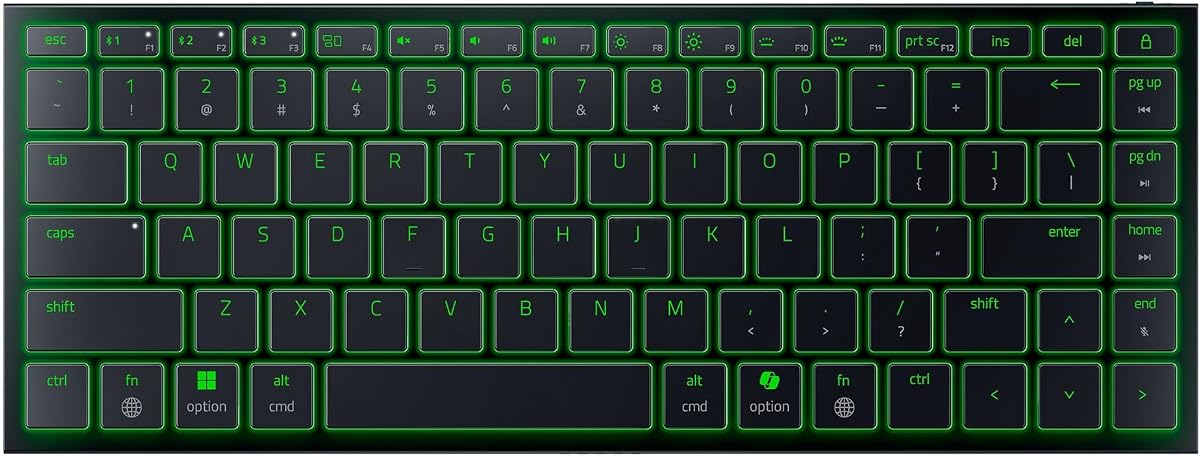
The Razer Joro Wireless is built for gamers on the go who want performance in a pocketable package. Its ultra-low profile design minimizes wrist strain during extended sessions.
We may earn a commission when you buy through this link, at no additional cost to you.
Features like Snap Tap allow for faster directional changes in games which is a unique advantage. The ability to connect three devices seamlessly makes it great for multi-platform users. The RGB lighting adds a nice touch.
Its compact size means some users might find the keys a bit tight for large hands. Bluetooth can introduce slight latency compared to wired but it is minimal for most tasks. These trade-offs are worth it for the portability.
Ideal for travelers and casual gamers this keyboard balances function and form. We recommend it for those who prioritize a light setup without sacrificing essential gaming features.
Weighing just 374 grams and 16.5mm thin it is easy to carry anywhere making it a perfect travel companion.
Razer Synapse 4 enables Snap Tap technology for quicker directional changes giving a competitive edge in fast-paced games.
We may earn a commission when you buy through this link, at no additional cost to you.
This industrial keyboard focuses on ergonomic benefits and long-term reliability. Its 104 key layout is condensed to fit tighter spaces while keeping standard functionality.
We may earn a commission when you buy through this link, at no additional cost to you.
The Gold Crosspoint contacts ensure a reliable connection over millions of keystrokes. The compact width allows better mouse positioning which helps reduce shoulder strain. It is built for continuous professional use.
The design is quite traditional and lacks the aesthetic flair of newer boards. It also lacks media keys which some users might miss. However for durability and ergonomics it remains a strong contender in its class.
Best for office environments focused on efficiency this keyboard delivers consistent performance. We recommend it for teams needing a reliable durable input device that supports healthy typing posture.
The compact width brings the mouse closer to the keyboard reducing arm strain and promoting a healthier posture during long work days.
Designed for outstanding performance it meets high demands with a service life that ensures longevity in demanding environments.
We may earn a commission when you buy through this link, at no additional cost to you.
The Cherry Stream Wired is ideal for users who prefer silence and minimalism. Its TKL layout removes the number pad to save space without losing essential keys.
We may earn a commission when you buy through this link, at no additional cost to you.
SX scissor technology ensures precise pressure points and a quiet typing experience perfect for shared offices. Multimedia keys add utility without clutter. The integrated metal plate gives it stability and durability.
Lacking a numpad means it might not suit heavy data entry tasks. It is also wired which limits flexibility. However for general typing these are acceptable trade-offs given its quiet nature.
Best for writers and office workers this keyboard prioritizes focus. We recommend it for those seeking a reliable quiet tool for daily text creation.
Awarded the GS mark for safety this keyboard is whisper-quiet making it ideal for shared workspaces or late night sessions.
CHERRY SX scissor technology ensures a precise pressure point for a reliable typing feel that is gentle on the wrists.
We may earn a commission when you buy through this link, at no additional cost to you.
The Logitech Pebble Keys 2 is designed for simplicity and portability. Its slim profile makes it easy to slip into a bag for work on the go.
We may earn a commission when you buy through this link, at no additional cost to you.
It supports three devices via Bluetooth allowing you to switch between a tablet laptop and phone instantly. The round key design mimics a laptop feel which many users find familiar. Battery life is exceptional at three years.
The keys are basic scissor switches not mechanical so they are not for heavy gaming. It lacks some advanced customization options. These limitations are fine for casual users who prioritize mobility.
Best for students and casual users this keyboard offers great value. We recommend it for anyone needing a lightweight reliable device for light typing tasks.
Connect up to three devices across different operating systems and switch between them with a single press of the Easy-Switch buttons.
Made with minimum 49% recycled plastic this keyboard allows you to express your vibe while making a sustainable choice.
We may earn a commission when you buy through this link, at no additional cost to you.
The ProtoArc XK04 is a unique solution for mobile users needing physical typing on tablets. It folds into a small form factor making it easy to carry anywhere.
We may earn a commission when you buy through this link, at no additional cost to you.
Designed specifically for phones and tablets it offers a functional layout that supports on-the-go messaging. The PU leather cover protects it and adds a premium look. Bluetooth 5.1 provides a stable connection up to 33ft.
The keycaps are small which might take adjustment for large hands. It also lacks backlighting limiting low-light use. These are acceptable compromises for its extreme portability and protection.
Best for digital nomads and travelers this keyboard delivers convenience. We recommend it for anyone needing a physical typing experience for mobile devices while on the move.
The ultra-compact two-fold design allows it to fit into a pocket or bag easily making it the perfect travel companion.
An integrated PU leather protective cover shields the keyboard from scratches and damage while adding a stylish touch.
We may earn a commission when you buy through this link, at no additional cost to you.
Selecting the right 1800 compact keyboard involves weighing several critical factors to ensure it meets your specific needs and workflow demands.
The type of switch determines the tactile feel and sound of your keyboard. Mechanical switches offer durability and distinct feedback while membrane switches provide a softer and quieter experience.
For typing and gaming mechanical switches are often preferred for their precision. However membrane switches may suffice for casual use and are more budget-friendly.
You must decide between wired and wireless connections based on your setup. Wired keyboards offer zero latency and reliability while wireless models provide flexibility and cable-free setups.
Consider Bluetooth for multi-device users or USB for gaming. Ensure your device supports the necessary connectivity standards before purchasing.
The 1800 form factor sits between TKL and full-size providing a numpad but in a condensed space. Measure your desk to ensure it fits comfortably with your mouse.
A smaller footprint can improve ergonomics by bringing the mouse closer. Verify dimensions before buying to avoid space constraints.
Material and construction affect longevity. Look for boards with metal plates or high-grade plastics to prevent flexing and ensure durability over time.
High-quality builds reduce maintenance needs and ensure consistent performance. Check user reviews for feedback on long-term reliability.
Features like hot-swappable switches or software customization allow you to tailor the keyboard to your preferences. This is vital for enthusiasts or those who need macros.
If you plan to change switches or remap keys often choose a board with robust software support. This future-proofs your investment.
For wireless models battery life is crucial. Rechargeable options are more sustainable while those with replaceable batteries offer convenience for quick swaps.
Check battery life ratings and standby modes to ensure it fits your usage patterns. Long battery life reduces interruptions during work.
Ergonomic design can reduce strain on your wrists and hands. Look for adjustable feet or low-profile designs if you type for long periods.
Comfort should be a priority to prevent fatigue. A keyboard with good ergonomics supports healthier daily work habits.
Prices vary widely based on features and build quality. Determine your maximum budget and compare models to find the best balance of cost and utility.
Investing in a higher-quality board may save money long-term by avoiding replacements. Focus on value rather than just the lowest price.
To maximize the life of your keyboard keep it clean by regularly removing dust with compressed air or a soft brush. Avoid eating or drinking over the keys to prevent spills and debris buildup.
If your keyboard supports wireless connectivity ensure you pair it properly with your device before use. Charge the battery fully before first use and enable power-saving modes to extend battery life.
Customize your settings using the provided software to set up macros or lighting effects that suit your workflow. Store settings locally if possible to avoid losing configurations when updating drivers.
Yes a 1800 compact keyboard is suitable for gaming as it retains essential keys like arrow keys and a numpad while saving space for mouse movement. Many models offer high polling rates and mechanical switches that enhance responsiveness for competitive play.
Hotswap allows you to change mechanical switches without soldering giving you the flexibility to customize the feel of your keyboard over time. It is ideal for enthusiasts who want to experiment with different switch types easily.
Several models in this guide support wireless connectivity via Bluetooth or a USB receiver. This flexibility allows you to connect to multiple devices without cables making it easier to work across different systems.
Use compressed air to blow out debris from between the keys and a soft brush for surface dust. For deeper cleaning remove keycaps gently with a keycap puller and wipe the switches with a dry cloth avoiding liquids.
Compact keyboards can improve ergonomics by allowing the mouse to be positioned closer to the keyboard reducing shoulder strain. However you should also consider a wrist rest to maintain neutral wrist positions during typing.
Mechanical keyboards often last millions of keystrokes per key with some models rated for over 100 million actuations. Proper care such as avoiding spills and keeping dust away can extend their functional lifespan significantly.
We highlighted the HyperX Origins 2 1800 for enthusiasts the HyperX Eve 1800 for budget users and the Logitech Alto Keys K98M for wireless premium needs. These top picks offer strong value and performance across different categories.
When selecting your keyboard prioritize your primary use case whether it is gaming work or portability. Consider switch types connectivity and build quality to ensure the device supports your specific workflow demands.
Prices and availability are subject to change so we recommend checking current listings before finalizing your purchase. Always verify compatibility with your operating system to ensure seamless integration with your setup.