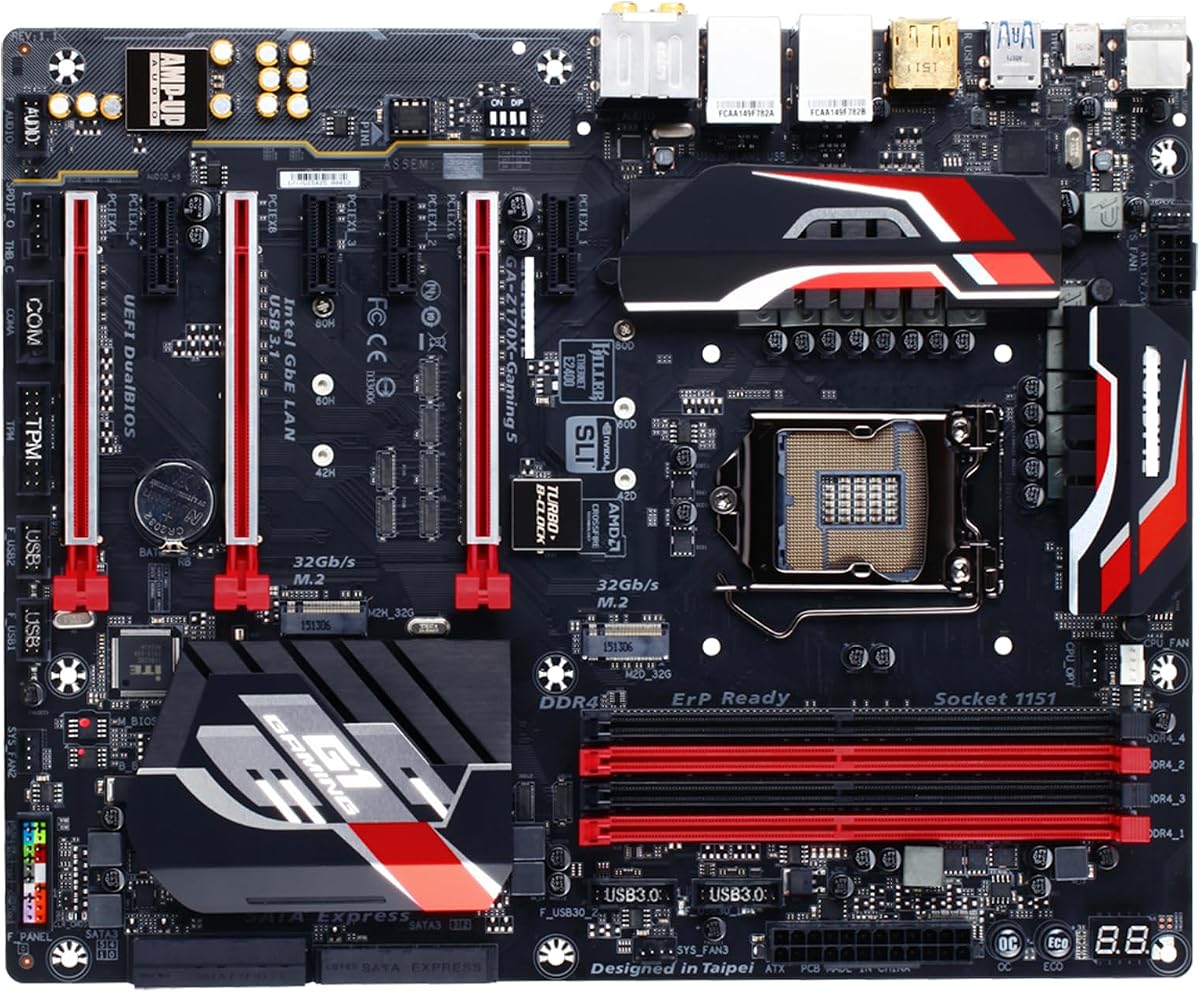
Gigabyte GA-Z170X-Gaming 5
5.0Editor score
Supports 6th and 7th Gen Intel
Dual channel DDR4 memory support
Includes M.2 SATA and PCIe slots
Explore our expert comparison of the top 1151 Z170 Skylake gaming motherboards to find the perfect fit for your high performance PC build today.
Building a high performance gaming PC requires choosing the right foundation for your system. The 1151 Z170 Skylake motherboards offer robust features for enthusiasts seeking stability and speed.
We compared ten top rated models based on connectivity audio quality and expansion capabilities. Each board supports 6th and 7th Gen Intel Core processors for versatile performance.
Every pick highlights unique strengths to help you match hardware to your needs. Please note that availability and pricing may change so verify details before purchasing your new system.
5.0Editor score

4.3Editor score

4.2Editor score
This side by side comparison reviews ten distinct motherboards designed for LGA1151 sockets. We evaluate their expansion slots audio codecs and power delivery to guide your selection.


The Asus ROG Maximus VIII Hero is a top tier gaming motherboard known for its premium features and reliable performance. It scores highly among enthusiasts looking for advanced connectivity and audio capabilities.
We may earn a commission when you buy through this link, at no additional cost to you.
It features Extreme Engine DIGI+ for stable power and SupremeFX 2015 for immersive sound. The onboard USB 3.1 Type A and C ports ensure fast data transfer rates.
While excellent, it commands a higher price and requires careful planning for installation. Users must ensure their case supports the ATX form factor and RGB lighting.
This board is ideal for serious gamers who value audio fidelity and connectivity speed. It stands as a strong recommendation for those building a high end rig.
The SupremeFX 2015 codec delivers clear sound which enhances gaming immersion significantly.
USB 3.1 Type C and A support provides rapid connectivity for modern peripherals.
We may earn a commission when you buy through this link, at no additional cost to you.
This Gigabyte model offers exceptional value for builders seeking a reliable Z170 chipset board. It supports both 6th and 7th generation Intel Core processors effectively.
We may earn a commission when you buy through this link, at no additional cost to you.
It includes dual channel DDR4 support and M.2 slots for fast storage. The industrial packaging does not affect performance but offers less aesthetic appeal for display.
Users should note the need to update the BIOS for 7th Gen support. This is a minor step that ensures compatibility with the latest processors.
This board is perfect for budget conscious gamers who do not want to compromise on performance. It delivers stability and speed for a very competitive price.
Supporting both 6th and 7th Gen Intel CPUs makes this board very versatile.
Multiple M.2 and SATA Express connectors allow for diverse storage configurations.
We may earn a commission when you buy through this link, at no additional cost to you.
The Z170 PRO Gaming balances performance and cost effectively for most users. It features SupremeFX audio and Intel Gigabit Ethernet with LANGuard for stable networking.
We may earn a commission when you buy through this link, at no additional cost to you.
It includes USB 3.1 Type A and C ports alongside M.2 support. This ensures your system can handle modern storage and peripherals without bottlenecks.
Gamer's Guardian features provide durability against wear and tear. While it lacks some premium aesthetics it focuses on functional reliability for daily use.
This board is recommended for users who want a straightforward setup. It delivers solid performance without unnecessary complexity or excessive cost.
Intel Gigabit Ethernet with LANGuard ensures stable connections during intense online gaming.
Highly durable components help maintain system stability over long periods.
We may earn a commission when you buy through this link, at no additional cost to you.
This board is designed to maximize potential for serious gamers with its upgraded power design. It offers durability and performance through enhanced power delivery.
We may earn a commission when you buy through this link, at no additional cost to you.
Advanced cooling ensures stability during marathon gaming sessions. The connectivity options are robust to support modern peripherals and high speed storage.
It features a rugged design meant to withstand continuous use. While specifics vary the focus remains on providing a stable platform for gaming.
Ideal for users seeking reliability in a mid range option. This board helps optimize performance without requiring extensive tuning.
Improved power systems ensure stable performance under heavy load.
Thermal management features help maintain optimal operating temperatures.
We may earn a commission when you buy through this link, at no additional cost to you.
This motherboard stands out with support for 2-Way NVIDIA SLI and 3-Way AMD Crossfire. It is built for users who want to utilize multiple graphics cards.
We may earn a commission when you buy through this link, at no additional cost to you.
It offers a vast array of USB ports including 3.1 and 3.0. This connectivity ensures you can plug in all necessary peripherals without adapters.
The power delivery is robust enough to handle high-end processors. This makes it a solid choice for overclocking and demanding applications.
Best for enthusiasts who need multi-GPU capabilities. It is a premium solution that offers extensive connectivity and performance potential.
Supports 2-Way SLI and 3-Way Crossfire for enhanced graphical performance.
With 8 USB 3.0 and 3.1 ports this board handles many devices easily.
We may earn a commission when you buy through this link, at no additional cost to you.
This board provides a robust platform for 6th Gen Intel Core processors. It features four DDR4 slots and supports Crossfire for graphics flexibility.
We may earn a commission when you buy through this link, at no additional cost to you.
The expansion slots are arranged to accommodate various cards. It includes SATA Express for those who need high-speed storage interfaces.
While some users find the setup complex it offers good value. The build quality is high and it supports multiple expansion options.
Recommended for those who prioritize connectivity and expansion. It is a reliable choice for mid-range gaming builds.
Supports 3-Way AMD Crossfire for scalable graphics performance.
SATA Express connectors allow for faster data transfer than standard SATA.
We may earn a commission when you buy through this link, at no additional cost to you.
This motherboard offers a large memory capacity of up to 64GB. It includes six SATA3 ports which is excellent for multiple drive setups.
We may earn a commission when you buy through this link, at no additional cost to you.
The Realtek ALC1150 codec supports premium Blu-ray audio. This makes it a good choice for media centers or gaming PCs.
It features flexible PCIe slots for various configurations. This allows for balanced expansion options across different hardware setups.
This board is suitable for those needing extensive storage and audio quality. It balances features effectively for a wide range of users.
Six SATA3 ports support multiple drives for large storage arrays.
ALC1150 codec delivers high fidelity sound for movies and games.
We may earn a commission when you buy through this link, at no additional cost to you.
The Z170 Krait Gaming focuses on delivering high performance with strong audio features. It includes Audio Boost 3 for immersive sound experiences.
We may earn a commission when you buy through this link, at no additional cost to you.
It supports multiple graphics cards with Crossfire and SLI readiness. The Steel Armor slots ensure durability for heavy graphics cards.
This board offers a solid range of USB connectivity. It is designed to handle modern peripherals and storage without issues.
Ideal for gamers who prioritize audio quality in their setup. It provides a solid platform for mid-range hardware configurations.
Audio Boost 3 enhances sound clarity for better game immersion.
Steel Armor protects PCIe slots from physical damage.
We may earn a commission when you buy through this link, at no additional cost to you.
This board is known for its Dual Intelligent Processors 5 technology. It simplifies system optimization for users without technical expertise.
We may earn a commission when you buy through this link, at no additional cost to you.
USB 3.1 Boost ensures fast data transfer for external drives. It also includes DTS Studio Sound for better audio quality.
The protection features guard against voltage and moisture. This adds longevity and reliability to your PC build.
Perfect for users who want an easy and reliable setup. It balances performance with user-friendly management tools.
5-Way Optimization simplifies system tuning for performance.
USB 3.1 Boost accelerates data transfer rates for storage.
We may earn a commission when you buy through this link, at no additional cost to you.
This model offers premium features in a compact mATX design. It includes Extreme Engine DIGI+ for stable power delivery.
We may earn a commission when you buy through this link, at no additional cost to you.
The SupremeFX 2015 audio ensures immersive sound. It also has USB 3.1 ports for fast connectivity options.
As a certified refurbished unit it comes with warranty coverage. This provides a cost-effective way to get high-end features.
Best for those building a compact PC with high specs. It delivers premium performance in a smaller footprint.
The mATX form factor fits easily into smaller cases.
SupremeFX audio delivers clear and immersive sound for gaming.
We may earn a commission when you buy through this link, at no additional cost to you.
Choosing the right motherboard involves several critical factors that impact performance and longevity. We outline the key aspects to consider.
Ensure the board supports your specific Intel Core generation. Some Z170 boards support 7th Gen with BIOS updates.
Check the CPU support list on the manufacturer site before buying.
Look for DDR4 slots to maximize speed. Most boards support dual channel memory for better bandwidth.
Verify the maximum RAM capacity needed for your workflow.
Count the PCIe slots for graphics and accessories. Ensure enough x16 slots for your GPU needs.
Consider if you need multiple GPUs for rendering or gaming.
M.2 slots provide faster storage than SATA. Check for SATA Express ports if you need legacy support.
Verify the number of SATA ports for additional drives.
Look for dedicated audio codecs like SupremeFX or Realtek ALC. This reduces interference for clear sound.
Check if you need a DAC for high-end headphones.
USB 3.1 Type C ports are modern standard. Ensure enough USB 3.0 ports for peripherals.
Verify Ethernet speed for stable online gaming.
ATX boards offer more slots while mATX save space. Check your PC case size before choosing.
Smaller cases may limit cooling and expansion options.
Robust VRM cooling supports overclocking. Look for MOSFET heatsinks for better thermal stability.
High-end boards have better power design for efficiency.
Install the motherboard carefully on standoffs to avoid short circuits. Use a magnetic screwdriver to prevent damage to sensitive components.
Apply thermal paste correctly to the CPU for heat dissipation. Ensure all cables are connected securely to avoid boot issues.
Update BIOS regularly to fix bugs and improve compatibility. Clean dust from heatsinks periodically to maintain optimal temperatures.
Most boards support 6th Gen Skylake out of the box. Some support 7th Gen Kaby Lake after a BIOS update. Always check the CPU list before purchasing to confirm compatibility.
No, all Z170 motherboards use DDR4 memory only. DDR3 is not compatible with the LGA1151 socket. Ensure you buy DDR4 RAM for your system build.
It is not mandatory but highly recommended for speed. M.2 slots offer faster boot times than standard SATA drives. Use it if your board has the port available.
Yes many boards support SLI or Crossfire. Check the expansion slots to see if x16 lanes are available. Ensure your PSU has enough power for multiple GPUs.
Codes like Realtek ALC1150 or SupremeFX are popular. They reduce background noise and improve clarity. Use a DAC if you have high-end headphones.
Download the update from the manufacturer website on a working PC. Transfer it to a USB drive and use the Flashback feature. Follow the manual for specific steps.
Certified refurbished units can save money and come with warranties. Check the seller rating and return policy. Ensure it functions fully before finalizing installation.
It rarely changes frame rates directly but ensures stability. It helps in overclocking and maintaining stable power. Choose a board that supports your CPU limits.
We have reviewed ten top boards offering great variety for gamers. The Gigabyte Gaming 5 stands out for budget builds while the ROG Maximus VIII offers premium features.
Prioritize connectivity and power delivery when making your choice. Ensure compatibility with your CPU and RAM before buying to avoid issues.
Prices and availability change quickly so check current listings online. Verify the BIOS version for 7th Gen support if needed for your system.