
Learning Resources Code & Go Robot Mouse
4.5Editor score
Screen-free coding activity set
Designed for ages four and up
Builds critical thinking skills
Discover the best coding toys for kids in October 2026. This guide compares top robotic and programmable toys for screen-free STEM learning and fun.
Coding toys have revolutionized how children learn technology by turning abstract concepts into tangible play. These interactive robots and kits teach logic, sequencing, and problem-solving without needing screens. Parents love them for fostering creativity and technical skills early.
We evaluated the market to find the most engaging and educational options available today. Our selection includes robots for all ages from preschoolers to teens. Each product was chosen for its build quality, educational value, and ease of use.
Every pick in this list highlights unique features that make learning enjoyable and effective. You will see detailed breakdowns of capabilities and educational goals. Please note that prices and availability can change frequently on retail sites.
4.5Editor score

4.1Editor score

4.6Editor score
This side-by-side comparison highlights the key specifications and features of each top-rated coding toy. Use this table to quickly identify which robot fits your child's age and learning goals.






The Thames & Kosmos My Robotic Pet stands out as a top educational tool for kids ages eight and up. This award-winning coding chameleon combines hands-on building with interactive play. It teaches coding concepts without needing any screen time which parents appreciate.
We may earn a commission when you buy through this link, at no additional cost to you.
Its standout quality is the innovative engineering that allows realistic movement like articulated eyes and torso joints. The color sensor and infrared sensor enable kids to program actions using physical colored cards. This tactile approach reinforces logic and sequencing effectively.
While it requires initial adult assistance for assembly the experience is deeply rewarding. The battery requirement is a minor trade-off for the durability and quality of materials used. The detailed manual ensures children understand the engineering principles behind the robot.
This toy is ideal for curious kids who enjoy building and mechanical design. It provides a solid foundation for STEM learning through playful experimentation. We recommend it for families seeking screen-free educational entertainment that grows with the child.
Using physical action cards instead of apps helps children focus on logic without digital distractions.
Three unique modes let kids program movements camouflage or interact like a pet animal.
We may earn a commission when you buy through this link, at no additional cost to you.
Makeblock mBot is an excellent choice for children aged eight to twelve wanting to enter the world of robotics. It simplifies complex electronics and programming into a fun building experience. The kit is designed to grow with the child's skills over time.
We may earn a commission when you buy through this link, at no additional cost to you.
Its key strength lies in its compatibility with standard LEGO parts and open-source system. This allows for endless customization and creative projects beyond the basic kit. The transition from Scratch to Arduino programming is smooth with the provided tutorials.
Setup is straightforward with clear instructions that kids can follow in minutes. The need for extra batteries is a common consideration for parents buying gifts. However the metal material ensures the robot withstands active play and construction.
This kit suits tech-savvy kids who enjoy building and customizing their toys. It offers a comprehensive introduction to robotics and coding principles. We suggest it for learners ready to explore beyond simple pre-assembled robots.
Connect to over a hundred electronic modules and thousands of parts for endless creativity.
Start with drag-and-drop blocks and advance to text-based coding as skills develop.
We may earn a commission when you buy through this link, at no additional cost to you.
Sphero Mini packs a lot of educational value into a tiny form factor resembling a ping pong ball. It is perfect for beginners who want to explore coding and robotics at home or on the go. The app integration is seamless and user-friendly.
We may earn a commission when you buy through this link, at no additional cost to you.
Its standout feature is the ability to drive and code using simple gestures on a smartphone screen. Kids can learn JavaScript or drag-and-drop blocks to create custom games and routines. The included cones and pins make setting up tracks easy.
The dependency on a mobile device might limit screen-free play options compared to other toys. Battery life offers one hour which is ample for short sessions. The colorful LED lights add visual feedback to coding actions.
This robot is ideal for kids who love games and interactive challenges. It brings robotics to life with fun and dynamic movements. We recommend it for families with smartphones looking for a quick and engaging STEM activity.
Use tilt joystick or slingshot modes to control the robot without complex coding.
Transform the robot into a controller for arcade-style games within the app.
We may earn a commission when you buy through this link, at no additional cost to you.
The Learning Resources Code & Go Robot Mouse is an exceptional entry point for preschoolers and early elementary students. It focuses on teaching coding basics through physical buttons and cards without any screen time. The design is specifically tailored for young hands.
We may earn a commission when you buy through this link, at no additional cost to you.
Its main strength is the affordability combined with high educational value. The set includes a robot mouse maze grids and activity cards to create various challenges. Children learn logic by programming Colby to navigate obstacles step by step.
While the interface is simple it may not offer complex coding for older children. Battery requirements are minimal but still an extra cost to consider. The durability ensures it can be used in classrooms or group settings.
This toy is perfect for parents wanting to introduce coding concepts early. It fosters problem-solving and critical thinking in a playful way. We recommend it as an affordable and effective gift for kids ages four and up.
Introduces sequencing and logic through simple button presses and card matching.
Build custom mazes with included walls and tunnels for endless replayability.
We may earn a commission when you buy through this link, at no additional cost to you.
TEACH TECH Mech-5 is a unique mechanical coding robot that challenges kids to build and program using snapping coding buttons. It is designed for aspiring engineers aged ten and older. The robot can throw lift kick and draw based on user inputs.
We may earn a commission when you buy through this link, at no additional cost to you.
Its key strength is the focus on mechanical principles and in-depth assembly. Building the robot takes multiple hours which teaches patience and precision. The mission-based coding approach encourages creativity and problem-solving in real-world contexts.
The build time may be daunting for younger or less patient children. It requires a significant time commitment compared to quick-play toys. However the sense of accomplishment after assembly is unmatched.
This kit is ideal for kids who enjoy building and understanding how things work. It bridges the gap between toys and engineering principles effectively. We recommend it for dedicated young builders ready for a substantial project.
Follow detailed instructions to construct a functional mechanical robot from scratch.
Program actions like kicking or lifting using physical coding buttons on a wheel.
We may earn a commission when you buy through this link, at no additional cost to you.
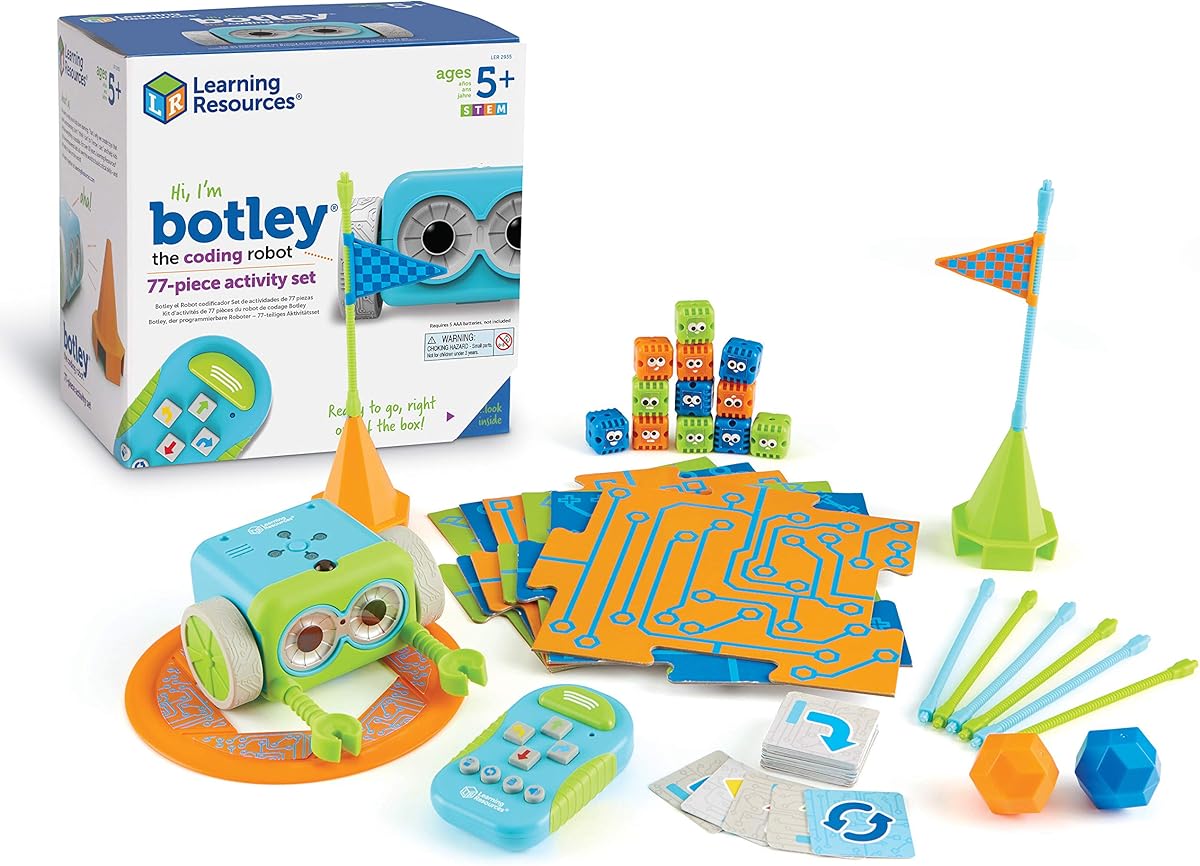
Learning Resources Botley offers a robust screen-free coding experience with object detection and looping commands. It comes with a remote programmer that simplifies coding for young children. The activity set includes dozens of pieces for building obstacles and challenges.
We may earn a commission when you buy through this link, at no additional cost to you.
Its standout quality is the ability to sense objects and avoid them automatically. This adds complexity to coding sequences and enhances logical thinking. The loop feature allows kids to create repetitive tasks efficiently.
Setup requires a few batteries and a screwdriver which takes minutes to complete. The remote programmer is intuitive and avoids screens for pure focus. The durability and piece count make it suitable for groups.
This robot is perfect for classrooms or families wanting collaborative coding play. It balances ease of use with advanced features like loops. We recommend it for children ready to explore beyond basic sequencing.
Program Botley to react to obstacles automatically for advanced problem-solving.
Includes 77 pieces like tiles and obstacle pieces for custom play setups.
We may earn a commission when you buy through this link, at no additional cost to you.
Ozobot Evo introduces coding through color codes and a comprehensive online platform with hundreds of lessons. It supports both screen-free play and digital coding allowing flexible learning styles. The kit includes markers and a durable case for organization.
We may earn a commission when you buy through this link, at no additional cost to you.
Its key strength is the extensive educational resources available for teachers and parents. The five skill levels ensure the toy grows with the child from beginner to master coding. The hard shell case keeps everything organized for classroom use.
The price point is higher than basic toys but justified by the content depth. The markers need careful storage to prevent drying out or damage. The durability ensures it survives active handling and regular use.
This kit is ideal for educators or parents seeking a structured curriculum. It offers long-term value through adaptable lessons and features. We recommend it for serious STEM learners who want consistent growth and support.
Switch between digital Blockly and offline color coding based on environment.
Access over 700 free lessons covering core subjects and STEM topics.
We may earn a commission when you buy through this link, at no additional cost to you.
Botley 2.0 builds on the original with multi-step paths and advanced object-sensing reactions. It adds lights and music to make coding more engaging for kids. The activity set allows for custom maze building with stackable pieces.
We may earn a commission when you buy through this link, at no additional cost to you.
Its standout feature is the secret code combinations that offer hidden play features. This keeps the toy fresh as children master basic commands and seek new challenges. The remote programmer is designed for intuitive learning and sequencing.
The reliance on standard batteries is a common maintenance task for parents. The learning curve is slightly steeper than basic toys but rewarding for older kids. The interactive feedback helps children understand cause and effect clearly.
This robot is best for children ready to tackle complex coding sequences. It balances fun and education well with interactive elements. We recommend it for families looking to expand on basic coding skills.
Unlock hidden abilities with specific code combinations for extended play.
Lights and sounds provide immediate visual and audio cues during programming.
We may earn a commission when you buy through this link, at no additional cost to you.
Wonder Workshop Dash is a highly advanced robot that is ready to play out of the box. It sings dances and responds to voice commands making it incredibly interactive. Designed for kids six and older it offers a rich coding curriculum.
We may earn a commission when you buy through this link, at no additional cost to you.
Its main strength is the lack of assembly and immediate usability for busy families. The battery life supports up to five hours of play which is substantial for a connected robot. It is trusted by schools globally for its educational value.
The price is higher than entry-level toys but reflects the quality and software. Requiring an app means some screen time is inevitable for coding. However the engagement and features justify the investment for many.
This robot is ideal for families wanting a premium screen-based coding experience. It provides endless entertainment with robust apps and challenges. We recommend it for tech-savvy households seeking a reliable and advanced STEM tool.
Unbox Dash and start coding immediately without tools or setup time.
Use five different apps including Blockly to learn coding concepts easily.
We may earn a commission when you buy through this link, at no additional cost to you.
TaleBot Pro is a specialized screen-free robot designed for children aged three to five. It encourages storytelling and creativity through voice recording and interactive maps. The robot can walk sing dance and record commands easily for toddlers.
We may earn a commission when you buy through this link, at no additional cost to you.
Its standout feature is the focus on language and creativity alongside basic coding concepts. Kids can record their own tales which TaleBot then plays back. This helps develop communication and imagination alongside logic skills.
The simple design may feel limited for older children seeking complex challenges. Battery operation requires consistent replacement but ensures reliability during play. The compatibility with LEGO blocks allows for creative construction extensions.
This toy is perfect for preschoolers ready to explore interactive learning. It fosters storytelling and critical thinking in a fun way. We recommend it for families with young children seeking a gentle introduction to tech.
Record and play back your own stories using voice commands and buttons.
Choose from ten languages to support diverse learning environments at home.
We may earn a commission when you buy through this link, at no additional cost to you.
Selecting the right coding toy involves considering age appropriateness, learning goals, and interaction style.
Different toys are designed for specific age groups based on complexity and safety. Younger children need simple buttons and large parts while older kids benefit from app-based coding or building kits.
Always check the manufacturer's age recommendations to ensure the toy matches your child's developmental stage.
Some coding toys operate entirely without screens using physical cards or buttons while others require a tablet. Screen-free options help reduce digital fatigue whereas app-based ones offer more interactive feedback.
Decide how much screen time you allow to choose the right balance for your family's needs.
Coding toys focus on different skills such as sequencing loops algorithms or mechanical engineering. Consider what concepts you want your child to learn before purchasing a specific model.
Match the toy's learning outcomes with your child's interests to keep them engaged longer.
A good coding toy should grow with your child's skills. Look for options that offer multiple difficulty levels or add-on packs for expanded play.
Investing in a versatile kit prevents outgrowing the toy too quickly as skills improve.
Complex setups can lead to frustration for both parents and kids. Choose toys with intuitive interfaces and clear instructions for smoother play sessions.
Simple programming interfaces encourage independent play and confidence building in young learners.
Robots undergo active play so sturdy construction is essential. Look for materials that resist breakage and components that can withstand repeated use.
High-quality builds ensure the toy remains functional for a longer period of time.
Many coding toys require batteries which adds to the overall cost of ownership. Check whether rechargeable options are available or if standard batteries are needed frequently.
Consider the convenience of power sources to avoid interruptions during play or lessons.
Some kits include lesson plans or online resources to guide learning. These can be invaluable for parents who are not coding experts themselves.
Look for products with robust support materials to maximize the educational value.
Read the instruction manual carefully before assembling any coding robot. Understanding the parts and basic controls helps prevent frustration during initial setup. Many toys offer guides that explain simple coding concepts clearly.
Keep the toy clean and stored properly when not in use. Dust and moisture can damage electronic components so store in a dry place. Use soft cloths to wipe down sensors and surfaces gently.
Encourage creative experimentation to get the most out of the robot. Let children modify coding sequences or build custom obstacles to challenge themselves. This approach deepens understanding and keeps play engaging.
Yes many coding toys are designed specifically for beginners with simple interfaces. They often start with drag-and-drop commands before progressing to complex logic. This makes them accessible for children with no prior experience.
Not all coding toys require screens as many are screen-free and use physical cards. These options help children focus on logic without digital distractions. Screen-based models typically offer more advanced features and interactivity.
Coding robots range from toddler versions for ages three to complex kits for teens. Most general coding toys start around age five to eight. Choose models aligned with your child's motor skills and attention span.
They teach programming through hands-on activities like sequencing commands and debugging errors. Physical interactions help children understand abstract concepts like loops and conditionals. Gamified challenges reinforce these skills effectively.
Many modern coding robots offer connectivity via Bluetooth to apps or other modules. This expands functionality allowing control from phones or integration with other tech. Check compatibility before purchasing for desired features.
Several brands provide online tutorials and lesson plans for their robots. These resources often include community challenges and user-generated content. Accessing them can enhance the learning experience significantly.
Coding toys support math logic and problem-solving skills used in school. They help children understand sequencing algorithms and analytical thinking. These transferable skills benefit broader academic learning.
Many toys come with warranties or replacement parts for common issues. Check the manufacturer's policy for support. Sturdy toys with simple mechanisms are easier to repair if damage occurs.
Coding toys offer a fun and effective way to introduce children to technology and logic. Whether screen-free or app-based these robots provide interactive learning experiences that grow with kids. The top picks balance affordability with educational depth for various needs.
Prioritize toys that align with your child's age and learning goals for best results. Look for features like object detection loops or storytelling to keep engagement high. Consider the durability and battery needs to avoid disruptions in play.
We recommend reviewing current prices and availability before making a purchase. Educational toys often have seasonal sales that can offer better value. Select a toy that sparks curiosity and supports long-term STEM development.