
HDMI Audio Extractor Splitter HDMI to 3.5mm
4.2Editor score
Affordable entry level option
Simple 3.5mm audio output
Compatible with most HDMI sources
Compare the top HDMI Audio Extractor models for 2026 including 4K 8K ARC and eARC support to find the perfect audio solution for your home theater setup today.
Finding the right HDMI Audio Extractor is essential for modern home theater setups that require flexible audio routing. These devices allow you to separate audio from video signals, enabling connection to external speakers, soundbars, or receivers that lack HDMI inputs.
This guide compares ten top-rated models based on video resolution support, audio format compatibility, and ease of use. We evaluated features like 4K pass-through, ARCeARC support, and optical versus analog outputs to ensure you find the best match for your needs.
Each pick highlights specific strengths such as budget-friendliness, premium 8K capabilities, or specialized ARC functionality. Remember that product availability and pricing can change frequently, so verify current details before making your final purchase decision online.
4.2Editor score

4.2Editor score

4.2Editor score
The following table provides a side-by-side comparison of all ten reviewed HDMI Audio Extractor models highlighting their key specifications and unique features to help you make an informed decision quickly.






The VPFET HDMI Audio Extractor offers a budget friendly solution for users needing basic audio separation. With a solid rating it handles 4K video at 30Hz while extracting audio via optical or 3.5mm outputs.
We may earn a commission when you buy through this link, at no additional cost to you.
This unit supports DTS 5.1 and PCM formats making it suitable for basic home theater setups. The passive design requires only a USB connection for power ensuring it runs quietly without extra noise.
However it lacks support for newer ARC protocols which limits compatibility with modern TVs. Users must ensure their source device supports HDMI 1.4V for optimal performance without signal loss.
This model is ideal for PC setups or older game consoles where cost matters most. It delivers reliable audio extraction for budget conscious buyers who do not need advanced 4K 60Hz features.
Ideal for users needing basic audio separation without breaking the bank.
Runs on standard USB power eliminating the need for wall adapters.
We may earn a commission when you buy through this link, at no additional cost to you.
The OREI HDMI Audio Extractor ARC is designed for modern setups requiring bidirectional audio. It supports 4K 60Hz and handles ARC signals allowing you to pull audio directly from a smart TV to external speakers.
We may earn a commission when you buy through this link, at no additional cost to you.
This device excels with HDR support including Dolby Vision and HLG ensuring colors remain vibrant. The CEC pass-through simplifies control but volume must be adjusted on the external audio device directly.
While it offers robust performance it is priced higher than basic extractors. The downmix feature ensures stereo output on analog ports even when multichannel audio is selected for digital outputs.
Buyers with newer TVs and premium soundbars will appreciate the ARC functionality. It bridges the gap between modern streaming devices and legacy audio systems effectively.
Allows pulling audio directly from smart TV HDMI ports via ARC.
Maintains 4K 60Hz with HDR support for high fidelity viewing.
We may earn a commission when you buy through this link, at no additional cost to you.
This OREI model stands out with its support for high resolution audio and video formats. It handles 4K 60Hz video pass-through and decodes Dolby Atmos via optical output ensuring cinematic sound quality.
We may earn a commission when you buy through this link, at no additional cost to you.
The metal housing provides durability and heat dissipation making it suitable for extended use. It is compliant with HDCP 2.2 ensuring it works with protected content from streaming devices and consoles.
Although it lacks ARC the extractor focuses on high bandwidth throughput for source devices. Users should note the dual voltage plug configuration for international travelers using this unit abroad.
It serves as a strong middle ground for home theater enthusiasts needing reliable performance. The mix of optical and analog outputs makes it versatile for various receiver configurations.
Supports Dolby Atmos and TrueHD formats for surround sound setups.
Metal enclosure ensures longevity during continuous operation.
We may earn a commission when you buy through this link, at no additional cost to you.
The eSynic Professional Extractor is specialized for users needing to extract audio from TV eARC ports. It converts these digital signals into high quality analog L/R or 3.5mm outputs for speakers.
We may earn a commission when you buy through this link, at no additional cost to you.
With support for 192KHz sampling rates this device delivers clean audio without distortion. It is ideal for connecting TVs to amplifiers that lack digital inputs but require high fidelity analog signals.
Users must note it does not support optical outputs limiting digital connectivity options. Configuration requires enabling specific audio modes on the TV to ensure PCM output compatibility.
This unit is perfect for living room upgrades where HDMI audio return is the primary source. Its compact design fits easily into tight spaces behind entertainment centers.
Delivers 192KHz high sampling rates for crystal clear sound.
Optimized specifically for TV HDMI ARC and eARC ports.
We may earn a commission when you buy through this link, at no additional cost to you.
This extractor supports high refresh rates like 1080P at 144Hz making it attractive for gamers. It handles HDR10 and passes Dolby Digital signals effectively to external audio systems via optical.
We may earn a commission when you buy through this link, at no additional cost to you.
For analog outputs it requires the source to be set to PCM mode ensuring compatibility. This step is crucial for avoiding static noise which can occur with digital pass-through to analog amps.
The device includes CEC support for simplified system control although volume remains independent. It is built to handle a wide range of video resolutions without signal degradation.
Gamers looking for smooth motion and crisp audio will find this unit useful. It balances gaming performance with standard home theater audio extraction needs.
Supports 144Hz at 1080P for fluid gameplay visuals.
Maintains HDR10 standards through video pass-through.
We may earn a commission when you buy through this link, at no additional cost to you.
This VPFET model provides both optical and coaxial digital outputs simultaneously. It is designed exclusively for HDMI eARC ports on TVs allowing dual digital connections for different audio gear.
We may earn a commission when you buy through this link, at no additional cost to you.
With support for 192KHz sampling it ensures high fidelity audio transfer to DACs or amplifiers. It works well for users who want to connect multiple digital audio devices from a single TV source.
Users should be aware it does not support CEC meaning remote control integration is limited. It is also restricted to TV inputs which limits use with standalone game consoles directly.
Ideal for audiophiles wanting to route audio to both a soundbar and a DAC. The dual output design offers flexibility for complex digital audio setups.
Sends audio to coaxial and optical devices at the same time.
Prioritizes digital audio quality with high sampling rates.
We may earn a commission when you buy through this link, at no additional cost to you.
This extractor is built for the future supporting 8K video at 60Hz with HDMI 2.1 protocols. It features high bandwidth throughput ensuring no compression loss for next gen gaming and media.
We may earn a commission when you buy through this link, at no additional cost to you.
With HDCP 2.3 support it handles protected high resolution content seamlessly. It also supports ARC but not eARC so users with high end TVs might prefer other options for lossless audio.
The metal enclosure aids in cooling during heavy usage ensuring stable performance. It includes a universal power supply making it easy to use in different regions without adapters.
Perfect for early adopters preparing for 8K displays. It offers the most advanced video specs available in this category currently.
Ready for 8K resolution and HDMI 2.1 gaming features.
Universal power supply included for worldwide usage.
We may earn a commission when you buy through this link, at no additional cost to you.
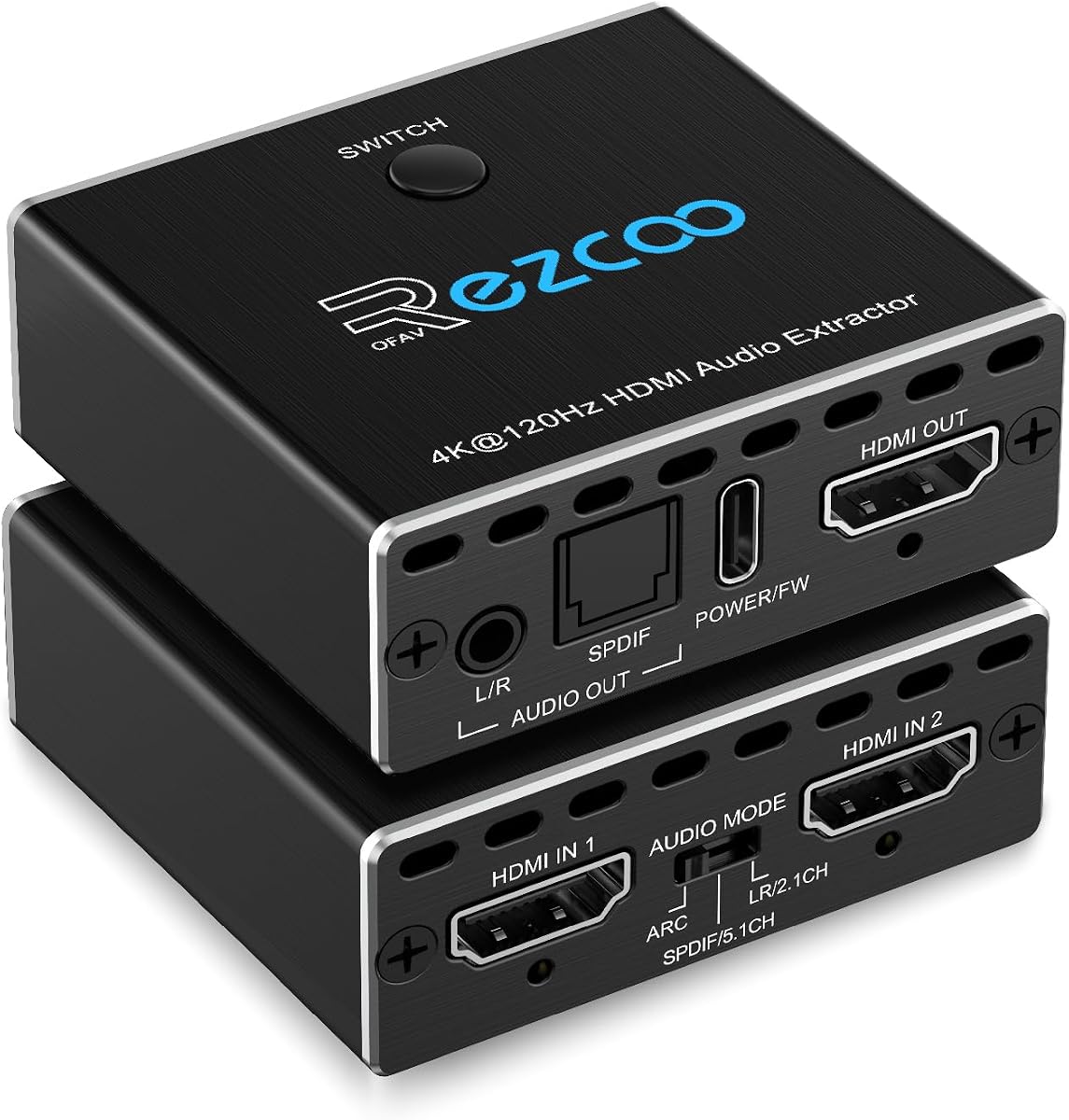
This device combines a video switch with audio extraction saving space on the desk. It supports 4K 120Hz making it excellent for modern consoles that output high frame rates.
We may earn a commission when you buy through this link, at no additional cost to you.
The automatic switching feature simplifies usage when toggling between devices like Xbox and PS5. It supports 7.1 CH audio on HDMI out while providing stereo on analog outputs.
Users should note it requires specific high quality cables for best performance. It is a compact solution for gamers who need both audio separation and input switching.
Ideal for dual console setups needing clean audio routing. The integration reduces cable clutter significantly.
Combines HDMI switching and audio extraction in one box.
Handles 120Hz for smooth gameplay on compatible displays.
We may earn a commission when you buy through this link, at no additional cost to you.
This extractor supports 8K video at 60Hz and offers three distinct operating modes for audio. Users can choose between pass-through downmix or SPDIF depending on their speaker setup needs.
We may earn a commission when you buy through this link, at no additional cost to you.
The eARC backward compatibility makes it versatile for newer TVs while maintaining support for older ARC ports. It handles HDR and Dolby Vision ensuring visual quality is not sacrificed.
However setting the correct mode for analog outputs requires careful configuration. PCM settings must be selected to avoid noise when using the 3.5mm or RCA jacks.
It is a robust choice for mixed AV setups needing flexible audio routing. The high resolution support future proofs the investment against new content.
Offers pass downmix and SPDIF modes for different audio needs.
Supports 8K 60Hz for next gen display setups.
We may earn a commission when you buy through this link, at no additional cost to you.
This lightweight splitter offers the most straightforward solution for analog audio extraction. It supports 4K 30Hz and includes a USB cable for power ensuring stable signal handling.
We may earn a commission when you buy through this link, at no additional cost to you.
Ideal for portable use it connects easily to game consoles or laptops without bulky adapters. The 3.5mm output is simple but effective for basic soundbars or headphones.
Users seeking advanced surround sound features will find it limiting. It focuses on simplicity and ease of installation for everyday tasks.
It is the best option for casual users on a tight budget. It gets the job done without complicated settings or high costs.
Compact size makes it perfect for travel or temporary setups.
Requires no configuration just plug in for audio.
We may earn a commission when you buy through this link, at no additional cost to you.
Selecting the right HDMI Audio Extractor involves considering video resolution, audio formats, and specific connectivity needs like ARC or optical outputs.
Ensure the extractor supports at least the maximum resolution of your source device. Most modern units support 4K 60Hz but some high end models now offer 8K compatibility. Using an older model with a 4K 120Hz console may result in reduced video quality.
Match the extractor to your display capabilities to avoid bottlenecking your video signal.
Check if the device supports the audio codecs used by your content such as Dolby Atmos DTS X or PCM. Some models only pass stereo audio to analog outputs requiring manual source configuration.
Digital optical outputs are better for surround sound systems needing high bandwidth audio transmission.
If you plan to extract audio directly from a TV choose a model with ARC or eARC support. eARC allows higher bandwidth for lossless audio but is only available on newer TVs.
Standard HDMI extractors without ARC cannot connect to TV HDMI ports for audio return.
Most extractors require external power via USB or AC adapters to handle signal conversion properly. Ensure you have access to a USB port or wall outlet near your setup.
Active powered units generally provide more stable signals than passive ones.
Decide between optical digital outputs or 3.5mm analog jacks based on your receiver or speakers. Some devices offer both allowing flexible routing options for different scenarios.
Analog outputs are simpler for headphones while optical works best for AV receivers.
Metal enclosures help dissipate heat during long usage sessions ensuring the unit stays cool. Look for robust builds if you plan to leave the device on continuously.
Plastic bodies may overheat during extended 4K streaming sessions.
Ensure the extractor is HDCP compliant with your source such as 2.2 for 4K content. Non-compliant units will block protected video signals and display a black screen.
Verify the version number in the product specs before purchasing.
Plug and play devices without software requirements save time and effort. Models with auto-switching features reduce the need for manual input selection.
User manuals should be clear to avoid confusing audio format errors.
Connect the HDMI cable from your source device to the input port of the extractor. Plug the output HDMI cable into the display or monitor to pass through video signals.
Use the optical or analog audio cable to connect the extractor to your speakers or receiver. Ensure the audio mode is set to match your output device capabilities.
Keep the device in a well ventilated area to prevent overheating. Regularly update firmware if available and check cables for wear to maintain signal integrity.
Check that the HDMI cable is connected correctly and the source is set to PCM for analog outputs. Ensure the device is powered via USB or the included adapter. Also verify the correct audio mode is selected if the unit supports multiple output formats.
Standard extractors work with any HDMI source device. However using one with a TV as an input usually requires an ARC or eARC port. Without ARC support connecting to a TV input may not yield audio output.
Only premium models with HDMI 2.1 support can handle 8K resolution. Most common units are limited to 4K 60Hz. Check the product specifications to confirm supported video bandwidths before purchasing.
Yes most extractors require external power via USB or AC adapters to function correctly. Some units can draw power from the HDMI port but this is rare and often unstable for high resolution content.
Connect the 3.5mm or RCA output from the extractor to your amplifier or speakers. Set the extractor or source device to PCM output mode to ensure compatibility with analog audio systems.
eARC offers higher bandwidth and supports lossless audio formats like Atmos compared to standard ARC. If your TV has an eARC port an eARC extractor ensures you get the best audio quality available.
Yes most extractors are compatible with consoles like PS5 and Xbox. Ensure the extractor supports the console's resolution and audio formats to avoid signal issues during high performance gaming.
Some models require a display to be connected to the output port for proper video handshake. If no audio plays check if your device needs a monitor signal to activate the extractor.
We have reviewed ten top HDMI Audio Extractor models ranging from budget-friendly options to high-end 8K devices. Each unit serves different needs whether for gaming setups home theater systems or basic audio routing.
Prioritize video resolution and audio format support to match your current and future devices. If you use newer TVs look for ARC or eARC compatibility to simplify connections effectively.
Prices and availability fluctuate so always check the latest listings before buying. This guide provides a solid foundation for finding the right audio solution for your setup.