
Logitech MX Vertical
4.4Editor score
57-degree vertical angle
Textured rubber surface
Advanced optical tracking
Discover the top ergonomic mice for wrist pain in October 2026. We compare ten vertical and ergonomic models designed to reduce strain and improve comfort.
If you spend long hours at a desk, wrist pain can quickly become a daily struggle. Choosing the right ergonomic mouse helps align your hand naturally and reduces strain on your forearm and carpal tunnel during extended computer sessions.
We compared ten highly rated ergonomic mice based on design comfort, connectivity options, battery life, and user feedback. Each product was evaluated for its ability to support a neutral handshake position and minimize repetitive motion stress over time.
Every pick below highlights key features, pros, cons, and ideal use cases for different hand sizes and budgets. Please note that prices and availability may change, so verify current details before making your final purchasing decision today.
4.4Editor score

4.4Editor score

4.3Editor score
The following table provides a side-by-side overview of all ten selected ergonomic mice, highlighting their core specifications and design attributes to help you make an informed decision.





The Logitech Lift stands out as a top choice for anyone seeking relief from wrist pain without sacrificing daily productivity. It carries a 4.4 rating from users who appreciate its upright design and textured grip that promotes a natural handshake position throughout the workday.
We may earn a commission when you buy through this link, at no additional cost to you.
This mouse features a 57-degree vertical angle that helps align your forearm and wrist in a relaxed posture, reducing strain on the carpal tunnel. It includes customizable buttons and a SmartWheel for seamless scrolling, along with whisper-quiet clicks that keep your workspace peaceful during meetings or focused tasks.
While it lacks a dedicated DPI switch, most users find the default sensitivity sufficient for standard office work. The battery life is impressive at up to two years, and the use of recycled plastic in construction adds an eco-friendly touch that aligns with modern sustainability goals.
Ideal for small to medium right hands, this model is an excellent investment for anyone spending long hours at a computer. It balances ergonomic benefits with practical functionality, making it a reliable daily driver for home or office environments.
The 57-degree vertical design helps keep your wrist and forearm aligned, reducing muscle activity and strain compared to traditional flat mice.
Whisper-quiet clicks and a smooth SmartWheel ensure you can navigate documents and applications without disturbing others around you.
We may earn a commission when you buy through this link, at no additional cost to you.
The Anker Vertical offers a straightforward approach to ergonomic design, focusing on core comfort features without extra complexity. It holds a 4.2 rating and is favored by users who want a basic vertical mouse that encourages a healthy wrist position during long computer sessions.
We may earn a commission when you buy through this link, at no additional cost to you.
Its design promotes a neutral handshake posture, which helps reduce strain on the forearm and wrist. The optical tracking supports DPI settings up to 1600, ensuring smooth cursor movement across various surfaces. It also includes dedicated next and previous buttons for efficient web browsing.
One limitation is that it requires two AAA batteries and does not support silent clicks, which may be noticeable in quiet environments. However, its automatic power-saving mode after eight minutes of inactivity helps conserve energy, and the overall build remains durable for everyday tasks.
This model is well-suited for budget-conscious buyers who prioritize basic ergonomic benefits. If you are new to vertical mice and want a low-risk entry point, the Anker provides solid performance and comfort without a high price tag.
With essential buttons and a standard vertical shape, it simplifies the transition to ergonomic computing without overwhelming users with extra features.
The adjustable DPI settings ensure smooth cursor control on different surfaces, making it versatile for both office work and casual use.
We may earn a commission when you buy through this link, at no additional cost to you.
The TECKNET 4800 DPI model appeals to users who need flexibility across multiple devices without sacrificing ergonomic comfort. It has a 4.4 rating and supports seamless switching between three devices, making it a practical choice for hybrid work setups involving laptops and desktops.
We may earn a commission when you buy through this link, at no additional cost to you.
Its high DPI capability allows for precise cursor control, which is helpful for detailed tasks or larger screens. The left and right clicks are designed to be nearly silent, reducing noise in shared or quiet spaces. It connects via both Bluetooth and a 2.4G USB receiver.
On the downside, side buttons do not function on macOS, which limits its utility for Apple users who rely on navigation shortcuts. It also runs on AAA batteries, which may be less convenient than rechargeable options for long-term daily use.
For users managing multiple workstations and seeking high sensitivity, this model offers a strong balance of features. Its extensive warranty and multi-device support make it a reliable investment for power users who value efficiency and comfort.
With six adjustable DPI levels up to 4800, you can tailor cursor speed to match any task, from detailed design work to quick browsing.
The quiet clicks help maintain focus and minimize disruption, which is especially valuable in libraries or open offices.
We may earn a commission when you buy through this link, at no additional cost to you.
The UGREEN Ergonomic Mouse delivers a compelling mix of comfort, connectivity, and affordability. It has a 4.3 rating and is designed with a natural vertical handshake position that reduces wrist rotation and muscle strain during extended use.
We may earn a commission when you buy through this link, at no additional cost to you.
It features quiet-click buttons and a five-button layout that enhances productivity by allowing quick navigation and scrolling. The PTFE glide feet ensure smooth movement with minimal friction, while dual wireless options let you connect via Bluetooth or a 2.4G USB receiver.
Although it runs on a standard AA battery rather than being rechargeable, its smart sleep mode helps extend battery life between replacements. It is compatible with a wide range of systems including Windows, macOS, Linux, and Android, making it a versatile choice for mixed-device environments.
This mouse is an excellent budget option for those seeking a reliable ergonomic solution without sacrificing quality. Its focus on silent operation and smooth tracking makes it well-suited for office work, home use, or casual browsing.
The combination of PTFE glide feet and quiet-click technology ensures effortless movement and minimal noise during everyday tasks.
Switch easily between Bluetooth and 2.4G wireless modes to fit your setup, and connect to multiple devices for seamless workflow.
We may earn a commission when you buy through this link, at no additional cost to you.
The ProtoArc EM11 is specifically tailored for users with smaller hands who need an ergonomic solution that fits comfortably. With a 4.4 rating, it offers a built-in rechargeable battery and supports connection to up to three devices via Bluetooth or USB.
We may earn a commission when you buy through this link, at no additional cost to you.
Its vertical design helps align the forearm and wrist in a natural position, reducing discomfort and strain over time. The left and right clicks are quiet, supporting focused work without distraction. However, there is a recommended adjustment period of one to two weeks to adapt to the shape.
Side buttons for forward and back navigation do not work with macOS, which may limit utility for Apple users. Despite this, the rechargeable feature and multi-device connectivity make it a convenient and sustainable choice for daily computing needs.
Ideal for users with smaller hands looking for a rechargeable option, this mouse balances comfort with practical functionality. It is a strong contender for those who want to reduce waste from disposable batteries while improving their ergonomic setup.
Designed to fit hands under 7.5 inches, it provides a comfortable grip that reduces wrist strain and improves posture during long sessions.
The built-in 500mAh battery can be recharged via Type-C, eliminating the need for constant battery replacements and saving costs over time.
We may earn a commission when you buy through this link, at no additional cost to you.
The Lekvey Ergonomic Mouse emphasizes convenience with its high-capacity rechargeable battery that offers up to 150 hours of continuous use per charge. It has a 4.3 rating and encourages a neutral handshake wrist position for smoother movement and reduced overall strain.
We may earn a commission when you buy through this link, at no additional cost to you.
Users often report a noticeable reduction in wrist pain within a few days of adjustment. The mouse includes page back and forward buttons for efficient browsing, and its three DPI levels allow for sensitivity adjustments. It connects via a nano USB receiver for plug-and-play simplicity.
While it lacks Bluetooth, the reliable 2.4G connection ensures stable performance across Windows and Mac systems. The main trade-off is the absence of wireless Bluetooth options, which may be a drawback for users who prioritize cable-free device switching.
This model is well-suited for those who want a simple, reliable ergonomic mouse with long battery life. If you do not need Bluetooth connectivity and value ease of use, the Lekvey provides strong ergonomic benefits with minimal setup effort.
With over 150 hours of use on a single charge, it reduces the frequency of charging and keeps you productive throughout the work week.
Many users find significant relief within three to five days as the wrist adapts to the natural vertical handshake positioning.
We may earn a commission when you buy through this link, at no additional cost to you.
The TECKNET 52 Degree model is a robust option with a high 4.6 rating, offering a natural handshake grip that reduces forearm strain and fatigue. Its rechargeable 600mAh battery supports up to two months of use from a single charge, enhancing convenience.
We may earn a commission when you buy through this link, at no additional cost to you.
Users benefit from six adjustable DPI levels, silent clicks for quiet environments, and seamless switching between three devices. The 52-degree angle promotes a relaxed posture during extended sessions. It is compatible with Windows and Mac systems though some side button functions may be limited on macOS.
New users may need a week to adjust to the vertical shape, but long-term comfort improvements are often reported. The durable build is rated for up to 6 million clicks, making it suitable for heavy daily use without performance degradation.
Ideal for professionals seeking a durable and versatile ergonomic solution, this model delivers strong value. Its combination of rechargeability, multi-device support, and silent operation makes it an attractive choice for busy office environments.
A single charge of 1.5 hours provides up to two months of use, reducing the hassle of frequent charging or battery replacements.
With up to 4800 DPI across six adjustable levels, you can achieve pixel-perfect accuracy for detailed tasks or quick browsing.
We may earn a commission when you buy through this link, at no additional cost to you.
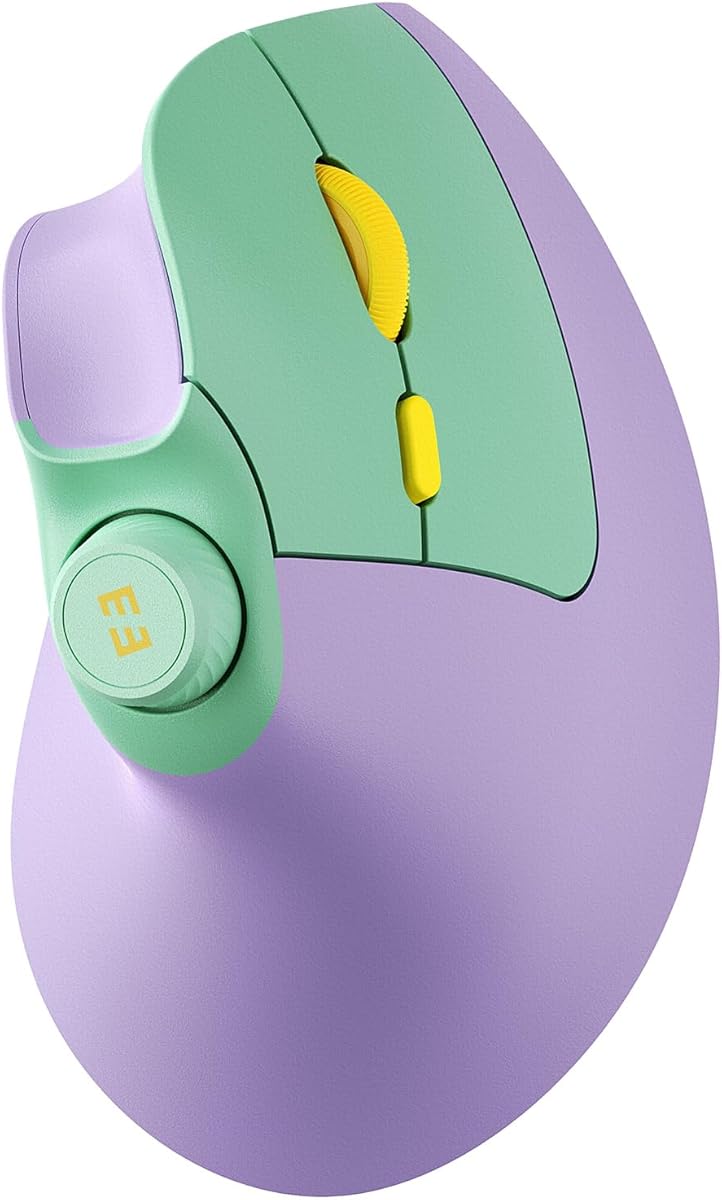
The seenda MOU-302 stands out with a dedicated volume knob that allows quick media control without switching windows. It has a 4.6 rating and promotes a neutral handshake grip to reduce pressure during long hours at a computer or workstation.
We may earn a commission when you buy through this link, at no additional cost to you.
Users can connect to three devices simultaneously via Bluetooth or USB, making it suitable for hybrid setups. The silent clicks help maintain focus, while the rechargeable battery supports up to two months of use per charge. Its adjustable DPI ensures smooth control across tasks.
Although side navigation buttons do not function on Mac systems, the core ergonomic and media control features remain useful. The overall design suits users who multitask with media and need quick access to volume or playback without interrupting workflow.
This model is an excellent choice for streamers, remote workers, or anyone who values convenience and ergonomic comfort. If you appreciate integrated media controls and multi-device support, the seenda offers a unique and practical solution for daily use.
Adjust volume or pause playback directly from the mouse, saving time and keeping your workflow uninterrupted during work or leisure.
Noiseless clicks prevent distractions in shared spaces, making it ideal for libraries, open offices, or late-night home use.
We may earn a commission when you buy through this link, at no additional cost to you.
The Logitech MX Vertical is a premium ergonomic mouse with a 4.4 rating, designed to reduce muscular activity by 10% compared to standard mice. Its unique 57° vertical angle lowers pressure on the wrist while keeping the thumb comfortable on a dedicated thumb rest.
We may earn a commission when you buy through this link, at no additional cost to you.
With a 4000 DPI sensor, it requires less hand movement for cursor control, reducing fatigue during detailed tasks. The textured rubber surface ensures a natural grip, and a cursor speed switch lets you instantly adjust DPI for speed or accuracy with a single button press.
Although it carries a higher price, the investment is justified by its ergonomist-approved design and long-term comfort benefits. Some users with smaller hands may find the size less ideal, but for most professionals, it offers an excellent blend of precision and posture support.
This model is best suited for users seeking a top-tier ergonomic solution that combines performance with comfort. If you want a reliable mouse that reduces strain and supports productivity over long sessions, the MX Vertical is a strong candidate worth considering.
The high-precision sensor results in significantly less hand movement, reducing fatigue and improving accuracy during detailed tasks.
Tested with leading ergonomists to improve posture and reduce wrist pressure, ensuring a scientifically backed ergonomic experience.
We may earn a commission when you buy through this link, at no additional cost to you.
The TECKNET 60 Degree model combines vertical ergonomics with productivity-focused programmable buttons. It has a 4.4 rating and features a 60-degree grip that keeps your forearm straight, reducing twisting and strain over time.
We may earn a commission when you buy through this link, at no additional cost to you.
With six programmable buttons, users can customize shortcuts to streamline workflows and reduce repetitive clicking. The mouse is rechargeable and supports a stable 2.4GHz wireless connection up to 10 meters. Its silent left and right buttons maintain a quiet workspace for focused tasks.
Users may need a few days to adjust to the new posture, but the comfort benefits often follow. Although it lacks Bluetooth, the reliable 2.4G connection ensures stable performance for desktops, laptops, and tablets.
Ideal for those seeking a balance of ergonomics and customization, this mouse provides solid value. It is a strong choice for productivity-focused users who want to tailor their input device while reducing wrist strain during daily computer work.
Six programmable buttons allow quick access to shortcuts, reducing repetitive clicking and enhancing overall work efficiency.
Silent buttons and a stable wireless connection ensure a distraction-free experience with consistent performance across your devices.
We may earn a commission when you buy through this link, at no additional cost to you.
Selecting the right ergonomic mouse involves evaluating several factors to ensure comfort, functionality, and long-term usability.
The vertical angle of an ergonomic mouse determines how naturally your wrist and forearm align. A 57 to 60-degree angle typically reduces twisting motion and muscle strain by mimicking a handshake position, which is more relaxed than using a flat mouse.
Look for a model with an angle that feels comfortable during extended sessions and supports a neutral posture without requiring excessive grip force.
Ergonomic mice come in different sizes to match small, medium, or large hands. A proper fit ensures your palm and fingers rest comfortably on the textured surfaces without slipping or stretching, which helps minimize fatigue.
Check product dimensions and user feedback to confirm the mouse accommodates your hand length and width for a snug and supportive grip.
Consider whether you prefer Bluetooth, a USB receiver, or both. Multi-device support allows you to switch between computers or tablets quickly, enhancing productivity in hybrid work environments.
Choose a connectivity option that matches your system and workflow, ensuring stable connections without needing extra adapters or dongles.
Adjustable DPI settings let you customize cursor sensitivity for different tasks, from detailed editing to rapid scrolling. Higher DPI offers more precision with less hand movement, which can reduce strain during precise work.
Opt for a mouse with multiple DPI levels and a dedicated switch so you can adapt to various screen sizes and tasks comfortably.
Ergonomic mice may use disposable batteries, rechargeable batteries, or internal built-in batteries. Rechargeable models reduce waste and long-term costs, while disposable options offer convenience when power runs out.
Evaluate battery life expectations to ensure the mouse can support your daily usage without frequent recharging or battery changes.
Additional buttons for page navigation, DPI switching, or custom macros can improve workflow efficiency. Silent clicks also help maintain a quiet environment during meetings or focused work.
Choose a layout that includes the shortcuts you need most and supports quiet operation if noise is a concern in your workspace.
Not all ergonomic mice support every operating system fully, particularly regarding side buttons or custom software features. Ensure the model you choose is compatible with your Windows, macOS, or Linux setup.
Verify product descriptions for any limitations on certain platforms to avoid functionality issues after purchase.
A sturdy build quality and click durability rating ensure the mouse withstands daily use without premature failure. A solid warranty period also protects your investment and indicates manufacturer confidence in the product's quality.
Look for models rated for millions of clicks and backed by an extended warranty to support long-term reliability and peace of mind.
When you first switch to an ergonomic mouse, allow a few days to adapt to the vertical position. Start with short sessions and gradually increase usage time as your wrist and forearm adjust to the new posture to prevent initial discomfort.
Keep the mouse surface clean by gently wiping it with a dry cloth to prevent dust buildup on the textured grip. Store it in a dry environment when not in use to maintain battery health and prevent moisture damage.
Regularly check for firmware updates if your mouse supports customization software. Adjust DPI settings as needed to match different tasks, and replace or recharge batteries before they fully deplete to avoid sudden interruptions during work.
Yes, vertical mice help keep the wrist in a neutral handshake position, reducing pressure on the carpal tunnel. Many users report less pain and strain during long work sessions. However, individual results vary, so it is best to consult a medical professional for personal advice.
Most users adapt within one to two weeks of consistent use. Initially, precision may feel different, but comfort improves as your wrist learns the new posture. Gradual introduction helps ease the transition and prevents early frustration.
Some ergonomic models support gaming with adjustable DPI and responsive tracking. However, they may not be ideal for competitive games requiring quick, flat movements. Choose a model with sufficient DPI and low latency for casual gaming needs.
Many ergonomic mice are compatible with Mac, but some side buttons or features may not function fully. Check product specifications for macOS support before buying to ensure all desired features work on your device.
Bluetooth connects directly without a receiver, while 2.4G uses a USB dongle for a stable connection. Bluetooth saves USB ports, but 2.4G may offer lower latency. Both work well for office tasks and ergonomic mice.
Yes, silent-click technology reduces click noise by up to 90 percent. This is helpful for shared offices or quiet environments. Note that some models only silence the main buttons, not scroll wheels or side keys.
You can return to a regular mouse, but your wrist may feel discomfort again. It is often better to continue using ergonomic designs if you experience strain. Many users find they prefer the comfort once adjusted.
Vertical mice are available in sizes suited for small, medium, and large hands. Measure your hand length and consult product recommendations to find the best fit. A proper fit ensures better comfort and less strain.
The Logitech MX Vertical, Logitech Lift, and UGREEN Ergonomic stand out as top picks for their ergonomic comfort, reliable connectivity, and thoughtful design features. Each offers a unique balance of performance and relief for different hand sizes and budgets.
Prioritize a mouse with a comfortable vertical angle, solid battery life, and appropriate DPI controls to suit your tasks. Ensure it matches your operating system and supports the number of devices you use regularly.
Remember that prices and availability may vary. Review current details before purchasing to make sure you choose the model that best supports your long-term comfort and productivity goals.