
NetumScan USB 1D Barcode Scanner
4.4Editor score
Plug and play USB connection
Durable anti-shock design
Reads damaged barcodes well
Discover the top 10 Barcode Scanner for Library models compared for speed, connectivity, and durability to help you choose the right tool for your collection.
Libraries rely on efficient tools to manage vast collections. A reliable barcode scanner ensures smooth checkouts and accurate inventory tracking for staff and patrons alike.
We compared ten top-rated scanners based on connectivity options, battery life, and decoding power. Our analysis focuses on models suited for daily library environments and quiet zones.
Each pick highlights key features and potential trade-offs for library use. Prices fluctuate frequently so please verify current costs before purchasing your next scanning device.
4.4Editor score

4.4Editor score

4.3Editor score
The following table provides a side-by-side overview of connectivity types, sensor technologies, and special features to help you quickly identify the right fit for your library needs.




The NETUM Bluetooth Barcode Scanner stands out for its versatility and power. With a 4.4 rating it handles various barcode types efficiently.
We may earn a commission when you buy through this link, at no additional cost to you.
Its CCD sensor reads codes directly from screens and paper. The 2600mAh battery lasts for extensive library shifts without interruption.
The storage mode is useful when wireless signals drop. However it lacks compatibility with some POS systems.
Librarians needing a robust handheld scanner should consider this model. It balances performance and cost effectively.
The CCD sensor allows scanning from computer monitors and tablets. This is crucial for libraries using digital check-in systems.
A single charge supports up to 200,000 scans. This longevity ensures the device lasts through busy opening hours easily.
We may earn a commission when you buy through this link, at no additional cost to you.
The NetumScan USB Scanner is a reliable choice for fixed stations. It connects via USB and requires no driver installation.
We may earn a commission when you buy through this link, at no additional cost to you.
Its CCD sensor handles damaged codes well. The sturdy design withstands drops making it ideal for high-traffic areas.
While it lacks wireless freedom it saves money. This trade-off fits libraries with fixed desks or counters.
Budget-conscious buyers will appreciate its performance. It offers essential features without extra cost.
Connection is simple with just a USB cable. This reduces technical hurdles for non-tech staff members.
The ABS material resists shocks from drops. This ensures longevity even in busy environments with frequent handling.
We may earn a commission when you buy through this link, at no additional cost to you.
The Tera Pro Version offers advanced features like a built-in screen. This allows easy configuration without extra software.
We may earn a commission when you buy through this link, at no additional cost to you.
It handles 2D QR codes which many basic models cannot. The charging cradle keeps it ready at all times.
While costlier it provides superior flexibility. Libraries needing QR scanning benefit most from this model.
Librarians wanting premium control should consider it. The extra features justify the investment for specific needs.
The display allows language and volume changes on device. This simplifies setup for staff with specific preferences.
Support for PDF417 and QR codes expands utility. This is vital for modern identification and tracking systems.
We may earn a commission when you buy through this link, at no additional cost to you.
The Eyoyo Mini is designed for portability. At only 35g it fits easily in a pocket for mobile use.
We may earn a commission when you buy through this link, at no additional cost to you.
Its vibration mode keeps noise down during quiet hours. This ensures minimal disturbance to patrons reading nearby.
However the battery life is shorter than bulkier models. Staff may need to charge it more often.
Ideal for mobile staff needing a small tool. Its design prioritizes comfort and discretion.
The tiny form factor makes it perfect for roaming. Staff can carry it without weighing down their pockets.
Vibration replaces the beep sound effectively. This is essential for maintaining a quiet study environment.
We may earn a commission when you buy through this link, at no additional cost to you.
The Tera 5100 Purple offers clear battery status through its indicator light. This helps avoid unexpected shutdowns during shifts.
We may earn a commission when you buy through this link, at no additional cost to you.
It provides a long wireless range suitable for large stacks. The IP54 protection handles dust common in library archives.
The ergonomic handle reduces hand strain over time. This makes it comfortable for extended scanning sessions.
Libraries needing reliable wireless tools should consider this. The battery indicator adds practical peace of mind.
The light shows remaining power clearly. Staff can charge proactively before work runs out.
IP54 rating protects against dust intrusion. This extends the device life in older library buildings.
We may earn a commission when you buy through this link, at no additional cost to you.
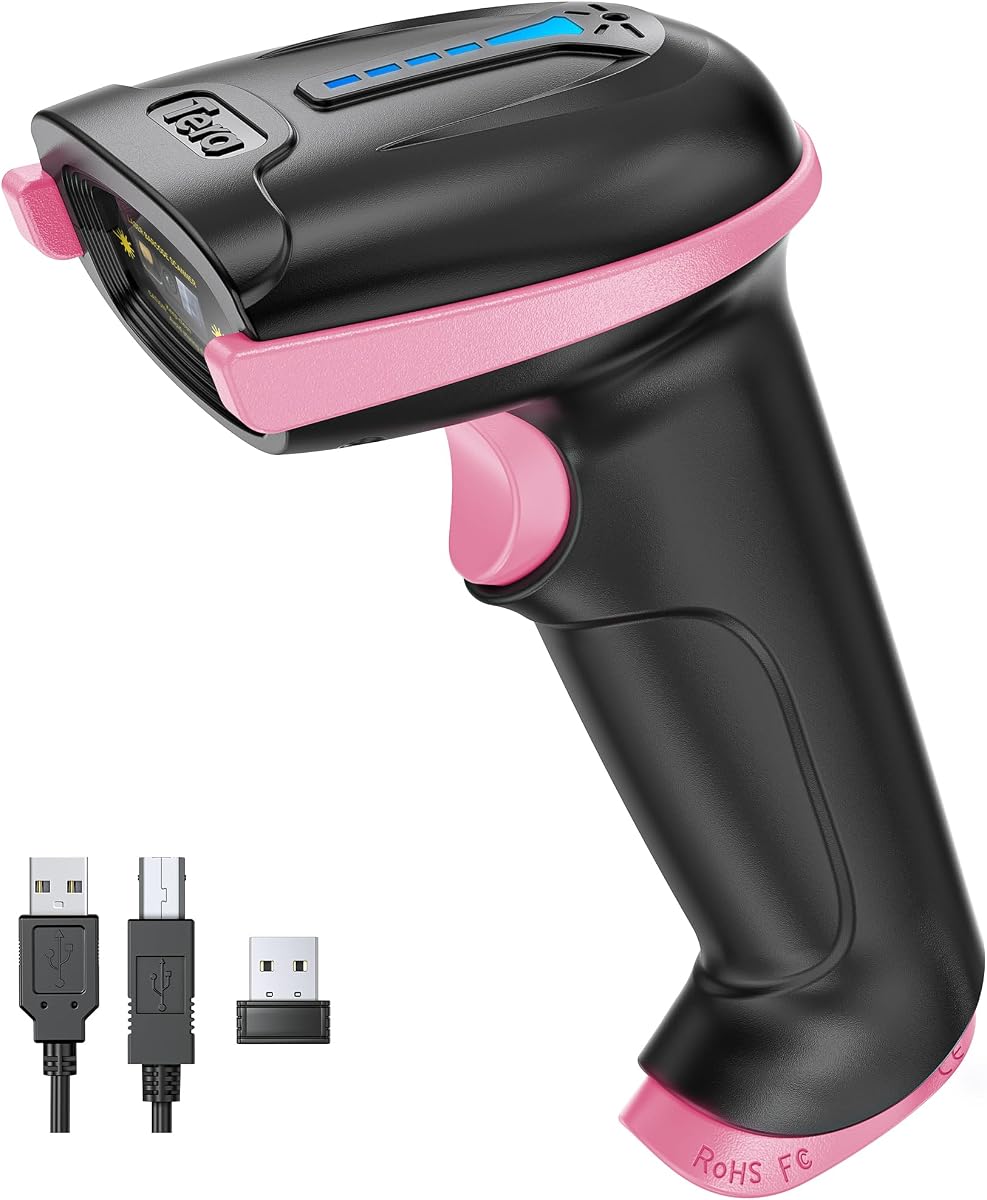
This model offers the same specs as the purple version but in pink. It helps distinguish scanners in large organizations easily.
We may earn a commission when you buy through this link, at no additional cost to you.
The battery indicator and wireless range match the other variant. It maintains high performance standards regardless of color.
The design ensures comfort during long tasks. Staff will appreciate the ease of use.
Libraries wanting personalized equipment will like this. It combines function with style effectively.
Color coding helps manage multiple devices. Staff can quickly identify assigned scanners without confusion.
The curved handle supports natural hand positions. This reduces fatigue for staff scanning hundreds of items daily.
We may earn a commission when you buy through this link, at no additional cost to you.
The WoneNice scanner uses visible laser technology. It provides fast scanning speeds suitable for high-volume checkouts.
We may earn a commission when you buy through this link, at no additional cost to you.
Its USB connection ensures stable data transfer. Configuration options allow for customization of output formats.
However lasers cannot read screens which limits use. It is best for physical book labels only.
Libraries with fixed checkout desks should consider it. The speed and reliability are significant advantages.
200 scans per second reduce wait times. This improves workflow efficiency during peak hours.
Visible lasers work well on printed paper. This ensures high accuracy for standard barcode labels.
We may earn a commission when you buy through this link, at no additional cost to you.
The Symcode scanner supports a network mode. This allows multiple devices to transmit to one receiver simultaneously.
We may earn a commission when you buy through this link, at no additional cost to you.
Its range is extensive for open areas. The battery life supports continuous scanning for over a week.
Laser limitations apply here as well. It cannot read digital displays on tablets.
Large library systems with multiple staff benefit. The network mode optimizes team workflow effectively.
Multiple scanners can send data to one PC. This enables teams to work independently without interference.
The 400m open air range covers large facilities. Staff can move freely throughout the building with confidence.
We may earn a commission when you buy through this link, at no additional cost to you.
This pink version adds a touch of style to work. It is compact and light for daily carrying.
We may earn a commission when you buy through this link, at no additional cost to you.
The vibration mode ensures quiet operation in reading areas. Connectivity options include Bluetooth and wired modes.
Battery capacity is moderate requiring regular charging. But it is easy to maintain.
Librarians wanting a cheerful tool should check this out. It combines utility with pleasant aesthetics well.
The pink color offers a distinct look. This can brighten up the workspace for staff members.
Switching between Bluetooth and USB is simple. This ensures compatibility with varied library devices.
We may earn a commission when you buy through this link, at no additional cost to you.
The Barcode Scanner with Stand offers hands-free use. The adjustable stand allows optimal positioning for various items.
We may earn a commission when you buy through this link, at no additional cost to you.
It handles both 2D QR and 1D codes. Auto-sensing enables scanning without manual triggers.
Its fixed nature limits movement. This makes it suitable for checkout counters or desks.
Libraries needing a self-service setup will find it useful. The hands-free feature improves throughput rates.
Auto-sensing triggers the scan automatically. This leaves hands free for handling books during checks.
Support for 2D codes adds modern utility. This accommodates newer barcodes on digital cards.
We may earn a commission when you buy through this link, at no additional cost to you.
Choosing the right scanner requires balancing performance features with operational needs. This section outlines the critical factors to consider.
Libraries often need both wired and wireless options. Wireless allows staff to move through stacks while wired offers stability at desks.
Select a device that supports your existing infrastructure without requiring complex drivers.
CCD sensors read codes from screens while lasers do not. This distinction matters for digital check-in workflows.
Ensure the sensor matches the types of codes your library uses daily.
Wireless units require long-lasting batteries to avoid interruptions. Look for models offering hours of continuous scanning.
Higher mAh capacity means fewer charges and more uptime for staff.
Library scanners face frequent drops and handling. Look for protective covers and shock-resistant design.
A sturdy build extends the device lifespan and reduces replacement costs.
Check if the scanner reads damaged or printed codes. Some units handle reflective or worn labels better than others.
Robust decoding ensures fewer errors during inventory checks.
Libraries demand quiet environments. Models with mute or vibration feedback are essential.
This feature prevents disturbing patrons while still confirming scans.
Ensure the device works with your library software and OS. Some POS systems may block certain scanners.
Verify compatibility lists to avoid integration issues during setup.
Consider the budget versus necessary features. Basic models suffice for fixed stations while advanced ones help mobile teams.
Invest in durability and battery life for long-term savings.
Start by connecting the device to your computer or network. Follow manufacturer instructions for pairing or driver installation.
Store the scanner in a protective case when not in use. This prevents damage from falls or dust exposure.
Regularly clean the scanning window with a soft cloth. Avoid harsh chemicals that might damage the sensor lens.
Most standard barcode scanners act as keyboards entering data into any field. Ensure your library system accepts HID input for seamless integration.
CCD sensors can read codes from screens while lasers are for printed codes only. Libraries with digital kiosks need CCD models.
Quality models offer 10 to 20 hours of continuous use on a charge. Battery capacity varies by device size and usage.
Yes if the scanner supports 2D reading. Check specifications to confirm compatibility with QR formats before purchasing.
Most devices allow you to disable audio beeps via configuration barcodes or software settings. This helps maintain a quiet environment.
Yes modern models offer ranges over 100 feet. Ensure the receiver connects to a central computer for data collection.
No most plug-and-play devices work without extra software. They emulate keyboard input for direct data entry.
The NETUM Bluetooth Scanner remains our top pick for its balance of connectivity and battery life.
Budget buyers should look to the NetumScan USB for reliable fixed station performance.
Always verify current specs and prices as technology evolves quickly in this sector.