Dell Latitude E6520
3.8Editor score
Intel Core i7 2620M
8GB DDR3 RAM
Affordable Refurbished Option
Finding a laptop with a built-in DVD drive is increasingly difficult in today's market. Most modern devices prioritize thin designs and long battery life over optical media support. However, for business professionals, students, and legacy system users, having access to physical discs remains essential for software installation, data recovery, or media playback.
We have thoroughly evaluated the best laptops currently available that include optical drive capabilities. Our comparison covers a wide range of options from budget-friendly models to high-performance business machines. Each product was selected based on processor power, storage capacity, display quality, and the reliability of its optical drive solution.
Each pick in this list highlights specific strengths such as performance, portability, or value for money. Please note that prices fluctuate frequently based on market demand and seasonal promotions. We recommend checking the current listing details before making your final purchase decision to ensure you get the best deal available today.
3.8Editor score

4.5Editor score
As an Amazon Associate we earn from qualifying purchases.
The following table provides a side-by-side comparison of all ten selected laptops featuring DVD drive support. Review the specifications below to quickly identify which model meets your specific performance and budget requirements.


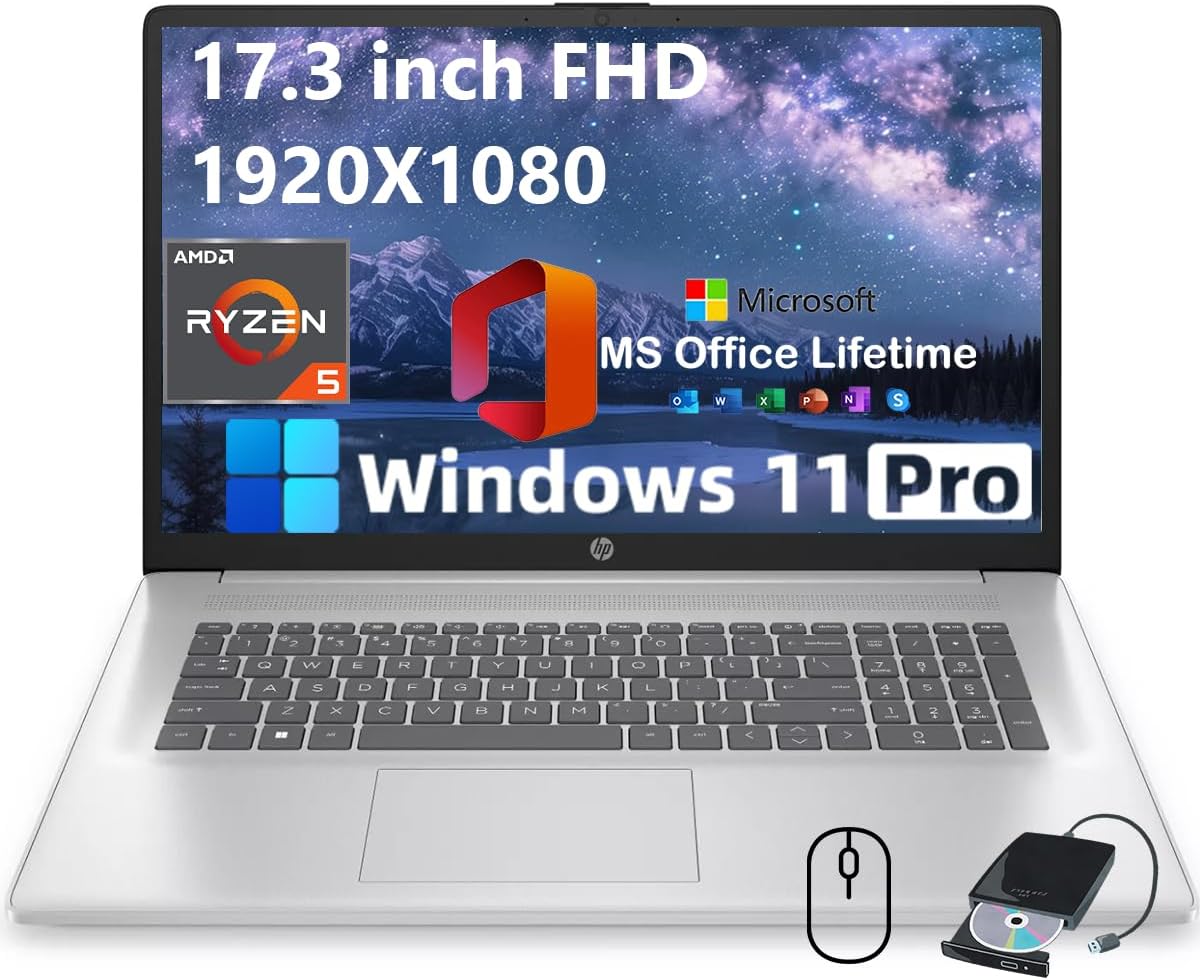
The HP 17.3 Business Laptop stands out as the top choice for professionals who require a reliable workstation with optical media capabilities. It combines a modern AMD Ryzen 5 processor with ample RAM and storage to handle demanding business applications efficiently.
We may earn a commission when you buy through this link, at no additional cost to you.
Its performance is driven by the AMD Ryzen 5 7430U processor which features six cores and twelve threads. This configuration ensures smooth multitasking whether you are running virtual machines or editing large spreadsheets. The 16GB of RAM provides enough headroom for modern productivity software without lag.
While the external optical drive adds bulk it ensures compatibility with legacy software and physical media. The 17.3 inch FHD display offers crisp visuals ideal for long working sessions. The anti-glare coating helps reduce eye strain in brightly lit office environments.
This laptop is best suited for business users or students who need a balance of power and legacy support. It is an excellent choice for those who still rely on physical discs for software installation or data backup while needing modern performance.
Includes a lifetime Microsoft Office license which saves recurring subscription costs for users who need Word and Excel daily.
Features USB Type-A and Type-C ports along with HDMI ensuring you can connect to various peripherals and external monitors easily.
We may earn a commission when you buy through this link, at no additional cost to you.
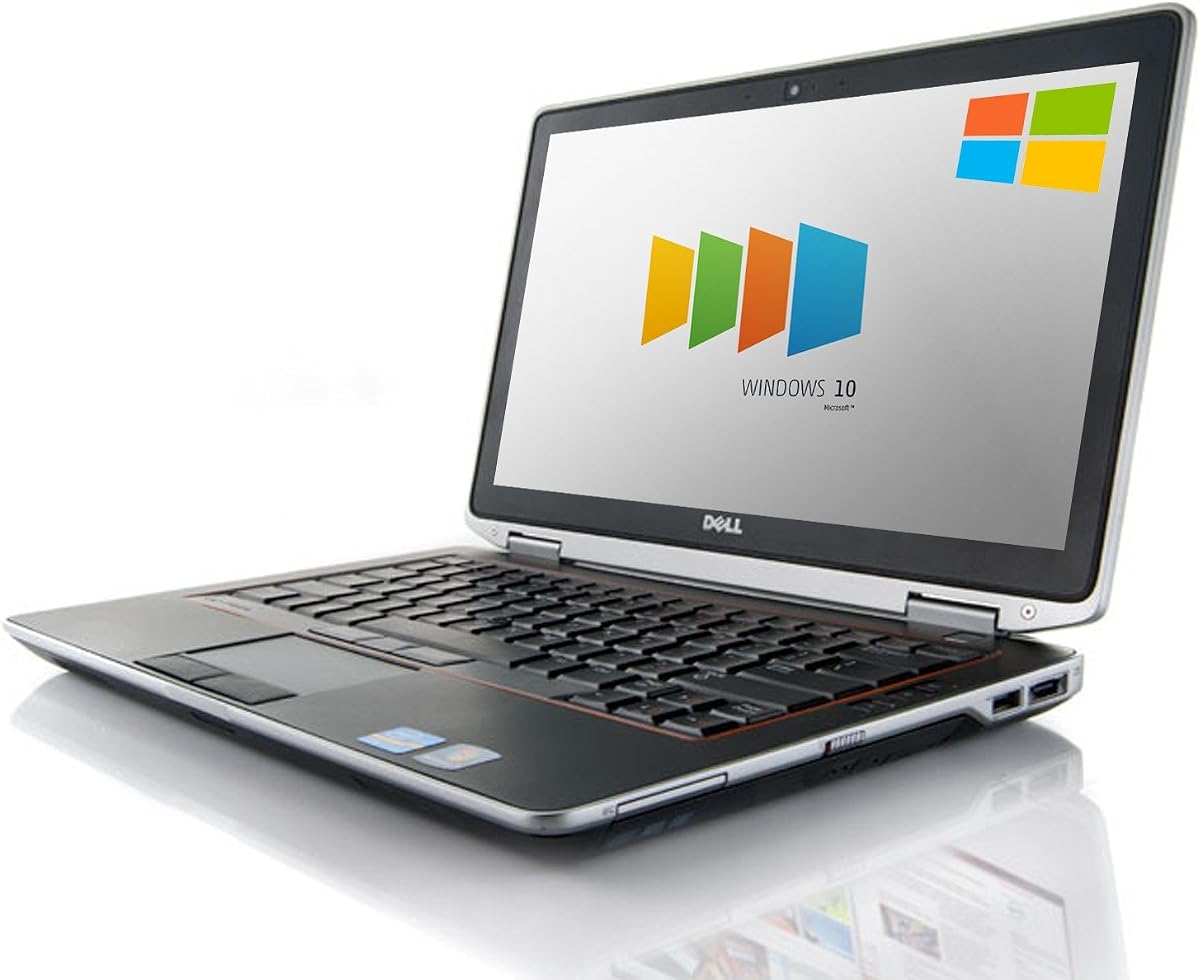
The Dell Latitude E6520 is an ideal choice for users who need a budget friendly laptop with a built-in DVD drive. As a certified refurbished unit it offers significant savings while maintaining essential business features.
We may earn a commission when you buy through this link, at no additional cost to you.
Despite its age this laptop remains capable for basic office tasks and web browsing. The Intel Core i7 2620M processor provides decent performance for light multitasking. The built-in DVD drive is a key feature for those who need to read discs without carrying an external peripheral.
Trade-offs include older hardware that may not support the latest Windows 11 features. The device is also heavier than current ultrabooks which impacts portability. However for a stationary desk setup this is a cost effective solution.
We recommend this model for home users or small businesses on a tight budget. It is perfect for accessing archived data on discs or running legacy software without spending a fortune on a new machine.
This refurbished model provides essential hardware at a fraction of the cost of new premium laptops with optical drives.
The built-in optical drive allows you to read DVDs and CDs directly without needing extra cables or power sources.
We may earn a commission when you buy through this link, at no additional cost to you.
The HP 17.3 FHD Business laptop is a premium powerhouse designed for heavy workloads and extensive storage needs. It combines high-end specifications with essential business tools to create a versatile workstation.
We may earn a commission when you buy through this link, at no additional cost to you.
With 64GB of RAM and a 2TB SSD this machine can handle virtualization and large file processing effortlessly. The AMD Ryzen 5 7430U ensures fast response times while the Windows 11 Pro OS adds enterprise level security and management features.
While it lacks a built-in optical drive the included external DVD drive solution maintains compatibility with physical media. The lifetime Microsoft Office license adds significant value by removing the need for annual subscription payments.
This laptop is ideal for power users or businesses that need robust performance and data security. If you require maximum memory and storage without sacrificing optical drive capability this model is a top contender.
The 64GB RAM ensures that you can run multiple heavy applications simultaneously without any slowdowns or memory errors.
Windows 11 Pro offers advanced security tools like BitLocker encryption to protect sensitive business data on your device.
We may earn a commission when you buy through this link, at no additional cost to you.
This HP 17.3 FHD Laptop offers a reliable balance of performance and features for business and education users. The large screen and robust processor make it suitable for multitasking in classroom or office environments.
We may earn a commission when you buy through this link, at no additional cost to you.
The AMD Ryzen 5 7430U delivers efficient multitasking capabilities that keep work flowing smoothly. The 16GB RAM ensures that multiple browser tabs and applications run without issues. The privacy shutter on the webcam adds an extra layer of security for video meetings.
The external DVD drive is included to support legacy software needs but requires a USB port. While the 250 nits display is bright enough indoors it may struggle in direct sunlight. Overall it remains a solid choice for daily productivity.
Buyers looking for a dependable machine for general computing will appreciate its value. It is well suited for students or office workers who need a stable platform with physical media access.
The built-in privacy shutter allows you to physically block the camera when not in use for enhanced security and peace of mind.
Wi-Fi 6 ensures fast wireless speeds and reliable connections even in crowded network environments like offices or campuses.
We may earn a commission when you buy through this link, at no additional cost to you.
The Lenovo IdeaPad 15.6 is a practical choice for home users who need basic computing with optical media support. It offers a full-size keyboard and essential connectivity for everyday tasks.
We may earn a commission when you buy through this link, at no additional cost to you.
Powered by the AMD Athlon 7120U this laptop handles web browsing and document editing well. The 4GB DDR5 RAM provides enough speed for light usage though heavy multitasking may slow it down. The external DVD player ensures you can access physical media easily.
Trade-offs include a lower resolution display and limited memory which may not suit power users. However for general home use the value proposition is strong. The numeric keypad is a welcome addition for data entry tasks.
This model is best for casual users or families who need an affordable secondary computer. It meets the needs of those who primarily use the web and need occasional disc access.
The full-size keyboard includes a dedicated numeric keypad which speeds up number entry for spreadsheets or billing tasks.
Supports Wi-Fi 6 for faster internet speeds and stable connections throughout your home network.
We may earn a commission when you buy through this link, at no additional cost to you.
This HP laptop delivers impressive storage and memory specs for users who need significant capacity. While the processor is mid-range the ample RAM ensures smooth operation for most daily tasks.
We may earn a commission when you buy through this link, at no additional cost to you.
The 32GB RAM allows for heavy multitasking which is rare in this price range. The 1TB SSD provides plenty of space for files and applications. Windows 11 Pro adds professional features like BitLocker and remote desktop capabilities.
The main drawback is the external DVD drive requirement which is not always included in the package. Users should verify drive compatibility before purchasing. The processor is efficient for general work but not for demanding creative tasks.
We recommend this model for users who prioritize storage and memory over raw processing power. It is a solid choice for media servers or light business use where capacity is key.
With 32GB of RAM you can run multiple heavy applications simultaneously without experiencing performance bottlenecks or lag.
Windows 11 Pro includes enterprise-grade security and management tools ideal for small business environments.
We may earn a commission when you buy through this link, at no additional cost to you.
This HP 17 Business Laptop is designed for students and professionals who need robust performance. The combination of processor speed and memory supports a wide range of academic and office tasks.
We may earn a commission when you buy through this link, at no additional cost to you.
The AMD Ryzen 5 7430U provides efficient multitasking capabilities that keep you productive during long sessions. The 16GB RAM ensures smooth operation when working with multiple documents and browser tabs. The large FHD display helps reduce eye strain with its anti-glare coating.
The external DVD drive adds utility for legacy software but requires a USB port. While the price is competitive the device may not be the lightest option for daily commuting. Overall it offers a balanced feature set for its class.
This laptop is a smart choice for students or office workers needing a reliable daily driver. It balances performance and cost effectively for general computing needs.
The anti-glare display coating minimizes reflections so you can work comfortably in various lighting conditions without eye strain.
Wi-Fi 6 technology ensures fast and stable internet connections for smooth video calls and file downloads.
We may earn a commission when you buy through this link, at no additional cost to you.
The Dell Latitude E6530 is a rugged business laptop that offers reliability for legacy workflows. Its refurbished status makes it an affordable option for specific enterprise requirements.
We may earn a commission when you buy through this link, at no additional cost to you.
Powered by an Intel Core i7 processor this machine handles multitasking well for office applications. The built-in DVD drive is crucial for users who rely on physical media for software or data. The SSD improves boot times compared to traditional hard drives.
Trade-offs include older hardware that lacks modern security features like Windows 11 support. The weight also makes it less suitable for travel. However for a dedicated workstation it provides stability and durability.
We recommend this model for businesses that need a stable platform for legacy applications. It is a cost-effective choice for environments where physical media access is still required.
The built-in optical drive allows you to read and write CDs and DVDs without needing external hardware.
Multiple USB ports including 3.0 ensure you can connect various peripherals like printers and mice easily.
We may earn a commission when you buy through this link, at no additional cost to you.
The Dell Latitude D531 is a legacy machine that serves users with specific historical software needs. While outdated it remains functional for very light tasks and physical media reading.
We may earn a commission when you buy through this link, at no additional cost to you.
It features a dual-core processor and built-in DVD drive which allows basic browsing and disc access. The 2GB RAM is minimal by modern standards but sufficient for old OS environments. The hard drive capacity is also limited for large file storage.
This laptop is not suitable for general modern use due to performance limitations. It is best reserved for specific applications that require older hardware configurations or software compatibility.
We recommend this model only for collectors or specific industrial systems. It serves as a backup option for scenarios where modern laptops cannot run necessary software.
This device supports older software environments that may be required for specific industrial or archival tasks.
The DVD/CDRW drive allows you to read and write discs for data backup or software installation.
We may earn a commission when you buy through this link, at no additional cost to you.
This Lenovo IdeaPad 15.6 offers a balanced set of features for home users needing optical media support. The combination of SSD and DVD drive provides both speed and legacy compatibility.
We may earn a commission when you buy through this link, at no additional cost to you.
The AMD A9 processor handles basic multitasking while the SSD improves boot times significantly. The built-in DVD/CDRW drive allows you to burn discs for backups or install software from physical media. Bluetooth support enables easy wireless accessory connections.
Limitations include limited storage space which may require external drives for large media collections. The HD resolution is adequate for general use but not ideal for high-definition content. However it remains a solid entry-level option.
We recommend this model for families or students needing a budget friendly solution for light computing. It is a reliable choice for web browsing and physical media access without breaking the bank.
The 128GB SSD provides faster boot and load times compared to traditional hard drives improving overall system responsiveness.
The DVD+/-RW drive allows you to not just read but also write discs for data backup and media sharing.
We may earn a commission when you buy through this link, at no additional cost to you.
Selecting the right laptop with a DVD drive requires balancing modern performance with legacy compatibility. Below are key factors to consider before making your purchase.
The processor is the core of your laptop's performance. For business or student use look for multi-core processors like the AMD Ryzen 5 or Intel Core i5 to ensure smooth multitasking. Avoid older single-core models if you plan to run multiple applications at once.
Prioritize modern processors that support current operating systems and security features.
Memory and storage determine how many tasks you can handle simultaneously and how much data you can keep locally. Aim for at least 16GB of RAM for professional work to avoid slowdowns. Storage should ideally be a solid state drive for faster boot times.
Ensure your laptop has enough SSD space for your files and operating system.
Determine whether you need a built-in or external optical drive. Built-in drives are convenient but often limit portability. External drives offer flexibility and work with thinner laptops but require an available USB port and power source.
Choose an external drive for modern thin laptops and a built-in one for desktop replacement models.
Check that the laptop supports the operating system you require. Windows 11 Pro offers enhanced security for business users. Ensure the hardware is compatible with the latest updates and security patches to protect your data.
Always verify system requirements before buying to ensure long-term software support.
A high quality display reduces eye strain during long work sessions. Look for IPS panels with at least Full HD resolution for clear text and images. Anti-glare coatings are helpful if you work in bright office environments.
Select a screen size that balances portability with comfortable viewing.
Consider how often you will carry your laptop. Models with built-in DVD drives are generally heavier than ultrabooks. If you travel frequently an external drive might be a better option to reduce weight.
Choose a weight that fits your daily carrying requirements and travel needs.
Ensure the laptop has enough ports for your peripherals. Look for USB Type-A and Type-C ports HDMI and SD card readers. Wi-Fi 6 support ensures faster wireless internet speeds which are essential for modern work.
Check connectivity options to ensure you can connect all your necessary devices.
Some laptops come with pre-installed Microsoft Office licenses which can save money on subscriptions. Verify if the license is included or if you need to purchase it separately. This adds value especially for business users.
Confirm software inclusions to understand the total cost of ownership.
To use your optical drive correctly insert the disc gently until it clicks into place. Avoid touching the data surface of the disc to prevent damage. If using an external drive ensure it is connected to a powered USB port to avoid power fluctuations.
Clean your laptop regularly to prevent dust from entering the disc drive slot. Use compressed air to blow out debris gently. Avoid opening the drive tray while the computer is sleeping to prevent mechanical jams.
Update your disc drivers periodically to ensure compatibility with new media formats. If you use the drive frequently check for scratches on your discs before inserting them. Proper maintenance extends the life of both your laptop and the optical drive.
No most modern laptops do not include built-in DVD drives to save space and weight. You may need to purchase an external USB optical drive if you require media capabilities. Check product specifications carefully before buying to confirm drive type.
You can install Windows from a DVD using an external USB optical drive. Alternatively you can create a bootable USB drive which is faster and more common. Ensure the laptop supports booting from USB or external drives.
Built-in drives are integrated into the chassis and do not need separate cables. External drives connect via USB and are portable but require power. Built-in drives are convenient for desktop replacements while external ones suit portable setups.
Most external DVD drives work with any laptop that has a USB port. Check compatibility with your specific operating system before purchasing. Some newer models may require specific USB standards for optimal performance.
Manufacturers remove drives to make devices thinner lighter and more power efficient. Software distribution has moved largely to digital downloads and cloud storage. This shift reduces the need for physical media in most consumer workflows.
Keep the drive clean by avoiding dust and debris. Insert and eject discs gently to prevent mechanical issues. Do not use the drive while the laptop is moving rapidly to avoid scratches or read errors.
Yes if the laptop includes a DVD writer or burner you can create discs. Ensure the software supports burning and that the drive hardware has writing capabilities. This is useful for backups and sharing data.
Windows 10 and 11 support standard DVD and CD drives via built-in drivers. macOS also supports optical media if connected properly. Ensure your system is updated to avoid compatibility issues.
Choosing a laptop with a DVD drive involves balancing performance portability and legacy support. The models reviewed range from budget refurbished units to high-end business machines with external optical solutions.
Prioritize processor power and RAM if you need modern performance. Ensure you select an optical drive solution that fits your workflow whether built-in or external.
Prices and availability change frequently so check current listings before buying. Our top picks offer the best combination of specs and reliability for various needs in 2026.