
Lenovo V-Series V15 Business Laptop
4.2Editor score
AMD Ryzen 7 5825U Processor
40GB RAM and 1TB SSD
Numeric Keypad and RJ45 Port
This expert guide compares the top 10 laptops with numpad for business and productivity, evaluating specs, displays, and value to help you choose.
Laptops with numpad are essential tools for professionals who handle data entry, accounting, or spreadsheet-heavy workflows daily. A dedicated numeric keypad significantly boosts efficiency by allowing quick number input without switching layers on the keyboard. Whether you work from a home office or travel frequently, finding a reliable machine with this feature is crucial for productivity.
We have carefully analyzed ten top-rated models available in the market to compile this comprehensive list. Our selection process focuses on performance, build quality, display clarity, and the presence of a full-sized numeric keypad. We evaluated processors, memory configurations, storage speeds, and port availability to ensure each recommendation meets rigorous professional standards.
Each pick in this guide highlights specific strengths and potential trade-offs to help you make an informed decision. You will find detailed breakdowns of what makes each laptop stand out for different use cases and budgets. Please note that prices and availability can change frequently, so verify current details before making your final purchase.
4.2Editor score

4.8Editor score

4.5Editor score
The following table provides a side-by-side comparison of all ten laptops included in this guide. It highlights key specifications such as processor type, memory capacity, storage size, and screen dimensions to help you quickly identify the model that best fits your specific workflow requirements and budget constraints.




The HP 255 G10 Business Laptop stands out as a top contender for professionals seeking a reliable machine with a numeric keypad. With a rating of 4.8 stars, this device balances performance and affordability effectively. Its AMD Ryzen 3 7330U processor ensures smooth operation for everyday business tasks while the included numpad streamlines data entry workflows.
We may earn a commission when you buy through this link, at no additional cost to you.
This laptop features 16GB of high-bandwidth RAM, allowing you to run multiple browser tabs and applications simultaneously without slowdowns. The 512GB SSD provides fast boot times and ample storage for documents and media. The 15.6-inch Full HD IPS display offers vibrant colors and wide viewing angles, making it suitable for extended work sessions in various lighting conditions.
While the laptop excels in connectivity with Wi-Fi 6 and Bluetooth 5.3, the battery life may require frequent charging during heavy use. The design is thin and light at 3.4 lbs, which aids portability, but the build relies on plastic materials that may not feel as premium as higher-end models. These trade-offs are acceptable given the strong value proposition.
We recommend this laptop for small business owners, students, and remote workers who need a dependable tool for spreadsheets and virtual meetings. The inclusion of Windows 11 Pro and AI Copilot further enhances productivity by offering advanced security features and workflow optimization. It is an excellent choice for those prioritizing performance and connectivity in a compact package.
The AMD Ryzen 3 7330U processor delivers responsive performance for multitasking, video chatting, and media editing without lag.
With Wi-Fi 6, Bluetooth 5.3, and a variety of ports, staying connected and collaborating with teams is seamless and efficient.
We may earn a commission when you buy through this link, at no additional cost to you.
The Lenovo V-Series V15 Business Laptop is designed for power users who require exceptional memory and processing capabilities. With a 4.2-star rating, it delivers robust performance suitable for heavy multitasking and professional applications. The inclusion of a numeric keypad and RJ45 port makes it particularly useful for networking tasks and intensive data work.
We may earn a commission when you buy through this link, at no additional cost to you.
Equipped with an AMD Ryzen 7 5825U processor and 40GB of high-bandwidth RAM, this laptop handles demanding workloads with ease. The 1TB PCIe NVMe SSD ensures rapid data access and boot times, while the 15.6-inch FHD display provides clear visuals for detailed spreadsheets. The Windows 11 Pro operating system adds enterprise-grade security and management tools.
While the specs are impressive, the laptop comes at a higher price point compared to basic models. Its weight and bulk may be less ideal for frequent travelers, but the performance benefits often outweigh this drawback for stationary office work. The build quality is solid, though users should expect a heavier footprint on their desk.
This model is ideal for professionals in accounting, engineering, or data analysis who need to run virtual machines or complex software simultaneously. The generous RAM and storage ensure that you will not face bottlenecks as your projects grow. If budget is not a constraint and performance is key, this is a top-tier option to consider.
With 40GB of RAM, you can run numerous applications and browser tabs simultaneously without any performance degradation or lag.
The inclusion of an RJ45 Ethernet port ensures stable wired connections for critical network tasks and secure data transfers.
We may earn a commission when you buy through this link, at no additional cost to you.
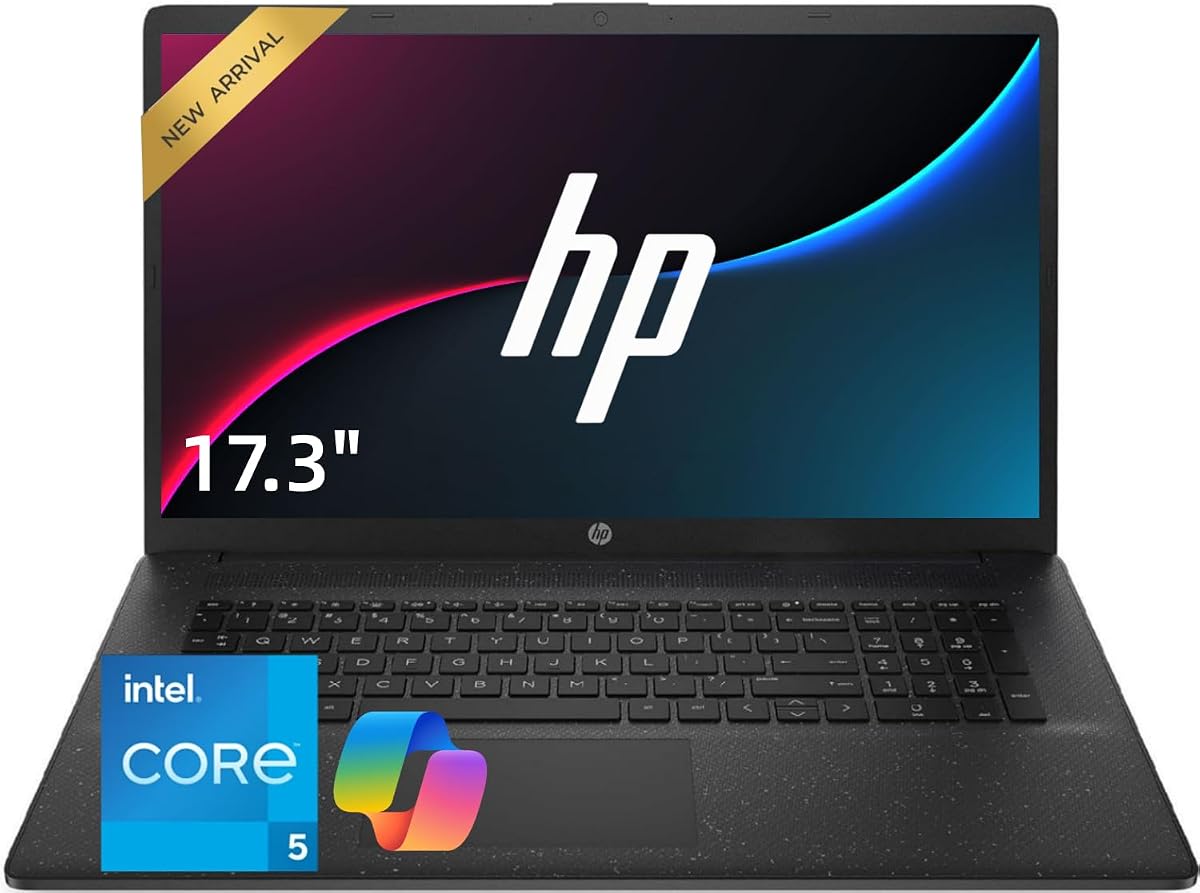
The HP 17.3 Large Screen Business Laptop offers a spacious workspace for users who need room to view complex spreadsheets side-by-side. With a strong 4.5-star rating, it provides excellent value for money by combining a large screen with ample memory and storage. The full-size keyboard and numeric keypad are tailored for accounting and office productivity tasks.
We may earn a commission when you buy through this link, at no additional cost to you.
Powered by an Intel Core 5 120U processor and 32GB of RAM, this laptop handles daily business applications smoothly. The 1TB SSD ensures fast file access and plenty of space for storing documents and projects. The 17.3-inch display enhances visibility, reducing eye strain during long work sessions and allowing for more open windows on the screen.
The main trade-off is the physical size; the laptop is bulkier than 15-inch models, which can make it less portable. While the performance is solid for office work, it is not intended for gaming or high-end graphic design. The battery life is average, so keeping a charger nearby is recommended for all-day use outside the office.
This laptop is best suited for home office users, students, and small business owners who prioritize screen real estate and keyboard comfort. The combination of a numeric keypad and large display makes it particularly effective for data entry and financial modeling. If you need a desktop replacement that is still mobile enough for occasional use, this is a smart choice.
The 17.3-inch screen provides extra room to open multiple spreadsheets and documents simultaneously without constant switching.
A dedicated numeric keypad and full-size keyboard allow for efficient typing and accurate input of financial data.
We may earn a commission when you buy through this link, at no additional cost to you.
The HP 255 G10 15.6 Business Laptop is a reliable choice for users needing a powerful processor and dedicated numeric keypad. It has earned a 4.1-star rating for its balanced performance and practical features. The AMD Ryzen 7 7730U processor ensures that even demanding tasks are handled smoothly without compromising on speed or efficiency.
We may earn a commission when you buy through this link, at no additional cost to you.
This model comes with 16GB of RAM and a 512GB PCIe SSD, providing fast system responsiveness and quick data transfer speeds. The 15.6-inch FHD display with anti-glare coating reduces eye strain and maintains visibility in bright environments. Windows 11 Pro adds extra security features and management tools that are beneficial for business environments.
While the performance is solid, the laptop shares a common chassis design with other budget-friendly models, which may not feel as robust as premium ultrabooks. Battery life is decent but may not last through a full workday without a charger. These limitations are generally acceptable given the strong internal specifications and affordability of the unit.
We recommend this laptop for business professionals and students who need a machine capable of running office suites and multitasking efficiently. The inclusion of a numeric keypad makes it particularly useful for anyone who works with numbers regularly. If you need a dependable workhorse for everyday tasks, this model delivers good value.
The Ryzen 7 7730U offers eight cores and sixteen threads for seamless multitasking and rapid application loading.
Windows 11 Pro includes enhanced security and remote desktop capabilities for enterprise-grade management and safety.
We may earn a commission when you buy through this link, at no additional cost to you.
The Lenovo 16 inch Numeric Keypad Intel i5 is a modern machine designed for professionals who need efficient multitasking capabilities. With a 4.2-star rating, it stands out for its DDR5 memory and high-resolution display. The numeric keypad is integrated into a full-size keyboard, making it suitable for accountants and data entry specialists.
We may earn a commission when you buy through this link, at no additional cost to you.
Powered by the Intel Core i5-13420H processor, this laptop handles video conferencing, spreadsheet editing, and web browsing with ease. The 24GB of DDR5 RAM ensures that applications run smoothly, while the 1TB SSD provides ample storage. The WUXGA display offers 11 percent more vertical space than standard HD screens, improving productivity on vertical documents.
One consideration is the weight; at 3.70 lbs, it is heavier than some ultrabooks, which may impact travel convenience. The build quality is good but not exceptional, focusing more on utility than premium materials. The battery life is adequate for general use but may require a plug during intensive sessions.
This laptop is recommended for professionals, students, and remote workers who need a balance of performance and productivity features. The inclusion of Copilot AI integration and a privacy shutter adds value for those working in shared environments. If you need a reliable tool for daily business tasks, this model is worth considering.
With 24GB of DDR5 RAM, the system offers faster data processing and smoother multitasking than DDR4 counterparts.
The 16 inch WUXGA display provides extra vertical space for viewing longer documents and spreadsheets more effectively.
We may earn a commission when you buy through this link, at no additional cost to you.
The HP 17.3 Large Screen Business Laptop offers a spacious workspace for professionals who need to view multiple documents at once. With a 4.5-star rating, it is praised for its large display and robust memory configuration. The numeric keypad and privacy shutter make it a secure and productive choice for office environments.
We may earn a commission when you buy through this link, at no additional cost to you.
Featuring an Intel Core 5 120U processor and 32GB of RAM, this laptop ensures responsive performance for multitasking and cloud-based applications. The 1TB SSD provides fast access to files and plenty of space for projects. The 17.3-inch display helps reduce eye strain during long work sessions by offering more visual real estate.
While the screen size is beneficial, the laptop is bulkier and heavier than 15-inch alternatives, which limits portability. The privacy shutter adds a layer of security for video meetings, but the overall build is functional rather than premium. Battery life is average, so users should keep a charger handy for extended use.
We suggest this laptop for users who prioritize screen size and keyboard layout over portability. It is an excellent choice for home offices or desk-bound professionals who need a reliable workstation for accounting and data analysis. The combination of features offers strong value for those focused on productivity.
The 17.3-inch display provides room to keep multiple windows open, making complex tasks easier to manage.
A privacy shutter on the webcam ensures you control when your camera is active for enhanced personal security.
We may earn a commission when you buy through this link, at no additional cost to you.
The HP 17 inch Business Laptop Computer 2026 Edition is tailored for users who need a large screen and solid productivity tools. With a 4.5-star rating, it delivers good performance for daily tasks and features a numeric keypad for efficient data entry. The integration of Office 365 for Web adds immediate value for document management.
We may earn a commission when you buy through this link, at no additional cost to you.
Powered by an AMD Ryzen 5 CPU and 16GB of RAM, this laptop handles web browsing, video calls, and document editing smoothly. The 17.3-inch FHD display is clear and bright, making it suitable for detailed work. The long battery life and fast charging capabilities ensure you stay productive throughout the day without constant interruptions.
However, the laptop is somewhat heavy and bulky due to the larger screen, which may not appeal to frequent travelers. The build quality is functional but not premium, focusing on practicality over aesthetics. While performance is good for office work, it is not designed for gaming or heavy media production tasks.
This model is ideal for business users, students, and home office workers who need a spacious display and full keyboard. The inclusion of Office 365 for Web is a strong selling point for those needing document creation tools. If you value screen size and battery life, this laptop is a reliable choice.
Long battery life and fast charging keep you productive all day without needing to search for a power outlet.
Preloaded access to Office 365 for Web enables easy document creation and collaboration right out of the box.
We may earn a commission when you buy through this link, at no additional cost to you.
The 15.6 inch laptop AMD CPU is an affordable option for users who need a compact machine with a numeric keypad. With a 4.5-star rating, it offers good value for students and home users on a budget. The numeric keypad is a rare feature at this price point, enhancing its utility for data entry.
We may earn a commission when you buy through this link, at no additional cost to you.
Powered by an AMD processor up to 3.2 GHz, this laptop handles basic tasks like web browsing and document editing. The 8GB of RAM is sufficient for light multitasking, while the 256GB SSD offers fast boot times. The large 10000mAh battery promises extended use without frequent charging, making it suitable for travel.
While the price is attractive, the RAM and storage are lower than premium models, which may limit performance for heavy tasks. The build is slim and portable, but the materials are simple to keep costs down. Connectivity options like Wi-Fi 5 are functional but not the latest standard.
We recommend this laptop for budget-conscious users who need a portable device for school or light office work. The numeric keypad and long battery life are key benefits that support productivity on the go. If you need a no-frills machine for essential tasks, this is a practical choice.
Weighing only 3.3 pounds with a slim design, it easily fits into backpacks for commutes and travel.
A built-in 10000mAh battery provides extended usage time, reducing the need for frequent recharging.
We may earn a commission when you buy through this link, at no additional cost to you.
The 15.6 Inch Laptop with FHD display is a budget-friendly entry for those needing basic computing with a numeric keypad. With a 4.4-star rating, it is suitable for students and light home use. The inclusion of a numeric keypad helps with number entry, which is useful for simple accounting or data tasks.
We may earn a commission when you buy through this link, at no additional cost to you.
Powered by an Intel 5205U processor, this laptop handles basic web browsing and document editing. The 6GB of RAM supports limited multitasking, while the 128GB storage offers enough space for essential files. You can expand storage to 512GB, providing flexibility for additional documents and media files.
The low RAM and storage are significant limitations for power users or anyone needing to run complex software. The laptop is lightweight and portable, making it easy to carry around, but performance may lag with many open applications. It is best suited for very light tasks and occasional use.
We suggest this laptop for students or users with minimal computing needs who want a low-cost device with a numpad. The expandable storage and Windows 11 pre-installation are helpful starting points. If you only need basic functionality and value price over performance, this model fits the bill.
With an expansion slot allowing up to 512GB of storage, you can add space for files as needed.
Windows 11 is pre-installed, so you can start working immediately without additional setup or installation steps.
We may earn a commission when you buy through this link, at no additional cost to you.
The HP 15.6 FHD Flagship Business Laptop offers a strong memory and storage configuration in a standard 15-inch form factor. With a 4.7-star rating, it is popular for its high RAM and fast SSD at a competitive price. The numeric keypad supports efficient data entry for business and home users.
We may earn a commission when you buy through this link, at no additional cost to you.
Featuring an Intel i3-1215U processor, this laptop handles everyday office applications and web browsing smoothly. The 32GB of RAM allows for significant multitasking, while the 1TB NVMe SSD ensures fast data access. Fast charge technology helps reduce downtime, allowing you to get back to work quickly.
While the processor is entry-level, the generous RAM compensates for most daily tasks. The build is solid for the price, though not as premium as business-grade options. Battery life is standard, so planning for charging during heavy use is advisable.
We recommend this laptop for users who need a balance of RAM and storage without spending a premium on the CPU. It is well-suited for business users, students, and home office workers who prioritize multitasking and storage speed. If you need a practical workhorse for general tasks, this model is a solid choice.
With 32GB of RAM, you can run multiple applications simultaneously without slowdowns or performance issues.
The 1TB NVMe SSD provides quick boot times and fast file access, improving overall system responsiveness.
We may earn a commission when you buy through this link, at no additional cost to you.
Selecting the right laptop with a numeric keypad involves considering several critical factors to ensure it meets your specific workflow needs.
The processor is the brain of your laptop and dictates how well it can handle tasks. For business work involving spreadsheets and data entry, look for modern multi-core processors like Intel Core i5 or AMD Ryzen 5 and above. These ensure that your system remains responsive even when you have many tabs and programs open.
Prioritize processors with higher core counts and clock speeds to avoid bottlenecks during peak usage hours.
Memory (RAM) allows your computer to handle multiple tasks at once, while storage holds your files and operating system. For a laptop with a numpad used for business, aim for at least 16GB of RAM to ensure smooth multitasking. Storage should be at least 512GB SSD to provide fast boot times and enough space for documents.
Investing in ample RAM and SSD storage will significantly improve the longevity and responsiveness of your device.
The display plays a major role in your daily productivity, especially when working with detailed spreadsheets or reports. A larger screen like 17.3 inches offers more space for viewing data, while 15.6 inches provides a balance of portability and workspace. Look for Full HD resolution and anti-glare coatings to reduce eye strain.
Choose a screen size that fits your workspace and portability needs while maintaining high resolution for clarity.
A full-size numeric keypad is essential for efficient data entry. Ensure that the keys are well-spaced and comfortable to press, as this will reduce fatigue during long sessions. Some laptops integrate the numpad into a compact layout, so verify that it feels natural for your typing style.
Test the keyboard feel if possible to ensure the numeric keypad is ergonomic and efficient for your tasks.
Connectivity options are crucial for connecting external monitors, mice, and other peripherals. Look for laptops with USB Type-C, USB Type-A, and HDMI ports. Some business users may also benefit from an Ethernet (RJ45) port for stable internet connections during important meetings.
Ensure the laptop has enough ports to support your existing peripherals without needing excessive dongles.
If you travel or work from different locations, battery life and weight are key considerations. Look for a battery that can last at least 6 to 8 hours under typical usage. Also, consider the weight of the laptop; models with 17-inch screens tend to be heavier than 15-inch ones.
Balance screen size with weight to ensure the laptop is portable enough for your specific routine.
Most laptops come with Windows 11, which offers robust features for business and productivity. Consider if you need a Home or Pro version; Pro offers additional security and management tools. Check if the laptop includes any bundled software like Office 365, which can save you money and setup time.
Verify the operating system version and included software to ensure it aligns with your security and work needs.
Laptops with numpads range from budget-friendly to premium models. Determine how much you are willing to spend and prioritize features that matter most to your workflow. A higher price does not always mean better performance for your specific needs, so compare specs carefully.
Focus on value by matching the specs to your actual requirements rather than chasing the most expensive option.
To maximize the efficiency of your numeric keypad, ensure that your Num Lock key is enabled when typing numbers. This allows you to enter data directly without switching between character and number modes on the keypad.
Regularly clean your keyboard and screen using a soft, dry cloth to remove dust and oils. For the numeric keypad, you may use a small brush to remove debris between the keys to prevent sticking.
Keep your laptop on a hard, flat surface to ensure proper airflow and prevent overheating. If you travel often, use a protective sleeve to shield the device from physical damage and scratches.
Not all 15-inch laptops include a numeric keypad, as some models prioritize portability and a compact keyboard. You must check the product specifications to confirm the presence of a numpad before purchasing. Many business-oriented models do include it, but consumer laptops often omit it to save space.
Yes, you can add an external USB numeric keypad to any laptop that lacks one. These are affordable and plug directly into a USB port. They offer the same functionality as a built-in keypad and are ideal for desktop or laptop setups.
A numeric keypad is important for business users because it speeds up data entry and reduces errors when inputting numbers. It is especially useful for accountants, financial analysts, and anyone working with spreadsheets. It allows for quick and accurate entry without needing to use the top row of number keys.
For spreadsheets and data entry, 16GB of RAM is recommended to ensure smooth multitasking. This allows you to run multiple applications like Excel, browsers, and email simultaneously without slowdowns. If you work with very large datasets, consider 32GB for better performance.
17-inch laptops are generally heavier than 15-inch models due to the larger chassis and screen. While they offer more workspace, they may be cumbersome for frequent travel. If portability is a priority, a 15-inch model with a numpad might be a better balance.
An SSD provides faster boot times, quicker file access, and better overall system responsiveness compared to an HDD. This is crucial for business laptops where efficiency is key. Most modern laptops with numpads use SSDs as standard storage options for this reason.
Many business-oriented laptops in this list come with Windows 11 Pro, while some have the Home version. Windows 11 Pro offers additional security and management tools that are beneficial for enterprise use. Check the specific product title to confirm the operating system version.
To extend battery life, reduce screen brightness, close unused applications, and use battery saver mode. Avoid running heavy tasks on battery power. Regularly updating your drivers and keeping the system clean also helps maintain optimal power efficiency.
In conclusion, choosing a laptop with a numeric keypad is a strategic decision for anyone who works regularly with numbers and data. Our top picks highlight models that excel in performance, screen size, and productivity features to meet various professional needs.
We recommend prioritizing the processor, RAM, and keyboard layout when making your choice. Ensure that the laptop you select aligns with your budget and portability requirements for a satisfying long-term experience.
Please remember that prices and availability fluctuate frequently. Always check the current details and offers on the product pages before making your final purchase to get the best value possible.